Stop Re-Explaining Yourself to Claude Every Session. I Built a Permanent Memory System. Here's the Setup.
By Gencay
Published: 2026-03-17
URL: https://www.learnwithmeai.com/p/claude-code-and-obsidian-my-second

Yesterday, I opened Claude Code for my client project.
Explained the tech stack. Again and Again.
Same story. Different project.
Fifth time this week.
We’re all chasing faster AI. Better prompts. Smarter tools.
But here’s the problem.
Every new Claude project? You start from zero.
You re-explain yourself. Every. Single. Time.
I got tired of it.
I wanted the best of both worlds: Claude’s power AND permanent memory.
Not “remember this session.”
Actual memory. Forever.
So I built a second brain.
Inside Claude Code itself.
Now? Claude remembers everything I forget.
One system. Two tools. Hit the jackpot.
To be able to show you, let me introduce you to my Stack.
What is Claude Code?
Claude Code.
The name says “code.”
But here’s the thing.
It’s not just coding.
Sure, you can build apps in minutes. Zero technical knowledge required.
But that’s scratching the surface.
Claude Code is a Swiss Army knife.
- Connect NanoBanana API? Generate images.
- Connect Notion API? Create documents. Edit pages.
- Connect Google CLI? Manage your entire Google Workspace.
Sheets. Docs. Calendar. All from Claude.
Most people think it’s a coding tool.
They’re missing the bigger picture.
It’s an automation engine.
Your personal assistant that connects to everything.
That’s why I built my second brain inside it.
Not because it codes.
Because it connects.
Check out my Claude Code MasterClass for everyone, if you want to learn it in depth.
Obsidian
Obsidian is a Note-taking app.
But on steroids.
I’m not going to pretend I’m an Obsidian expert.
I’m not.
But here’s what I know: it connects to Claude Code.
And that’s all that matters.
Two steps. That’s it.
- Step 1: Download Obsidian (desktop + mobile).
- Step 2: Install the Git plugin. Sync to GitHub.
Done.
Pro tip: Got OpenClaw? Connect it to the same repo.
Now you update notes from your phone, too.
The setup is a piece of cake.
You just need it to talk to Claude and tell it the local file path.
My System
Here’s how mine looks.
Organized. Bulletproof.
Obsidian Vault/
├── Client A/
│ ├── Meeting Notes/
│ │ ├── 2025-02-15.md
│ │ └── 2025-03-10.md
│ ├── WhatsApp Messages/
│ │ ├── 2025-01.md
│ │ └── 2025-02.md
│ ├── Project Brief.md
│ └── Tech Stack.md
├── Client B/
│ ├── Meeting Notes/
│ ├── Slack Messages/
│ │ ├── 2025-02.md
│ │ └── 2025-03.md
│ └── Brand Guidelines.md
├── LearnAIWithMe/
│ ├── Substack Posts/
│ │ ├── Ideas/
│ │ ├── Drafts/
│ │ └── Published/
│ ├── Substack Notes/
│ │ ├── Ideas/
│ │ └── Published/
│ ├── Article Research/
│ │ ├── NotebookLM.md
│ │ ├── Claude Code.md
│ │ └── Obsidian.md
│ └── 2 AM Ideas.md
├── Daily Plans/
│ ├── 2025-03-15.md
│ ├── 2025-03-16.md
│ └── 2025-03-17.md
└── Random Ideas/
├── App Concepts.md
├── Automation Ideas.md
└── Tool Discoveries.md
Four main folders. But look closer.
Each client folder has:
- Meeting Notes (by date)
- Messages (WhatsApp, Slack - monthly files)
- Project briefs, tech stack docs
LearnAIWithMe folder has:
- Ideas, Drafts, Published
- Research notes by topic
- 2 AM Ideas file (the gold mine)
Daily Plans: One file per day. Created every night with OpenClaw.
Random Ideas: App concepts. Automation ideas. Tool discoveries.
Zero chaos. Everything has a home.
Every night, lying in bed, I talk with OpenClaw. Review the day. Plan tomorrow.
Client meeting? → Client A/Meeting Notes/2025-03-17.md
Slack conversation? → Client B/Slack Messages/2025-03.md
Random 2 AM idea? → LearnAIWithMe/2 AM Ideas.md
Here’s the kicker.
Claude Code reads all of this.
Every folder. Every note. Every random thought.
I open a new project for Client A?
Claude already knows:
- Their tech stack (Next.js, Tailwind, Supabase)
- Their brand voice (casual, no corporate speak)
- That one bug we fixed last month
I don’t explain. Claude remembers.
It’s like having a coworker with perfect memory.
How Do I Let Claude Code Know All This?
Good question.
You’ve got Obsidian. Notes everywhere.
But how does Claude Code actually read them?
Two steps. That’s all you need.
Step 1: Obsidian App
Download an Obsidian app from here.
Click on “File” and “Open Vault”.
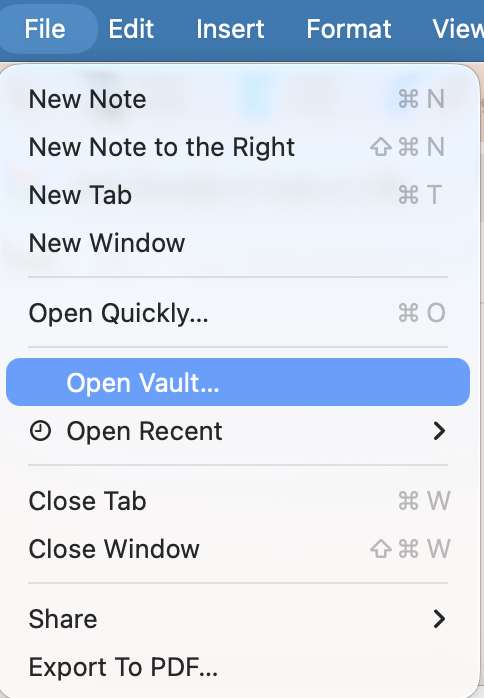
\File/Open Vault\
Next, click on “Open folder as vault”.
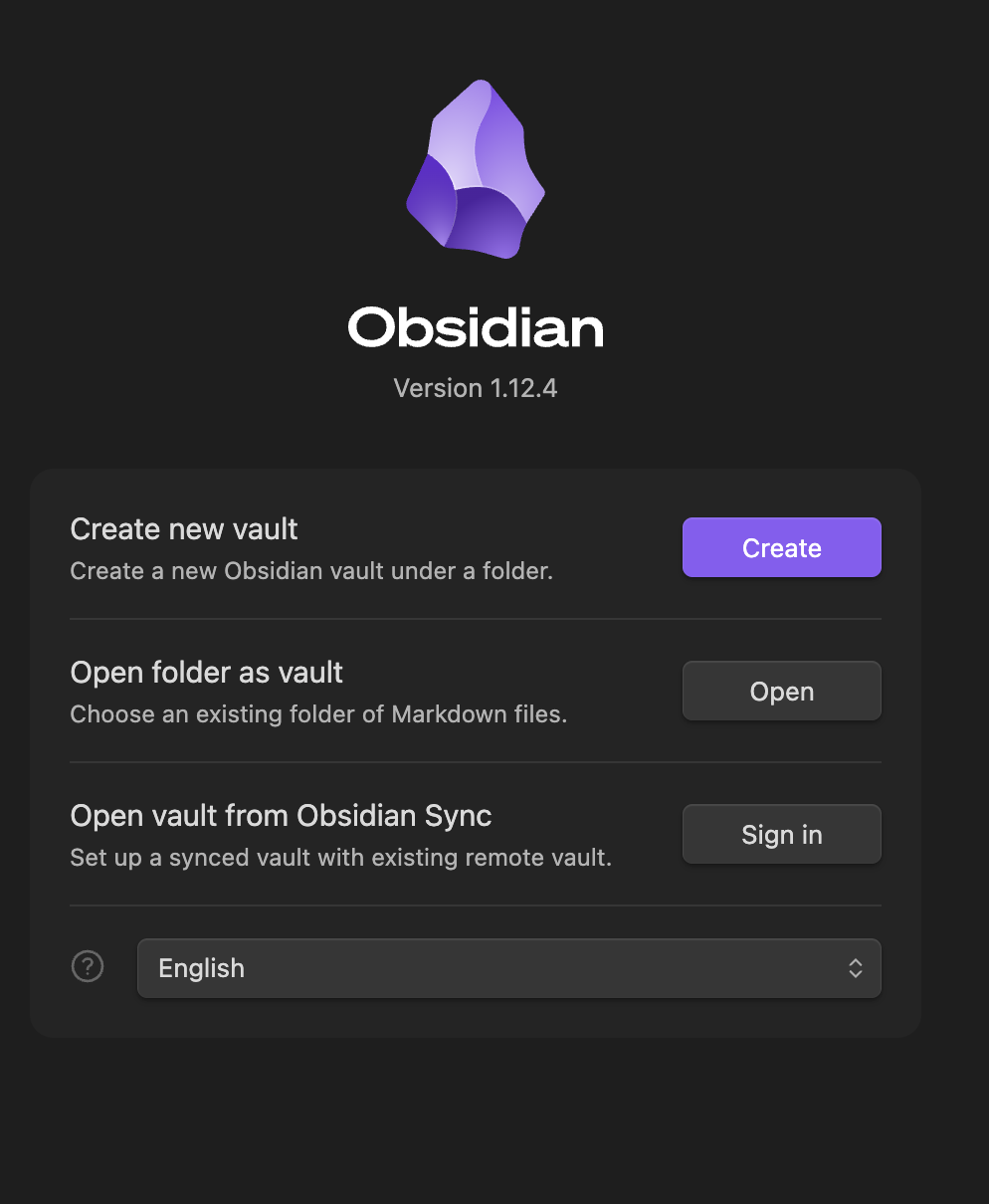
\Obsidian\
Here is your vault’s path.
Now copy this path because you’ll need this in step 2.
Pro tips: To create a great Obsidian note, copy this link and paste it into Claude with this instruction:
https://github.com/kepano/obsidian-skills
Create skills from this link [ ].
Step 2: CLAUDE.md (The Brain)
Every Claude Code project has a CLAUDE.md file.
Here’s a sample of my LearnAIWithMe project.
This should include a path to your Obsidian
# LearnAIWithMe Project
## Who I Am

- Newsletter writer (LearnAIWithMe on Substack)

- Focus: AI tools, automation, no-code

- Tone: Direct, short sentences, no fluff
## Obsidian Vault Path
[path to your obsidian vault]
## Folder Structure

- Client projects: /Client A/, /Client B/

- Each has: Meeting Notes/, Messages/ (WhatsApp/Slack), Project Brief.md, Tech Stack.md

- Newsletter: /LearnAIWithMe/

- Substack Posts/Ideas/, Drafts/, Published/

- Substack Notes/Ideas/, Published/

- Article Research/ (by topic)

- 2 AM Ideas.md

- Daily Plans: /Daily Plans/ (one file per day)

- Random Ideas: /Random Ideas/
## Rules

- ALWAYS check Obsidian vault before asking me for context

- For client questions: Check /Client [Name]/Meeting Notes/ and /Messages/ first

- For article ideas: Check /LearnAIWithMe/Substack Posts/Ideas/ and /2 AM Ideas.md

- For writing style: Check /LearnAIWithMe/Published/

- For daily context: Check /Daily Plans/[today's date].md

- NEVER ask "what's your tech stack?" - it's in Client folders
## What You Can Do

- Read any note in the vault (meeting notes, messages, ideas)

- Find past client conversations (search Messages/ folders by date)

- Suggest article ideas based on my past notes and research

- Remember my writing style from published posts

- Recall project decisions from months ago

- Answer "what did [Client] say about X?" questions
Paste the path you copied in step 1 and tell your Claude to edit your .md file based on it.
That’s it.
Claude reads it automatically. Every session when you need it.
No prompting needed.
What Happens Next?
You open Claude Code.
Start a new chat.
Type: “What article ideas do I have about NotebookLM?”
Claude doesn’t ask you to explain.
It goes straight to:
/LearnAIWithMe/Substack Posts/Ideas/
Reads your notes.
List your ideas.
No context loss. No re-explaining.
It just works.
Like magic.
But it’s not magic.
It’s just two files doing the heavy lifting.
Let Me Show You This Working
Real scenario. This morning.
Client called.
"What was that API authentication method we used last month?"
Old me?
Panic. Search emails. Check Slack. Ask them to resend the docs.
15 minutes wasted.
New me?
Opened Claude Code.
Typed: “What authentication method did we use for Client A’s API?”
Claude went to: /Obsidian/Client A/Meeting Notes/2025-02-15.md
Pulled the answer:
“OAuth 2.0 with refresh tokens. Client ID stored in .env, redirect URI: <https://client-a.com/callback>“
3 seconds. Done.
Client impressed.
But it’s not me.
It’s my second brain doing the heavy lifting.
Pro Tip: It Works for Messages Too
I don’t just save meeting notes.
I save everything.
Daily Slack messages with Client A? Saved.
WhatsApp threads with Client B? Saved.
Every conversation. Every decision. Every “hey can you do this?”
All in Obsidian. All synced.
Here’s why that’s a game-changer.
Client messages me:
“Remember what we discussed about the pricing page last week?”
Old me?
Scroll through Slack. Search keywords. Find nothing. Ask them to remind me.
Embarrassing.
New me?
Open Claude Code.
Type: “What did Client B say about the pricing page last week?”
Claude goes to: /Obsidian/Client B/WhatsApp Messages/2025-02.md
Finds the exact message:
“Feb 8: Let’s add a comparison table. Show Basic vs Pro vs Enterprise.”
30 seconds. I look like I have perfect recall.
But it’s not me.
It’s my second brain backing me up.
Every. Single. Time.
Final Thoughts
I built this system because I was tired of being Claude’s memory.
Every project, same story. Re-explain everything. Waste 10 minutes on context.
Now? Claude knows more about my work than I do sometimes.
It remembers client preferences I forgot. Project decisions from months ago.
That bug fix pattern saved hours.
I’m no longer the one who remembers everything. Claude is my memory. I focus on creating.
The setup? 3 minutes. Two files. Zero complexity.
When I open a new project, I point CLAUDE.md to my Obsidian vault. That’s it.
My second brain travels with me. Every project. Every client. Every session.
If you’re tired of starting from zero every session, build your second brain today.