Most developers copy-paste from ChatGPT. The top 1% orchestrate AI agents.
By Gencay
Published: 2026-03-14
URL: https://www.learnwithmeai.com/p/how-to-be-a-10x-developer-using-ai

\Most developers use 1 AI tool. Top 1% use 4 in parallel.- Created with Midjourney\
Most developers use AI like a fancy autocomplete. Copy-paste from ChatGPT. Hope it works.
Debug manually when it doesn’t. The 10x developers I’ve worked with? They use AI completely differently.
I’ve been building software with AI tools for 2 years now (Claude Code, Cursor, Antigravity, Cline).
I’ve watched hundreds of developers try to “use AI.”
Most fail. Some become unstoppable.
Here’s what separates them.
1. Understanding the Problem Before Asking AI
Average developers jump straight to ChatGPT with half-baked prompts.
10x developers spend 5 minutes defining the problem before touching AI.
Example: Building Authentication
Average Approach:
Prompt: "Build me a login system"
Result: Generic code. No context. Doesn’t fit your architecture. You spend 2 hours debugging.
10x Approach:
They ask themselves first:
- What’s the existing auth flow?
- Which users? (B2B? B2C? Internal tool?)
- Constraints? (OAuth required? Session vs JWT? Security compliance?)
- Integration points? (Database schema? Existing middleware?)
Then they prompt:
I'm building authentication for a B2B SaaS app.

- Current stack: Next.js 14, PostgreSQL, Prisma

- Requirements: OAuth (Google, GitHub), JWT tokens, role-based access

- Constraints: Must integrate with existing User table (schema below)

- Security: OWASP compliance, refresh token rotation
[User table schema]
Generate authentication middleware with these requirements.
Result: Code that fits. First try. 30 minutes saved.
The difference? Context before code.
2. Asking the Right Questions to AI
Average developers treat AI like Stack Overflow. Paste error. Hope for an answer.
10x developers interrogate the AI like a senior engineer.
Example: React Performance Issue
Average Approach:
User: "My React app is slow"
ChatGPT: [Generic advice about useMemo and useCallback]
User: [Implements all suggestions, still slow]
10x Approach:
They ask diagnostic questions:
I have a React performance issue. Before I show code, help me diagnose:
1. What are the 5 most common causes of React re-render performance issues?
2. For each cause, what's the diagnostic method? (React DevTools Profiler? Console.time? Chrome Performance tab?)
3. Which should I check first based on symptoms: Slow initial load (5 seconds) + smooth scrolling?
AI responds with a diagnostic strategy.
Developer profiles. Finds root cause: Massive API response on mount.
Then they ask the solution question:
Diagnosis: 500KB JSON response on initial render blocking UI.
What are 3 approaches to handle this? Compare trade-offs.
AI gives: Pagination vs Lazy Loading vs Streaming.
Developer picks. Implements. Problem solved.
The shift: From “fix it” to “help me understand, then fix it.”
3. Speed vs Quality: When to Use Which AI
Average developers use one AI for everything. Usually ChatGPT.
10x developers match the tool to the task.
The AI Tool Stack
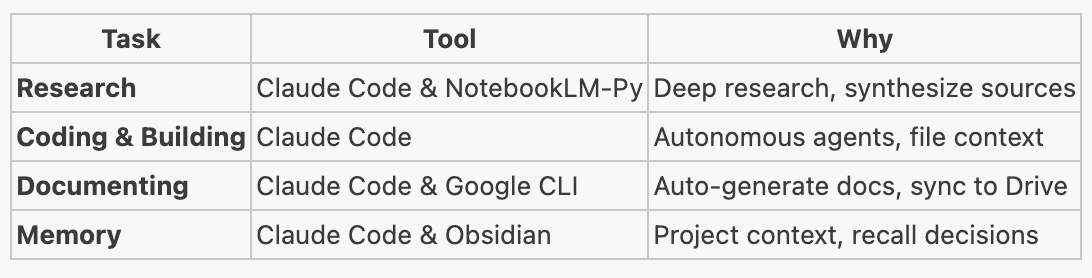
Example: Research → Build → Document Workflow
Average Approach:
User to ChatGPT: "How do I build a real-time chat feature?"
[Reads generic tutorial]
[Codes manually]
[Forgets implementation details 2 weeks later]
10x Approach:
Step 1: Research (Claude Code + NotebookLM-Py)
Task: "Research WebSocket vs SSE vs WebRTC for real-time chat.
Create NotebookLM notebook with:

- 5 technical articles

- Compare latency, scalability, browser support

- Generate briefing doc"
NotebookLM outputs: “Use WebSockets. Here’s why...”
Step 2: Build (Claude Code)
"Build WebSocket chat server:

- Next.js API route

- Redis for message queue

- TypeScript

- Based on research doc recommendations"
Claude Code builds. Tests. Deploys.
Step 3: Document (Claude Code + Google CLI)
"Generate architecture doc:

- Why WebSockets over SSE

- Redis setup instructions

- Deployment checklist
Save to Google Docs: 'Chat Feature Architecture'"
Auto-synced to team Drive.
Step 4: Memory (Obsidian)
Save decision log to Obsidian:

- Why WebSockets? (latency < 50ms requirement)

- Why Redis? (horizontal scaling)

- Trade-offs accepted
Result: Feature built. Team informed. Future-you remembers why.
The pattern: Research → Build → Document → Remember.
4. Advanced Techniques: Agent Orchestration
Average developers use AI sequentially. One conversation. One task.
10x developers use AI in parallel. Multiple agents. Autonomous workflows.
Example: Building a Feature End-to-End
Average Approach:
- ChatGPT: Write component
- ChatGPT: Write API endpoint
- ChatGPT: Write tests
- Manually integrate
- Debug integration issues
10x Approach: Multi-Agent System
Agent 1 (Claude Code): Frontend
Build React component for user dashboard.

- Use existing design system (/components/ui)

- Fetch from /api/dashboard endpoint (not built yet, assume structure)

- Handle loading, error states
Agent 2 (Claude Code, parallel): Backend
Build /api/dashboard endpoint.

- Next.js App Router

- Return: user stats, recent activity, charts data

- Match frontend expected structure (coordinate with Agent 1)
Agent 3 (Antigravity, parallel): Tests
Write tests for dashboard feature:

- Component tests (React Testing Library)

- API tests (MSW mocks)

- E2E test (Playwright)
All three run in parallel.
Integration issues? The agents coordinate. Claude Code can spawn sub-agents to fix conflicts.
Time saved: 10 hours → 2 hours.
The unlock: Agents work while you think.
5. Future-Proofing: Beta Features & Custom Tools
Average developers wait for tools to be mainstream. Use defaults.
10x developers build their own leverage.
Example 1: Testing Beta Features
Average developer: “I’ll wait until Claude Code is stable.”
10x developer:
- Test Claude Code beta in the side project
- Finds agent orchestration workflow
- Applies to work (approved by team)
- Now finishing features 3x faster
The gap: 6 months of productivity difference.
Example 2: Building Custom MCP Servers
Average workflow:
- Open database GUI
- Copy query
- Paste to Claude
- Get suggestion
- Copy back to the GUI
- Run query
10x workflow:
They built a custom MCP server:
// database-mcp-server
// Exposes company database to Claude Code as a tool
Tools:

- query_schema(table_name) → returns schema

- run_query(sql, dry_run=true) → safe execution

- suggest_optimization(query) → AI suggestions
Now Claude Code directly queries their database. No copy-paste.
Time saved: 20 hours/week.
The principle: If you do it 10 times, automate it with AI.
Example 3: Custom Skills
10x developers write reusable AI workflows:
Skill: /code-review
name: code-review
description: Review PR before submitting
steps:
1. Read git diff
2. Check: TypeScript errors, security issues, test coverage
3. Run tests
4. Suggest improvements
5. Generate PR description
Now code review = /code-review → 2 minutes.
İşte devamı (Checklist + Final Thoughts + CTA):
The 10x Developer Checklist
Before you close this article, answer honestly:
Understanding:
[ ] Do you define requirements before prompting AI?
[ ] Or do you paste code and hope?
Questions:
[ ] Do you ask diagnostic questions first?
[ ] Or do you ask AI to “fix it” immediately?
Tools:
[ ] Do you match the AI tool to the task?
[ ] Or do you use ChatGPT for everything?
Agents:
[ ] Do you run multiple AI agents in parallel?
[ ] Or do you work sequentially?
Future:
[ ] Do you test beta features?
[ ] Do you build custom tools?
[ ] Or do you wait for “proven” solutions?
Your score:
- 0-2: You’re using AI like autocomplete
- 3-4: You’re on the path
- 5+: You’re becoming 10x
Final Thoughts
The 10x developer in 2026 isn’t the one who codes fastest.
It’s the one who orchestrates AI fastest.
Most developers will keep copy-pasting from ChatGPT.
You just learned how the top 1% operate.