A field guide to ACID transactions, normalization, indexing, joins, isolation levels, replication, sharding, the CAP theorem, and SQL vs. NoSQL
By The Coding Gopher
Published: 2026-09-19
URL: https://thecodinggopher.substack.com/p/acid-indexes-sharding-and-6-other
Every developer eventually has the same realization: you can write perfectly good application code and still build something that falls over the moment real users show up — because the database underneath it was never designed to survive contact with reality.
The good news is that the core ideas behind almost every database, from a single SQLite file to a sharded cluster spanning continents, are a small, learnable set. Once they click, query plans stop looking like magic, “why is this so slow” stops being a mystery, and database design decisions start to feel like decisions instead of guesses.
Here’s the tour.
1. ACID: the promise your database makes you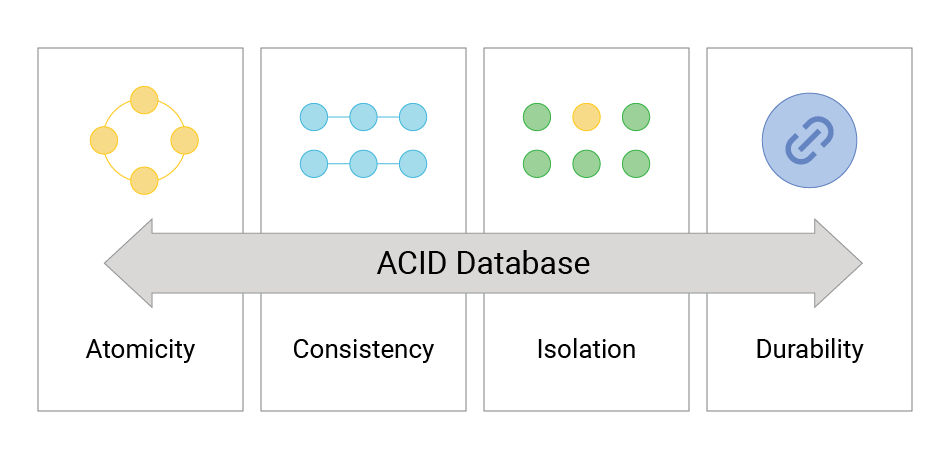 ACID refers to a strict set of database transaction properties—Atomicity, Consistency, Isolation, and Durability—that guarantee data integrity and reliability. It is primarily used in applications where accuracy and fault tolerance are non-negotiable, such as banking or inventory management.
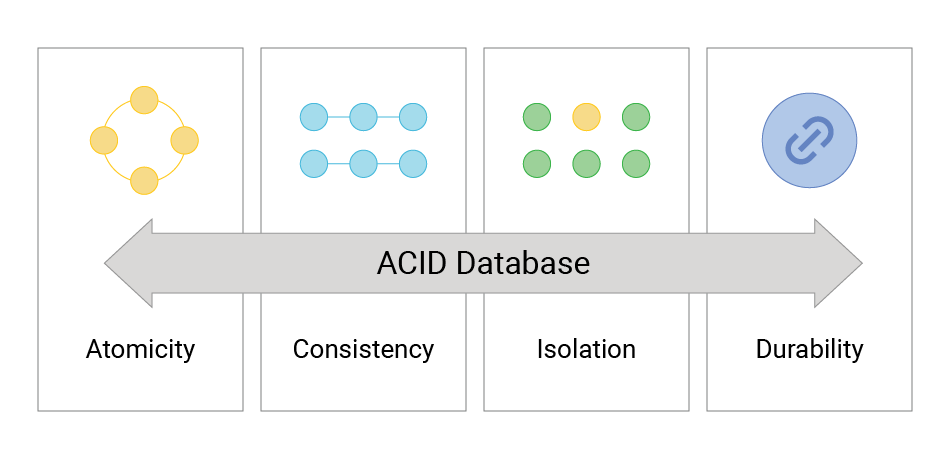
ACID is the contract most relational databases sign with you. It’s an acronym for four guarantees:
-
Atomicity — a transaction either fully happens or fully doesn’t. If you’re transferring money between two accounts and the system crashes halfway through, you never end up with money deducted from one account and not added to the other.
-
Consistency — a transaction takes the database from one valid state to another, never violating constraints (foreign keys, uniqueness, etc.) along the way.
-
Isolation — concurrent transactions shouldn’t see each other’s half-finished work. Two people checking out the last item in stock shouldn’t both succeed.
-
Durability — once a transaction is committed, it survives a crash. No “oops, the power went out and we lost your order.”
This is why relational databases (Postgres, MySQL, SQL Server) are still the default choice for anything involving money, inventory, or anything where “probably correct” isn’t good enough.
2. Normalization — and knowing when to break it
Normalization is the practice of organizing tables so that each piece of data lives in exactly one place. Instead of storing a customer’s address on every single order row, you store it once in a customers table and reference it by ID from orders.[](https://substackcdn.com/image/fetch/$s!2gm9!,w1456,climit,fauto,qauto:good,flprogressive:steep/https%3A%2F%2Fsubstack-post-media.s3.amazonaws.com%2Fpublic%2Fimages%2F5ff591a1-1c49-4370-91e5-f6326880d724949x610.png)](https://substackcdn.com/image/fetch/$s!2gm9!,fauto,qauto:good,flprogressive:steep/https%3A%2F%2Fsubstack-post-media.s3.amazonaws.com%2Fpublic%2Fimages%2F5ff591a1-1c49-4370-91e5-f6326880d724949x610.png)Database normalization is the systematic process of structuring a relational database engine to eliminate data redundancy and protect data integrity. First proposed by computer scientist Edgar F. Codd, it breaks down large, complex tables into smaller, linked tables to ensure that data dependencies make logical sense.
The benefit is obvious: update the address once, and it’s correct everywhere. The classic levels — first, second, third normal form — are really just increasingly strict rules against duplicating data.
But normalization has a cost: more tables means more joins, and joins aren’t free. This is why high-read systems sometimes deliberately denormalize — duplicating some data to avoid expensive joins on every request. A product page that shows “written by Jane Doe” might store the author’s name directly on the article row, rather than joining out to a users table every single time. It’s a trade: faster reads, in exchange for the discipline to keep duplicated data in sync.
There’s no universally correct answer here — it’s a spectrum, and where you land depends on whether your system is read-heavy, write-heavy, or somewhere in between.
3. Indexes — the most underrated performance lever
Without an index, finding a row means scanning the entire table, row by row, like reading a book cover to cover to find one sentence. An index is a separate, sorted data structure (usually a B-tree) that lets the database jump straight to the rows you want.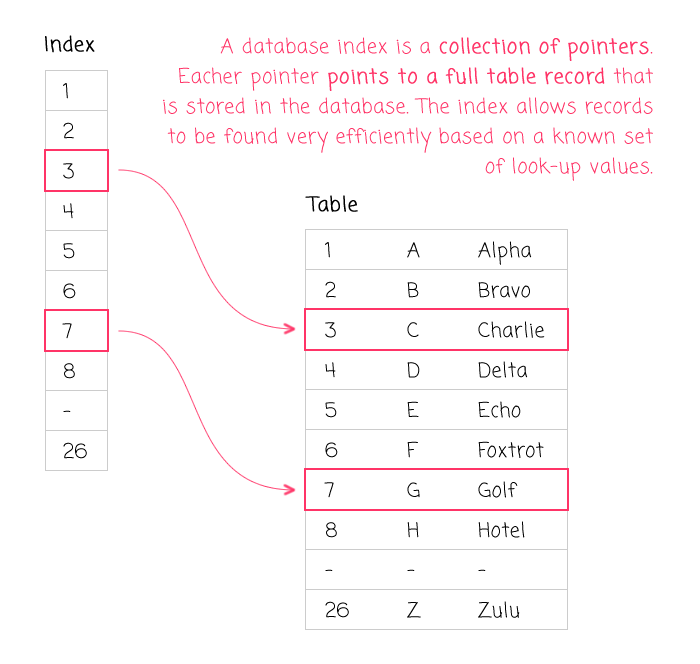 A database index is a data structure—similar to the index at the back of a book—that speeds up data retrieval operations (like
SELECT with a WHERE clause). It minimizes disk access by creating a sorted lookup map of column values directly linked to physical storage rows.
Indexes make reads dramatically faster — but they’re not free. Every index has to be updated on every insert, update, and delete, which slows down writes and takes up disk space. This is why you don’t just index every column “to be safe.” The real skill is indexing the columns that show up in WHERE clauses, JOIN conditions, and ORDER BY clauses on your most frequent and most performance-sensitive queries — and leaving the rest alone.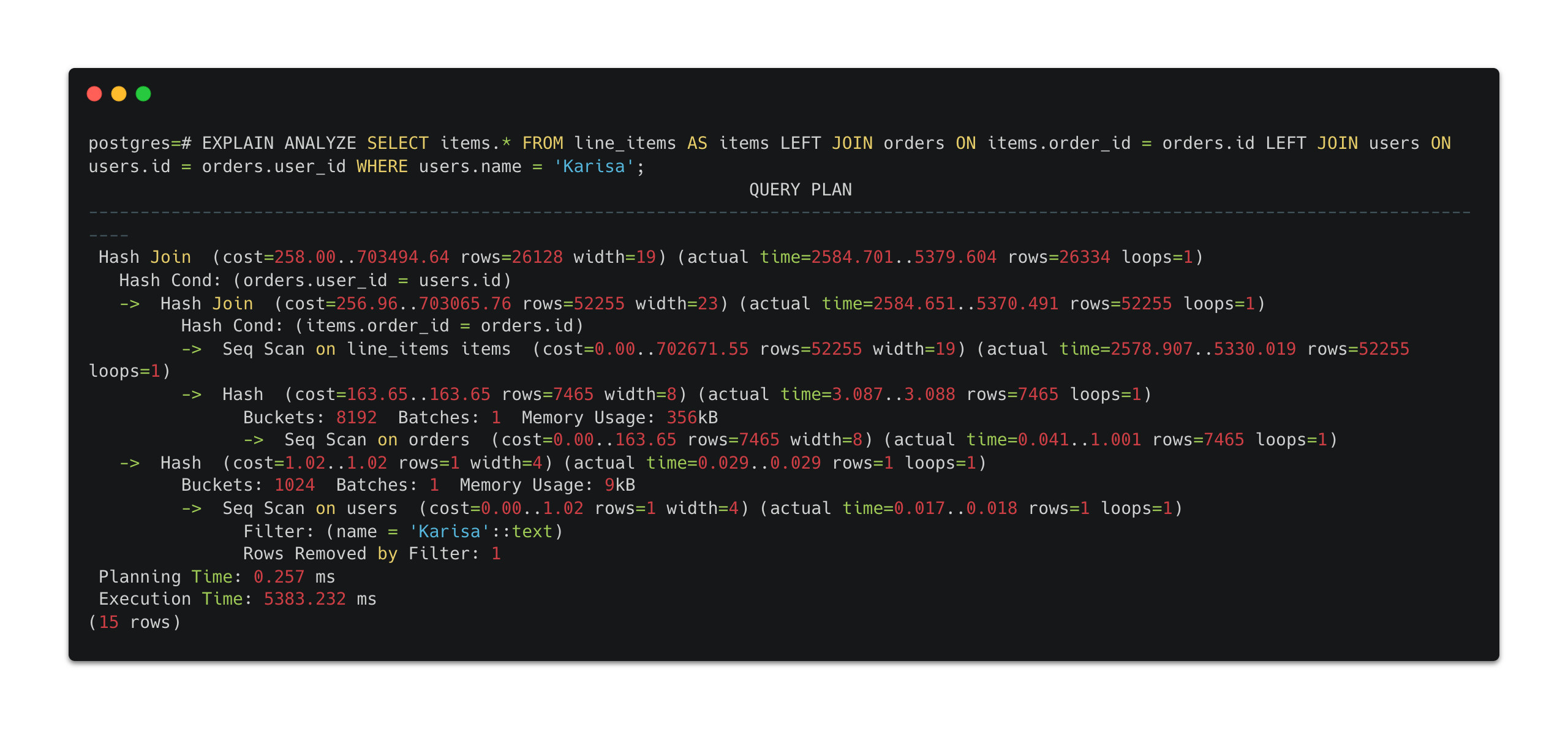
EXPLAIN and EXPLAIN ANALYZE are powerful SQL profiling tools used to troubleshoot and optimize slow queries. While EXPLAIN simply shows how the database plans to run a query, EXPLAIN ANALYZE actually executes it to provide real-time profiling statistics.
A good habit: when a query feels slow, run it through EXPLAIN (or EXPLAIN ANALYZE) before guessing. It tells you exactly whether the database is using an index or doing a full table scan, which turns performance tuning from folklore into something you can actually verify.
4. Joins — combining data without duplicating it
Joins are how normalized data gets reassembled at query time. The main flavors:
-
Inner join — only rows that match in both tables.
-
Left join — all rows from the left table, with NULLs filling in where there’s no match on the right.
-
Full outer join — everything from both sides, matched where possible.
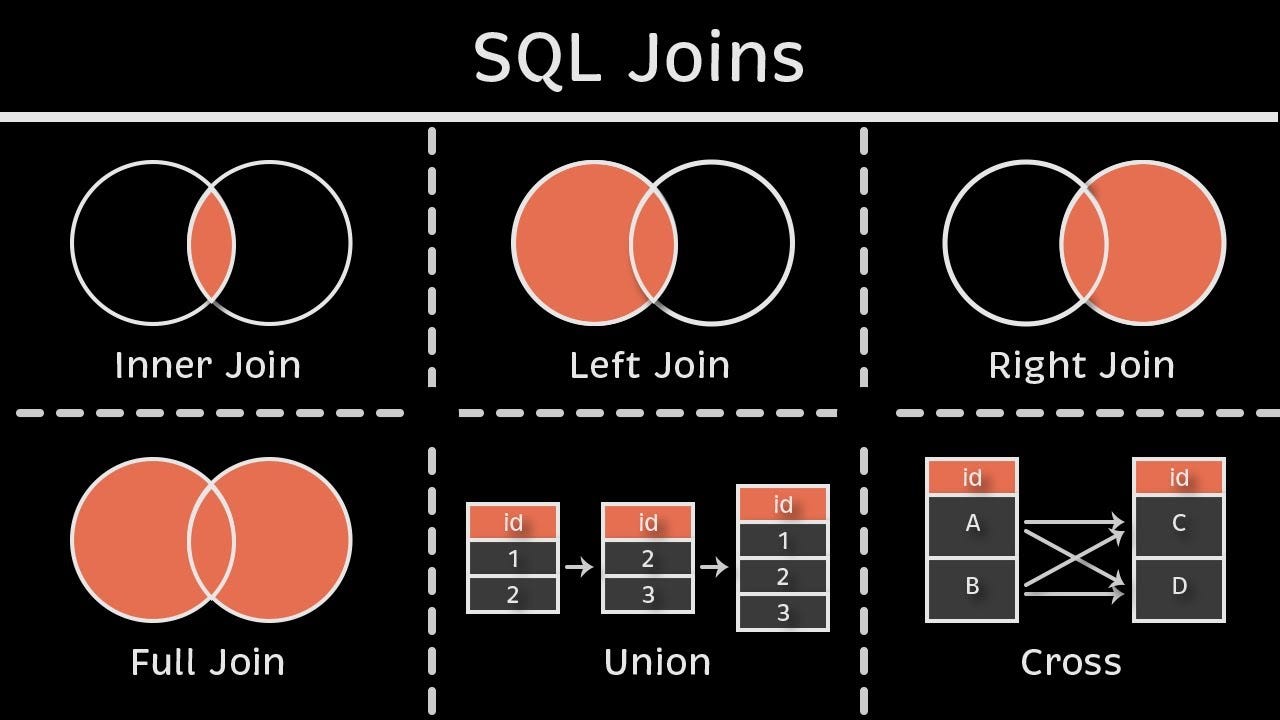 The primary types of SQL joins are
INNER JOIN, LEFT JOIN, RIGHT JOIN, and FULL OUTER JOIN, which combine columns from two or more tables based on a related common column.
Under the hood, the database picks a join strategy — nested loop, hash join, or merge join — based on table sizes and available indexes. You usually don’t need to choose this yourself, but understanding that it’s happening explains why a join on indexed columns can be near-instant while the same join on unindexed columns can bring a query to its knees.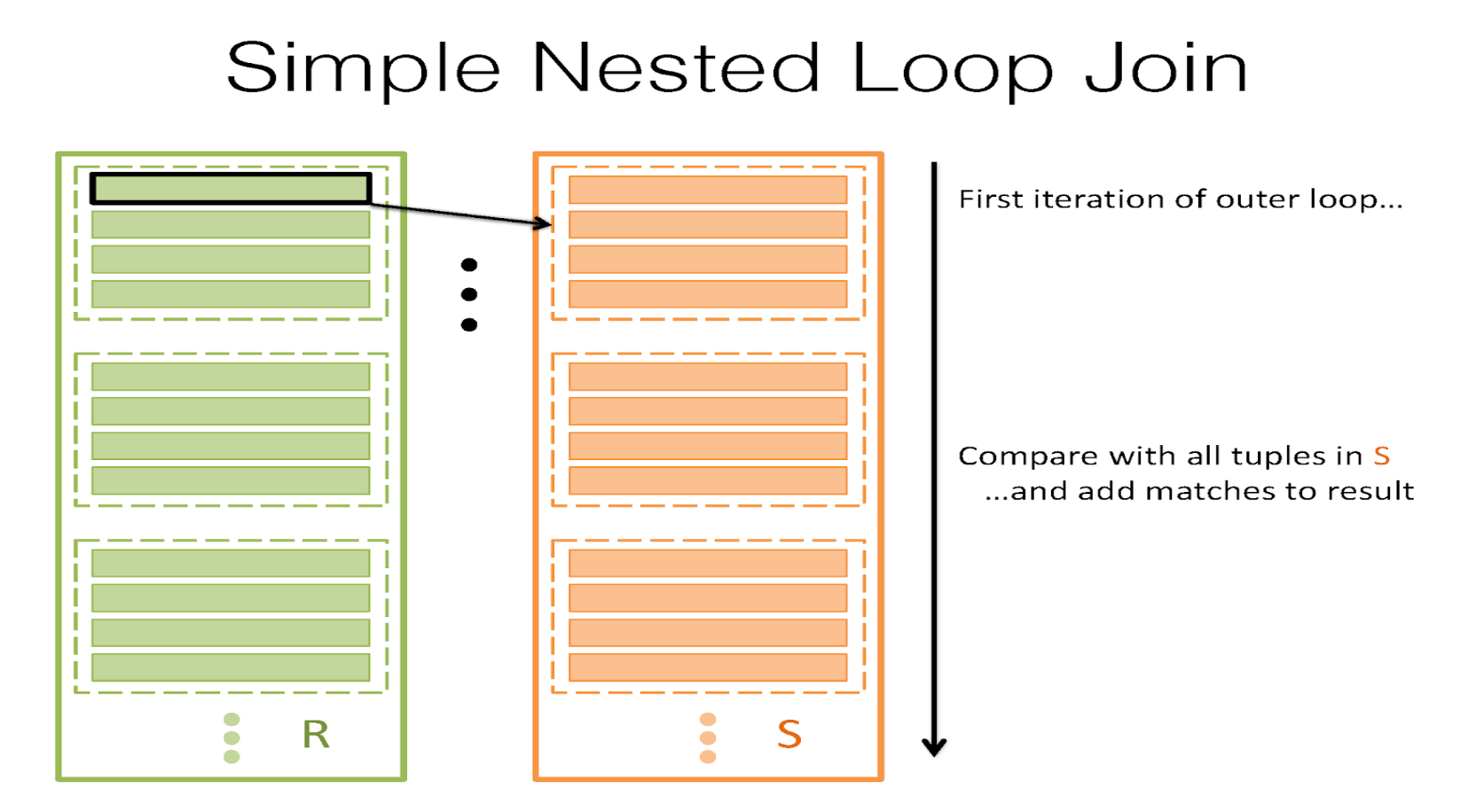 A nested loop join iterates over each row of one table (the outer loop) and, for every single row, scans the entire second table (the inner loop) for matching records. While highly inefficient for massive datasets, it is incredibly fast for small tables or when the inner table has a highly optimized index on the join column.
A hash join operates in two steps: it first takes the smaller table and builds a temporary in-memory hash table based on the join key.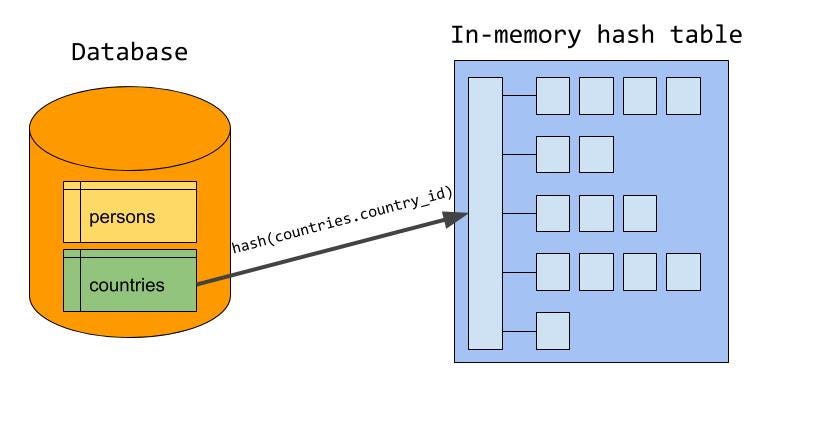 The build phase is the first step of a standard hash join algorithm, where the database engine scans the smaller data set to construct a temporary, in-memory hash table. This phase is a blocking operation. The database must read and process the entire build input before the join can emit any results to subsequent query operations.
Then, it scans the larger table, applies the same hash function to match the rows instantly without iterative scanning. It is highly efficient for joining large, unsorted datasets but requires enough memory to hold the hash table.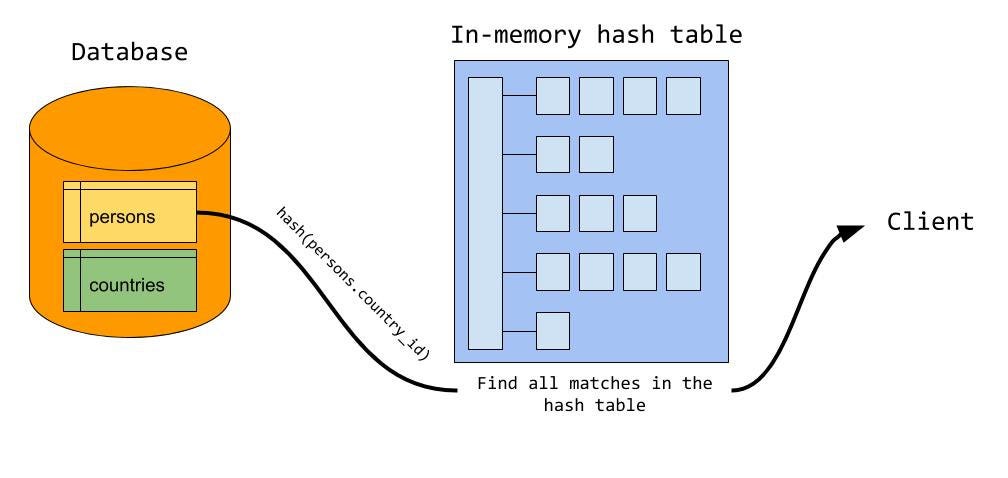 The probe phase is the second and final step of a hash join operation in relational databases. After a hash table has been created during the build phase, the database engine scans the larger dataset and uses a hash function to look up matching rows in the hash table.
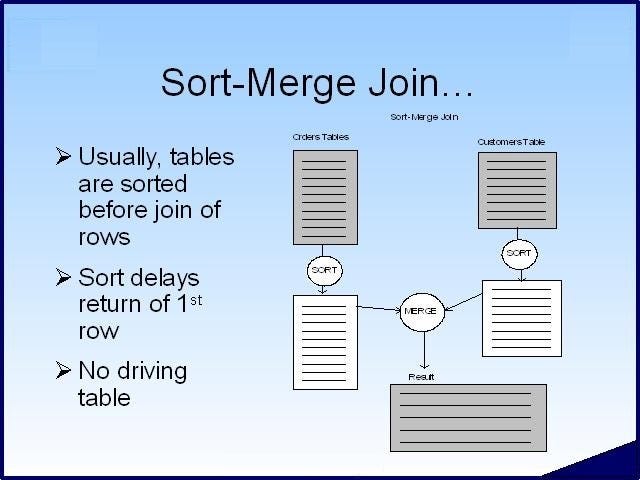 A merge join (or sort-merge join) matches rows by reading two already-sorted inputs in a single, parallel pass. It compares the current rows in both tables; if they match, it joins them, and if one is smaller, the database advances the pointer for that table until a match is found. It performs best on massive datasets when both tables are either indexed or pre-sorted by the join key.
𝐋𝐞𝐚𝐫𝐧 𝐭𝐨 𝐛𝐮𝐢𝐥𝐝 𝐆𝐢𝐭, 𝐃𝐨𝐜𝐤𝐞𝐫, 𝐑𝐞𝐝𝐢𝐬, 𝐇𝐓𝐓𝐏 𝐬𝐞𝐫𝐯𝐞𝐫𝐬, 𝐚𝐧𝐝 𝐜𝐨𝐦𝐩𝐢𝐥𝐞𝐫𝐬, 𝐟𝐫𝐨𝐦 𝐬𝐜𝐫𝐚𝐭𝐜𝐡. Get 40% OFF CodeCrafters: https://app.codecrafters.io/join?via=the-coding-gopher
System Design Blueprint is a reader-supported publication. To receive new posts and support my work, consider becoming a free or paid subscriber.
5. Transactions and isolation levels
A transaction groups multiple operations so they succeed or fail together — that’s the “atomicity” piece of ACID in practice. But isolation, the “I” in ACID, comes in degrees, and most databases let you choose how strict you want to be: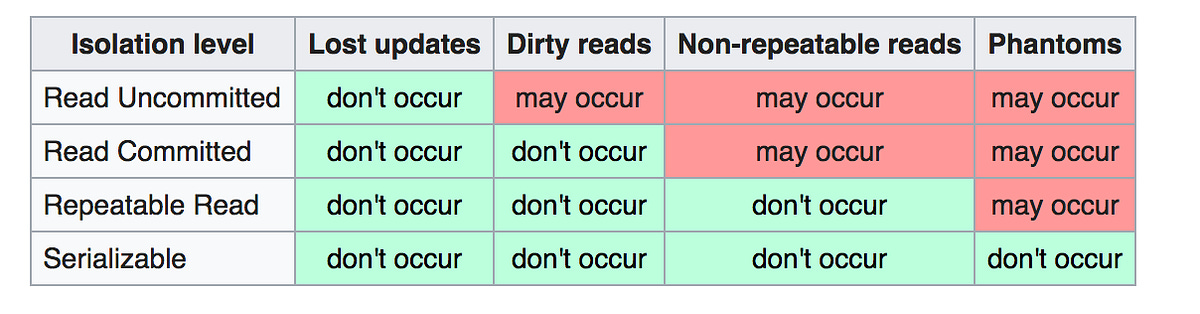 Database isolation levels control how concurrent transactions see changes made by one another, trading performance for data consistency. At the lowest level, Read Uncommitted maximizes performance but allows transactions to see uncommitted, temporary data modifications from other sessions, causing "dirty reads". Moving up, Read Committed blocks dirty reads by only allowing queries to see data that has officially been saved, though values can still change midway through a transaction if another session commits a modification (non-repeatable reads). To prevent this, Repeatable Read creates a stable snapshot when a transaction starts, ensuring that any row read once will return the exact same values if read again, though newly inserted rows from concurrent transactions might still pop up as "phantom reads". Finally, Serializable is the highest and most restrictive level; it completely isolates transactions by forcing them to execute as if they occurred one after another in a perfect, sequential order, eliminating all reading anomalies at the cost of significantly higher system locking and slower performance.
-
Read uncommitted — you might see other transactions’ uncommitted changes (”dirty reads”). Rarely used.
-
Read committed — you only see committed data, but a value can change between two reads in the same transaction.
-
Repeatable read — the data you’ve read stays consistent for the duration of your transaction.
-
Serializable — the strictest level; transactions behave as if they ran one after another, with no overlap at all.
Stricter isolation means fewer surprises but more contention — transactions blocking each other, or failing and needing a retry. Most applications run on read committed by default and only reach for stricter levels around the genuinely sensitive operations, like financial transfers or anything involving inventory counts.
6. Replication — copies for safety and speed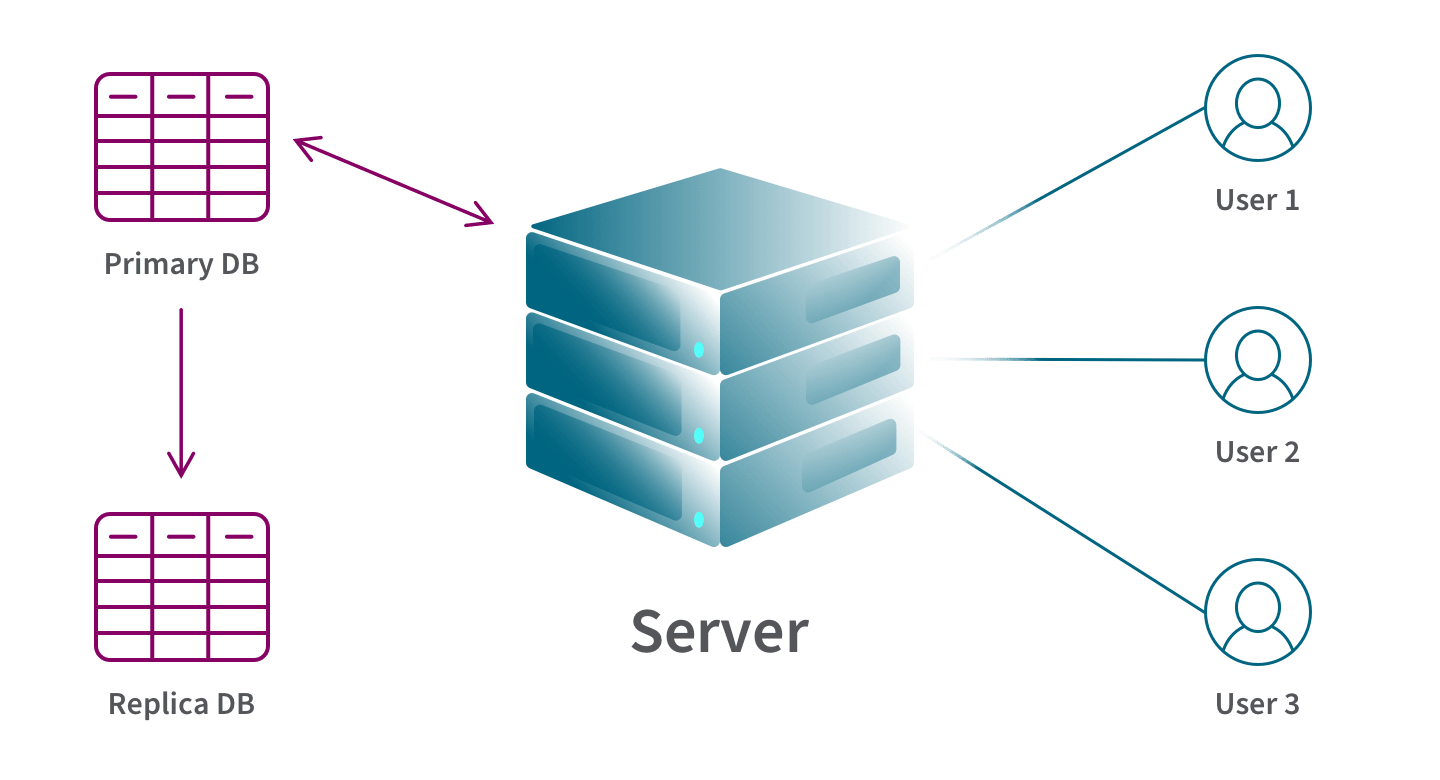 Data replication is the process of copying and syncing data from a source system to one or more destination nodes. It is primarily used to ensure continuous business operations, improve system performance, and guard against data loss.
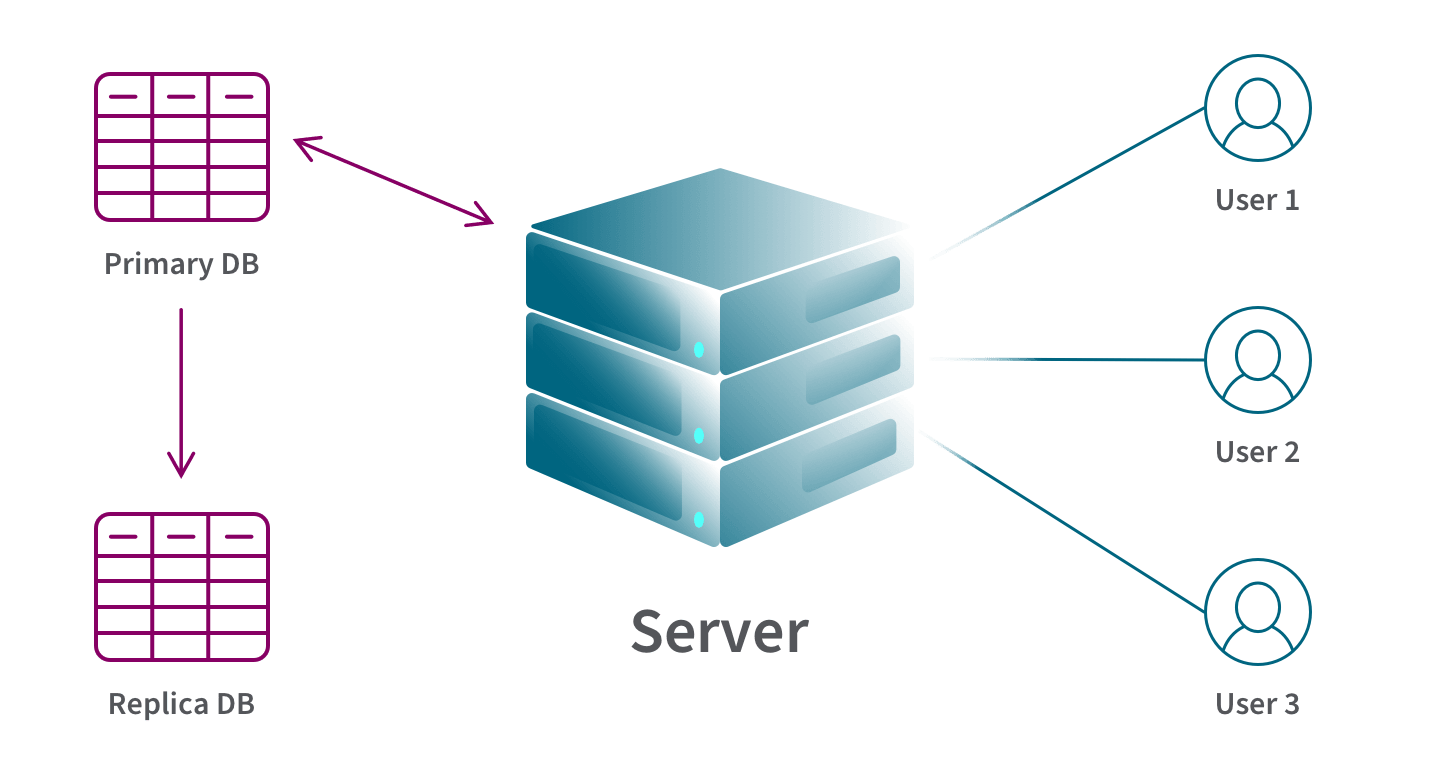
Replication means keeping copies of your data on multiple machines. There are two main reasons to do it:
-
Durability — if one server dies, you haven’t lost your data.
-
Read scaling — you can send read queries to replicas and keep the primary free for writes.
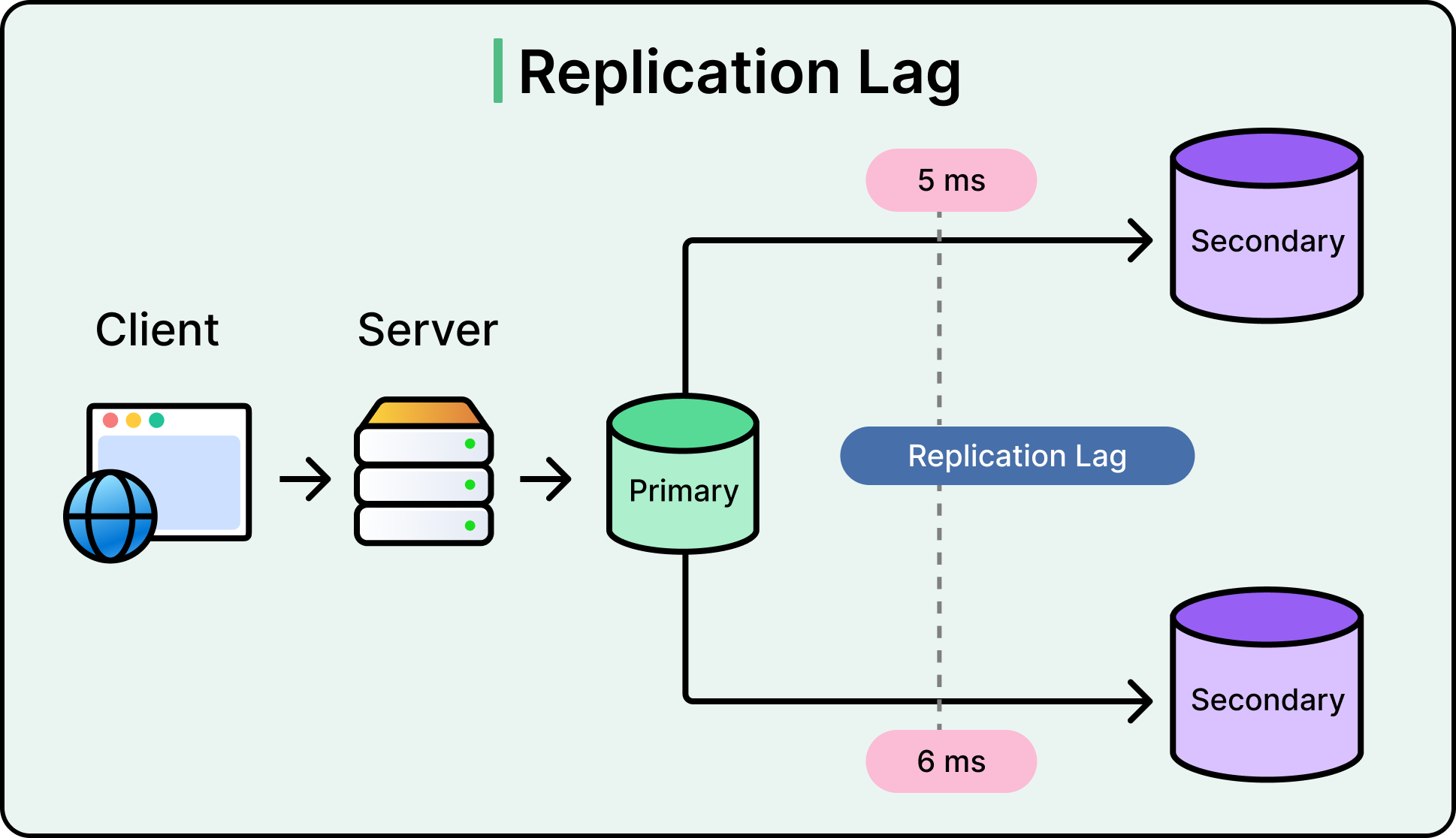 Replication lag is the time delay between a write operation occurring on a primary database and that update being successfully copied to and applied on a read replica. It causes temporary data inconsistency (e.g., users viewing "stale" data) and is primarily caused by network latency or resource limits.
The catch is replication lag. Replicas usually receive updates asynchronously, which means there’s a small window where reading from a replica gives you slightly stale data. This is invisible most of the time, but it explains a specific, very common bug: a user updates their profile, immediately reloads the page, and briefly sees their old data because the read got routed to a replica that hadn’t caught up yet.