CPU Registers, L1 Caches, RAM, and more
By The Coding Gopher
Published: 2026-09-24
URL: https://thecodinggopher.substack.com/p/the-memory-hierarchy-explained
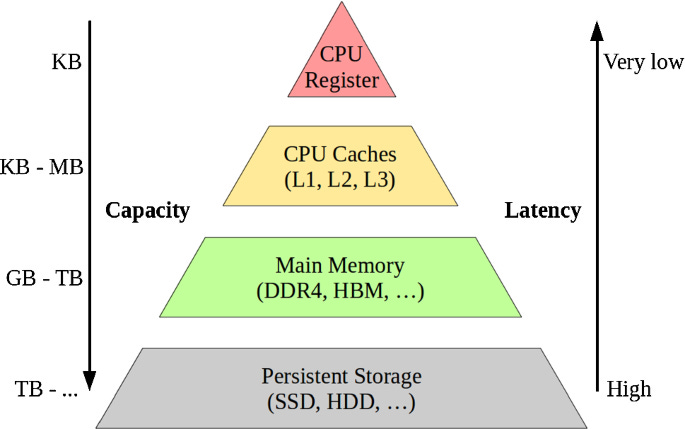
The modern computing landscape is defined by a fundamental hardware challenge: the physical and economic trade-off between memory speed, capacity, and cost. While processors have advanced exponentially in speed, memory technologies have struggled to keep pace. To bridge this performance gap, computer architects developed the hierarchical memory system.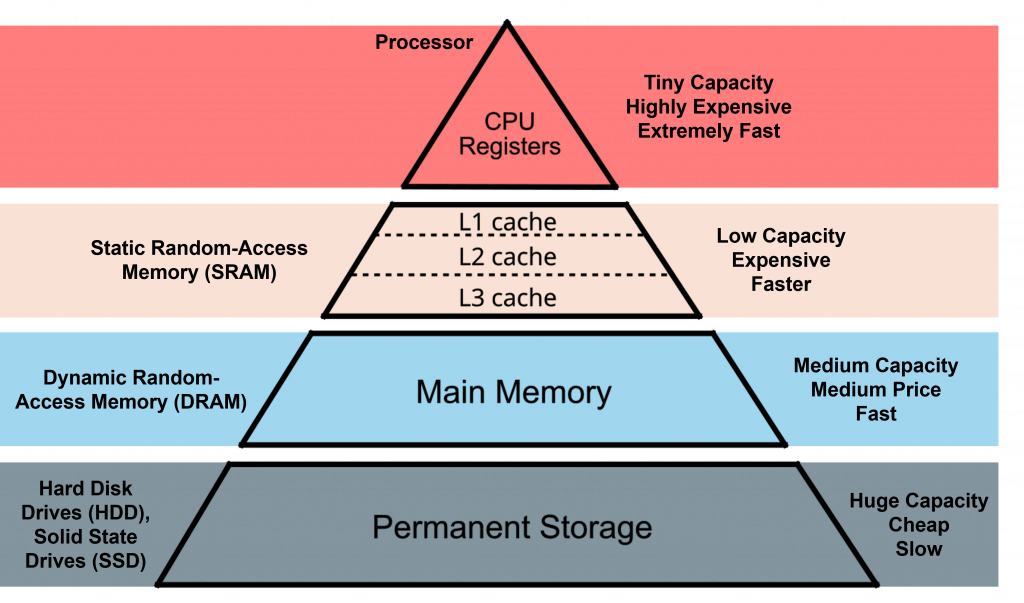 Memory hierarchy organizes computer storage into multiple levels based on speed, capacity, and cost. It places the fastest, most expensive, and smallest memory types closest to the CPU. This design bridges the gap between processor speed and slower storage, keeping frequently used data immediately accessible.
The memory hierarchy is structured as a pyramid. At the peak reside microscopic, ultra-fast, and expensive memory cells directly integrated into the processor cores. At the base lie massive, slow, and highly cost-effective storage mediums. Understanding this hierarchy is essential for designing efficient software and optimizing system-level performance.
Join a community of senior engineers. Subscribe and get FREE access to System Design deep dives.
The Core Architecture: Memory Hierarchy Overview
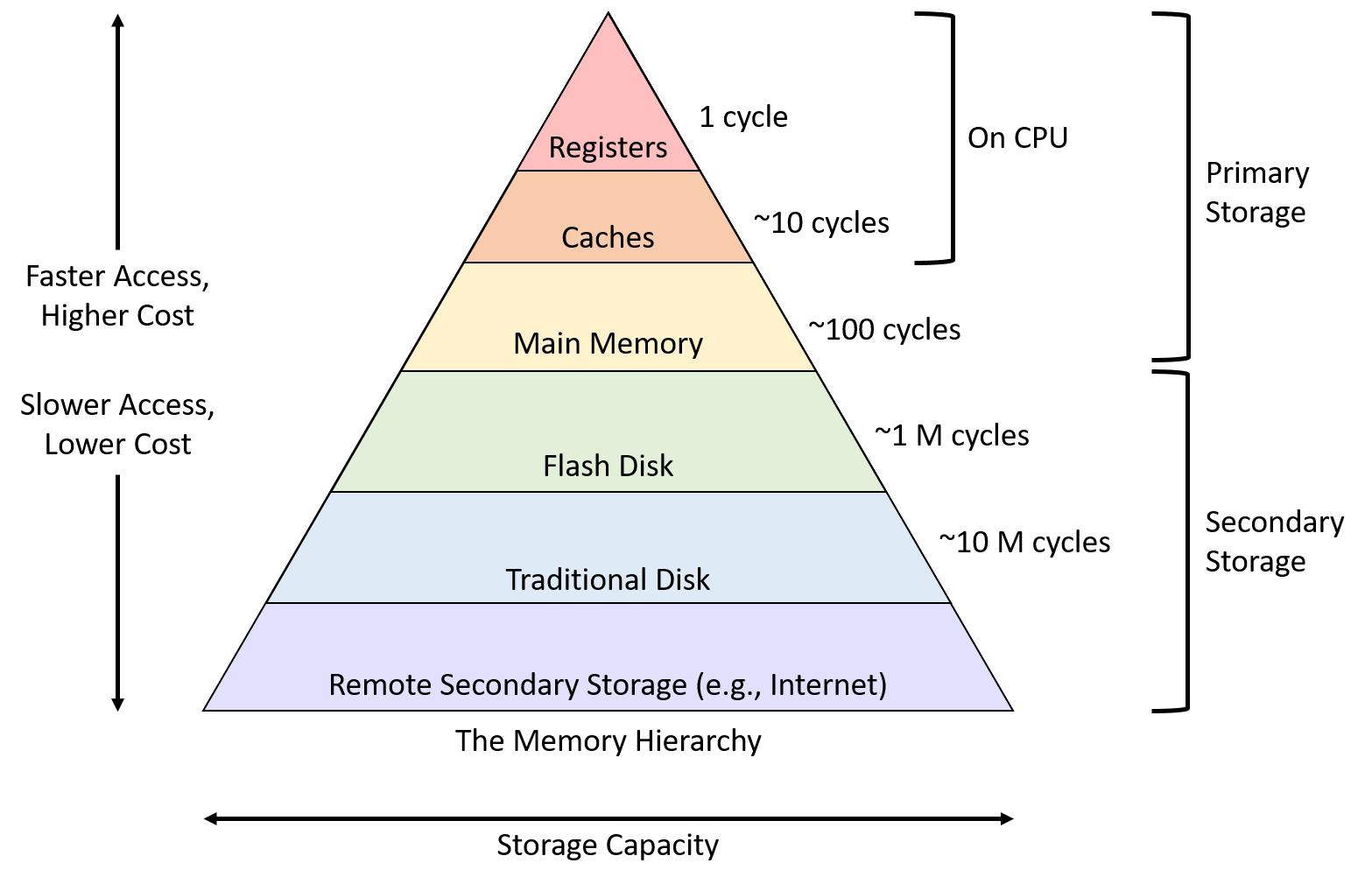 To balance speed and capacity, computers utilize a multi-layered Memory Hierarchy. The processor accesses frequently needed data starting with ultra-fast but tiny CPU registers, cascading through localized L1-L3 cache and system RAM (main memory). When data is absent, the system pulls it sequentially from persistent flash disks (like SSDs), traditional disks (HDDs), and ultimately remote secondary storage over a network.
The memory hierarchy operates on the principle that smaller, faster memory elements should buffer larger, slower ones. Data moves dynamically between these levels based on how frequently the processor requires access.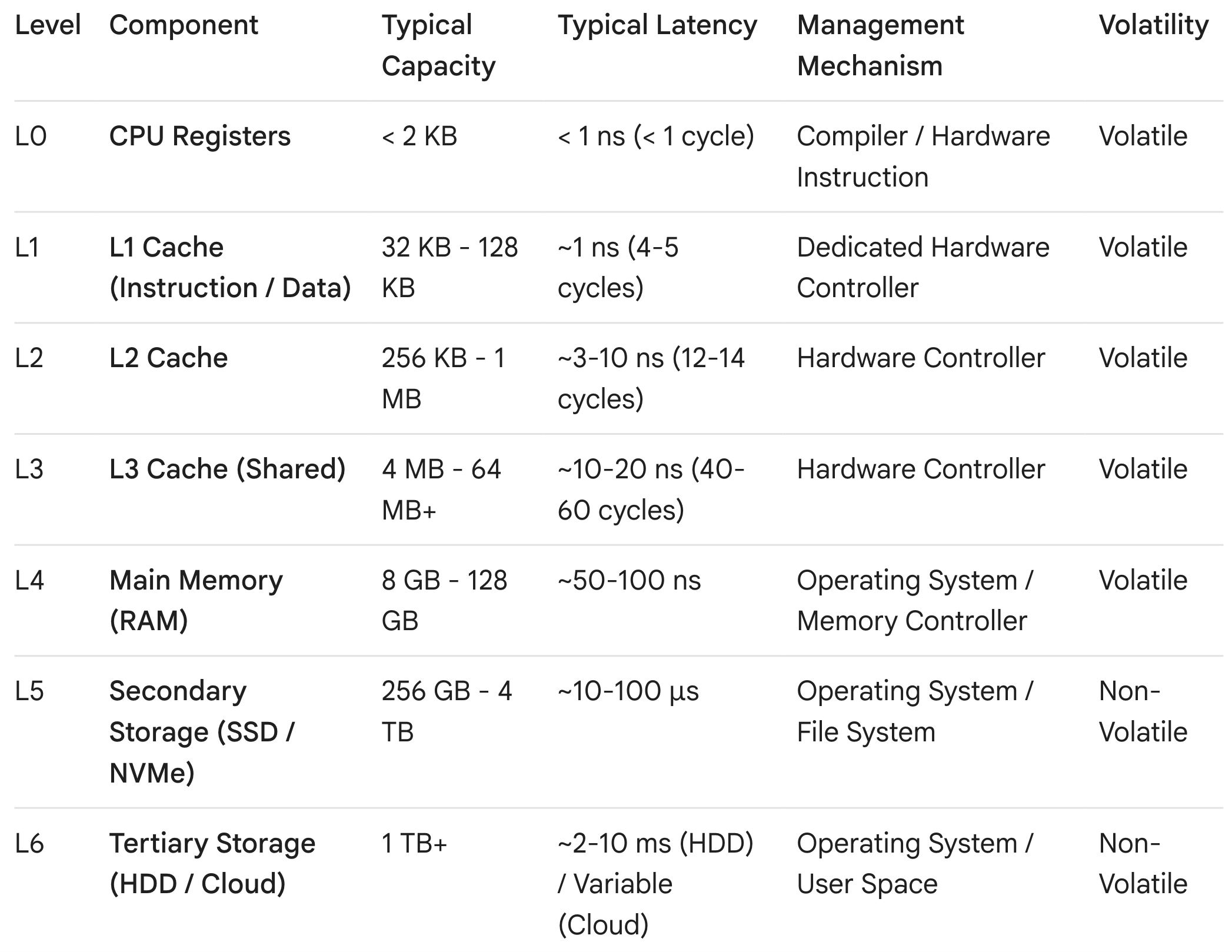
Build Redis, Git, Docker & Claude Code From Scratch

Want to become a better software engineer?
Trusted by engineers at Google, NVIDIA, and Anthropic, CodeCrafters helps you rebuild technologies like Redis, Git, Docker, and Claude Code from scratch so you can deeply understand how real systems work.
We’ve partnered with CodeCrafters to give all readers an exclusive 40% lifetime discount.
💡 Engineers may expense platforms like this through their team’s learning budget.
Start Building & Unlock 40% Off
Analysis of the Hierarchy Levels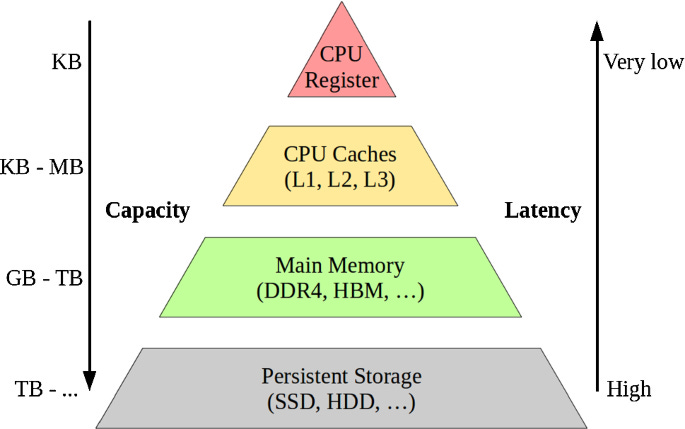
Level 0: CPU Registers
At the absolute peak of the hierarchy are CPU registers. These are small storage locations situated directly inside the execution units of the central processing unit (CPU). Operating at the internal frequency of the processor, registers require less than one clock cycle to read or write. They hold the immediate operands for active instructions, such as values undergoing mathematical operations or memory addresses currently being dereferenced.
Level 1: L1 Cache (Instruction and Data)
Level 1 (L1) cache is the fastest cache level, built directly onto individual CPU cores. To maximize efficiency, modern designs utilize a split L1 architecture:
-
L1 Instruction Cache (L1i): Stores the raw machine instructions currently being decoded and executed.
-
L1 Data Cache (L1d): Holds the data variables that those instructions are manipulating.
This separation prevents structural hazards in the CPU pipeline, allowing the processor to fetch an instruction and read memory data simultaneously without resource contention.
Level 2: L2 Cache
The Level 2 (L2) cache serves as a secondary, larger buffer for the CPU core. While L2 caches historically resided on separate chips, modern architectures integrate a dedicated L2 cache block into each individual CPU core alongside the L1 cache. It acts as a fallback; if the core experiences an L1 cache miss, it queries the L2 cache next. L2 cache offers a balance of moderate capacity and low latency.
Level 3: L3 Cache
Unlike L1 and L2 caches, which are typically dedicated to individual cores, the Level 3 (L3) cache is a large, shared pool of memory accessible by all cores on a multi-core processor. The primary functions of L3 cache are to:
-
Reduce Main Memory Accesses: Provide a shared repository for data frequently accessed by multiple processing threads.
-
Facilitate Core Communication: Allow cores to share data quickly without writing back to system RAM, which reduces inter-core communication latency.
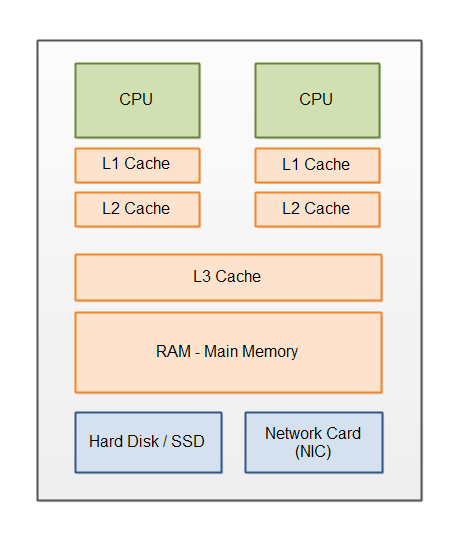 CPU caches (L1, L2, L3) are ultra-fast memory tiers built into your processor. When a CPU needs data, it checks these levels sequentially before accessing the slower system RAM. Caches get progressively larger in capacity but slower in access speed the further they sit from the actual processing cores.
Level 4: Main Memory (RAM)
Physical Random Access Memory (RAM) serves as the primary system workspace. RAM stores the active operating system kernel, running application code, and associated runtime data. While dynamic RAM (DRAM) is dense and relatively inexpensive, accessing it requires routing signals across the motherboard’s memory bus. This introduces a significant latency penalty—often referred to as the “memory wall”—which can cause the high-speed CPU to stall while waiting for data.
Level 5: Secondary Storage (Solid-State Drives)
Secondary storage represents the first non-volatile layer in the hierarchy, retaining data even when the system is powered down. Modern systems utilize Solid-State Drives (SSDs) connected via high-speed interfaces like Non-Volatile Memory Express (NVMe). SSDs use NAND flash memory, which operates without moving parts. This provides high throughput and microsecond-level latencies, making them ideal for virtual memory paging, operating system files, and application loading.
Level 6: Tertiary Storage (Hard Disk Drives and Cloud)
At the base of the hierarchy lies tertiary storage, comprised of legacy mechanical Hard Disk Drives (HDDs) and remote Cloud/Network-Attached Storage. Mechanical HDDs rely on rotating physical magnetic platters and read/write heads. Because of the mechanical movement involved, latencies escalate to the millisecond range. This tier is reserved for high-capacity, low-cost long-term archiving where speed is not a critical constraint.
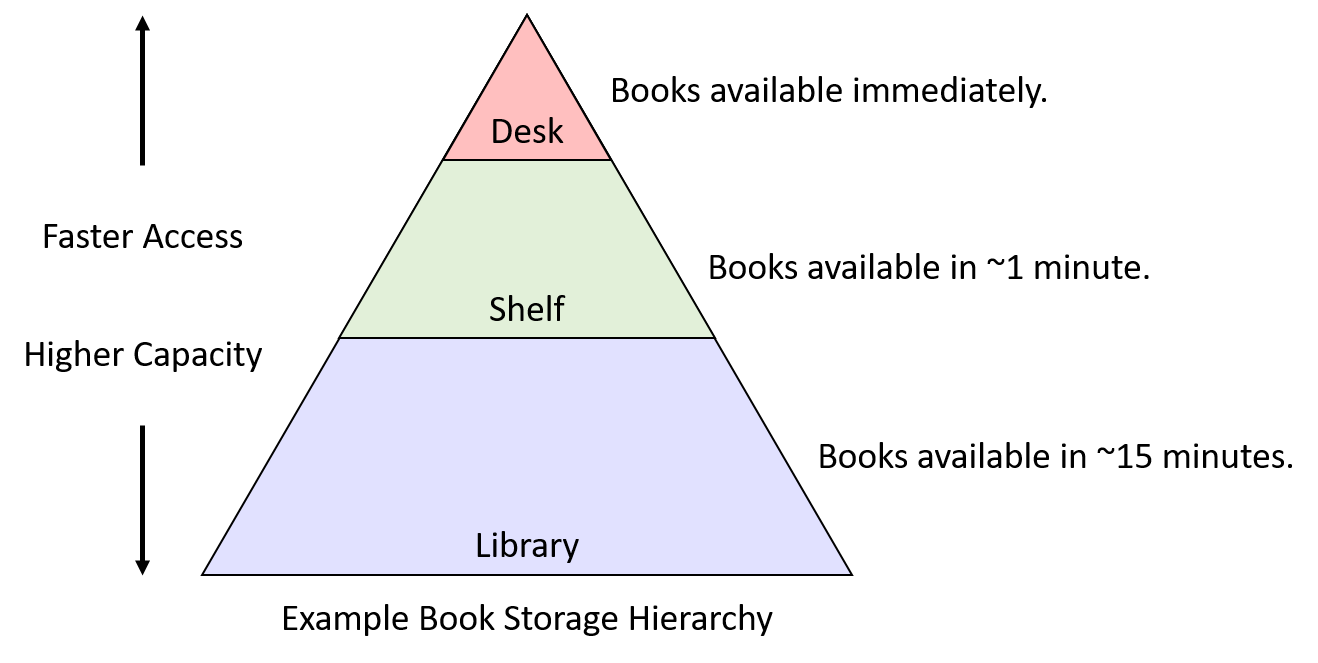 The memory hierarchy is like a researcher in a massive library. The CPU registers are like the exact book open in the researcher's hands, providing instant information. The rapid cache is like the stack of books on their immediate desk, and the slower RAM is like the main shelves within the room. Meanwhile, the massive hard drive is like a remote, off-site storage warehouse.
Join a community of senior engineers. Subscribe and get FREE access to System Design deep dives.
Hardware Management and Locality Principles
The entire caching hierarchy relies on hardware-controlled mechanisms designed around two core principles of data access:
Temporal Locality
Temporal locality dictates that if a program accesses a particular memory location, it is highly likely to access that same location again in the near future. Cache controllers leverage this by retaining recently accessed data in the highest possible cache levels.
Spatial Locality
Spatial locality dictates that accessing a specific memory address increases the probability that adjacent memory addresses will be accessed soon. Rather than retrieving a single requested byte from main memory, the hardware always transfers a fixed-size block called a cache line (typically 64 bytes in modern x86 and ARM architectures).
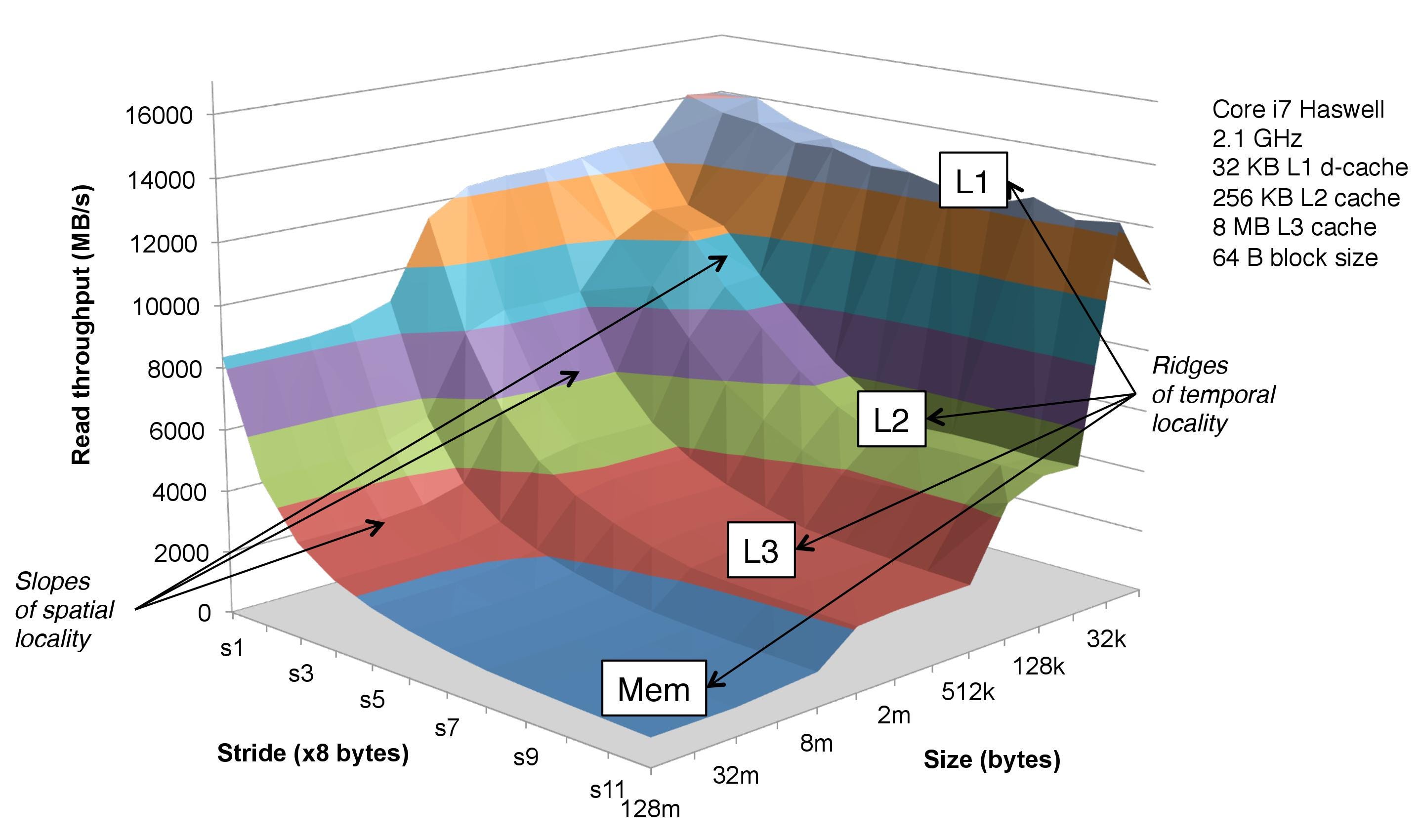 Temporal locality and spatial locality are principles of memory access in computer science. Temporal locality means accessing the same data multiple times in a short period, while spatial locality means accessing data that is physically close in memory to previously accessed data.
Software Optimization and Cache Performance
When software is executed, the efficiency of the cache hierarchy drastically impacts processing speed. Modern CPUs utilize speculative execution and prefetching to anticipate which cache lines will be needed next. However, poor software design can lead to persistent cache misses.
Cache Misses and Processor Stalls
When the CPU requests data that is not present in L1, L2, or L3 caches, it triggers a cache miss. The processor must then fetch the data from RAM, halting execution for hundreds of clock cycles.
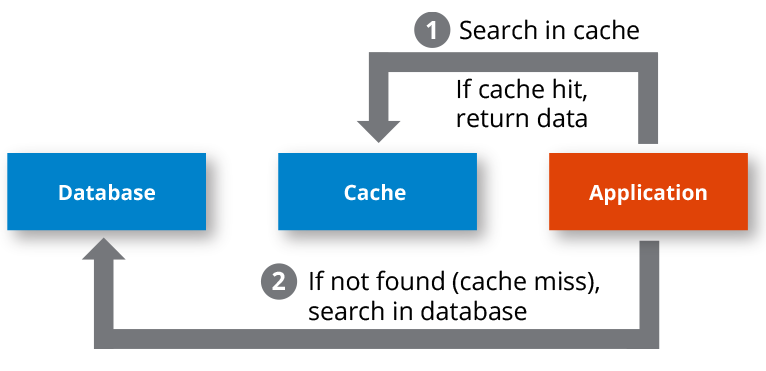 A cache miss occurs when a system requests data from a fast, small cache, but the data is not there. The system is then forced to fetch the data from a slower primary source (like a main memory or database), which causes a delay (latency).
Structuring Data for Cache Efficiency
Software developers must design data structures that respect spatial locality to minimize cache misses.
-
Contiguous Layouts (Arrays): Elements are stored sequentially in physical memory. Reading the first element pulls subsequent elements into the cache line, maximizing cache hits during sequential iteration.
-
Pointer-Based Layouts (Linked Lists): Nodes are scattered throughout physical memory. Iterating through a linked list forces the CPU to fetch a new cache line for nearly every node, resulting in frequent memory latency stalls.
| [](https://substackcdn.com/image/fetch/$s!3TWk!,fauto,qauto:good,flprogressive:steep/https%3A%2F%2Fsubstack-post-media.s3.amazonaws.com%2Fpublic%2Fimages%2F005375d6-c5b8-46af-8ada-fae5399221d2986x771.png)Contiguous memory layouts (like arrays) maximize cache efficiency by grouping data sequentially in physical memory, ensuring the CPU can fetch and process multiple adjacent elements in a single hardware operation. When the CPU requests a single variable, it does not fetch just that value; it retrieves an entire fixed-size block of memory known as a cache line (typically 64 bytes). Because arrays store elements back-to-back, a single cache line preloads subsequent array elements automatically, drastically minimizing expensive trips to the main RAM. |
|---|
Conclusion
The cache memory hierarchy represents a highly optimized compromise between physical constraints and computing demands. By staging data across registers, multi-tiered caches, RAM, and non-volatile storage, computer systems achieve near-instantaneous execution speeds while maintaining access to terabytes of persistent data. For software engineers and systems architects, writing cache-aware code remains one of the most effective levers for unlocking maximum hardware performance.
Join a community of senior engineers. Subscribe and get FREE access to System Design deep dives.