Eliminate Bottlenecks and Drastically Reduce Database Latency
By The Coding Gopher
Published: 2026-08-30
URL: https://thecodinggopher.substack.com/p/database-connection-pooling-explained
Deconstructing the critical middleware that prevents backend infrastructure from collapsing under scale.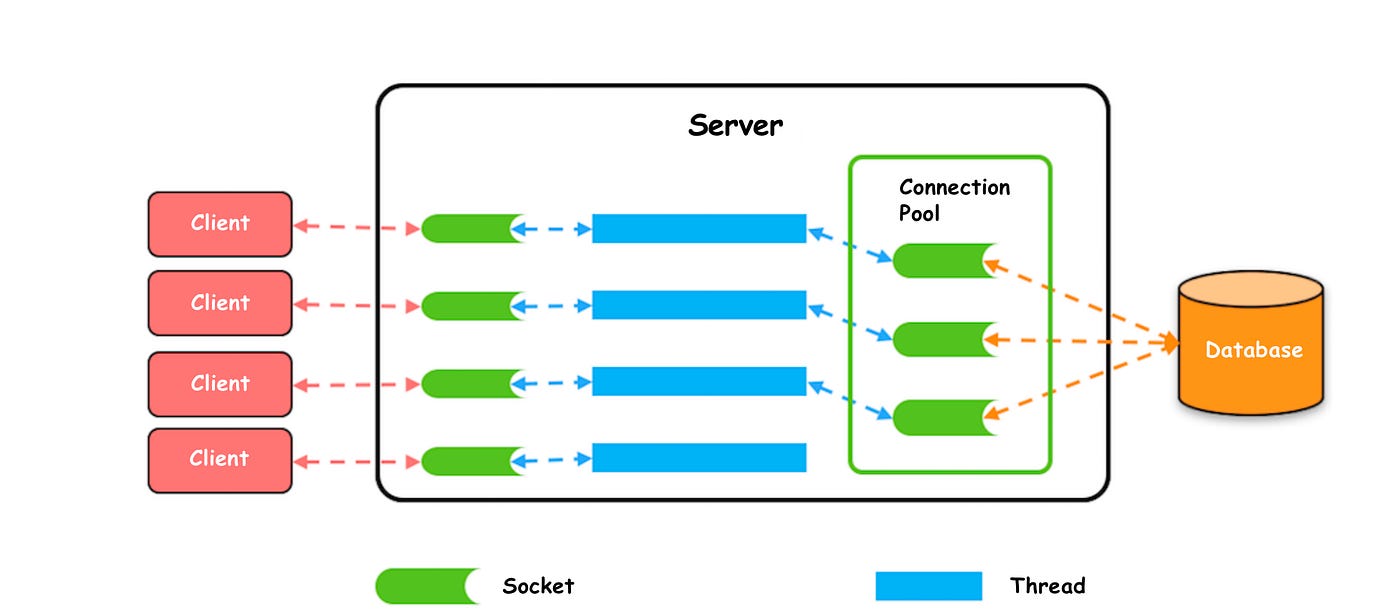
When a backend system goes down during a sudden surge in user traffic, the root cause is rarely a lack of compute power or poorly written SQL queries. In most distributed systems, the catastrophic failure point is connection exhaustion.
If an application is configured to open a new, direct connection to the database for every single incoming HTTP request, it will inevitably crash the database under load.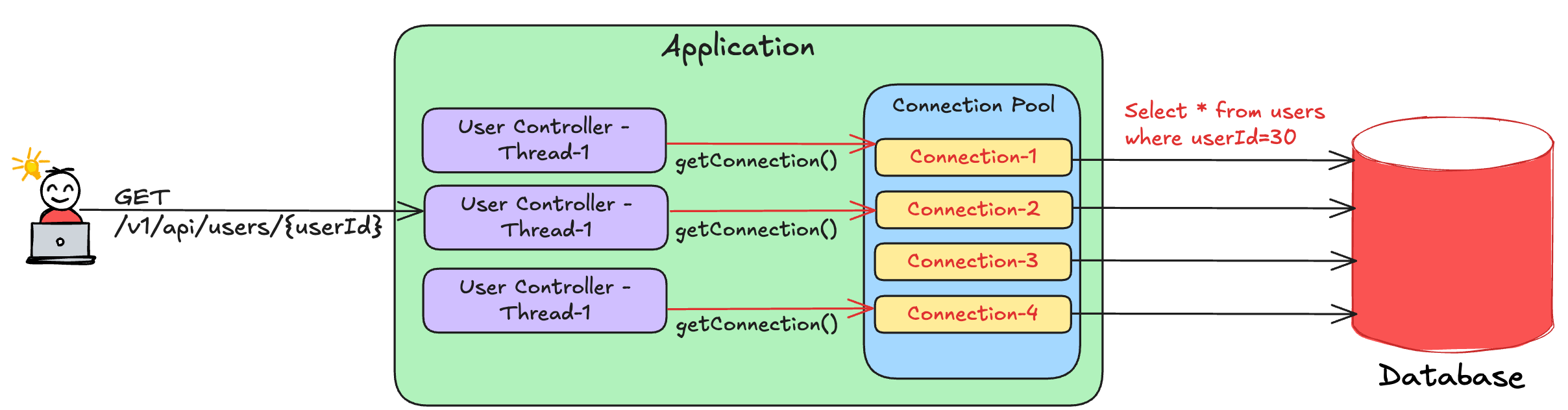 Database connection pooling is a performance optimization technique that maintains a cache (a "pool") of pre-established, open database connections. Instead of creating and destroying a new connection for every single query, your application "borrows" an existing one from the pool and returns it when finished.
Here is the reality of how Database Connection Pooling works, and why it is a mandatory architectural component for any production-grade application.
1. The Bottleneck
To understand why pooling is necessary, you have to look at the physical and cryptographic steps required just to say “hello” to a relational database like PostgreSQL or MySQL.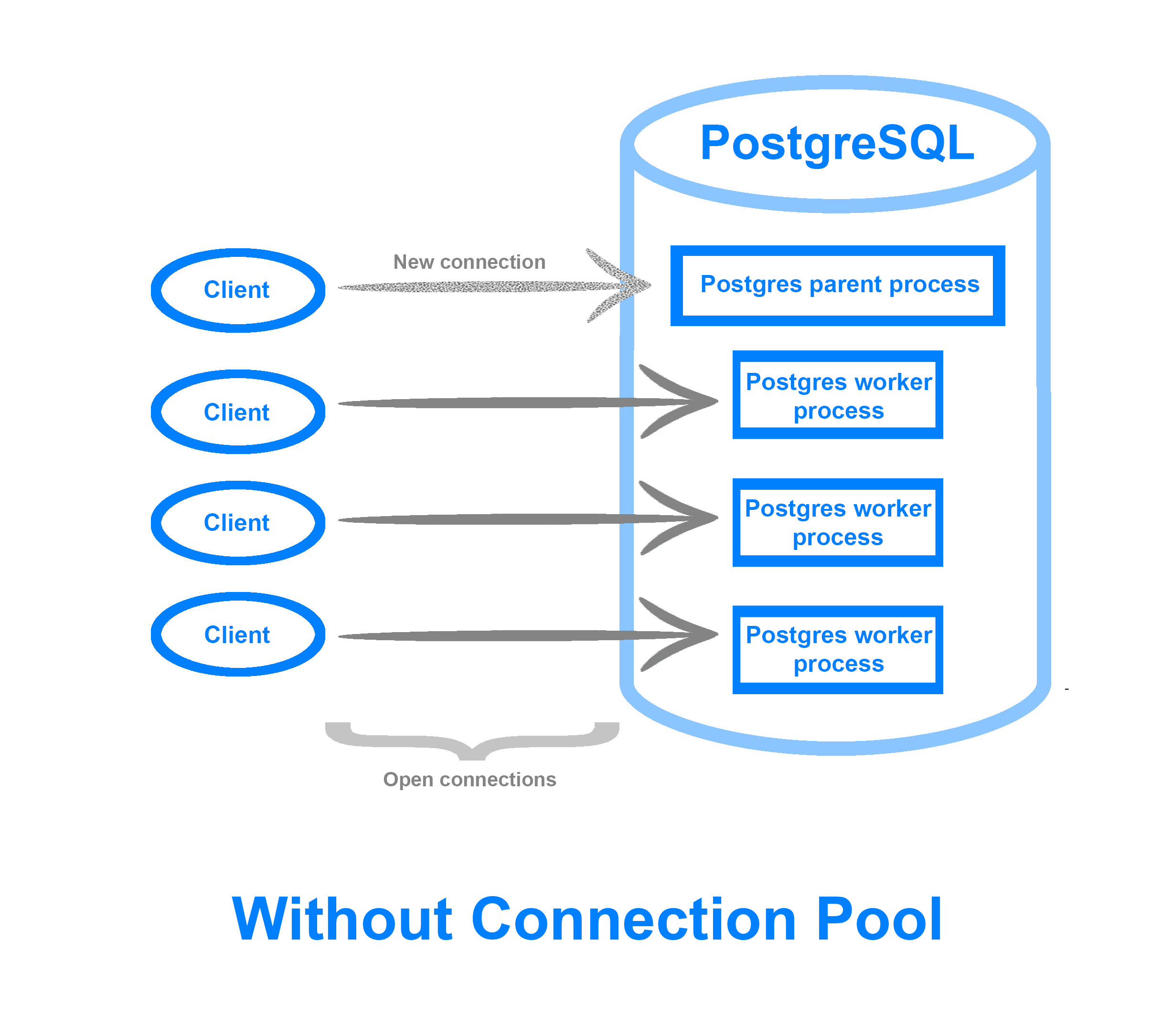 Without a database connection pool, your application must open and close a new connection for every single database query. This causes extreme performance degradation, high latency, and high CPU usage. It also risks crashing your database due to connection limits being overwhelmed.
When your application attempts to open a new database connection, the following sequence occurs:
-
TCP Handshake: The application and the database server exchange packets to establish a reliable network route.
-
TLS/SSL Negotiation: The servers exchange cryptographic keys to ensure the data stream is encrypted.
-
Authentication: The database verifies the username, password, and access permissions.
-
Memory Allocation: The database engine allocates dedicated RAM and spins up a specific background process to manage this exact session.
This entire sequence is incredibly expensive. If your application opens a new connection, runs a 2-millisecond SELECT query, and then closes the connection, you are spending 95% of your compute time and latency just negotiating the handshake.
When 5,000 users hit your application simultaneously, the database will spend all of its CPU cycles trying to authenticate 5,000 new TCP connections rather than actually executing queries. The database engine will hit 100% CPU utilization, lock up, and drop all incoming traffic.
2. The Architecture: Borrowing vs. Building
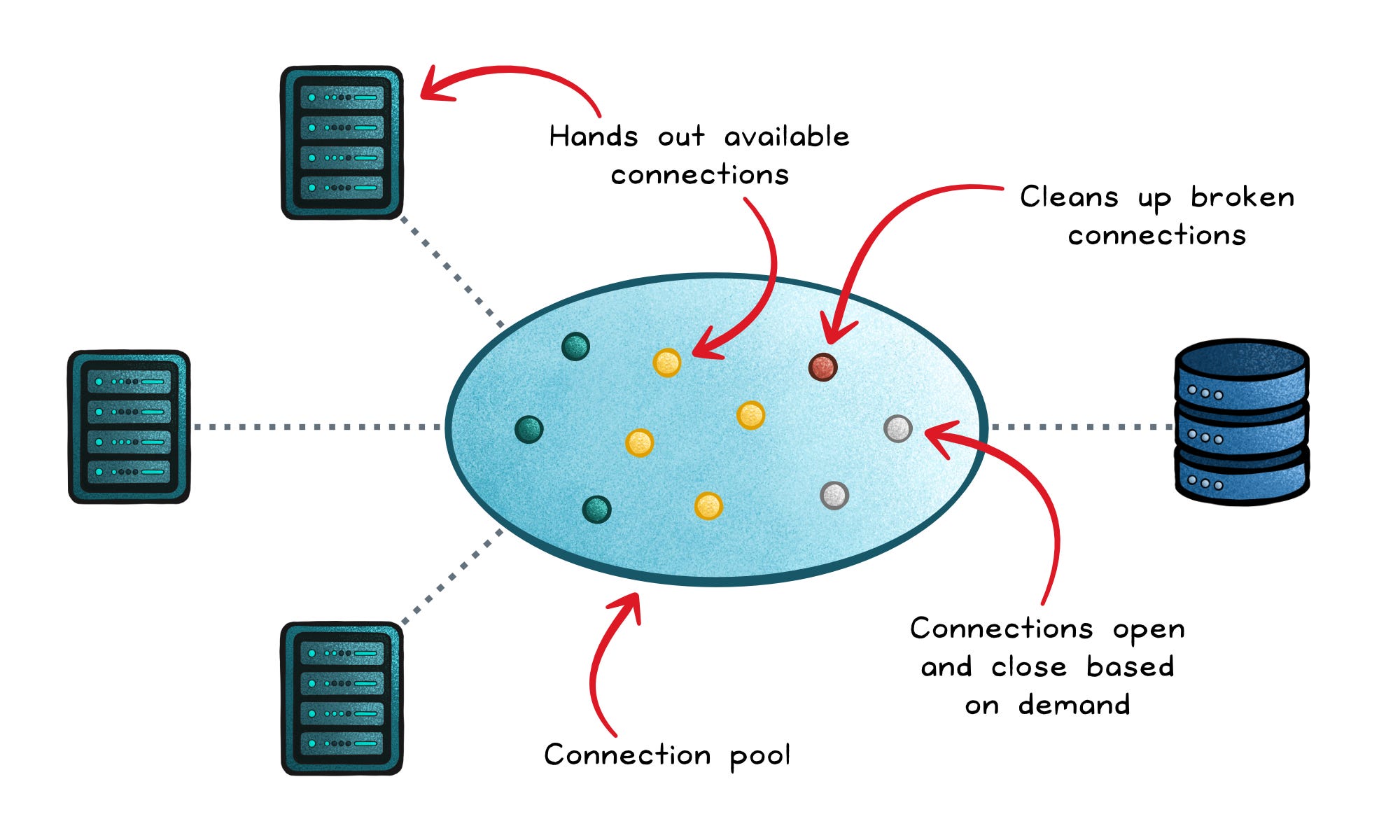
Connection pooling fundamentally alters this network flow. A Connection Pool is a middleware component (either built into the application framework, or running as a standalone proxy like PgBouncer) that maintains a fixed number of pre-opened, continuously active connections to the database.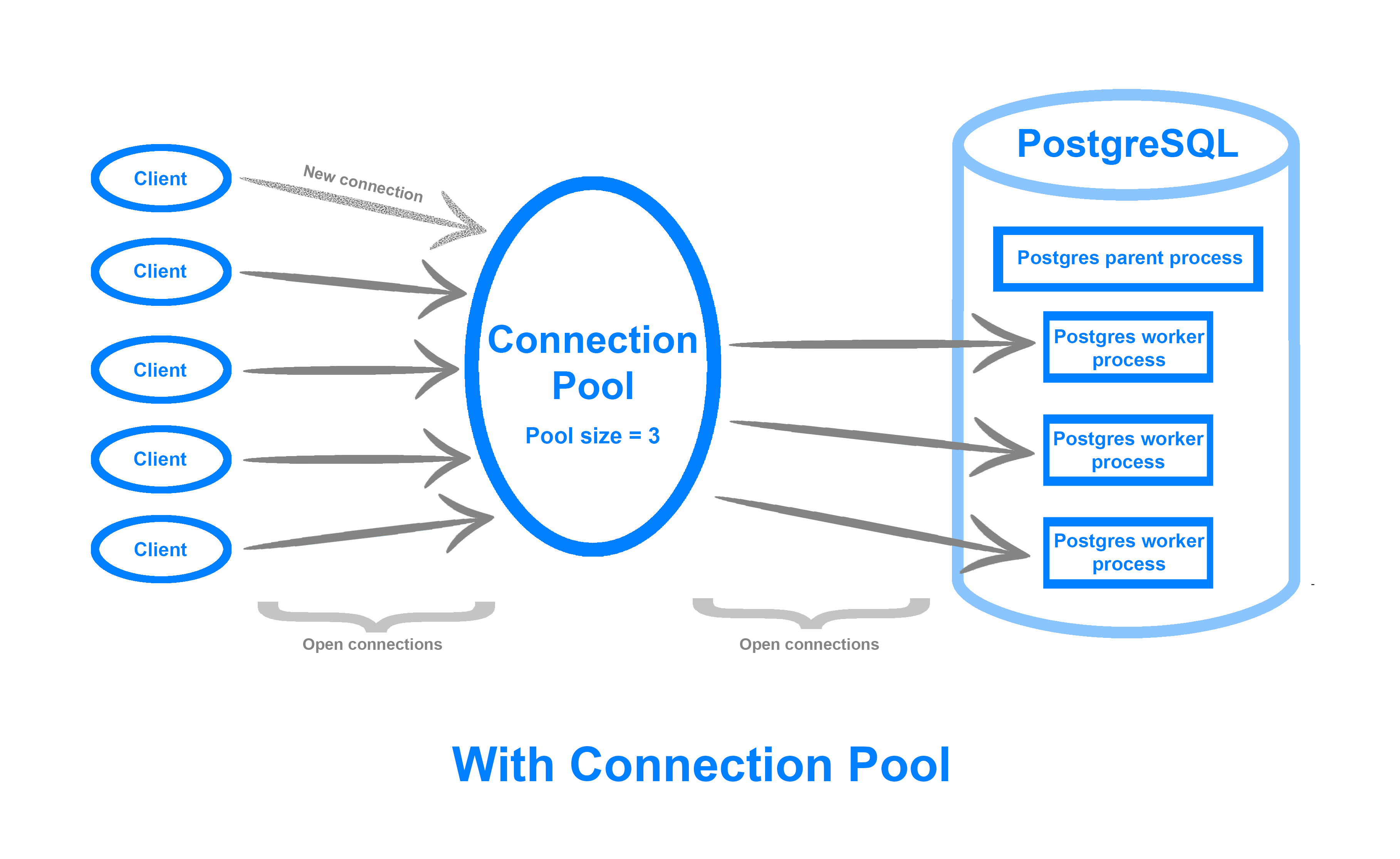 Connection pooling significantly improves application performance and scalability by maintaining a cache of ready-to-use database connections, allowing multiple requests to share them rather than creating new physical connections for every single query.
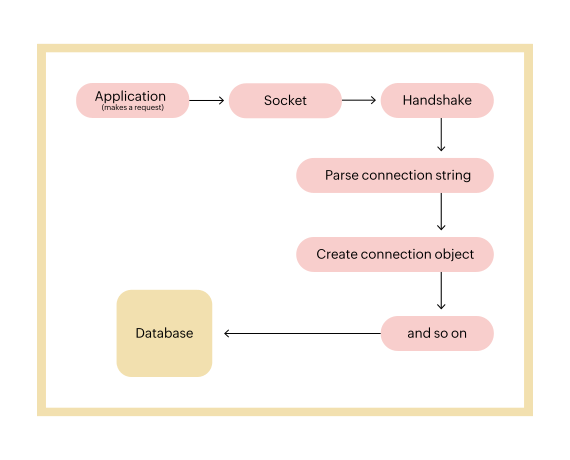 When an application opens a database connection, it establishes a network session to authenticate and prepare for queries. This happens in four main technical phases: DNS Resolution, TCP Handshake, TLS/SSL Handshake (optional but common), and Database Protocol Authentication.
Here is how the data flows in a pooled architecture:
-
Initialization: When your server boots up, the connection pool immediately opens a set number of connections to the database (e.g., 20 connections) and holds them open in an idle state.
-
The Borrow: When an HTTP request comes in and needs data, the application does not talk to the database. It asks the pool for a connection. The pool hands over one of its active connections.
-
The Return: The application executes its lightning-fast SQL query. Instead of tearing the connection down, the application simply hands the connection back to the pool.
-
The Reuse: The pool sanitizes the connection state and holds it ready for the very next HTTP request.
𝐋𝐞𝐚𝐫𝐧 𝐭𝐨 𝐛𝐮𝐢𝐥𝐝 𝐆𝐢𝐭, 𝐃𝐨𝐜𝐤𝐞𝐫, 𝐑𝐞𝐝𝐢𝐬, 𝐇𝐓𝐓𝐏 𝐬𝐞𝐫𝐯𝐞𝐫𝐬, 𝐚𝐧𝐝 𝐜𝐨𝐦𝐩𝐢𝐥𝐞𝐫𝐬, 𝐟𝐫𝐨𝐦 𝐬𝐜𝐫𝐚𝐭𝐜𝐡. Get 40% OFF CodeCrafters: https://app.codecrafters.io/join?via=the-coding-gopher
This Substack is reader-supported. To receive new posts and support my work, consider becoming a free or paid subscriber.
3. The Trade-off: Queuing Over Crashing
The true value of a connection pool is not just latency reduction; it is acting as a strict, physical shield for your database.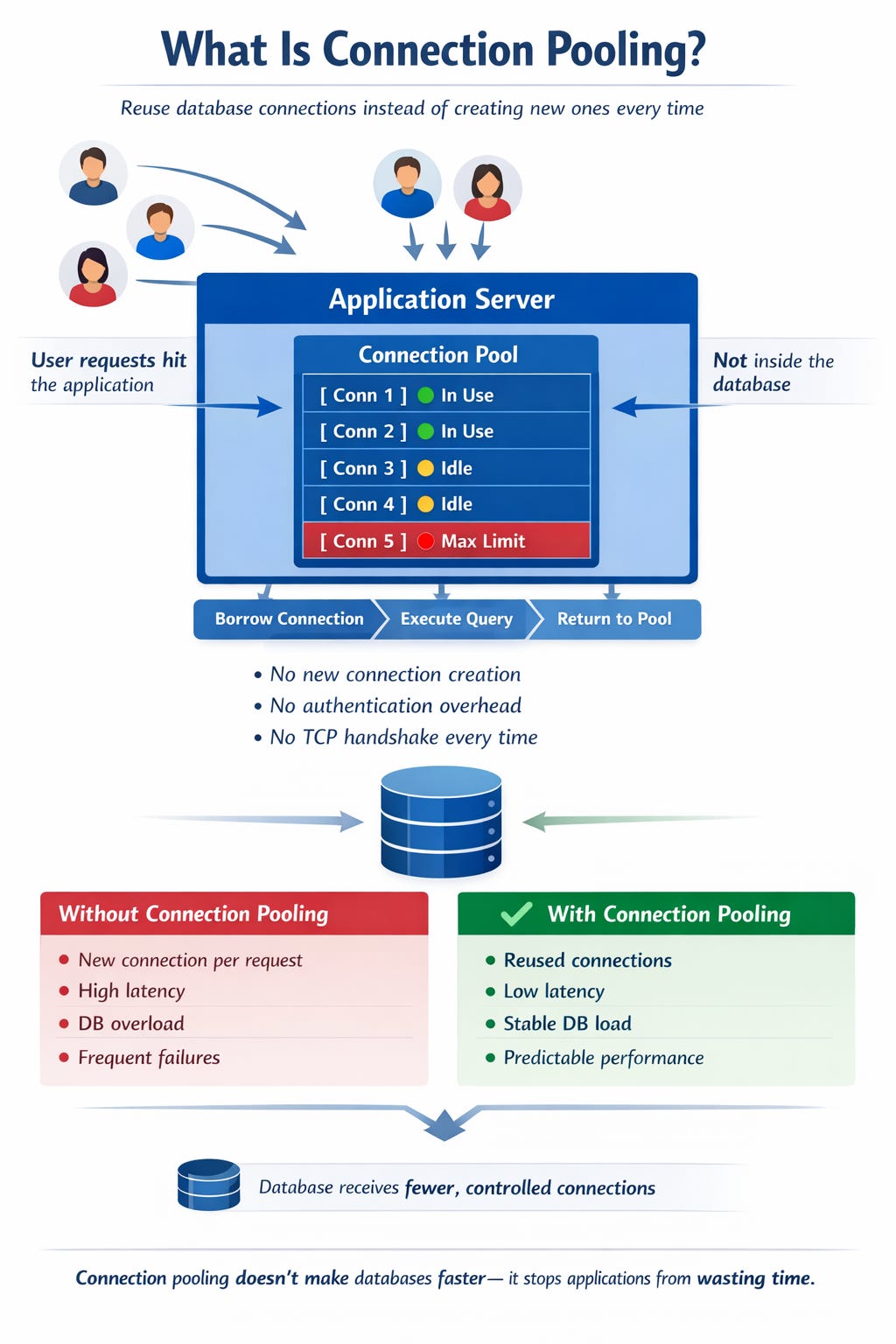
If you configure a maximum pool size of 50 connections, and a massive traffic spike sends 1,000 simultaneous HTTP requests to your server, the pool dictates the flow of physics. It will only send exactly 50 concurrent queries to the database. The database easily processes those 50 queries without breaking a sweat.
What happens to the other 950 requests? They are forced to queue in the application layer, waiting a few extra milliseconds for a connection in the pool to become available.
This is a deliberate architectural trade-off. It is vastly better for application requests to wait in a queue (slightly increasing latency for the user) than to bypass the queue, overwhelm the database with 1,000 simultaneous connections, and cause an out-of-memory crash that takes the entire platform offline for everyone.
4. The Sizing Paradox: Why Smaller is Faster
The most common mistake engineers make is assuming that more database connections equal more throughput. If a server is slow, the instinct is to increase the pool size from 100 to 1,000.
In reality, a database can only execute as many parallel queries as it has physical CPU cores. If your database server has 8 CPU cores, and you send it 100 concurrent queries, the CPU has to rapidly pause and switch between all 100 tasks (Context Switching). The overhead of constantly switching contexts destroys the database’s throughput.
According to PostgreSQL core developers, the optimal connection pool size is surprisingly small. A highly optimized pool for a standard 8-core database server is often only 15 to 20 connections. A smaller, highly active pool will process thousands of queries per second significantly faster than a massive pool bogged down by context switching.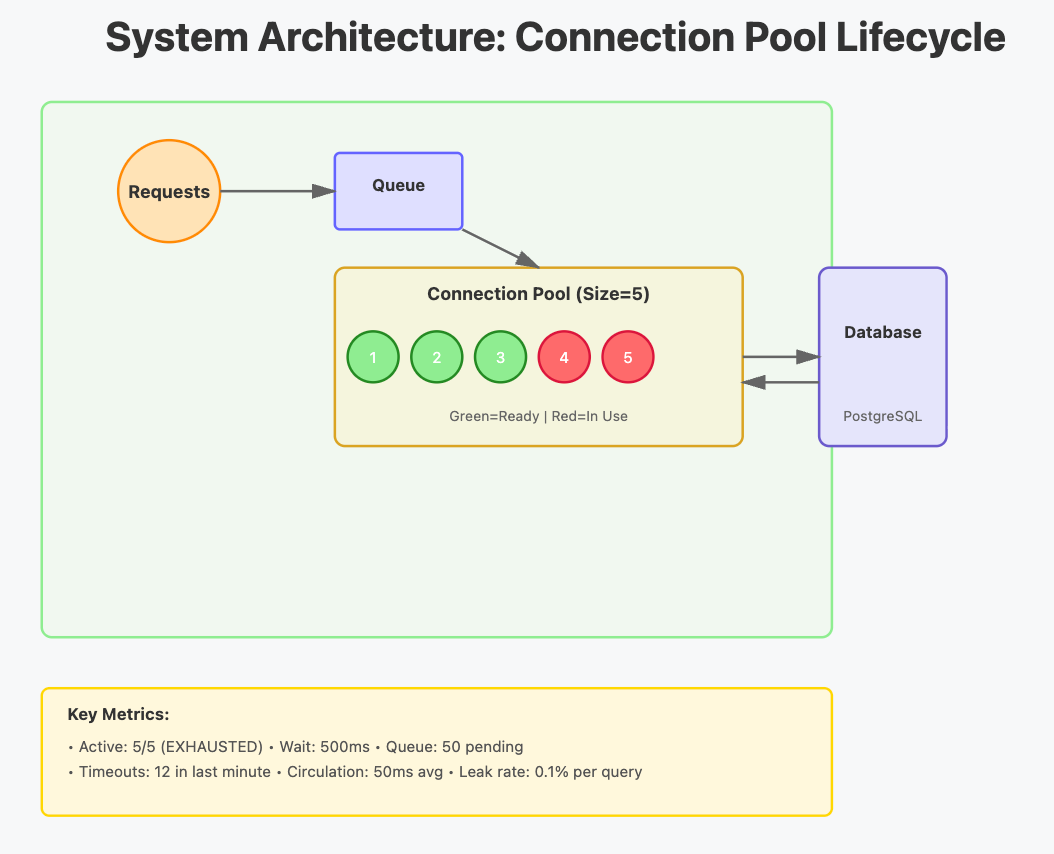
The Traffic Spike Simulator
To visualize exactly how a pool acts as a shield during a traffic surge, try interacting with the simulator below. Notice how the database behaves under load when the pool is bypassed versus when it is enforced.
This Substack is reader-supported. To receive new posts and support my work, consider becoming a free or paid subscriber.
Thanks for reading! This post is public so feel free to share it.