Everything You Need to Know to Choose Between a Hard Drive and a Solid-State Drive
By The Coding Gopher
Published: 2026-08-27
URL: https://thecodinggopher.substack.com/p/hdds-vs-ssds-explained
How data is physically persisted and why mechanical storage is hitting its ceiling.
At the lowest level of computing, software is an illusion. When the power is turned off, data must be persisted to a physical medium.
For decades, the technology industry relied on mechanical engineering to solve this problem. Today, the standard is flash memory. Understanding the difference between a Hard Disk Drive (HDD) and a Solid State Drive (SSD) requires looking at the physical physics of how data is actually written and retrieved.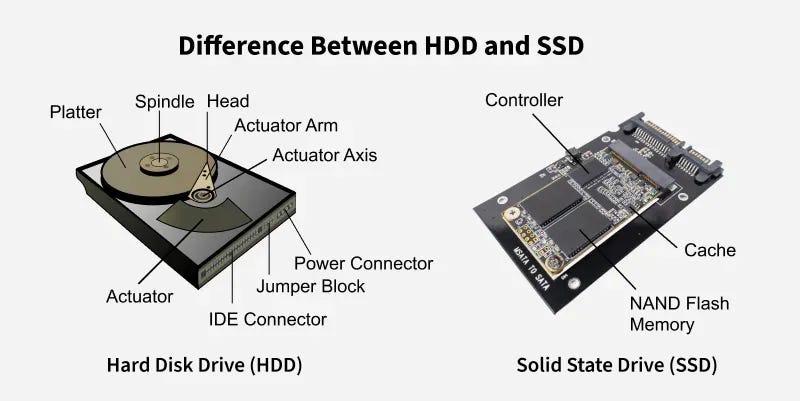 Solid-State Drives (SSDs) and Hard Disk Drives (HDDs) are both devices used to store files and data, but they operate on vastly different technology. SSDs use flash memory and have no moving parts, making them much faster, quieter, and more durable. HDDs rely on mechanical spinning disks, which make them cheaper but slower.
A Hard Disk Drive (HDD) is a mechanical storage device that writes data magnetically to physical, spinning disks. A Solid State Drive (SSD) is an electrical storage device that traps electrons inside microchips. A “spindle” is the physical motor shaft inside an HDD that spins those disks.
Hard Disk Drives (HDDs): Mechanical Storage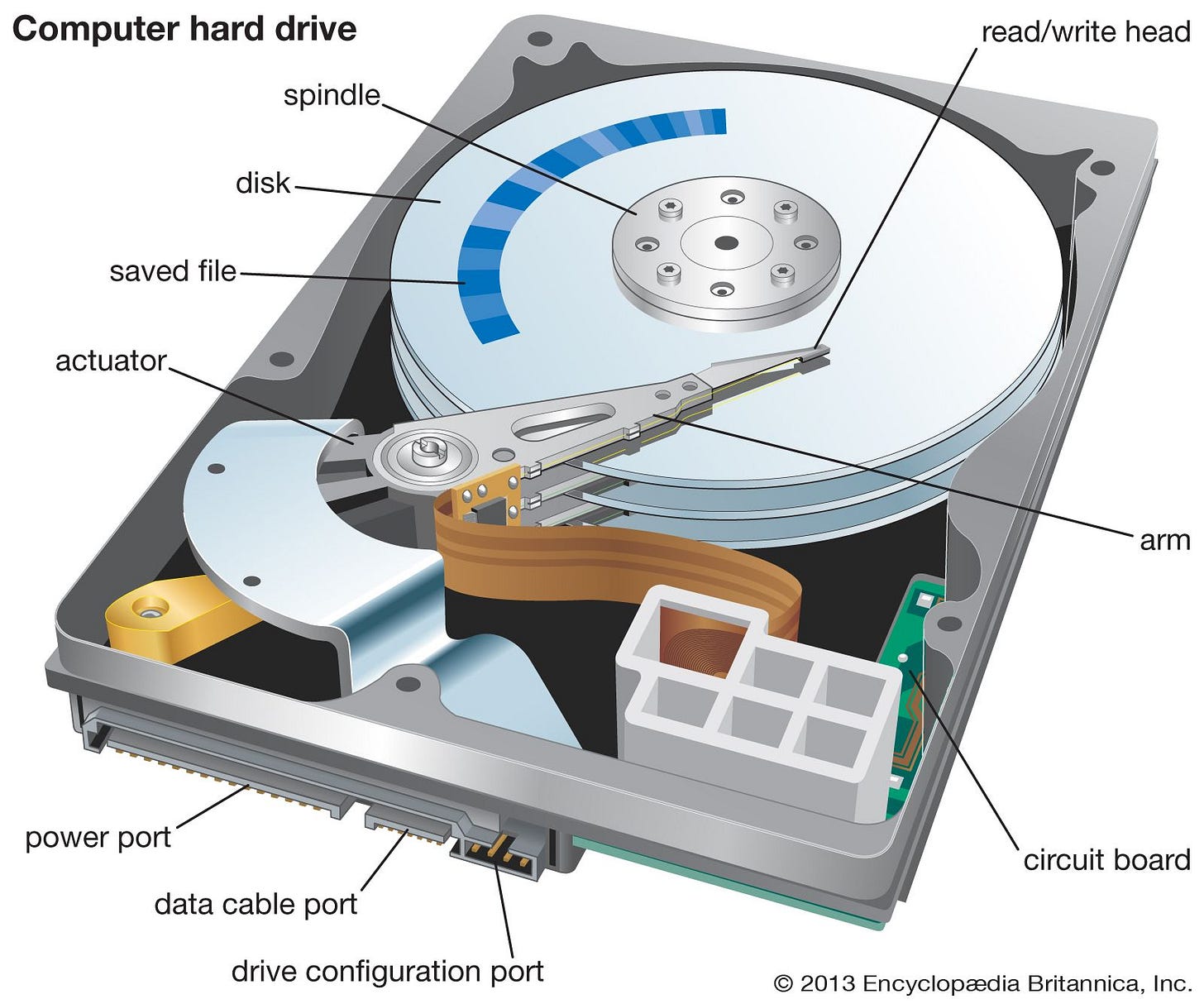 A Hard Disk Drive (HDD) is a traditional, electro-mechanical data storage device that uses rapidly rotating magnetic platters and read/write heads to store and retrieve digital data. They are non-volatile (retaining data when powered off) and offer high capacities at a lower cost per gigabyte.
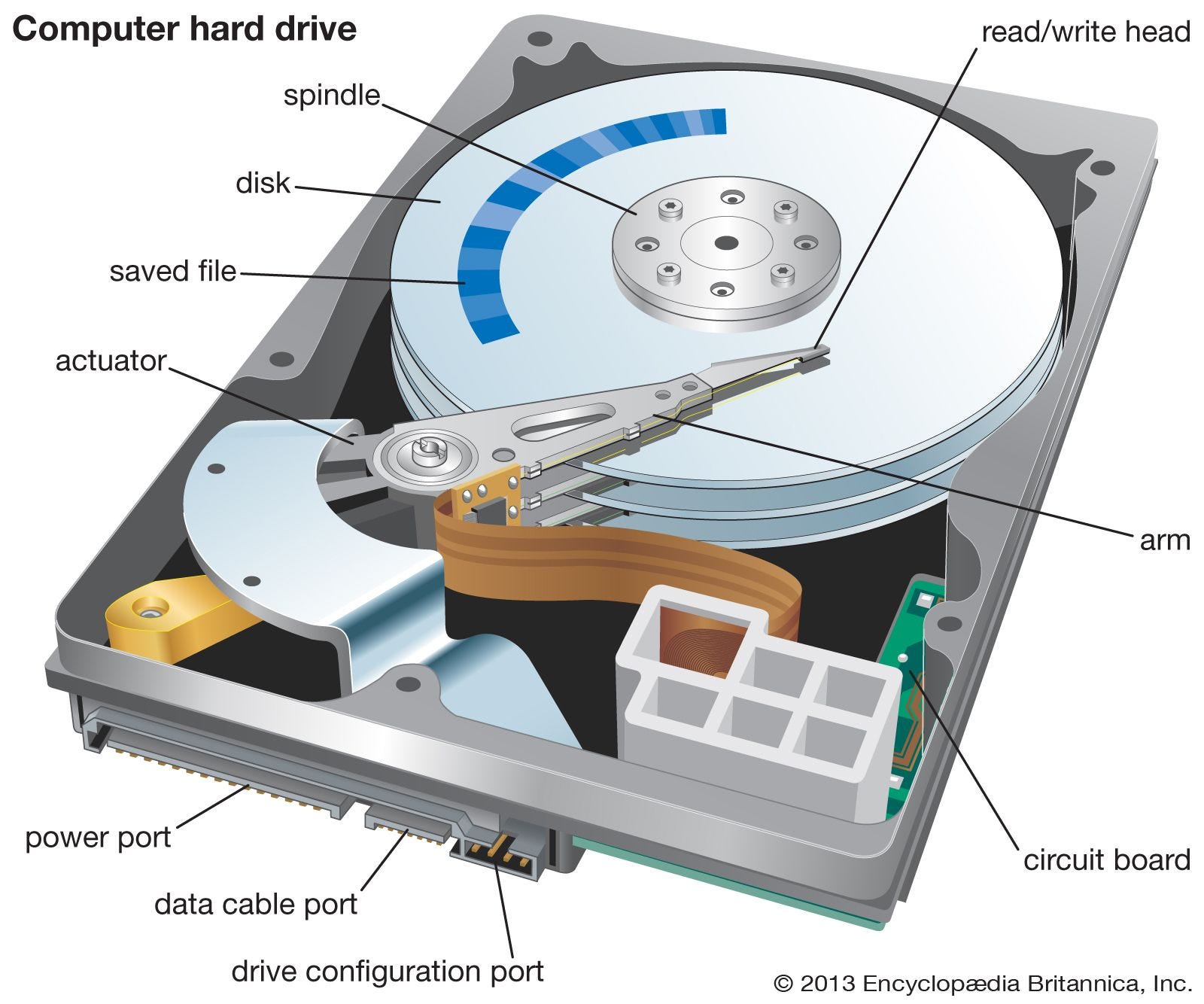
A Hard Disk Drive relies entirely on moving physical parts to read and write data.
Inside the metal casing are several stacked disks made of glass or aluminum, coated in a magnetic film. These are called platters. Data is stored by magnetizing microscopic regions on these platters to represent binary 1s and 0s.
Hovering nanometers above these platters is a mechanical arm holding the read/write heads. This actuator arm physically sweeps back and forth across the disks to find the correct data track.
The Spindle Bottleneck
Because the actuator arm can only move horizontally (in and out), it cannot reach every piece of data on its own. It relies on the Spindle—the central, motorized shaft that holds the stacked platters in place and physically rotates them at high speeds.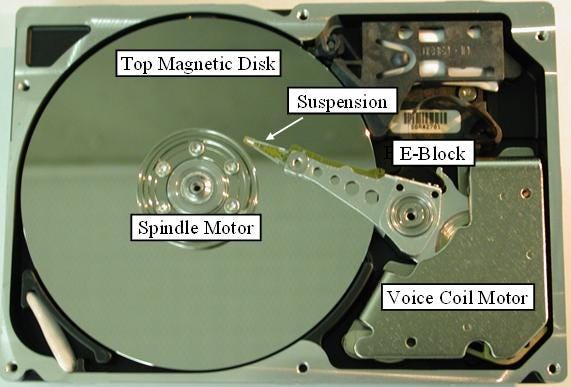 In a traditional Hard Disk Drive (HDD), the spindle is the central motorized axle that securely holds and rapidly spins the magnetic platters. It acts as the mechanical engine that allows the drive's read/write heads to access data across the spinning disks.
The speed of this spindle motor is measured in Revolutions Per Minute (RPM). Standard consumer HDDs spin at 5,400 or 7,200 RPM, while enterprise server drives reach 15,000 RPM.
The spindle is the exact reason HDDs are inherently slow. If an application needs to read a file, the read head moves to the correct track, but then it must wait for the spindle to rotate the specific sector of data into position. This wait time is known as Rotational Latency. If a large file is fragmented (scattered across different physical areas of the disk), the actuator arm must constantly jerk back and forth while the spindle spins. The system is entirely bottlenecked by physical friction and momentum.
𝐋𝐞𝐚𝐫𝐧 𝐭𝐨 𝐛𝐮𝐢𝐥𝐝 𝐆𝐢𝐭, 𝐃𝐨𝐜𝐤𝐞𝐫, 𝐑𝐞𝐝𝐢𝐬, 𝐇𝐓𝐓𝐏 𝐬𝐞𝐫𝐯𝐞𝐫𝐬, 𝐚𝐧𝐝 𝐜𝐨𝐦𝐩𝐢𝐥𝐞𝐫𝐬, 𝐟𝐫𝐨𝐦 𝐬𝐜𝐫𝐚𝐭𝐜𝐡. Get 40% OFF CodeCrafters: https://app.codecrafters.io/join?via=the-coding-gopher
This Substack is reader-supported. To receive new posts and support my work, consider becoming a free or paid subscriber.