How Adobe's Creative Agent Handles the Mechanics While You Direct
By TechTiff
Published: 2026-11-09
URL: https://techtiff.substack.com/p/adobe-creative-agent
If your creative apps are sitting there waiting for you to click through every edit yourself, you’re doing way too much. Adobe built its Creative Agent to take those steps while you focus on deciding what a good result should look like.
But handing over the mechanics still requires knowing what to delegate, how to communicate your creative vision, and when to step in. The more work an agent handles, the more important those decisions become.
Ahead of Adobe MAX, I asked Deepti Pradeep, Adobe’s Sr. Director of Agentic Product, what creative direction looks like when AI agents are doing the execution. She shared her perspective on how the Creative Agent works across Photoshop and ChatGPT, how creators communicate their taste, and what a successful creative partnership with an agent should look like.
Adobe MAX kicks off tomorrow, and I’ll be covering the announcements here.
The Short Version
- The Adobe Creative Agent takes on multi-step and repetitive work, and you decide what’s right for your audience and the moment.
- The Creative Agent runs the AI Assistant in Firefly and works across Creative Cloud, using the assets, brand standards, and project history you choose to give it.
- Adobe is bringing its pro tools into ChatGPT, Claude, and Gemini, with open standards like MCP connecting them.
- You direct the agent with references, constraints, your own assets, direct edits, and a “that’s not it” with the reason attached.
The Agent Takes Execution While You Decide
As agents take on more execution, which creative decisions still depend most heavily on human judgment? I’m particularly interested in the choices that require taste, cultural context, emotional intelligence, or an understanding of the intended audience.
Deepti: The hardest creative decisions aren’t the technical ones. They’re about what you want your work to say, and how you want to make people feel. Agents can take on the execution, handling multi-step workflows and repetitive work, but you bring the perspective, voice and taste to decide whether something is right for your audience and the moment.
That’s how we think about everyone becoming a creative director: having a clear sense of the outcome you want, deciding what great looks like, and knowing where the agent should act and where your own craft matters most. A lot of what we’ll be showcasing at Adobe MAX this week, is helping you bring what’s in your mind to life with the best of AI, combined with the precision and control that you expect from Adobe. You choose what to delegate, what to keep, and how to shape the work along the way. What the agent can give you is scale. More possibilities to explore. More of your time back to take on more ambitious work. But whether any of it is right for your audience and the moment is still your call.
Your move
Before you open the AI Assistant, write down who the piece is for and what you want them to feel. That sentence stays yours, and the agent takes the steps that come after it.
Photoshop Hands Your Image Off to ChatGPT
Could you walk through a real agentic creative workflow from the initial idea to a finished asset? I’d especially like to understand which tasks the agent handles, when the creator steps in, and how work moves between the AI environment and professional creative tools.
Deepti: Our approach is about helping creators pursue more ambitious ideas by removing some of the complexity and repetitive work involved in bringing them to life. That means bringing the Adobe Creative Agent into our creative suite that our customers trust for their best work, while also making our pro-grade tools available in popular AI assistants like ChatGPT, Claude and Gemini. Let me give you an example of how that can come together.
Say you’re in Photoshop working on a set of assets for a campaign. You have a vision for the hero image, but there’s still work to do to get it right. You start a conversation with the AI Assistant in Photoshop and describe what you want, like removing distractions, refining the lighting or adjusting color. You choose whether the Creative Agent applies the edits or guides you through them step by step, and you stay in control of the creative decisions.
Once you’re happy with the edits, you save the image to Creative Cloud and move on. Later, you’re in ChatGPT preparing the rest of the campaign, and you need that same image adapted for social channels. You invoke the Adobe plugin in ChatGPT, pull in your asset from Creative Cloud and ask ChatGPT to resize it. ChatGPT calls on the right Adobe tools and shows you a few samples to review before the changes are applied across the full set. Maybe those first samples aren’t quite right. You want the subject to stand out more, so you ask for an adjustment, fine-tune it in the interactive editor in ChatGPT, and review again. Once you’re satisfied, you ask ChatGPT to apply the changes across the remaining formats, then download the assets.
And, we’re excited about how open standards like MCP are making these connections possible, giving people more flexibility in how they work with Adobe within their preferred AI assistants. It’s an area we’re investing in, and you’ll hear more about it at MAX.
That’s what we’re working toward: agents that help you throughout the creative process, whether you’re deep in one of our apps or working in an AI assistant. We don’t believe there’s just one interface or one way people can create. Wherever the work begins, Adobe can meet you there and help you take it further.
Your move
Pick an asset you edit over and over, and decide up front whether the Creative Agent applies the edits or walks you through them. Approve the samples before the changes go to the full set.
Saying “That’s Not It” Counts as Direction
Taste is difficult to define and even harder to measure. How should creators communicate their taste to an agent, and how much of that direction comes from references, constraints, iteration, or rejecting work that is technically correct but creatively wrong?
Deepti: I don’t think taste is something you can reduce to a preference setting or perfectly articulate upfront. It’s shaped by experience, curiosity, culture and the countless things you encounter and respond to over time.
In practice, you express taste through the creative choices you make: you show the Creative Agent what you’re responding to, tell it the outcome you’re after, set the constraints that matter, and react to what it gives back. That can come through conversational back-and-forth, reference images, your own assets and brand guidelines, or direct editing, not one perfect prompt. Sometimes knowing what you don’t want matters as much as knowing what you do. An agent can produce something technically excellent and still creatively wrong. Saying “that’s not it,” explaining why, and changing direction are all forms of creative direction.
That’s the thinking behind our Creative Agent, which powers the AI Assistant in Firefly, as well as across our Creative Cloud suite. It can suggest actions, handle the steps, and accelerate progress while you direct the outcome and can step in to refine or redirect as the work evolves. It can also draw on the assets, brand standards, and project history you choose to provide, making the experience more relevant to what you’re actually making.
We’re not trying to define your taste for you. The point is to put more possibilities in front of you quickly and make it easy to move away from what isn’t right. Over time, the goal is for our Creative Agent to learn how you work, so it feels like your own creative partner. We know that’s a high bar, so we’re building it thoughtfully and iteratively, alongside our creative community. And at MAX, you’ll see a lot more of this thinking come to life across Firefly.
Your move
Put your brand guidelines, your own past work, and a reference image in a folder before you start. When a result misses, tell the agent what’s off and why, the same way you’d redirect a designer on your team.
Adobe Measures Success by Your Clearer Voice
Looking ahead, what does a strong creative director-agent relationship actually look like? What would tell you that the technology is expanding a creator’s point of view instead of gradually replacing it with the system’s defaults?
Deepti: The best version of this is one where your point of view gets sharper, not blander. The Creative Agent we’re building should help you explore more and take on more ambitious work, not push everyone toward the same result. You bring your perspective, voice and taste, and the agent should help you go deeper into them, not smooth them out.
Creative growth comes from doing the work: making more, trying new things (even when they don’t land), and staying open to new influences. We want the agent to make more room for that, so you have more time to think about what you want to create and to take bigger creative swings. The measure is whether your voice gets clearer over time, so that a year from now, you look back at work that’s more clearly yours and that you’re proud of.
You can expect us to go further here, with agents that take more of the recurring, time-consuming work off creators’ plates while the creator sets the goals and approves the outcome. That balance of creative authority and delegation is what staying the creative director really means: your hands off the mechanics, your judgment all over the result. It’s also a big part of the spirit behind this year’s MAX: dream big, create bigger.
Your move
List the recurring tasks you’d hand off first, mark the spot in each one where you approve the result, and give the agent every step in between.
Bring Your References to the AI Assistant
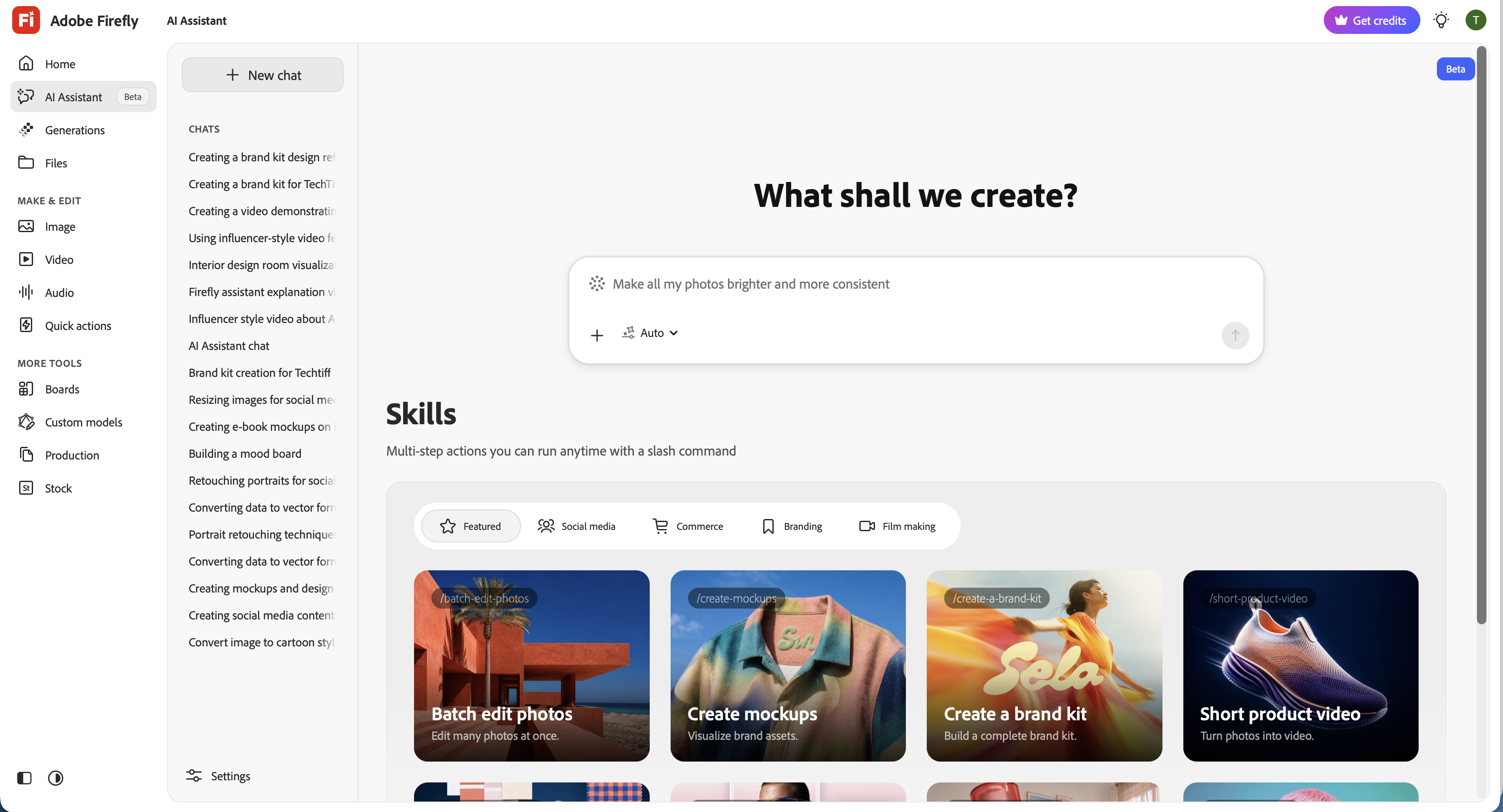
\Firefly’s AI Assistant is taking requests, and its Skills run multi-step jobs from a single slash command.\
The more creative work we hand to AI agents, the more important it becomes to know what we actually want from them. Creative direction is a skill, and learning to communicate your vision, recognize what works, and explain what doesn’t is part of getting better at it.
Start by opening the AI Assistant in Firefly or Photoshop with a project, assets, and a reference image. Give the agent a clear direction, review what it produces, and explain what you’d change. See how the result changes when you give the agent specific feedback instead of starting over.
Read more: Get a closer look at the multi-step workflows available in Firefly
Adobe MAX kicks off tomorrow, and I’ll be covering the announcements here, including what’s available to use and what’s still in development.
Get practical AI workflows, creative tools worth knowing about, and clear guidance on putting AI to work. Subscribe to The AI Creator Drop for new articles delivered straight to your inbox.
If you want the workflows I build when I hand creative work to an agent, AI Flow Club is where I share them: flow-club.techtiff.ai