One deployment workflow explains what each layer adds, and why the same package can behave differently across agents.
By Sumant Thakur
Published: 2026-08-19
URL: https://sumantthakur.substack.com/p/agent-skills-vs-mcp-vs-plugins
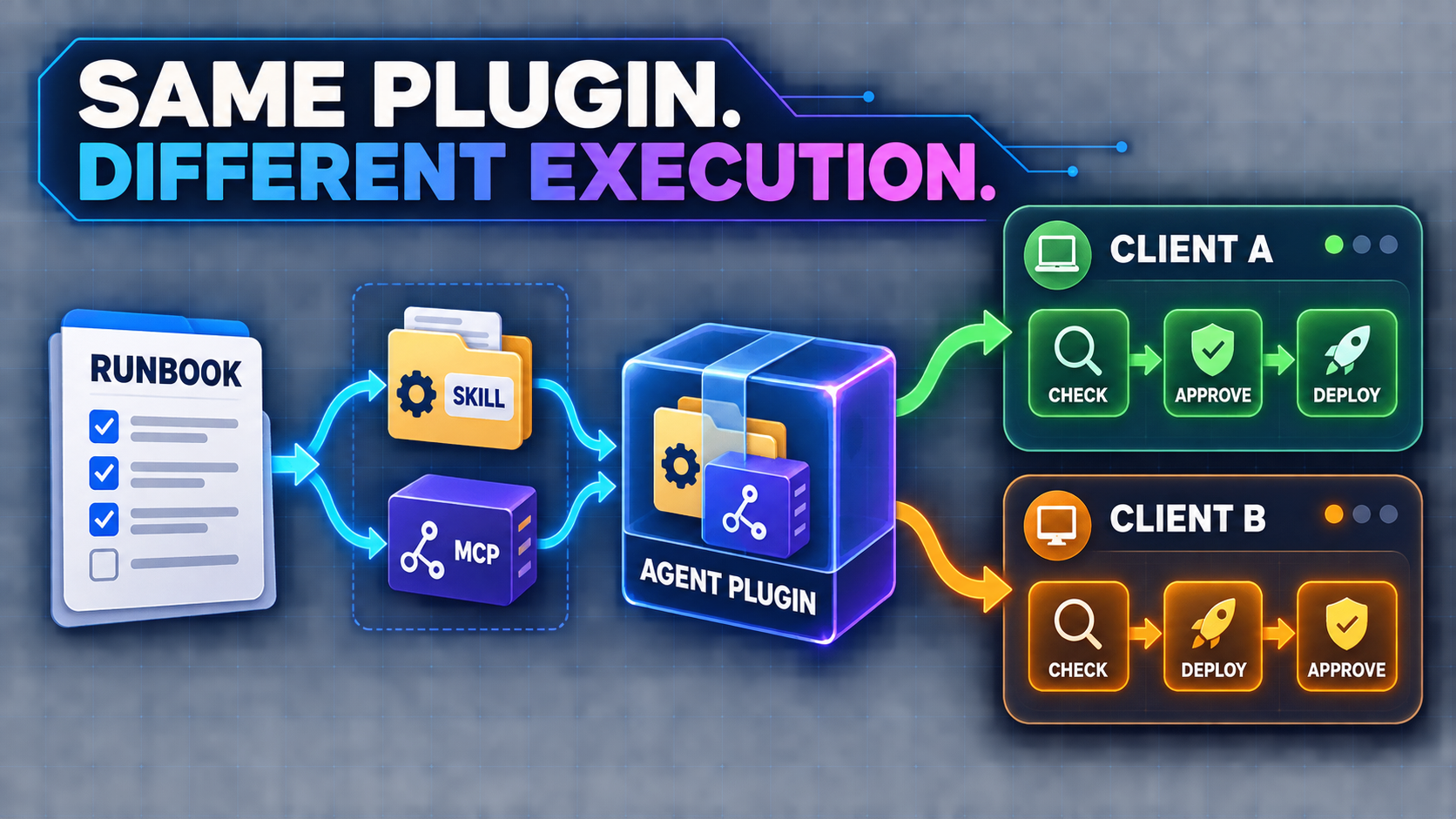
A platform team has a production deployment runbook.
It began as a short checklist. Over time, incidents made it longer.
Confirm the service owner before changing shared infrastructure. Check whether the release contains a database migration. Verify that a rollback build exists. Use the approved deployment window for high-risk changes. Attach policy results to the pull request. Ask for security review when network exposure changes.
None of these steps is unusual. Together, they describe how this particular organization deploys software without repeating old mistakes.
The runbook works reasonably well for engineers who remember to open it.
Then the team introduces a coding agent.
They connect the agent to GitHub, the service catalogue, CI, and the deployment system. It can inspect repositories, find ownership metadata, run tests, read deployment status, and open pull requests.
Its first task looks straightforward: prepare a production deployment for a service that includes a database migration.
The agent reads the repository and runs the test suite. It prepares the change and opens a pull request. The output looks clean.
It never confirms that a rollback build exists. It checks the service owner after preparing the change rather than before touching shared infrastructure. It treats the passing test suite as sufficient evidence even though the runbook requires a migration review.
Every integration worked. The agent called valid tools with valid arguments. It had access to the systems involved in the deployment.
It did not know how this team performs the job.
That gap is a useful way to understand MCP, Agent Skills, and the new Agent Plugins format. They solve different problems inside the same workflow.
The agent has access, but no method
The team used the Model Context Protocol to connect the agent to its engineering systems.
An MCP server can expose tools, resources, and prompts through a shared protocol. The deployment system might expose tools for creating a release, checking its status, and requesting a rollback. The service catalogue might provide ownership and dependency data as resources. GitHub can expose repository operations.
The agent client discovers those capabilities without needing a separate integration design for every model.
That is the job MCP was built to do. Its architecture defines how clients and servers communicate, discover capabilities, exchange context, and execute tools. It deliberately leaves model usage and context management to the application hosting the agent.
The distinction becomes visible in the deployment task.
MCP can tell the agent that getserviceowner, validatemigration, and createrelease exist. The protocol does not decide which tool should run first. It does not know that this organization checks rollback readiness before approving a migration. It cannot infer whether a policy result should block the change or appear as a warning.
Those decisions belong to the working method around the tools.
Giving the agent more integrations would not solve the problem. More tools would give it more possible actions while leaving the sequence and decision points undefined.
The team could place the entire deployment procedure in the initial prompt. That may work for one workflow, but the prompt would grow every time the agent took on another job. Code review, incident triage, dependency upgrades, infrastructure planning, and release management would all compete for the same context.
The runbook needs a form the agent can load when deployment work begins and ignore when it is doing something else.
The runbook becomes a skill
The team converts the deployment procedure into an Agent Skill.
A skill is a directory containing a SKILL.md file. The file begins with metadata describing what the skill does and when it should be used. Its main body contains the instructions. The directory can also include scripts, reference documents, templates, and other assets.
The deployment skill tells the agent to identify the target environment and service owner before proposing a change. It explains how to classify deployment risk, which evidence to collect, and when to stop for approval. A reference file contains the organization’s deployment classes. A script checks whether a rollback artifact exists and verifies that the migration metadata follows the required schema.
The team keeps deterministic checks in code. The model handles the parts that need interpretation, such as deciding whether a repository change affects the deployment model or whether an assumption needs clarification.
The next time the agent receives a deployment task, the client recognises that the skill applies. It loads the instructions, reads the relevant reference, and runs the validation script at the prescribed point.
On the next task, the agent checks ownership before preparing the change. It notices the database migration and requests the required review. When it cannot find a rollback build, it stops instead of treating the passing tests as permission to continue.
The skill has changed how the agent uses the same tools. MCP exposes what the agent can reach, while the skill carries the organization’s working method.
Skills also help with context discipline. The client can initially inspect the skill’s name and description, then load its full instructions only when the task calls for them. Larger references remain outside the active context until they are needed. The deployment runbook no longer has to sit beside every code-review rule and incident procedure in one permanent prompt.
The team now has a reusable deployment skill, but it still has a distribution problem.
The skill needs to travel
The first group uses the skill in one coding agent. Another engineering group prefers a different client. A third wants to run the same procedure from a cloud agent attached to GitHub.
The underlying pieces are reusable. Each client can work with skills and MCP servers. The packaging around those pieces differs.
The platform team copies the skill into a different directory structure. It rewrites the MCP configuration. It maintains a client-specific manifest and keeps separate instructions for installation. A small update to the deployment procedure now has to be applied in several places.
This is the problem Agent Plugins 1.0 addresses.
The open format was published on August 6, 2026, with involvement from AWS, Anysphere, Microsoft, OpenAI, and Vercel. Google joined as a core maintainer. GitHub added support across VS Code, Copilot CLI, the Copilot SDK, and the Copilot app a few days later. The published compatibility list also includes Cursor, ChatGPT and Codex, Kiro, and several other agent clients.
Agent Plugins defines a common package structure. Version 1 supports two portable component types: Agent Skills and MCP server configuration.
The platform team can now arrange its deployment capability like this:
deployment-plugin/
├── plugin.json
├── skills/
│   └── deploy-service/
│       ├── SKILL.md
│       ├── scripts/
│       │   └── validate-release.sh
│       └── references/
│           └── deployment-policy.md
└── mcp.json
The manifest identifies the plugin. The skill contains the working method. The MCP configuration tells a compatible client how to locate the connections that method expects.
One versioned directory now carries the shared part of the capability.
For the platform team, this is more useful than copying a prompt. The package can combine instructions, reference material, deterministic checks, and tool connections. A change to the migration policy can produce a new plugin version. Teams can install the same version across supported clients instead of rebuilding the workflow for each one.
The deployment runbook has started to behave like a software component.
Then the team tests the plugin in two clients.
Portable files, different execution
Both clients discover the plugin. Both load the deployment skill and connect to the declared MCP servers.
The first client asks for approval before invoking the release tool. The second treats the tool as pre-approved because of its local policy. One client loads the full deployment reference early. The other waits until the skill directs it to that file. They use different models, carry different system instructions, and recover from a failed validation in different ways.
Both clients load the same plugin, yet they do not produce the same execution path.
Agent Plugins creates a common packaging floor. It does not standardise the complete agent runtime.
Authentication shows where the boundary sits. Version 1 defines how an MCP server is declared, but it does not define portable OAuth configuration, secret storage, or credential references. Each client manages authorization and user interaction. The specification warns plugin authors against embedding credentials in headers or environment values.
Permissions remain client-specific too. The Agent Skills specification includes an experimental allowed-tools field, and support can vary between implementations. One client may enforce tool approval through its own settings. Another may apply an enterprise policy or sandbox. The skill can describe an approval boundary, but the runtime decides how that boundary is enforced.
Plugins can also contain client-specific extensions. A vendor may add hooks, commands, or other behaviour inside its own namespaced directory. Compatible clients ignore extensions they do not implement. The portable package can therefore provide a shared centre while offering richer behaviour in one environment.
Even conformance has a narrower meaning than readers may assume. A client only needs to support one portable component type to conform. A client that loads Agent Skills but ignores the plugin’s MCP configuration can still be compatible with the specification.
The platform team has solved its duplication problem. It has not proved that the deployment workflow behaves consistently everywhere.
Loading the package proves that the client can discover the capability. Production use requires evidence about when the skill was selected, which context it received, which tools it could call, where approval occurred, and whether a failed validation stopped the workflow. The team also needs to trace the resulting pull request back to the plugin version that produced it.
Those properties have to be tested for every approved client-and-plugin combination.
The specification itself shows how early this work remains. It uses the version number 1.0.0, while its current status is listed as a working draft. Implementations are already shipping, but the shared contract is still young.
The platform team now owns more than a runbook
Before this exercise, the deployment procedure lived in a wiki. An engineer updated it after an incident and hoped other people would read the change.
The plugin gives the procedure a name, version, owner, scripts, dependencies, and distribution path. A policy update becomes a reviewed change. A validation script needs tests. An MCP endpoint needs an owner. A new plugin version needs evaluation before it reaches every team.
The platform team now owns an operational component rather than a page of guidance. Internal developer platforms already provide approved infrastructure patterns, deployment workflows, service metadata, and policy checks to engineers. Agents need those capabilities through interfaces they can consume. MCP exposes the platform’s systems. Skills encode the organization’s working methods. Plugins give the platform team a way to distribute both without tying the portable core to one agent client.
The same structure applies beyond deployment.
A code-review plugin could carry the team’s review method, a script for deterministic checks, and MCP connections to the issue tracker and service catalogue. An incident plugin could include the triage procedure, known escalation paths, and access to observability tools. A repo-to-infrastructure plugin could describe how to move from application signals to a reviewable blueprint, validate schemas through scripts, retrieve organizational context through MCP, and stop for approval before creating a Terraform pull request.
Packaging also creates a software-supply-chain concern. A plugin can contain natural-language instructions, executable scripts, and configurations that connect an agent to external systems. Organizations need to know who published it, who reviewed it, which version is approved, and which MCP servers it may connect to. GitHub’s enterprise controls already allow administrators to approve or block plugins and marketplaces, alongside MCP allowlists.
The team should start with one workflow narrow enough to inspect closely. It should encode the procedure as a skill, move deterministic checks into scripts, connect only the MCP servers the job requires, and run the same plugin in two clients.
The comparison should focus on the execution trace rather than the final answer alone: when the skill loaded, what context entered the session, which tools ran, where approval occurred, and how the agent responded when a required check failed.
A plugin that loads everywhere has passed a packaging test. Production use still requires an execution test for every client where the organization allows that plugin to run.
Thanks for reading Autonomous AI Architect! Subscribe for free to receive new posts and support my work.