Stop telling potential clients what you can build. Send them a link.
By Alessandro Magionami
Published: 2026-07-26
URL: https://shipwithai.substack.com/p/no-referrals-ship-one-live-ai-project
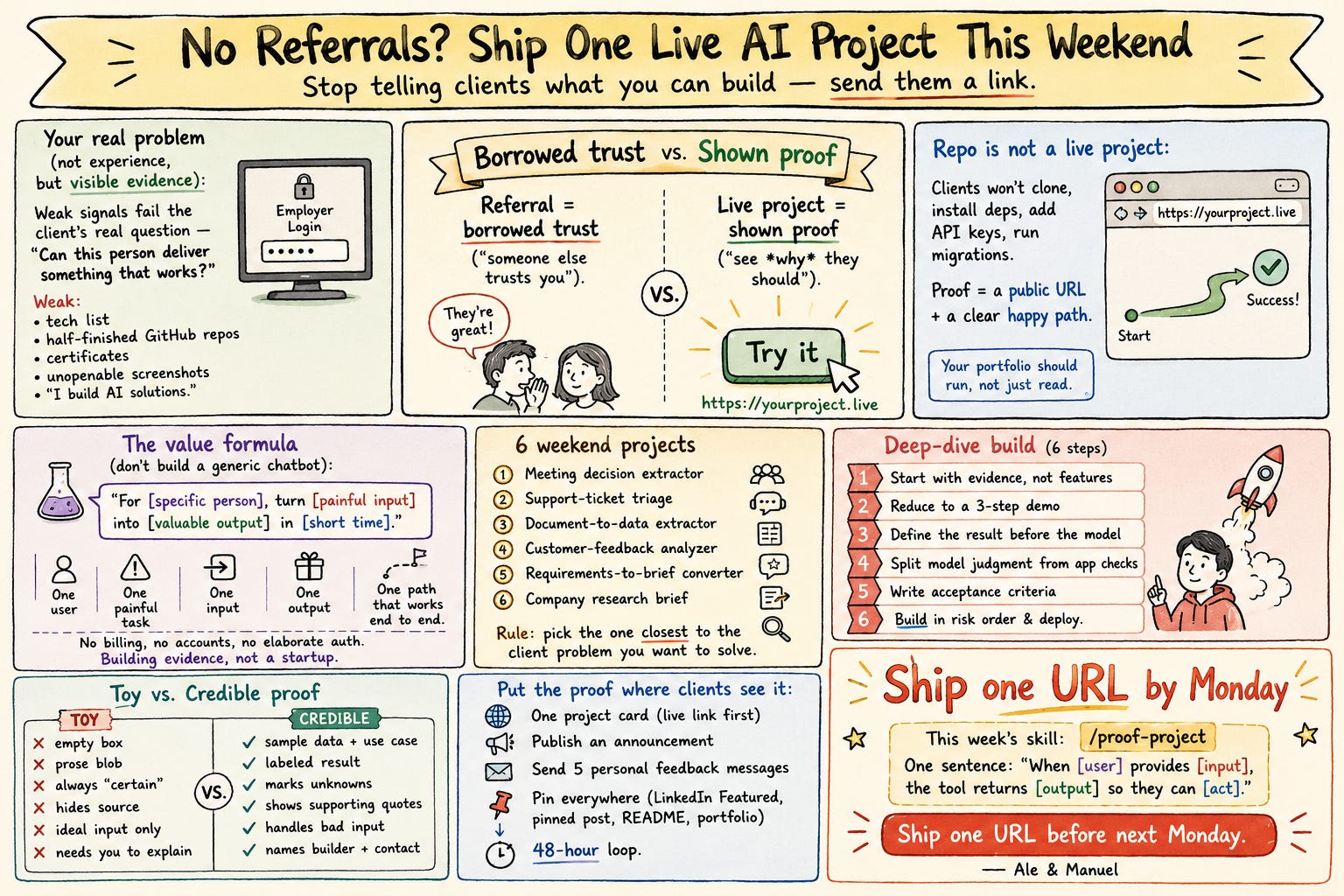
You have no client testimonials.
You have no referrals.
Your LinkedIn profile says you can build AI products, but so do thousands of other software engineers.
A potential client has no reason to doubt you. They have no reason to believe you yet.
You can wait until someone gives you the first opportunity. Or you can create your own proof.
Build a small AI project that solves one recognizable business problem. Put it online. Let people try it. Then use that link everywhere you currently make claims about what you can do.
A referral tells a client someone else trusts you.
A live project lets them see why they should.
Your problem is not experience. It is visible evidence.
Most software engineers already know how to build useful things.
They solve production incidents, automate internal workflows, connect APIs, clean up bad data, and turn vague tickets into working software every week. But almost all that evidence stays behind an employer's login screen.
When they decide to find a client, they have years of experience and nothing they can show.
So they fall back on weak signals:
-
a list of technologies;
-
a GitHub profile full of half-finished repositories;
-
course certificates;
-
screenshots from projects nobody can open;
-
claims like "I build AI-powered solutions."
None of those answers the client's real question:
Can this person take a problem like mine and deliver something that works?
A small live project can.
It shows that you can identify a problem, reduce it to a useful workflow, build the complete path, deploy it, and finish what you started.
It does not need a thousand users. It needs to work when someone clicks the link.
A repository is not a live project
Developers tend to treat GitHub as the portfolio.
GitHub matters when the person evaluating you wants to inspect the code. Most clients do not.
They will not clone your repository, install dependencies, create API keys, run migrations, and start a local server. If that is the only way to see your work, most of them will never see it.
The strongest proof has a public URL and a clear happy path.
A potential client should be able to:
-
understand the problem in a few seconds;
-
try the project with example data;
-
see a useful result;
-
understand what you contributed;
-
contact you if they want something similar.
The live project is the proof. The repository supports it.
A short demo video can support it too, especially if the project needs credentials or private data. But screenshots and videos should not become an excuse to leave a working application trapped on localhost.
Your portfolio should run, not just read.
Do not build another generic chatbot
An AI project is not credible just because it calls a model.
A chat box connected to an API proves you can follow a tutorial. A narrow tool connected to a recognizable business problem proves much more.
Use this formula:
For [specific person], this tool turns [painful input] into [valuable output] in [short amount of time].
For example:
For customer-support managers, this tool turns a CSV of unresolved tickets into categorized issues, urgency scores, and draft responses in under a minute.
That is stronger than:
I built an AI support assistant with Next.js, LangChain, and GPT.
The first describes value. The second lists implementation details.
Your weekend project should have:
-
one specific user;
-
one painful task;
-
one clear input;
-
one useful output;
-
one path that works from beginning to end.
No billing system. No organization management. No elaborate authentication. No agent platform with twelve configurable roles.
You are not building a startup in two days. You are building evidence.
Six AI projects small enough for a weekend
Choose a project adjacent to the work you want a client to pay you for.
1. Meeting decision extractor
Upload a transcript. Receive decisions, owners, deadlines, unresolved questions, and a follow-up email.
This demonstrates document processing, structured model output, validation, and a workflow almost every team recognizes.
2. Support-ticket triage tool
Upload a CSV of tickets. Receive categories, urgency scores, recurring problems, and suggested replies.
This demonstrates batch processing and a direct operational outcome: a queue that is easier to act on.
3. Document-to-data extractor
Upload an invoice, policy, application, or order form. Receive structured fields with confidence flags and validation errors.
This demonstrates that you can combine AI with deterministic checks instead of trusting model output blindly.
4. Customer-feedback analyzer
Paste reviews, survey answers, or interview notes. Receive repeated problems, supporting quotes, and suggested priorities.
This demonstrates synthesis without hiding the source material behind a vague summary.
5. Requirements-to-brief converter
Paste messy meeting notes or a rough request. Receive a reviewable brief with goals, users, scope, risks, open questions, and acceptance criteria.
This demonstrates one of the most valuable client skills: turning ambiguity into something people can approve.
6. Company research brief
Enter a company URL. Receive a structured overview of its product, customers, recent signals, and questions worth asking on a sales call.
This demonstrates retrieval, source handling, structured output, and practical time savings.
Do not choose the most impressive idea. Choose the one closest to the type of client problem you want to solve.
Deep dive: build a meeting action-item extractor
Now take one idea through the complete process.
Imagine a project lead who ends every meeting by replaying the transcript, finding commitments, checking who owns them, and writing a follow-up list.
The problem is not “meetings need AI.” The problem is that agreed work disappears inside a transcript and someone must recover it manually.
Step 1: start with evidence, not features
Begin with one occurrence you have seen yourself.
Write down who did the work, what they received, what they did manually, and what happened when they missed something.
For this example:
After a weekly project meeting, the project lead reads the transcript and copies every commitment into a follow-up message. Owners and deadlines are sometimes missing.
That gives you a project contract:
When a project lead pastes a meeting transcript, the tool returns a reviewable list of action items with owners, deadlines, and supporting quotes.
The supporting quote matters. It lets the user verify an extraction instead of trusting unexplained model output.
Step 2: reduce it to a three-step demo
A visitor should need only three actions:
-
load a sample transcript or paste their own;
-
select Extract action items;
-
review the result and copy it as Markdown.
That is the complete product demonstration.
Do not add transcript uploads, meeting-platform integrations, accounts, saved history, reminders, or automatic email delivery.
Those features may be useful later. None is necessary to prove that you can turn an unstructured meeting into reviewable work.
Step 3: define the result before calling a model
Use safe sample data and write the expected result by hand.
Priya: Marco, please send the revised quote by Thursday.
Marco: I will.
Priya: We also need someone to own the security review.
The result should look like this: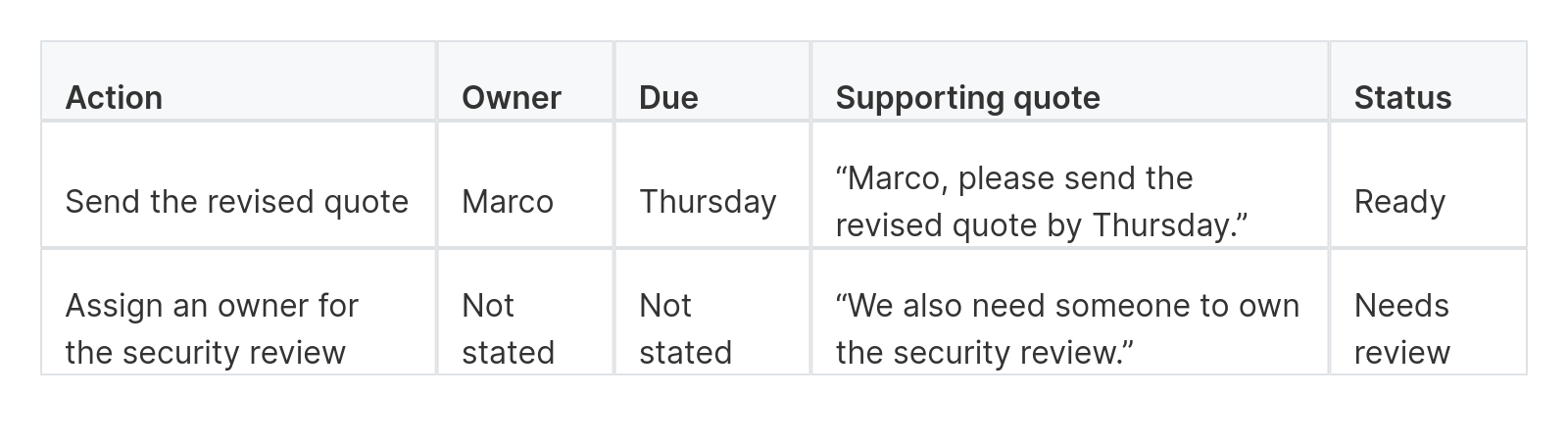
This output reveals an important rule: unknown information stays unknown.
A toy invents a plausible owner. Credible proof marks the gap so a person can resolve it.
Step 4: separate model judgment from application checks
Give the model only the work that requires language understanding:
-
identify explicit commitments;
-
rewrite them as concise actions;
-
associate owners and deadlines only when the transcript states them;
-
return the supporting quote.
Let normal application code handle the rest:
-
validate the response shape;
-
confirm each supporting quote exists in the transcript;
-
replace missing owners and deadlines with Not stated;
-
mark incomplete items as Needs review;
-
reject empty input before making a model call.
You do not need multiple agents, retrieval, memory, or a workflow engine. One structured model response plus deterministic checks is enough.
Step 5: write acceptance criteria
Before building, define what “works” means:
-
the sample transcript produces both expected actions;
-
the tool never invents an owner or deadline;
-
every action includes a quote from the transcript;
-
incomplete actions are visibly marked for review;
-
empty input produces a helpful message;
-
a visitor can copy the result without creating an account;
-
the public URL works in a private browser window.
These criteria tell you what to build and when to stop.
Step 6: build in risk order
First, build the page with the sample transcript and the hand-written result. Make sure a visitor can understand the workflow before any AI is connected.
Second, replace the fixed result with one structured model call.
Third, add the deterministic checks and the Needs review state.
Fourth, add loading, empty-input, and model-error states. Keep the messages short and tell the visitor what to do next.
Finally, deploy it and give the link to one person without instructions. If they cannot complete the three-step demo, fix the demo before adding anything else.
The finished project is small: one input, one transformation, and one useful output. Its credibility comes from how clearly and reliably it completes that path.
The difference between a toy and credible proof
Professional does not mean feature-rich.
A project looks professional when it removes doubt: the visitor understands the problem, can try the workflow, can inspect the result, and knows what happens when something goes wrong.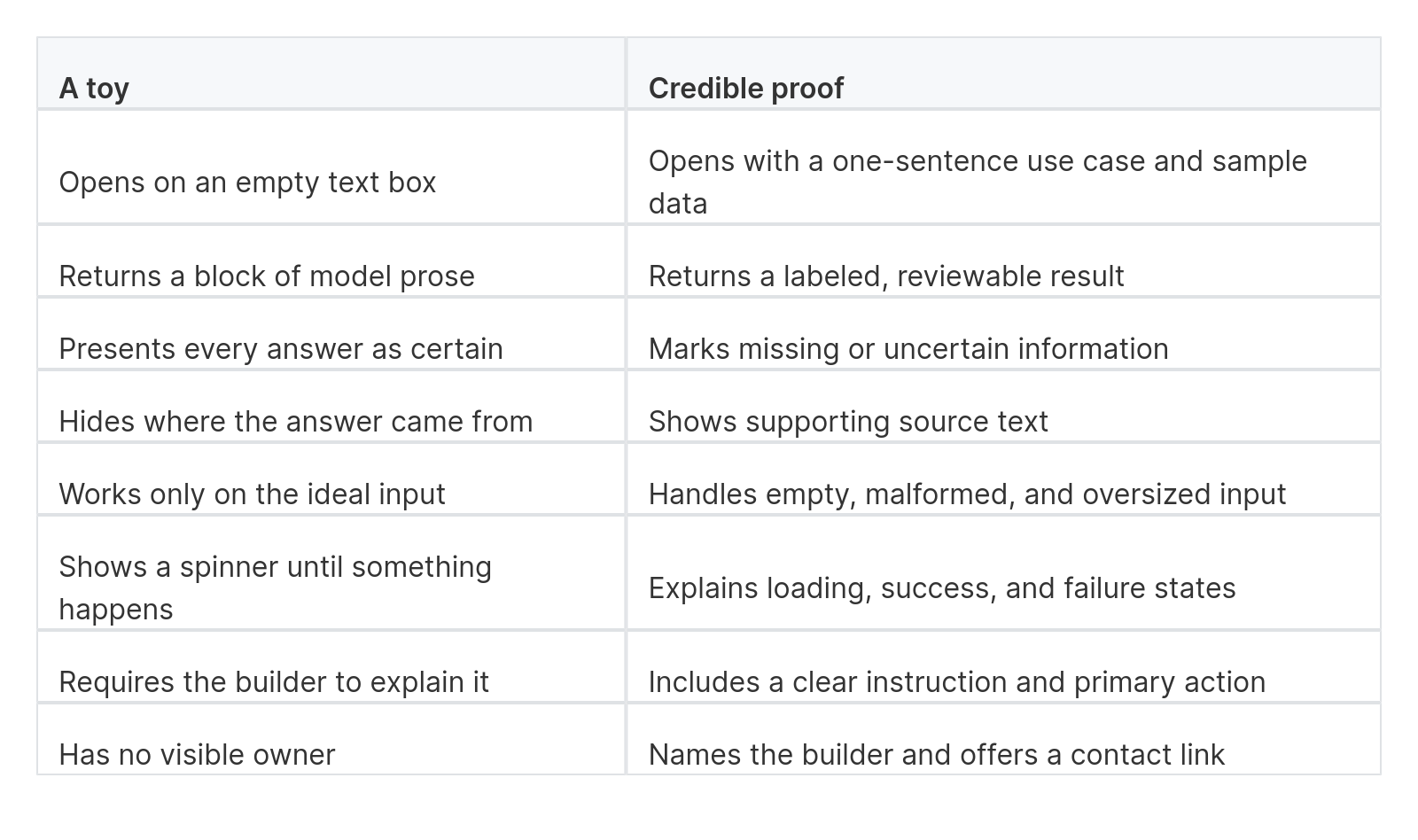
None of these improvements expands the core workflow. They add clarity, constraints, and trust around it.
Before publishing, spend one focused hour on the proof:
-
load useful sample data by default;
-
use precise labels instead of clever product language;
-
make the primary button obvious;
-
preserve the visitor's input when a request fails;
-
set input and usage limits;
-
test the page on mobile and in a private browser window;
-
state what the project does not do;
-
add a direct way to contact you.
Do not hide a weak workflow behind gradients and animation. A restrained interface with predictable behavior looks more professional than an ambitious interface with broken edges.
Put the proof where clients will see it
A live project produces no credibility if nobody sees it.
Package it once, then share the same clear story everywhere: who has the problem, what the project does, what you deliberately excluded, and where someone can try it.
Create the project card
Your portfolio does not need a redesign. One clear card is enough:
Project: Meeting Action-Item Extractor
For: Project leads who turn meeting transcripts into follow-up work
Problem: Commitments, owners, and deadlines get buried in transcripts
What it does: Produces a reviewable action list with supporting quotes
What I demonstrated: Structured AI output, deterministic validation, error handling, and deployment
Links: Try the project / Watch the demo / View the code
Put the live link first. The repository supports the proof; it should not be the only way to experience it.
Publish an announcement
Do not post only “I built this.” Explain the observed problem, the constraint, and the result.
Use this template:
Project meetings often end with someone rereading the transcript to recover commitments, owners, and deadlines.
I built a small live tool that turns a transcript into a reviewable action-item list. Every item includes its supporting quote, and missing details are marked instead of invented.
I deliberately left out accounts, integrations, saved history, and reminders. The entire demo is: load a transcript, extract the actions, and copy the result.
Try it here: [live URL]
If you run project meetings, I would like to know: which result would you trust, and which one would you still check manually?
Add one screenshot or a short recording of the three-step demo. The media should show the result, not a decorative landing page.
Ask your network for specific feedback
Send the link directly to people who recognize the workflow. Ask a narrow question they can answer after a two-minute test.
For a former colleague:
Hey [name] — I built a small version of the meeting follow-up work we used to do: paste a transcript and get action items with owners, deadlines, and supporting quotes.
Could you try the sample at [URL] and tell me one thing that feels useful and one thing that makes you hesitate to trust the result?
For someone in the target role:
Hi [name] — you are closer to project meetings than I am, so I would value your judgment.
I built a three-step action-item extractor at [URL]. Would you try the sample and tell me whether the output matches the follow-up work your team actually needs?
Do not ask, “What do you think?” Ask about usefulness, missing information, and trust. Those answers tell you whether the project demonstrates the right work.
Send five personal messages before interpreting silence as feedback about the project.
Pin the proof to your profiles
Make the project visible after the announcement disappears from the feed:
-
add the live project to LinkedIn's Featured section;
-
pin the announcement post on X, Bluesky, or any network that supports pinned posts;
-
put the live URL in the repository description and at the top of its README;
-
pin the repository on GitHub;
-
place the project card first on your portfolio;
-
link the portfolio from every social profile you use for professional conversations.
Use the same project title and one-sentence outcome everywhere. A visitor should recognize that each link points to the same proof.
Complete the sharing loop
Within 48 hours of deployment:
-
publish the announcement;
-
send five personal feedback messages;
-
pin the project to your profiles;
-
record every point of confusion or mistrust;
-
fix the repeated trust problems without adding a second workflow.
When a prospective client has a related problem, send the relevant proof with context:
I built a small version of a similar workflow. You can try it here: [URL]. If this is close to what you need, I can show you how I would adapt it to your process.
Do not send your entire portfolio. Send the one project closest to the problem under discussion.
Build the proof before you need permission
Your first live project will not replace every benefit of a referral.
It will not prove that you can manage a six-month engagement, navigate a client's organization, or support a production system under load.
Do not pretend it does.
Its job is smaller: give someone enough evidence to start a conversation.
That is what you need before your first client.
Once you complete real engagements, testimonials, referrals, and case studies can join the stack. But you do not need to wait for them to begin building credibility.
You can ship the first piece of evidence yourself.
This week's skill: /proof-project
The easiest way to ruin a weekend project is to start with a list of features.
/proof-project starts somewhere else: one real problem you have personally observed.
It interviews you one question at a time. It asks who experienced the problem, how they handle it today, what one input starts the task, and what smallest output would make the task easier.
Then it cuts.
If your answer contains “and,” the skill makes you choose one side. It removes accounts, billing, dashboards, settings, integrations, background jobs, and persistent data unless the core demonstration cannot work without them.
The project must fit one sentence:
When [specific user] provides [single input], the project returns [single useful output] so they can [specific action or decision].
If you cannot describe a real occurrence or current workaround, the skill stops instead of inventing a plausible-sounding app.
Install it:
npx skills add Ship-With-AI/skills --skill proof-projectThen run:
/proof-projectThe skill produces a PROOF-PROJECT.md brief containing:
-
the evidence behind the problem;
-
the single feature you will build;
-
a three-step public demo flow;
-
strict in-scope and excluded lists;
-
observable acceptance criteria;
-
safe example data;
-
a Friday-to-Sunday runbook;
-
a ready-to-publish portfolio card;
-
a build prompt for your coding agent.
No idea buffet. No product roadmap. No second feature.
Run the skill today. Build only the three-step demo flow. Do not add anything until the public URL works with the example data.
Then ship one URL before next Monday that demonstrates the work you want a client to hire you for.
— Ale & Manuel
*PS.
Run the proof-poject skill and find your next client. *
Reply with the link to your project so we can share the most amazing ones!.
When you’re ready, two more ways we can help:
1. AI Side-Project Clarity Scorecard. Find what’s blocking you from shipping your first side project.
2. NoIdea. Pick a ready-to-start idea born from real user problems.