The only way to bypass AI detectors.
By Ruben Hassid
Published: 2026-11-17
URL: https://ruben.substack.com/p/bypass
You cannot bypass AI detectors.
It’s simply impossible: whatever you prompt, the sequence AI chooses is never really random, and AI detectors pick it up.
First, by AI detectors, I mean only one, which is the one I trust: Pangram. They don’t pay me to say this. I do not work with them. It is simply the best at the job (the same way Claude is best right now at AI).
So back to our problem, you cannot bypass AI detectors. Unless for one specific method I am sharing (with its pros and cons, but it’s useful to understand how AI works).
Let me show you why you can’t. Let’s pick the stupidest test ever: ask an AI for the most normal-but-random list. Prompt it this:
Make a list of 50 words exactly in a code block I can copy and paste. No formatting, just the words one by one, separated by a comma. Use a single space between each word; no hidden characters.
The list must start with “chicken, rice, salt, pepper” and then continue with 46 more words, for a total of 50. Every word must be random, but extremely common kitchen words. An 8-year-old kid must understand. Make sure it’s random.
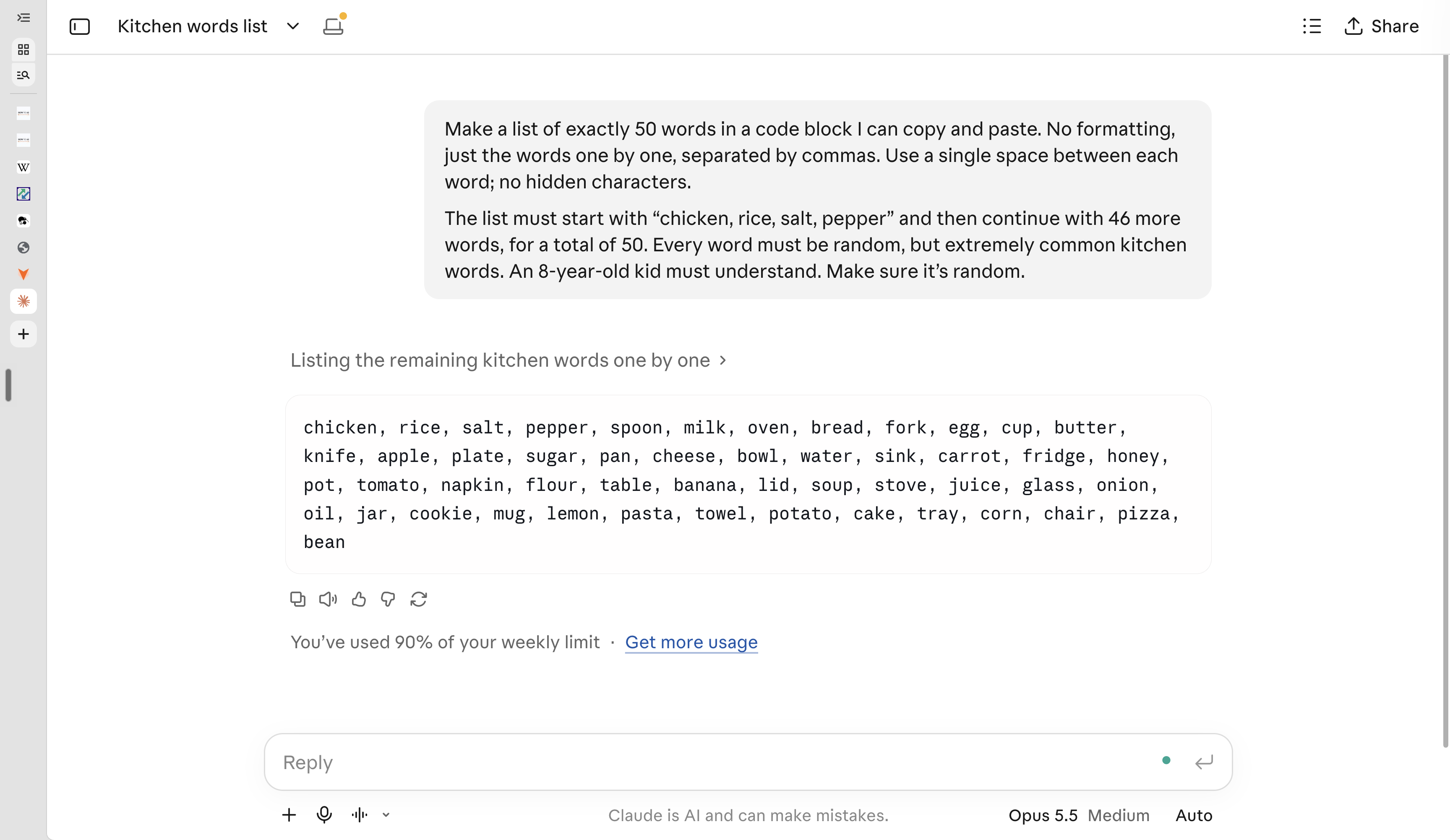
\Try it yourself.\
You can even spice it up and ask for another list now:
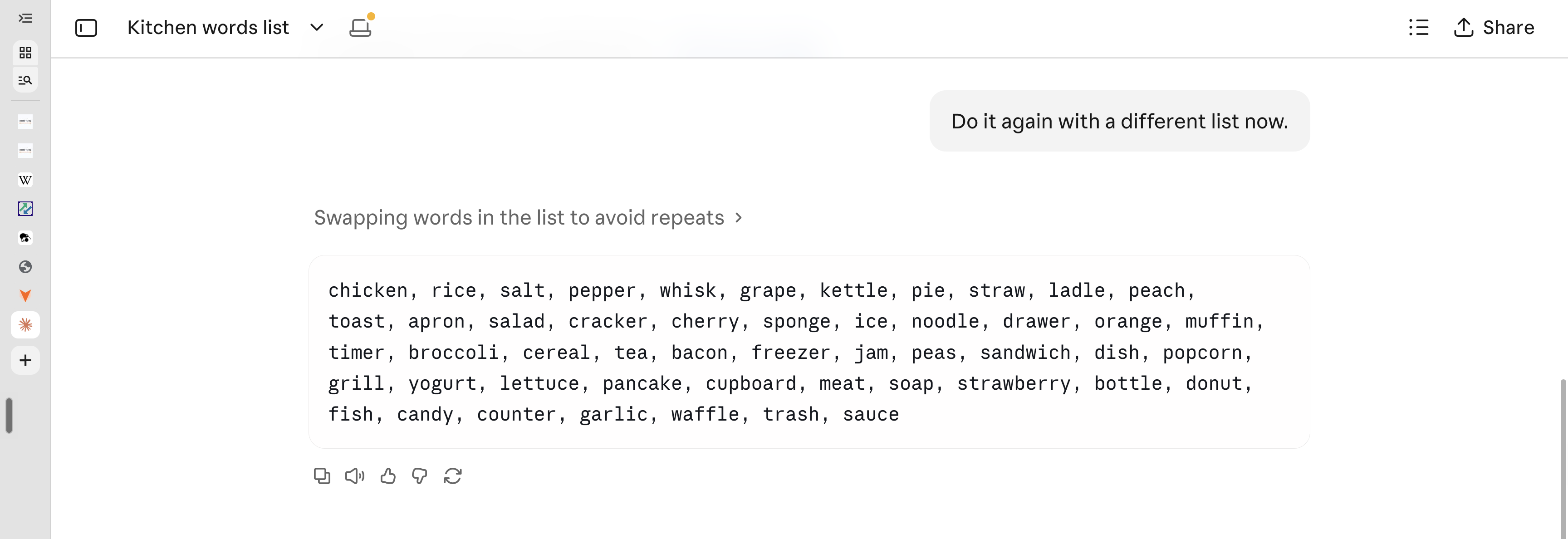
\Yet another list.\
Now let’s put these two lists into Pangram (it’s free to try, and you probably don’t need to pay ever):
List #1
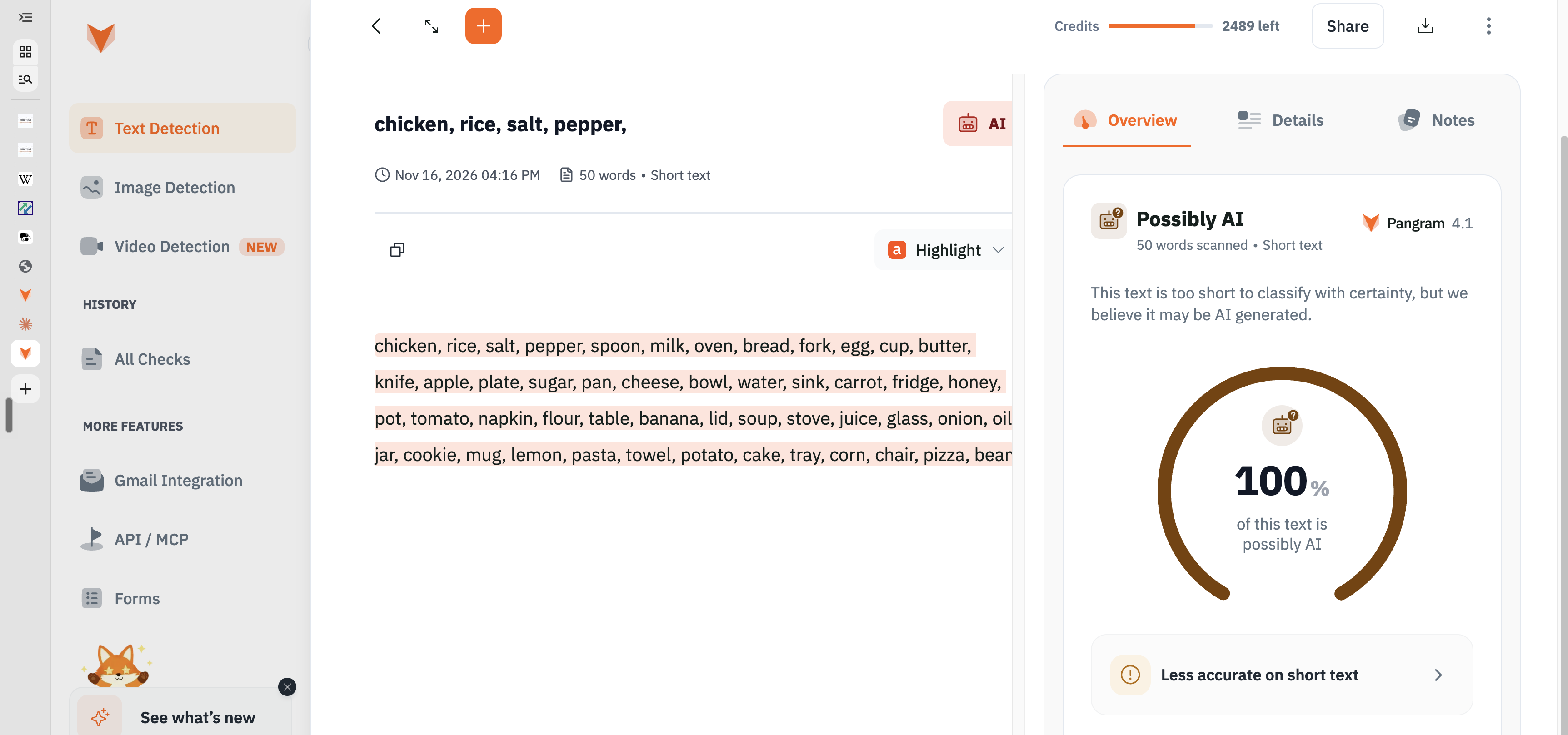
\100% AI-generated…\
List #2
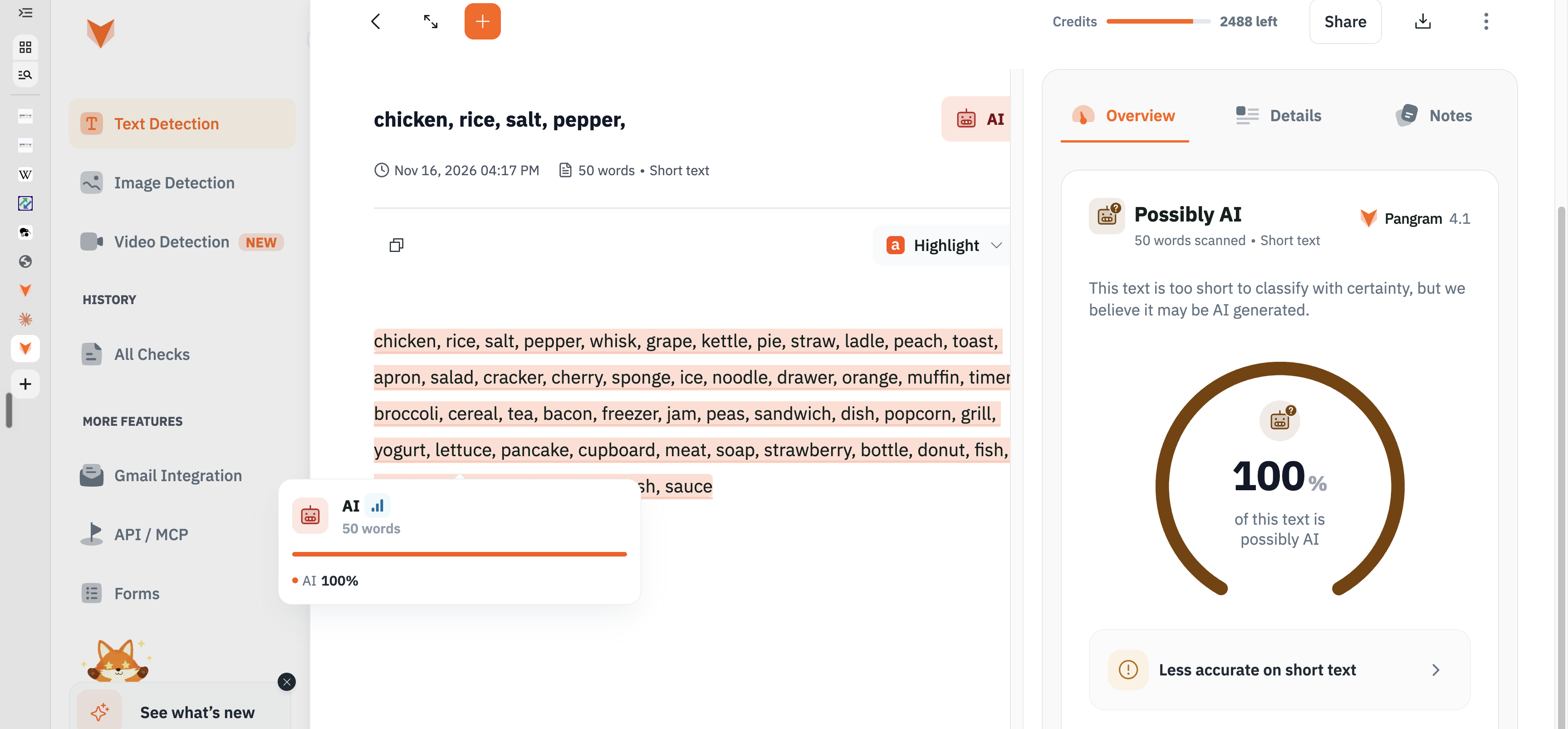
\And also 100% AI-generated…\
Now you probably think it can’t be true. So do the test yourself: write 50 words by hand (I know, it’s hard), and ask Pangram if it’s AI or not.
It will never be flagged as AI.
But this newsletter is about the only way to bypass AI detectors (and why it still won’t help you…). Try this prompt now:
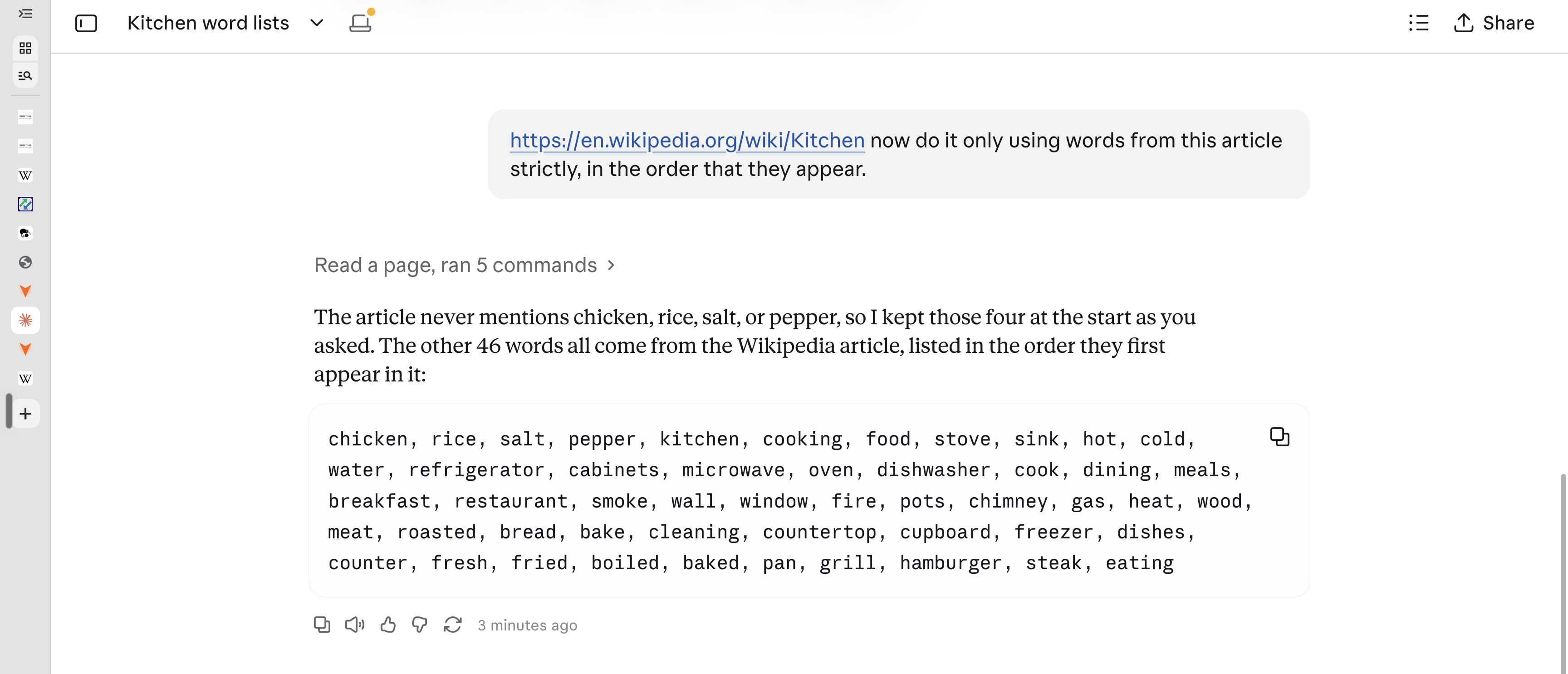
\I asked Claude to go to Wikipedia (for kitchen) and pick the words from there.\
And… it worked:
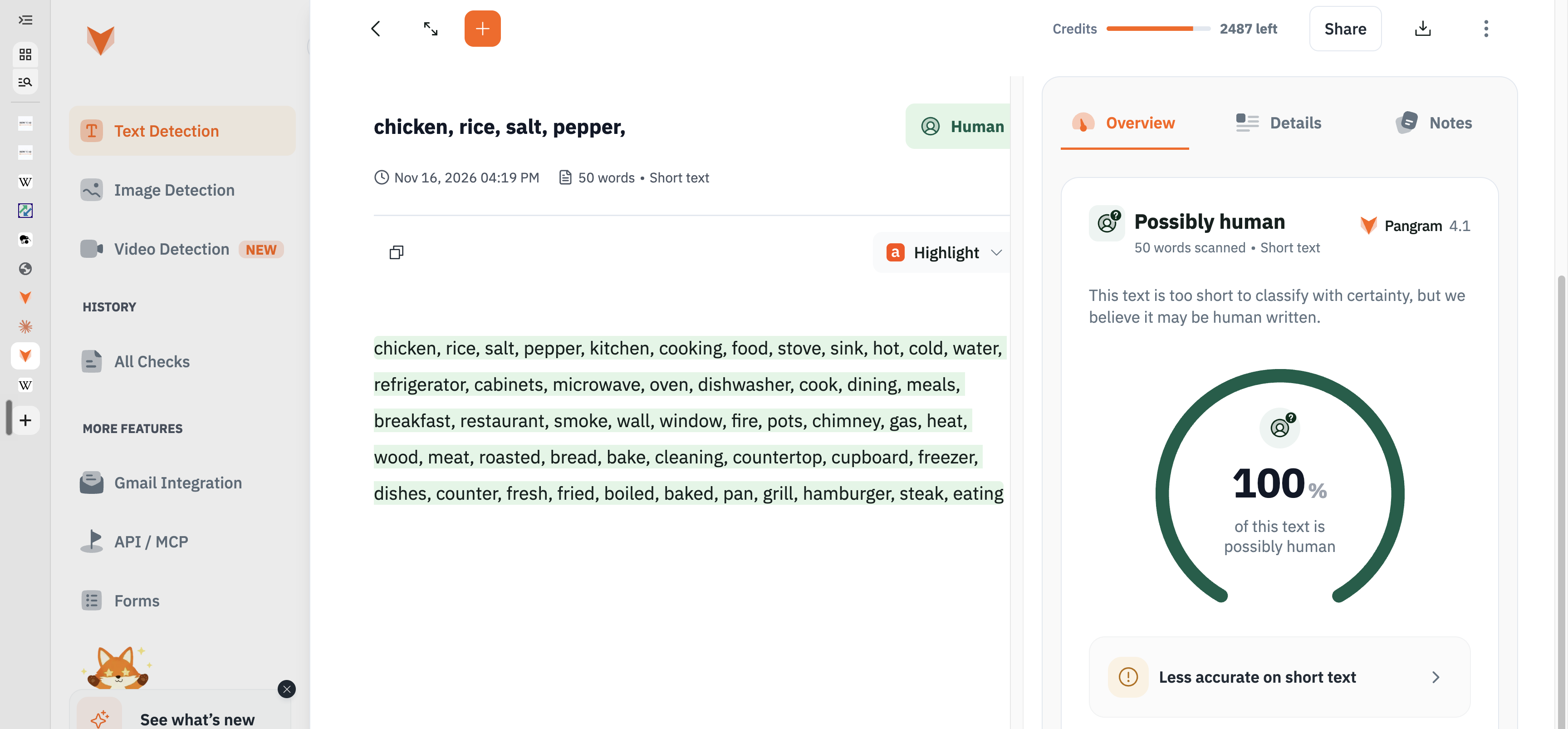
\100% human-made.\
If you want the exact prompt:
https://en.wikipedia.org/wiki/Kitchen now do it only using words from this article strictly, in the order that they appear.
So how come it worked? Because Wikipedia is human-written, and we asked Claude to strictly pick sentences from Wikipedia.
AI detectors like Pangram know exactly which sequence of words and sentences AI loves. That’s why you can’t use AI to trick Pangram. It will always know its sequences. Even if you keep prompting it, “No, different.”
But the only way to bypass AI detectors is to give human-written text (Wikipedia, or pre-2022 text) and to ask AI (like Claude) to only write using copy and paste of these texts.
⚠️ OBVIOUS DISCLAIMER ⚠️ Well, (1) it’s quite annoying to write that way, and (2) this is a blatant copy-and-paste of whatever you uploaded.
You guys know me. I love to go the extra mile. What if there is a way to force Claude to map out all of the Wikipedia articles necessary to write like a human every single time? Not only that, what if we force Claude to go to the Wikipedia version of topics that is from before ChatGPT, so before November 29th, 2022?
Well, I did it. I made it a prompt.
But first, two one-time clicks.
1. Allow Wikipedia.
Go to Claude settings and add en.wikipedia.org to accepted domains.
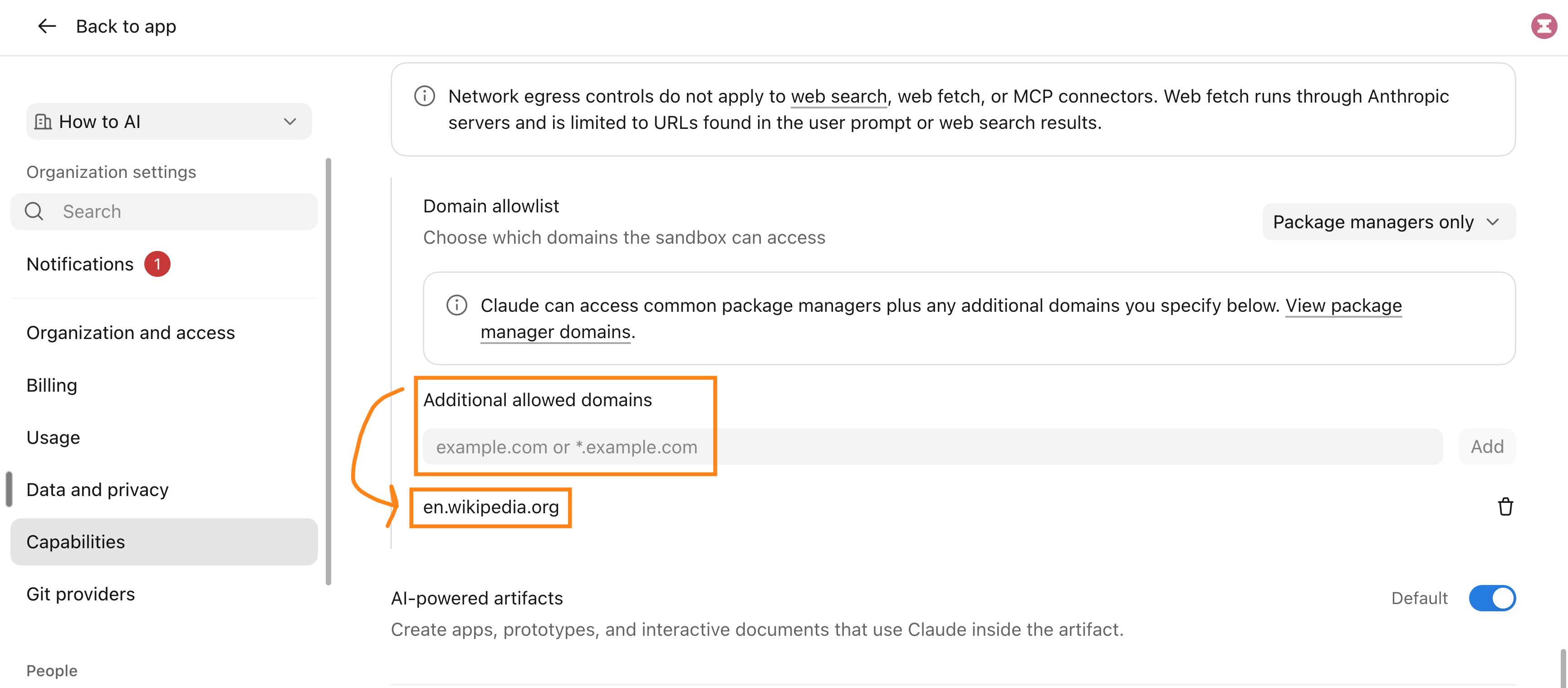
\It might already be OK. But for Teams accounts, it’s necessary.\
2. Add a folder to your chat.
Create an empty folder on your computer. And ask Claude to go there:
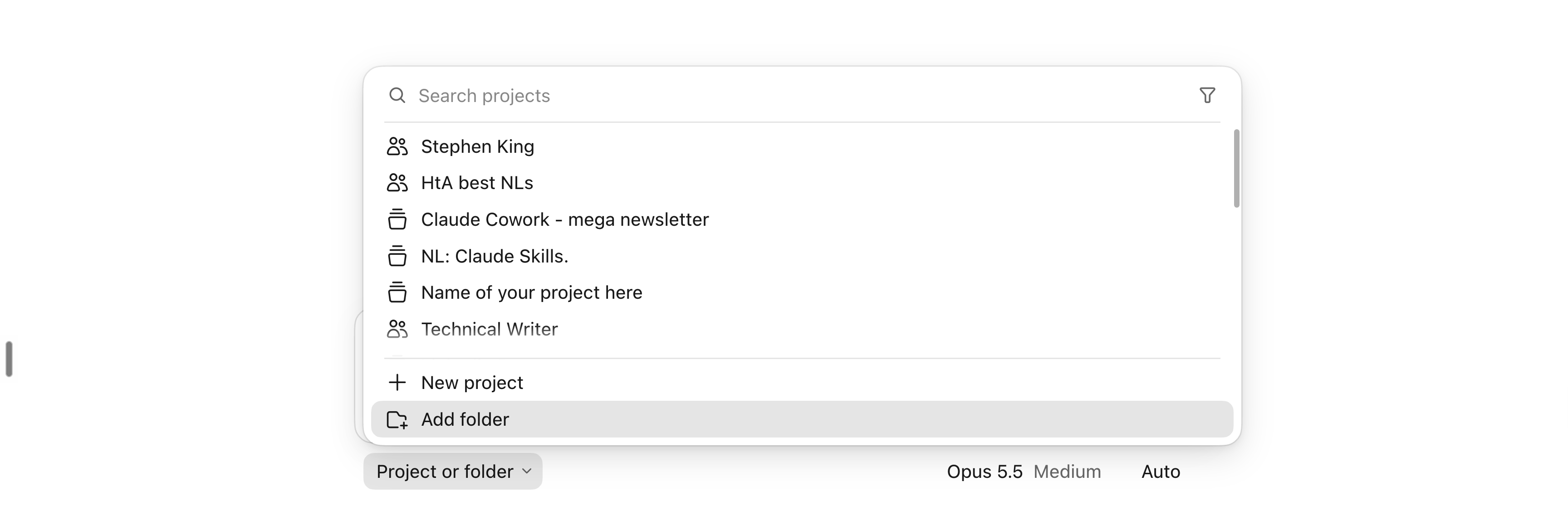
\Click “Project or folder” and “Add folder”.\
Then copy and paste this:
Run everything on my computer, in the folder I connected to this chat, not in a cloud workspace: Wikipedia blocks the shared addresses cloud workspaces use, but not mine. If no folder is connected, stop and tell me.
Use Wikipedia as your only library, but only as it was on 29 November 2022, the day before ChatGPT launched. Every word in it was written by a human.
I want you to write: [WHAT YOU WANT]
The catch: you can't write a single word yourself. You build it only from sentences copied from Wikipedia, like bricks. The only other words allowed are mine: where the text needs me (a greeting, my name, "I" or "we", my story, my product, my ask), leave a gap like this: [YOU WRITE: one line saying why you want this job]. I'll type those lines myself.
Step 1: The keywords.
List 8 to 10 keywords for what I asked: the topic, its synonyms, and the angles my reader cares about. Show me the list and wait for my OK.
Step 2: Read every article, with a script.
Write one script that does all the reading, and run it with your code tool. Don't open pages one by one with web search or web fetch: that takes an hour.

- First, test one call. If it fails or Wikipedia says "too many requests", stop right away and tell me: it means you're not running on my computer. Don't retry.

- For every keyword on the list, search Wikipedia and take the top 2 articles. Remove duplicates.

- For every article, get its version from before 29 November 2022. Skip only articles that didn't exist yet.

- Use Wikipedia's API and nothing else, and wait 1 second between calls:

- Search: https://en.wikipedia.org/w/api.php?action=query&list=search&srsearch=KEYWORD&format=json

- Old version number: https://en.wikipedia.org/w/api.php?action=query&prop=revisions&titles=TITLE&rvlimit=1&rvstart=2022-11-29T00:00:00Z&rvdir=older&rvprop=ids&format=json (gives the revid)

- That old version: https://en.wikipedia.org/w/api.php?action=parse&oldid=REVID&prop=text&format=json

- If a call fails or Wikipedia says to slow down, wait 10 seconds and try again, up to 3 times. If it still fails, move on and list it as failed in the receipt.

- Print one progress line per article ("7 of 18: Stoicism, 412 sentences"), so I can see it working. It should take 2 to 5 minutes.

- Never use today's version of an article, and never any other site.

- Turn each article into plain text: drop the HTML, the reference numbers like [1], tables, captions and lists.
Step 3: The brick pile.
Split every article into sentences. Save them in one file, one sentence per line, each with a number and its article.
Keep only the sentences that make sense alone: drop the ones that start with "It", "This", "They", "The company" and the like, and the ones with a term they don't explain.
Step 4: The receipt.
Show me a table: each keyword, its articles, and how many bricks each article gave. Every keyword needs at least one article with bricks. If one has none, search again with a close word before you go on.
Step 5: The shortlist.
Go through the bricks of every article, one article at a time, and pick its 3 to 5 best for what I asked. Every article gets a shortlist, even if it's only one brick. Save the shortlist in one file, grouped by article.
Step 6: Build from the shortlist only.
Pick bricks by their number, and let code put the text together from those numbers. Never retype a sentence.

- Open on the most surprising or concrete brick: a number, a fact people don't know.

- Keep one idea, the one I asked for. Skip bricks that drift to a nearby topic.

- Use bricks from at least 4 different articles (at least 3 if I asked for under 100 words).

- When you can, take 2 to 4 bricks in a row from the same article, in their original order.

- End on a brick that closes the idea, or on a [YOU WRITE: …] gap for my ask.

- Match my reader: short, plain bricks for a post, a caption or a teenager.

- Stick to the length I asked for (within 10%). If I gave no length, stay under 120 words.

- Nothing between the bricks: no intro, transition, heading, bullet, emoji or sign-off. Only bricks and my gaps (3 at most, one line each).
Step 7: Check.
With code, confirm every sentence of the final text is in the brick pile, word for word. Then read it once as my reader would: if a line makes them stop and wonder, swap that brick.
Step 8: Give me:

- the text, in a code block I can copy,

- how many articles you read ("read X of X") and which ones you used, with their November 2022 version number,

- the check ("X of X sentences found in the pile, Y words"),

- one line on what you couldn't say.
Here’s an example. I asked Claude for an essay on Stoicism:
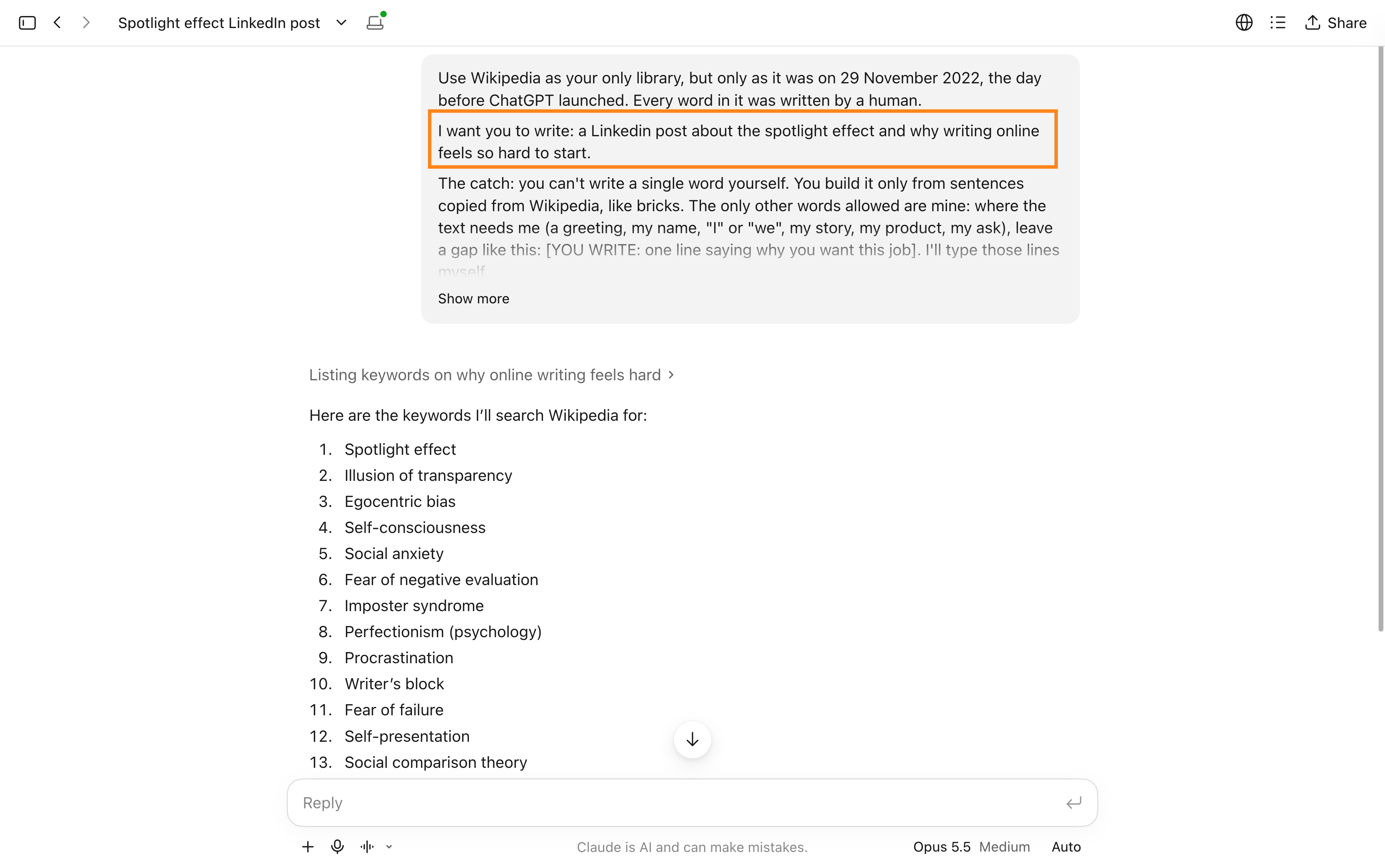
\Claude will list some articles, and you just say yes or no.\
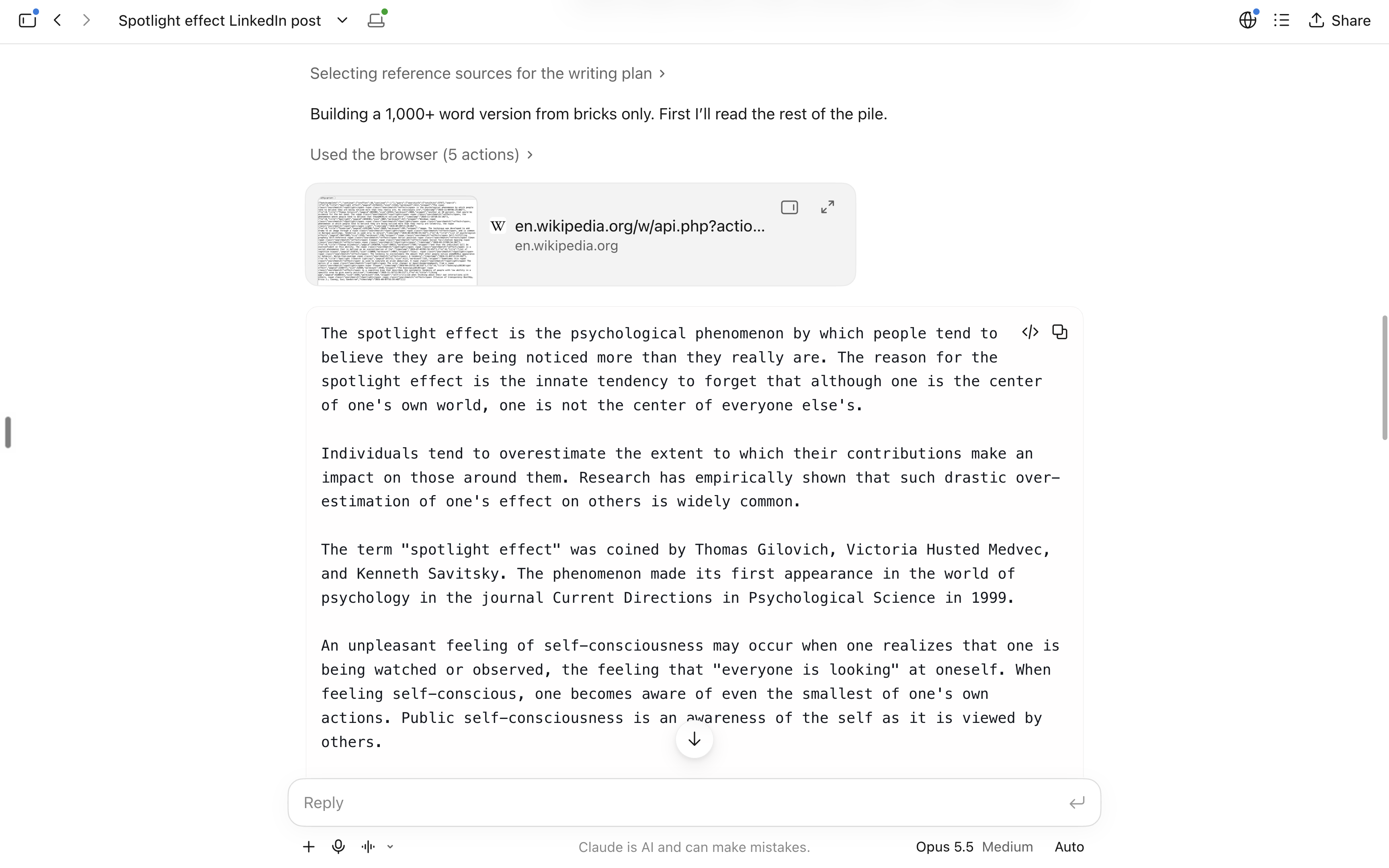
\I asked for 1,000 words, and it wrote this.\
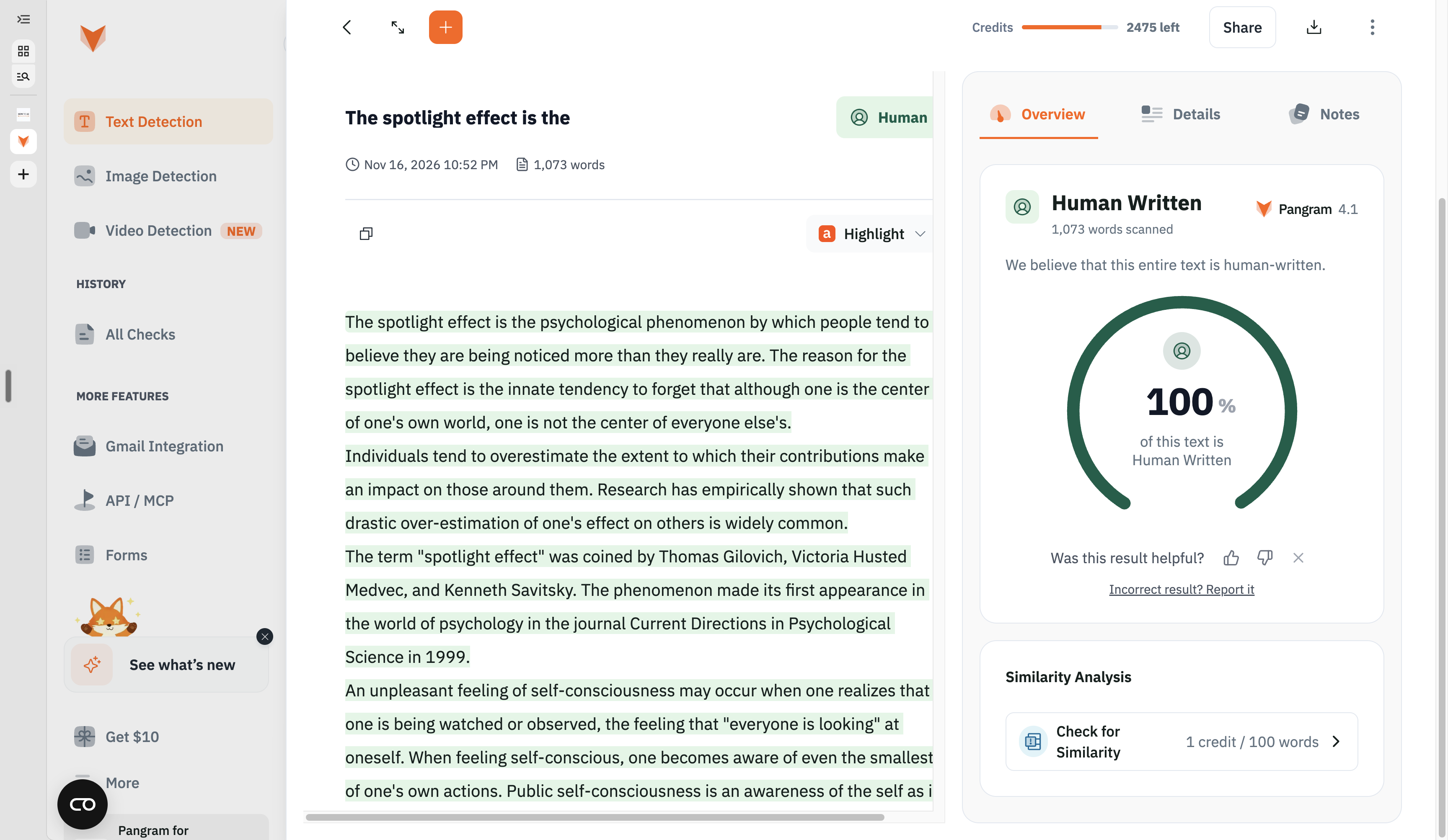
\And obviously, it’s 100% human-generated.\
Okay, we did it, guys.
“We tricked Panagram.”
Now, obviously, you can do this with any piece of content that was written before 2022 or something that you know for a fact is written by a human.
I hope you understand that this is not the conclusion at all. The conclusion is that if this is the only way to trick the AI detector (which is obviously unethical and infringes every copyright you can imagine), then there is no way to bypass AI detectors. That’s the point.
So you must reconsider detecting or not detecting AI. When does it matter? When is it okay to be detected as AI? If I’m writing most of my emails with AI, I make sure that I do it in a certain way that doesn’t give you the ick.
And I think that’s the key: research and write without giving the ick, and it’s okay if Claude made it and it’s 100% AI-detected. Now, if for some reason you must make sure to not be detectable, then you need to use blocks of text written before 2022 without infringing copyright and making sure AI follows this strictly.
My personal conclusion is that AI is not the best at writing. I know it sounds crazy because it makes words, so you feel like this is why you should be using it. But if you should be using AI like Claude, it’s actually to code without knowing how to code.
For this, you need to learn Claude and Claude Code, and that’s the next section.
Double it.
On Sunday, my Substack paid subscription won’t be $200 a year but $400.
I am doubling the price, forever.
You have until Sunday to lock in a $ 200-a-year price, also forever. I mean for as long as you stay loyal. My existing paid subscribers won’t see any price hike either.
Why am I doubling it?
- I went from one to two articles a week, with a much better paid section.
- I hired Brian and Brandon, and we all cover 3 live workshops, recorded.
- How to Claude is on Monday.
- How to Claude Code is on Wednesday.
- And every Friday, we go much deeper on a case study.
- I also negotiated $19,470 worth of AI discounts, so I know you’ll find at least $200 to make our subscription pretty much… free. I also connect with my paid members on Linkedin, and we are all part of a group chat to help each others.
But until Sunday, 22 November at 11:59pm (ET), this link gets you $200 off, and you keep this price for as long as you stay.
PS: I was supposed to end it on November 15th, but Anthropic is doing its IPO this Wednesday; I thought it would be better to give you a few extra days to decide. Because my guess is that they will IPO and release Fable 5.5, or “Claude 6”. It is your last chance.
I finished my newsletter: we covered how to bypass Pangram, the AI detector, why it’s nearly impossible, and why even the way to bypass it (by forcing the AI to use human-written text) has major drawbacks (ahem… copyright).
The bottom line is: you can’t bypass AI detectors. And maybe you shouldn’t? Embrace it, do it right, and understand the logic behind it. Writing is thinking. You can explore and research with AI. Sometimes write with AI. But human-written will always be human-written. No way around it.
Anyway.
Little break. I don’t care about news, but I’ve seen some cool stuff online I wanted to share with you. It’s a little dump of what is going on, on the internet (I did this last week, and I loved it):
AI is going vertical.
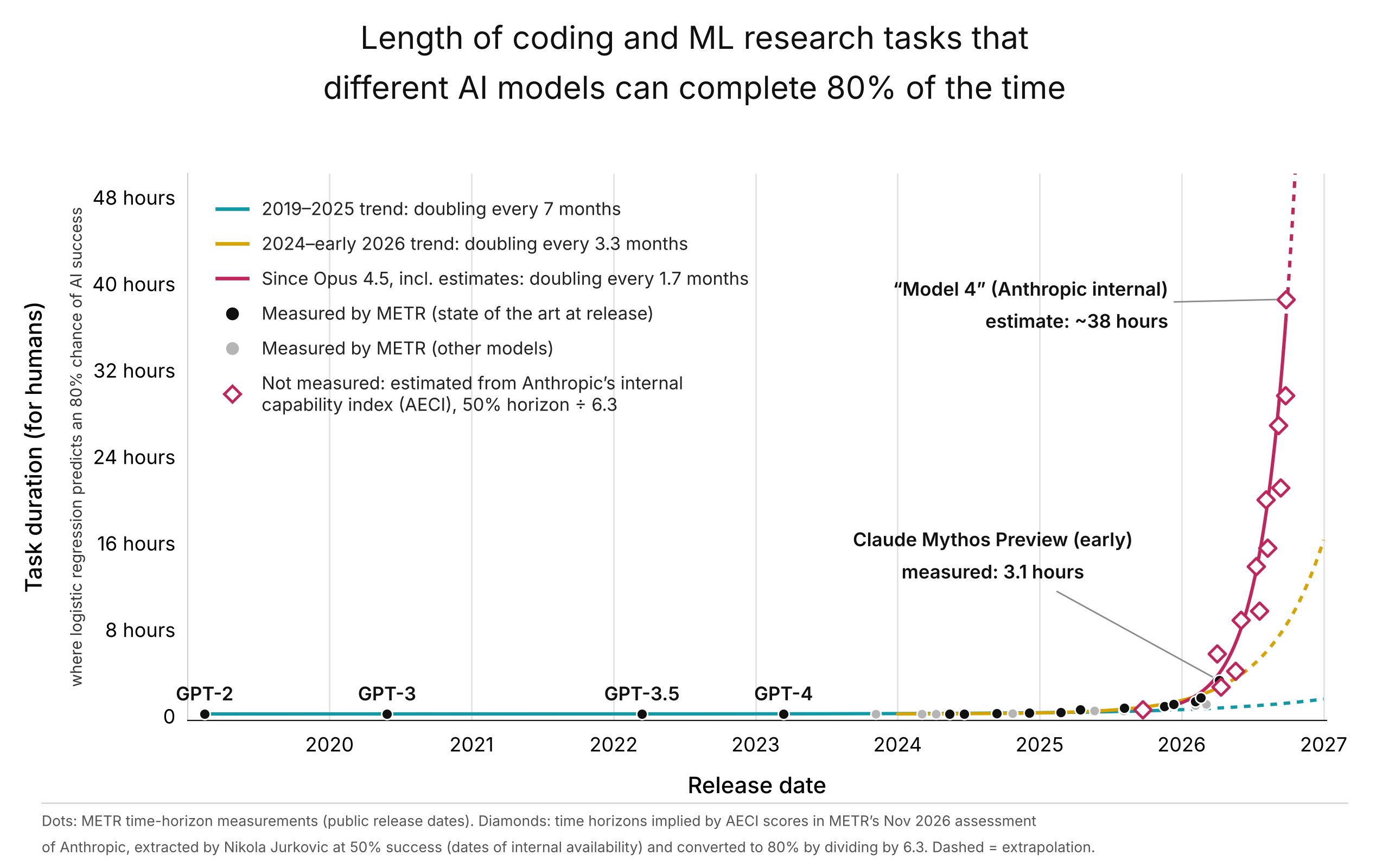
\You are in the exponential.\
Capacity doubles every 1.7 months. Prepare accordingly.
Claude Docs is… better than Google Docs?
Quite a delight to use. And you can @ ping your colleagues.
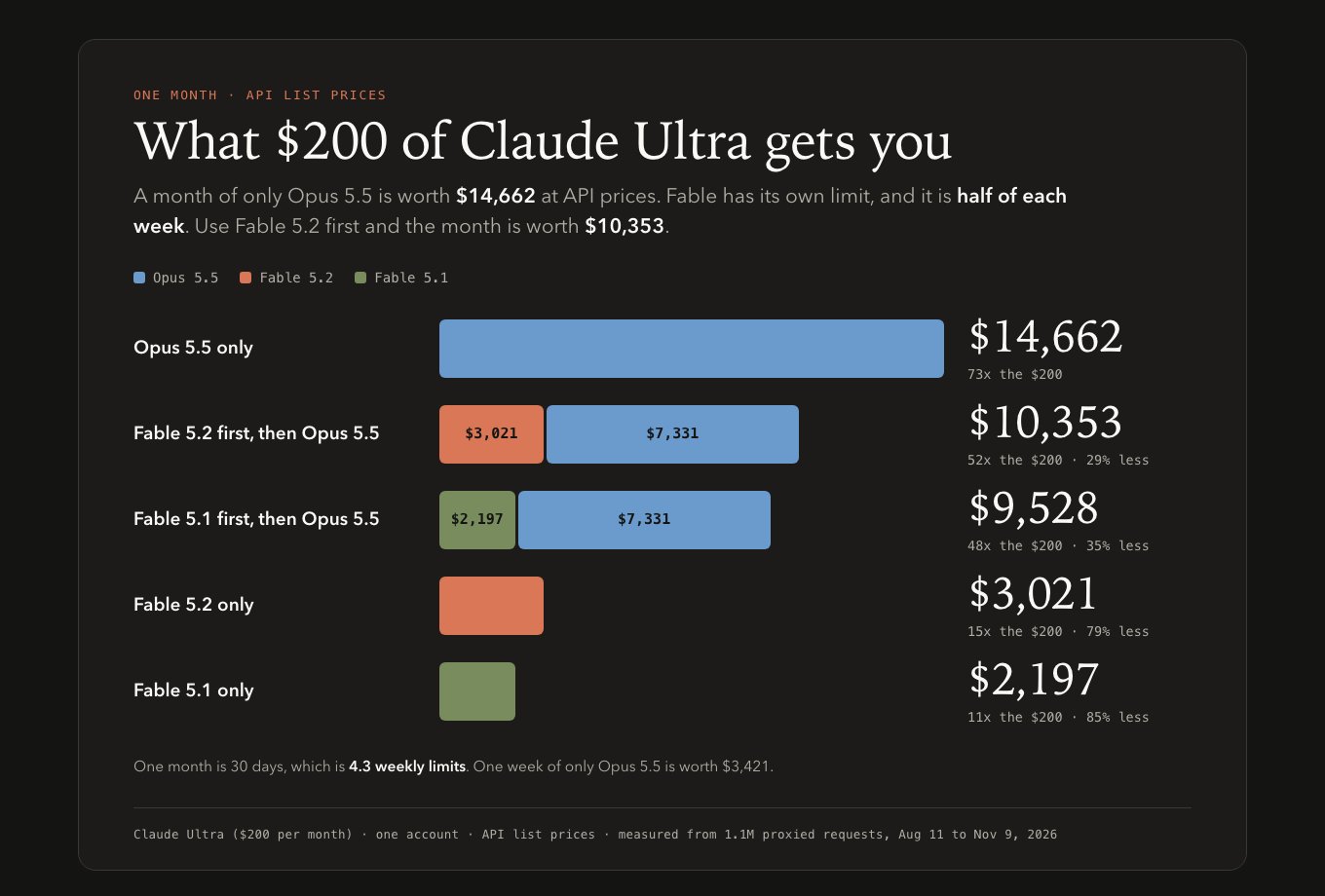
$200 of Claude gets you a lot.
\From @theo on X\
You must be crazy not to spend $100/$200 on Claude right now. Because you get the equivalent of tens of thousands of dollars. And yes, it is sustainable for Anthropic because AI gets 79x cheaper every year (and it compounds).
Claude Code when you’re a pro.
During pre-release testing, Claude Fable 5.2 and Claude Mythos 5.2 worked on ambitious projects in many different fields. From a one-paragraph prompt, it designed 3 working electronic devices, including this home voice assistant hub.
Am I paid by Claude?
No.
Not by Claude or Anthropic, the parent company.
Not even by Pangram - great tool, would recommend (if you desperately need AI detection on a daily basis; otherwise, use the free version).
I cover twice a week how I use AI, and how it changes how we work. How, how, how. This is all that matters to me. Not stocks or bubbles. Not doomerism fantasies. Not fake promises (“AI will make you rich,” ew).
AI is a tool. Few know how to use it because few care to use it every day and then teach it to others. That’s all I do, 6 days a week, for the last 4 years.
I don’t know how to code. I am not gifted. But I am pretty good at teaching others!
If someone shared this newsletter with you, join us! it’s free:
And if you are one of my readers, thank you for your support. Sharing it is free, and it is my weekly north star (on how good I am doing). Thanks for sharing.
Humanly yours,

\Ruben\