BlackRock's 2026 calls returned 23% in my backtest. So I built 6 Grok agents that follow the smart money every day.
By Gencay
Published: 2026-09-23
URL: https://www.learnwithmeai.com/p/grok-trading-bot-smart-money
Last week, when I was building 5 trading notebooks, I realized that some of these companies, like BlackRock, JPMorgan, or Goldman Sachs, also write reports includes suggestions.
For instance, iShares publishes the holdings of every BlackRock ETF daily.
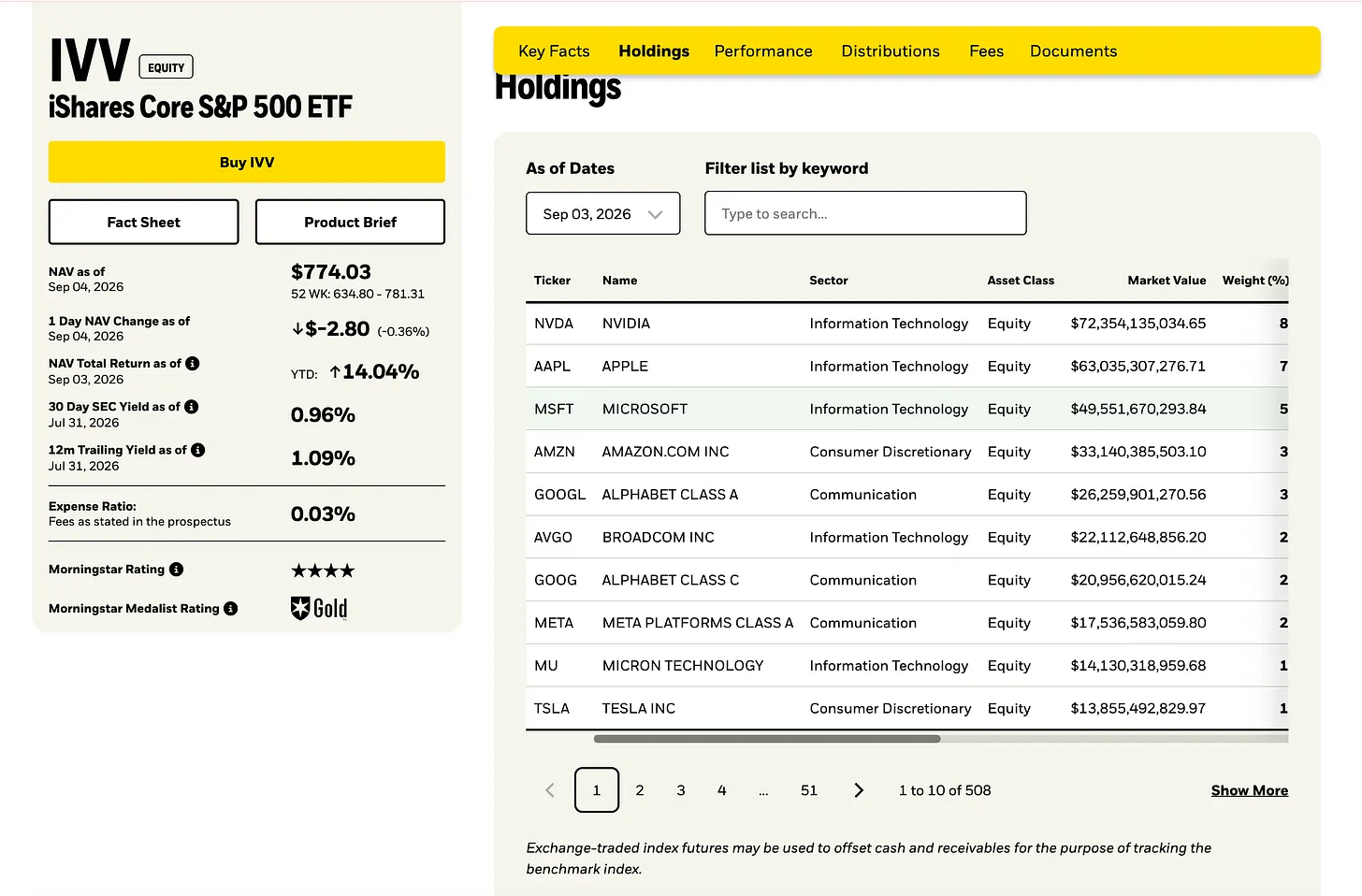
\BlackRock's iShares Core S&P 500 ETF (IVV) shows its holdings every day. Source: iShares, Sep 2026.\
But how is this useful?
While writing this one, I ran a hypothetical analysis, showing what would happen if I invested $10K based on BlackRock's 2026 analysis.
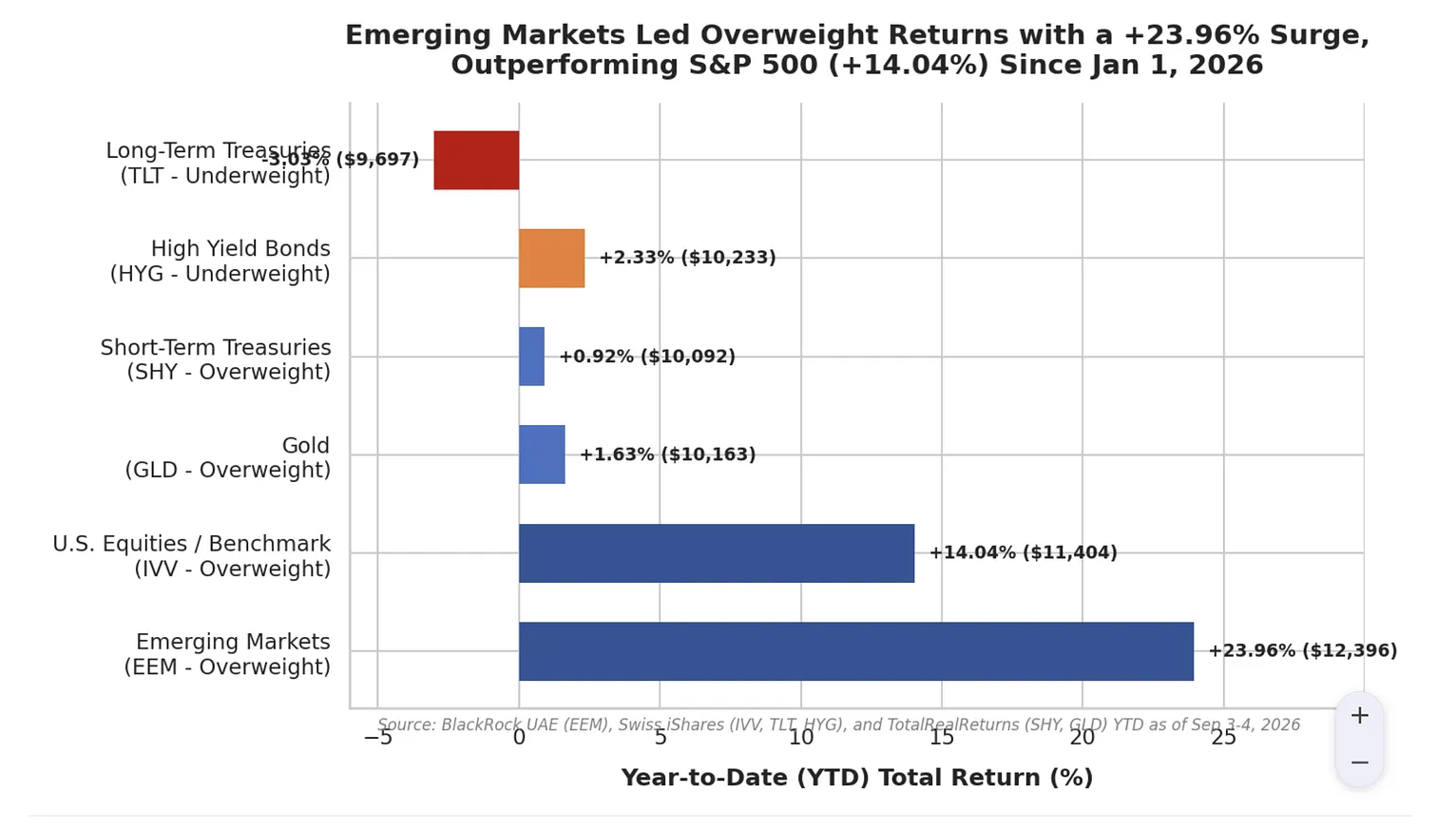
\Hypothetical $10K in each of BlackRock's 2026 calls, year to date as of Sep 4, 2026. Emerging markets (EEM) led at +23.96%.\
Their best call, emerging markets, would have returned 23.96% by September 4.
Because deep down, I knew I could take this much further.
I could analyze reports from all these firms, turn their insights into signals, and follow what firms managing trillions of dollars publish
While researching how to do this, I realized there’s already a term for it in finance: smart money.
The idea was simple. Follow the money.
So I did.
I built a living desk using Grok Bot.
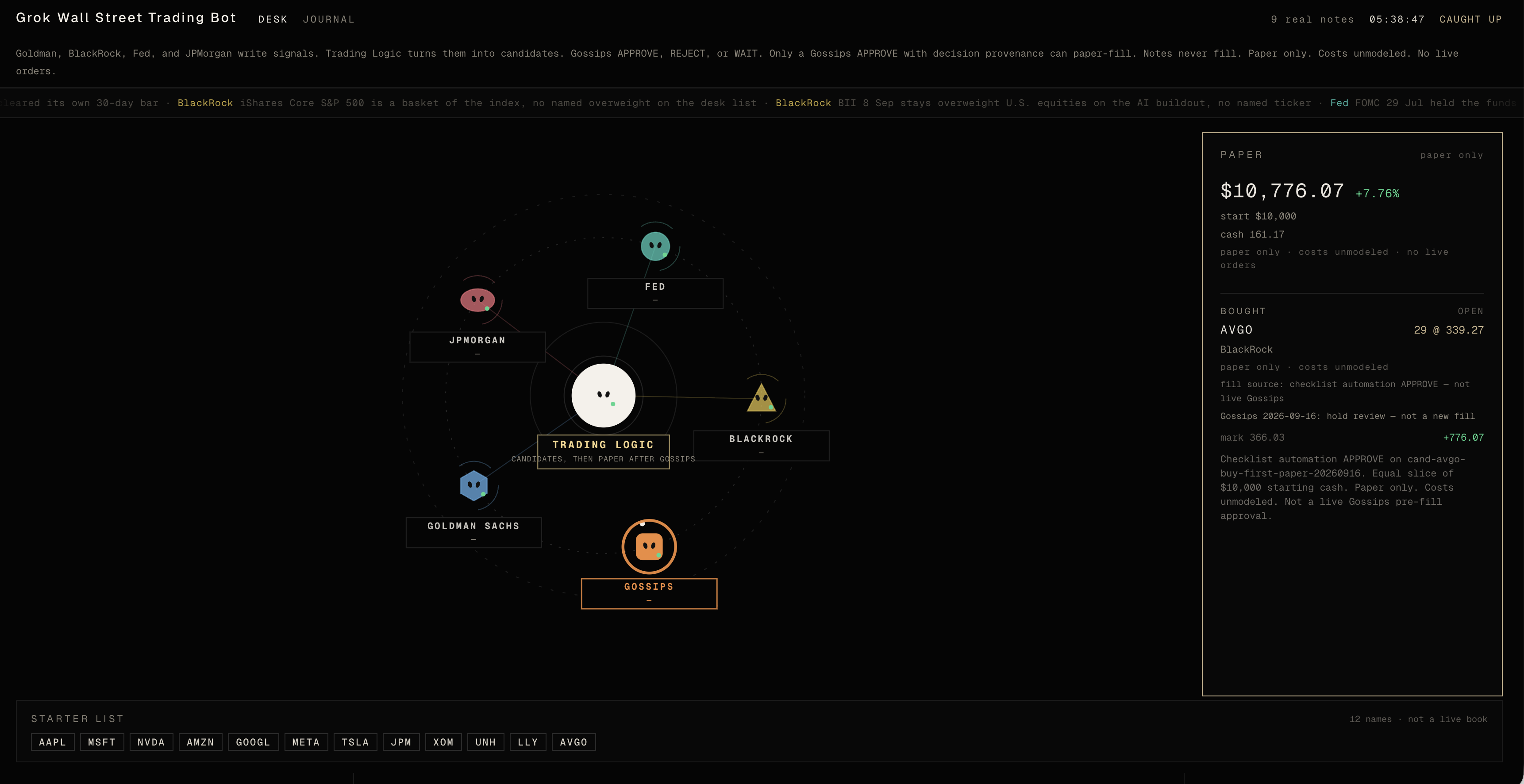
\The live Grok trading bot desk. Six agents feed Trading Logic, and every trade uses paper money.\
In this desk, six agents work together. Five read what trillion-dollar firms publish, and one decides.
Let me explain.
Note: This is a build tutorial, not trading advice, and my results come from one account over a short window.
The Desk Reads Trillion-Dollar Firms

\Four smart money signals, one Gossips check, one decision: buy, sell, or wait.\
This desk has 6 Grok bots.
The Grok bots are working like OpenClaw or Hermes.
Basically, they are working in the cloud 7/24.
My Grok agents also update the website that I built and do trades using paper money.
Here are the 5 agents;
- Goldman Sachs: Follows its public research, including Top of Mind, and brings relevant findings to the desk.
- BlackRock: Reads its investment commentary and iShares information to track the themes and allocations it discusses.
- JPMorgan: Follows Guide to the Markets and its outlooks to add context about stocks, bonds, and the economy.
- The Fed: Tracks policy announcements and interest-rate decisions that could affect the trade ideas.
- Gossips: Check the news and evidence around each candidate, then give an approve, reject, or wait decision.
So the idea is to collect information from these agents and decide whether to buy or sell.
For now, I’m using paper money, and the agents are updating a live website.
Note: It did %7 for now in 1 trade.
After the paywall, I’ll share the link to this desk, where the agents are actively trading with paper money. I’ll also share the agents’ instructions, explain how I built the entire system, and give you a single prompt to build your own version using a Grok bot.
Here are the files.
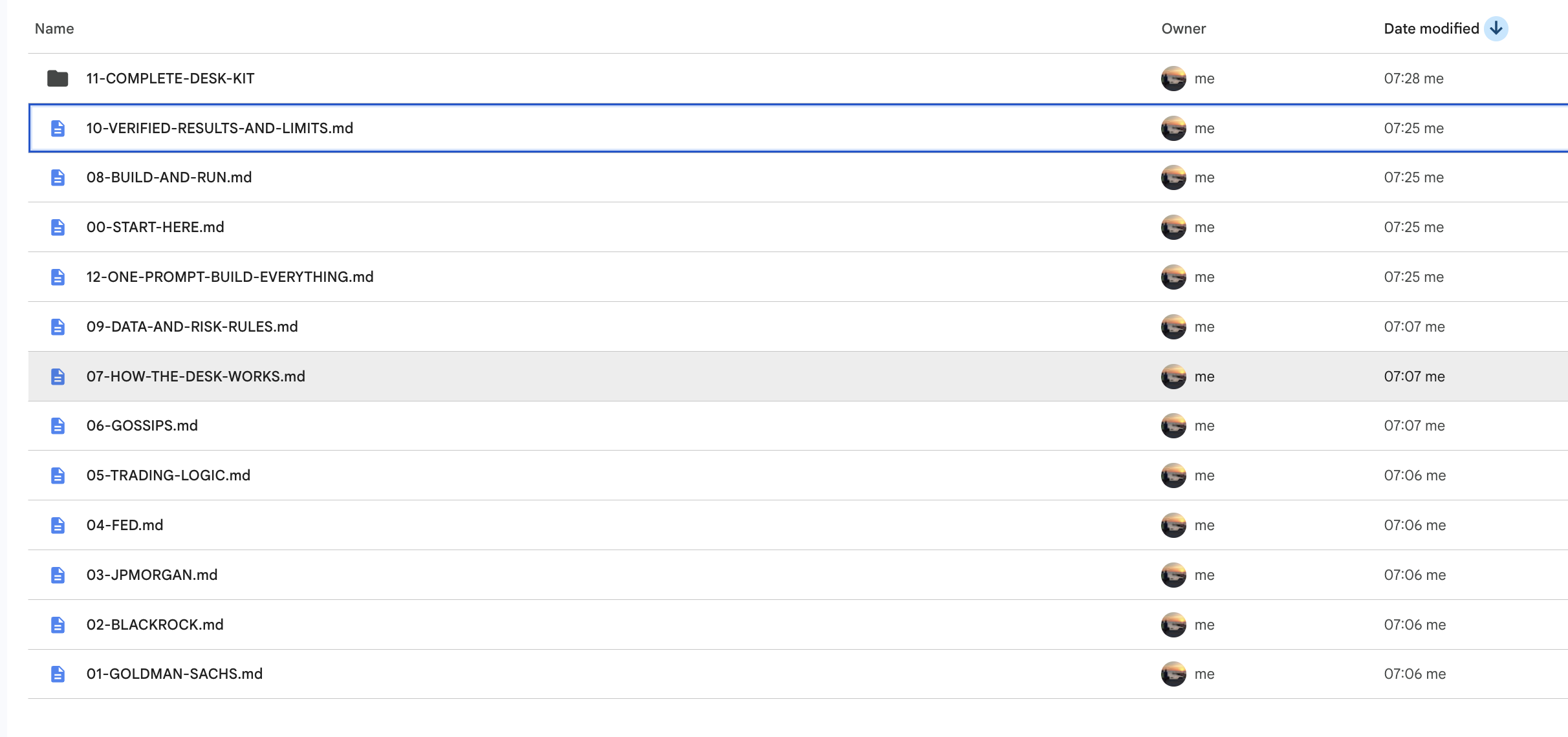
\The desk kit: one file per agent, risk rules, and a single prompt to build your own.\
Now let me share the links.
Here is the link: https://drive.google.com/drive/folders/1MLtklS46wZr94WdHcDVMofrx9n7xaw6Z?usp=sharing
Let’s Build Your Own Desk
You can open my desk here.
Now, let’s build yours.
First, download Grok Bot.
Access currently starts at $20/month through Cursor Pro, or $30/month through SuperGrok. Both include a usage allowance; additional usage can cost extra.
Install it and sign in with your Cursor account.
If you are using SuperGrok, follow the account-linking step. Here are the installation instructions.
Then open this setup prompt.
Copy the entire prompt block and paste it into a new Grok Bot conversation.
I put the setup in one prompt so you don’t have to create every agent manually.
It asks Grok Bot to create the four research agents, Trading Logic, Gossips, their routines, and a shared paper account starting with $10,000.
It also asks for an HTML dashboard and a trade journal.
You can open those files directly.
Publishing your own website is a separate step.
Follow any creation approvals the app shows. When it says the setup is finished, ask:
Show me the six agents, their active routines, the paper-account balance, the dashboard, and the test results. Tell me what is still missing.
You can change the watchlist later.
You can also open the individual agent files in the Complete Desk folder and adjust what each one follows.
Now, let’s connect it to ChatGPT.
First, send this to Trading Logic:
Create a webhook routine called “Desk commands.” Read requests from the JSON field command. Use it to inspect and report on this paper-trading desk, without placing trades or changing settings. Send the result in this Grok Bot conversation. Show me where to copy the webhook URL and key.
Open the saved routine, make sure it is active, and ask your Grok bot to this prompt:
Send back to me the following information of this:
Webhook URL
Webhook key
Authorization header
After getting them, go back to Codex and paste this information with this prompt;
Read the files in this project and connect to Trading Logic using my webhook URL and key. Store the credentials in private local configuration, outside the shared files and version control.
Send instructions as HTTP POST requests, using the key in the Authorization: Bearer header and the instruction in the JSON field command.
First, ask Trading Logic to report the desk’s agents, routines, paper balance, and open positions without changing anything. Use Computer Use to check its reply in Grok Bot and confirm that the connection works.
Now you can control your Grokbot using your ChatGPT account.
You can also build a version with OpenClaw or Hermes.
Both support scheduled jobs, but their setup tools are different. OpenClaw, Hermes.
Put the files from the Complete Desk folder into your agent’s workspace.
Give it the main setup prompt too, then add:
Adapt this desk to my installed OpenClaw or Hermes environment.
Read the supplied files first.
Replace Grok Bot-specific commands with this platform’s supported agent and scheduling tools.
Keep the six roles, independent Gossips approval, paper account, persistent ledger, and dashboard.
Test the handoffs before enabling the routines.
Do not deploy a website or place real-money orders.
I haven’t tested this desk on both platforms, so ask it to show what works and what still needs adapting.
If you run it on your own computer or server, keep that machine and its scheduler running.