I built a trading bot with Claude Code that copies Hyperliquid's top 5 wallets every 5 minutes. Paper portfolio live. Here is the full setup.
By Gencay
Published: 2026-05-20
URL: https://www.learnwithmeai.com/p/claude-trading-bot-hyperliquid
I have nearly a decade of cryptocurrency experience and a stock trading history of five years.
Still feels like I am starting from scratch every time I open a chart. Markets move faster than I can keep up.
So, I built my own crypto trading bot using OpenClaw, and I update it weekly with a NotebookLM and Claude connection.
But between clients, the baby coming, and the promises I keep making to build with AI and ship with AI, the trading bot lives in a quiet corner of my repo.
It runs. I do not look at it.
So I was searching for the cheat code, like always.
I DM’d too many financial Substack accounts to collaborate.
My offer was simple. I build the trading bot, you bring the strategy, we tweak it together.
Nobody responded. If you think you know markets and can prove it, DM me.
Then I came across a method called copy trading.
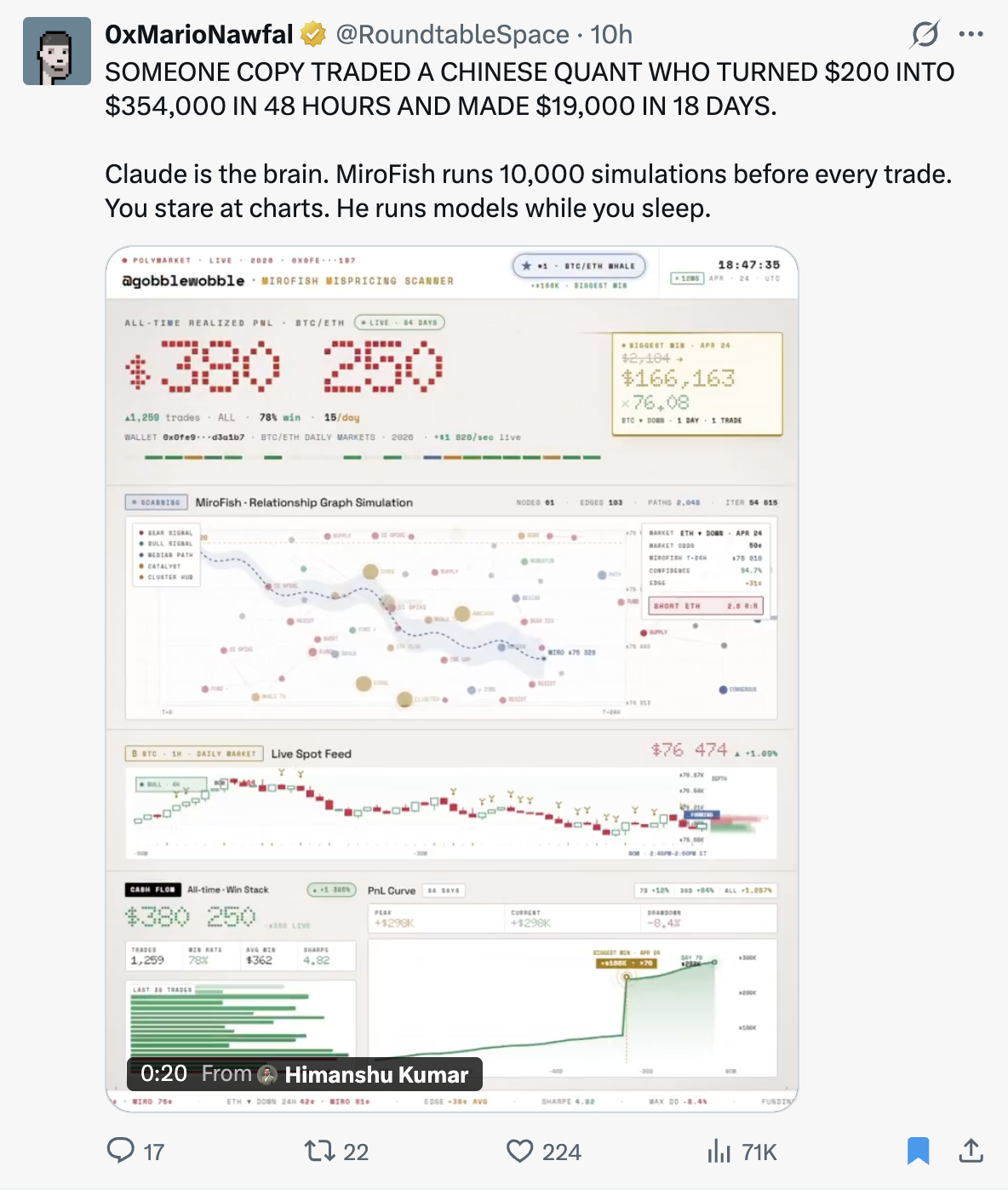
\Copy trading with Claude,reference\
The post is half marketing, and I know it can be clickbait.
But the idea is hard to ignore.
Skip the years of learning.
Find traders who already make money.
Copy what they do.
So I dug deeper.
What Copy Trading Actually Is?
A profitable trader opens a long position on BTC.
You open the same long. They close it. You close it.
That is the entire idea.
On a centralized exchange, copy trading is a paid feature.
You pick a successful trader, they take a cut of your profits, and the platform handles the execution.
On a perp DEX like Hyperliquid, all of this is public.
Every trader’s open positions and recent fills sit on-chain, free to query.
No API key, no subscription.
I did not want to spend a single dollar before testing this.
So I opened a new Claude project inside the Claude Code, dumped the idea into it, and started building.
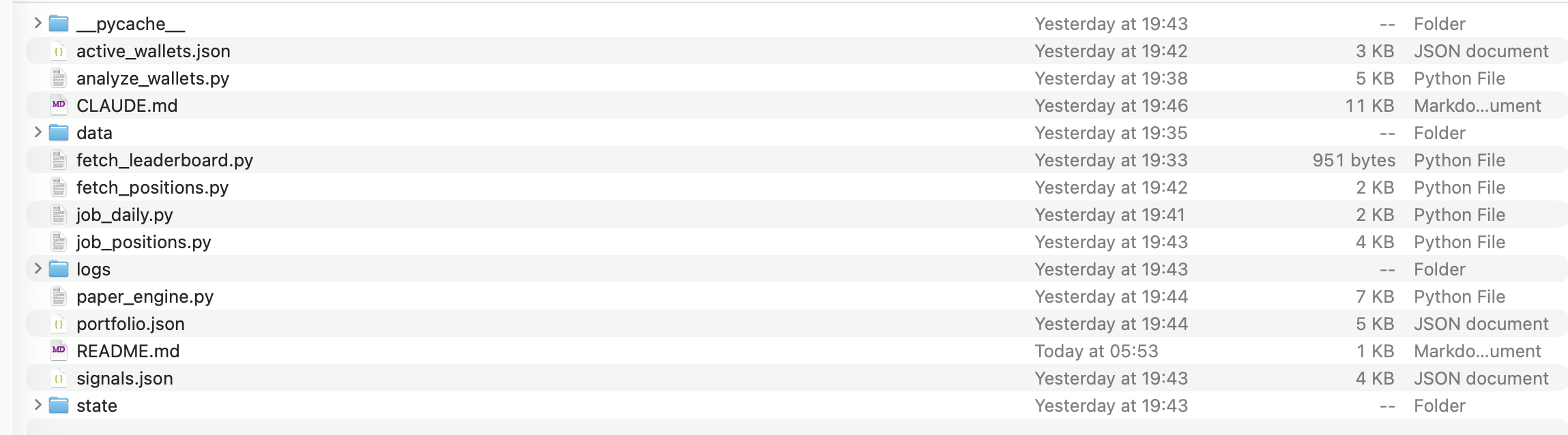
\Copy Trade Project Files\
The Trading Bot I’ve Built with Claude
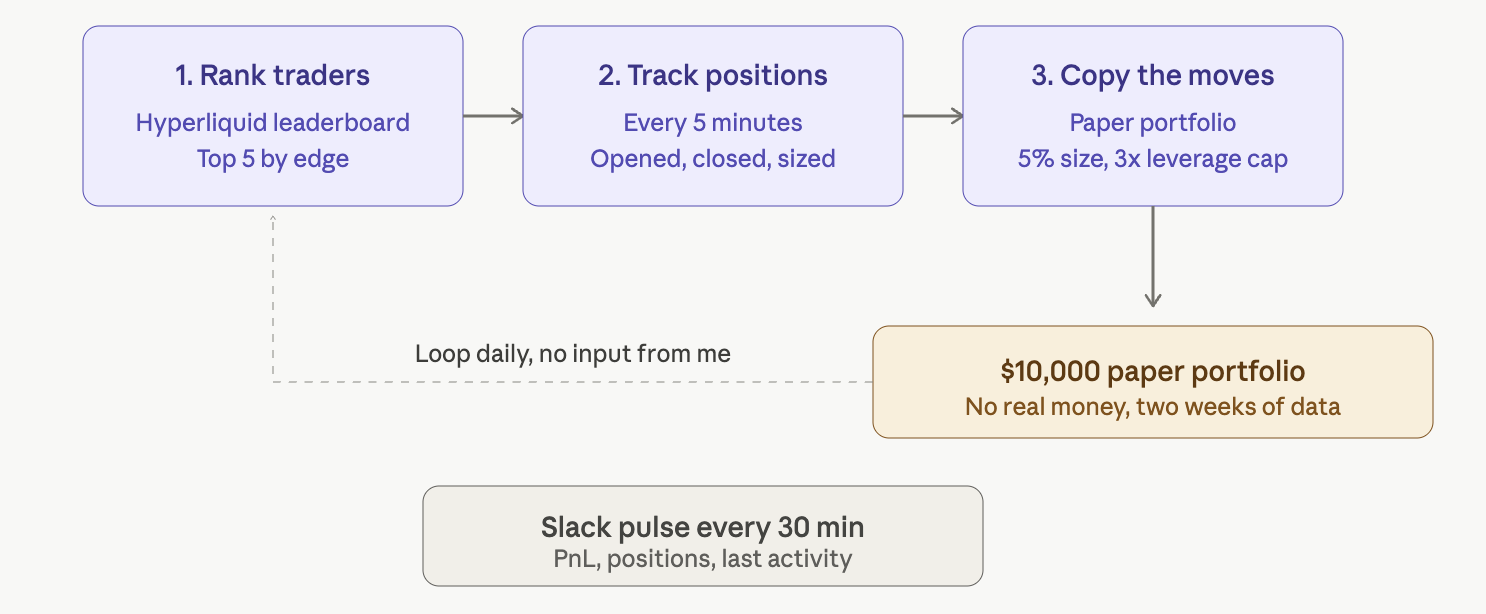
\Three jobs in a loop. The bot picks the winners, copies the trades, and tells me what happened on Slack. No real money in it yet, just paper.\
The goal is a system that runs daily, with no input from me, that does three things.
- One. Find the most profitable and consistent traders on Hyperliquid.
- Two. Track their open positions in near real time and detect when they open or close something.
- Three. Apply those moves to a paper portfolio of $10,000 so I can see if the strategy works before risking real money.
Everything runs on GitHub Actions.
My laptop can be off.
The cron lives in the cloud. (for free)
And send back to me reports via Slack. like this.
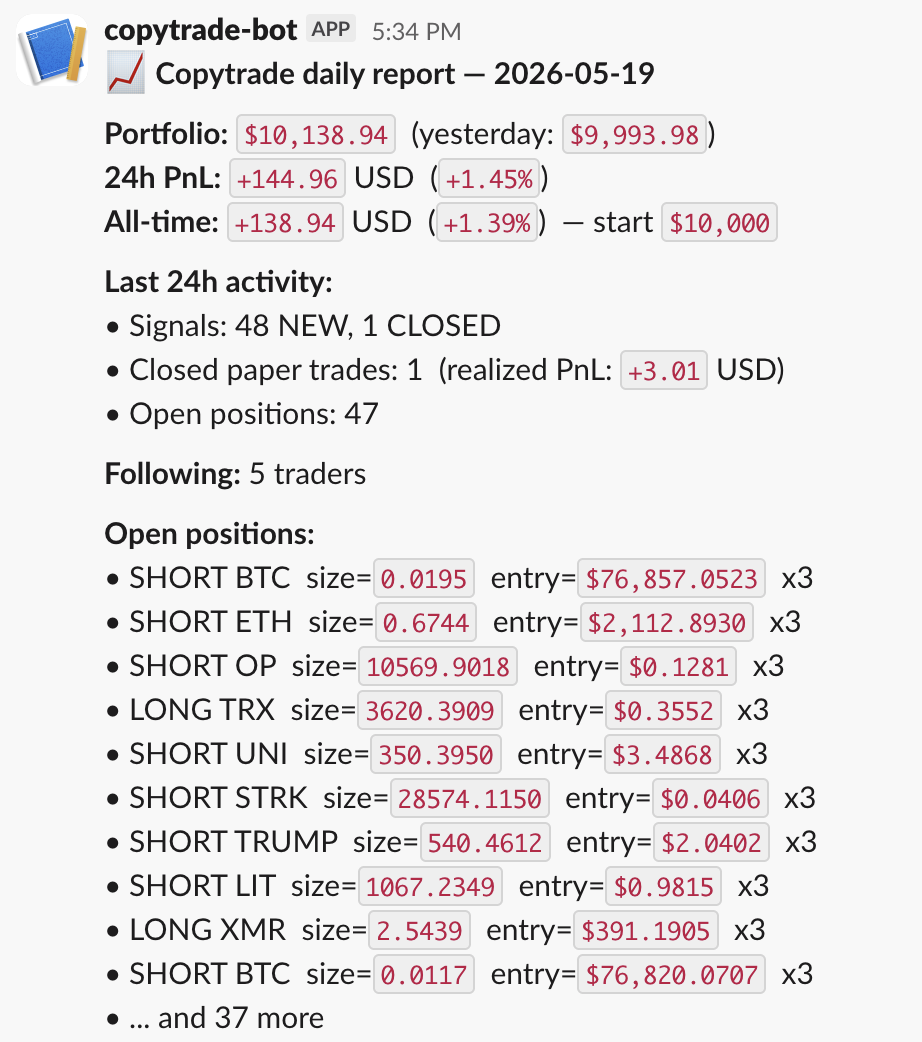
\Copy Trade Daily Report Via Slack\
How the Claude Trading Bot Works?
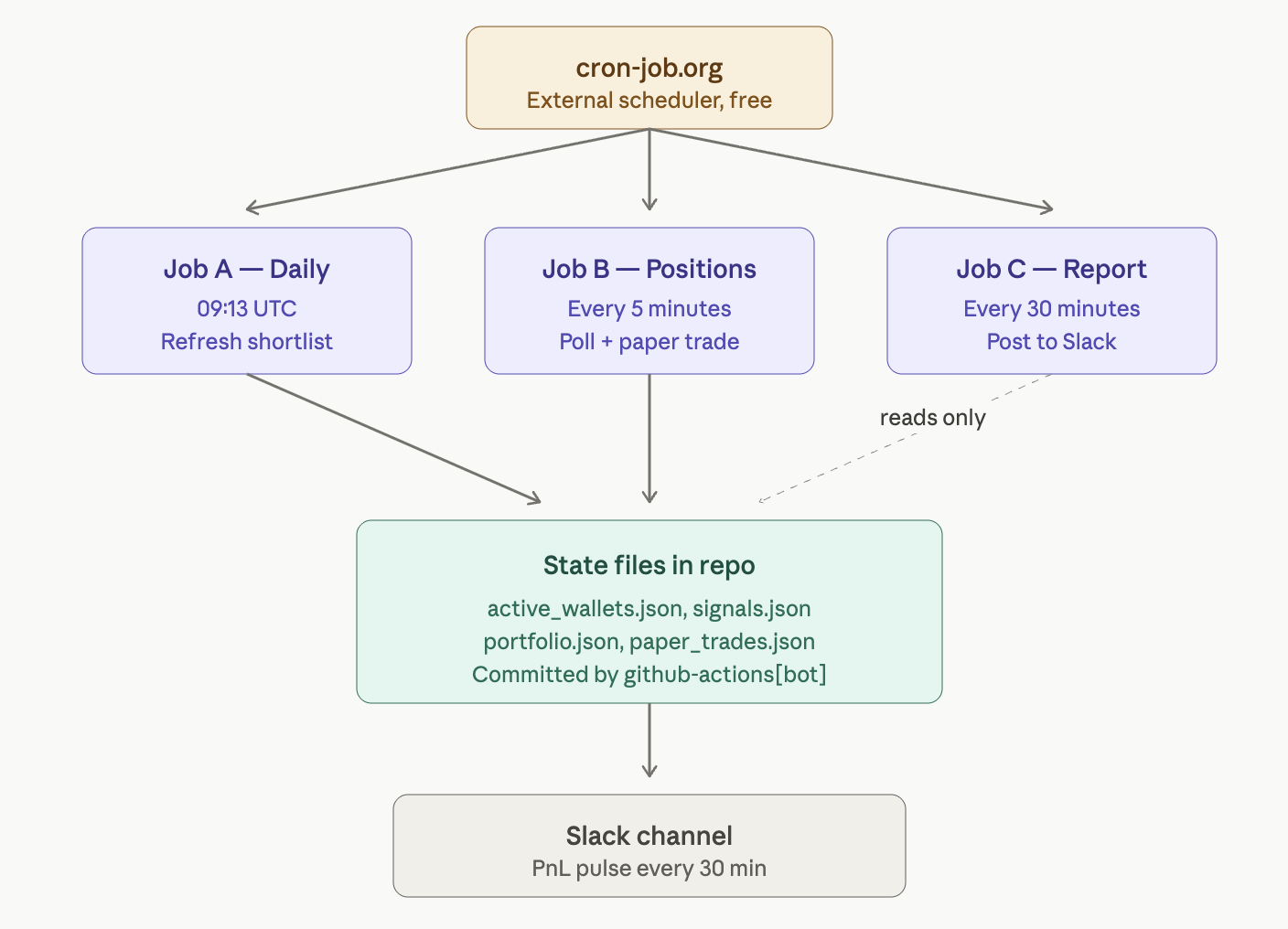
\How the Claude Trading Bot Works?\
Three jobs, decoupled, each doing one thing.
- Job A runs once a day at 09:13 UTC. Pulls the Hyperliquid leaderboard, filters out the noise, ranks traders by execution quality, and writes the shortlist to a JSON file.
- Job B runs every 5 minutes. Reads the shortlist, fetches each wallet’s open positions, and compares them to the last snapshot. New positions become BUY signals. Closed positions become SELL signals. The paper engine applies them to the portfolio.
- Job C runs every 30 minutes. Reads the state, calculates 24h PnL and activity, and sends a pulse to Slack. Read-only, never touches state.
The system has a memory. Every time a job runs, it saves what it learned back to the repo: which traders we are following, which positions are open, and where the paper portfolio stands. Next run picks up where the last one left off.
GitHub’s free scheduler is unreliable. It silently skips around 80% of frequent jobs when their servers get busy. So I plugged in a free external scheduler called cron-job.org that pokes GitHub on time, every time. Setup takes 5 minutes and I’ll walk through it below.
Setting Up the Trading Bot With Claude Code
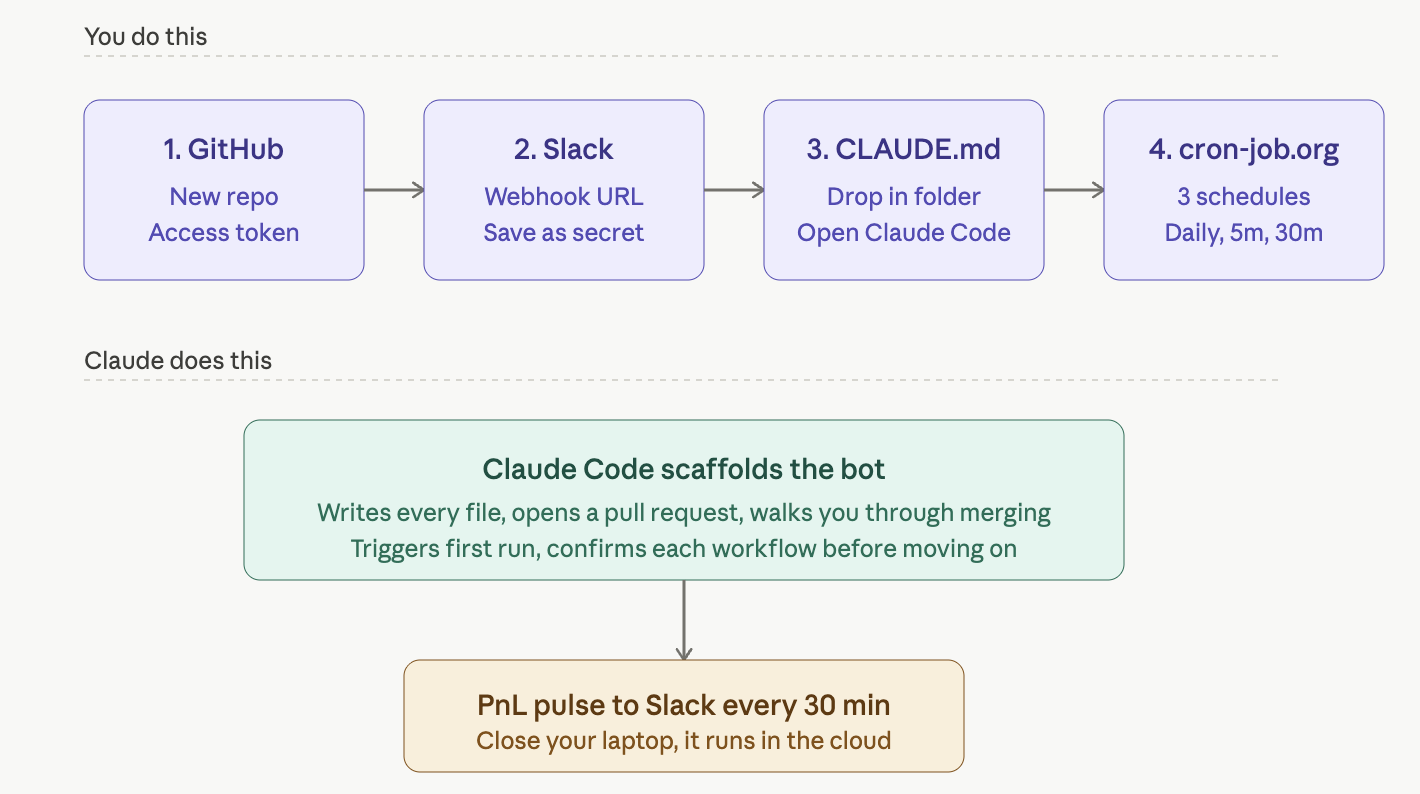
\Setting Up the Trading bot With Claude\
I did not want to write this from scratch.
Claude Code can ship a working version of this in two sessions if you give it the right setup.
But Claude does not do everything.
There is a clean split between what Claude writes and what you click.
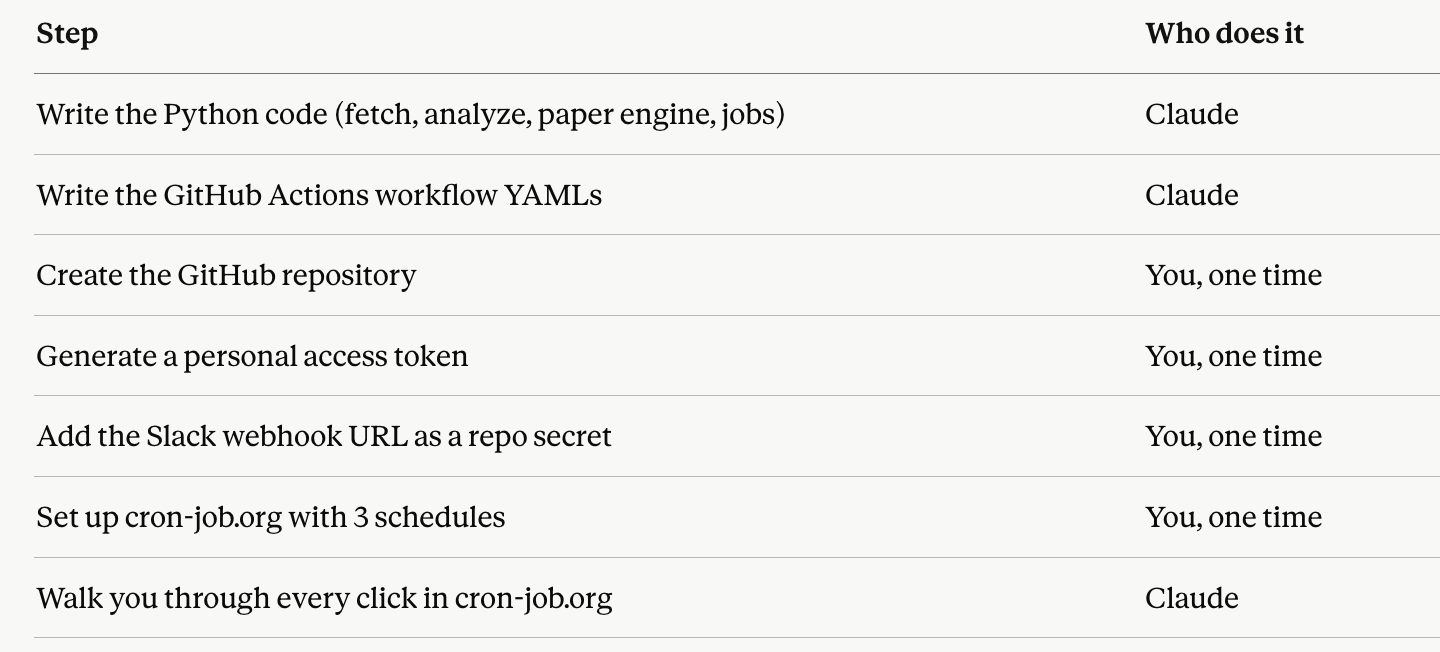
\Claude and your collaboration\
Four setup steps. About 20 minutes total. Everything else Claude handles.
1- Create a GitHub account if you do not have one, then open a new repository. Make it private, leave it empty, no template.
This is the folder where your bot will live.
Next, create a token.
Visit here.
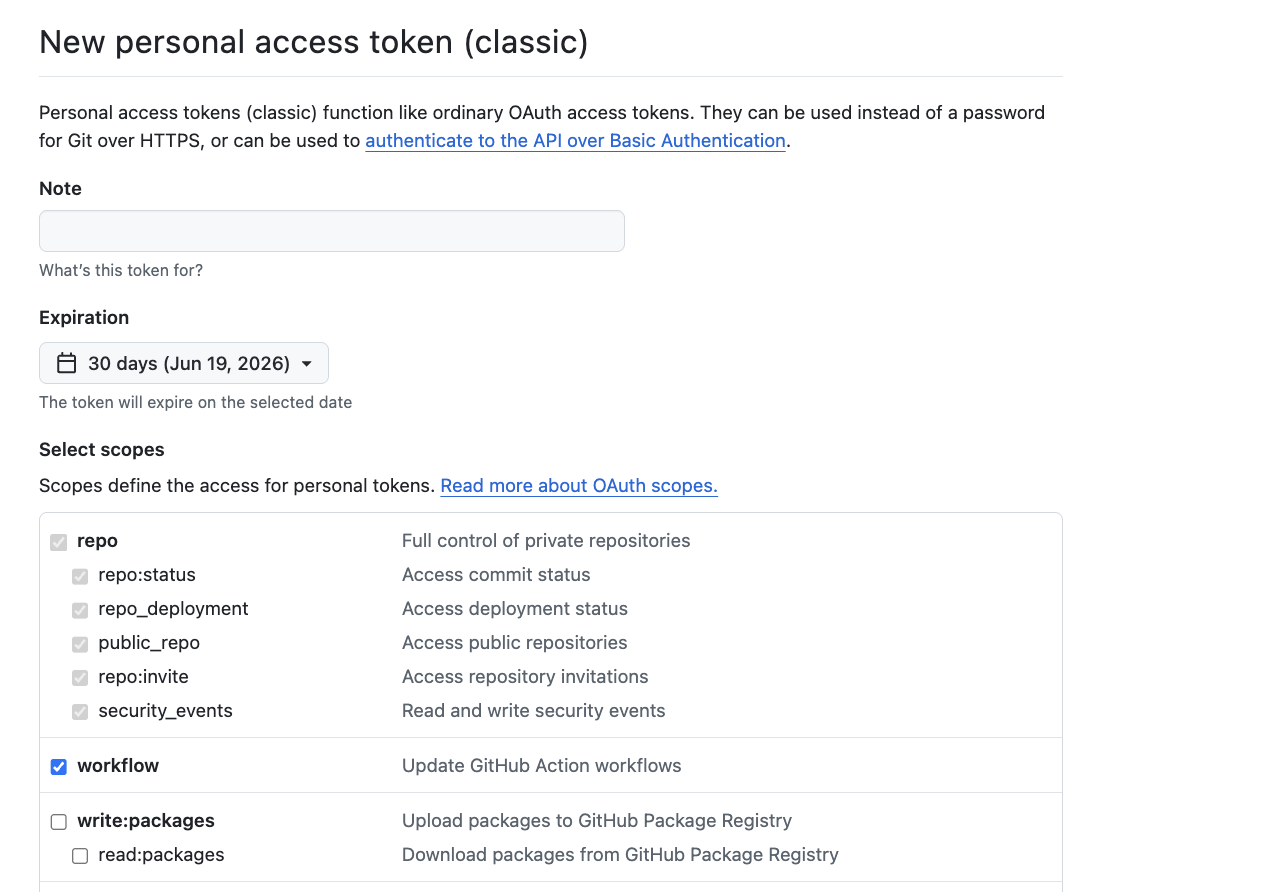
\Generate token\
And click generate token.
If you don’t know how you can do it, copy the link below to your Claude or Codex does not matter, so it will help you do these.
2- Set up a Slack channel for the daily report.
Go to api.slack.com, create a new app, turn on Incoming Webhooks, pick the channel where you want the report to land, and copy the webhook URL.
Then on your GitHub repo, click Settings, then Secrets and variables, then Actions, then New repository secret. Name it SLACK\WEBHOOK\URL and paste the URL as the value.
This is the pipe the bot uses to ping you every 30 minutes.
3- Drop the Claude.MD file into your repo.
I will share mine at the end of this article.
Just download it, put it inside a new folder, and open that folder with Claude Code.
It will ask you to connect to GitHub using your token, and you are good to go.
This file is the bot’s instruction manual. Claude reads it every time you open the project and knows exactly what to build.
4- Set up cron-job.org to fire the workflows on schedule.
GitHub’s free scheduler drops around 80% of frequent jobs when its servers get busy, so we replace it with a free external scheduler.
Go to cron-job.org, sign up, and create three cron jobs.
One for the daily refresh, one for the position polling every 5 minutes, and one for the Slack pulse every 30 minutes.
Each one calls a GitHub URL, pastes the token from step 1, and saves.
(The Claude.MD has the instructions on how to set up.)
Here is the Claude.MD
This file is the bot's full instruction manual.
Architecture, scoring formula, file structure, the protocol Claude follows when you ask it to build the system.
About 600 lines of specification.
Download it from here.
What to do with it
- Download the file. Name it
CLAUDE.md(capitalized, that is the convention Claude Code looks for). - Create a new empty folder on your laptop. Drop the file inside.
- Open the folder with Claude Code.
- Paste this prompt:
Read CLAUDE.md in this folder. Follow the Quickstart protocol at the top. Start by asking me for the three things you need.
That is the whole prompt. The Quickstart section inside CLAUDE.md takes over from there.
What will Claude do next?
Claude asks you for the three things you already prepared:
- Your empty GitHub repository URL
- Your personal access token
- Your Slack webhook URL
Paste them in. From here, Claude takes over in four phases.
1. Scaffold the code. Claude clones the repo, writes every file, and opens a pull request. The PR has the Python code, the three workflow YAML files, requirements.txt, and .gitignore.
2. Merge it. Open the PR link Claude gives you. Click Merge. Confirm. Reply with “merged”.
3. Add the secret and bootstrap. Claude walks you through adding SLACK\WEBHOOK\URL as a repo secret on GitHub, click by click. Then it tells you to manually trigger the three workflows in order from the Actions tab. One click each.
After the third workflow finishes, the first PnL pulse drops in your Slack channel. Bootstrap done.
4. Wire up cron-job.org. Claude walks you through three external cron jobs that fire the workflows on schedule. Five minutes, no code. GitHub’s free scheduler is too unreliable to trust on its own, so we drive the runs from outside.
Once cron-job.org is set, your bot is live. Total time, around 20 minutes if you have the three things ready.
From here on, you do nothing. The cron lives in the cloud, off your laptop:
- Every day at 09:13 UTC, the leaderboard refreshes and the shortlist updates.
- Every 5 minutes, positions get polled and signals get applied to the paper portfolio.
- Every 30 minutes, Slack gets a PnL pulse with the latest activity.
Close your laptop.
How does it actually work?
Now that your bot is running, here is what is happening under the hood. You do not need to read this section to use the bot. Read it if you want to tune the system or fork it for your own strategy.
Picking Winners
job\daily.py pulls the Hyperliquid leaderboard, filters out noise, scores what remains, and writes the top 5 to active\wallets.json.
The filters: min account $100K, min 30d volume $5M, min 30d PnL $50K, positive day and week PnL, and day\pnl < 0.8 \* month\pnl. The last one kills “lucky today” traders.
The score is volume-normalized PnL in basis points.
score = month_edge_bps \* 2.0 + week_edge_bps \* 1.0 + log10(month_pnl)
ROI does not work here. Hyperliquid’s roi field returns nonsense for accounts with deposits or withdrawals. One trader showed 17,197% ROI. Seventeen thousand. Edge in basis points measures execution quality and stays clean across account sizes.
Detecting Signals
job\_positions.py runs every 5 minutes. For each trader, it pulls open positions and diffs against the previous snapshot in state/<address>.json.
New position → NEW signal. Closed position → CLOSED signal. Both append to signals.json.
The Paper Engine
Three rules keep the portfolio survivable.
Position size fixed at 5% of cash, regardless of what the trader used. Leverage capped at 3x, regardless of what the trader ran. Every fill includes 5 bps of slippage against Hyperliquid’s allMids mark price.
That is the whole engine. Open, close, log to paper\_trades.json, snapshot equity.
Not financial advice. Paper portfolio only, build experiment, not a trading recommendation.
The Slack Pulse
daily\_report.py reads the state files, computes 24h PnL, all-time PnL, signal counts, open positions, and POSTs the message to your Slack webhook. Read-only. Never touches state.
The Traps the System Avoids
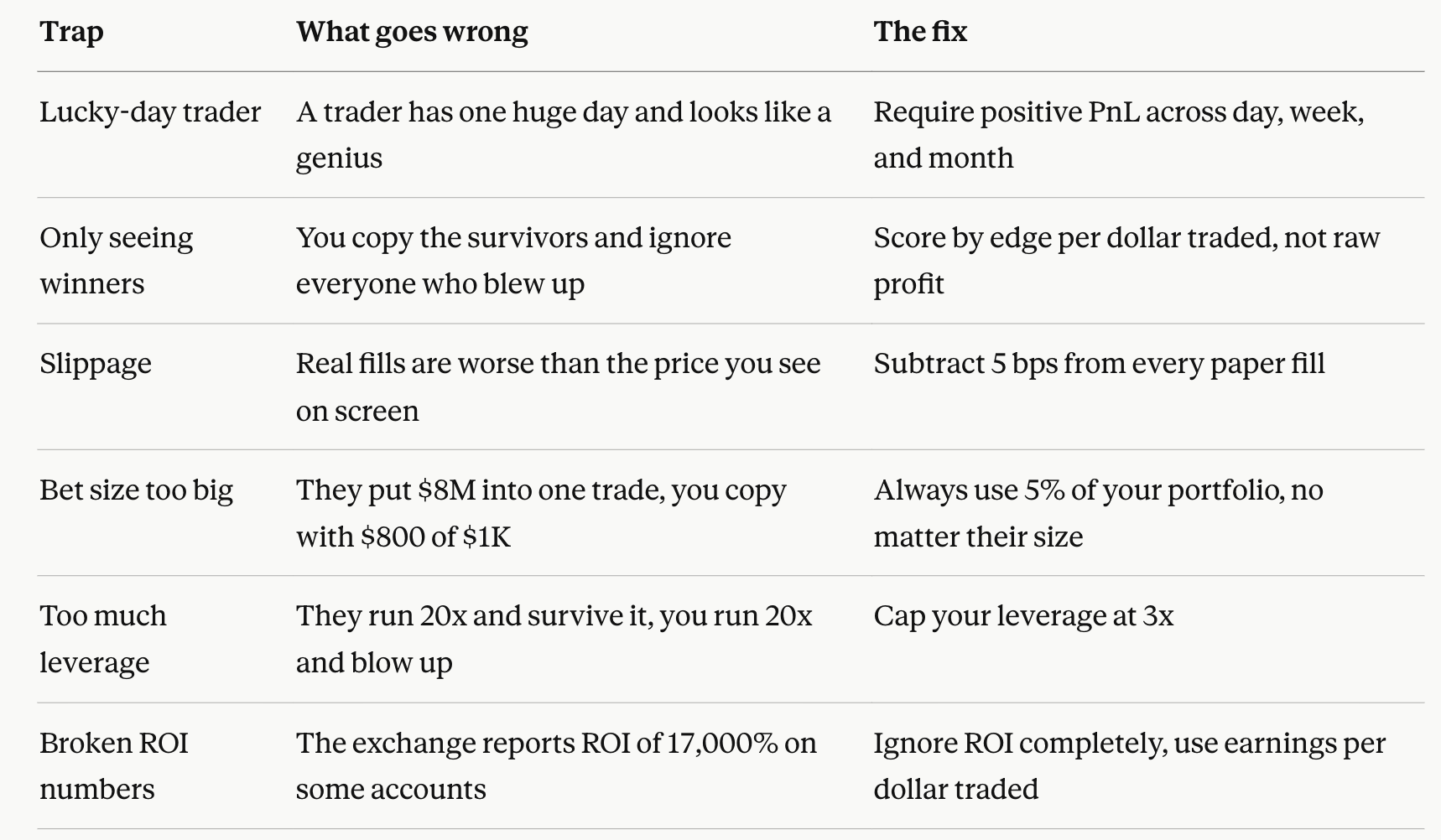
None of these is clever.
They are the obvious mistakes you make if you ship the first version.
Day 1 Results
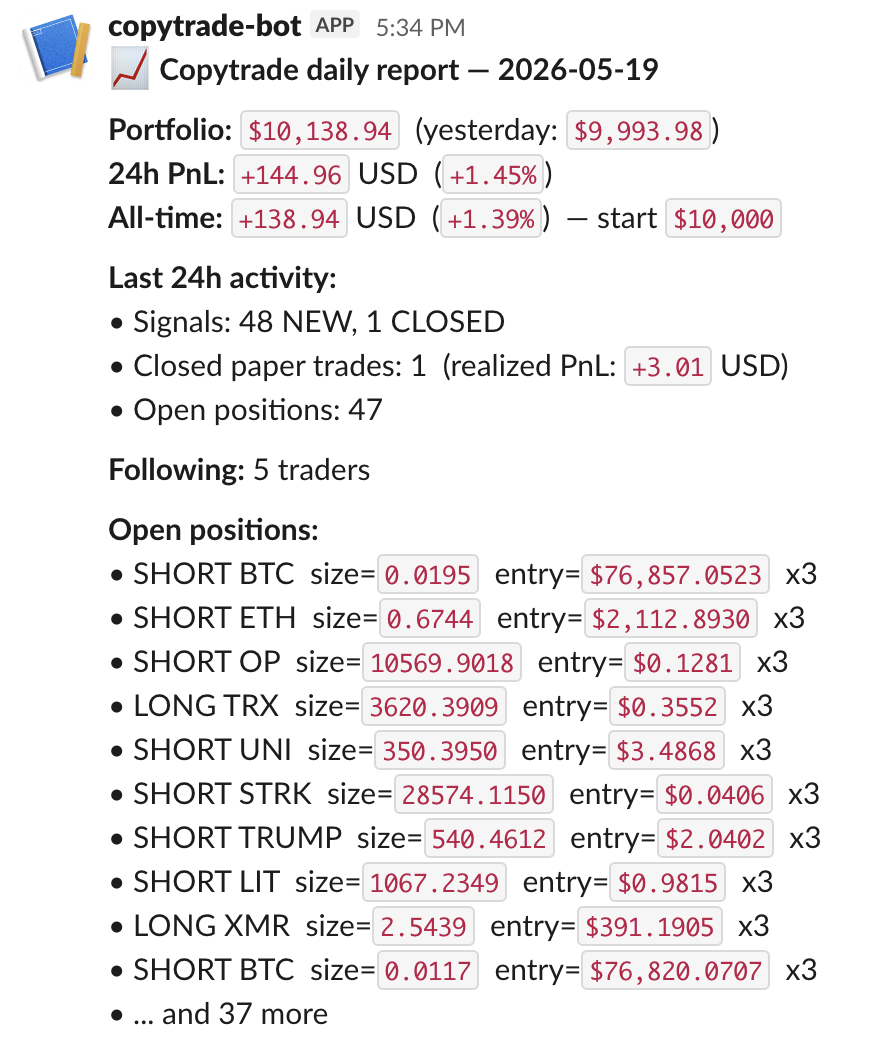
What Comes Next?
Two weeks of paper data, then a decision. The bar to go live with real capital is Sharpe > 1.5.
If the math gets there, three features go in next. Confluence scoring when two or more traders open the same coin in the same direction. Subaccount aggregation for cleaner risk ratios. Trailing stops so the copy does not depend on the source trader closing on time.
If the math does not get there, the post-mortem becomes the next post.
Final Thoughts
Copying smart traders is not a strategy. Filtering for execution quality, sizing positions with discipline, and respecting slippage is.
The system is 600 lines of Python and three YAML files. The thinking took longer than the code. Claude Code wrote most of the implementation in two sessions using the CLAUDE.md file above.
The money machine part is still a paper hypothesis. The build part is real and running.