13 techniques from Anthropic's Boris Cherny. Most skip these. The smart ones extract 100x value from the same $20/month subscription.
By Gencay
Published: 2026-03-01
URL: https://www.learnwithmeai.com/p/claude-code-masterclass-for-everyone-b2f

\Claude Code best practices from Anthropic's engineering team - Boris Cherny's workflow.\
Most developers will skip this. They’ll continue getting mediocre outputs and conclude “Claude isn’t ready yet.”
Meanwhile, the smart ones who invest 2 minutes in context hygiene will extract 100x the value.
Which camp are you in?
Previously in Claude Code MasterClass For Everyone
- Part 1: Install Claude Code (just paste commands) and build your first agent, zero coding.
- Part 2: Stop repeating yourself with Skills (what to do) and CLAUDE.md (who you are).
- Part 3: Master 3 plugins that code better than most AI tools.
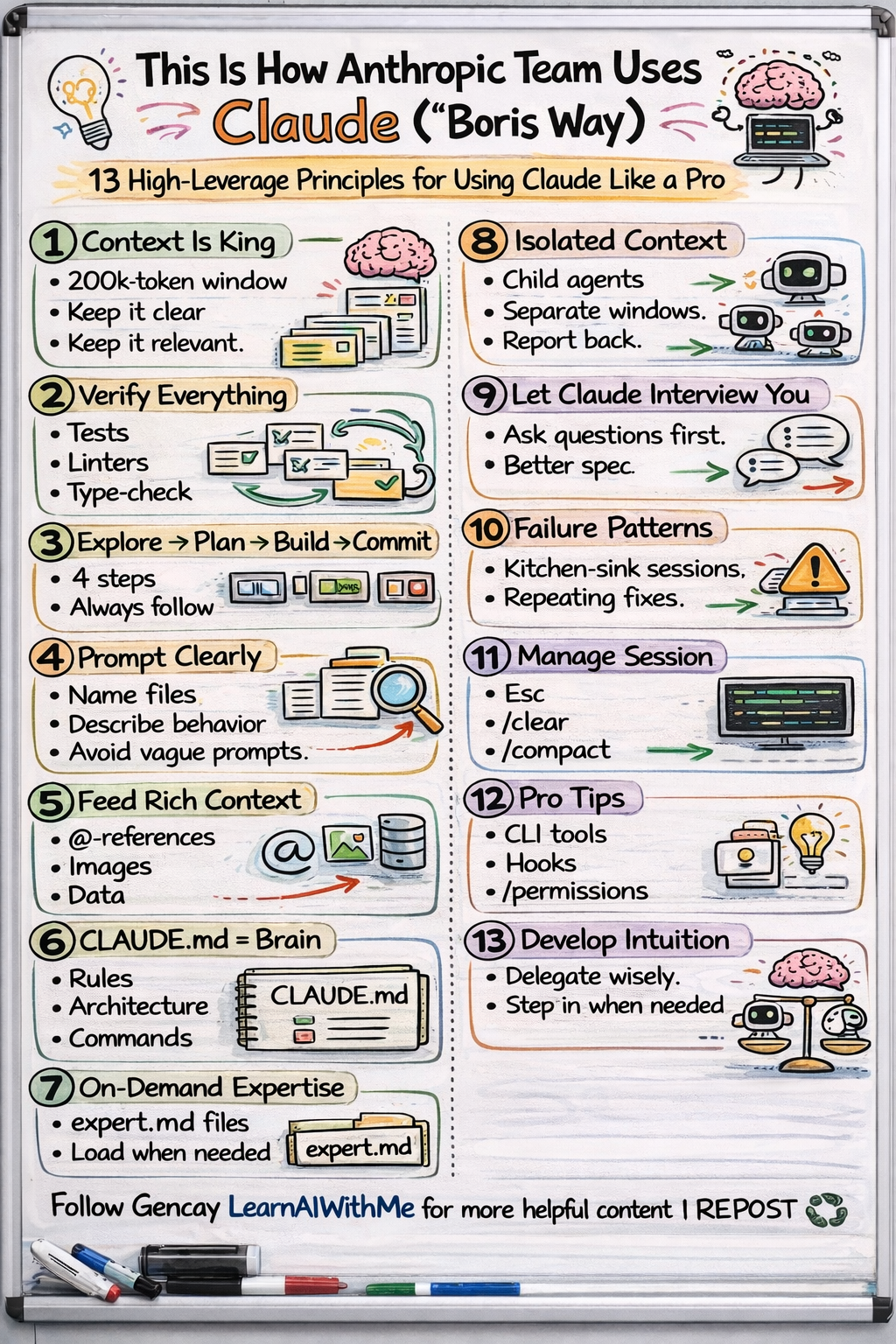
\13 Principles from the Claude team to use Claude Code better.\
These 13 principles come directly from Anthropic's official best practices and Boris Cherny's personal workflow, compiled by the Grit AI Studio team, who worked closely with Anthropic's engineers.
1. Context is king
Most developers treat Claude like a magic wand.
They dump vague requests into the chat, watch it hallucinate, then complain, "AI isn't there yet.”
The difference between developers who get $200/month of value from Claude Code and those who get $20,000? It’s not the model.
It’s context management.
Three Rules
- Be clear
- Vague input = vague output.
- Keep it compact
- Bloated sessions slow Claude down
- Parallelize
- Separate work = separate sessions.
Track Your Budget
# Track context usage in your statusline (always visible)
❯ /statusline
Customize your status bar to always show context usage
Wipe Between Tasks (Non-Negotiable)
# Clear between unrelated tasks
❯ /clear
✓ Context cleared. CLAUDE.md reloaded.
2. Give Claude a way to verify
Most people treat Claude like a vending machine.
Input prompt. Get code. Hope it works.
That’s gambling, not building.
The Problem: One-Shot Code Roulette
Without verification:
- Claude writes code → you manually test → find bugs → come back → explain error → repeat
- You’re the QA department for an AI
- Every bug = wasted time
With verification:
- Claude writes → tests itself → fixes bugs → delivers working code
- Errors caught before you see them
- First attempt success rate jumps 10x
Better Prompts With Verification Built In
VAGUE
"Add a login page"
WITH VERIFICATION
"Add a login page. Write tests for email validation, wrong password,
and successful login. Run the tests and make sure they pass."
Anthropic’s Official Recommendation
Give Claude tests, type-checks, linters, or other verification commands. Tell Claude to run them and iterate.
This is the most impactful thing you can do for code quality.
The “Go Fix It” Pattern
When something breaks, don’t write paragraphs explaining the error.
Just say: “Go fix it”
Claude runs the tests you set up.
Sees what failed. Fixes it.
Re-runs tests. Repeats until green.
3. Explore. Plan. Implement. Commit.
Most developers jump straight to coding.
Then, spend 3 hours fixing assumptions that were wrong from minute one.
Anthropic’s workflow prevents this: Explore → Plan → Implement → Commit.
Boris’s rule: Complex tasks start in plan mode. No exceptions.
Explore
Ground the conversation in reality, not guesses.
Tell Claude: “Read the code. Explain what’s happening. Don’t touch anything.”
❯ Read src/auth/ and explain how login works right now.
No changes yet.
Plan
Claude writes a step-by-step plan. You review it.
Press Shift+Tab twice for plan mode (read-only lock).
❯ Write a plan for OAuth. Which files change? What's the order?
Don't implement.
Boris iterates here until the plan is bulletproof.
Then switches to auto-accept for implementation.
Implement
Now Claude builds. Fast. Accurate.
Why? It already understands the code. You agreed on the approach. No mid-flight course corrections.
❯ Execute the plan. After each file, run tests.
Don't continue if tests fail.
Commit
Claude saw every change. It writes better commit messages than you.
If the diff is huge, ask it to split into logical commits.
Commit with a clear message. If large, split into logical commits.
✓ 2 commits:
a3f2c1d feat: add OAuth config
b7e4a9f feat: integrate OAuth with tests
Boris’s Take
“Claude typically executes in one shot after a good plan. The planning prevents mid-course corrections that waste time and context.”
4. Be Specific
Vague prompts = vague results.
Specific prompts = surgical precision.
Scope
Too Broad:
Improve the API
Scoped
Add rate limiting to POST /api/users. 100 req/min per IP.
Return 429 with retry-after header.
Anchor to Sources
Unanchored:
Write a migration script.
Anchored:
Migrate db/v1.sql to db/v2.sql. Handle user.role column becoming a separate roles table.
Reference Patterns
No Guidance:
Add error handling.
With Patterns:
Add error handling like src/api/orders.ts. Use AppError class. Log to Sentry.
Detail Symptoms
Minimal:
The app crashes sometimes
Detailed:
Crashes on dashboard load after login. Stack trace: useEffect in Dashboard.tsx:47. Only when user has no recent orders.
5. Feed Claude rich content
Claude isn’t limited to text prompts.
You can reference files, paste images, and pipe data directly from other tools.
The richer your input, the less Claude needs to guess.
Three Input Methods
@-references
Type @filename to add a file directly to context. Works with URLs too.
@https://... fetches and includes the page content.
Images
Drag-and-drop screenshots, mockups, or error messages into the prompt.
Claude reads images natively. Paste a design and say “build this.”
Pipes
Pipe output from any shell command directly into Claude.
git diff | claude gives Claude the exact changes to review.
Works with logs, test output, anything.
Real Examples
# Pipe git diff for a code review
$ git diff main | claude "Review this diff for bugs"
# Pipe test failures for debugging
$ npm test 2>&1 | claude "Fix the failing tests"
# Pass a URL as context
❯ Read @https://api.example.com/openapi.json and generate a TypeScript client
6. CLAUDE.md is your project brain
CLAUDE.md is a markdown file
Claude reads at the start of every session.
Your project’s persistent memory.
How to create Claude.md for your project?
❯ /init
✓ Created CLAUDE.md with project overview
Good Example
# Example CLAUDE.md content:
# My Project
Tech stack: Next.js 14, TypeScript, Prisma, PostgreSQL
Test cmd: npm test (vitest)
Lint cmd: npm run lint (eslint + prettier)
Style: Functional components, no classes. Zod for validation.
The Most Important Rule
Keep It Under 500 Lines.
Boris’s Golden Rule
“After every correction, update CLAUDE.md so you don’t make that mistake again. This turns every mistake into permanent improvement.”
7. On-demand expertise
CLAUDE.md sits in your context 24/7. Skills only load when you call them.
Why does this matter? Context budget.
Base knowledge stays lean. Specialized expertise appears on demand.
The Difference
CLAUDE.md: Always in context. Project-wide rules. Eats tokens whether you need it or not.
Skills: Dormant until invoked with /skill-name. Deep specialization without context bloat.
Boris’s Strategy
Build skills for any pattern you repeat twice.
Commit them to Git. Reuse across projects.
The team even has learning skills: explain your understanding, and Claude fills gaps.
8. Isolated context
Your main Claude session has 200k tokens.
What happens when you need to audit 50 API endpoints, each with 5 files?
You’d blow your entire context budget in one task.
Solution: Subagents.
How does it work?
Claude spawns separate instances. Each gets its own 200k window.
They work in parallel. When done, only the summary comes back to you.
9. Let Claude interview you
Most developers write 500-word prompts trying to explain every detail.
Then Claude still guesses wrong because you forgot to mention the one edge case that matters.
Better approach: Let Claude ask the questions.
How does it work?
Claude Code has an AskUserQuestion tool.
You give a minimal prompt.
Claude interviews you with targeted questions about things you might not have considered: implementation details, edge cases, trade-offs.
Then it generates a spec that it can actually implement.
Example:
I want to add a [new feature] Interview me about the requirements, then write a spec.
Why This Works?
Claude asks you questions to understand what you want.
This will eliminate the AI hallucinations.
Very powerful method.
Boris’s Strategy
“Claude asks about things you might not have considered. Technical implementation, UI/UX, edge cases, trade-offs. You can use this for much more than coding.”
10. Common failure patterns
Anthropic documented these explicitly.
When Claude Code produces garbage, it’s usually one of these patterns.
Recognize them early. Each has a specific fix.
a. Kitchen Sink Session
You’re debugging the login, then ask about database optimization, then jump back to the login.
Your context is now a junkyard of unrelated conversations.
Fix: /clear between unrelated tasks.
b. Correcting Over and Over
Claude writes buggy code. You point it out. Still buggy. You explain again. Still wrong.
Now your context is filled with three failed attempts instead of one working solution.
Fix: After 2 failures, /clear and rewrite the prompt from scratch.
c. Overspecified CLAUDE.md
Your CLAUDE.md is 1,000 lines.
Claude ignores most of it because the critical rules are buried under noise.
Fix: Prune ruthlessly, or convert to hooks.
d. Trust-Then-Verify Gap
Claude’s code looks good. Reads well. You merge it.
Production breaks because it doesn’t handle the edge case where users have no email address.
Fix: Always provide verification. Can’t verify? Don’t ship.
e. Infinite Exploration
“Explore the codebase and find performance bottlenecks.”
Claude reads 200 files. Your context explodes. You get a vague summary.
Fix: Scope investigations narrowly, or use subagents.
f. Sunk Cost Fallacy
You’ve been in this session for 45 minutes. It’s going nowhere. But you keep trying because “we’re so close.”
Boris admits 10-20% of sessions fail.
Fix: Quick abandonment. Parallel sessions hedge against dead ends.
Recovery Technique
After a mediocre fix, try: "Knowing everything you know now, scrap this and implement the elegant solution."
11. Manage your session
Six commands that control your Claude Code session like keyboard shortcuts in your IDE.
You’ll use them constantly.
a) Esc: Interrupt
Claude’s going off the rails.
Hit Esc. Stop it mid-action. Give new instructions immediately.
b) Esc Esc: Rewind Menu
Double-tap Esc or type /rewind.
Restore a previous conversation state.
Or summarize from a specific point.
Useful when Claude took a wrong turn 10 messages ago.
c) /clear
Nuke the conversation. Start fresh.
CLAUDE.md reloads.
All previous context gone.
Use when the conversation drifted too far from the original task.
d) /compact
Summarize the conversation to free up context tokens.
You can guide it: /compact Focus on the API changes.
Better than letting autocompact decide what’s important.
e) “undo that”
Claude just wrote code you don’t want.
Say “undo that.” It reverts the changes.
Quick fix when Claude misunderstood.
f) --continue
Pass claude --continue in the terminal.
Picks up where you left off. Context and tool state restored from the last session.
12. Pro tips
Small wins that compound.
Not essential on day one, but pros use them constantly.
- Install CLI tools: GitHub CLI, AWS CLI, gcloud. Claude uses them without rate limits.
- Run /init on old projects: Detects build systems, patterns. Instant CLAUDE.md starter.
- Use IMPORTANT in CLAUDE.md: “IMPORTANT: never use var” carries more weight. Use sparingly.
- Post-tool-use hooks: Auto-run formatter after edits. No approval prompts needed.
- Use /permissions, not --skip: Pre-approve safe commands. Never skip permissions in production.
- Always use the latest model: Weak models’ corrections cost more than Opus upfront.
- Keep learning with Claude: Enable explanatory output in
/config. Claude explains the why.
13. Develop your intuition
These are patterns to notice.
The real skill is knowing when to ignore it.
- Sometimes you let context accumulate because you’re neck-deep in a gnarly bug.
- Sometimes you skip planning because you’re just poking around.
- Sometimes a vague prompt is the right move because you want to see how Claude interprets the mess.
Nobody can teach you that.
You build it by paying attention.
Pick one technique from this guide.
Use it until it’s muscle memory. Then add another.
Final Thoughts
You just learned how Anthropic’s team uses Claude Code.
13 techniques from Boris Cherny and Anthropic's engineering team.
Most developers will skim this and change nothing. They’ll keep writing vague prompts, letting context explode, shipping without tests.
The smart ones pick one technique today. Use it for a week. Then add another.
Start today. Pick one principle. Master it.