Prompt “DECAY” is REAL (And no one is talking About it)
By Mr V
Published: 2026-10-08
URL: https://useaitowrite.substack.com/p/my-best-prompt-stopped-working-and
Hello everyone:
Something no one is talking about, and I'm seeing it more and more in my AI prompts:
A prompt ships and works well for weeks. Then, for no clear reason, it starts failing on inputs it used to handle fine.
I'll walk through why this happens and also why prompt management is a real thing especially once you've moved up to building AI skills.
We treat a prompt like a fixed set of instructions. It isn't.
→ The same prompt can behave differently over time.
Why prompts and skills creations degrade:
-
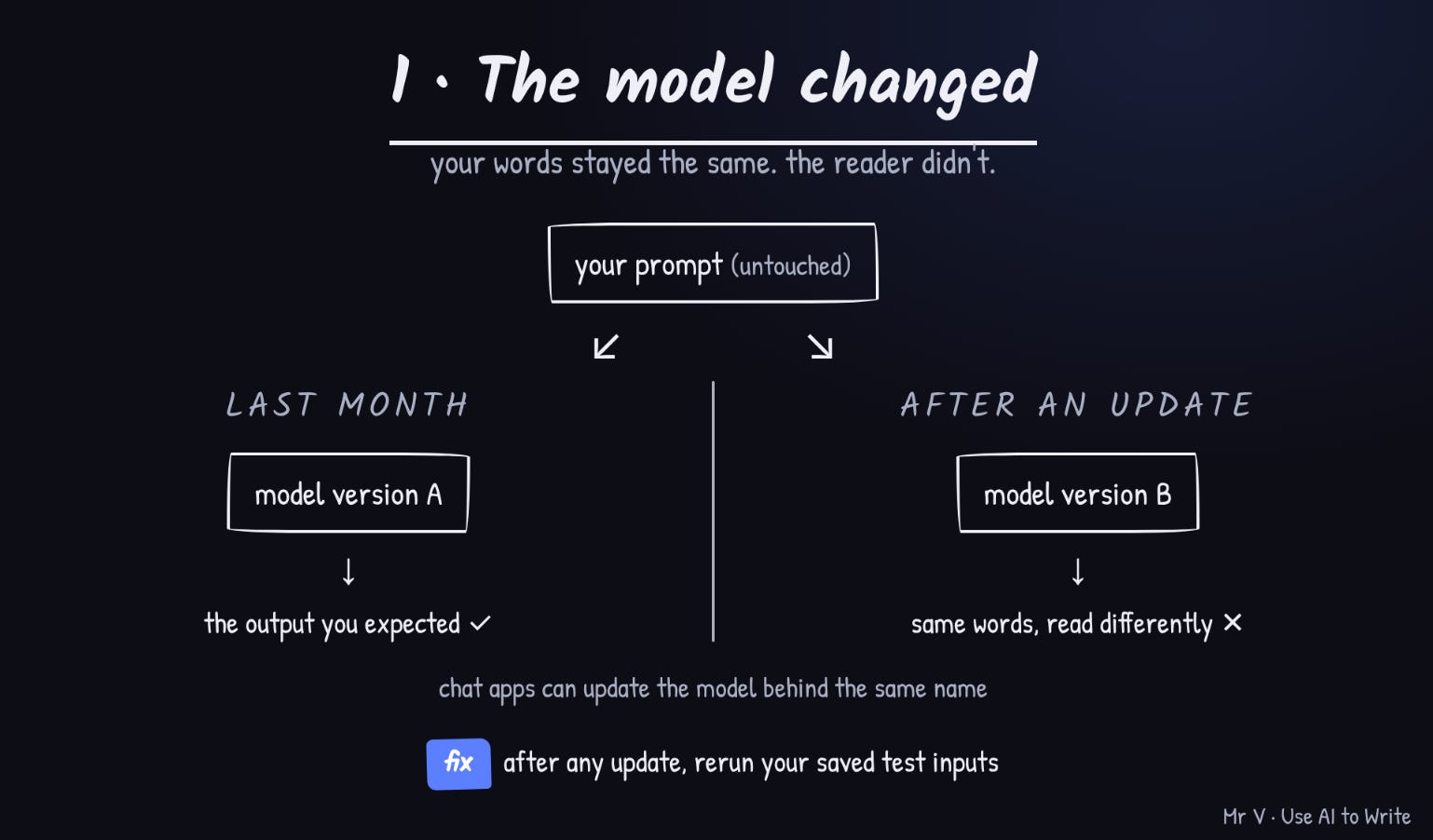
Model updates — AI models are constantly being updated, which can change how they interpret and respond to our prompts.
AI companies update their models constantly, and every update can change how your prompt gets read. As models are tuned more often and more continuously, the exact words you chose can land differently than they did last month, even though you changed nothing.
The ground moves under your prompt.
-
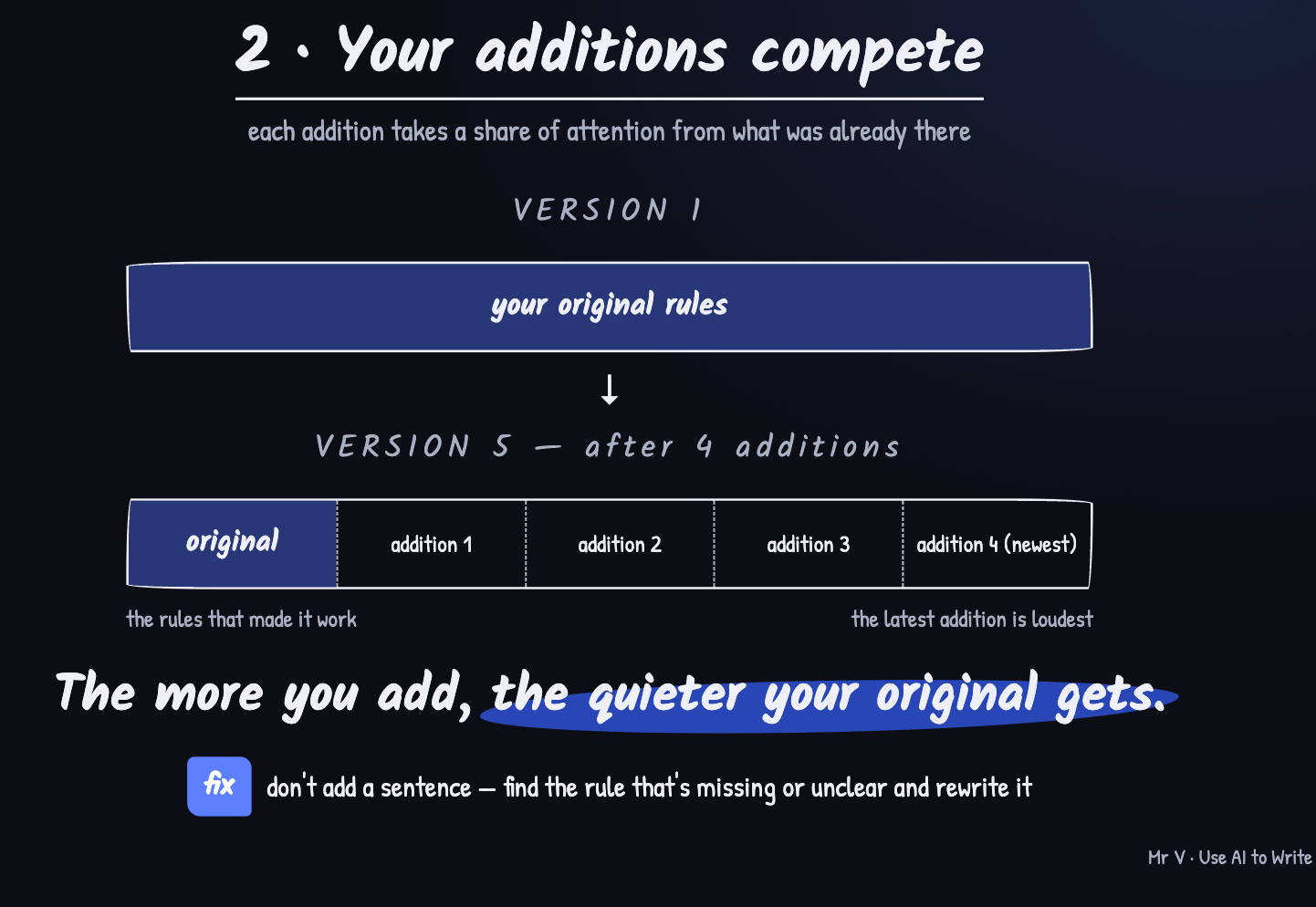
Context addition creates competition — The instructions you gave the model carry less influence as more context is added.
Meaning every instruction, example, rule, or reference material, you add in your prompt has to share the model's attention. Add enough of them and some start losing.
This happens when you keep adding substance to the prompt.
For example, imagine asking an AI to explain a topic in both a simple way for beginners and a detailed way for experts. Sounds smart, right?
Here’s the reality,
The model will spend more space adding technical detail and the beginner-friendly explanation may become shorter or less clear.
If it chooses to focus heavily on simplicity, it will leave out the deeper technical explanation.
This is also why making a prompt longer doesn’t fix it. More rules means more competition.
-
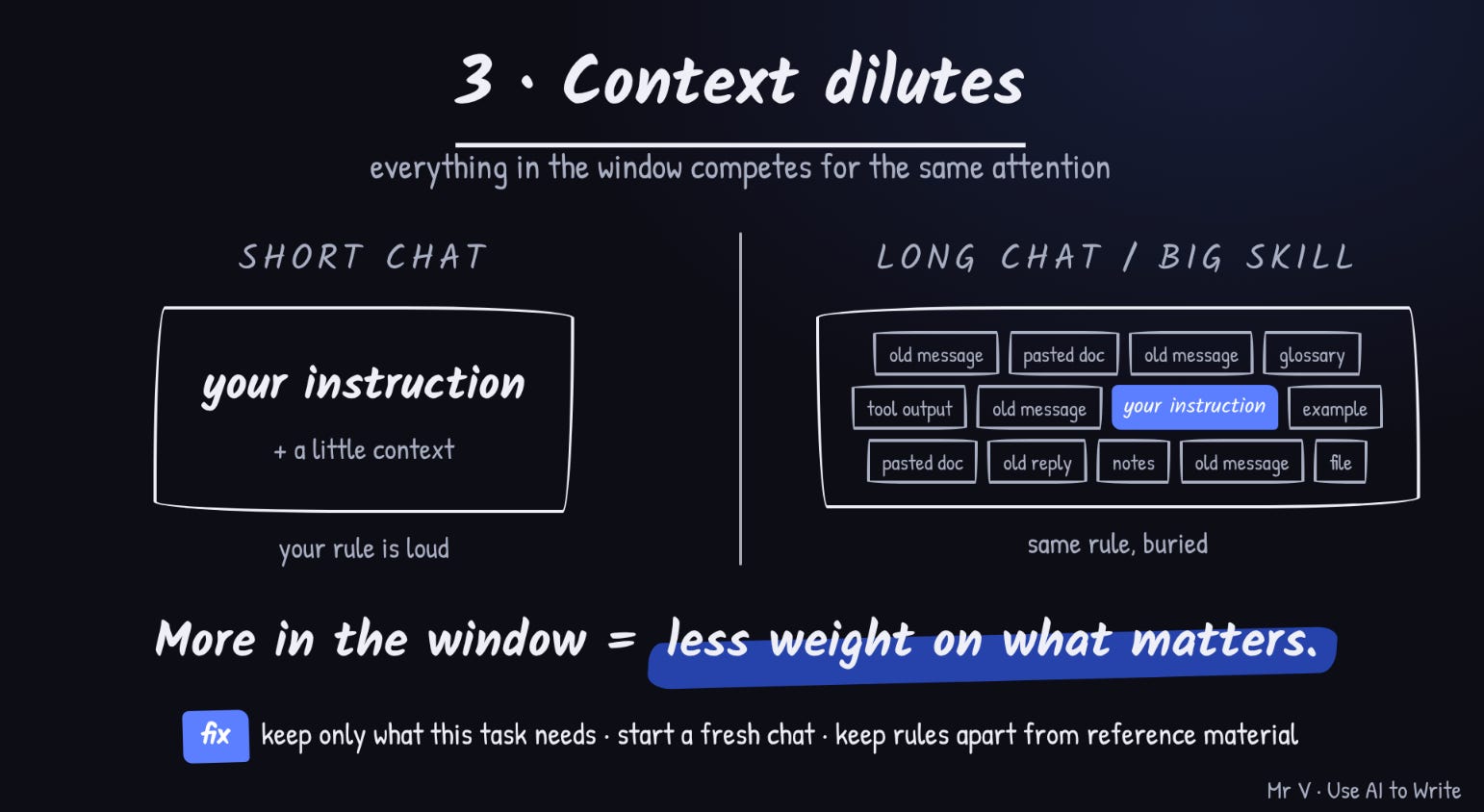
Context dilution — earlier guidance loses relative influence.
The longer you chat with the model, the more new messages pile on top of your original instructions, and the less those instructions steer the output.
This is the biggest mistake people make: They rely on the models context window to maintain behavioral state. The longer you chat, the more the focus drifts.
This one happens over time, not at writing time.
I used to love the idea of having a long conversation with a model, then asking it to turn everything we discussed into a system prompt or reusable skill.
The logic: if we spent enough time together refining the behavior, the model could capture everything important and turn it into something reusable, right?
Here’s the reality:
The model can see the context without giving every part of that context equal weight.
As the conversation gets longer, more instructions, examples, corrections, and ideas compete for influence. Some details remain available in the context, but not everything gets encoded into the prompt.
So when you ask the model to create a reusable system prompt or skill from that conversation, you’re not necessarily getting everything you engineered during the conversation.
Models struggle with long chats. This is a well-established limitation of language models. Stop relying on the model’s context window to maintain a behavioral state.
-
AI Iteration — When you hand your prompt to AI to 'improve,' it often waters down the sentences that mattered most.
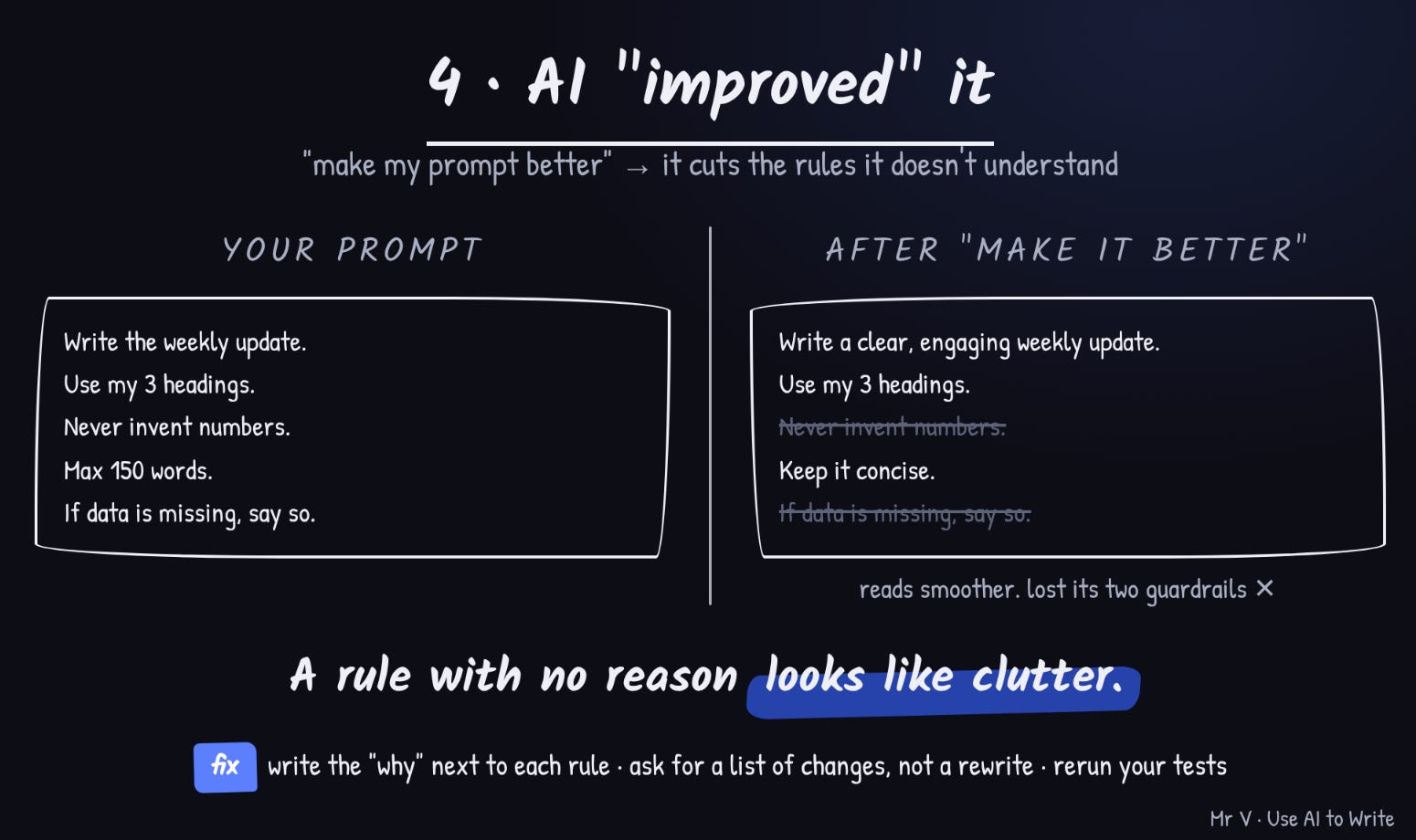
Every factor i have demonstrated here points to the same thing: you can't escape basic prompt engineering and prompt management skills.
Even if you make a skill or an Agent. These issues will likely happen over time and its best you know how to deal with them.
Meaning of prompt decay:
The original instructions for a workflow may no longer produce the same behavior as consistently as it did when the context was smaller and cleaner.
Prompts, skills, Agents they all lose their efficiency with time.
THE TWO TECHNIQUES THAT SOLVE PROMPT DECAY:
1: A META PROMPT THAT’S BUILT TO EVALUATE THE MAIN PROMPT:
A meta-prompt evaluates the main prompt.
It inspects the prompt’s instructions, structure, constraints, and intended behavior, then identifies what could cause the prompt to fail or degrade.
It asks one question:
-
“Is this prompt designed well enough to consistently produce the behavior we want?”
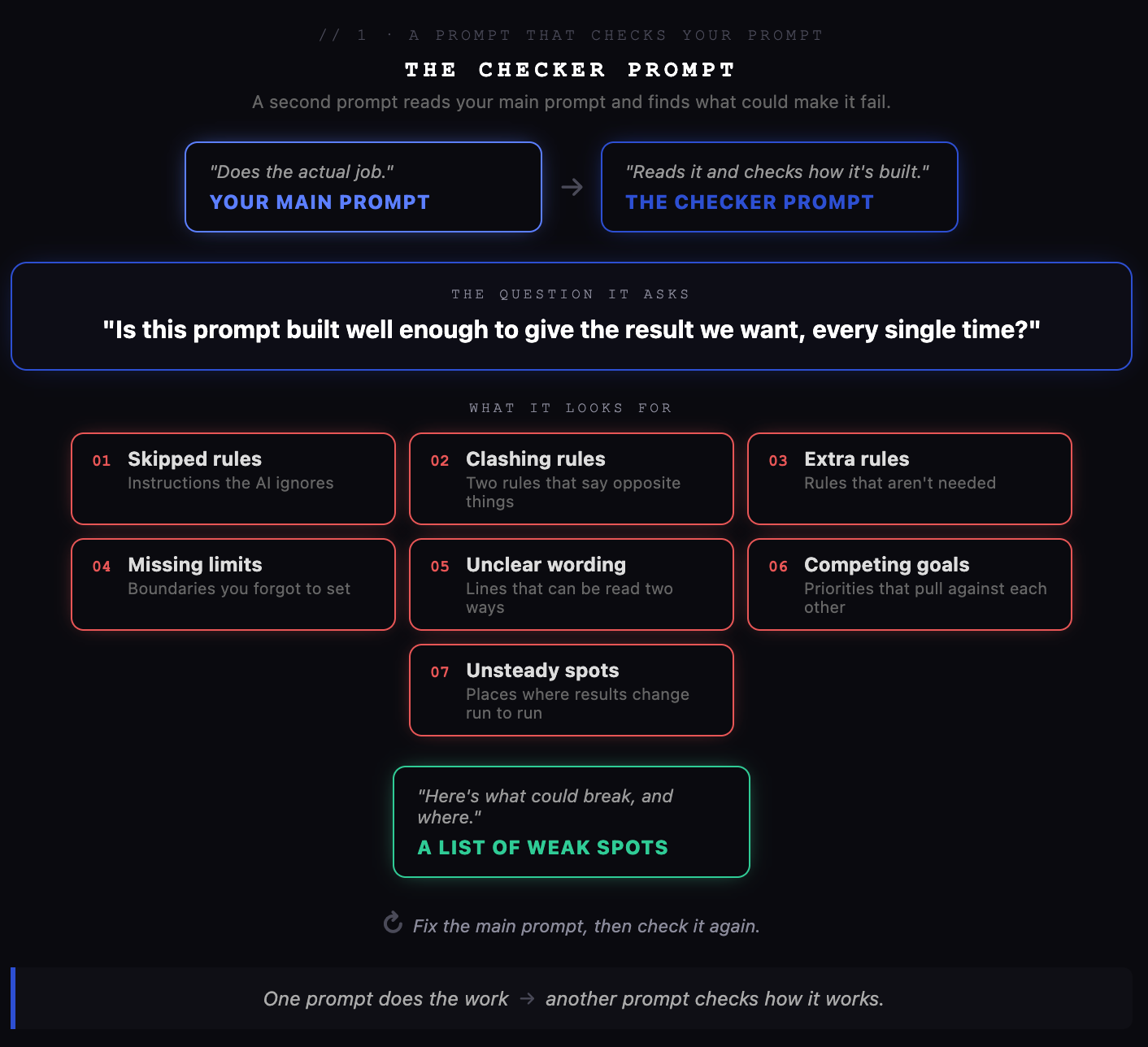
Then it looks for things like:
-
instructions that are being ignored
-
contradictions
-
unnecessary rules
-
missing constraints
-
ambiguous instructions
-
conflicting priorities
-
areas where the prompt could produce inconsistent behavior
The Checker Prompt (Meta)
Prompt:
I want you to review my prompt. Your only job is to inspect the prompt below and
find what could make it fail, drift, or give different results from one run
to the next. You do not rewrite the whole prompt, and you do not run it.

THE QUESTION YOU ARE ANSWERING:
"Is this prompt built well enough to produce the behavior we want, every time?"

CHECK FOR THESE 7 PROBLEMS:

1. Skipped rules: instructions likely to be ignored (buried, vague, stated
once in passing, or outweighed by louder instructions).
2. Clashing rules: two instructions that cannot both be followed.
3. Extra rules: instructions that add nothing, repeat others, or cover
situations that will never happen.
4. Missing limits: things the prompt never says but needs to (length,
format, tone, what to do when information is missing, what NOT to do).
5. Unclear wording: lines a reader could reasonably interpret two ways.
6. Competing goals: priorities that pull against each other with no rule
for which one wins (e.g. "be brief" vs "be thorough").
7. Unsteady spots: places where the model must guess, so results will
change from run to run.

RULES FOR YOUR REVIEW:
- Quote the exact line for every problem you raise. If you cannot point to
a line (or to a clear absence), do not raise the problem.
- Mark each finding as CONFIRMED (the text clearly shows it) or POSSIBLE
(it could happen, but depends on how the model reads it).
- For "Skipped rules": if no sample outputs are provided, you are predicting,
not observing. Mark those findings POSSIBLE.
- Do not invent problems to fill a category. "None found" is a valid answer.
- For each fix, suggest the smallest change that solves it. Do not add new
rules unless something is genuinely missing.

OUTPUT FORMAT:

## Verdict
One sentence: ready to use / needs small fixes / needs major fixes.

## Findings
For each problem:
- Category: (one of the 7)
- Status: CONFIRMED or POSSIBLE
- Line: "exact quote" (or "Missing: ...")
- Why it matters: one sentence on what could go wrong
- Smallest fix: the exact wording change

## Top 3 fixes
The three changes that would make the biggest difference, in order.

## What's working
Two or three parts of the prompt that are clear and should not be changed.

---

MAIN PROMPT TO REVIEW:
<prompt>
[paste your main prompt here]
</prompt>

OPTIONAL — SAMPLE OUTPUTS FROM THAT PROMPT:
<outputs>
[paste 1–3 real outputs here, or leave empty]
</outputs>
One prompt does the work → another prompt checks how it works.
2: A SYSTEM BUILDER: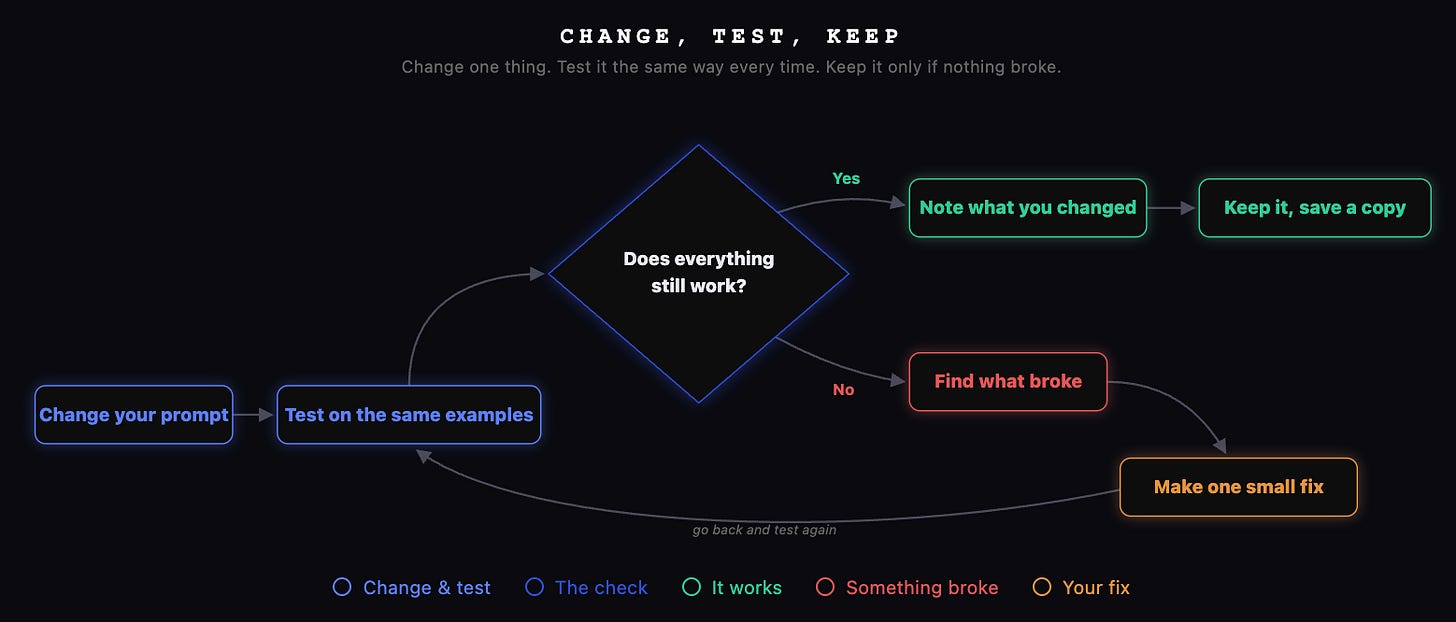
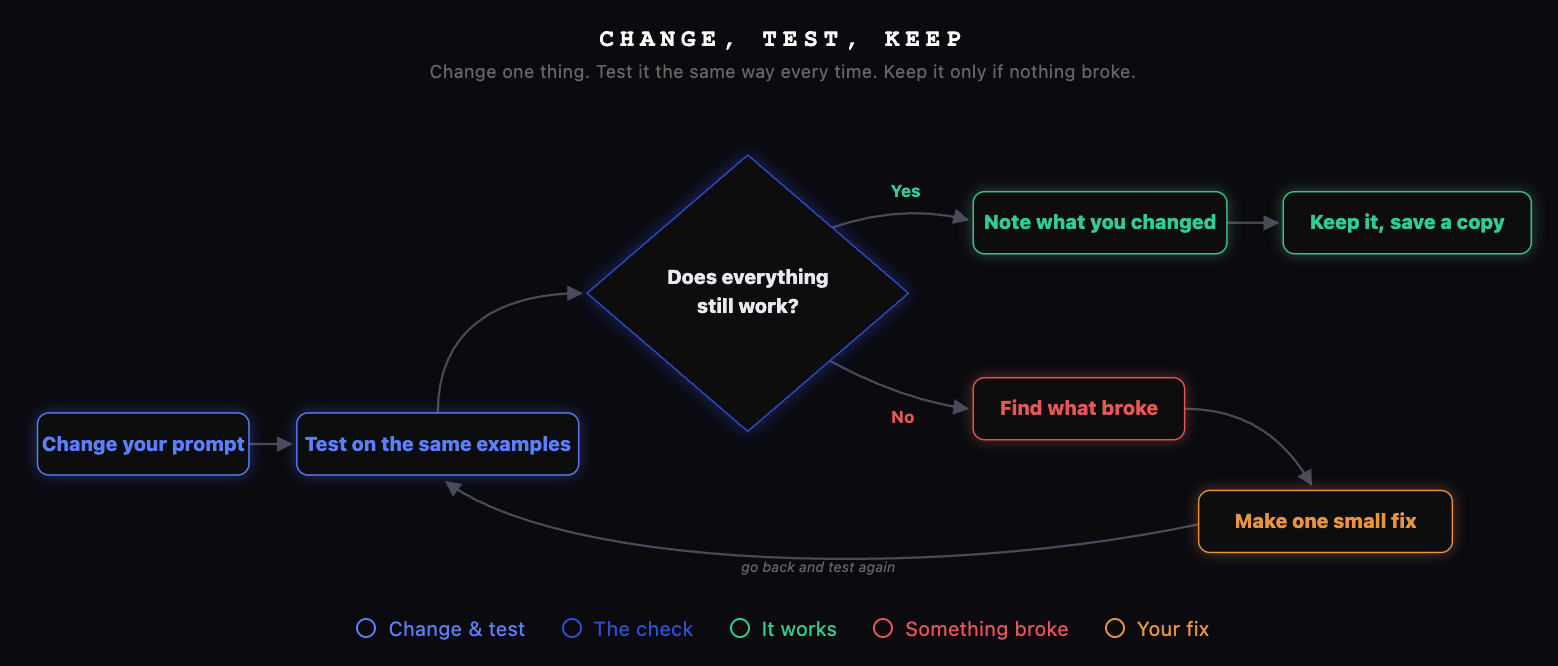
A system builder takes that idea one step further.
**1/ Prompt → does the work
2/ Meta-prompt → evaluates the prompt
3/ System Builder → maintains the whole system**
So instead of:
→ prompt → output → manually fix the prompt → output → fix again
You get:
prompt → output → evaluate against good examples → identify gaps → improve → test again.
Prompt to use:
Your job is to make one prompt produce the same quality it produced at its best. You do this by
comparing new outputs against a library of proven good outputs, tracing
every gap back to the prompt, and proposing the smallest fix.

The good examples are the standard.

Do not rewrite the prompt from scratch. Do not judge outputs by
your own taste.

STEP 1 — BUILD THE STANDARD
Read the gold library. List 4–8 traits that ALL the gold outputs share
(structure, tone, length, specificity, format, what they avoid).
For each trait, quote a short line from a gold output that shows it.
Only list traits you can quote. Do not invent a standard the examples
don't show.

STEP 2 — SCORE THE NEW OUTPUTS
For each new output, score every trait:
- MATCH: the trait is clearly present
- DRIFT: the trait is present but weaker or inconsistent
- MISSING: the trait is absent
Quote the evidence for every DRIFT or MISSING.

STEP 3 — TRACE EACH GAP TO THE PROMPT
For every DRIFT or MISSING, point to the prompt line that should have
produced that trait. Quote it. If no line covers it, write
"Missing: the prompt never asks for this."
Then tag the likely cause as one of:
- BURIED: the line exists but is outweighed by other instructions
- CONFLICT: another line pulls against it
- ABSENT: the trait was never in the prompt; the gold outputs got lucky
- UNKNOWN: the prompt looks fine; the change may come from a model update
Mark the cause as a guess unless the text clearly proves it.

STEP 4 — PROTECT WHAT WORKS
List the prompt lines that most directly produced the gold traits.
These are PROTECTED. Never reword, shorten, or "smooth out" a protected
line in your fixes.

STEP 5 — PATCH
For each gap, give the smallest change that fixes it:
- Line to change: "exact quote" (or "Add after: ...")
- New wording: the exact replacement
- Fixes: which trait
Do not add a rule unless a gap requires it. If you add a line, say what
it might crowd out. If every trait is a MATCH, say "No changes needed"
and stop.

STEP 6 — TEST PLAN
Give 3 test inputs to re-run the patched prompt on: one normal, one
edge case, one that previously failed. For each, state what a passing
output must contain, using the traits from Step 1.

STEP 7 — CHANGELOG
Write a version entry:
[next version] | Changed: [lines] | Why: [gaps fixed] | Protected: [lines]

OUTPUT FORMAT:
## Standard (Step 1)
## Scorecard (Step 2): a table of traits × outputs
## Gap trace (Step 3)
## Protected lines (Step 4)
## Patches (Step 5)
## Test plan (Step 6)
## Changelog (Step 7)

INPUTS:

<main_prompt>
[paste the prompt or skill you are maintaining]
</main_prompt>

<gold_library>
[paste 2–5 of your best past outputs from this prompt. Under each one,
add one line: "Why this is good: [your reason]"]
</gold_library>

<new_outputs>
[paste 1–3 recent outputs that feel off, or that you want to check]
</new_outputs>

<checker_report>
[optional: paste the Checker Prompt's findings, or leave empty]
</checker_report>

<version>
[current version number, e.g. v1.3, or "none yet"]
</version>
If you document your best AI outputs, that documentation itself becomes the foundation for building a working system.
The model can use that reference to evaluate new outputs and help reconstruct the prompt or skill.
If you want me to build this system for you, let me know.
Resources used:
-
1/ Model update
-
-
-
-
5.0/ System Builder(Anthropic’c guide)
-
5.1/ System Builder
Hope this helps.
Mr V.