Most AI tools wait for prompts. I tested whether MyClaw could run a recurring research workflow and send useful updates before I asked.
By Youssef Hosni
Published: 2026-07-13
URL: https://todatabeyond.substack.com/p/i-used-myclaw-to-build-a-research
Most AI tools are useful only after you open them, explain the task, and ask the right question. In this article, I tested MyClaw from a different angle: not as another chatbot, but as a scheduled research assistant that can run a recurring workflow and send the result to Telegram.
The workflow was simple: discover relevant updates, summarize long technical material, and turn the output into follow-up questions or next steps. I used MyClaw to test whether this kind of assistant can reduce the repetitive setup work in research, especially the daily loop of checking sources, scanning for updates, and rebuilding the same prompt structure.
The main takeaway is that MyClaw is most useful when the task is recurring, structured, and worth receiving as a message. It does not replace research judgment, and the output still needs review, but it can give you a prepared starting point instead of another blank browser tab.
The value is not that the assistant answers one question. The value is that it can keep a useful research workflow running.
Table of Contents:
- The Problem: Research Work Is Repetitive
- Why I Tested MyClaw
- The Workflow: Discover → Understand → Act
- Testing the Research Assistant
4.1. The Scheduled Research Briefing
4.2. Long Document Summarization
4.3. From Summary to Next Steps
- Where MyClaw Felt Different From ChatGPT
- Final Takeaway
I’m hosting a 3-hour live workshop on Hands-On Loop Engineering with Claude.
We will build Claude loops with persistent state, verification, scheduling, and safer permissions, then apply the pattern to real coding, research, and automation workflows.
1. The Problem: Research Work Is Repetitive
Research rarely fails because there is not enough information. It usually fails because there is too much of it. Every week, there are new papers, product releases, benchmarks, GitHub repos, technical posts, and opinion pieces. Some are important.
Most are not. The actual work is not only reading. It is deciding what deserves attention, extracting the useful parts, and turning them into something you can use later.
For me, this usually turns into a repeated loop:
- check a few sources
- open too many tabs
- skim updates
- save links
- summarize what seems relevant
- decide what is worth reading deeply
- turn the useful parts into notes, ideas, or follow-up questions
None of these steps is difficult on its own. The problem is that the loop repeats constantly.
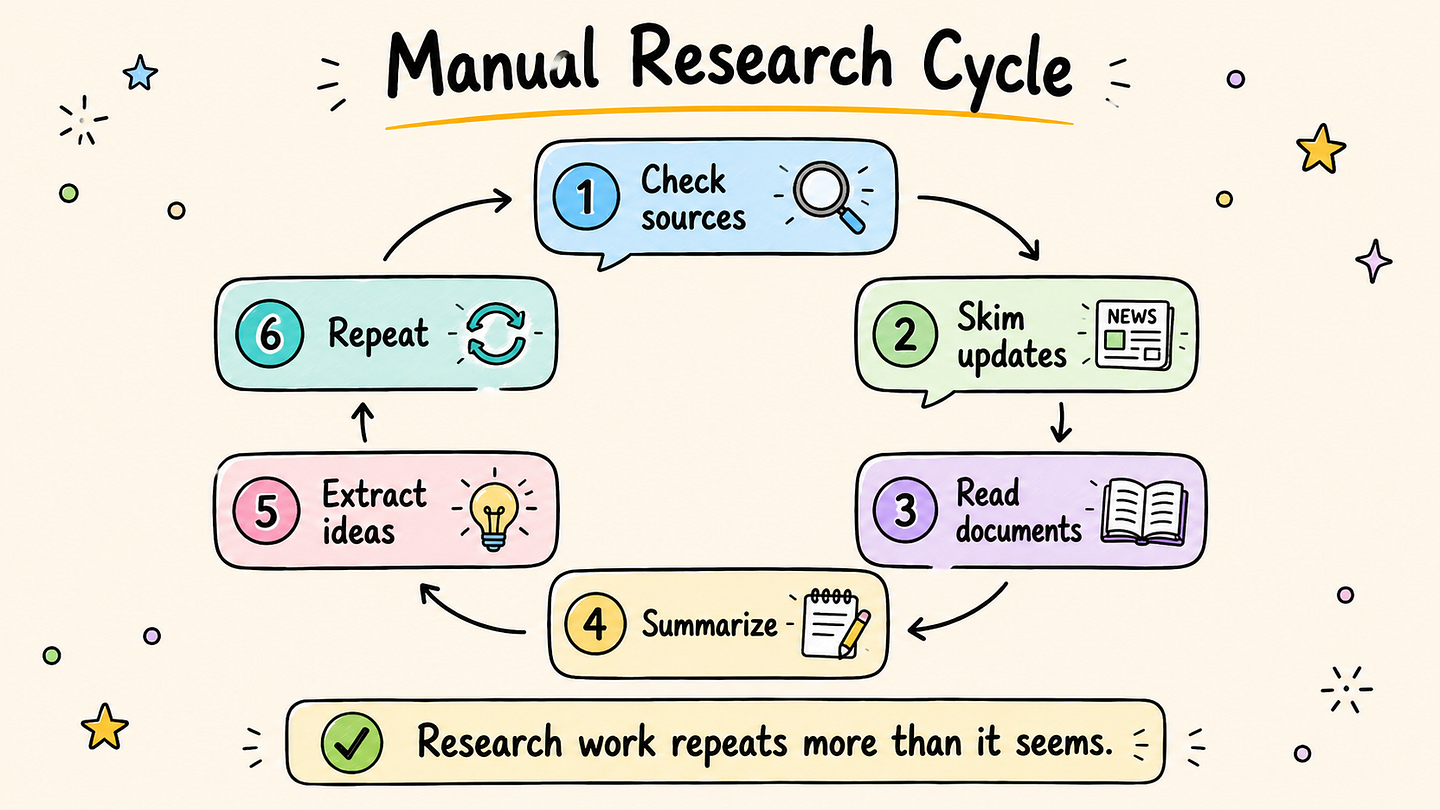
\Figure 1.manual research cycle: Check sources → skim updates → read documents → summarize → extract ideas → repeat\
AI tools already help with parts of this workflow. I can paste a paper into ChatGPT or Claude and ask for a summary. I can ask for key claims, limitations, or content ideas. That is useful, but it still depends on me starting the process every time.
I still need to open the tool, write the prompt, provide the context, and decide what to ask next.
That is the part I wanted to test differently.
Instead of using AI as a research tool that waits inside a browser tab, I want to make it behave more like a small research assistant: something that runs on a schedule, prepares a useful briefing, and sends it to me where I already check messages.
The real bottleneck is not summarization. It is restarting the same research workflow again and again.
That is why I tested MyClaw around a specific use case: building a research assistant that sends updates to Telegram. The goal was not to see whether it could answer a question. Most AI tools can do that.
The goal was to see whether it could support a recurring research workflow: discover useful updates, summarize long material, and turn the output into next steps.
In other words, I wanted to test whether an AI assistant could help before I asked it anything.
2. Why I Tested MyClaw
Most AI assistants are still built around the same pattern: open a chat window, explain the task, wait for the answer, and repeat the process later. That works for one-off questions. It is less effective for workflows that come back every day or every week.
For this test, I used MyClaw, which hosts OpenClaw and Hermes agents in the cloud. You pick the runtime, connect a channel, and get finished work without local setup. For this test, I used it as a scheduled research assistant that delivers to Telegram.
What made it worth testing was not the chat interface itself. It was the combination of three things: scheduled tasks, persistent context, and messaging-based delivery.
I wanted to know whether this could make research work feel less manual. Instead of opening a browser tab every morning and asking for updates, could I define the workflow once and receive a useful briefing automatically?
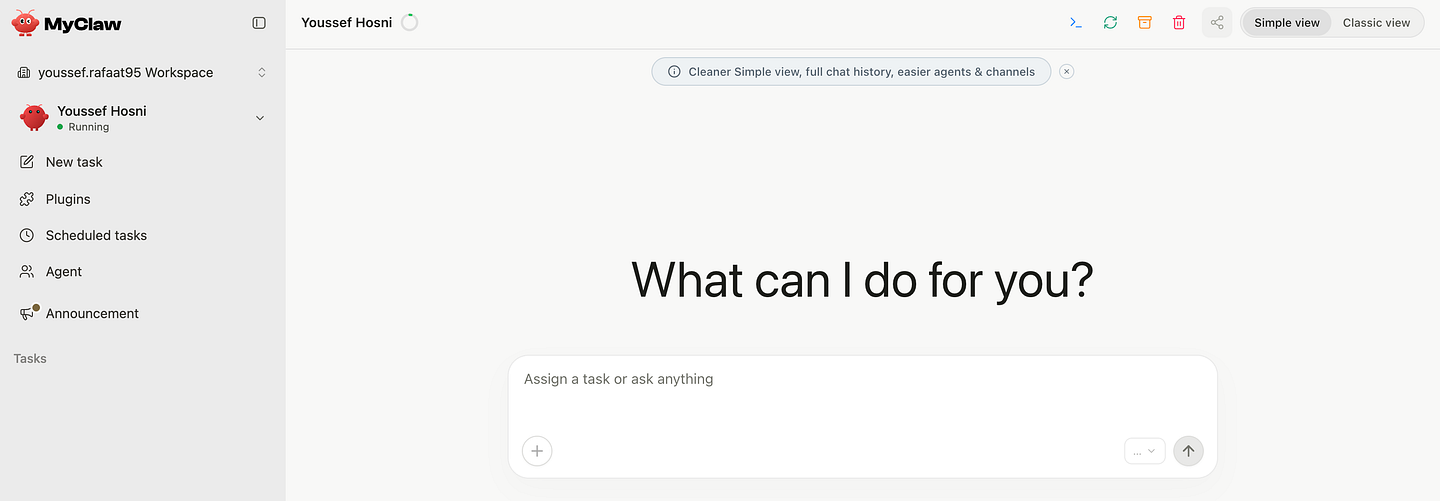
\Figure 2.MyClaw home screen.\
Then, to connect to Telegram, I opened the messaging integration inside MyClaw, selected Telegram as the delivery channel, and followed the connection steps shown in the dashboard.
The process is similar to connecting any assistant to a messaging app: choose the channel, authorize or start the bot, and confirm that MyClaw can send messages to the right chat.
Once the connection was active, Telegram became the place where the research assistant could send scheduled briefings instead of keeping the workflow inside another browser tab.
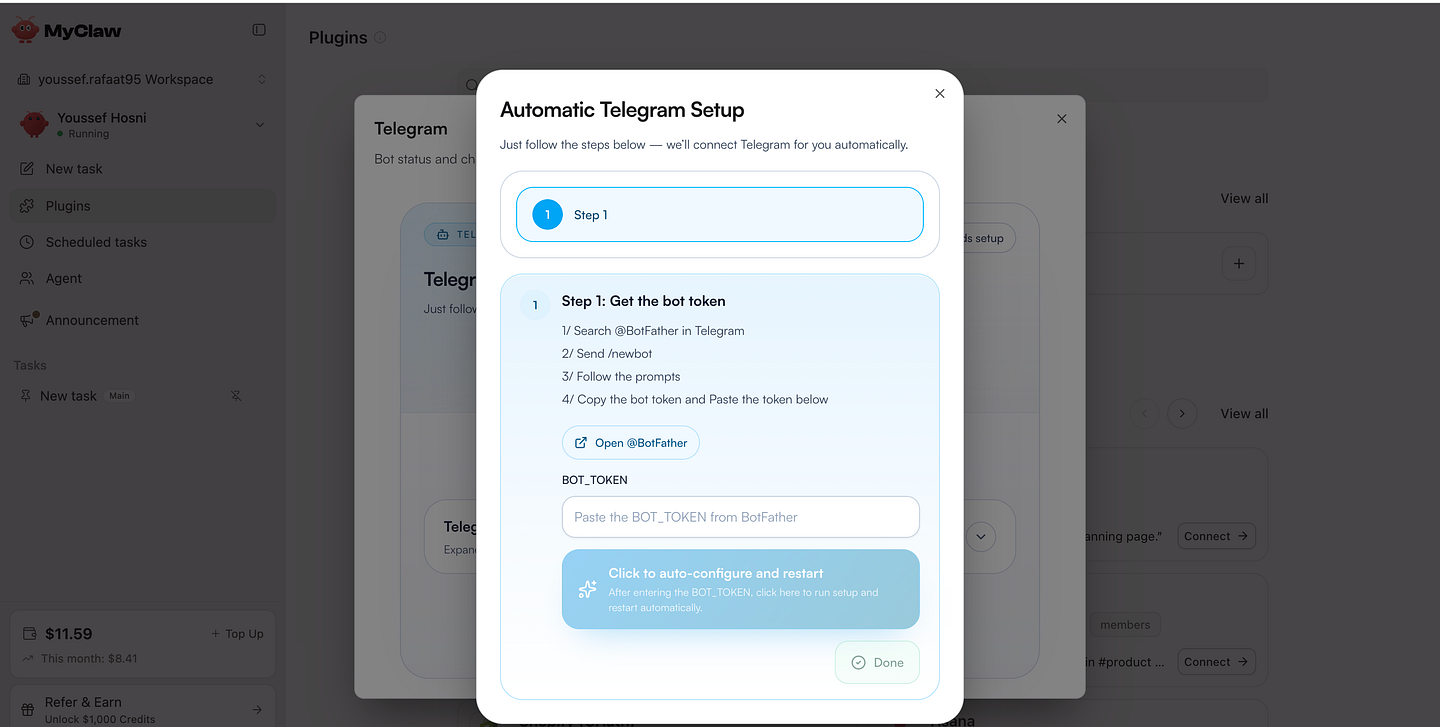
\Figure 3.Telegram connection screen.\
The setup was simple enough that it did not need to become the main story. The more important test was what happened after setup: whether MyClaw could run a recurring research workflow without me restarting it every time.
The useful question is not “Can this AI answer me?” It is “Can it keep a workflow running when I am not actively prompting it?”
That is why I focused on a research assistant use case. Research has enough repetition to benefit from automation, but it still requires enough judgment that the output should be reviewed. That makes it a good middle ground: practical, repeatable, and easy to evaluate.
The workflow I tested had three parts:
- Find relevant updates.
- Summarize long research material.
- Turn the output into next steps.
In other words, I wanted MyClaw to support the research loop from discovery to action, then send the result to Telegram, where I would actually see it.
3. The Workflow: Discover → Understand → Act
I did not want to test MyClaw with a vague task like “help me with research.” That kind of prompt usually produces a broad answer, but it does not reflect how research actually works.
Research is a workflow, not a single request. You first discover what is worth looking at, then you understand the material, and finally you decide what to do with it.
So I structured the test around three steps:
- Discover: find relevant updates, papers, product releases, or technical discussions.
- Understand: summarize the useful material in a format that keeps the important details.
- Act: turn the summary into follow-up questions, notes, content ideas, or next steps.
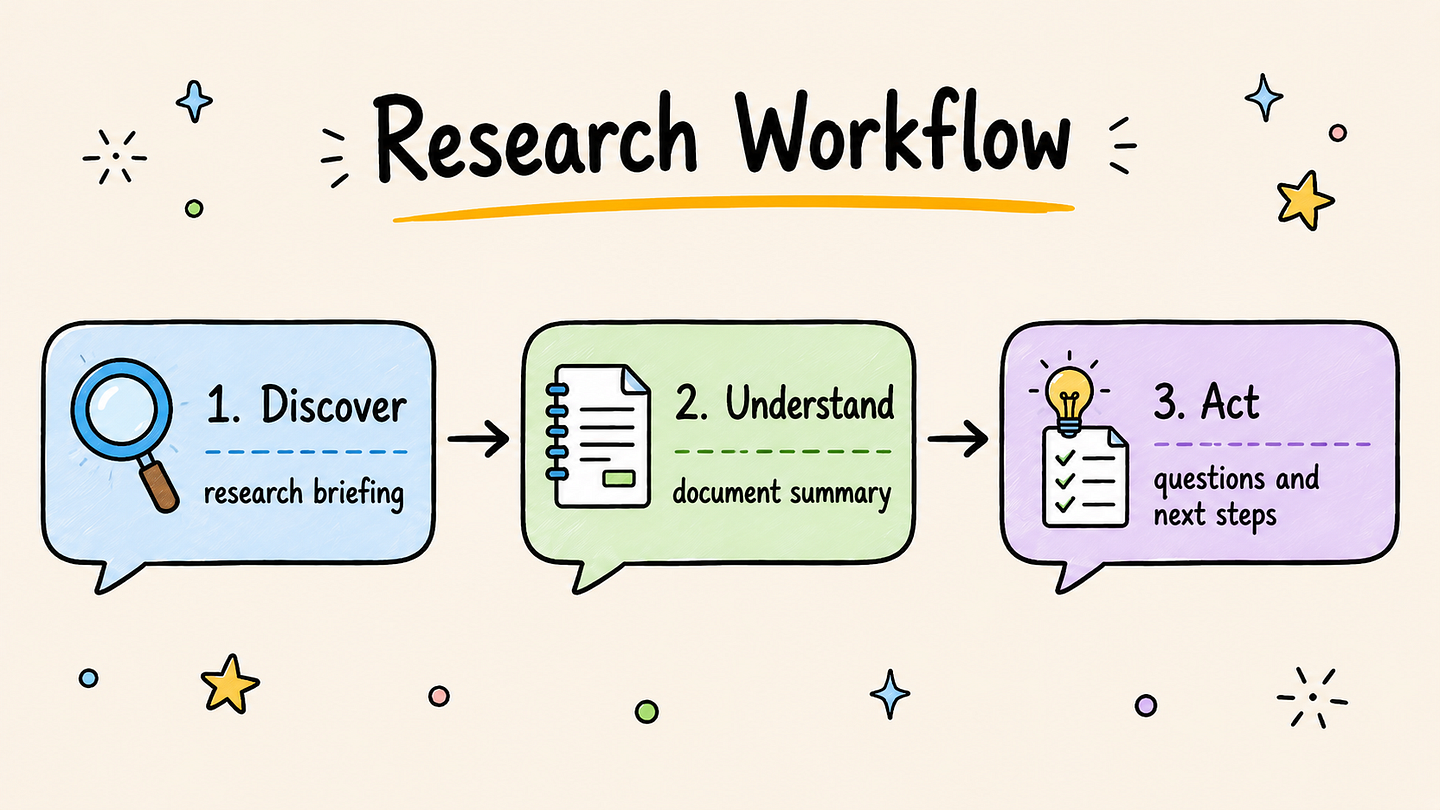
\Figure 4.Research workflow.\
This structure made the test easier to evaluate. I was not only checking whether MyClaw could produce a good answer. Could it support a repeated research process from the first signal to something I can reuse later?
A useful research assistant should not stop at summarization. It should help move from information to decisions.
Inside MyClaw, this workflow was defined as a scheduled research task. The important part was the instruction format. I wanted the assistant to send a briefing that was short enough to read quickly, but structured enough to be useful later.
The prompt I used followed this structure:
You are my research assistant.
Every day, prepare a short AI research briefing and send it to me on Telegram.
Focus on:

- important AI research updates

- new technical papers

- product or model releases

- practical ideas worth investigating
Return the briefing in this format:
1. Top updates
2. Why each update matters
3. Technical details worth noticing
4. What to read next
5. Follow-up questions
6. Possible content angles
After writing the instructions, I attached the task to a schedule. This is the part that made the test different from using a normal chatbot. I was not planning to open the assistant manually every morning. I wanted the workflow to run on its own and send the result to Telegram.
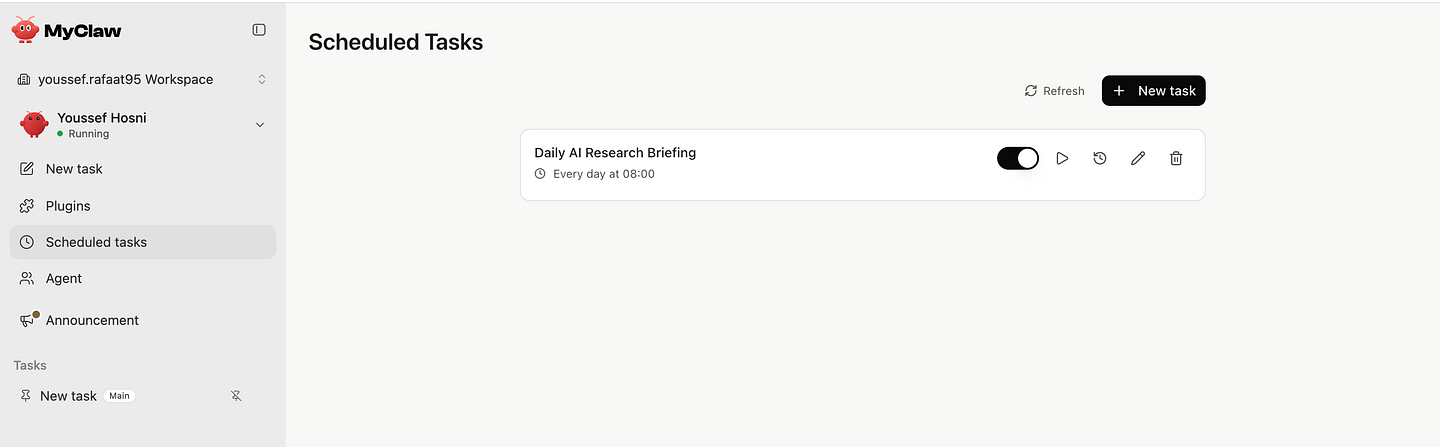
\Figure 5.The scheduled tasks.\
For the first part, I wanted a scheduled briefing that could be delivered via Telegram without me having to open a browser. For the second part, I wanted to test whether it could summarize a long technical document without flattening it into a generic overview. For the third part, I wanted the assistant to extract follow-up questions and possible content angles.
This gave me a practical baseline: if the workflow only produced a summary, it was not enough. The output had to help me decide what deserved deeper attention.
4. Testing the Research Assistant
Once the workflow was defined and scheduled, I tested MyClaw across three parts of the research loop: the briefing, the document summary, and the next-step extraction.
I was not looking for a perfect autonomous researcher. That is not a realistic benchmark. I wanted to see whether the assistant could produce a useful first version of the work: something structured enough to review, edit, and reuse.
A. The Scheduled Research Briefing
The first test was the scheduled briefing. This is the workflow that best shows the difference between a chatbot and a scheduled assistant. With ChatGPT or Claude, I usually need to start the task myself. With MyClaw, the task was already configured to run and send the result to Telegram.
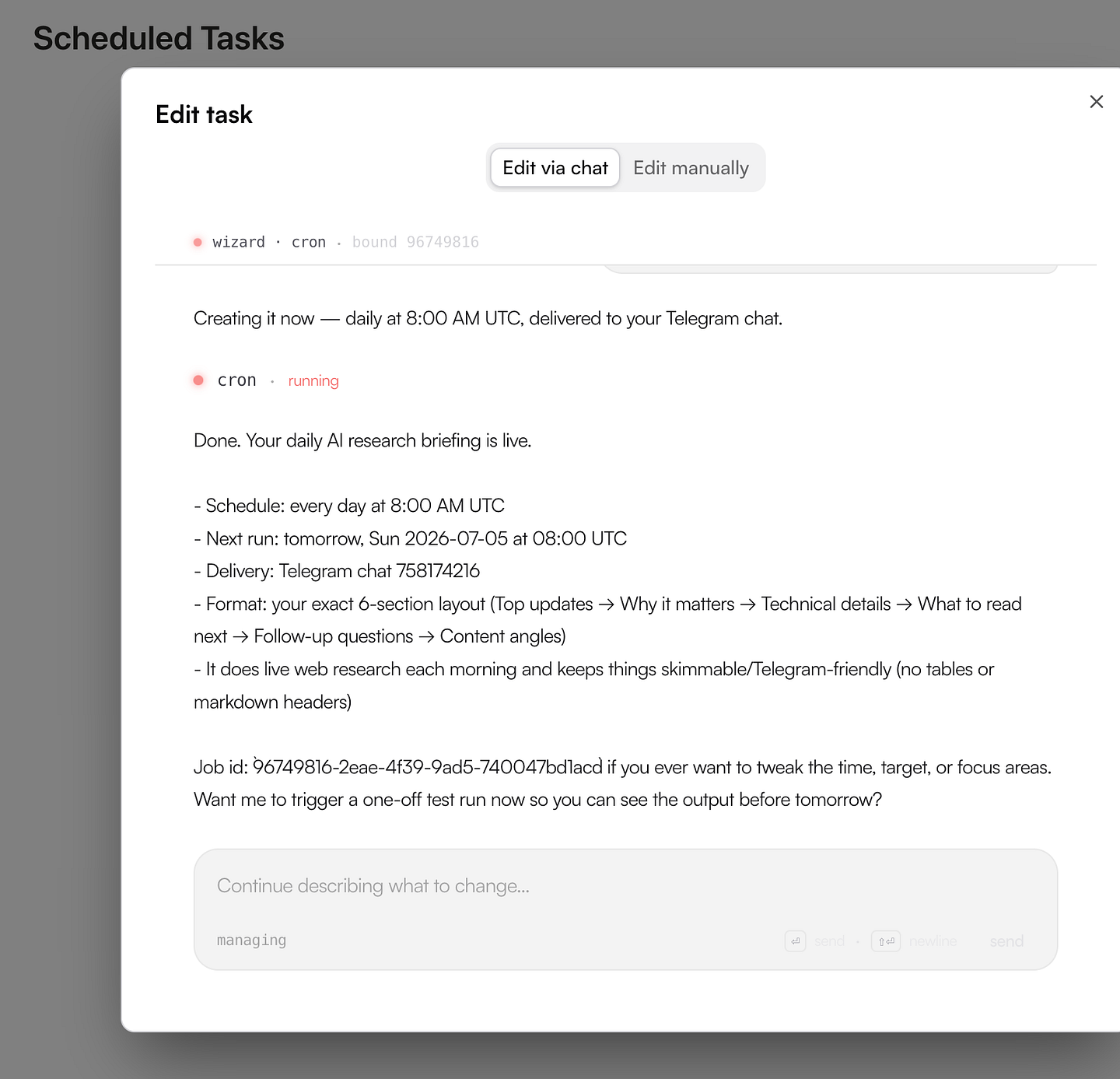
\Figure 6. Scheduled task setup inside MyClaw.\
The output I wanted was not a long report. For a daily briefing, too much detail becomes noise. The useful format was short and structured: a few updates, why they matter, technical notes, and follow-up questions.
The daily briefing is a starting point rather than verified news, and you should still verify important information with the original sources. It would also be helpful to note that the quality of the briefing depends on the model and credits used.
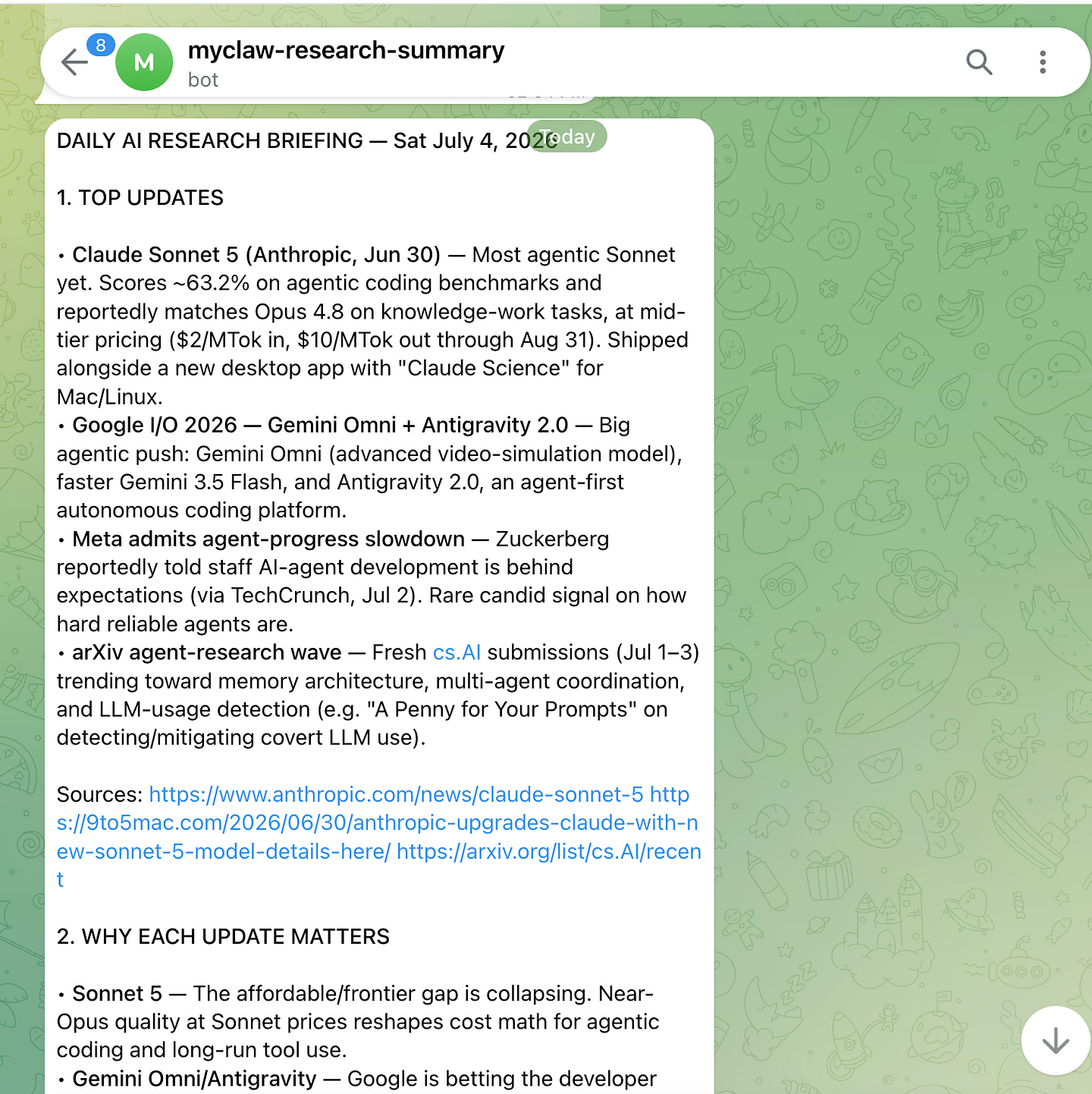
\Figure 7.The delivered research briefing to Telegram.\
The result worked best as a starting point. It gave me a compact view of what to inspect, but I still needed to verify the sources and decide what deserved deeper reading.
The value of the briefing is not that it replaces research judgment. It reduces the empty setup work before judgment starts.
That distinction matters. I do not want an automated agent deciding what is true for me. I want it to prepare a cleaner first pass so I can spend less time collecting inputs and more time evaluating them.
B. Long Document Summarization
The second test was a long technical document. For this part, I wanted to check whether MyClaw could produce something closer to a research note, not just a compressed abstract. A useful summary should keep the technical idea, separate claims from evidence, and point out what still needs review.
I used this structure:
Summarize this document for a technical reader.
Return:
1. One-paragraph overview
2. Core technical idea
3. Key claims
4. Evidence used
5. Limitations
6. Practical implications
7. Questions worth investigating
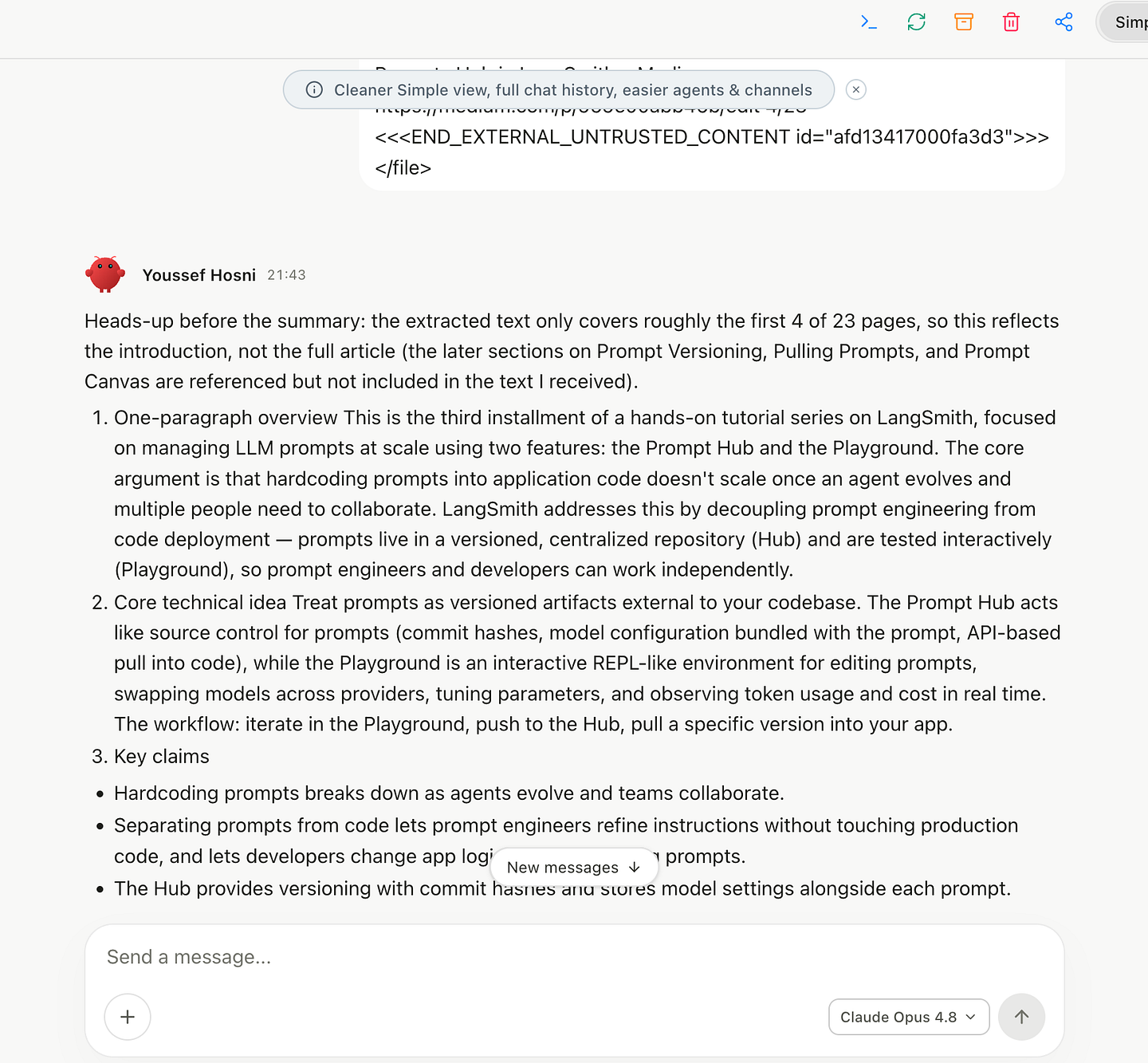
\Figure 8.MyClaw summary output\
This is where the quality of the output matters more than the length. A long answer is not automatically useful. What I wanted was a summary that helped me decide whether the document deserved more attention.
The strongest summaries were the ones that did three things: explained the main idea clearly, preserved the technical details, and made the uncertainty visible.
C. From Summary to Next Steps
The final test was turning the summary into something actionable. This is usually where research workflows become messy. After reading a paper or technical post, I often need to decide what to save, what to investigate later, and whether the idea can become a blog section, experiment, or newsletter topic.
So I asked MyClaw to convert the summary into:
1. Follow-up questions
2. Related topics to investigate
3. Possible blog angles
4. Practical next steps
5. Open questions or uncertainties
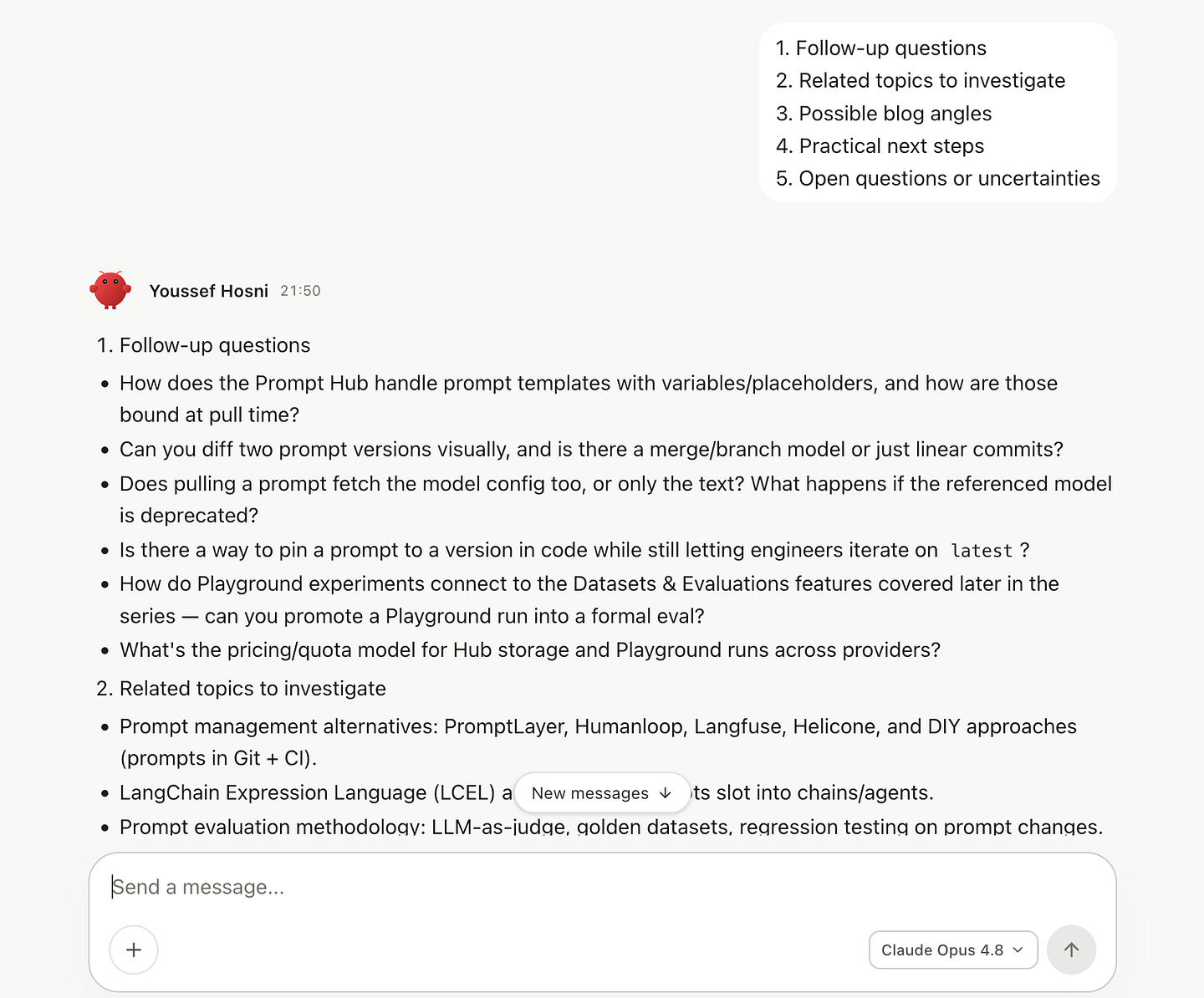
\Figure 9.Follow-up extraction output.\
This was useful because it moved the workflow beyond summarization. The output was not final, but it gave me options: what to read next, what to verify, and what could become a future piece of content.
A research assistant becomes more useful when it helps you decide what to do after the summary.
By the end of the test, the workflow was simple:
scheduled briefing → document summary → follow-up actions → Telegram delivery
That simplicity is the point. The workflow does not need to be complicated to be useful. It only needs to remove enough repeated setup work that the researcher can spend more time on evaluation and less time rebuilding the same process.
5. Where MyClaw Felt Different From ChatGPT
ChatGPT is still strong when I want to think through an open-ended question, test an idea, or explore a technical topic interactively. The difference I noticed with MyClaw was not model intelligence. It was the workflow around the model.
ChatGPT is useful when I start the task.
MyClaw is useful when the task should run even if I do not start it manually.
That difference matters for research work. A lot of the value comes from repetition: the same briefing every morning, the same summary format, the same follow-up structure, and the same delivery channel. If I have to rebuild that workflow every time, the assistant is helping with the answer but not with the process.
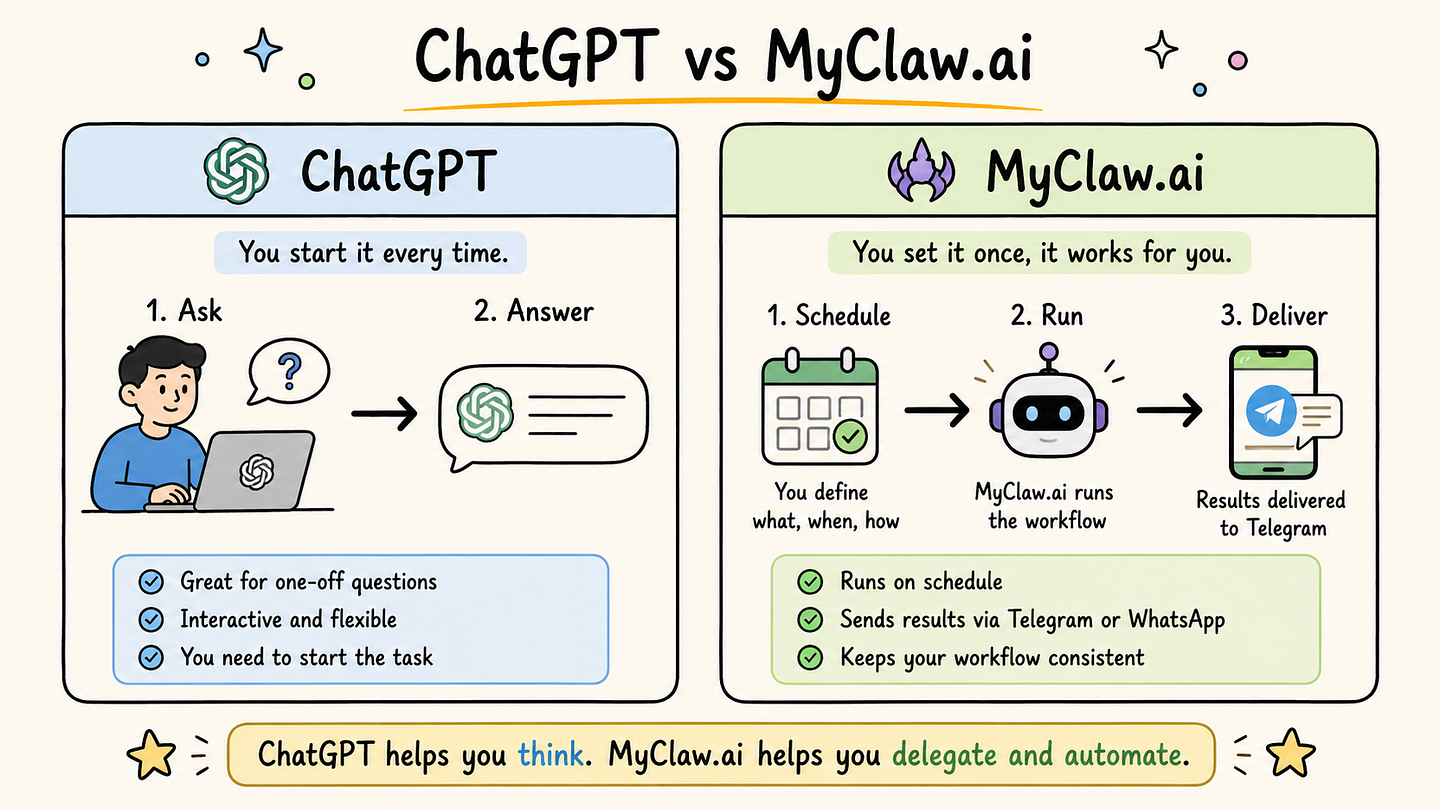
\Figure 10.MyClaw vs ChatGPT comparison.\
The Telegram delivery also changed how the workflow felt. A browser tab is easy to ignore. A message is harder to miss. For a scheduled briefing, that matters because the goal is not to create another place to check. The goal is to bring the output into a place I already use.
This does not make every task better as an automated task. Some research questions need deep back-and-forth reasoning. Some summaries need careful manual reading. Some decisions should not be delegated at all.
But for recurring research workflows, the pattern is different.
The advantage is not that MyClaw gives better one-off answers. The advantage is that it can turn a repeated prompt into a running workflow.
That is the main distinction I would make:
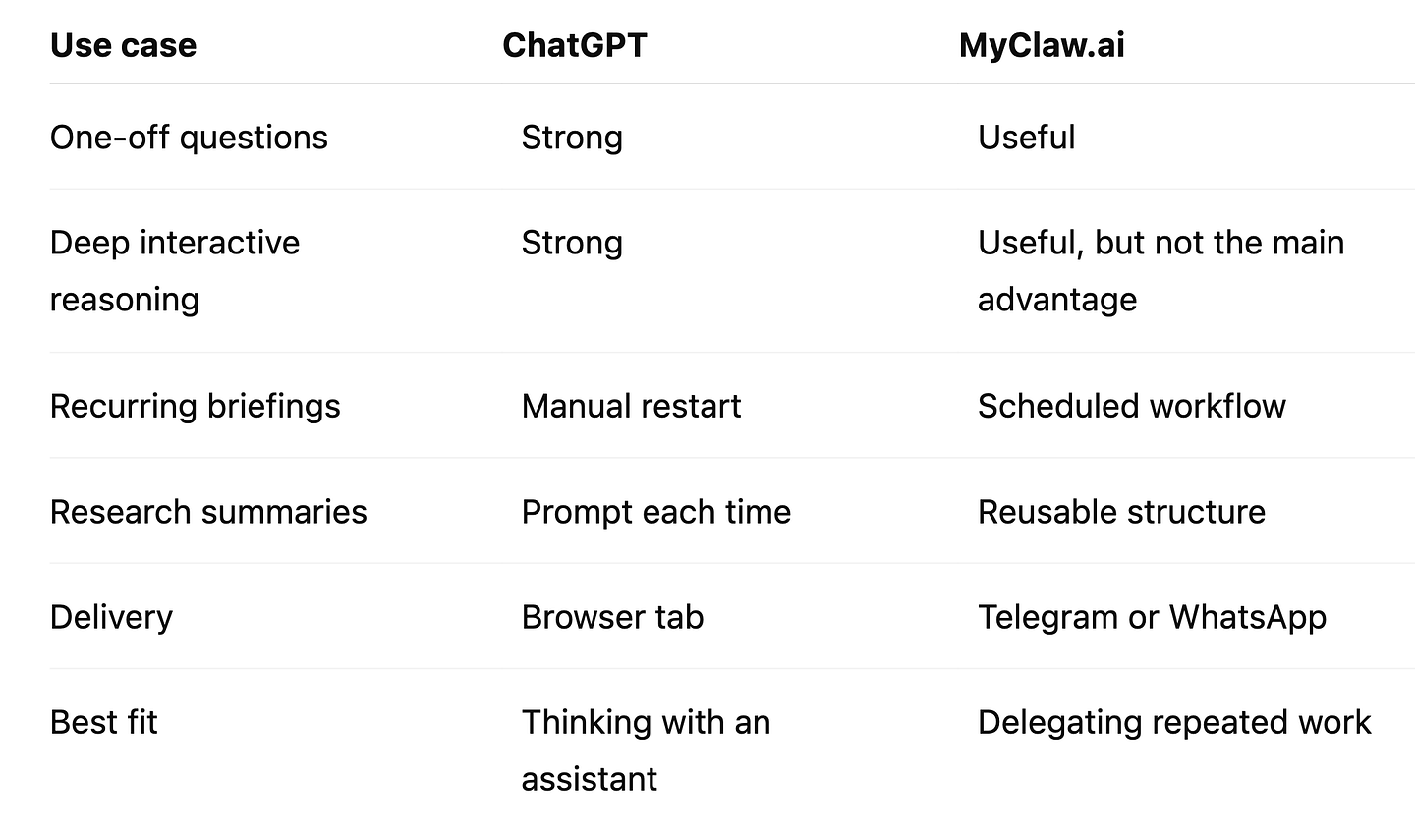
\Table 1. MyClaw vs ChatGPT use cases.\
This is why the research assistant use case made sense. It did not require full autonomy. It only required a clear workflow, a schedule, and a useful output format.
For me, that is the better way to think about tools like MyClaw: not as smarter chatbots, but as a way to move repeated AI work out of the browser and into a scheduled workflow.
6. Final Takeaway
After testing MyClaw as a research assistant, the clearest value was not in replacing my research process. It was in making the repeated parts easier to start.
The scheduled briefing gave me a first pass before I opened a browser. The document summary helped turn long material into a structured note. The follow-up extraction made the output easier to reuse for questions, writing ideas, or deeper reading.
None of this removes the need for review. For research work, I still want to verify sources, check claims, and decide what matters myself. But that is also the point. I do not want an AI assistant to replace judgment. I want it to reduce the setup work before judgment begins.
MyClaw is most useful when you stop treating it like a chatbot and start treating it like a scheduled workflow assistant.
For one-off questions, I would still use ChatGPT or Claude. For recurring tasks, the interaction model matters more. If the same research briefing, summary format, or follow-up structure needs to happen every day or every week, it makes sense to define it once and let it run.
That is where MyClaw felt useful: not as another place to chat with AI, but as a managed assistant that can run a small workflow, keep the format consistent, and send the result to Telegram.
For researchers, technical writers, graduate students, and solo professionals, that can be enough to change how the day starts. Instead of beginning with a blank tab and a repeated prompt, you begin with a prepared briefing that is ready to review.
If you want to move from one-off Claude prompts to repeatable AI workflows, join my Hands-On Loop Engineering with Claude workshop.
It is a 3-hour live session covering the theory, a complete guided build, and a hands-on lab where you start building your own loop.
To Data & Beyond is a reader-supported publication. To receive new posts and support my work, consider becoming a free or paid subscriber.