By Working Smarter with AI
Published: 2026-11-07
URL: https://thepromptshell.substack.com/p/a-simple-prompt-a-better-prompt-or
I wanted to find out whether building an AI Skill is actually worth the effort. So I designed a practical comparison using one of the most repetitive tasks at work that is turning scattered notes and KPIs into a weekly management report.
There is something about AI-generated reports that bothers me.
They can look incredibly professional, even when the information behind them is incomplete.
You give your AI a few numbers, some meeting notes, a list of problems and a couple of priorities. Seconds later, you have a report with a management summary, achievements, risks and next steps.
The language is polished with a structure that makes sense but I have always many doubts regarding how much of that report can you actually trust.
Did AI interpret the numbers correctly? Distinguish confirmed facts from assumptions? Identified missing information, or simply fill the gaps with something that sounded reasonable?
If you prepare the same report every week, should you keep writing prompts, create a reusable prompt, or build an AI Skill that follows your reporting rules?
I think this is a more useful question than simply asking how to create an AI Skill because building something more sophisticated doesn’t automatically mean you’re solving the problem better.
Let’s work through a practical example and compare the three approaches.
1. The problem: a weekly report that looks better than the underlying data
Imagine you manage a team responsible for operational activities.
Every Friday, you collect a few performance indicators, review the team’s notes and prepare a short management report.
You want something that takes five minutes to read and tells management what happened, what needs attention and what should happen next.
For this example, we’ll use fictional operational data.
Week 1 — Performance indicators
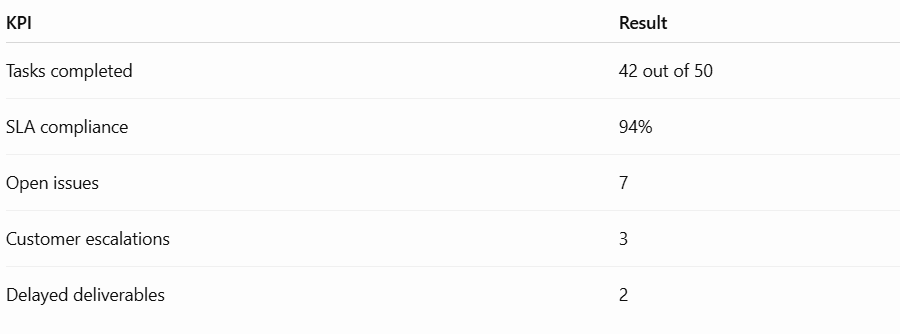
Additional notes:
- Two deliverables were delayed because a supplier did not provide the required information.
- One customer escalation remains unresolved.
- The team completed training on a new reporting tool.
- Next week’s priority is to close outstanding issues and improve response times.
There is nothing particularly complicated here and that’s exactly why I chose this example.
Most people don’t need AI to solve extraordinarily complex problems every day. They need it to help with ordinary work that keeps coming back.
Approach 1: Give your AI a simple prompt
Let’s start with something many people would naturally write.
Prompt 1 — The simple approach
Create a professional weekly management report using the following KPIs and notes.
Include:

- Executive summary

- Key achievements

- Main problems

- Priorities for next week
Keep the report concise and suitable for management.
[Paste weekly data here]
This is a perfectly reasonable request.
Your AI can organize the information, calculate that 42 out of 50 tasks represents an 84% completion rate, and produce a readable report.
But the important question is what happens when the input isn’t perfectly clear.
For example, consider these possible statements:
“The team maintained strong operational performance throughout the week.”
What makes the performance strong? We have an SLA of 94%, but no target or previous-week comparison.
Or:
“Customer escalations were successfully managed.”
We know there were three escalations and one remains unresolved. We don’t know enough to make that assessment.
Or:
“The new reporting tool improved team productivity.”
The team completed training. That doesn’t prove productivity improved.
These are examples of conclusions we should look for during testing, not claims that your AI necessarily makes every time.
The problem isn’t always an incorrect number. Sometimes it’s a reasonable sounding conclusion that the data doesn’t support.
And those are often harder to notice.
2. Before building anything, try a better prompt
This is where I think many AI tutorials skip an important step.
They move from a basic prompt directly to building an agent, automation or Skill.
But what if a better prompt already solves most of the problem?
Before creating something more complicated, let’s give AI some clearer instructions.
Prompt 2 — The structured approach
Act as an operations reporting analyst.
Your task is to transform weekly KPIs and operational notes into a management report.
Follow these rules:
1. Use only information provided in the input.
2. Never invent numbers, explanations, trends or achievements.
3. Calculate percentages only when sufficient data is available.
4. Distinguish confirmed facts from interpretations.
5. Identify missing information that prevents a reliable conclusion.
6. Do not describe performance as good, bad, improving or declining unless a target or comparison supports that assessment.
7. Do not assume an issue has been resolved unless explicitly stated.
8. Keep the language concise, factual and suitable for management.
Use this structure:
EXECUTIVE SUMMARY
Maximum 100 words.
KEY PERFORMANCE INDICATORS
A table with KPI, result and relevant observation.
KEY ACHIEVEMENTS
Only confirmed achievements.
RISKS AND OPEN ISSUES
Identify unresolved problems and their known impact.
PRIORITIES FOR NEXT WEEK
Use only stated priorities or clearly label proposed actions.
INFORMATION REQUIRING VALIDATION
List missing data, inconsistencies and conclusions that cannot be confirmed.
Before producing the final report, check that every numerical claim matches the source data.
Weekly information:
[Paste weekly data here]
This is already a much stronger approach.
We’ve moved from asking AI to write something professional to explaining what professional reporting actually requires.
Notice the difference.
We haven’t asked the model to sound more intelligent. We’ve defined what it must avoid doing.
For management reporting, I consider that a much more valuable improvement.
What should we expect to change?
The structured prompt should give us a better chance of receiving a report that:
- Uses a consistent structure.
- Separates confirmed information from interpretation.
- Highlights missing data.
- Avoids unsupported performance claims.
- Makes the review process easier.
These are expected benefits, not proven results and we still need to test them.
The other issue is that next Friday, we need to find this prompt again, reuse it, and make sure we’re using the latest version.
If we decide to change the reporting format, the validation rules or the level of detail, we need to maintain those instructions somewhere.
This is where a reusable AI Skill becomes interesting.
3. What changes when we build an AI Skill?
Let’s clarify something first.
A prompt tells AI what to do in a particular interaction.
A reusable prompt lets us repeat those instructions.
An AI Skill packages instructions, procedures and, when useful, supporting files into a reusable capability that an AI application can load when performing a particular type of task.
Depending on the application, a Skill can contain reporting templates, validation rules, examples and scripts.
For this tutorial, we’ll use the SKILL.md approach supported by skill compatible AI environments.
The idea is simple and instead of repeatedly explaining how our weekly reports should be prepared, we create a reusable set of instructions.
Then we provide the weekly data and ask the AI to produce the report.
The real value isn’t that the AI writes more. It’s that we can define, reuse, inspect and improve the rules it follows.
Let’s build a small version of this skill.
4. Build your first weekly reporting Skill
You don’t need a complex system for this example.
We’ll start with one file.