A practical guide to AI workflow redesign using a real claims process.
By The Practical AI Strategist
Published: 2026-03-03
URL: https://thepracticalaistrategist.substack.com/p/how-to-redesign-workflows-with-ai
This post is part of the AI Transformation Series, exploring what is really needed to transform businesses into AI-enabled organizations.
In the last post, we talked about the AI maturity curve and what to do at each stage. For organizations that want to be AI-enabled, however, there is one step that is crucial, but often overlooked: workflow redesign.
Most AI initiatives fail not because the models are weak, but because the workflows are unchanged. In a previous post I talked about how innovating with AI requires rethinking processes from scratch instead of just “slapping” AI on top of existing ones.
When leaders try to “bolt AI on” to existing processes that were never designed for automation, intelligence, or speed, the result is predictable: pilots don’t scale, teams feel overwhelmed, and tools never make it into daily work.
Workflow redesign is the missing middle. It’s the bridge between AI potential and AI impact.
So today, I’m sharing a practical framework for redesigning workflows in a way that actually improves work, and I am going to use a real-life example from claims processing industry to illustrate how to use it.
The Workflow Redesign Framework
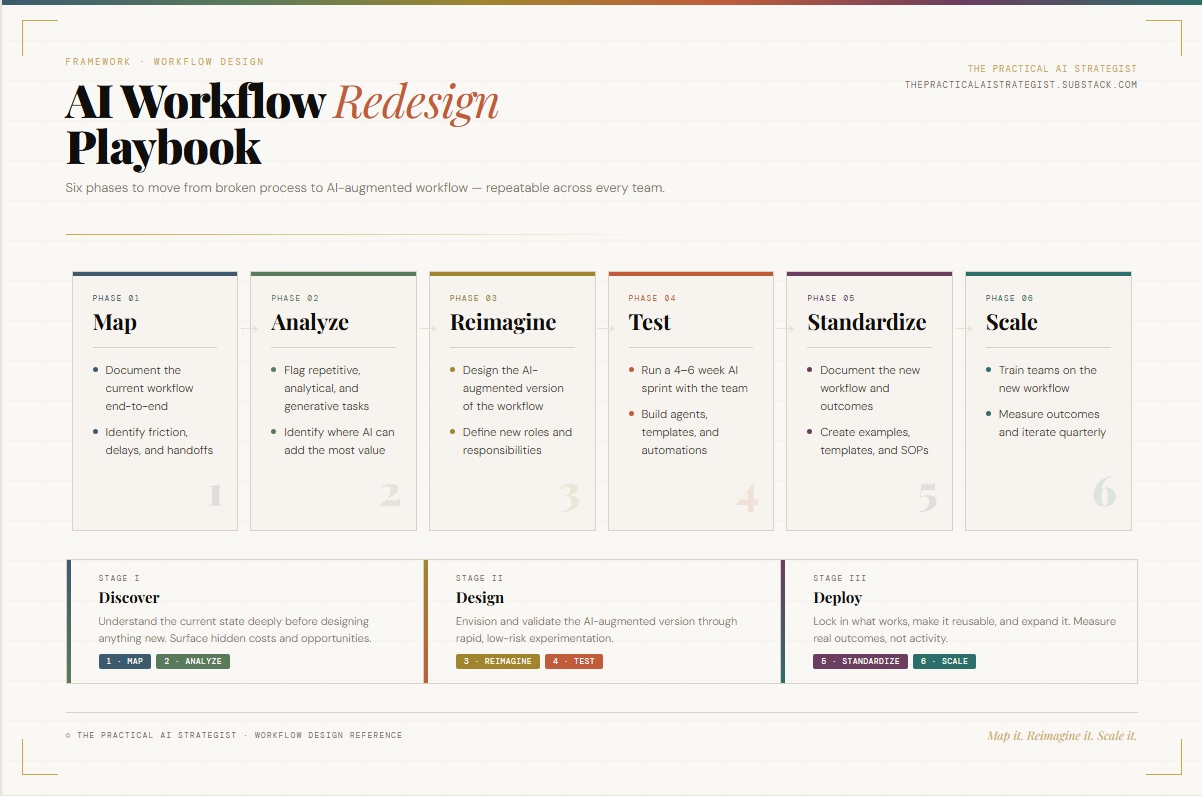
The framework has 6 steps (Download the PDF framework here):
- Map: Document the current workflow and identify friction points.
- Analyze: Flag repetitive, analytical and generative tasks where AI can add value.
- Reimagine: Design the “AI-augmented” version of the workflow (i.e. where does AI fit?).
- Test: Build and test the new framework on a smaller scale, narrower scope.
- Standardize: Document the workflow. Create new templates and SOPs as needed.
- Scale: Train teams, measure outcomes and increase scope.
Now let’s see how it works with a real-life example.
Why claims processing is the perfect real‑life example
When I worked with claims teams, I saw the same pattern across industries:
- high document volume
- repetitive data extraction
- multiple handoffs
- long cycle times
- inconsistent decisions
- frustrated customers
It’s a workflow built on waiting, not working.
And because it’s so structured, rule‑driven, and document‑centric, it’s also one of the best candidates for AI‑enabled redesign.
Let’s walk through it.
The current (pre‑AI) claims workflow
This is the standard process I saw again and again:
- Claim submission: customer sends forms, emails, photos, PDFs.
- Intake & triage: someone manually enters data, categorizes the claim, and assigns it.
- Document collection: back‑and‑forth with the customer and third party providers to gather missing information.
- Eligibility check: adjuster looks up policy details and coverage rules.
- Investigation: calls, statements, vendor coordination, timeline reconstruction.
- Assessment: adjuster reviews everything and estimates damages.
- Decision & approval: manual write‑up, supervisor review, compliance checks.
- Payment: calculate payout, issue payment, notify customer.
- Closure: update systems, archive documents, send final communication.
It’s a 9-step procedure that is repeated for every claim, every time.
The pain points
Across clients, the same friction points showed up:
- Manual data entry at intake.
- Slow triage: queues are assigned by humans.
- Poor document hygiene: missing files, inconsistent formats, long delays. Data is stored in different systems (no centralized repository).
- Policy lookup fatigue: adjuster constantly flipping between systems.
- Investigation bottlenecks: manually summarizing calls and extracting facts.
- Decision inconsistency: different adjusters, different interpretations.
- Supervisor overload: every case is reviewed, not just exceptions.
- Inefficient hand-offs: No context sharing among teams. The same documents are reviewed multiple times per claim.
- Long cycle times: customers waiting days or weeks for updates.
This is exactly the kind of workflow where AI doesn’t replace people, but it removes the friction around them.
How the workflow redesign process applies to claims
1. Map the current workflow
We started by mapping the end‑to‑end process with the team. Every step. Every handoff. Every system. Every delay.
This surfaced the real blockers:
- 40–60% of adjusters time is spent on document handling
- 20–30% of cycle time lost in triage queues
- 15–25% of delays caused by missing information
- Supervisors reviewing 100% of cases instead of the 10–20% that actually needed escalation
Mapping made the invisible visible.
2. Analyze the workflow for AI‑ready tasks
We flagged tasks that were:
- repetitive
- rule‑based
- document‑heavy
- pattern‑driven
- cognitively draining
- slow due to waiting
This created a clear list of AI opportunities:
- Document extraction (forms, invoices, photos)
- Automated triage (classification + routing)
- Policy summarization
- Drafting claimant communications
- Summarizing call transcripts
- Drafting assessment notes
- Drafting decision rationales
- Flagging inconsistencies or fraud signals
These weren’t “nice to haves.” They were the exact tasks slowing the entire system down.
3. Reimagine the workflow with AI in the loop
This is where the transformation happens.
The table below shows the before vs after redesign for each step of the claims process, plus the technology required.
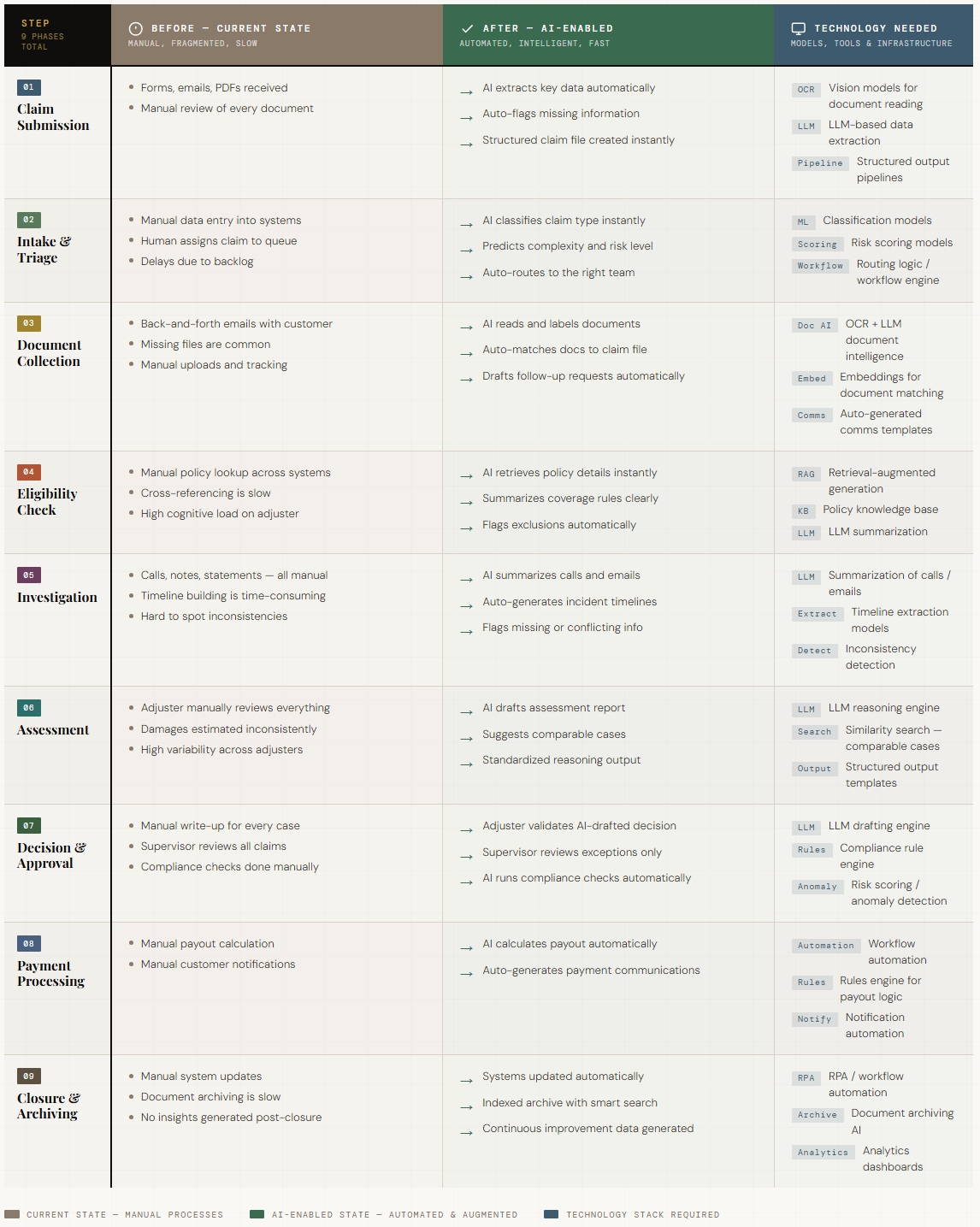
This isn’t “AI everywhere.” It’s AI where it matters.
4. Test the redesigned workflow (AI sprint)
We ran a 6 week sprint with a cross‑functional team to create the first version of the tool. We wanted to have subject matter experts in the loop. Since the adjusters were the ones using the tool, we wanted to collect their feedback and iterate accordingly.
The goal wasn’t perfection at the start. It was to ship something real, prove the value and lay the foundations for future phases. This sprint created the first version of the new workflow.
5. Standardize the new workflow
Once the team validated the new flow, we documented:
- new steps
- new roles
- new responsibilities
- validation rules
- exception paths
- templates
- examples
- quality checks
This turned the sprint output into a repeatable process. SOPs and training material were created as output.
6. Scale and measure
The final step was scaling the redesigned workflow across teams and onboard employees through training and workshops.
The impact
Across clients, the results were consistent:
- 30–50% reduction in cycle time
- 40–60% reduction in manual document handling
- 20–30% fewer handoffs
- More consistent decisions
- Supervisors reviewing only 10–20% of cases
- Higher customer satisfaction due to faster updates and clearer communication
Since claims is a highly regulated industry, the final decision still resided with the human adjuster, but automation and AI-in-the-loop removed the friction and provided them the tools to get to that decision more quickly and easily, with less room for error.
This is what real AI transformation looks like. Not a tool. Not a pilot. A redesigned workflow.
What changed and why it matters
For the business
- Faster cycle times
- Lower operational cost
- More consistent decisions
- Better compliance
- Higher throughput without adding headcount
For employees
- Less manual work
- Fewer repetitive tasks
- More time for complex cases
- Clearer workflows
- Higher confidence using AI
For customers
- Faster responses
- Clearer communication
- Fewer back‑and‑forth requests
- More predictable outcomes
This is the kind of transformation leaders want, and the kind employees actually need.
Something to be careful of
It is tempting for leaders to start redesigning workflows with as much scope as possible to prove the value to the business, especially when they need to justify an initial investment to onboard new technology. However, it’s never a good idea.
Starting small, with limited but clear scope, helps control the experiment and better identify the bottlenecks. For example, in the claims case, since the business handled multiple products, we started with the one with the largest volume of claims, which was the most critical and the most time-consuming.
Closing thought
Workflow redesign is where AI becomes real. Claims processing is just one example, but the pattern holds everywhere: map → analyze → reimagine → test → standardize → scale.
The organizations that learn to redesign workflows, and not just deploy tools, will be the ones that unlock real, measurable value.
Thanks for reading! Subscribe for free to receive new posts and support my work.