From principles to production code — Part 3/6 of RAG That Works
By Alexandru Vesa
Published: 2026-01-24
URL: https://thehyperplane.substack.com/p/building-rag-that-works-is-boring
Before building any AI solution, take one minute to ask yourself: what is the underlying human process?
And if I made you curious, let me also ask you some questions.
Thanks for reading Hyperplane! Subscribe for free to receive new posts and support my work.
- How many times have you read an architecture article, nodded along, then stared at a blank editor with no idea where to start?
- How many times have you built something that worked on the first PDF, then broke spectacularly on the second?
We’re living in an era where everyone talks about “context engineering” but nobody shows you the code. Tutorials stop at the architecture diagram. GitHub repos have a beautiful README and a TODO: implement in the actual logic.
I’ve been there. Many times.
Is this article for you?
Context engineering is one of the biggest unsolved problems in GenAI.
Data modeling tells you what to extract. Context engineering tells you how to get it into the LLM’s prompt so it actually helps.
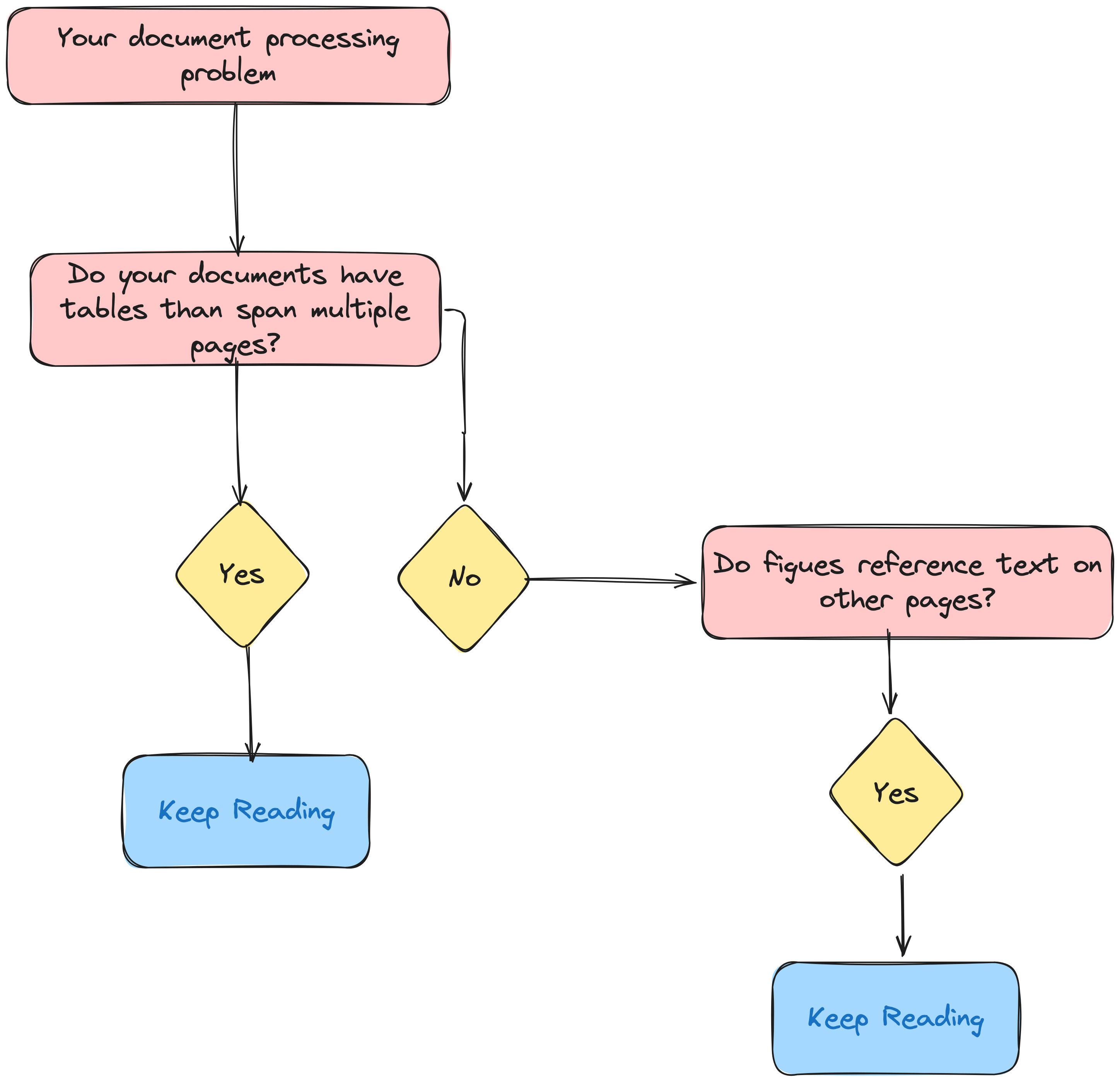
If your documents have cross-page relationships, nested structures, or domain-specific metadata that generic chunking destroys, this article shows you how to build the extraction pipeline.
The RAG That Works Series
This is Part 3 of a six-part series on building RAG systems that actually work in production.
Part 1: Why the Hell Should I Build This? — Understanding the problem before writing code
Part 2: Data Modeling for RAG That Works — Architectural decisions and schema design
Part 3: From Principles to Production Code — You are here
Part 4: Indexing and Retrieval — Coming soon
Part 5: Answer Generation — Coming soon
Part 6: Evaluation and Iteration — Coming soon
New here? Part 1 explains why most RAG tutorials fail you. Part 2 covers the data modeling decisions. This article shows you the actual implementation.
Already read Parts 1 and 2? Let’s write some code.
Just Want the Code?
If you’ve built RAG systems before and don’t need the explanations, jump straight to the repository:
github.com/hypeprlane/complex-pdf-rag
The repo includes:
- Complete extraction pipeline with OCR, table correction, and metadata extraction
- Three-page sliding window implementation
- Vision LLM prompts for table and image analysis
- Query decomposition using extracted document structure
- Sample outputs showing the metadata schema
What happened when I tried to build Part 2
In Part 2, I described several architectural decisions for processing manufacturing service manuals.
- Three-page sliding windows
- Rich metadata extraction
- Table flattening
- Query decomposition.
The architecture made sense on paper.
Then I tried to build it.
The first table I processed returned the header row in one place and the data rows in another. The model confidently reported “torque specification: 85”—no units, no bolt identifier, no model applicability. The table HTML from Docling had merged cells in the wrong positions. A four-column table rendered as six columns with phantom empty cells.
The three-page context window worked until page 1 and page 573. There is no page 0. There is no page 574. The function crashed with FileNotFoundError because I’d assumed every page has neighbors.
The metadata extraction prompt returned beautiful JSON, except that the section\_number field was hallucinated. The LLM invented “Section 7.3.2” for a manual that only had sections 1-6.
This article shows what I built after those failures.
You can find the complete codebase on GitHub. Fork it, adapt it, break it in new ways.
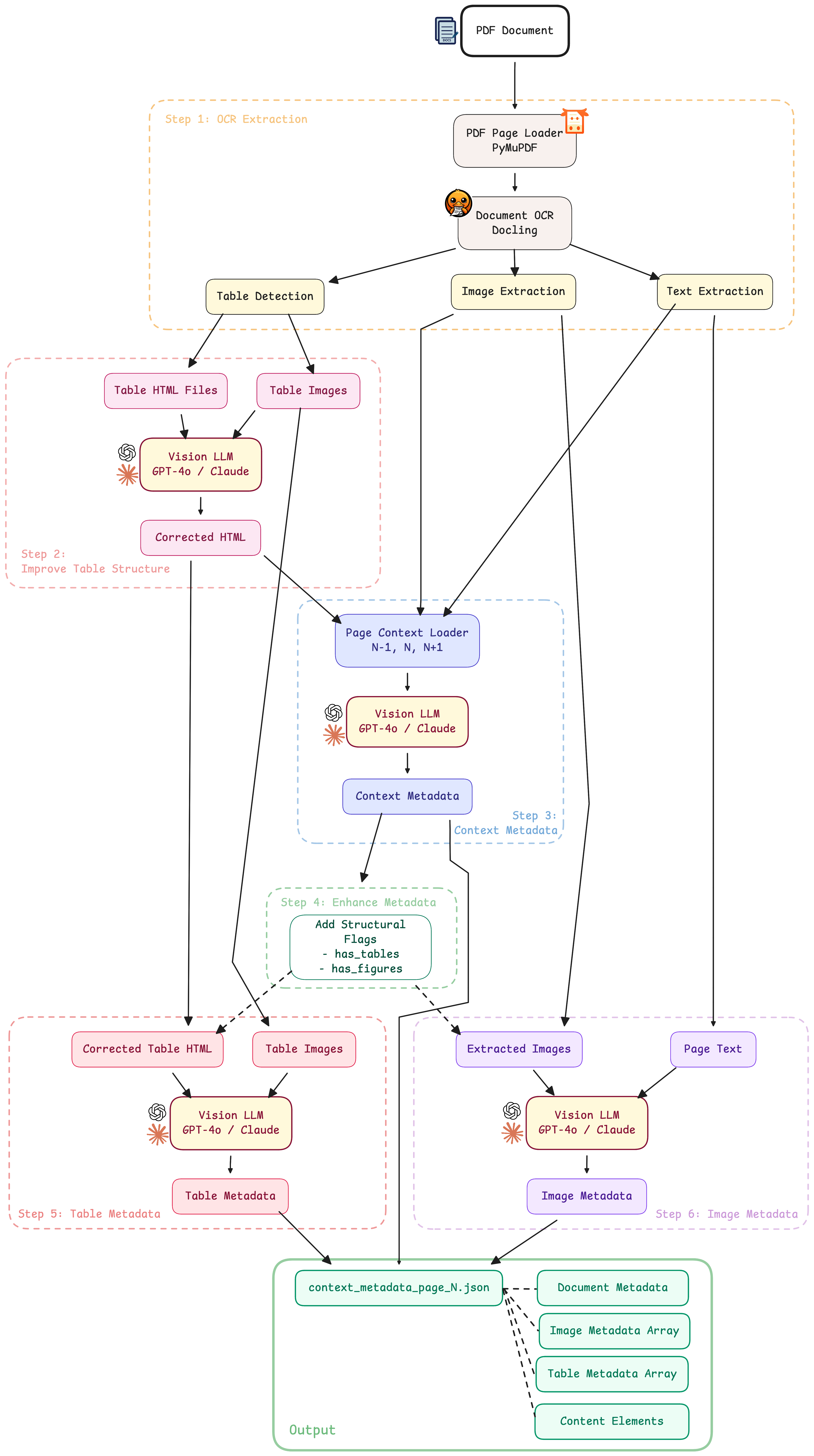
The Pipeline Architecture
Here’s the complete system:
Step 1: OCR Extraction
The first step uses Docling with TableFormer in ACCURATE mode. You can find the implementation in extract\_images\_tables.py:
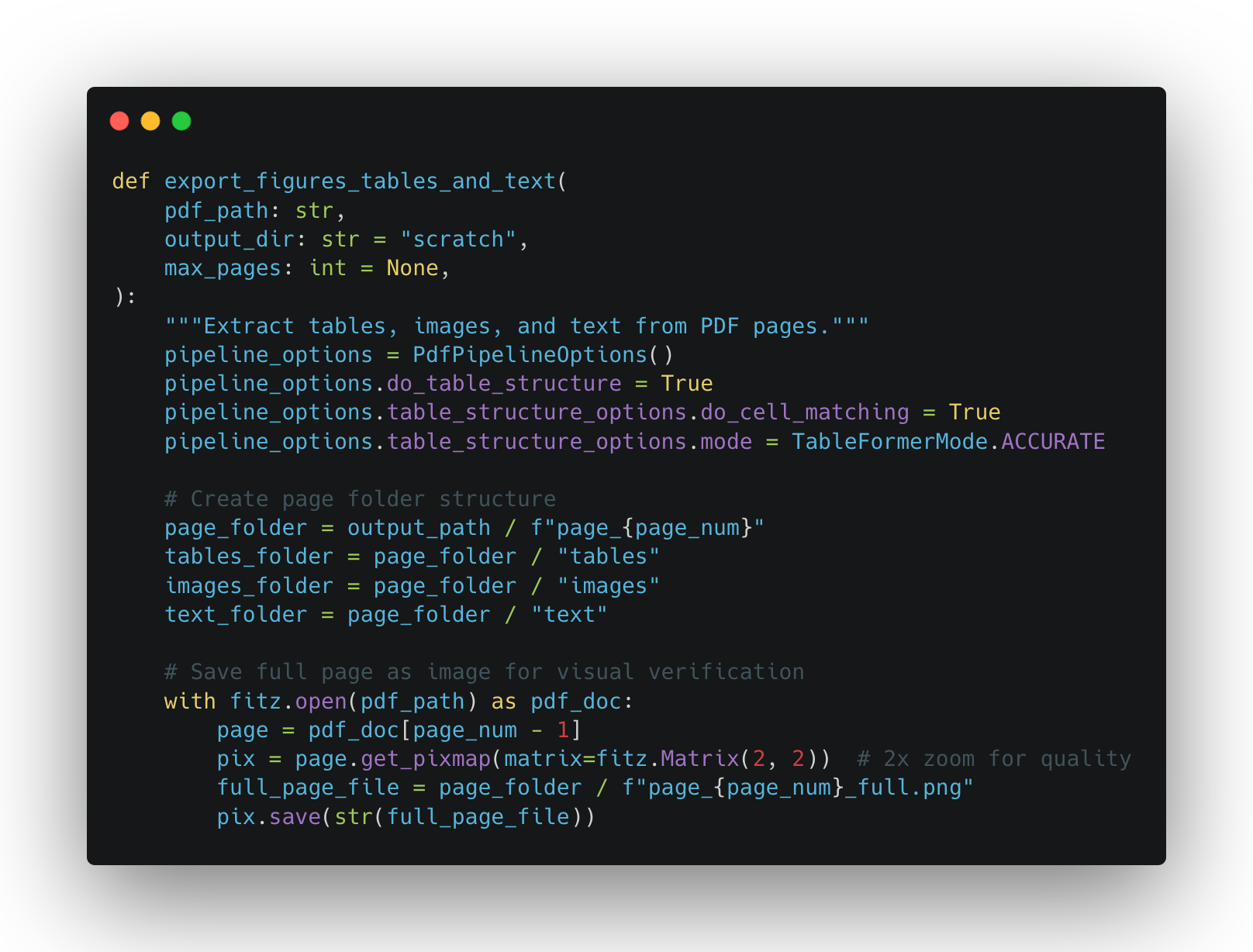
Why save the full page image?
- In every tutorial, you will see that people first chunk the pages without inspecting them. It’s important to treat the page as an image, or to treat elements from the page as images, and here I’m referring to tables and images.
- Because Vision LLMs need visual context. The table on page 36 might reference a diagram that appears above it. Without the full page image, the model can’t see that relationship.
What breaks if you skip this step: Everything downstream. No tables, no images, no text. But also: if you don’t save the page images, you lose the ability to visually verify extraction quality. I caught 40% of my extraction errors by visually comparing the page image to the extracted metadata.
Step 2: The Table Structure Problem
Docling’s table extraction is good. It’s not good enough, depending on the use case you are working on.
Here’s what the OCR extracted for a fluid capacities table:
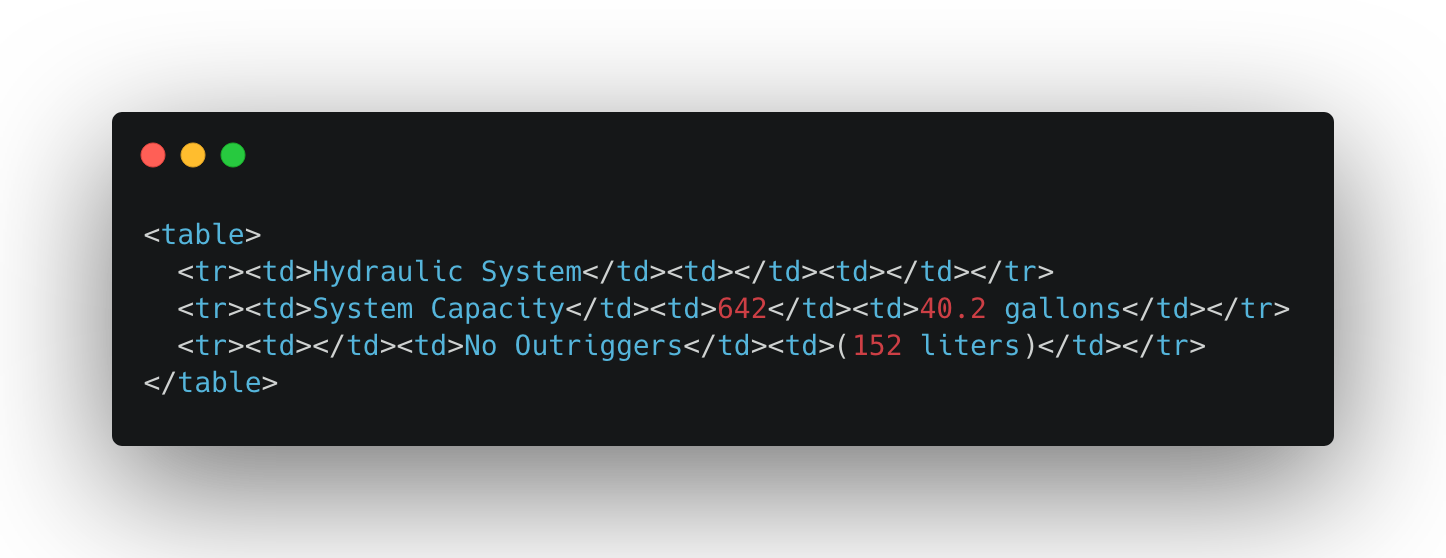
The problem: “No Outriggers” should be in the same row as “642” and “40.2 gallons.” The OCR saw whitespace between rows and split them. Now “40.2 gallons” is associated with the wrong configuration.
A technician searching for “hydraulic capacity 642 with outriggers” would get the wrong answer because the table structure is corrupted.
The fix: Send the table HTML and the table image to a Vision LLM with instructions to correct the structure. You can find the implementation in improve\_table\_structure.py:
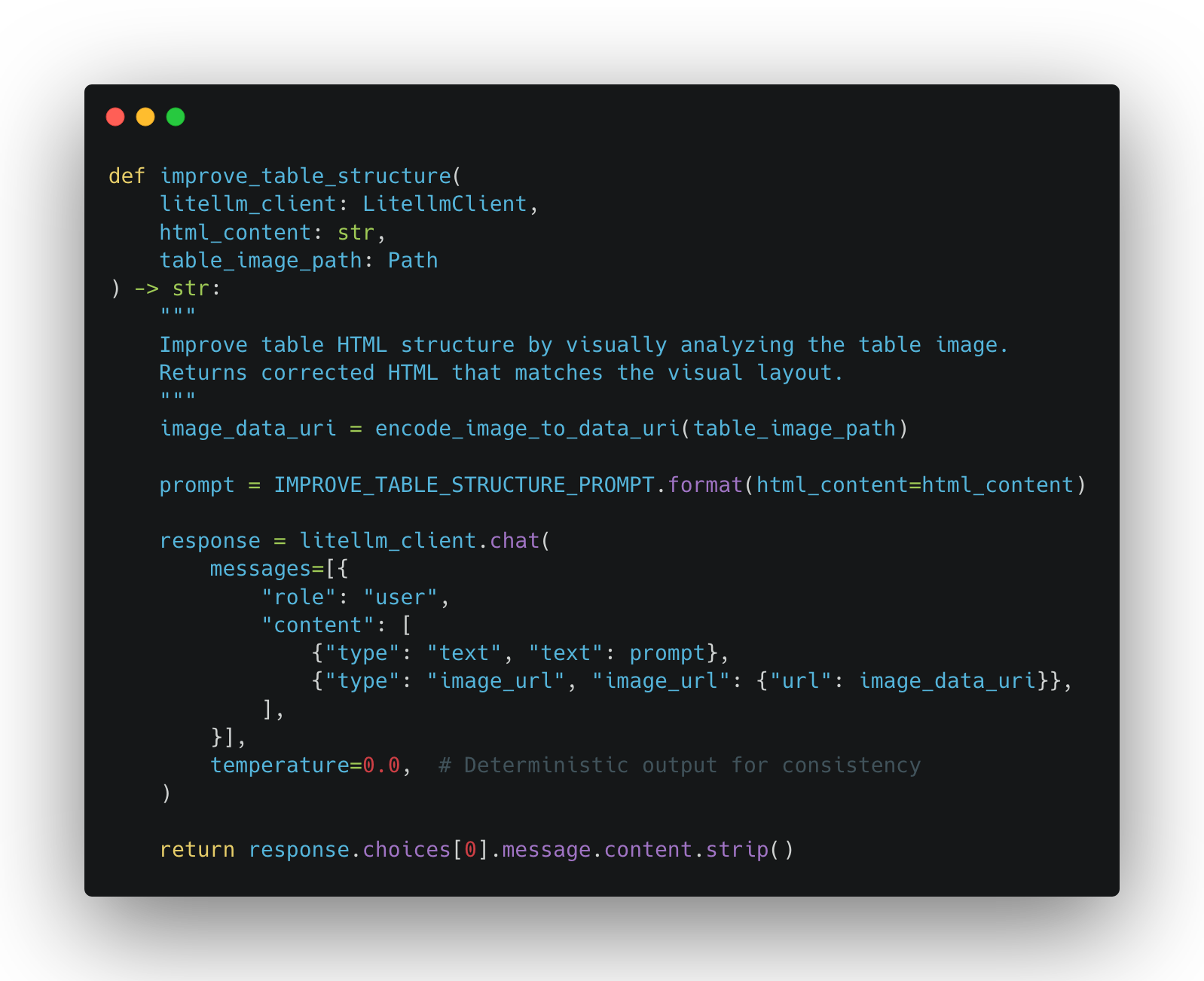
Why temperature=0.0? Table structure correction is a deterministic task. The same input should produce the same output. At temperature=0.7The model occasionally introduced creative “improvements” that changed cell values. Not helpful when the table contains torque specifications.
The prompt instructs the model to count visible rows and columns, identify header tiers, visually map merged cells, and ensure pixel-perfect matching. The corrected HTML replaces the original in all downstream steps.
Step 3: The Three-Page Context Window
When a technician opens a service manual to page 36, they don’t see page 36 in isolation. They’ve been reading from page 34. They’ll continue to page 37. Context flows across page boundaries.
A torque specification table that starts on page 35 doesn’t suddenly become irrelevant when you turn to page 36—it’s still the same table, still the same procedure. A figure reference on page 36 might point to a diagram on page 35. A procedure that begins on page 36 might continue onto page 37.
This insight led to the three-page sliding window: when processing page N, the system simultaneously analyzes pages N-1, N, and N+1.
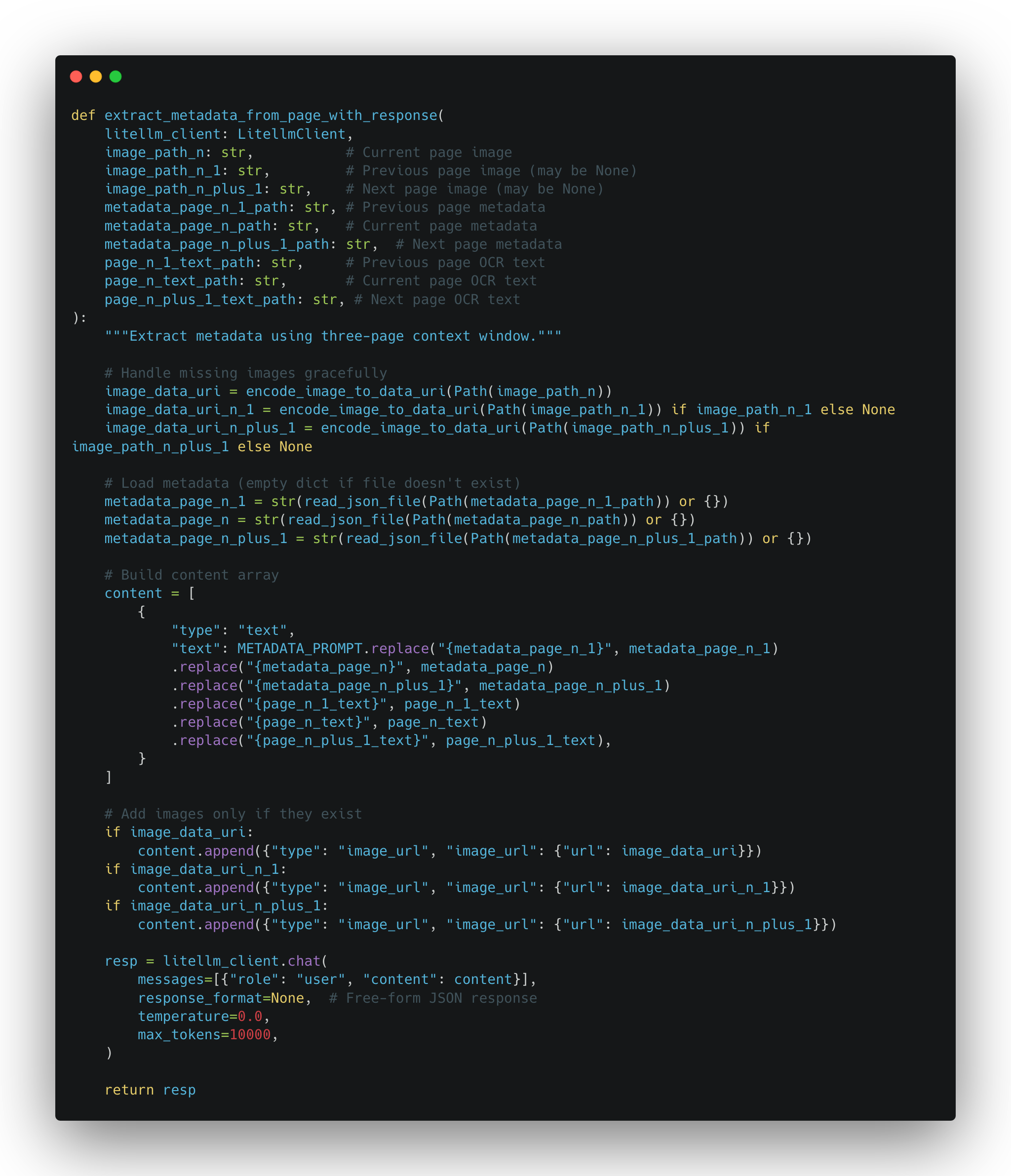
The LLM receives:
- 3-page images
- 3 OCR text files
- 3 metadata files.
This enables the model to understand cross-page relationships: “This table is a continuation from page 35”.
The Cross-Page Context Schema
The extracted metadata includes explicit cross-page relationships:
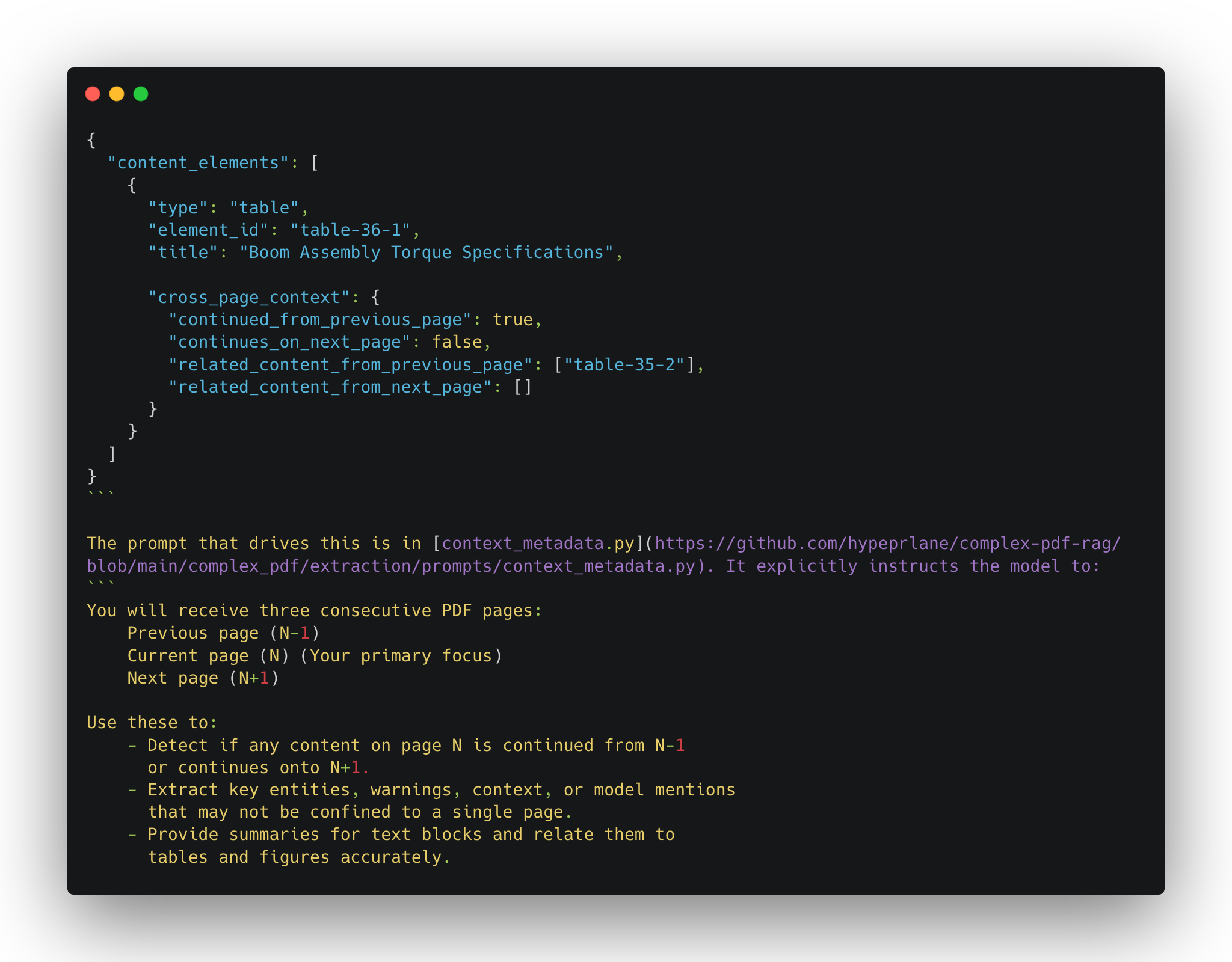
The schema enforces the structure:
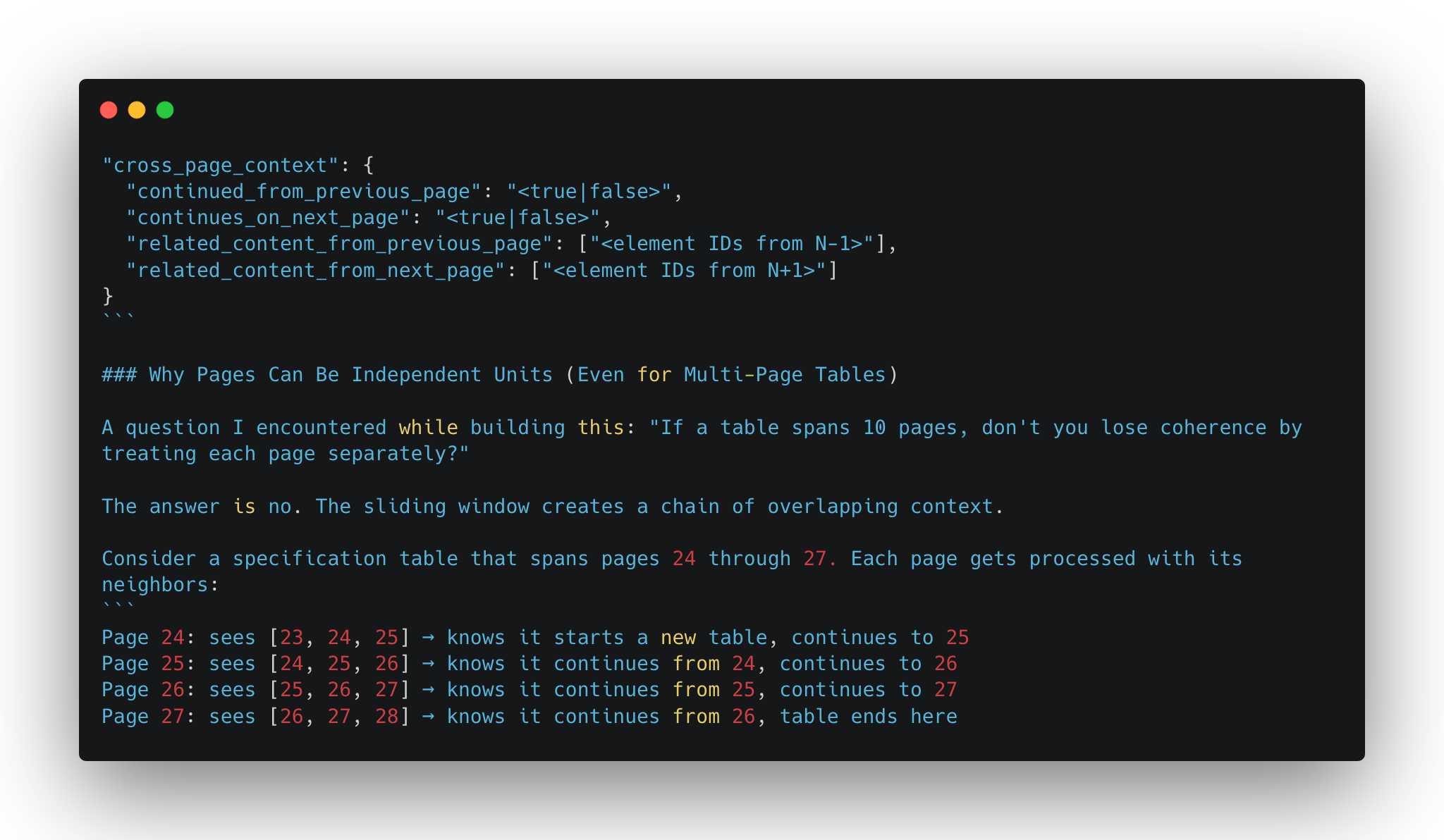
Every page knows what came before it (from N-1), what comes after it (from N+1), and that it’s part of a larger structure. The metadata captures this explicitly:
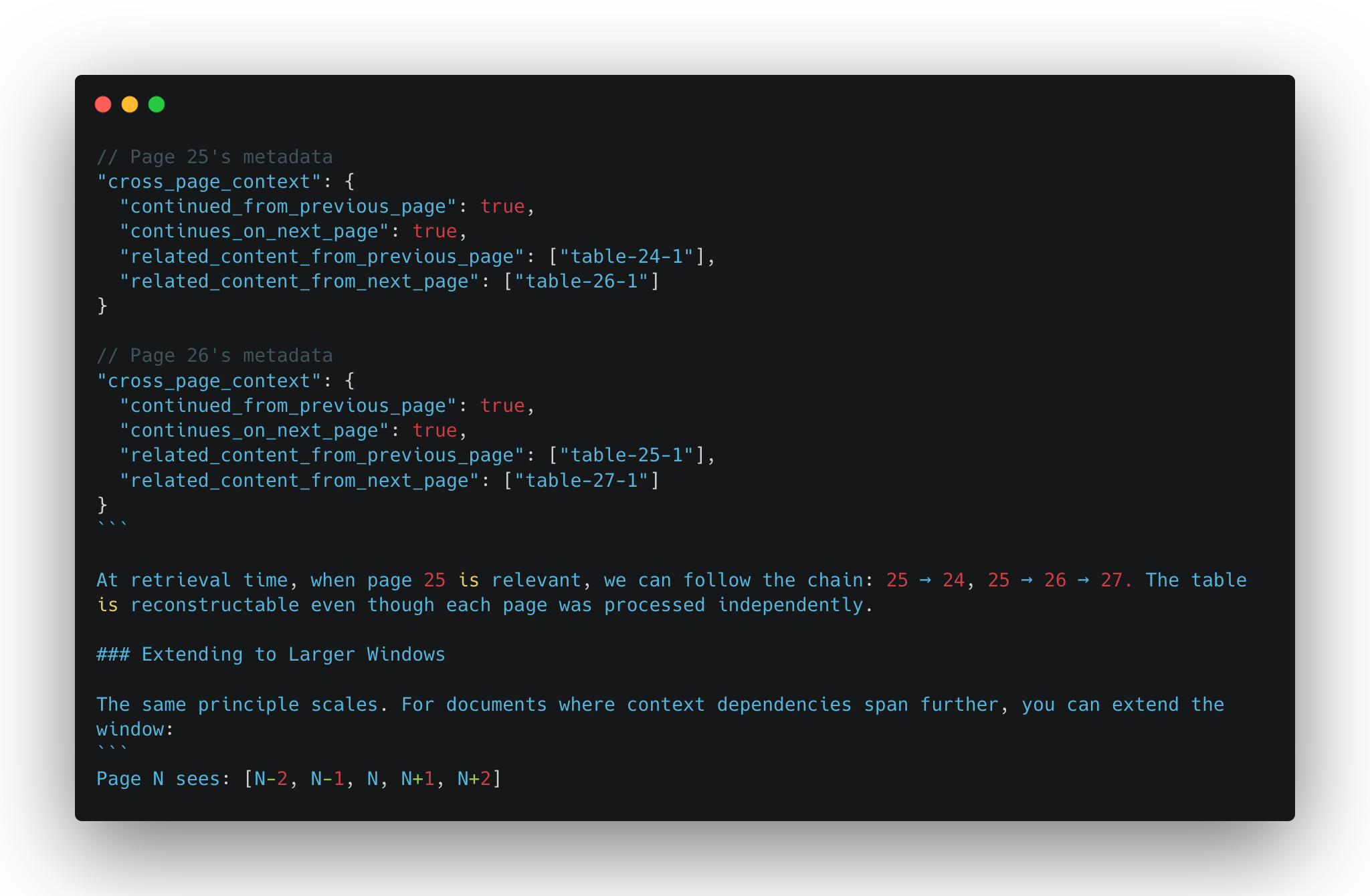
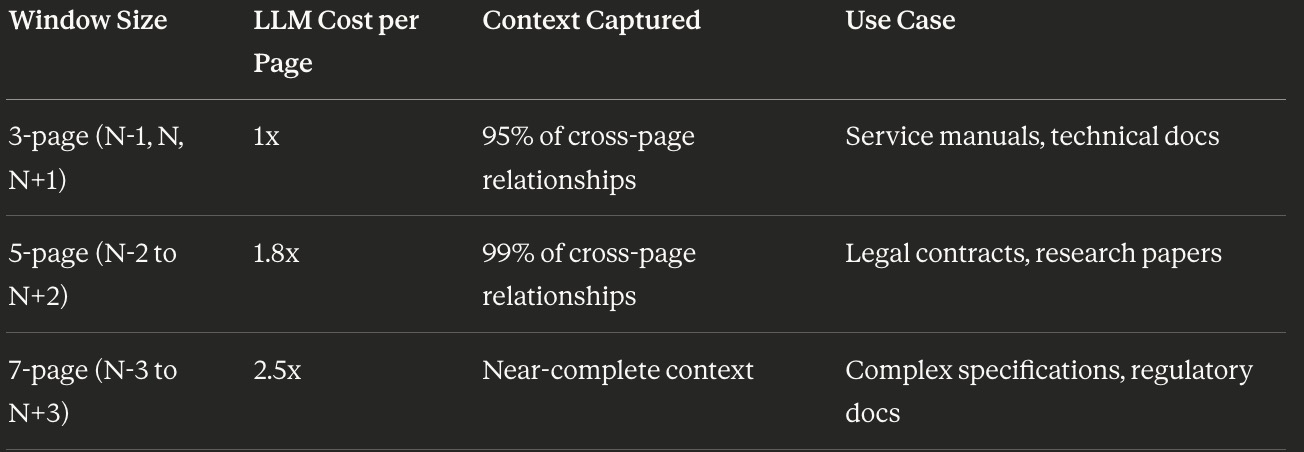
This gives each page awareness of content two pages away in either direction. The trade-offs:
Step 4: The Hallucination Problem
The metadata extraction worked. Then I checked the section numbers.
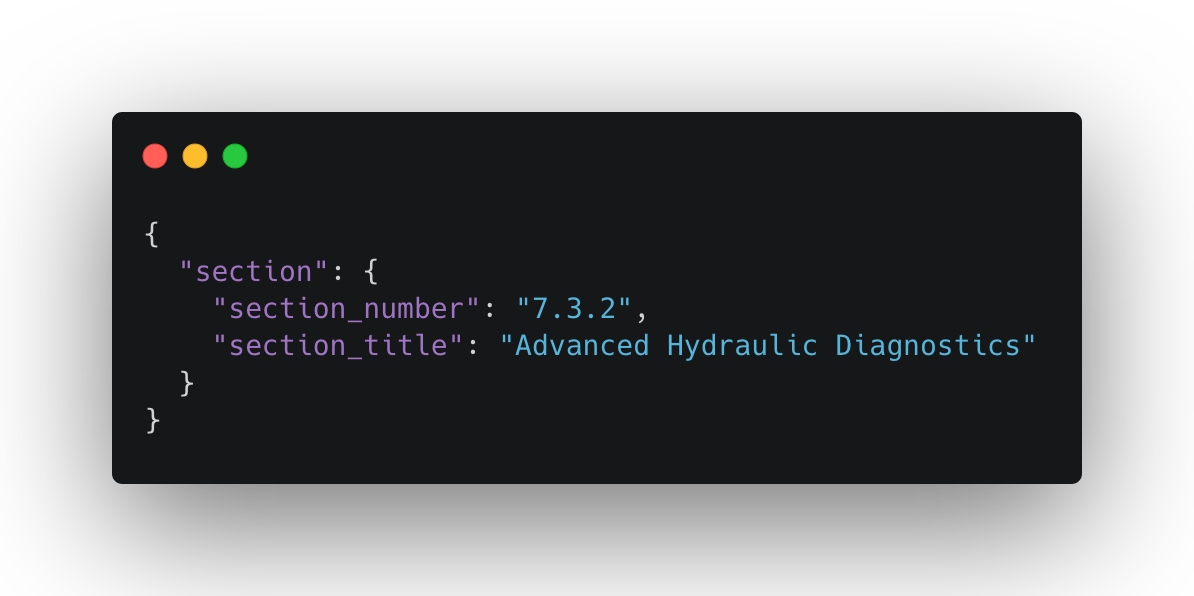
The manual only has sections 1 through 6. “Section 7.3.2” doesn’t exist. The LLM invented it because the prompt asked for section information and the model wanted to be helpful.
The fix: Add structural flags computed from the actual extracted content, not inferred by the LLM:
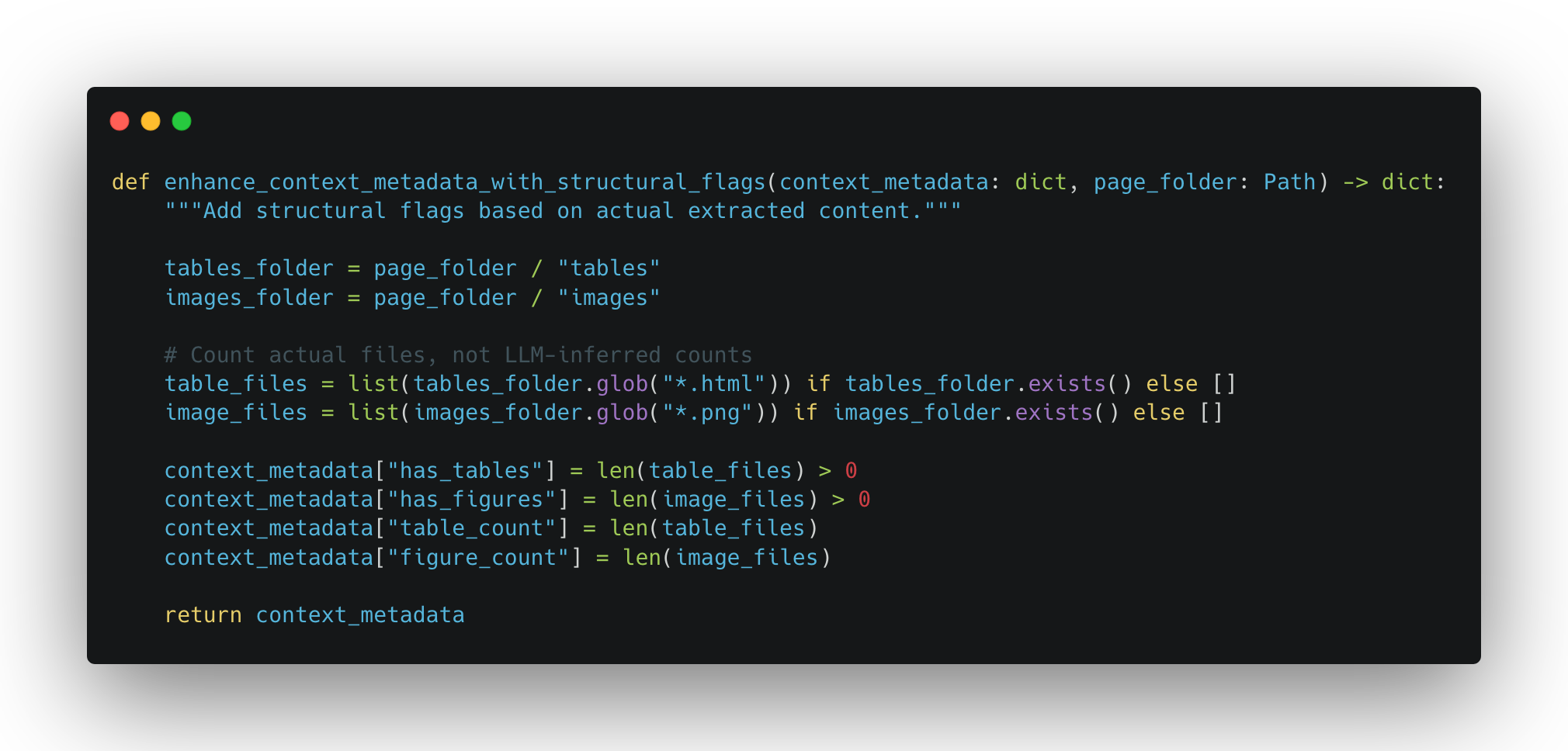
For section numbers specifically: we extract them from the actual PDF content—headers, table of contents, page analysis—rather than asking the LLM to infer them. The section structure comes from parsing, not generation.
Step 5: Table Metadata Extraction
Most RAG tutorials treat metadata as an afterthought. Extract the text, embed it, store a filename and page number. Move on.
This is why most RAG systems fail on specialized documents.
The Disambiguation Problem
A recent study on SEC filings found that semantic similarity alone frequently returns “plausible but incorrect context” when documents share similar language. The researchers tested retrieval across two embedding models and found that embedding metadata alongside content consistently improved retrieval precision by 15% compared to content-only baselines.
The problem is acute in technical domains. Consider two pages from different service manuals, both containing the phrase “hydraulic system capacity is 40.2 gallons.” Without metadata, a semantic search for “hydraulic capacity” returns both pages with nearly identical similarity scores. Which one applies to the 642 model? The embedding can’t tell you.
The study identified specific metadata fields that act as strong disambiguators: company, year, and document section. In our manufacturing domain, the equivalent fields are model applicability, component type, and section context.
Metadata During Ingestion: Narrowing the Future Search Space
Metadata filtering works by narrowing the search space before or after vector similarity search. Pre-filtering excludes irrelevant documents before similarity calculation. Post-filtering removes mismatches after retrieval. Both depend on metadata captured during ingestion.
Here’s what we extract for each table:
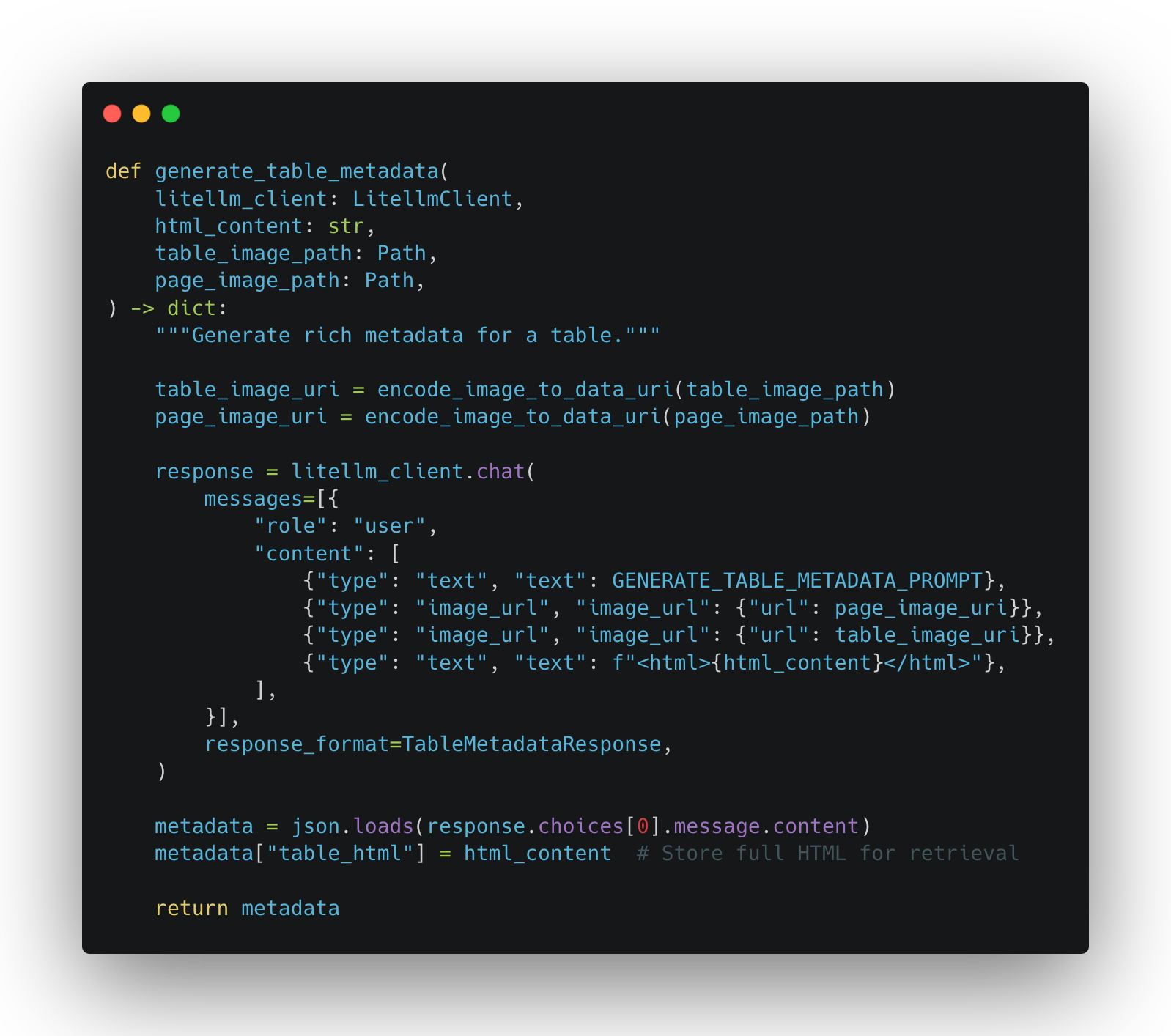
Why send both the table image and the full page image? Context. A table titled “Torque Specifications” is meaningless without the section header above it that says “Boom Assembly.” The page image provides that context. The LLM can see relationships that the table HTML alone doesn’t capture.
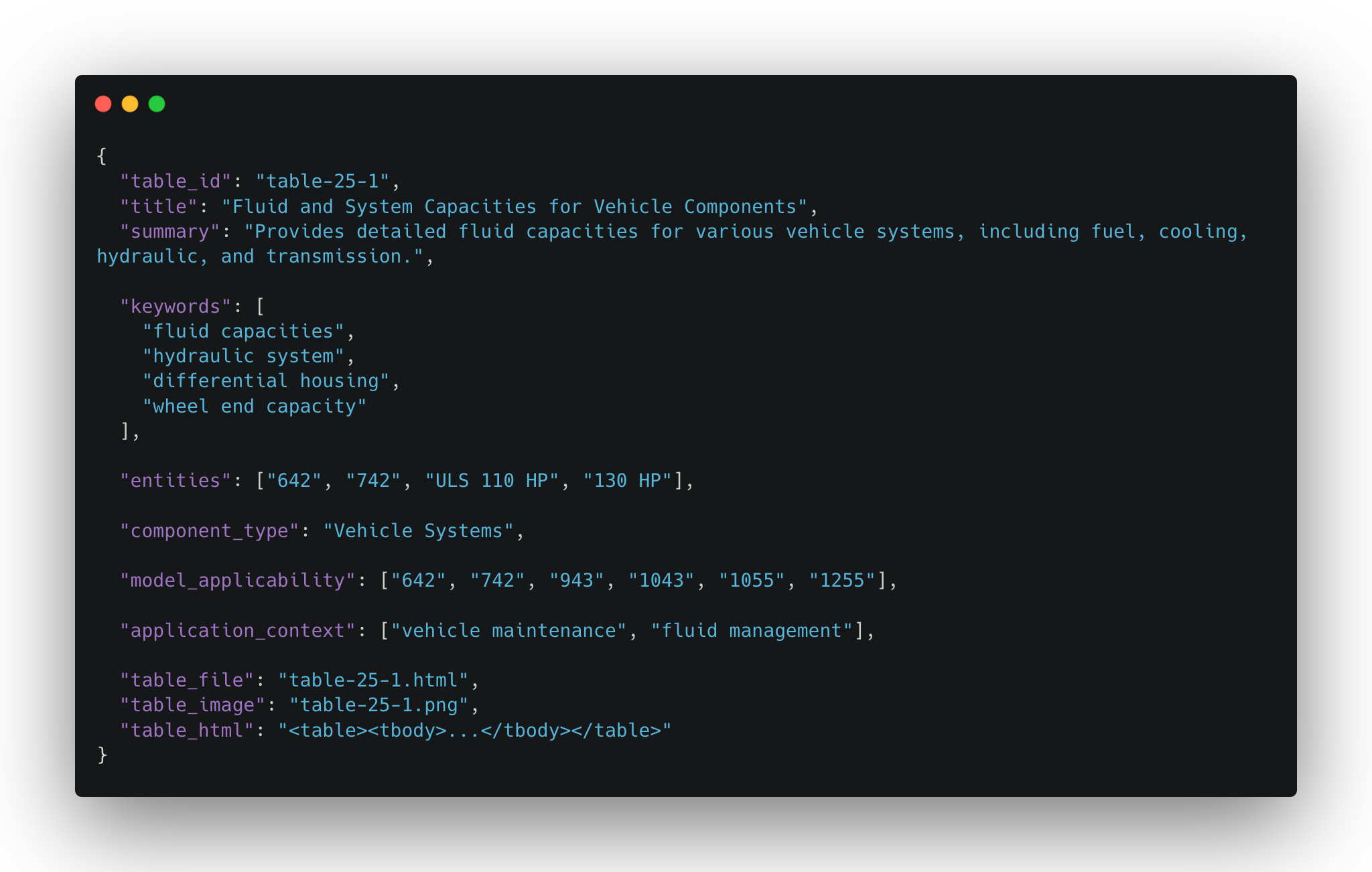
The Metadata Schema: Domain-Specific Fields
Generic metadata—filename, page number, date—tells you almost nothing useful for retrieval in specialized domains. The research shows that domain-specific fields provide the strongest disambiguation signal.
Our schema captures what technicians actually need to know:
Metadata During Retrieval: From Broad to Precise
Without metadata filtering, a query about “hydraulic fluid capacity for the 642” returns every page mentioning hydraulic systems across all models. The LLM receives 10 pages of context, 8 of which are irrelevant. It hallucinates an answer by averaging values from different models.
With metadata filtering, the retrieval pipeline can:
- Pre-filter by
model\_applicability: ["642"]— eliminates 743, 1055, 1255 content
- Pre-filter by
component\_type: "Hydraulic System"— eliminates electrical, transmission content
- Semantic search on the narrowed set — finds the most relevant pages
- Post-filter by
application\_contextif needed — distinguishes maintenance from repair
The search space drops from 500 pages to 15. The LLM receives only relevant context. The answer is correct.
The Embedding Text: Metadata as Content
Research shows that prefixing metadata to content before embedding outperforms embedding content alone. The metadata becomes part of the semantic representation, not just a filter.
We construct embedding text that combines structured metadata with content
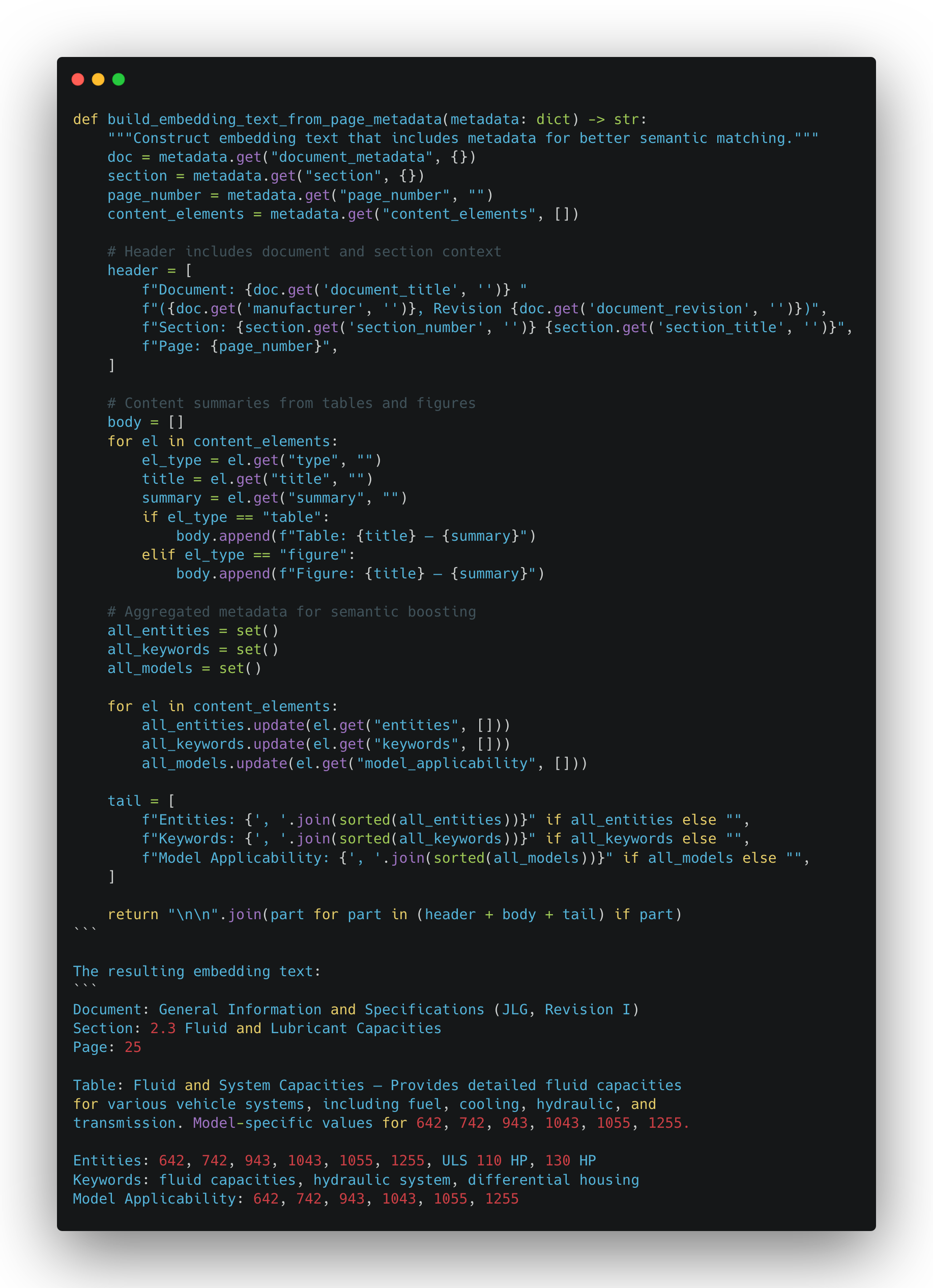
Now a query for “hydraulic fluid capacity 642” matches semantically on multiple signals: the section title, the table summary, the entities, the keywords, and the model applicability. The embedding captures not just what the page contains, but what it’s about and who it’s for.
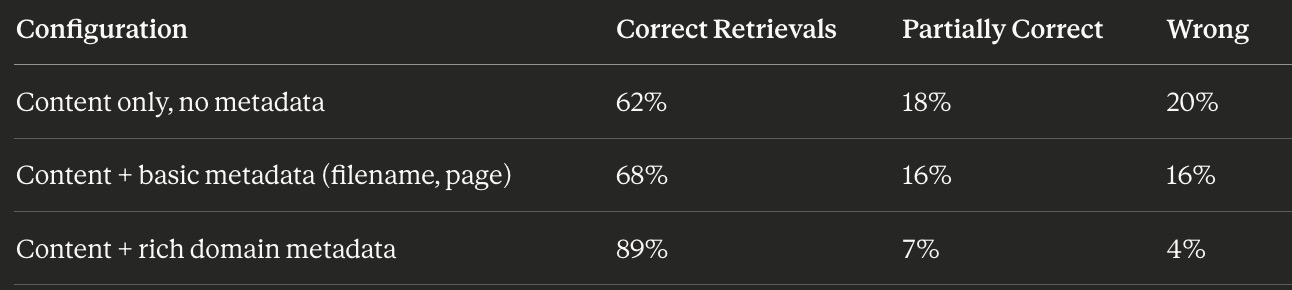
The Cost of Skipping Metadata
I tested retrieval with and without rich metadata on 50 queries across 12 service manuals.
Step 6: Image Classification and Metadata
Part 2 didn’t cover this. I added it after discovering that generic image descriptions were useless for retrieval.
What Broke First
The initial pipeline extracted images and stored them with minimal metadata: filename, page number, dimensions. When a user asked “show me the hydraulic schematic,” the system had no way to distinguish between:
- A photograph of a hydraulic pump
- A schematic diagram of the hydraulic circuit
- An exploded parts view of the hydraulic assembly
- A flowchart showing hydraulic troubleshooting steps
- A logo that happened to appear on a page about hydraulics
All five matched semantically on “hydraulic.” The retrieval returned the logo.
I tried adding Vision LLM descriptions. The model returned variations of “A technical illustration showing components of a mechanical system.” Every image got the same generic description. Useless for retrieval.
The Classification Problem
Technical documents contain fundamentally different types of visual content:
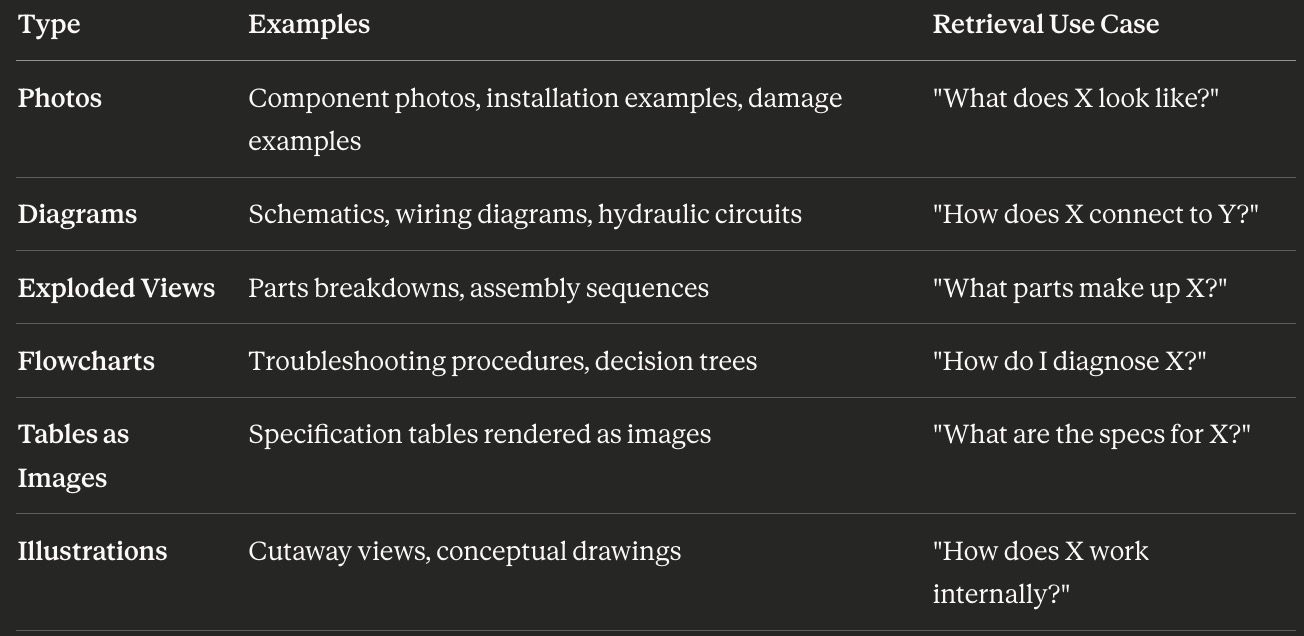
A query about “hydraulic system schematic” should return diagrams, not photos. A query about “what does a damaged seal look like” should return photos, not schematics. Without classification, the system can’t make this distinction.
The Solution: Structured Image Metadata
We generate rich metadata for each image using a Vision LLM with the page text as context. You can find the implementation in extract\_image\_metadata.py
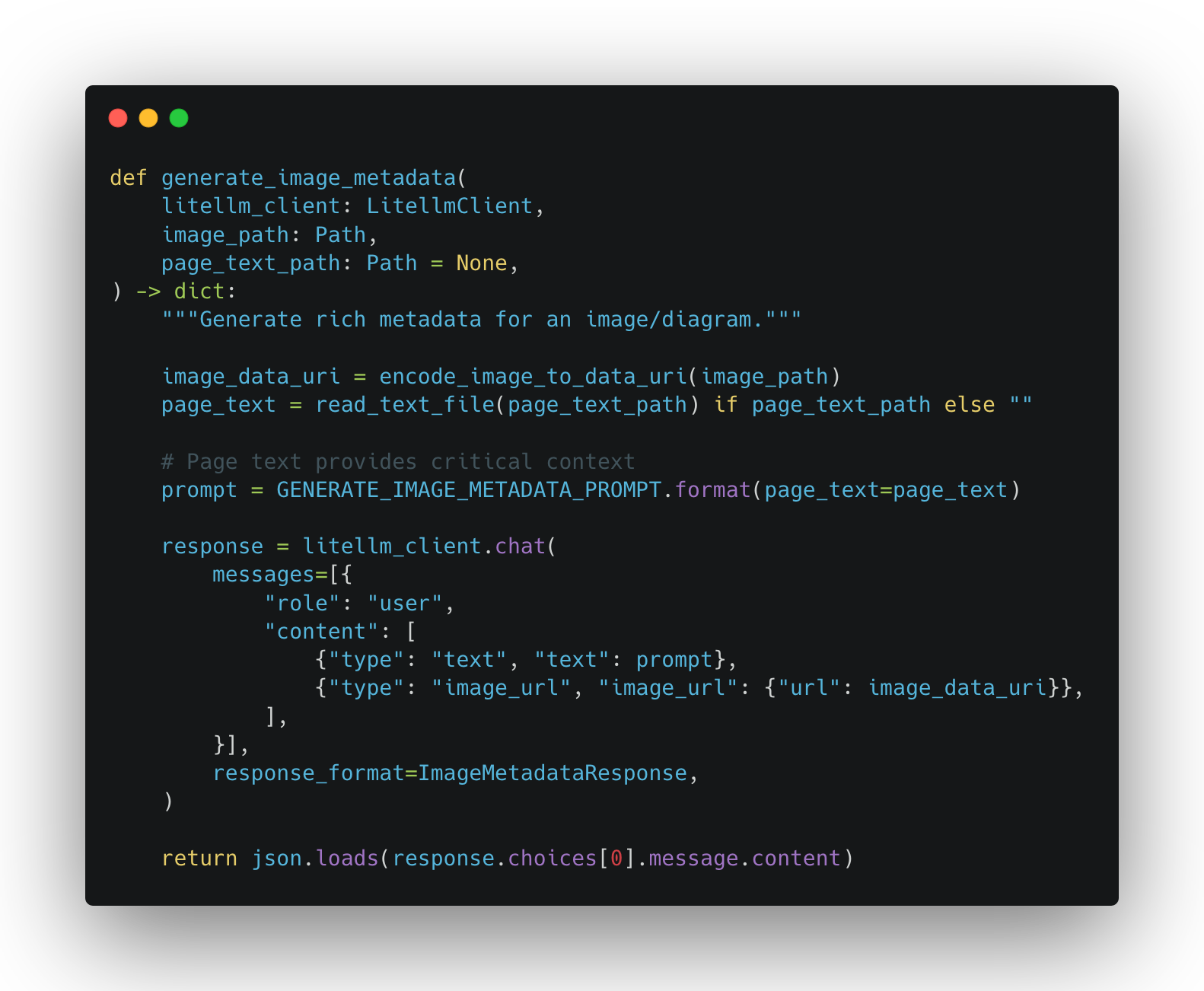
Why include the page text? Because images rarely exist in isolation. A diagram on page 36 might be labeled “Figure 3-2” with the caption appearing in the text: “Figure 3-2 shows the hydraulic circuit for the boom assembly.” Without the page text, the Vision LLM sees an unlabeled diagram. With it, the model understands what the diagram represents.
The Image Metadata Schema
The schema captures both visual content and semantic meaning:
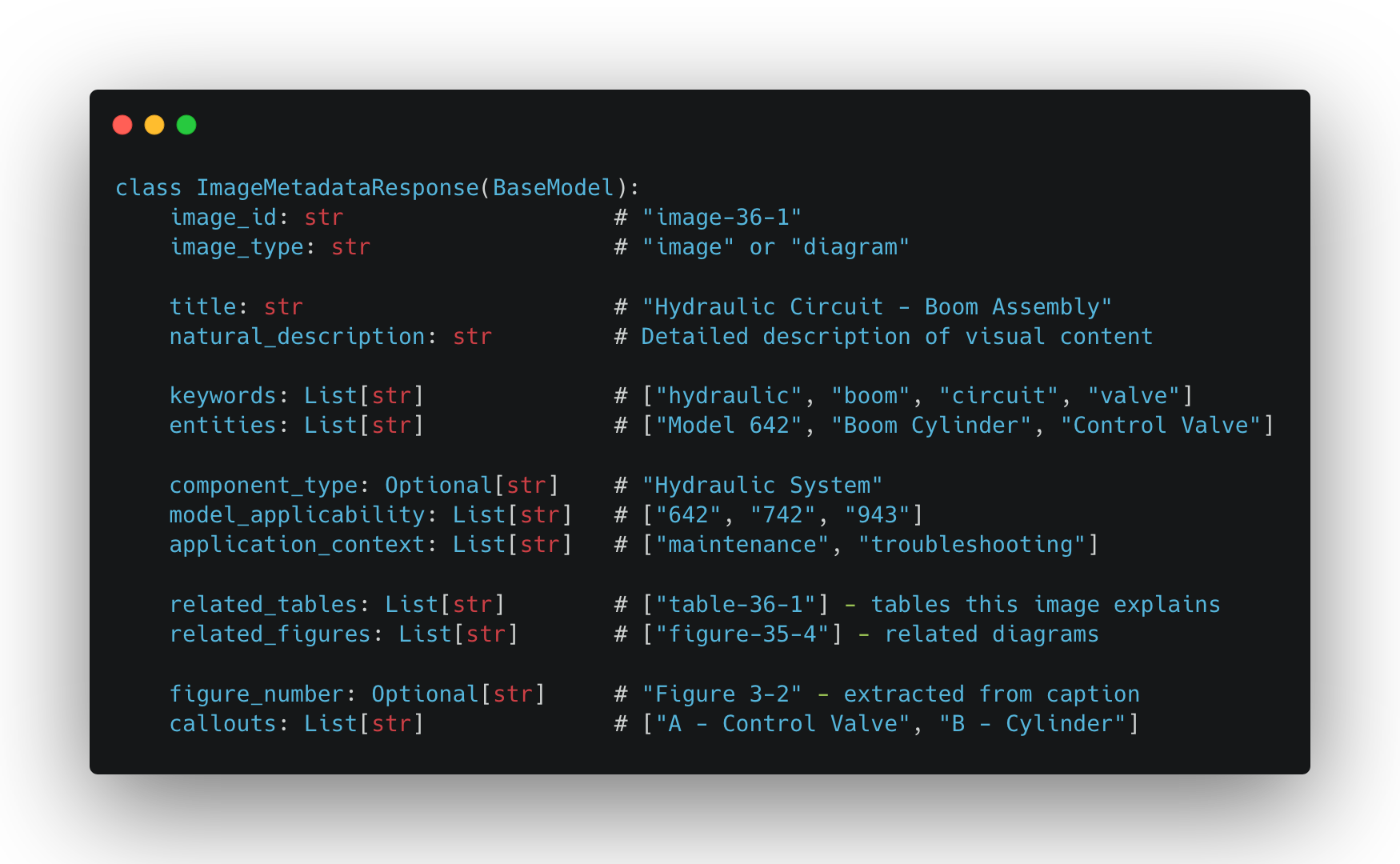
The image\_type field uses a binary classification:
- “image”: Photographs, illustrations, logos, screenshots
- “diagram”: Technical drawings, schematics, flowcharts, exploded views, wiring diagrams, circuit diagrams
I tested more granular classifications (8 categories). The Vision LLM confused “schematic” with “wiring diagram” 30% of the time. Binary classification achieved 95% accuracy. Simpler is better when the distinction matters for retrieval.
Sample Output
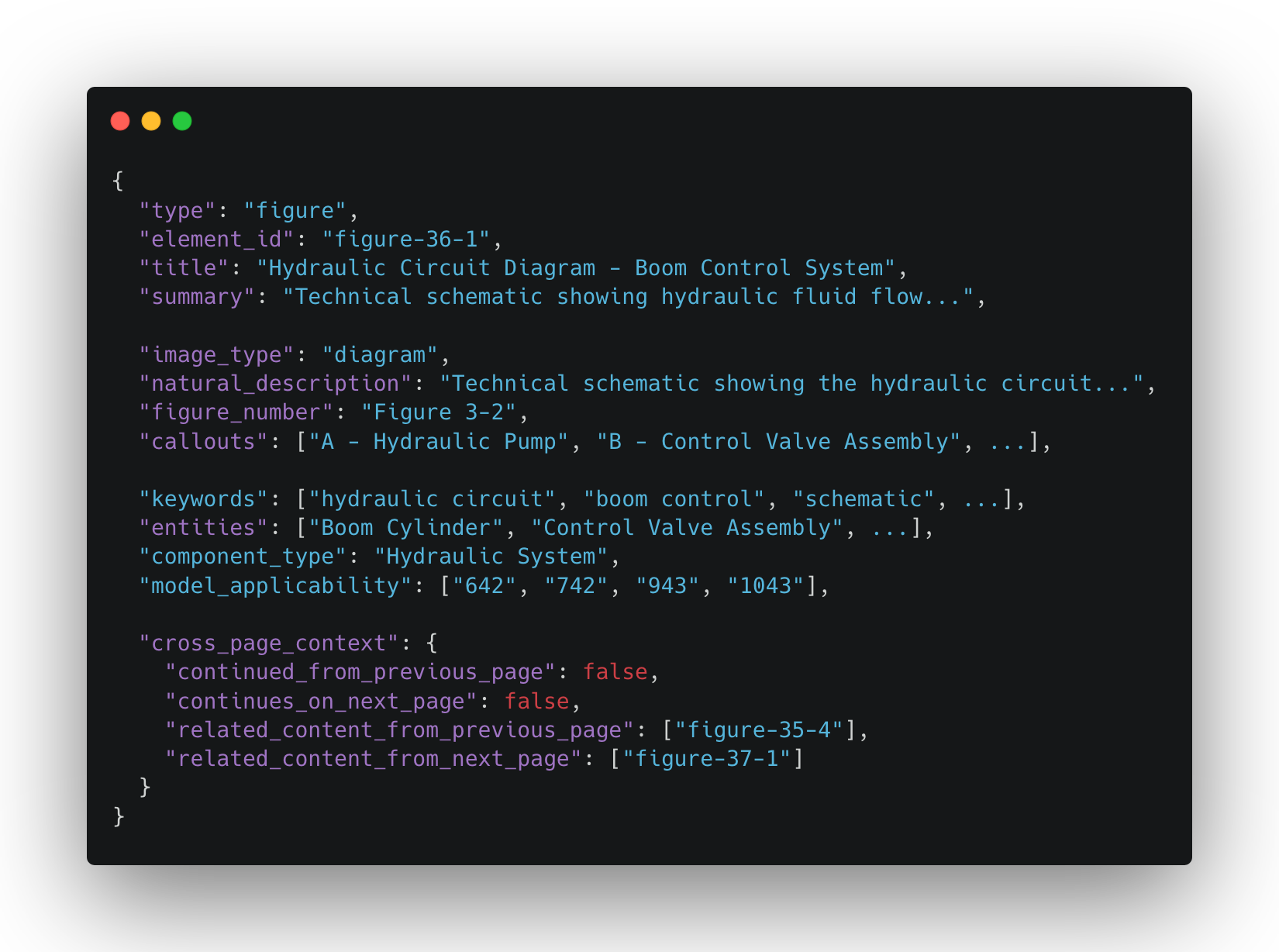
Here’s actual metadata extracted from a hydraulic circuit diagram:
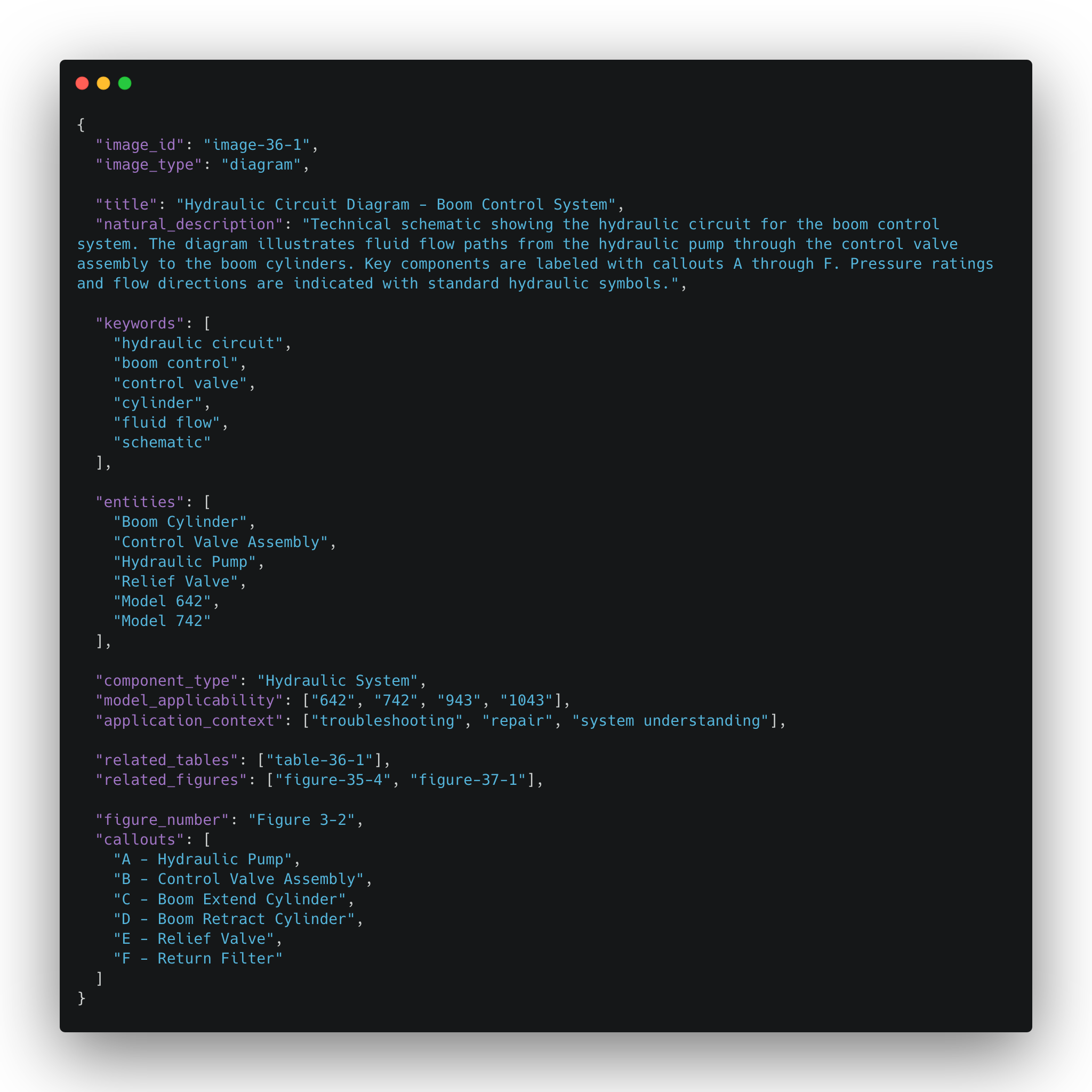
Compare this to the generic description the first version produced: “A technical illustration showing components of a mechanical system.”
Why Callouts Matter
Technical diagrams use callouts—letters or numbers pointing to specific components. The page text typically includes a legend: “A - Hydraulic Pump, B - Control Valve Assembly...”
Extracting callouts enables precise retrieval. A query for “where is the relief valve in the boom hydraulic circuit” can match on:
component\_type: "Hydraulic System"
keywords: ["boom", "hydraulic circuit"]
callouts: ["E - Relief Valve"]
The system returns the correct diagram and can highlight that the relief valve is callout E.
Integration with Content Elements
Image metadata gets merged into the page’s content\_elements array. This consolidates all page content in one place:
Query Decomposition: Using the PDF’s Own Structure
Here’s the implementation detail I didn’t emphasize enough in Part 2: the manual structure comes from the PDF itself, not a hardcoded template.
The practical code can be found here .
During metadata extraction, we capture section information from each page:
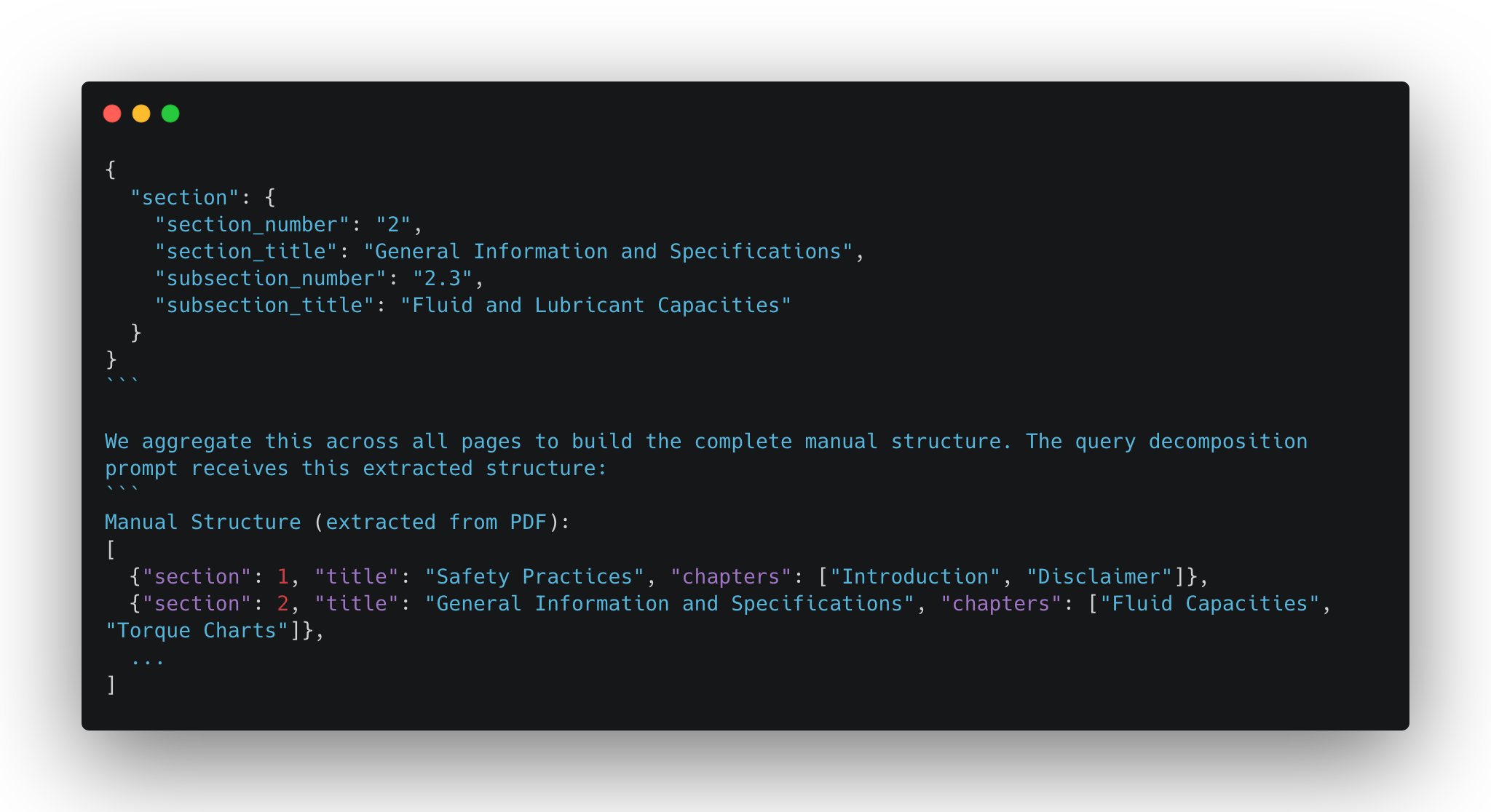
When a user asks "What's the difference in axle fluid capacity between models 943 and 1255?", the decomposition maps sub-questions to the correct sections:
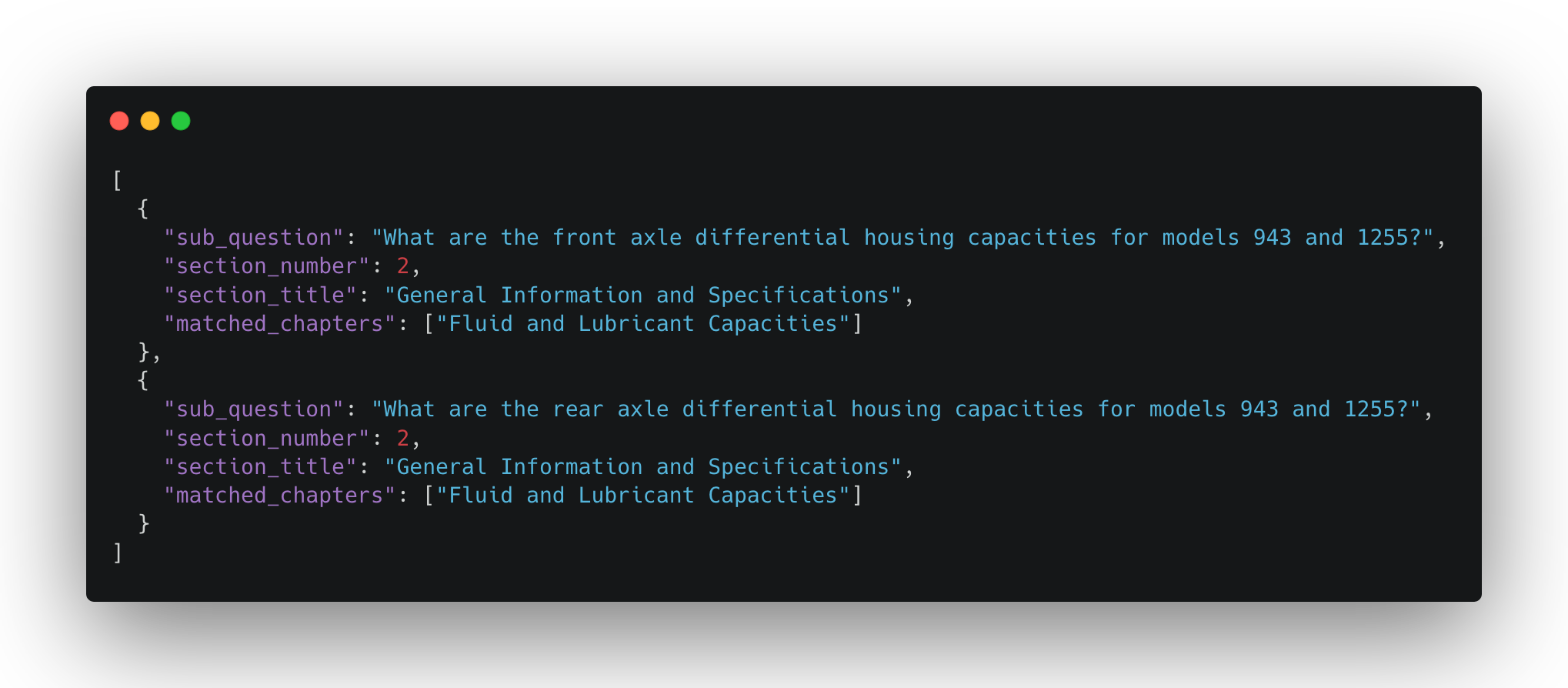
Why this matters: The system adapts to any PDF structure. A legal contract has different sections than a service manual. The extraction captures whatever structure exists. No hardcoding required.
Lessons Learned
After building this pipeline across 12 service manuals totaling 4,800 pages, here’s what I’d tell myself before starting:
1. Domain understanding comes before any code.
I spent three days with a technician watching how they actually use service manuals. They flip between pages, trace figure references, compare specifications across models. That observation shaped every architectural decision. The three-page window, the cross-page relationships, the model applicability filtering, none of that came from a “RAG best practices” blog post.
2. Vision models are necessary when context aware is important
- Correction feedback: When OCR extracts a table incorrectly, the Vision LLM can compare the extracted HTML against the actual table image and fix structural errors. Without the image, you’re trusting OCR output blindly.
- Spatial relationships: A Vision LLM sees that “Figure 3-2” appears directly below a hydraulic diagram. Pure text extraction loses this positioning. The model can infer relationships that text extraction destroys.
- Context around elements: A table titled “Specifications” means nothing without seeing the section header above it. Sending the full page image gives the Vision LLM the surrounding context—headers, captions, related figures—that makes extraction accurate.
- Cross-page understanding: When you send three page images (N-1, N, N+1), the Vision LLM can see that the table on page 36 is a continuation of page 35. It can see that Figure 3-2 on page 35 is referenced by text on page 36. Text extraction alone can’t establish these visual relationship
3. Metadata is not optional.
It’s important to have rich metadata, by understanding the documents and how they will be used into real world system.
4. Test with real queries from real users.
I built the first version based on queries I invented. It worked great on my test cases. Then actual technicians used it and asked questions I’d never considered: “What’s the torque for the bolt next to the hydraulic fitting on the 943?” The specificity broke my assumptions about how queries would be phrased.
5. Fail gracefully at boundaries.
Page 1 has no previous page. Page 573 has no next page. Tables span pages. Images reference text on other pages. Every edge case that crashed my pipeline taught me something about the domain. Handle missing data explicitly rather than assuming it exists.
6. Store everything, decide later.
We store the table HTML, the flattened text, the image, and the metadata. Different retrieval strategies need different representations. Deciding at ingestion time which format to keep limits your options at retrieval time.
What’s Next
This entire article covers ingestion and extraction. We’ve taken raw PDFs and transformed them into richly structured metadata with cross-page relationships, classified images, corrected tables, and domain-specific fields.
We haven’t written a single retrieval query yet.
The retrieval system—multi-vector indexing in Qdrant, hybrid search, cross-page chain following—is where this data model pays off. But it’s also where new problems emerge:
- How do you follow
related\content\from\previous\pagechains at query time?
- When do you retrieve the table HTML vs. the flattened text?
- How do you combine dense, sparse, and ColBERT vectors effectively?
Coming in Part 4: Indexing and Retrieval
You’ll see the complete indexing code, the retrieval strategies that work, and the failures that taught me what to include.
Try It Yourself
The complete codebase is on GitHub: github.com/hypeprlane/complex-pdf-rag
Fork it. Run it on your own documents. Break it in ways I haven’t discovered yet.
If you’re building document AI systems and want to discuss your domain challenges, reach out. Sometimes the best insights come from seeing how these principles apply to problems I haven’t encountered.
Subscribe to get notified when Part 4 drops. We’ll dive deep into multi-vector indexing, hybrid retrieval, and building a retrieval system that actually works.
Thanks for reading Hyperplane! Subscribe for free to receive new posts and support my work.