Learn exactly how lazy loading impacts your database and how to easily implement eager loading solutions.
By The Coding Gopher
Published: 2026-09-13
URL: https://thecodinggopher.substack.com/p/the-n1-database-query-problem-explained
If your database-driven application is running slower than expected, it might not be a lack of computing power or missing indexes. Often, it’s death by a thousand cuts. In the database world, this is known as the N+1 query problem.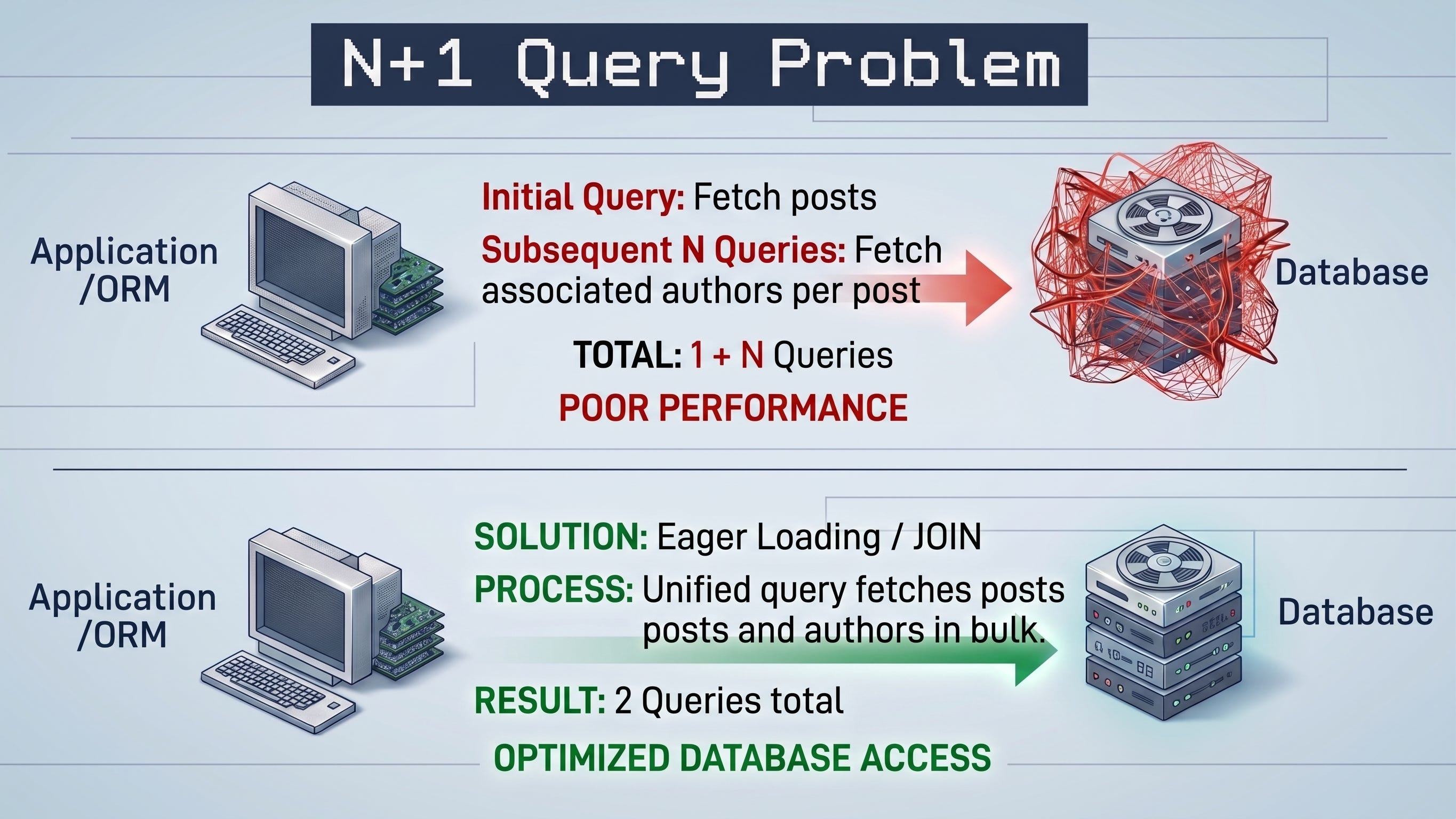 The N+1 query problem is a database performance bottleneck where an application executes one initial query to fetch a list of parent records, followed by N additional queries to fetch related child data for each individual record. Instead of retrieving all data efficiently in one or two database roundtrips, the application makes N+1 total requests, which creates massive network latency and can easily overwhelm your database server.
It’s one of the most common performance bottlenecks in modern web development, particularly when using Object-Relational Mappers (ORMs) like Entity Framework, Django ORM, or ActiveRecord. It is especially dangerous because code with an N+1 flaw will often run perfectly fast in a local development environment with dummy data, only to bring your production servers to a crawl when real users arrive.
Here is a breakdown of what the N+1 problem is, why it happens, and exactly how you can fix it.
The Anatomy of the Problem
Imagine you are building a simple blog page. You want to display a list of 10 recent articles, and next to each article, you want to show the author’s name.
In your application code (using a generic ORM syntax), you might write something straightforward like this:
# Fetch 10 recent articles
articles = Article.objects.limit(10)

for article in articles:
# Print the article title and the author's name
print(f"{article.title} by {article.author.name}")
Logically, this makes perfect sense. But under the hood, the ORM is translating your elegant code into SQL in a highly inefficient way.
Here is what the database actually sees.
The “1” Query: First, the ORM fetches the initial list of articles.
SELECT * FROM articles LIMIT 10;The “N” Queries: Then, as your loop iterates through each article, the ORM realizes it doesn’t have the author data in memory yet. To compensate, it lazily fetches the author for each individual article.
SELECT * FROM authors WHERE id = 1;
SELECT * FROM authors WHERE id = 4;
SELECT * FROM authors WHERE id = 2;
-- ... repeated 10 times
To display just 10 articles, your application executed 11 separate database queries (1 to get the articles, plus 10 to get the authors). If you change the page to display 100 articles, you will suddenly be executing 101 queries.
This is the N+1 problem: 1 query to fetch the parent records, plus N queries to fetch the related child records.
Why do ORMs do this? ORMs default to a behavior called “lazy loading” to save memory. If you fetch 100 articles but never actually access the author property in your code, the ORM saves resources by not pulling that author data from the database. Lazy loading is actually a great feature—until it gets trapped inside a loop.
Why It Kills Performance
Database queries are relatively fast, so executing 11 queries instead of 1 might not crash your server right away. But as your dataset grows, that simple loop becomes a massive traffic jam.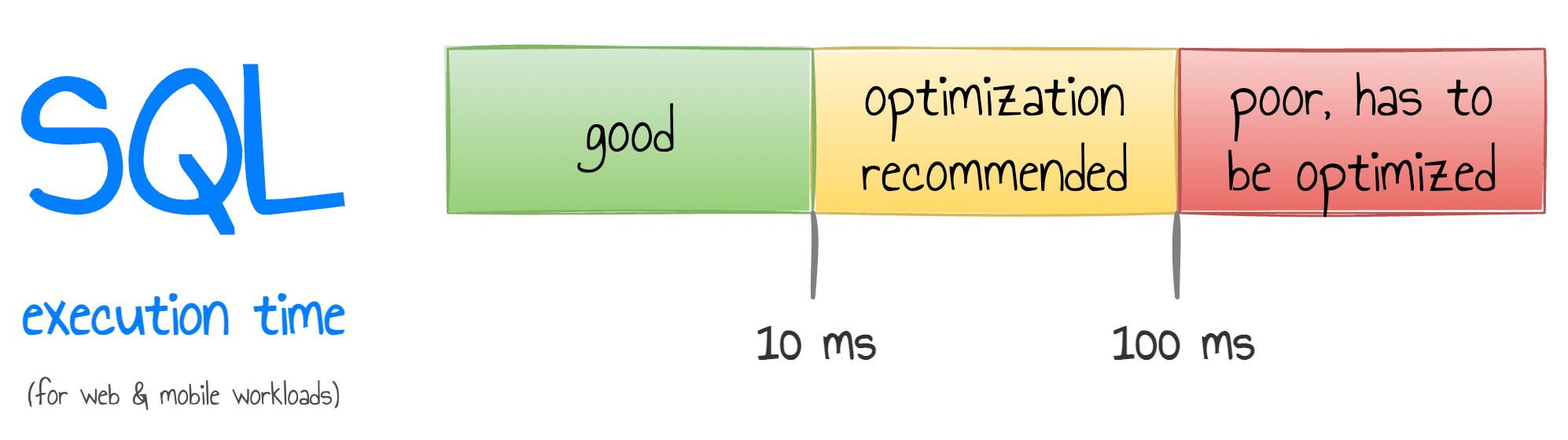 The N+1 SQL query pattern severely degrades application speed because it forces the application to make multiple sequential round-trips to the database instead of fetching all required data in a single optimized query. While a single query might run in just a few milliseconds, executing hundreds or thousands of them inside a loop quickly creates massive latency bottlenecks.
The performance degradation comes from three main sources:
-
Network Latency: Every time your application talks to your database, there is round-trip network overhead. If a single query takes 2 milliseconds of network travel time, 1 optimized query takes 2ms. An N+1 scenario with 100 records takes 202ms. That is a fifth of a second wasted just on wire transit.
-
Database CPU Load: Your database engine has to parse, plan, and execute every single query you send it. Forcing it to parse 100 separate SELECT statements is incredibly inefficient compared to parsing one bulk request.
-
Connection Pool Exhaustion: Most applications have a limited pool of database connections. If a single user’s request is firing off hundreds of sequential queries, they are hogging a connection for much longer than necessary. This starves other users and can quickly lead to application timeouts.
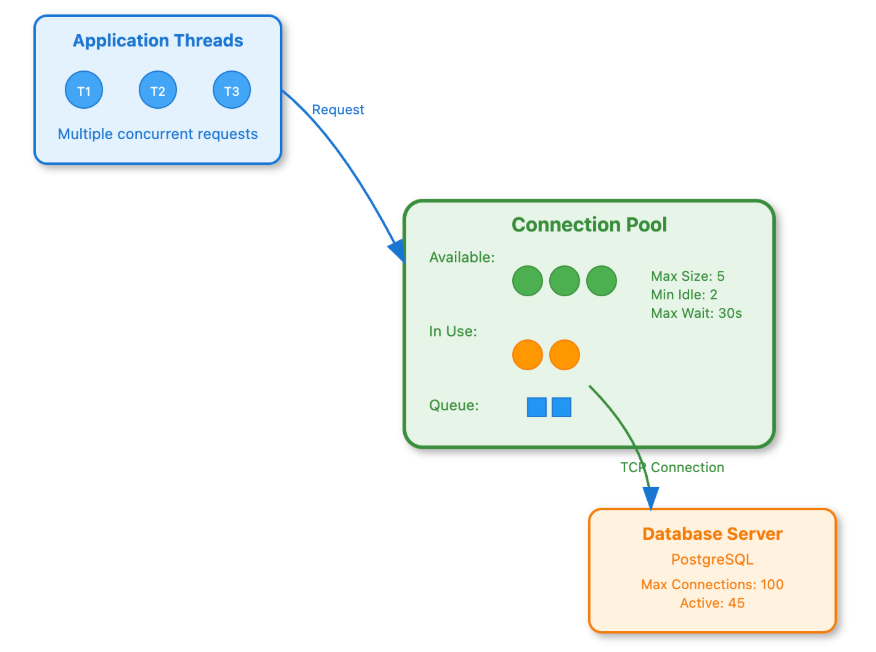 Connection pool exhaustion happens when every available connection in an application’s pool is actively in use or stuck, leaving no capacity to handle new requests. This causes incoming requests to queue, triggering severe latency spikes, cascading timeouts, and application downtime.
𝐋𝐞𝐚𝐫𝐧 𝐭𝐨 𝐛𝐮𝐢𝐥𝐝 𝐆𝐢𝐭, 𝐃𝐨𝐜𝐤𝐞𝐫, 𝐑𝐞𝐝𝐢𝐬, 𝐇𝐓𝐓𝐏 𝐬𝐞𝐫𝐯𝐞𝐫𝐬, 𝐚𝐧𝐝 𝐜𝐨𝐦𝐩𝐢𝐥𝐞𝐫𝐬, 𝐟𝐫𝐨𝐦 𝐬𝐜𝐫𝐚𝐭𝐜𝐡. Get 40% OFF CodeCrafters: https://app.codecrafters.io/join?via=the-coding-gopher
System Design Blueprint is a reader-supported publication. To receive new posts and support my work, consider becoming a free or paid subscriber.
How to Fix It: Eager Loading
The solution to the N+1 problem is a technique called eager loading. Instead of lazily fetching related records one by one as they are needed, you tell the ORM upfront: “I am going to need the authors for all of these articles. Grab them all at once.”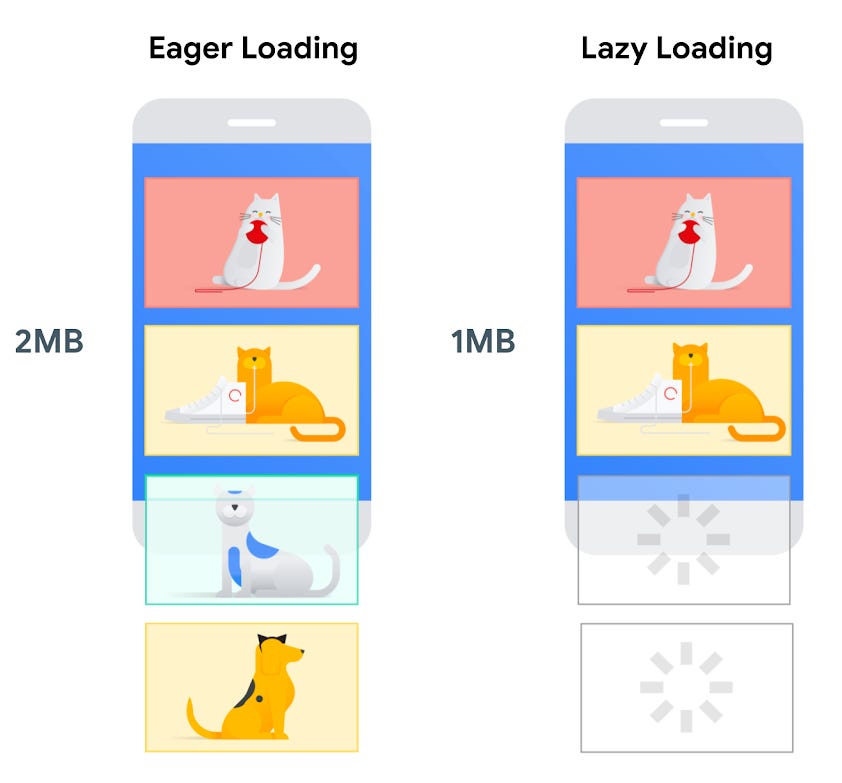 Lazy loading and eager loading are design patterns used to manage how an application retrieves data from databases or APIs. Eager loading fetches all necessary data immediately in a single query, while lazy loading delays fetching related data until it is explicitly requested.
At the SQL level, this usually translates to a JOIN or a bulk WHERE IN clause:
-- Using a JOIN (1 query total)
-- Best for 1-to-1 or Many-to-1 relationships
SELECT articles.*, authors.*
FROM articles
JOIN authors ON articles.author_id = authors.id;

-- Using a WHERE IN clause (2 queries total)
-- Best for 1-to-Many relationships to avoid data duplication
SELECT * FROM articles LIMIT 10;
SELECT * FROM authors WHERE id IN (1, 4, 2, ...);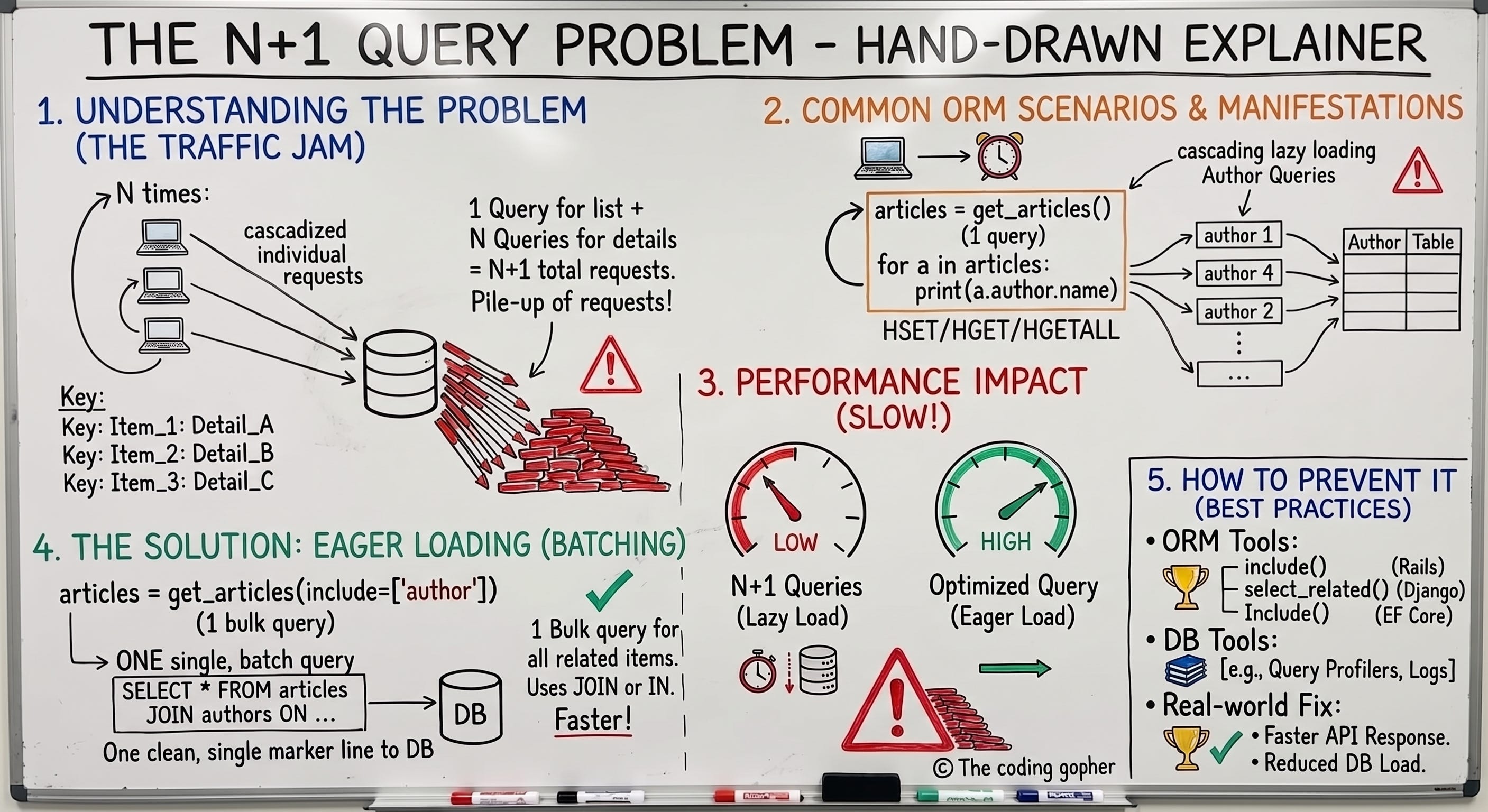
Implementing Eager Loading in Your ORM
Modern ORMs have built-in methods to handle eager loading easily. You just have to remember to use them before you start looping through your data.
-
Django (Python): Use selectrelated for Foreign Keys (e.g., Article.objects.selectrelated('author')) and prefetchrelated for Many-to-Many relationships (e.g., Article.objects.prefetchrelated('tags')).
-
ActiveRecord (Ruby): Use .includes() to tell Rails to load the associations (e.g., Article.includes(:author).limit(10)).
-
Entity Framework (C#): Chain the .Include() method to your query (e.g., context.Articles.Include(a => a.Author)).
-
Laravel Eloquent (PHP): Utilize the with() method to specify relationships (e.g., Article::with('author')->get()).
Eager loading is an optimization technique where your ORM fetches primary records and their related data simultaneously in a single, optimized query (or a small, controlled batch of queries). This preemptive retrieval eliminates the dreaded N+1 query problem and significantly reduces database round-trips.
Catching N+1 Queries Before Production
Because ORMs completely hide the underlying SQL, N+1 issues can easily slip past code reviews. To catch them proactively and keep your application fast, you should implement a few safeguards:
-
Assert Query Counts in Tests: The best way to prevent N+1 issues is through automated testing. Most testing frameworks allow you to assert exactly how many queries a block of code should execute. If someone accidentally removes the eager loading, the test will immediately fail (e.g., Django’s assertNumQueries).
-
Monitor Query Logs: During local development, turn on SQL query logging in your console. If you see a wall of identical SELECT statements scrolling by, you have an N+1 problem.
-
Install Dedicated Packages: Tools like bullet (for Rails) or django-debug-toolbar (for Django) monitor your local environment and throw highly visible warnings on your screen the moment you introduce an N+1 query.
-
Use APM Tools: Application Performance Monitoring tools (like New Relic or Datadog) will flag transactions in staging or production that generate unusually high query counts, allowing you to track down bottlenecks in the wild.
By understanding how your ORM fetches data and strategically applying eager loading, you can eliminate one of the most notorious performance killers in software development and keep your applications running smoothly.
System Design Blueprint is a reader-supported publication. To receive new posts and support my work, consider becoming a free or paid subscriber.
Thanks for reading System Design Blueprint! This post is public so feel free to share it.