Engineering Real-Time Peer-to-Peer Communication
By The Coding Gopher
Published: 2026-07-28
URL: https://thecodinggopher.substack.com/p/intro-to-webrtc
How browsers bypass traditional servers to stream live video, and the infrastructure required to make it work.
In a standard web application, all communication flows through a centralized server. If you send a message to a friend, your phone sends it to a cloud server, and the server pushes it to your friend’s phone.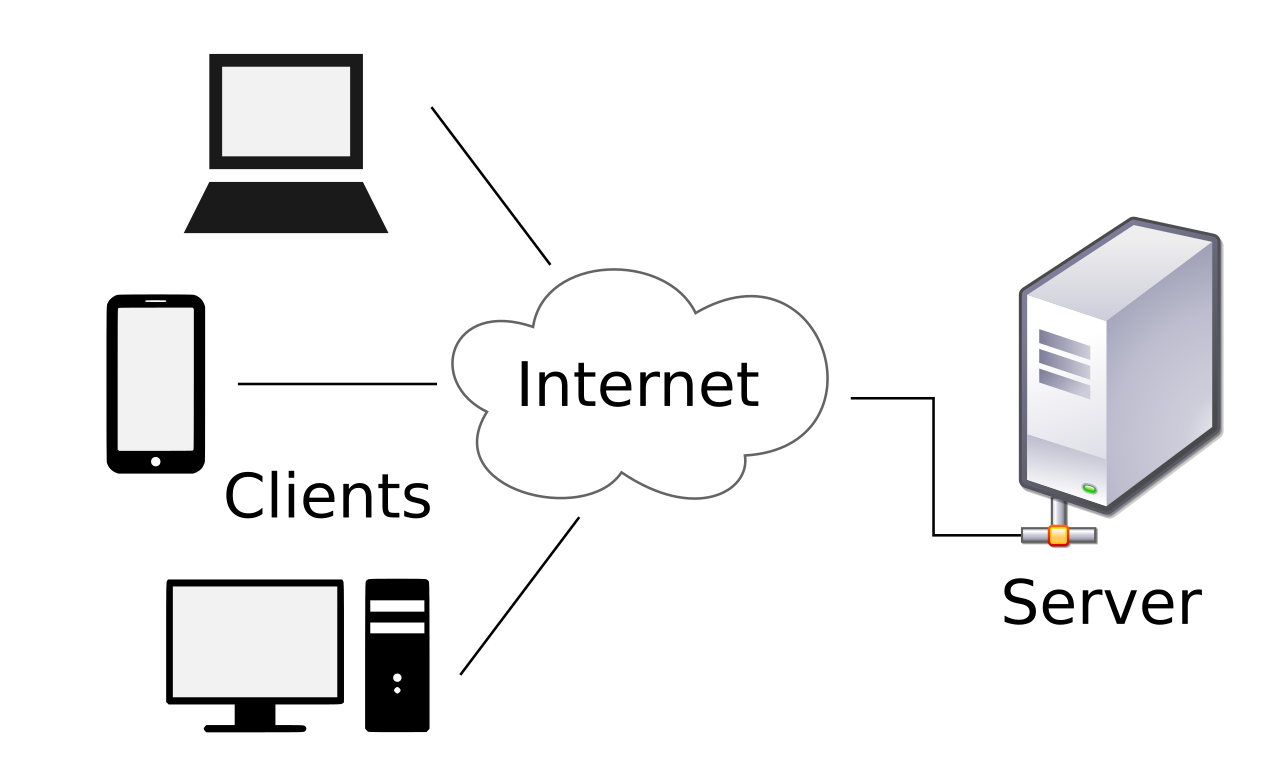
While this architecture works perfectly for text messages, it becomes incredibly inefficient for real-time video. Routing a live 4K video stream from your laptop in Toronto to a server in Virginia, just to send it back to your coworker sitting in the next office over, introduces unnecessary latency and consumes massive amounts of expensive server bandwidth.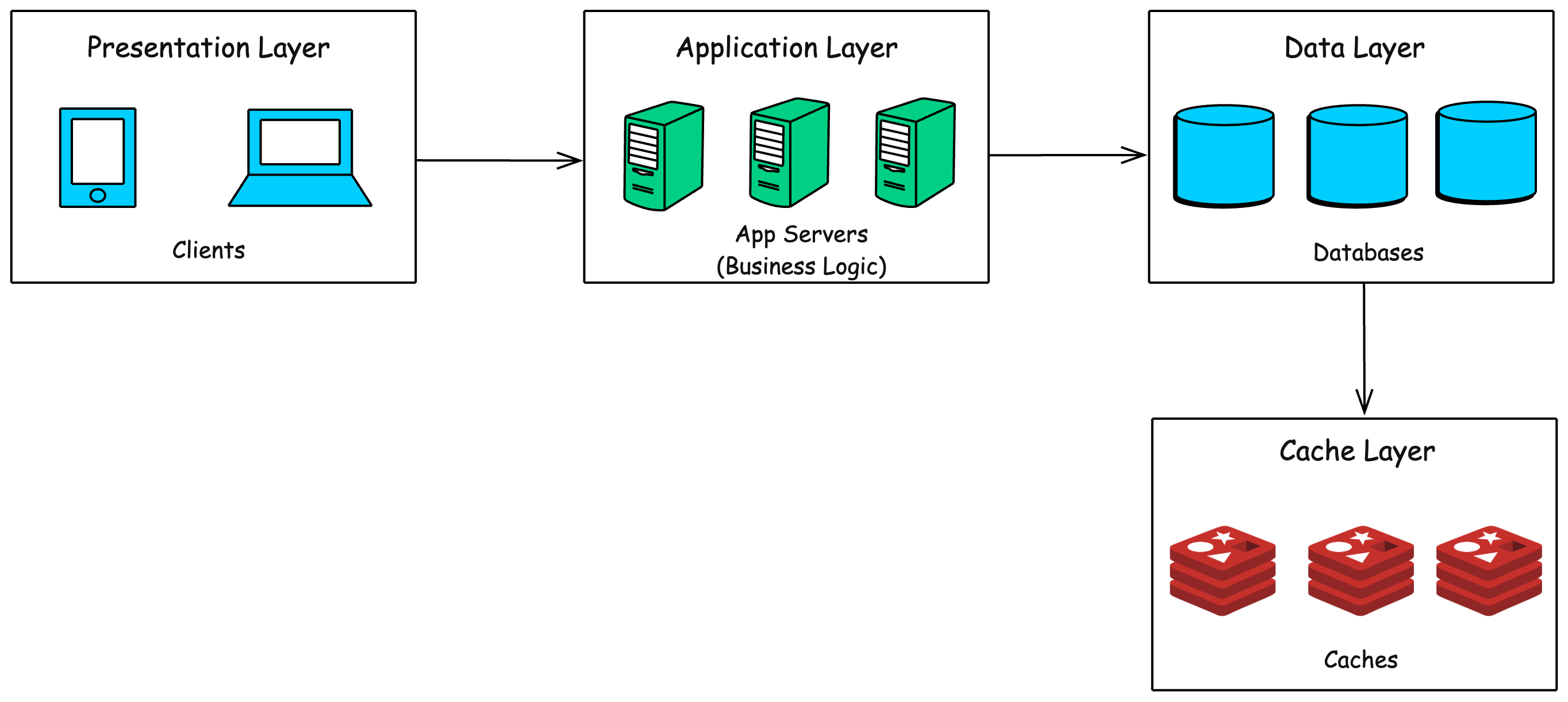
WebRTC (Web Real-Time Communication) was built to solve this. It is a set of open web standards that allows web browsers and mobile applications to stream audio, video, and raw data directly to each other (Peer-to-Peer or P2P), completely bypassing the central server for the actual media transfer.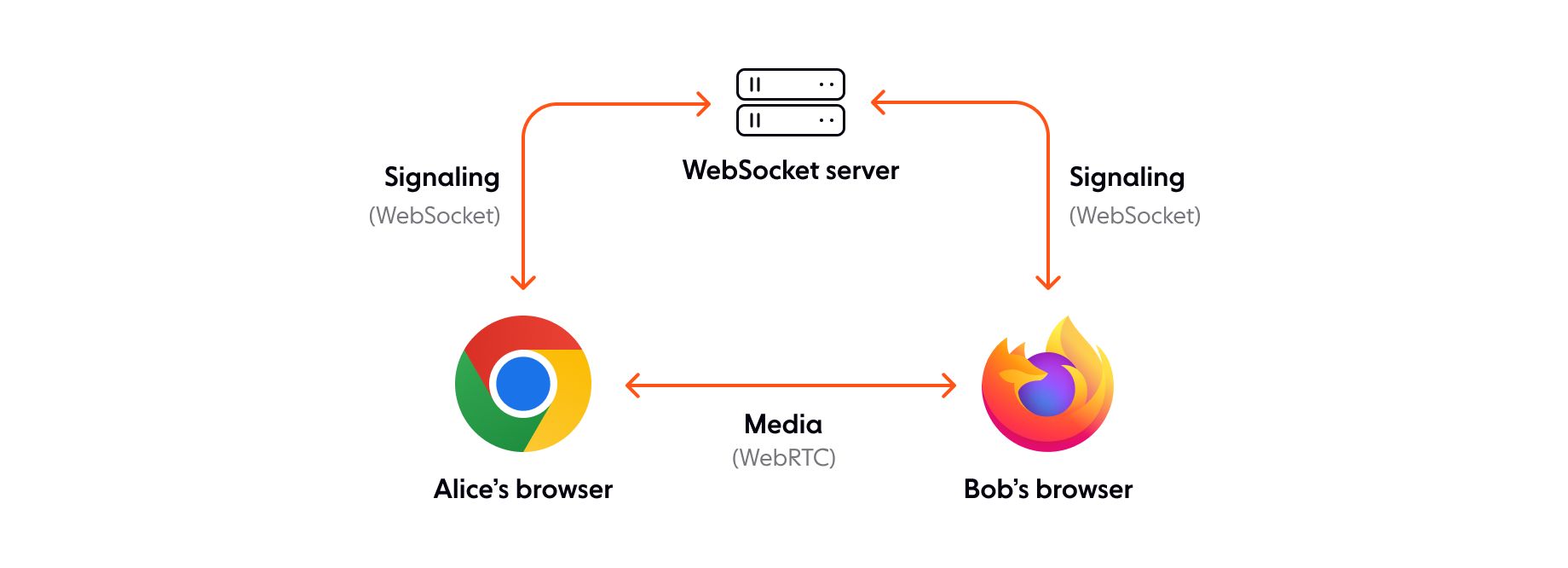
However, establishing a direct P2P connection over the chaotic, heavily firewalled open internet is an incredibly complex engineering challenge.
Client-server architecture (centralized) uses dedicated servers to provide resources to client devices, offering high security and stability. Conversely, Peer-to-Peer (P2P) architecture (decentralized) allows all nodes to behave as both client and server, making it cheaper and more scalable but less secure. Server setups excel in professional environments, while P2P is better for small, simple sharing tasks.
Here is the architectural breakdown of how a WebRTC connection is negotiated, established, and maintained.
1. The Handshake. Signaling and SDP
Before two browsers can stream video directly to each other, they have to find each other. They need to exchange public IP addresses, agree on which video codecs they both support (e.g., H.264 vs. VP8), and establish cryptographic keys.
Because they don’t know each other yet, WebRTC still requires a traditional server to initiate the call. This is called the Signaling Server.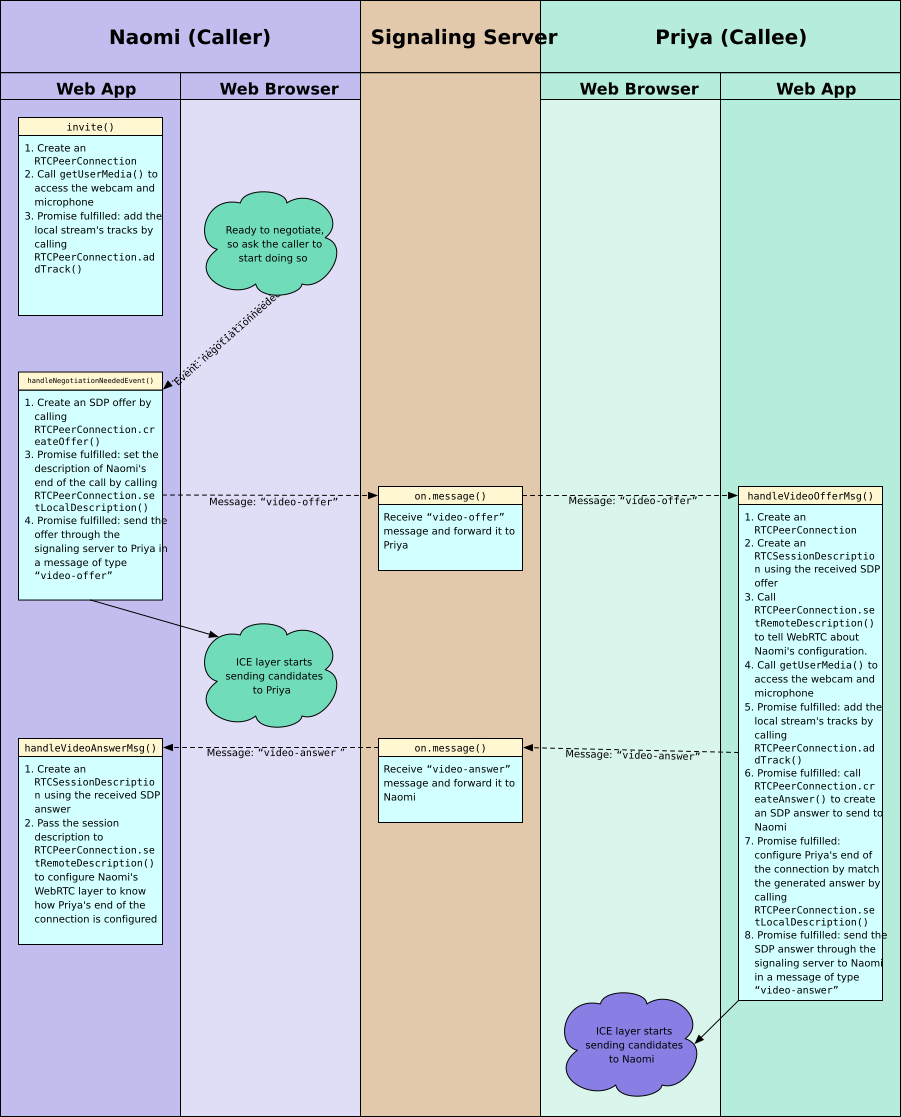
-
The Process: Client A generates a payload of data describing its media capabilities and network routing information. This payload is called a Session Description Protocol (SDP) offer.
-
Client A sends this SDP offer over a standard WebSocket connection to your Signaling Server.
-
The Signaling Server forwards the offer to Client B.
-
Client B responds with an SDP answer, which is routed back through the Signaling Server to Client A.
-
Once this handshake is complete, the Signaling Server’s job is entirely done. It steps out of the way.
2. The Network Barrier. NAT Traversal
If every computer had a public, globally addressable IP address, connecting them would be trivial. In reality, your laptop sits behind a home or office router. The router assigns your laptop a private, internal IP address (like 192.168.1.5) and uses Network Address Translation (NAT) to share a single public IP address with all the devices in your building.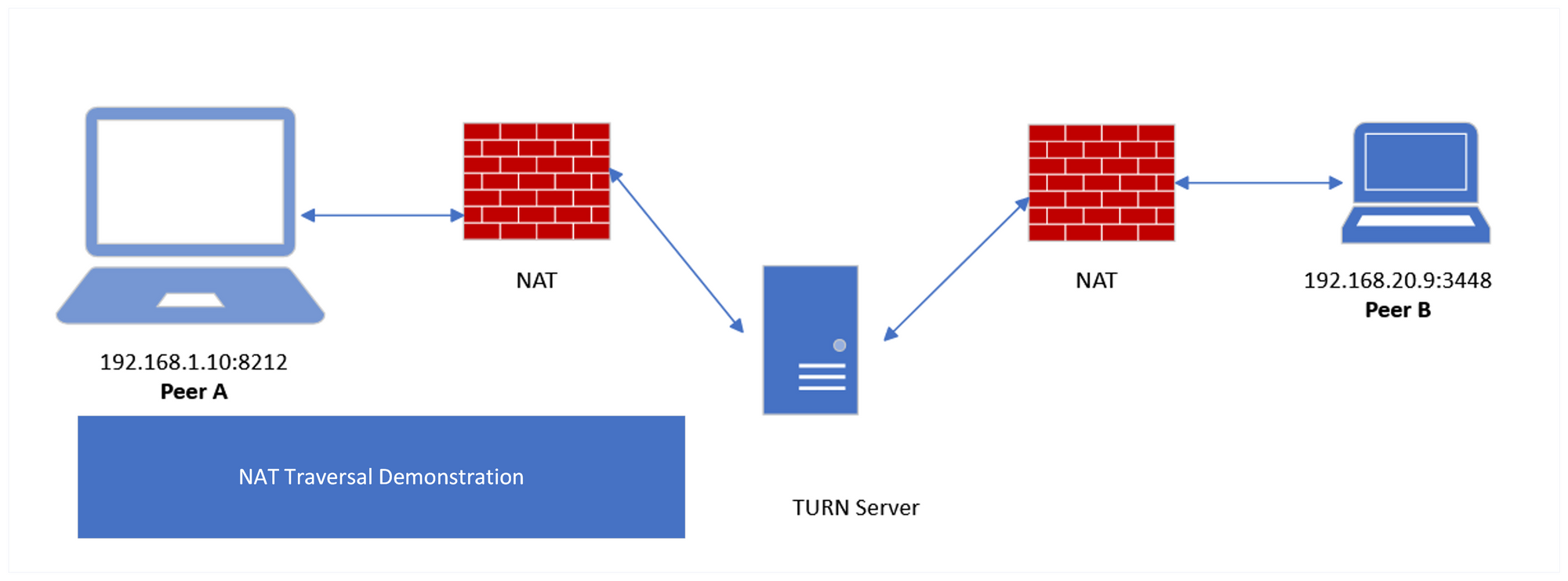
If Client A tells Client B, “Send the video to 192.168.1.5,” the connection will fail, because millions of devices share that exact same private IP. Client A needs to figure out its true, outward-facing public IP address before it can establish a P2P connection.
WebRTC navigates this using the ICE (Interactive Connectivity Establishment) framework, which relies on two critical server types:
STUN (Session Traversal Utilities for NAT)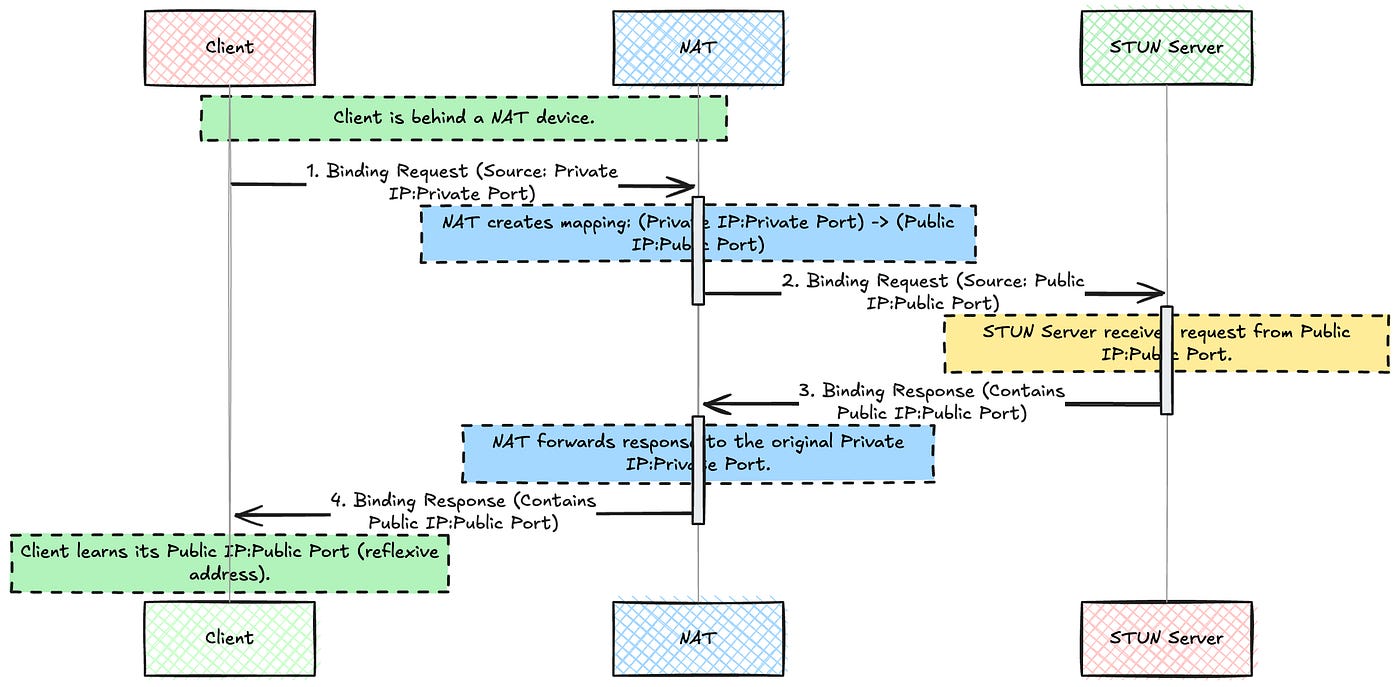
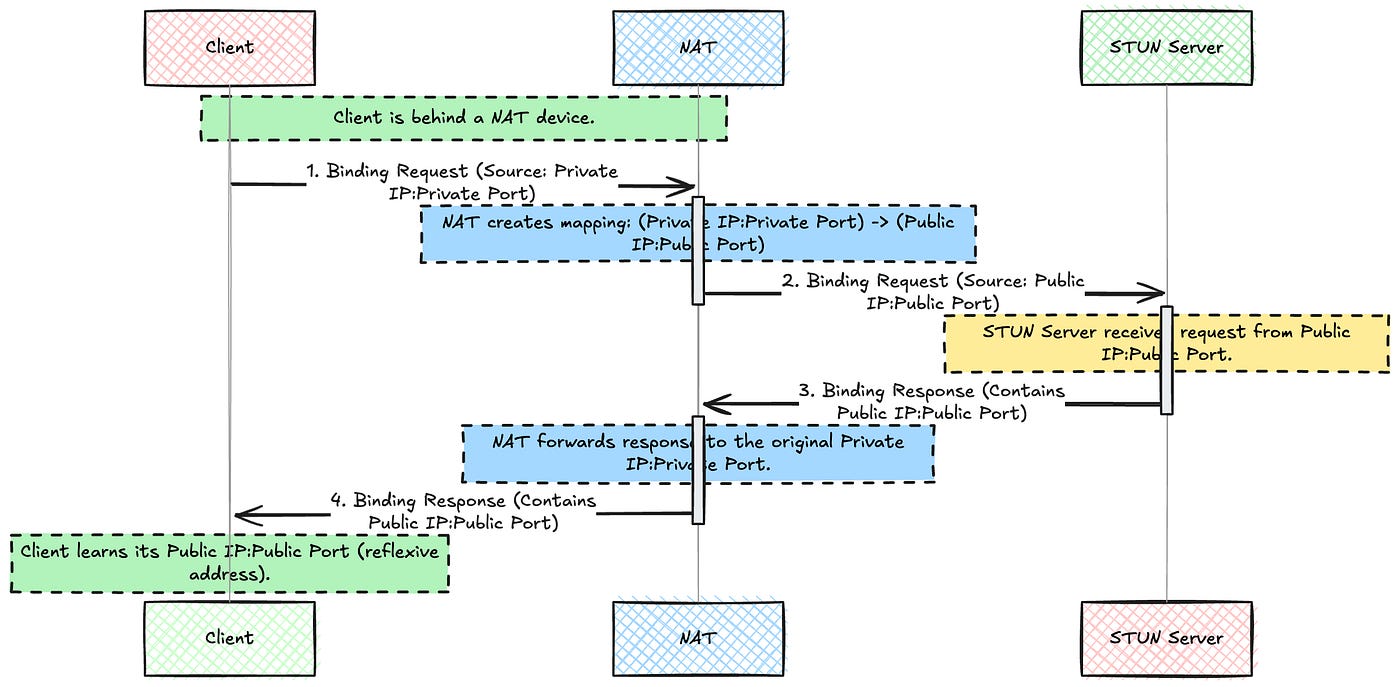
A STUN server is essentially a digital mirror. Client A sends a quick ping to a public STUN server. The STUN server looks at the incoming packet, reads the public IP address and port that the router stamped on it, and sends a message back saying, “Here is what your public IP address looks like to the outside world.” Client A then includes this public IP in its SDP offer. STUN servers are cheap, lightweight, and process requests in milliseconds.
TURN (Traversal Using Relays around NAT)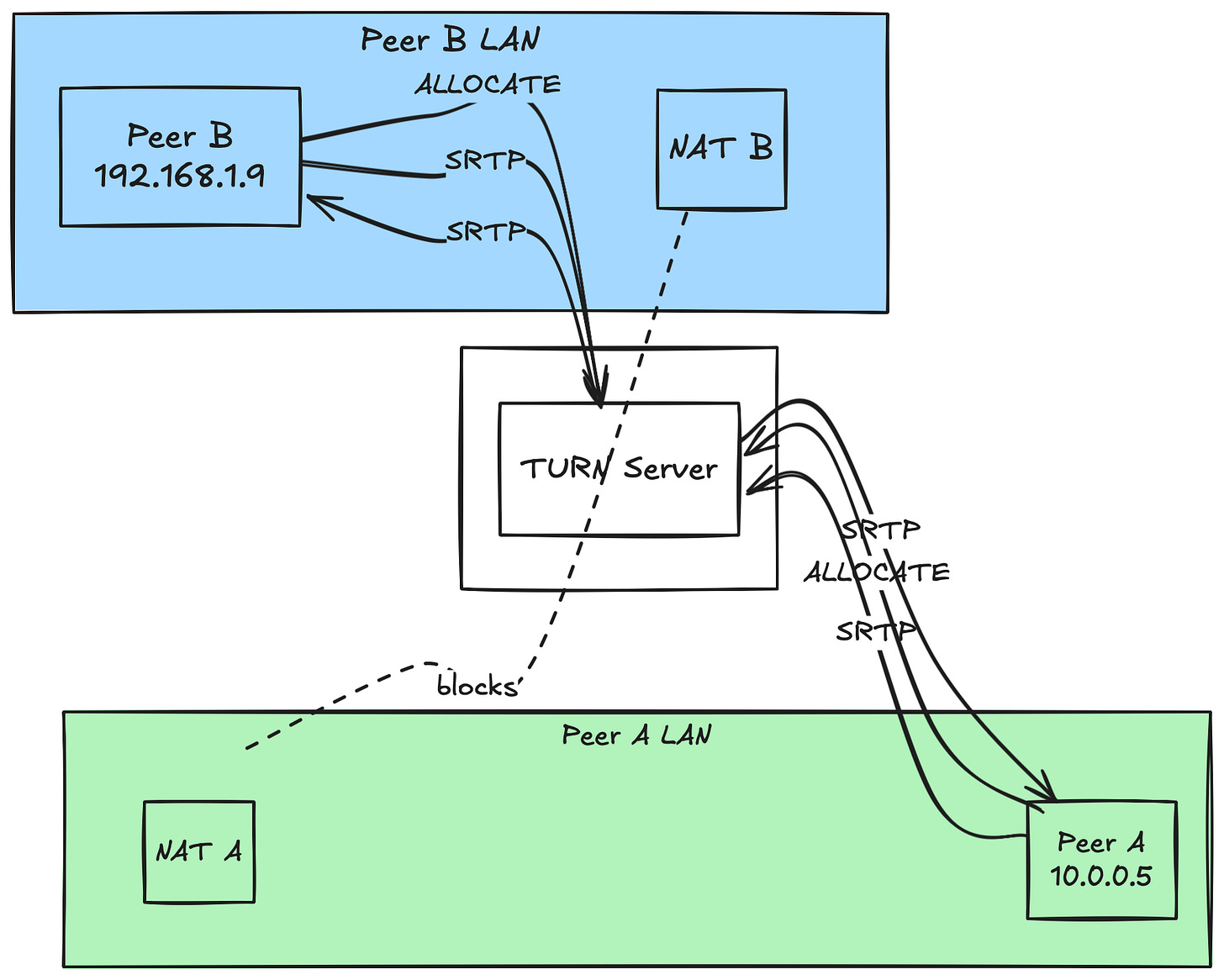
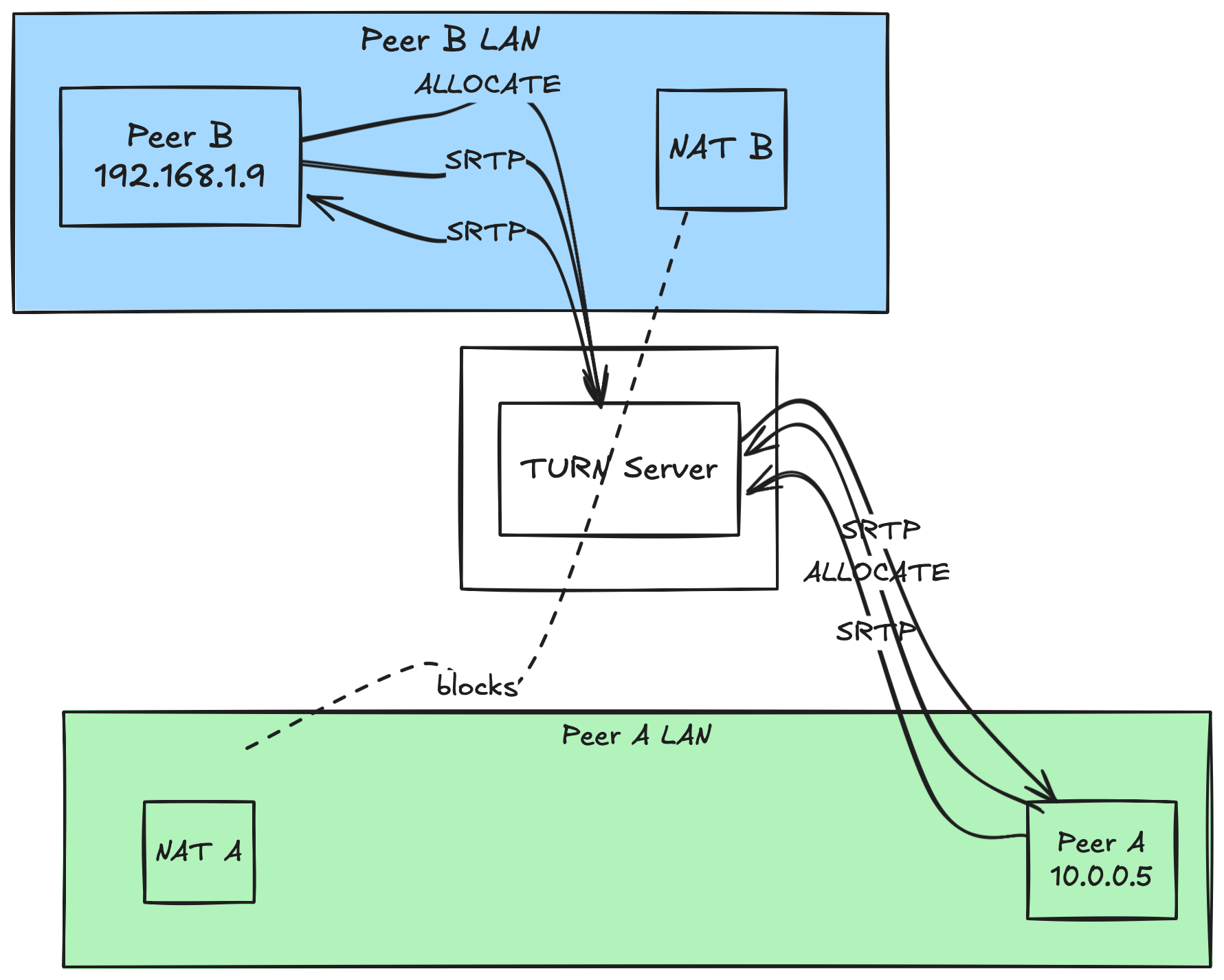
Sometimes, STUN is not enough. Many corporate networks and enterprise firewalls use “Symmetric NAT,” which actively blocks direct P2P connections from unrecognized external IP addresses. When direct P2P fails, WebRTC falls back to a TURN server. A TURN server acts as a middleman relay. Client A sends its video to the TURN server, and the TURN server forwards it to Client B.
-
Utilizing TURN defeats the entire purpose of Peer-to-Peer architecture. You are back to routing massive media payloads through a centralized server. TURN servers are notoriously expensive to operate due to high bandwidth consumption, but they are a necessary fallback to guarantee a connection connects (typically used in 15% to 20% of all WebRTC sessions).
STUN and TURN servers are essential WebRTC infrastructure components that enable peer-to-peer (P2P) connections by navigating NATs and firewalls. STUN (Session Traversal Utilities for NAT) lets devices discover their public IP address for direct connection, while TURN (Traversal Using Relays around NAT) relays media when direct connectivity fails, ensuring reliable communication.
𝐋𝐞𝐚𝐫𝐧 𝐭𝐨 𝐛𝐮𝐢𝐥𝐝 𝐆𝐢𝐭, 𝐃𝐨𝐜𝐤𝐞𝐫, 𝐑𝐞𝐝𝐢𝐬, 𝐇𝐓𝐓𝐏 𝐬𝐞𝐫𝐯𝐞𝐫𝐬, 𝐚𝐧𝐝 𝐜𝐨𝐦𝐩𝐢𝐥𝐞𝐫𝐬, 𝐟𝐫𝐨𝐦 𝐬𝐜𝐫𝐚𝐭𝐜𝐡. Get 40% OFF CodeCrafters: https://app.codecrafters.io/join?via=the-coding-gopher
This Substack is reader-supported. To receive new posts and support my work, consider becoming a free or paid subscriber.
3. The Transport Layer. SRTP and UDP
Once the ICE framework finds a valid network path, the actual media streaming begins.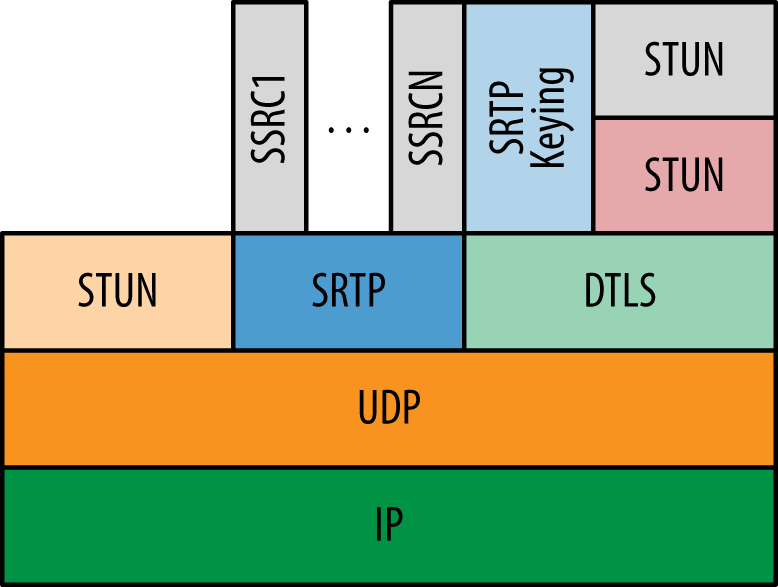
Unlike standard web traffic (HTTP) which relies on TCP (Transmission Control Protocol) to guarantee every single packet arrives in perfect order, WebRTC media runs on UDP (User Datagram Protocol). UDP is connectionless and prioritizes speed over reliability. If a few frames of video are lost in transit, UDP simply drops them and keeps moving forward, resulting in a minor visual glitch rather than causing the entire video stream to freeze and buffer.
To ensure privacy, WebRTC mandates that all media streams are heavily encrypted from end to end using SRTP (Secure Real-Time Transport Protocol).
SRTP (Secure Real-time Transport Protocol) is a security profile for RTP (Real-time Transport Protocol) that provides encryption, message authentication, and integrity for audio and video traffic, primarily in VoIP and WebRTC applications. It protects against eavesdropping and man-in-the-middle attacks by ensuring only authorized parties can access the media stream.
4. The Scaling Bottleneck. Mesh vs. SFU
WebRTC was originally designed for 1-on-1 communication. When you attempt to scale a P2P architecture to a large group (like a 10-person video conference), you encounter severe hardware bottlenecks.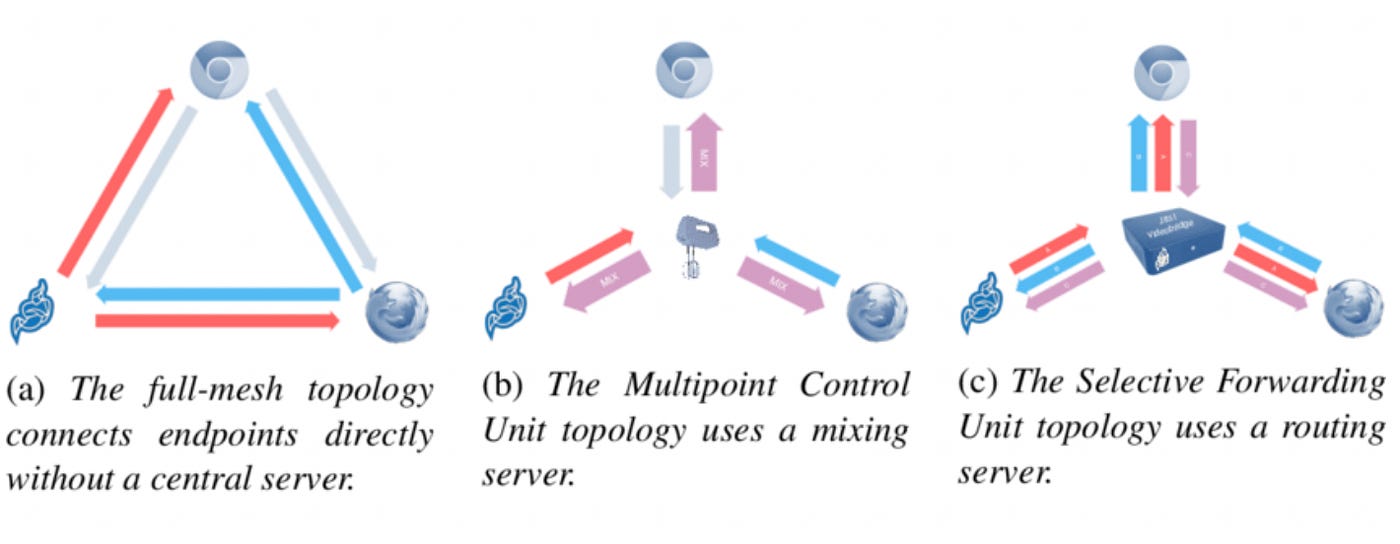
In a pure P2P Mesh Network, every participant must maintain a direct connection with every other participant. In a 10-person call, your browser has to simultaneously encode and upload your 1080p video stream 9 separate times, while downloading 9 incoming video streams. This instantly overwhelms the CPU and uplink bandwidth of a standard laptop or mobile device.
To solve this, modern video conferencing platforms (like Google Meet or Zoom’s WebRTC implementation) abandon the pure P2P Mesh model and deploy a centralized architecture:
-
The SFU (Selective Forwarding Unit). Every user uploads their video stream once to a central SFU server. The SFU server does not process or decode the video; it simply acts as an ultra-fast router, selectively copying and forwarding the incoming streams to the other 9 participants. This shifts the massive uplink bandwidth requirement from the user’s local network to your cloud infrastructure.
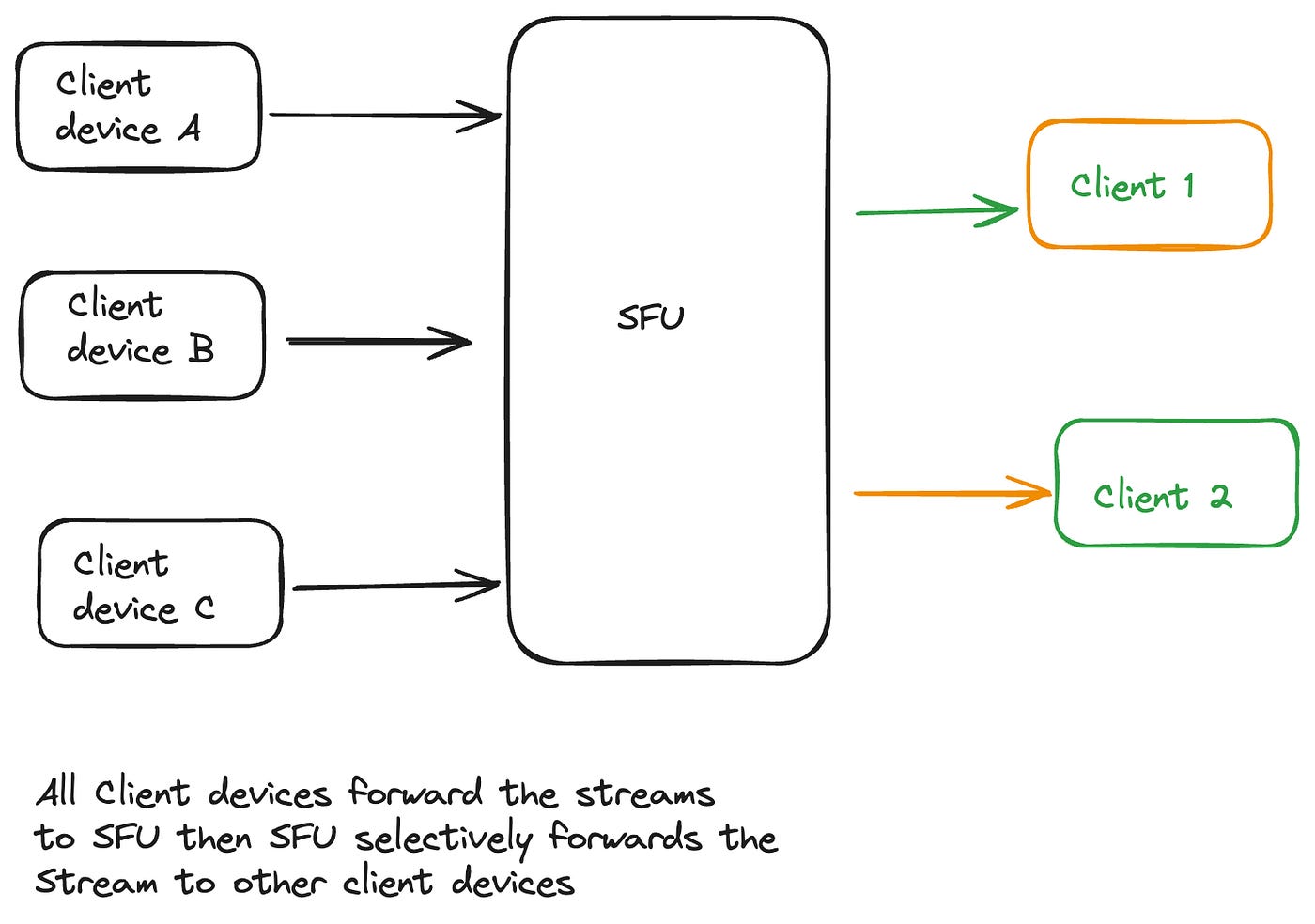
Mesh and Selective Forwarding Unit (SFU) are WebRTC architectures for handling multi-party video conferencing. Mesh is P2P, ideal for 2–4 participants, offering high privacy and no server costs. SFU is centralized, routing streams through a server for 5–100+ users, offering superior scalability and lower client bandwidth consumption at the cost of server infrastructure.
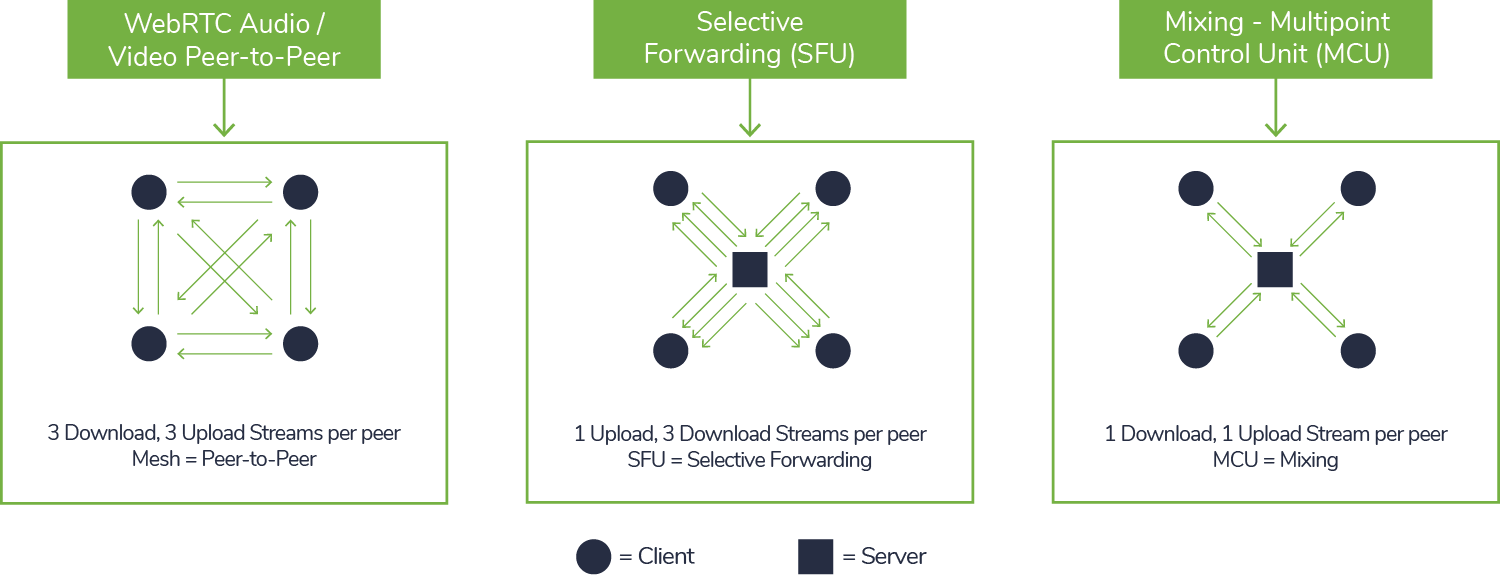
A Multipoint Control Unit (MCU) in WebRTC is a media server that acts as a central hub, receiving video/audio streams from all participants, transcoding them, and mixing them into a single, cohesive video stream to send back to every user. It reduces client-side processing and bandwidth, allowing older devices to handle large calls, but requires high server CPU to process the media.
This Substack is reader-supported. To receive new posts and support my work, consider becoming a free or paid subscriber.
Thanks for reading! This post is public so feel free to share it.