How to design an AI agent that helps on-call teams without creating more production risk.
By Ashu Kumar
Published: 2026-06-23
URL: https://theagenticstack.substack.com/p/the-incident-triage-agent
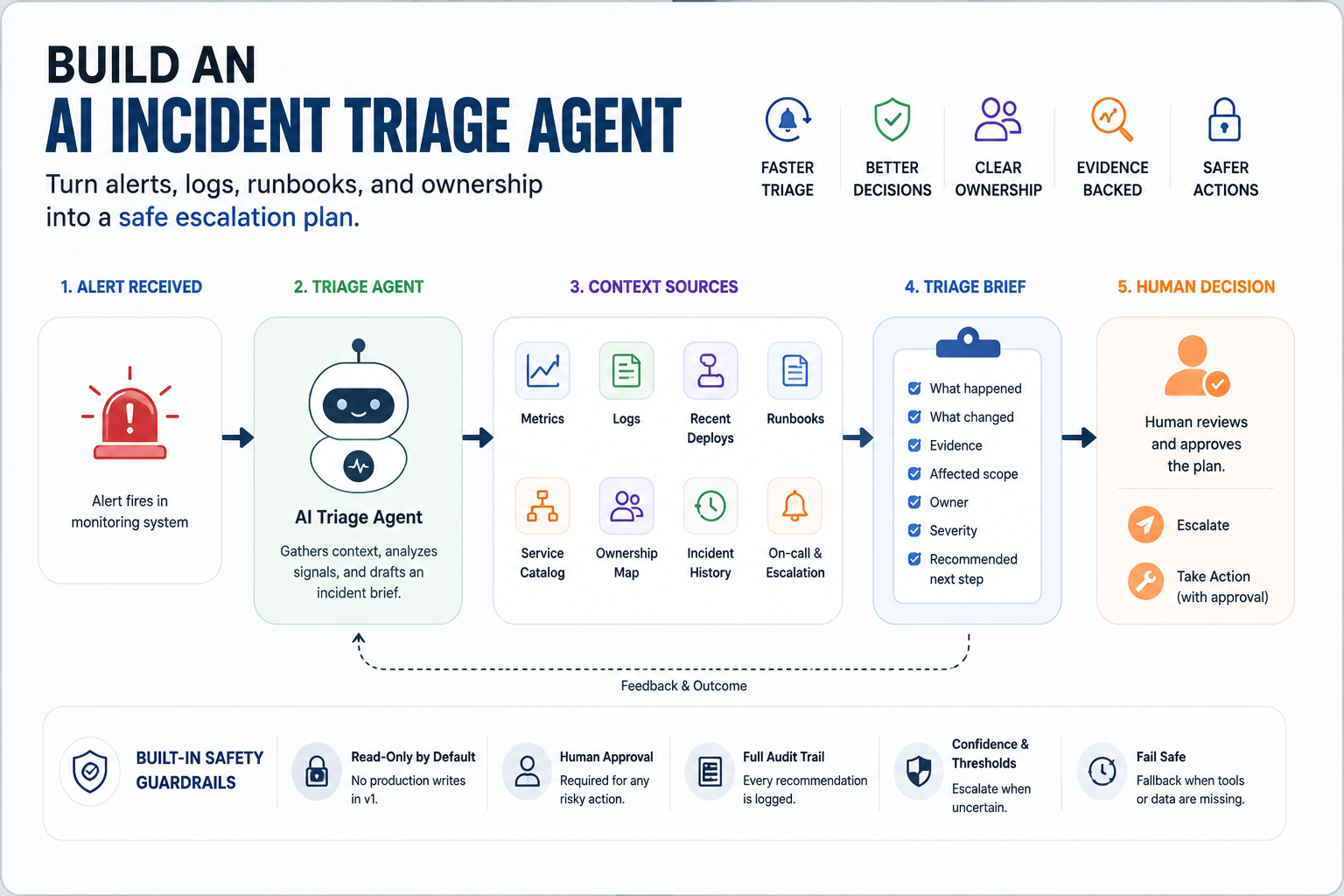
A production blueprint for turning alerts, logs, run-books, and ownership into a safe escalation plan.
An alert fires at 2:13 a.m.
The on-call engineer opens the usual five tabs.
Thanks for reading The Agentic Stack! Subscribe for free to receive new posts and support my work.
- Metrics.
- Logs.
- Recent deploys.
- Service ownership.
- Run-book.
The hard part is not reading the alert.
The hard part is figuring out what it means, whether it is real, who owns it, what changed, and what is safe to do next.
That is a good use case for an AI agent.
Not a chatbot.
Not an alert summarizer.
An incident triage agent.
Its job is not to “fix production” on its own. That is too much autonomy too early.
Its first job is simpler and more valuable:
turn noisy production signals into a clear, evidence-backed escalation plan.
That means the agent should help answer five questions quickly:
What is affected? What changed recently? Is this alert real or noise? Who owns the service? What is the safest next step?
If an agent can answer those questions reliably, it can save real time without taking dangerous production actions.
That is where agentic AI becomes useful.
Not by replacing on-call engineers.
By reducing the time they spend hunting for context.
The current workflow is mostly context gathering
When an incident starts, the alert is only the first clue.
A CPU spike may be noise. A latency alert may be a downstream dependency. A failed job may be a bad deploy. A payment error may be a vendor outage. A database warning may be a capacity issue.
The alert tells you something happened.
It does not tell you enough to decide.
So the engineer starts collecting context.
They check logs. They compare metrics. They look at recent deploys. They search old incidents. They find the service owner. They open the runbook. They ask in Slack if anyone changed something. They decide whether to escalate.
This is a perfect place for an agent because the work is repetitive, cross-tool, time-sensitive, and evidence-heavy.
The value is not magic reasoning.
The value is faster context assembly.
A good incident triage agent should not say:
“I think this is fine.”
It should say:
“Latency increased 9 minutes after deploy v2.3.8. Error rate is isolated to checkout-api. Similar incident happened on May 4. Runbook recommends checking payment-provider timeouts. Current owner is Platform Payments. Suggested severity: SEV-2. Recommended next step: page the service owner and do not restart until dependency health is confirmed.”
That is useful.
It gives the human a starting point.
It shows evidence.
It avoids pretending the agent has certainty it does not have.
What the agent should actually do
The first version of this agent should be read-heavy and action-light.
It should not restart services. It should not roll back deploys. It should not change traffic routing. It should not close incidents automatically.
Start with triage.
The agent receives an alert and builds a structured incident brief.
The brief should include:
What happened The alert, affected service, timestamp, metric, threshold, and current state.
What changed Recent deploys, config changes, feature flags, dependency changes, or infrastructure events.
What the evidence says Relevant logs, metric patterns, error messages, traces, and historical incident matches.
Who owns it Service owner, current on-call, escalation path, and related teams.
What the runbook recommends Known checks, safe diagnostic steps, and actions that require approval.
What to do next Escalate, monitor, gather more data, open an incident, or ask for human confirmation.
That is the core product.
Not “autonomous incident resolution.”
A better starting point is:
evidence-backed triage with safe escalation.
The blueprint
The architecture can stay simple.
Alert → Triage Agent → Context Tools → Risk Check → Human Decision → Escalation Plan
The agent needs access to context, not unlimited production power.
The tool layer might include:
- alert payload
- metrics
- logs
- traces
- recent deploy history
- service catalog
- ownership map
- runbooks
- incident history
- on-call schedule
- escalation policy
But every tool should be scoped.
For v1, the agent should have read access only.
It can inspect. It can compare. It can summarize. It can recommend. It can draft an incident update.
It cannot execute remediation.
That boundary matters.
An incident triage agent with read access reduces cognitive load.
An incident triage agent with write access can create a new incident while trying to solve the first one.
The agent needs a severity model
The hardest part of triage is not summarizing data.
It is deciding how serious the situation is.
A useful agent needs a severity model.
Not a vague one.
A practical one.
For example:
SEV-3 Limited impact. One service degraded. No confirmed customer impact. Owner identified. Monitoring continues.
SEV-2 Customer-facing impact or important internal workflow degraded. Owner required. Incident channel recommended. Human decision needed.
SEV-1 Broad production impact, data risk, payment risk, security risk, or customer-critical workflow failure. Immediate escalation required.
The agent should not invent severity from vibes.
It should map evidence to criteria.
Bad:
“This seems severe.”
Better:
“Suggested SEV-2 because checkout latency is above threshold for 12 minutes, error rate increased from 0.3% to 4.8%, and the issue affects customer-facing payment flow. No data loss signal detected.”
That gives the on-call engineer something they can trust, challenge, or correct.
The agent should show its evidence
In incident workflows, unsupported confidence is dangerous.
If the agent recommends escalation, it should show why.
If it recommends waiting, it should show why.
If it says the issue maps to a past incident, it should show the match.
A triage brief should include evidence links:
- metric chart
- log query
- trace sample
- recent deploy
- runbook section
- similar incident
- service owner record
The output should be easy to scan.
Something like:
Incident Brief Service: checkout-api Signal: p95 latency above threshold Start time: 02:13 Likely scope: customer-facing checkout path Recent change: deploy v2.3.8 at 02:04 Related evidence: payment-provider timeout errors increased Suggested severity: SEV-2 Owner: Platform Payments Recommended next step: page owner, open incident channel, check provider health Do not auto-restart: dependency failure not ruled out
This is where the agent earns trust.
Not by sounding smart.
By making the next human decision easier.
Where this agent can fail
Incident triage is a high-pressure workflow, so the failure modes matter.
The runbook may be stale.
The ownership map may be wrong.
Logs may be missing.
The recent deploy may be unrelated.
The alert may be a false positive.
A dependency may be failing silently.
The agent may overfit to a similar past incident.
The escalation policy may have changed.
This is why the agent needs uncertainty handling.
It should be allowed to say:
“I do not have enough evidence to classify severity.”
Or:
“Runbook and current metrics disagree.”
Or:
“Owner data is stale. Escalation should be confirmed.”
That is good behavior.
A production agent should not always produce an answer.
Sometimes the safest output is a structured uncertainty report.
Keep remediation behind approval
Eventually, teams will want the agent to do more.
Restart the service. Roll back the deploy. Scale the worker pool. Disable a feature flag. Create an incident channel. Page the owner.
Some of these are safe to automate.
Some are not.
The first production version should use this ladder:
Read Inspect alerts, logs, metrics, deploys, runbooks, and ownership.
Draft Prepare incident brief, Slack update, escalation message, or remediation plan.
Recommend Suggest severity and next step with evidence.
Approve Ask a human before paging broadly, rolling back, restarting, or changing traffic.
Execute Only later, only for narrow actions, only with policy checks, audit trail, and rollback.
The agent’s autonomy should increase only after the team trusts its triage quality.
Do not begin with auto-remediation.
Begin with faster, clearer decisions.
How to evaluate it
A normal eval set is not enough.
You need past incidents.
Take 20–50 historical incidents and turn them into test cases.
For each one, check whether the agent can identify:
- affected service
- likely owner
- relevant runbook
- recent deploy or config change
- useful logs or metrics
- severity level
- escalation path
- unsafe actions to avoid
- missing context
Also include messy cases:
A false alert. A stale runbook. A missing owner. A dependency outage. Two simultaneous alerts. A deploy that looks related but is not. A runbook that recommends an outdated action.
The goal is not to prove the agent is clever.
The goal is to see whether it helps the human make a better decision under pressure.
The real value
The best incident triage agent does not replace the on-call engineer.
It makes the first ten minutes less chaotic.
It gathers the context. It finds the owner. It checks the runbook. It compares recent changes. It drafts the escalation. It points to evidence. It warns when confidence is low.
That is enough.
In production systems, the first useful agent is often not the one that acts autonomously.
It is the one that helps humans act faster and safer.
An alert fires.
The agent should not panic. It should not guess. It should not restart things because it wants to be helpful.
It should build the clearest possible picture of what is happening.
Then hand that picture to the person who owns the decision.
That is a real incident triage agent.
Discussion prompt
If you were building this, what would you trust the agent to do first: summarize alerts, find owners, check runbooks, suggest severity, draft escalation, or recommend remediation?
Launch Gate
Do not give the agent remediation tools until it can reliably produce evidence-backed triage briefs from past incidents.
Start with:
Read → Draft → Recommend → Approve → Execute
Not the other way around.
Thanks for reading The Agentic Stack! Subscribe for free to receive new posts and support my work.