We taught agents how to execute. Now we must teach them how to wait. The engineering guide to asynchronous approval gates and state serialisation.
By Ashu Kumar
Published: 2026-04-28
URL: https://theagenticstack.substack.com/p/the-human-api-architecting-asynchronous
Over the last few months on The Agentic Stack, we have systematically torn down the fragile, prompt-based AI architectures of 2023. We killed the chatbot. We replaced the “Mega-Prompt” with deterministic Directed Acyclic Graphs (DAGs). We locked down our infrastructure with Zero-Trust API Sidecars, and we established that telemetry must measure state mutation, not semantic “vibes.”
If you’ve been following along, you are now building autonomous workers that can execute multi-step workflows, query databases, and mutate production state.
Thanks for reading! Subscribe for free to receive new posts and support my work.
But this introduces the most terrifying problem in enterprise AI: What happens when the agent makes a decision that is too critical to be fully autonomous?
If your agent is drafted to delete an S3 bucket, process a $10,000 refund, or push a code refactor to the main branch, you cannot rely entirely on an LLM—no matter how many Zero-Trust sidecars you have. You need a human to look at the execution plan and say, “Yes, proceed.”
The industry’s current solution to this is abysmal. Most developers just force the agent to ask the user a question in a chat UI.
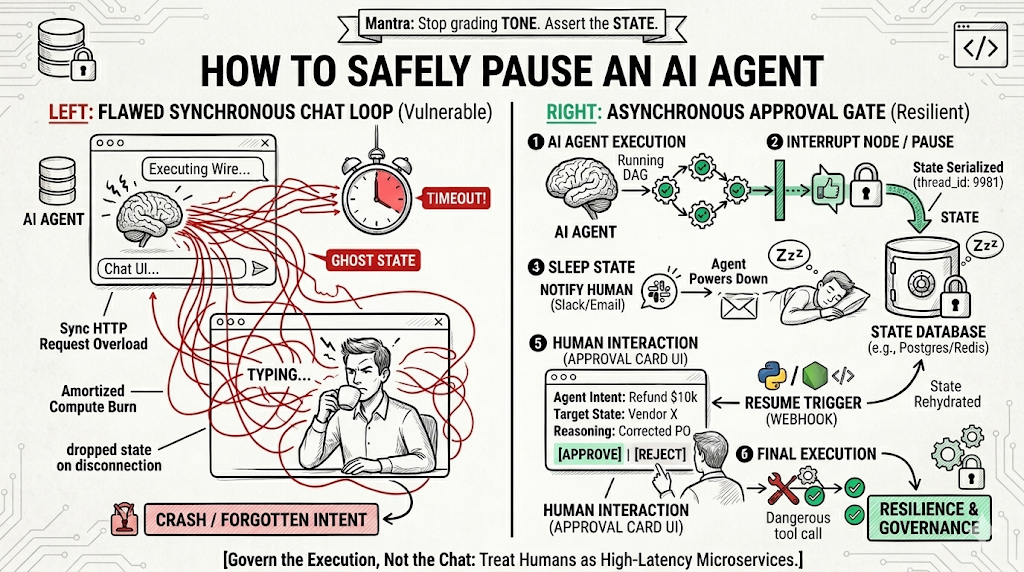
This is an architectural dead end. We are no longer building chatbots; we are building asynchronous background workers. You cannot pause a 45-minute data pipeline by making a chat window blink “typing...” while hoping the user doesn’t close their browser tab.
Today, we are bridging the gap between autonomous execution and governed execution. We are going to architect The Human API. We will break down exactly how to pause a state machine, serialize the execution context to a database, and expose a REST endpoint so a human can asynchronously approve or reject the agent’s trajectory.
Chapter 1: The Chat UI Timeout Trap
Let’s visualize the failure of synchronous Human-in-the-Loop (HITL).
Imagine an “Invoice Processing Agent.” Its DAG looks like this:
- Read incoming email.
- Extract PDF invoice.
- Cross-reference PO number in NetSuite.
- [DANGER ZONE] Execute wire transfer via banking API.
In a naive chatbot architecture, the agent reaches Step 3, formulates a response, and streams it to the frontend UI: “I found PO #552. Should I initiate the $8,500 wire transfer? (Yes/No)”
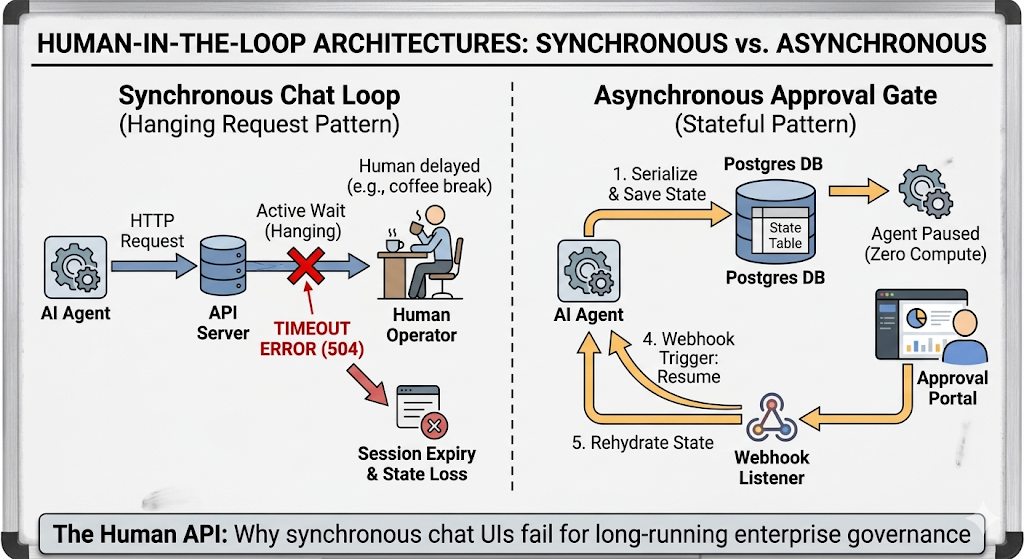
Behind the scenes, the Python script running your LLM chain is now sitting open. The HTTP request from the frontend is hanging. Compute is burning.
What happens if the human goes to lunch?
What happens if the human closes their laptop?
The connection times out.
When the human returns an hour later and types “Yes,” the backend session is dead. The agent has lost its context. It has amnesia. It replies, “I’m sorry, what wire transfer are you referring to?” Synchronous AI is incompatible with human reality. Humans are slow, distracted, and asynchronous. If your agentic architecture requires a live, continuous WebSocket connection to keep its memory alive while waiting for human permission, you are building a ticking time bomb of dropped states and frustrated users.
Chapter 2: The Human as a Microservice
To fix this, we must completely invert our mental model.
Stop thinking of the human as the “user” chatting with an AI. Start thinking of the human as just another API endpoint in your distributed system.
When an agent needs to query a database, it makes an async call, waits for the payload, and continues. When an agent needs human approval, it should do the exact same thing: issue a “request” to the Human API, completely power down its compute, and wait for a webhook to wake it back up.
This requires State Serialization.
In distributed systems engines like Temporal, or state machine frameworks like LangGraph, the concept of “pausing” is built into the architecture. You do not leave the Python process running. You take the entire state of the DAG (the memory, the tool calls, the current node, the variables), compress it, and write it to a persistent database (like PostgreSQL or Redis).
The agent is effectively dead. Zero compute is being used.
It is now up to your standard, deterministic backend (Node.js, Spring Boot, Django) to surface that paused state to a human, and eventually fire the “Resume” trigger.
Chapter 3: Architecting the Pause (LangGraph Implementation)
Let’s look at how this is practically engineered. If you are using LangGraph, this pattern is natively supported through checkpointers and the interrupt\_before mechanism.
Here is the blueprint for an asynchronous Approval Gate:
Python
from langgraph.graph import StateGraph, END from langgraph.checkpoint.postgres import PostgresSaver

# 1. Define your deterministic nodes

def node_extract_invoice(state):

# logic to parse PDF

return {"invoice_amount": 8500, "status": "pending_approval"} def node_execute_wire(state):

# logic to hit Bank API

return {"status": "paid"}

# 2. Wire the DAG

workflow = StateGraph(AgentState) workflow.add_node("extract", node_extract_invoice) workflow.add_node("execute", node_execute_wire) workflow.set_entry_point("extract") workflow.add_edge("extract", "execute") workflow.add_edge("execute", END)

# 3. THE CRITICAL STEP: The Approval Gate

# We tell the graph to categorically pause BEFORE it enters the execute node.

# We pass a PostgresSaver so the entire state is saved to disk.

memory = PostgresSaver.from_conn_string("postgresql://user:pass@localhost:5432/ai_db") agent_app = workflow.compile( checkpointer=memory, interrupt_before=["execute"] # <--- The Asynchronous Pause )
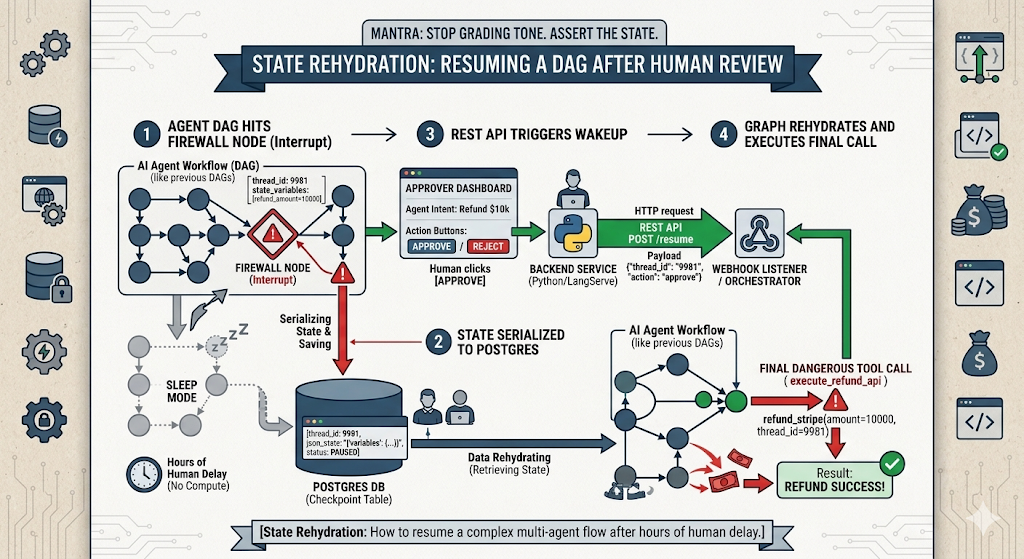
When you invoke this graph, it will run the extract node, realize it is about to hit the execute node, and stop. The Python script finishes. The thread closes. The current state (including the extracted $8,500 amount) is safely stored in your ai\db checkpoint table, keyed by a thread\id.
Your agent has successfully gone to sleep.
Chapter 4: Building the “Approval Card” UI
Because the agent is asleep, we do not use a chat UI to interact with the human. We use a standard React dashboard.
When the graph pauses, your backend should emit an event to your application’s notification service.
Instead of an unstructured text message saying “Do you want me to pay this?”, the human receives a highly structured, deterministic Approval Card in their web app or Slack channel.
The card displays:
- Agent Intent: Execute Wire Transfer
- Target State: Pay $8,500 to Vendor X
- Reasoning Trace: Extracted from PO #552 attached to email from [email protected].
- Action Buttons: [ APPROVE ] | [ REJECT ] | [ MODIFY ]
This UI is purely deterministic. When the human clicks [ APPROVE ], your frontend sends a standard REST API POST request to your backend.
JSON
// POST /api/v1/agents/threads/thread_9981/resume { "action": "approve", "human_override_data": null }
Chapter 5: The Wake-Up Webhook (Resuming the DAG)
When your backend receives that REST POST request, it must wake the agent up and inject the human’s decision into the graph’s state.
This is the beauty of state serialization. You simply re-invoke the graph using the exact same thread\_id. The checkpointer pulls the state out of the database, rehydrates the DAG, and the agent picks up exactly where it left off.
Python
@app.post("/api/v1/agents/threads/{thread_id}/resume") async def resume_agent(thread_id: str, payload: ApprovalPayload): config = {"configurable": {"thread_id": thread_id}} if payload.action == "approve":

# The human said yes.

# We invoke the graph with NO new input, simply telling it to continue.

agent_app.invoke(None, config=config) return {"status": "Agent resumed and executing."} elif payload.action == "reject":

# The human said no.

# We mutate the state to abort, overriding the agent's intent.

agent_app.invoke({"status": "aborted_by_human"}, config=config) return {"status": "Agent execution terminated safely."}
If the human approved, the graph transitions from the paused state directly into the node\execute\wire function. The API call fires, the database is updated, and the terminal state is reached.
Chapter 6: The Escalation Matrix (Handling Human Latency)
We have solved the UI timeout problem. But we have introduced a new enterprise problem: Human Latency.
Agents operate in milliseconds; humans operate in business days.
If your “Customer Support Refund Agent” pauses to ask a manager for approval on a $500 refund, and the manager is on PTO for two weeks, the customer is left in limbo. The DAG is permanently frozen in your Postgres database.
To build production-grade asynchronous agents, you must implement an Escalation Matrix (similar to a Dead Letter Queue, which we discussed in March).
You cannot rely on the agent to wake itself up (it’s asleep!). You must rely on standard backend cron jobs or Temporal timers to monitor the ai\_db checkpoints table.
The SLA Fallback Pattern:
- T+0 hours: Agent pauses, status set to
AWAITING\_APPROVAL.
- T+24 hours: Cron job detects stale thread. Triggers Slack ping to secondary manager: “Escalation: Agent thread\_9981 waiting for human API.”
- T+48 hours: Cron job detects critical stall. It programmatically injects a “REJECT” payload into the graph to safely terminate the thread and emails the customer: “Your request requires manual review and has been routed to a human support queue.”
You must engineer the “timeout” at the database level, not the network connection level.
The Executive Mandate: Govern the Execution, Not the Chat
The transition from “Generative AI” to “Agentic AI” is fundamentally a transition of trust.
If you give an LLM a read-only token to summarize a PDF, you need zero governance. If you give an LLM write access to your production PostgreSQL database and Stripe API keys, governance is the only thing that matters.
Leadership teams are currently terrified to deploy agents because they envision a rogue chatbot indiscriminately firing off API calls.
Your job as an architect is to prove them wrong.
By building The Human API—by explicitly severing the synchronous execution loop, serializing the state to disk, and gating critical nodes behind a deterministic REST webhook—you provide absolute, cryptographically secure guarantees that the AI cannot act without authorized human consent.
Stop building chat windows that time out.
Stop leaving Python threads hanging in the cloud.
Treat your human operators like high-latency microservices, and build the asynchronous graphs to support them.
Over to you: How is your team handling Human-in-the-Loop? Are you still relying on synchronous chat inputs, or have you migrated to stateful checkpointers and approval dashboards? Drop your architecture in the comments below.
Thanks for reading! Subscribe for free to receive new posts and support my work.