How OpenAI’s GPT-6 Astra Takes Complex Assignments From Research to a Finished Result
By TechTiff
Published: 2026-09-06
URL: https://techtiff.substack.com/p/gpt-6-astra
GPT-6 started handling the whole project. Give GPT-6 Astra the files, research, tools, and browser work that go with it, and it keeps working through the task while you change requirements along the way.
Computer use handles more of the project too. Astra browses websites, uses software, works through multi-step tasks, and keeps the assignment moving.
Your AI assistant got a promotion. Give it a job description before it starts clicking things.
The Short Version:
-
Astra stays on task across longer projects while you add files, change requirements, correct the direction, give it new information, or ask side questions.
-
Computer use handles more of the work, including websites, forms, calendars, research, document editors, software testing, and specialized software.
-
Astra and GPT-5.6 Sol share the same 1.05 million-token API context window. Codex saves notes and keeps earlier context searchable when a window fills.
-
AI with computer use access needs rules. Limit which files, apps, and websites it uses, set stopping points, and require approval before sending, deleting, purchasing, sharing, or changing permissions.
Start With the Finished Result
Open a new conversation with Astra, in ChatGPT or in a Codex project, and write the first message like a job description. Start by telling it what the finished result should include so Astra knows exactly where the project is supposed to end, then build the rest of the assignment around it:
-
Result: Describe exactly what you need finished.
-
Materials: The files, notes, documents, or other information it should use.
-
Research: Explain what needs investigation.
-
Computer work: Include the websites, apps, or tools it needs to use.
-
Requirements: Add the standards, constraints, and review criteria.
-
Check-in point: Tell it when to stop and ask before continuing.
And GPT-6 works with your changes, so you can update the task while it’s working. Shift the project direction, add new context, and tell it what changed without starting over.
Ask a side question inside the same conversation and GPT-6 answers it while keeping track of the work already underway. And inside Codex, notes are saved when a context window fills and earlier context stays searchable as the project continues.
Computer Use Handles More of the Work
Astra got better at using a computer so it’s handling tasks like:
-
filling out forms
-
updating calendars and CRM records
-
researching websites
-
drafting inside email and document editors
-
installing, testing, and working inside apps
It completed 72.6% of computer-use tasks compared with 65.7% for GPT-5.6 Sol, and the same class of work took roughly 40 minutes instead of 75.
So it’s getting more of the work done and taking less time to do it.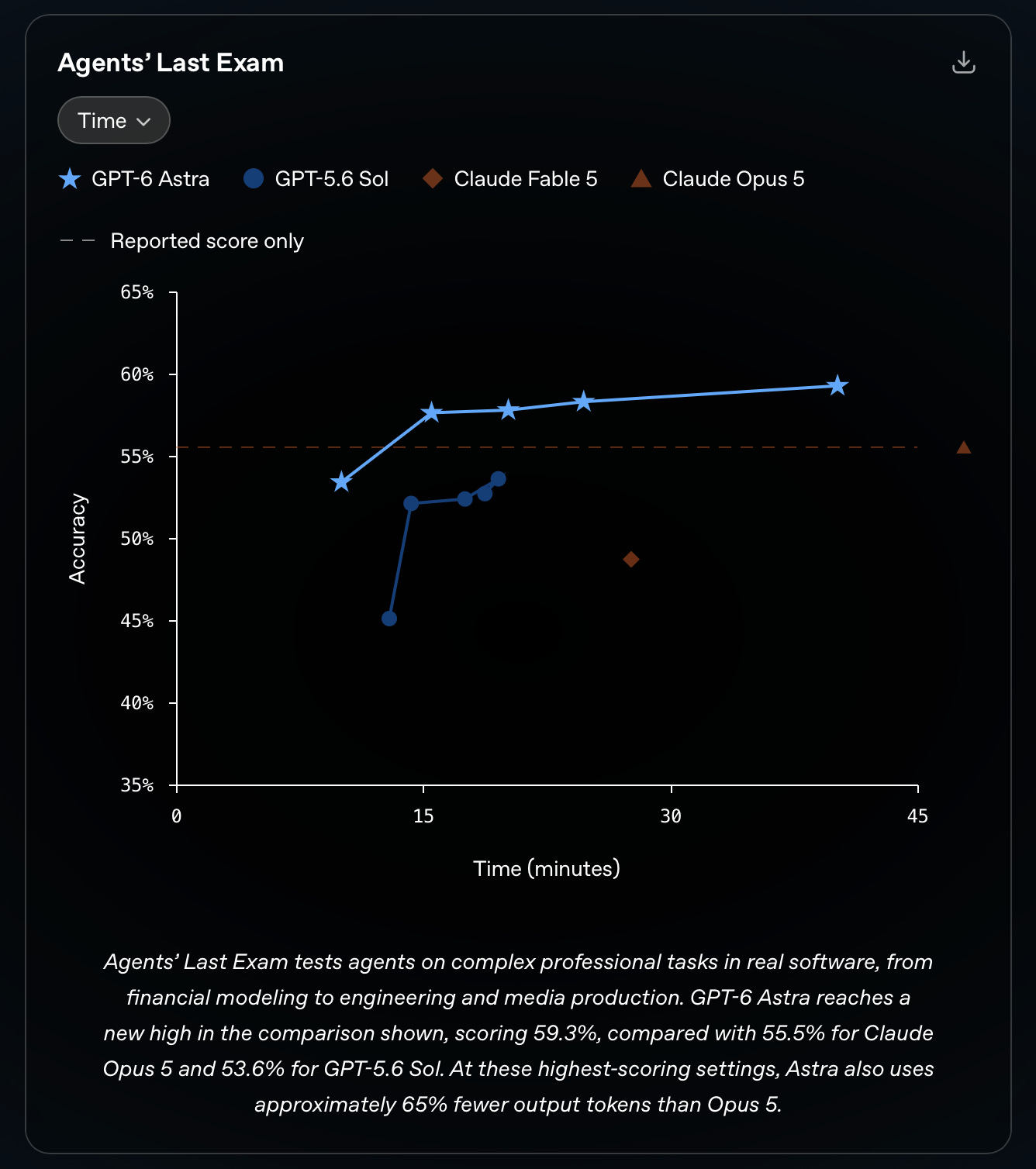 GPT-6 Astra scored 59.3% on Agents' Last Exam, which tests agents on complex professional tasks inside applications. Its score at 15 minutes already clears GPT-5.6 Sol's best. Source: OpenAI
Once AI knows how to use your computer, it also needs to know when to stop and check in.
Set Rules Before You Start the Project
Better computer use means the AI is doing more than reading what you gave it. It’s actually browsing websites, using tools, working with files, and taking actions.
Define the actual job before AI starts working inside websites, apps, files, or accounts.
Give It a Specific Job
Don’t give open-ended instructions like, “handle my inbox.”
Instead, define the task and work involved:
Review today’s emails, identify what looks urgent, and suggest which messages need a response. Stop before drafting or sending anything.
This tells it what information to use, the result you need, what steps are included, and where the task ends.
The stopping point changes with the assignment, so decide where the work ends before Astra passes that point in the workflow.
Tell Astra to review without changing anything, prepare a draft without sending it, or update a document while leaving the original file untouched.
Your AI only needs access to the files, websites, apps, and tools required for the task.
Put Operating Rules Inside the Project
For work inside a project folder, keep recurring operating instructions inside the AGENTS.md.
Define what Astra is allowed to change, which actions require approval, where unnecessary files should go, and when it needs to stop and check in.
Give it specific boundaries:
-
Never delete files; move anything that needs to be removed into the Archive folder.
-
Don’t send messages or publish anything without approval.
-
Don’t include personal information from files outside the project folder in the results.
-
Stop before buying, booking, deleting, changing access, or sharing information outside the project.
The rules stay with the project alongside the files and work they apply to.
Check the Finished Work
Before accepting the result, have Astra check the finished work against your requirements:
Review the finished work against my original request and any requirements I added or changed during this conversation.
If requirements were changed, follow my latest instructions.
Create a table listing each requirement as complete, partial, or blocked, with supporting evidence and links to the relevant files or records where available. Identify unresolved issues and assumptions.
Report which checks you performed and their results, and flag anything you haven’t verified. Don’t make changes during this review.
Then inspect the results yourself. Check dates and time zones in calendar entries, compare spreadsheet totals with the source data, and follow research links to confirm that they support the claims.
Give It Work With Moving Parts
A quick rewrite or summary won’t show much of this behavior. Use Astra on a project where several pieces have to stay connected.
The difference shows up in the size of the task. Astra and Sol share the same context window, so the gain comes from handing Astra a project that runs from the request to the finished result.
Give it the result, the materials, the tools, and the rules, then let it work through the project. Then add new information, change a requirement, or steer the project in a new direction.
Your AI assistant got a promotion, so give it something to do.
Your AI assistant has enough intelligence. Subscribe and I’ll help you give it an actual job.