The rate limit problem nobody warns you about when you go from one agent to twelve — and why you need an AI Gateway architecture to survive.
By Sumant Thakur
Published: 2026-04-23
URL: https://sumantthakur.substack.com/p/your-multi-agent-system-will-hit
Every LLM provider has rate limits.
Google Gemini: 300 RPM on Tier 1. OpenAI: varies by model and tier. Bedrock: per-region, per-model, sometimes per-account.
If you’re building multi-agent systems, you aren’t just hitting rate limits; you’re leaking revenue through inefficient retries and blocked user experiences.
When you have one agent making one call at a time, you will never notice. When you have twelve agents making fifty calls per workflow, with multiple users running concurrently, you will notice very quickly.
And the failure mode is not graceful.
Thanks for reading Autonomous AI Architect! Subscribe for free to receive new posts and support my work.
What actually happens
Here is the scenario nobody writes about in the getting-started guides.
You build a multi-agent system. Planning agent, architecture agent, code generation agent, review agent, repair agent. Each one calls the LLM multiple times per workflow run. Some steps run in parallel.
User A starts a workflow. Thirty LLM calls begin.
User B starts a workflow two minutes later. Another thirty calls.
You are now at sixty concurrent LLM requests against the same provider endpoint.
Google Gemini Tier 1 allows 300 requests per minute. Sounds like plenty. But your IaC generation step alone makes 15-20 calls in rapid succession — schema lookups, value reasoning, cross-module inference, contract evaluation. Each call has retries configured. A single 429 triggers three retries. Those retries count against the rate limit. Which triggers more 429s. Which triggers more retries.
This is a retry storm.
Your application does not crash. It degrades. Slowly. Silently. The workflow that normally takes four minutes now takes twelve. The user sees a spinner. The logs show a cascade of 429s, retries, and timeouts. But the system keeps trying, because that is what retry logic does.
By the time the workflow completes — if it completes — you have burned through three times the tokens you needed, the user has lost patience, and your error rate has quietly climbed to 30%.
This doesn’t just hurt your system; it destroys the user experience. Your power users (who often consume 60-80% of your quota) hit the wall first, but your new and free-tier users are the ones who experience the resulting system latency, often churning before they ever see the value of your product.
Nobody told you this would happen. Because most LLM tutorials assume you are making one call at a time.
The approaches that do not work
Approach 1: Add retry logic with exponential backoff.
This is the first thing every team tries. And it makes the problem worse.
Exponential backoff is designed for transient failures — a server hiccup, a network blip. Rate limits are not transient. They are capacity constraints. Backing off and retrying against the same endpoint that just told you it is at capacity does not help. It just delays the failure and adds to the queue.
Worse, if every agent in your system has its own retry logic, they all back off independently. Agent A waits 2 seconds and retries. Agent B waits 4 seconds and retries. Agent C waits 1 second and retries. They all hit the endpoint at slightly different times, creating a staggered wave of requests that keeps the rate limit saturated.
You have not solved the problem. You have distributed it across time.
Approach 2: Add rate limiting in your application code.
Some teams build a token bucket or sliding window rate limiter in their application. This works for a single process. It does not work when you have multiple agents, multiple workflow steps, and multiple users — especially if your agents run in different processes or containers.
You end up building a distributed rate limiter. Which means you need shared state. Which means Redis. Which means you are now maintaining rate limiting infrastructure instead of building your product.
And you still have the fundamental problem: you are rate-limiting against a single provider. When that provider is at capacity, your entire system stalls.
Approach 3: Catch 429s and switch providers manually.
This is the “if Google fails, try OpenAI” approach. It works in theory. In practice, it means:
- Every agent needs provider-switching logic
- You need credentials for multiple providers configured everywhere
- The model APIs are not identical — different parameter names, different response formats, different tool calling conventions
- You are now maintaining multiple provider integrations instead of one
This is the approach we tried first. It lasted two weeks before the complexity became unmanageable.
What actually works: The AI Gateway Pattern
The solution is not in the application layer. It is in the infrastructure layer.
A gateway sits between your agents and the LLM providers. It is not just a dumb load balancer; it is an intelligent state manager. Every request passes through it. The gateway knows the rate limits for every provider endpoint. It knows which endpoints are healthy, which are throttled, and which have capacity.
When Provider A is at 290/300 RPM, the gateway routes the next request to Provider B. No 429 reaches your application. No retry logic fires. No retry storm.
The Anatomy of an AI Gateway
Regardless of the implementation you choose, a functional AI gateway must perform four critical tasks:
- Request Orchestration: Routing traffic to the optimal provider based on real-time availability and capacity.
- State Management: Maintaining a shared, cross-process view of rate limits and caching.
- Policy Enforcement: Acting as the gatekeeper for budgets, access tiers, and security guardrails.
- Observability: Normalizing telemetry so you can attribute costs by agent, role, or user rather than just by provider API key.
Here is what this architecture gives you:
Usage-based routing. The gateway tracks how many requests each provider deployment has handled. New requests go to the deployment with the most remaining capacity. Not round-robin. Not random. Capacity-aware.
Cooldown logic. When a deployment returns a 429, the gateway marks it as unhealthy for a cooldown period. No requests are sent to it until the cooldown expires. This prevents the retry storm entirely.
Cross-provider failover. You configure the same model across multiple providers — Google AI and Vertex AI, for example. Same model, different API endpoints, different rate limit pools. The gateway treats them as a single model group and routes across both. Your effective rate limit doubles without any application code changes.
Transparent to agents. Your agents call a single endpoint. They do not know about providers, rate limits, or failover. They send a request and get a response. The gateway handles everything else.
How we implemented it
We run a multi-agent DevOps platform. Twelve specialized AI agents. Fifty-plus LLM calls per workflow. Gemini models across Google AI and Vertex AI.
We adopted an AI gateway architecture to decouple our application layer from provider constraints. While there are several ways to implement this—including custom-built middleware or mature open-source proxies—the core requirement is a centralized routing layer. For our stack, we implemented LiteLLM as a self-hosted proxy gateway.
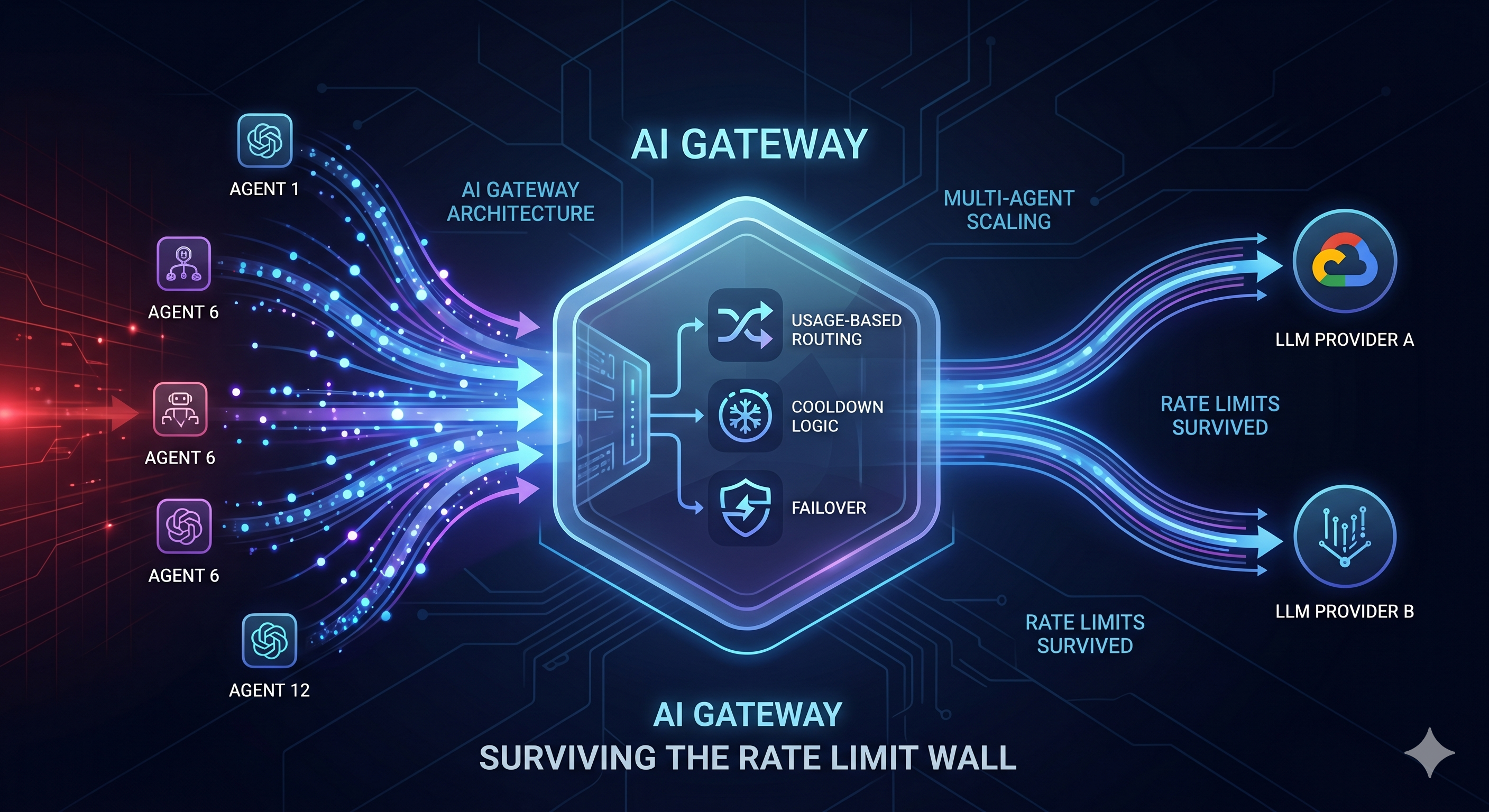
Here is the architecture pattern:
Agents → AI Gateway Proxy → Google AI (Gemini) ↕ → Vertex AI (Gemini) Redis (rate limit state + response cache) ↕ Postgres (spend tracking + virtual keys)
Instead of each agent connecting directly to Google, every LLM call goes through the gateway URL. The gateway maintains rate limit state in Redis and routes requests across deployments.
Model groups. We define groups instead of individual models. The following configuration represents the Gateway Pattern in our infrastructure:
YAML
model_list:

- model_name: iac-group

litellm_params: model: gemini/gemini-3-flash-preview api_key: os.environ/GOOGLE_API_KEY rpm: 300 tpm: 4000000

- model_name: iac-group

litellm_params: model: vertex_ai/gemini-3-flash-preview vertex_project: os.environ/GCP_PROJECT rpm: 300 tpm: 4000000
Same model, two deployments, two rate limit pools. The gateway routes across both. Effective RPM: 600 instead of 300.
Routing strategy. We use usage-based routing — the gateway tracks actual usage per deployment and sends requests to the one with the most remaining capacity. When one deployment approaches its limit, traffic shifts to the other.
Cooldown. If a deployment returns a 429, it enters a 60-second cooldown. During that time, all traffic goes to the other deployments. No retries against a throttled endpoint.
Application-side retries: almost zero. We set maxRetries: 1 at the AI SDK level. The gateway handles retries internally with num\retries: 2 and retry\after: 3 seconds. The application does not need to know about rate limits at all.
Per-user spend tracking and budget enforcement
Rate limiting solves the provider capacity problem. But it does not solve the user capacity problem.
Without per-user tracking, you know your total monthly spend. You do not know which user is responsible for 60% of it. You cannot set limits. You cannot offer tiers. You cannot prevent one power user from exhausting the budget for everyone else.
The gateway solves this with virtual keys.
Each user gets a unique API key provisioned in the gateway. When a user starts a workflow, their virtual key is resolved from the database and attached to every LLM request in that workflow chain. The gateway tracks spend per key automatically.
User logs in → Virtual key provisioned (if first time) User starts workflow → Key resolved from userId Every LLM call → Uses user's key → Spend tracked on that key User checks dashboard → /key/info returns spend, budget, reset date
The gateway enforces hard budget limits at the proxy level. When a user’s monthly spend hits their limit, the gateway rejects the request before it reaches the provider. The application gets a clear error. The user gets a clear message: “Monthly budget reached. Resets on May 1st.”
No application-side budget checking needed. No race conditions between checking the budget and making the call. The gateway is the single source of truth. The budget resets automatically without cron jobs or cleanup scripts.
The tier system
Virtual keys also solve the access control problem.
Not every user should have access to every model group. Free-tier users get planning and chat capabilities. Pro-tier users get the full pipeline — IaC generation, review, embeddings.
The gateway enforces this through model access groups:
YAML
model_access_groups: free-tier:

- planning-group

- chat-group

pro-tier:

- iac-group

- planning-group

- review-group

- chat-group

- embedding-group
When a free-tier user’s workflow tries to call iac-group, the gateway rejects it. The application catches this and shows the user an upgrade prompt. Tier configuration, budget amounts, and model access are all managed through environment variables or the gateway’s admin API.
Spend tags: knowing where the money goes
Tracking total spend per user is useful. Knowing which pipeline phase costs the most is actionable.
We tag every LLM request with metadata:
TypeScript
const tags = []; if (metadata.agentName) tags.push(`agent:${metadata.agentName}`); if (metadata.role) tags.push(`role:${metadata.role}`); if (phase) tags.push(`phase:${phase}`); if (currentStep) tags.push(`step:${currentStep}`);
The gateway stores these tags in its spend logs. Query the API and you get a breakdown:
JSON
[ { "tag": "agent:resource-composer", "total_spend": 1.24, "log_count": 89 }, { "tag": "step:compose-batch", "total_spend": 0.98, "log_count": 64 }, { "tag": "phase:generation", "total_spend": 2.10, "log_count": 156 }, { "tag": "role:iac", "total_spend": 3.45, "log_count": 312 } ]
Now you know that the resource composition step accounts for 40% of your IaC generation cost. You know which agent to optimize first. This is the difference between “we spent $500 on LLMs last month” and “the value-reasoning step spent $180, and 30% of that was retries on malformed structured output.”
The second one is actionable. The first one is just a number.
Semantic caching: the trap we walked into
The gateway supports response caching. Identical prompts return cached responses from Redis. This works well — our IaC pipeline makes repeated schema lookup calls, and exact-match caching saves 15-20% on provider requests.
Then we tried semantic caching.
Semantic caching goes beyond exact matches. It embeds the prompt into a vector, stores it, and returns cached responses for semantically similar prompts. “Deploy a Node.js app on ECS” and “deploy a Node application on AWS ECS” would hit the same cache entry.
It broke immediately.
Here is why. Our clarification agent and our blueprint agent both process the same user requirement — “I want to deploy a web application with a database on AWS.” The user prompts are semantically identical. But the clarification agent is supposed to generate questions. The blueprint agent is supposed to generate an architecture.
The semantic cache matched them. It returned the clarification response for the blueprint request. The blueprint step got a list of questions instead of a resource plan. Schema validation failed. The workflow fell back to defaults. The user got an empty blueprint.
The fundamental problem: semantic caching operates on the user message content. It does not consider the system prompt, the tools, or the expected output schema. In a multi-agent system where different agents process the same user input with different instructions, semantic caching causes cross-contamination.
We reverted to exact-match caching. It is less aggressive but it is safe.
If you are considering semantic caching for a multi-agent system, test it carefully. It works well for single-agent chatbots. It is dangerous for pipelines where multiple agents share the same input context.
Quick wins: security and cost protection
Two configuration changes that took five minutes and prevent real problems:
Request size limits. Our IaC pipeline generates large Terraform files. A malformed prompt or an oversized context window can burn through tokens fast. We set max request and response sizes on the gateway. Requests exceeding the limit are rejected before they reach the provider. One line of config prevents runaway cost from a single bad request.
Secret redaction. Users paste code, environment files, and configuration snippets into the chat. These often contain API keys and cloud credentials. A good gateway layer can detect and redact secrets before forwarding the request to the LLM provider — preventing accidental credential leakage. The principle stands regardless of your tool: sanitize before you send.
These are not headline features. They are operational hygiene. The kind of thing that prevents the incident you never want to have.
What we learned the hard way
Lesson 1: Your retry config is probably fighting the gateway.
Before the gateway, we had maxRetries: 3 with exponential backoff in every agent. After adding the gateway, those retries compounded with the gateway’s own retries. A single failed request could generate nine total attempts. We dropped application retries to 1 and let the gateway handle it.
Lesson 2: Failover models need to be in the same group.
We initially put Flash and Pro models in separate groups. When Flash hit rate limits, Pro sat idle. Moving them into the same group with Flash as primary and Pro as fallback meant the system automatically escalated to a more capable model under load. Rate limiting became a feature, not a failure.
Lesson 3: The gateway needs to be close.
We initially considered a hosted gateway. The added latency (50-100ms per request) multiplied across fifty calls per workflow added 2.5-5 seconds of overhead. We switched to a sidecar deployment — same network, sub-millisecond overhead. For high-throughput multi-agent systems, the gateway must be local.
Lesson 4: Rate limits are per-key, not per-model.
Google AI rate limits are per API key. Vertex AI rate limits are per project. By using both providers for the same model, we effectively doubled our rate limit pool. This is the single biggest improvement we made — and it required zero application code changes.
Lesson 5: Semantic caching and multi-agent systems do not mix.
Covered above, but worth repeating. If different agents process the same user input, semantic caching will cross-contaminate responses. Use exact-match caching or scope the cache per agent.
The before and after
Before (direct provider connections):
- 429 errors during concurrent workflows
- Retry storms compounding the problem
- 12-minute workflows that should take 4
- Per-agent retry logic duplicated across 12 agents
- Seven files of provider-specific model code
- No per-user spend visibility
- No budget enforcement
- Cost attribution: “it was expensive last month”
After (gateway routing):
- Zero 429s reaching the application
- Automatic failover across providers
- Consistent 4-minute workflow execution
- One line of retry config in the gateway
- One file for the entire model layer
- Per-user spend tracked to the cent
- Hard budget limits enforced at proxy level
- Cost attribution: “the resource-composer agent spent $0.38 on this run, and 30% was retries”
The total implementation effort was about a week. Most of that was removing old code, not writing new code. The gateway eliminated more complexity than it introduced.
Should you add an AI Gateway?
If you are making fewer than 10 LLM calls per user request, probably not. The complexity is not worth it.
If you are building a multi-agent system with concurrent users and dozens of LLM calls per workflow, you need one. Not eventually. Now. Before the first user reports that “it is slow sometimes.”
Because “slow sometimes” means your agents are fighting each other for rate limit capacity. And that problem only gets worse as you add users.
The rate limit wall is not a scaling problem you solve later. It is an architecture decision you make early.
Or you make it after the first production incident. Your choice.
I am building Flurit — a multi-agent DevOps platform that turns natural language into production-ready Terraform. Rate-limit-aware routing, per-user budgets, and spend attribution are operational foundations, not afterthoughts. If you are building agentic systems and want to follow the journey, subscribe.
Thanks for reading Autonomous AI Architect! Subscribe for free to receive new posts and support my work.