Codex plugins matter because the bottleneck moved.
By Nate
Published: 2026-05-09
URL: https://natesnewsletter.substack.com/p/codex-plugins-bottleneck-moved
Open a new Codex thread and you are the operating system.
You explain the repo. You paste the standard. You point at the docs. You list the tools. You list the failure modes you do not want the agent to repeat. By the time it is ready to act, you have done a real chunk of the work yourself, just to get the work started.
That part did not get better with GPT-5.5. The model did. Codex is now at 82.7% on Terminal-Bench 2.0, up from 75.1%, and the lift you actually feel is bigger than the number reads, because the model can now stay inside long, multi-tool tasks without losing the thread. It reviews pull requests against your standards, builds screens from Figma comps, runs tests in a browser, pulls context across Slack, Drive, GitHub, and Linear, and drafts release notes from the diff. The model is good now.
The work around it is not.
That is the bottleneck. The workflow lives in your head, and you reload it every thread. From here, the work has to meet the model halfway.
That is what plugins are for. A skill says how the work should be done. A plugin packages that skill with tool access, live integrations, deterministic checks, the team’s failure modes, and the parts of the standard nobody has written down. Once installed, the agent stops needing you to be the OS.
The stakes are not subtle. A stronger model with a vague environment does not give you more help. It gives you faster, more confident wrongness. Reviews that miss the team’s review standard. Release notes that drift into engineering language. Customer summaries that mix admin material into the team-facing recap. Each looks fine alone. Together they make a company that runs faster and means less.
The career version is sharper. The next competitive skill is not writing the longest prompt. It is knowing which parts of your work should become reusable infrastructure. Two years from now, the people who learned to package will be compounding. Everyone else will be explaining the workflow on Tuesday morning.
Here’s what’s inside:
- The bottleneck that GPT-5.5 made visible. Why a stronger model with a vague environment gives you faster wrongness, not more help.
- The decision ladder. When to stay with a prompt, when to build a skill, when to package a plugin, and when not to bother.
- Which workflows to package first. Five categories worth the investment, and a test for whether yours qualifies.
- Grab The Ultimate Codex Plugin Guide + prompts. The full step-by-step build guide from skill file through plugin manifest and debugging checklist, plus seven prompts that take you from workflow audit to installed, tested plugin.
Let me show you how the bottleneck moved, and what to do about it.
Subscribers get all posts like these!
LINK: Grab The Ultimate Plugin Guide + Prompts
The Ultimate Codex Plugin Guide walks you through building a Codex plugin from scratch. It starts with a single SKILL.md file, adds the plugin manifest, registers the marketplace entry, runs the install-and-test loop, and ends with the nine-item debugging checklist for when Codex cannot find your plugin. Most of those failures are path problems, not AI problems. The guide is designed so that someone who has never touched a plugin folder can follow it start to finish.
Alongside the guide, the prompt kit has seven prompts that chain in order but each stand alone. The Workflow Audit tells you whether your workflow is even worth packaging. The Decision Tree tells you what to build: a prompt, a skill, a single-skill plugin, or something heavier. The SKILL.md Generator writes the actual skill file with proper frontmatter and trigger logic. The Starter Plugin Generator scaffolds the full folder structure, manifest, and install instructions. The Testing Checklist, Trust Evaluator, and Plugin Refinement prompts handle the part most people skip: making sure the thing actually works, is safe to share, and improves after the first run. If you have never touched a plugin folder, start with the guide and Prompt 1. If you already have a plugin that is not triggering, skip to Prompt 5 or 7.
What Codex plugins actually do
Codex plugins are usually described as extensions, and at a surface level that description is true. You install GitHub, Slack, Google Drive, Figma, or some other integration, and Codex can reach more of the places where your work already lives. That is useful, but it also undersells what is happening. It makes plugins sound like accessories around the agent, when the more important shift is that plugins give Codex a way to inherit the structure of the work itself.
That distinction matters. The real promise of a plugin runs deeper than Codex touching another app. A plugin can bundle the instructions, tools, integrations, assets, commands, checks, and permissions that define how a category of work is supposed to happen. A skill can teach Codex the operating procedure for a specific kind of task. An app connector or MCP server can give it access to the systems where the work actually lives. Scripts and hooks can verify the parts that should not be left to judgment. A marketplace can make the whole package installable, shareable, and governable.
Taken together, that starts to look less like a feature system and more like a packaging system for agent work. Plugins are a way of turning a repeated workflow into something Codex can load, reuse, and carry from one task to the next. That would have been useful a year ago, but it matters much more after GPT-5.5, because the model is now better at exactly the kinds of long-running, tool-using tasks where environment and process become decisive.
A weaker agent does not benefit as much from a richer environment. If the model loses the thread, stops too early, uses tools unreliably, or cannot carry a task through the surrounding mess of a real codebase, then plugins can help only so much. You can give the agent more tools, but the agent still has to be capable enough to use them in sequence and stay inside the workflow long enough for the packaging to matter. The return on packaging a workflow depends on whether the model can actually inhabit that workflow.
GPT-5.5 changes that equation. OpenAI describes the model as better at messy, multi-part tasks: planning, tool use, ambiguity, self-checking, and continuing until the work is finished. In Codex specifically, OpenAI says GPT-5.5 improves implementation, refactoring, debugging, testing, validation, context retention across large systems, ambiguous failure analysis, assumption-checking with tools, and carrying changes through a codebase. It also uses fewer tokens than GPT-5.4 on the same Codex tasks, which matters because long-running agent work is expensive not only in money, but in human attention.
The plugin story belongs next to the model story. GPT-5.5 did not make plugins important because it added another menu item. It made plugins more important because Codex is becoming capable enough that the limiting factor starts to move. The old question was whether the model could do the task at all. The new question is whether the model can inherit the way the task is supposed to be done.
How GPT-5.5 changes what AI agents need to work
What the benchmarks are measuring matters more than the names. On Expert-SWE specifically, GPT-5.5 jumped to 73.1% from 68.5%. These are operating tasks. The model has to inspect, plan, edit, run commands, interpret failures, adjust, and keep going. They are not clean prompt-to-function tests where the model writes a short snippet in isolation.
That is the world where plugins become valuable. A plugin is overkill if all you want is a one-off answer. If you need a regex, a tiny script, or a short explanation, you mostly need a capable model and a clear request. You do not need an installable workflow around it. But the moment the task has shape around it, the environment starts to matter. The task is no longer just “answer this.” It becomes “do this kind of work according to this standard, using these tools, with these checks, and stop only when these conditions are met.”
A pull request review is a good example. A serious review is not just “look at this diff.” It has a standard. It has a severity order. It has a view on what counts as a real finding. It may prioritize behavioral regressions, security issues, data-loss risks, missing tests, rollback problems, or concurrency bugs. It may need GitHub comments, CI failures, linked issues, test logs, and local files. Reading the code is the surface. The deeper task is applying a review philosophy to a specific change inside a real development system.
Frontend implementation has the same shape. “Make the page match the design” is not a complete workflow. A real implementation may need Figma access, component-library awareness, browser verification, screenshots, responsive checks, accessibility review, loading states, empty states, error states, and a rule that Codex should use existing primitives before inventing new ones. The quality of the result depends not only on the model’s taste or coding ability, but on whether it understands the process around frontend work in that codebase.
The same is true for releases, customer summaries, business reporting, incident triage, data analysis, and internal documentation. A release workflow is not just “ship the code.” It may involve tests, changelog updates, migration notes, deployment checks, rollback concerns, customer-facing copy, and internal communications. A business reporting workflow is not just “summarize the data.” It may require spreadsheets, source separation, assumptions, calculations, charts, Slack context, and a final artifact in the format the organization actually uses.
These are the tasks GPT-5.5 is moving toward. Sustained, multi-tool work across surfaces, files, and context. A stronger model makes a richer environment worthwhile, and a richer environment gives the stronger model something more valuable to do than answer from a blank thread.
What Codex does beyond code generation in 2026
The second reason plugins matter now is that Codex itself is expanding beyond the narrow mental model of a coding assistant. OpenAI’s own Codex use cases now include code review, Figma-to-code, responsive frontend work, app QA with Computer Use, Slack task kickoff, data analysis, spreadsheet work, slide generation, document generation, onboarding coordination, and workflows that move across apps. In the GPT-5.5 announcement, OpenAI says the model is better than GPT-5.4 at generating documents, spreadsheets, and slide presentations. Combined with Codex’s computer-use skills, the product starts to feel less like autocomplete and more like an agentic work environment.
That is a different category. Once Codex can operate across code, files, browser sessions, documents, spreadsheets, slides, Slack, Drive, GitHub, Figma, and local apps, the amount of process around each task increases. The work is no longer contained inside the repo, and the relevant context is no longer sitting neatly in a prompt. The work lives across systems, and the agent has to know not only what to do, but where to look, what to trust, what to ignore, and how to tell when the work is complete.
This creates a new burden for the user. Every time the agent starts a task, someone has to explain where the relevant context lives, which sources are authoritative, which tool should be used, what output format matters, what checks are required, what should be ignored, and when the work is actually done. If all of that remains inside the prompt, the user becomes the operating system. The user remembers the workflow, loads the context, points to the tools, carries the standard, corrects drift, and reconstructs the task from scratch in every new thread.
Tolerable when the tasks are small. It becomes exhausting when the tasks are serious. Plugins matter because the operating structure stops living only in the knowledge base of one person. They let Codex start from something closer to a known workflow instead of asking the human to rebuild the workflow every time.
The real bottleneck is workflow reconstruction
That ceremony of reconstruction at the start of every thread is often described as a prompting problem, but that is too narrow. The deeper issue is that the workflow is trapped in the human. What the user is actually doing is repeatedly reconstructing the operating context that makes the work legible. The instructions are only the surface. That context includes preferences, standards, source hierarchy, tool selection, verification habits, format expectations, and institutional judgment. A better prompt can help, but if the same structure has to be rebuilt every time, the problem has not really been solved.
The plugin system is more interesting than the word “plugin” suggests. Codex connecting to Gmail, Drive, Slack, GitHub, or Figma is the visible half. The deeper half is that the connection can be paired with a process. OpenAI’s Codex docs make the distinction clearly. Plugins bundle skills, app integrations, and MCP servers into reusable workflows. Skills are the authoring format for those workflows. Plugins are the installable distribution unit. MCP gives Codex access to third-party tools and context.
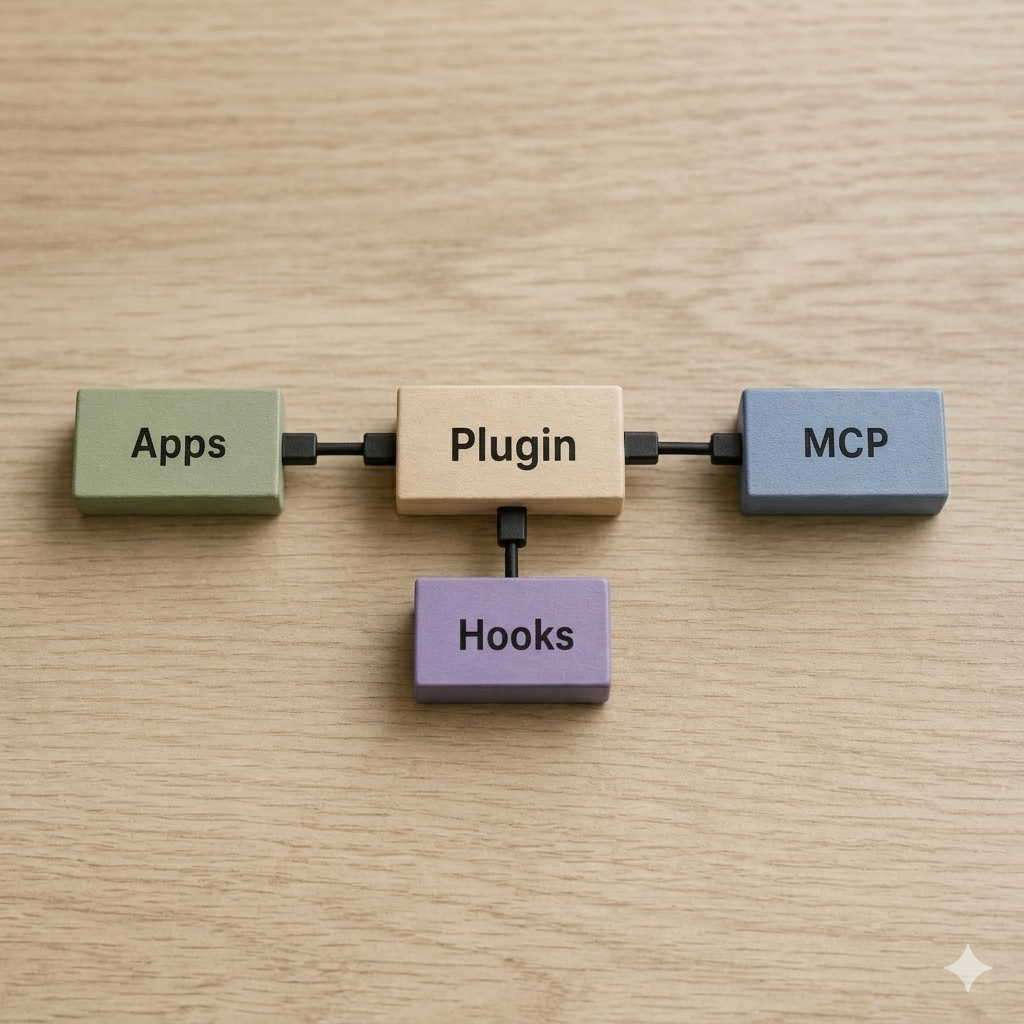
Skills define how the work should be done. Plugins package the workflow. Apps and connectors provide access to systems like GitHub, Slack, Google Drive, and Gmail. MCP servers provide additional tools and shared context, often from systems outside the local project. Hooks and lifecycle configuration can add deterministic behavior. Marketplaces make these packages installable. The practical result is simple: the next time you ask Codex to do the work, you should not have to rebuild the workflow from scratch.
A skill is not a prompt library
The first mistake is to treat skills as saved prompts. A saved prompt is useful, but a skill should be more than that. A skill is a reusable operating procedure. It tells Codex how to approach a category of work, what standards to apply, which mistakes to avoid, and what kind of output counts as finished. What makes a skill valuable is that it gives the agent a stable interpretation of what the task means. Saving typing is incidental.
A prompt might say, “Review this pull request for bugs.” A skill says something much more specific: when reviewing pull requests for this team, prioritize behavioral regressions, security issues, data-loss risks, race conditions, rollback problems, and missing tests where the risk justifies them. Lead with findings. Use file references. Do not spend review capital on style preferences unless they affect correctness or maintainability. If there are no substantive findings, say that clearly. That goes beyond a prompt. It is encoded judgment.
The same distinction applies outside code. A prompt might say, “Turn this article into a YouTube script.” A skill says: preserve the argument, but change the medium. Start with the viewer’s reason to care. Skip the author’s inside-baseball context. Make the payoff clear early. Use spoken language, not essay prose. Do not overuse numbered-list framing. Leave the deepest implementation details for the Substack version and make that boundary explicit. Again, the value comes from how the agent reads the task. The skill teaches the agent to handle a format transformation with editorial rules, separate from a generic rewrite.
A customer-call skill might do the same thing for research synthesis. It could tell Codex to open with factual context, distinguish direct customer evidence from interpretation, preserve uncertainty, call out missing source coverage, separate product implications from go-to-market implications, and avoid including admin-only material unless explicitly asked. That kind of instruction changes the agent’s behavior because it defines the standard, not just the assignment.
This becomes more important as the model gets stronger. With a weaker model, you spend most of your time correcting basic execution. With a stronger model, the model can do much more of the work, but it can also do much more of the wrong work if the process is vague. GPT-5.5 raises the stakes because it can carry tasks farther. If the workflow is clear, that capability compounds. If the workflow is unclear, the same persistence cuts the other way. The agent will execute the wrong version of the task with conviction.
AI plugins vs skills: what’s the difference
A plugin becomes necessary when the workflow needs more than instructions. If all Codex needs is a process, a skill may be enough. If you want Codex to follow your code review style, writing style, release-note format, meeting-summary process, or research memo structure, start with a skill. A skill is the simplest unit of reusable workflow.
A plugin makes sense when the workflow needs packaging. Maybe other people need to install it. Maybe it needs a connection to Google Drive, Slack, GitHub, Gmail, Figma, Stripe, or Vercel. Maybe it needs an MCP server. Maybe it needs lifecycle behavior. Maybe it needs to be distributed through a marketplace. At that point, the problem is no longer only “how should Codex behave?” It is “how do we bundle everything required for this work to happen reliably?”
A plugin needs a manifest to identify itself. Beyond that, it can bundle one or more skills, configuration for app connectors, configuration for MCP servers, lifecycle behavior, and supporting assets like templates or examples. The manifest identifies the plugin, points to bundled components, and provides install-surface metadata. That is packaging. The plugin says: here is the workflow, here are the tools it needs, here are the skills it should use, here is the identity of the package, here is how it can be installed, and here is how it should appear to the user.
The plugin layer matters for teams. A skill can improve your own workflow. A plugin can make a workflow portable. A team can distribute a PR review plugin, a frontend QA plugin, a design implementation plugin, a release management plugin, a customer research plugin, or an internal reporting plugin. The aim is to stop making every person explain the same process to every agent in every new thread. Full automation is a separate question. That is how organizational memory starts to move into the agent environment.
How MCP connectors integrate AI agents with real tools
The model can only operate on the context it can reach. If the source of truth is in GitHub and Codex cannot inspect GitHub, the user becomes the connector. If the design is in Figma and Codex cannot see Figma, the user becomes the connector. If the customer context is in Drive, Slack, Gmail, Linear, Salesforce, Stripe, or an internal database, the user becomes the connector. In each case, the agent may still be useful, but the human is forced to shuttle context in and out of the conversation.
MCP and app integrations sit close to the plugin story for this reason. MCP connects models to tools and context. Codex supports MCP servers in the CLI and IDE extension, and OpenAI’s docs point to examples like OpenAI Docs MCP, Context7, Figma, Playwright, Chrome DevTools, Sentry, and GitHub. Claude Code has moved in the same direction, using MCP to connect to issue trackers, monitoring tools, databases, design systems, and external services. The protocol details matter to implementers, but the user-facing point is simpler: serious workflows usually depend on live systems.
A code review workflow needs the repo, the diff, the test results, the pull request discussion, the issue that motivated the change, and sometimes the CI logs. A design-to-code workflow needs the design, the component library, the running app, a browser, screenshots, and the local codebase. A weekly business report needs data sources, spreadsheet logic, historical reports, Slack context, and a final document format. A support escalation workflow needs customer history, product logs, issue status, internal notes, and approved response language.
If those sources are not reachable, the agent can still help, but the human has to carry the source material. That is fragile, slow, and easy to get wrong. It is also exactly the kind of orchestration GPT-5.5 is supposed to reduce. Plugins matter because they let the access layer and the process layer travel together. The agent does not simply get a tool. It gets a workflow that knows when and how that tool should be used.
Computer use makes the environment messier and more valuable
Computer use is one of the reasons this story is broader than code. A coding agent that only edits files can still be powerful, but much of real work happens outside clean APIs. It happens in browsers, desktop apps, documents, spreadsheets, slide decks, dashboards, design tools, ticketing systems, admin panels, and internal software that was never designed for agent access. The more Codex can move through those environments, the more valuable it becomes, but also the more important workflow structure becomes.
OpenAI’s GPT-5.5 announcement ties the model’s knowledge-work gains to computer use in Codex. The claim is not merely that GPT-5.5 writes better code. It is that the model can move through more of the actual loop of work: find information, understand what matters, use tools, check the output, and turn raw material into something useful. With computer use, that begins to include seeing the screen, clicking, typing, navigating interfaces, and moving between tools with precision.
That makes the work surface messier. If Codex is using a browser to QA an app, the workflow needs to define what to check. It is not enough to say “look at the page.” A serious QA workflow might include desktop and mobile viewports, console errors, broken interactions, text overflow, visual alignment, loading states, empty states, keyboard behavior, and whether the page actually reflects the requested change. The agent’s ability to click around is useful only if it is paired with a standard for what good looks like.
The same is true in spreadsheets, documents, and slide decks. A spreadsheet workflow needs to define how to preserve source data, where to put formulas, how to check calculations, how to handle missing values, and what final artifact the user expects. A document workflow needs to define voice, audience, source coverage, formatting constraints, and verification. A slide workflow needs narrative structure, visual hierarchy, chart standards, and rendering checks. Computer use makes the agent feel more capable, but it also makes the need for packaged process more obvious. The tool expands the possible action space. The workflow narrows that space into useful work.
Claude Code is evidence that this is the category direction
This is not only an OpenAI pattern. Claude Code has its own plugin system with skills, agents, hooks, MCP servers, commands, marketplaces, and plugin scopes. Its docs distinguish between local project configuration and plugins that are meant to be shared, versioned, reused across projects, and distributed through marketplaces. Its MCP docs describe the same basic pain: when you find yourself copying data from another tool into chat, connect the tool instead.
The details differ, but the direction is the same. The coding agent is becoming an extensible work environment. It needs a way to hold process, reach tools, run deterministic checks, install capabilities, distribute workflows, and govern what has access to what. The agent has become a place where models, tools, permissions, workflows, and organizational standards meet.
The OpenAI Codex plugin for Claude Code makes this point almost too neatly. It lets Claude Code users invoke Codex for review, adversarial review, and background tasks from inside Claude Code. One agent environment can call another agent environment when that is the right tool for the job. The pattern shows where the abstraction is going.
The future is plural. It is a set of agent environments with different models, tools, workflows, permissions, and packaged capabilities. The user will not only ask, “Which model should I use?” They will ask, “Which environment has the right workflow for this job?” Plugins are one of the ways those environments become durable enough to matter.
GPT-5.5 makes the workflow problem visible
The reason GPT-5.5 belongs in this story is that stronger agents reveal bottlenecks weaker agents can hide. When the model is weak, every failure looks like a model failure. It did not understand the task. It lost the thread. It stopped too early. It broke the tests. It forgot the instruction. It failed to use the tool. The obvious answer is to wait for a better model.
When the model gets stronger, some of those failures remain, but another class of failure becomes clearer. The agent can do the work, but it may do the wrong version of the work.
Those failure modes need a different kind of fix. Model quality still matters, but once the model can plan, act, check, and persist, the next question is whether the work has been described in a way the model can inherit. Clear process becomes compounding advantage. Vague process becomes expensive ambiguity.
This is the practical bottleneck shift. The problem does not move from intelligence to workflow structure because intelligence stops mattering. It moves because intelligence becomes good enough to expose the absence of structure. Once the model can carry more of the work, the weak point becomes the definition of the work.
The first serious use of plugins is consistency
It is tempting to talk about plugins as a step toward full automation, and in some cases that will be true. OpenAI’s GPT-5.5 announcement includes examples of internal workflows where Codex helped analyze months of speaking-request data, build scoring frameworks, validate Slack automation, review tens of thousands of K-1 tax forms, and generate weekly business reports. Those examples are useful because they show Codex moving into real operational work.
But for most people, the first value of plugins will not be full automation. It will be consistency. Can Codex do this task the same way tomorrow? Can a teammate invoke the same workflow and get a similar standard? Can the agent remember the review philosophy without being told again? Can the workflow bring the right tools along with it? Can the output format stop drifting? Can the verification steps become routine? Can the organization stop correcting the same failure mode in every thread?
Consistency is what makes plugins valuable early. They reduce repeated orchestration. They reduce variance. They make the baseline higher. Full automation is a later question, and it will depend on the task, the risk, the available tools, and the quality of the checks. The first question is more basic: can the work become repeatable?
Repeatability is underrated because it sounds less dramatic than autonomy. But in real organizations, consistent execution is often the larger prize. A workflow that reliably produces a good review, a usable customer summary, a clean release note, or a complete weekly report is already valuable, even if a human still approves the final step. The goal is to stop the human from recreating the loop every time. Removing the human entirely is a different question.
Which workflows to automate with AI plugins first
The right starting point is the workflow that gets repeated, gets annoying to reconstruct, and stays easy to inspect. Ambition can come later. If a task happens once a quarter, a prompt may be enough. If it happens every week, every release, every pull request, or every customer cycle, the workflow is worth examining. Repetition is the first signal that the work may deserve a more durable form.
A good candidate also requires the same instructions every time. If you keep telling Codex the same caveats, constraints, standards, source hierarchy, and output format, those instructions probably belong somewhere more permanent. This is especially true when the workflow depends on house style or team judgment. Generic work does not need much packaging. Specific work does. Your code review philosophy, your product memo format, your launch-readiness checklist, your customer summary standard, your frontend QA process, your executive reporting shape: these are all places where the real value is in the judgment embedded in the workflow.
Tool repetition is another signal. If the task repeatedly uses GitHub, Slack, Drive, Figma, Linear, Sentry, Vercel, Stripe, a browser, or a database, that suggests the process and the access layer should travel together. A plugin can package not only what Codex should do, but where it should look and which tools it should use. This reduces the user’s burden and lowers the chance that the agent works from incomplete or stale context.
Code review is an obvious starting point because it is repeated, important, judgment-heavy, and easy to inspect. A review plugin can combine a team-specific review skill with GitHub access, CI context, and perhaps a separate adversarial review mode for higher-risk changes. Frontend implementation is another strong candidate because it can combine Figma access, local component rules, browser-use verification, screenshot checks, and responsive QA expectations. Release notes are a strong candidate because a workflow can read commits, PRs, issue context, and internal notes, then produce customer-facing language in the right format.
Incident triage, business reporting, and editorial workflows also fit the pattern. An incident workflow can inspect alerts, logs, deployments, recent changes, and runbooks, then produce a structured hypothesis and escalation path. A business reporting workflow can pull data, preserve calculations, generate charts, write a memo, and flag uncertainty. A creator who repeatedly moves from research to Substack to YouTube to prompts to social posts is running a content operating system. What looks like one task is many. A skill or plugin can encode the differences among formats so the agent does not flatten everything into generic summary.
The key is to package the workflows where repeated human reconstruction is wasting the most attention. Packaging everything would miss the point.
The ladder should stay boring
The shorthand fits in your head. If the work happens once, a prompt is enough. If the work happens repeatedly, the same way each time, you have a skill. If the workflow needs to travel between people, projects, tools, and environments, you have a plugin. If the agent needs live access to another system, that is the job of an MCP server or an app connector. If a step has to be deterministic and cannot be trusted to the model, that is a script or a hook. Knowing which is which is most of the work.
The right build path is simple. Begin with the workflow in plain English and treat it as a prompt at first. When the prompt becomes repetitive, turn it into a skill. When the skill needs to be shared, versioned, bundled with tools, or installed by others, turn it into a plugin. When the workflow needs live context, add MCP or app integrations. When the workflow needs deterministic checks, add scripts, hooks, tests, or review gates. When the workflow needs team distribution, use a marketplace or repository-level setup.
This order matters because a plugin cannot rescue an unclear workflow. If you start with plugin scaffolding before you understand the work, you will produce a well-structured package around a vague process. That does not help. It only makes the vague process easier to repeat. The first job is to understand what the work actually is: the inputs, the output, the standard, the authoritative sources, the tools, the assumptions, the checks, the failure modes, and the points where human confirmation is required.
Those questions are where plugins succeed or fail. They are the real work of making agents useful. What does good look like? What should never happen? What can be assumed? What should Codex do if the data is missing or contradictory? What should be verified before the task stops? What belongs to the agent, and what must remain a human decision?
A plugin is the final package. The workflow is the product. If the workflow is clear, packaging makes it portable. If the workflow is unclear, packaging only gives the confusion a nicer install surface.
Why AI agent trust and governance matter for plugins
Once plugins can carry tools, integrations, MCP servers, and lifecycle behavior, trust becomes central. A prompt is text. A plugin is closer to software. It may give the agent access to email, files, repos, design systems, ticketing systems, browsers, local commands, or third-party services. It may include scripts. It may call APIs. It may read private data. It may write to external systems.
That does not make plugins bad. It means they need to be governed like real dependencies. What can the plugin read? What can it write? What commands can it run? What credentials does it need? Does it fetch untrusted content? Does it update automatically? Is it maintained by OpenAI, a vendor, your company, or an unknown third party? Can it be limited to read-only access? Can it be disabled for certain users? Can the team inspect what it does?
Codex’s own Help Center notes that Business and Enterprise/Edu plugin access follows workspace app controls, and that admins can disable apps or determine which actions a plugin is allowed to have. That detail is part of the product story. The more useful plugins become, the more important governance becomes.
The same issue appears with Claude Code and MCP. Anthropic’s docs warn users to trust third-party MCP servers carefully, especially because tools that fetch untrusted content can create prompt-injection risk. The security issue is not hypothetical. Once an agent has tools, the text it reads can influence the actions it takes. More access makes the agent more useful, but it also increases the surface area for mistakes, abuse, and accidental leakage.
This is why the future of agent work is controlled autonomy. The agent needs access, but not unlimited access. It needs tools, but not every tool. It needs memory, but not all memory. It needs workflows, but workflows that can be reviewed and updated. It needs permissions that match the task. Plugins are powerful because they make agent work installable. For serious organizations, that also means they make agent work auditable, governable, and restrictable.
What changes for the user
The practical change is that the user’s job moves up a level. In the early phase of agent use, the user spends a lot of time instructing the agent: do this, use that, look here, follow this style, run this check, try again, not that file, not that kind of review, not that source, not that audience. That is manual orchestration, and it is tiring because the user is doing procedural work the environment should be able to remember.
With packaged workflows, the user should spend less time reconstructing the workflow and more time deciding whether the workflow is the right one, whether the result is good, and whether the agent should proceed. The human does not disappear. The human changes role. Instead of being the clipboard, the human becomes the owner of the process. Instead of being the router, the human decides which workflows deserve access. Instead of repeating the standard, the human maintains the standard.
The right division of labor. Agents should not require humans to babysit every procedural detail. They also should not be allowed to run vaguely through high-stakes systems without structure. Plugins create a middle ground: more durable process, better access, clearer checks, and human control at the points that matter.
This is also why plugins reshape more than productivity. They change the human-agent relationship. The user becomes less responsible for remembering every operational detail and more responsible for designing, selecting, and governing the workflows that deserve to exist.
There is a deeper reason this matters. If the scaffolding around an agent stays vague, if it remains engineering shorthand only the technical team can name, then only engineers will ever shape what these systems do. That was tolerable when the work was mostly experimental. That has stopped being tolerable. The people who understand the work, whether or not they write code, are the ones whose judgment needs to live inside these workflows. A review philosophy comes from the senior reviewer. A customer-summary standard comes from the people who own the customer relationship. A release-note format comes from the team that lives with how releases land. If the scaffolding stays mysterious, that knowledge stays trapped in the human, and the agent gets a weaker version of the work.
Someone I know who does editorial work, and who does not write code, built a plugin for first-pass review. The plugin reads the text three different ways: once for argument, once for clarity, once for factual consistency. It flags the rough sections, the places where the prose loses coherence, and the claims that do not hold up. It does not finish the editing. The editorial judgment still belongs to a person. But it does the part of the review that benefits from being mechanical, the part that benefits from being run the same way every time, and it pulls from more than one source of context, which is why a single skill would not have been enough. She built it herself. She did not wait for an engineer to build it for her.
The article’s real claim
The real story of Codex plugins runs deeper than “OpenAI added an extension system.” GPT-5.5 makes Codex more capable at sustained, tool-using work, and that raises the value of everything around the model.
If Codex can carry more of the task, then the hard part becomes defining the task well enough to carry. If Codex can use more tools, then the hard part becomes giving it the right tools with the right permissions. If Codex can move across code, documents, spreadsheets, slides, browsers, and local apps, then the hard part becomes packaging the workflow that tells it how to move. If Codex can check its work, then the hard part becomes defining what checks matter. If Codex can work longer, then the hard part becomes making sure it is working inside the right boundaries.
Plugins live underneath the flashy part of the agent story. The flashy part is the model, and GPT-5.5 is the reason this story becomes timely. But the model alone does not explain how work changes. Work changes when the model can inherit a process, reach the right tools, verify the right things, and repeat the workflow without the user rebuilding the environment from scratch.
The question to ask
The question for Codex users runs deeper than which plugins to install. That part is downstream. The better question is: what work do I keep re-explaining? Where does Codex need the same context every time? Where do I keep correcting the same failure mode? Where does the task depend on a team standard that has never been written down? Where does the agent need live access instead of pasted context? Where should a deterministic check replace a reminder? Where would another person benefit from installing the same workflow?
Start there. Some answers will become prompts. Some will become skills. Some will become plugins. Some will need MCP or app connectors. Some will need hooks. Some should stay human. Some should become ordinary scripts. You do not need to turn everything into a plugin. What matters is noticing that agent work now has a packaging layer, and that stronger models make that layer much more valuable.
Codex plugins matter because the agent is becoming strong enough to use them. The bottleneck moved from whether the model can act to whether the work has been packaged clearly enough for the model to act well.
I make this Substack thanks to readers like you! Learn about all my Substack tiers here