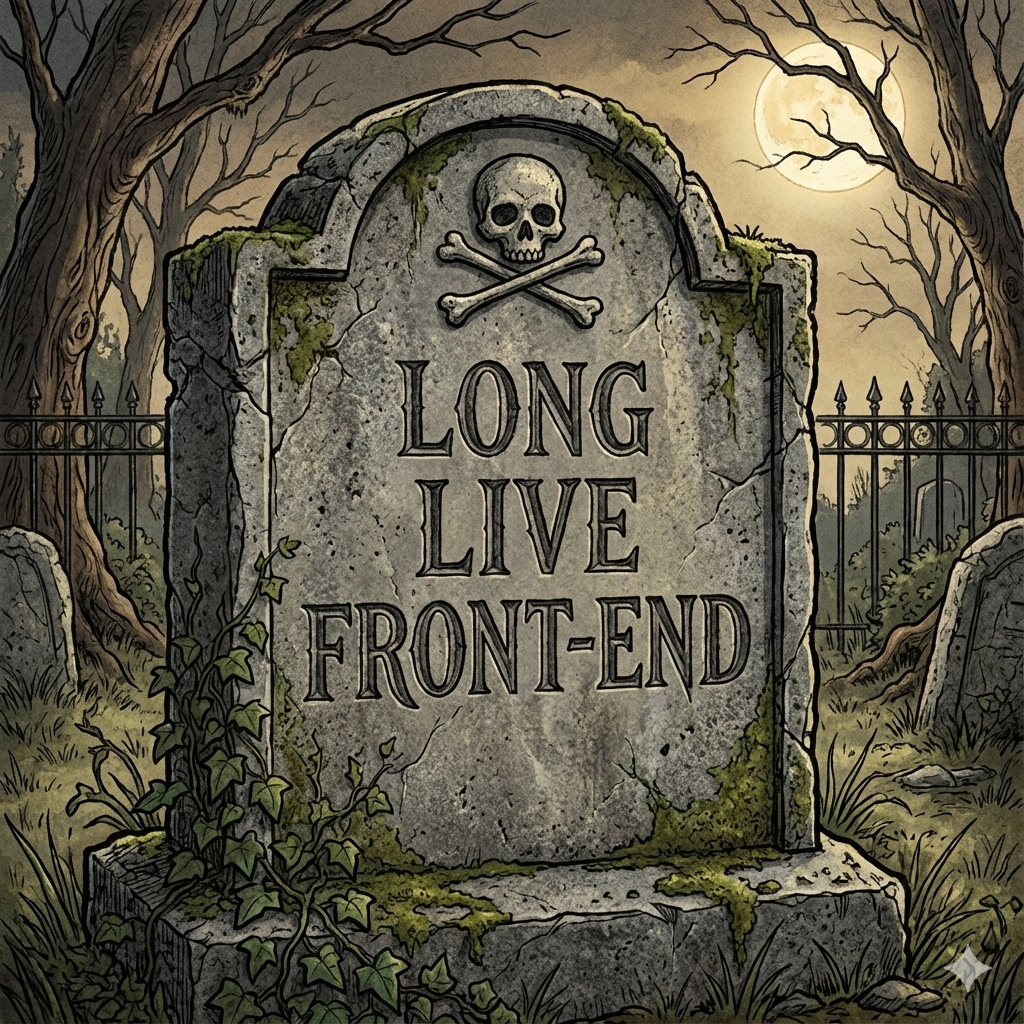
Yes, front-end is dead. But, believe it or not--this is a good thing for EVERYONE. Here's why this shift is so important for all builders (and yes, engineers, we still very much need you)
By Nate
Published: 2025-12-31
URL: https://natesnewsletter.substack.com/p/the-interface-layer-just-opened-up
We are all front-end builders now.
I want to sit with that sentence for a moment, because I think it’s easy to read it as hype and move on. It’s not hype. It’s a structural shift in who gets to make things—and it changes the game for everyone reading this, whether you write code for a living or have never touched a React component in your life.
Here’s what happened: the bottleneck that kept ideas trapped in non-technical heads just broke. For twenty years, if you had a vision for a product, a tool, an interface—something you could see clearly in your mind—you had two options. Learn to code (years of investment, steep learning curve, most people bounced off). Or find someone who could code and try to describe what you wanted (expensive, slow, and the thing that came back never quite matched what you imagined).
That bottleneck is gone. Not “easier to work around.” Gone.
Tools like Lovable, Replit, and a dozen others have collapsed the gap between “I can see it” and “it exists.” I’ve watched people with zero coding experience build working prototypes in two hours. Not toy demos—functional tools they use daily. The Lovable piece I wrote a few months back walked through this in detail: four build tracks, real prompts, honest assessments of what works and what doesn’t. The response was overwhelming. People were building things.
But that’s only half the story.
Because here’s what else is true: when everyone can build, the nature of what “front-end engineering” means transforms completely. The implementation work that used to dominate front-end jobs—taking Figma files, wiring up components, pushing pixels—that work is collapsing into something cheap and fast. AI handles it reasonably well for common patterns. The skill that used to take years to develop is becoming table stakes.
So front-end engineering is dead, in that sense. The era where most of the job was hand-implementing pages is ending.
But long live front-end engineering. Because someone still needs to build the systems that make all this composition reliable. Someone needs to define what can vary and what can’t. Someone needs to ensure that when a PM builds a prototype in Lovable, or when an AI generates a dashboard, the result feels like your product and not fourteen different apps wearing the same logo.
That work—I’ve been calling it front-end composability—is where the discipline grew up to. It’s harder in some ways, easier in others, and for most engineers, a better use of talent than the repetitive translation work that used to dominate the job.
This piece is for two audiences, and I’m going to address both directly:
If you’re a builder—a PM, a founder, a designer, someone with ideas who’s been waiting for permission to create—this is your moment. The door is open. I’ll walk through exactly what that means and how to step through it.
If you’re an engineer—specifically a front-end engineer watching this shift happen—your job isn’t disappearing. It’s transforming into something with more leverage and less pixel-pushing. I’ll walk through what that transformation looks like and what skills matter now.
And here’s the thing I want both audiences to understand: these aren’t separate stories. They’re the same story from different angles. The composability work engineers do is what makes Lovable and Replit possible. The builders stepping through the door are why that engineering work matters more than ever. You need each other.
Here’s what’s inside:
For builders:
- What actually changed—the three things that converged to make this real
- A 15-minute Lovable walkthrough so you can build something today
- What you can build (and what you still can’t)
- How this changes the way you talk to your engineers
- The skills you’re developing that matter beyond prototyping
For engineers:
- Why the implementation bottleneck broke and where the constraint moved
- What front-end composability actually means in practice
- The four capabilities your team needs (schema definition, brand consistency, agent auditability, generation guardrails)
- What happens when no one owns this work explicitly
- The fork: composability work vs. the handcrafted lane
- A diagnostic to run this quarter
For both:
- Where your worlds meet and why you need each other
- How organizations get faster when builders and engineers share vocabulary
I’ve also built four prompts to help you act on this—two for builders (clarify your idea before you build, hand off your prototype to engineering), two for engineers (audit your composability readiness, define UI contracts for components and patterns).
Let’s go.
Subscribers get all posts like these!
GRAB THE PROMPTS
How to Use These
This article describes a shift. These prompts help you act on it.
If you’re a builder: Start with the Builder’s Brief before you open Lovable. It takes fifteen minutes and prevents the most common failure mode—building something without clarity on what problem you’re solving or who it’s for. When your prototype is ready to become real, the Prototype Handoff prompt creates the documentation engineers need to build it properly.
If you’re an engineer: The Composability Audit reveals where your team stands on the four capabilities. Run it quarterly or when you’re restructuring. The UI Contract prompt is for the actual work—defining variation boundaries for specific components and patterns. Use it every time you’re establishing or revising a UI standard.
If you’re both: Lucky you. Run the Builder’s Brief when you’re prototyping. Run the engineering prompts when you’re building the systems that make prototyping reliable.
FOR BUILDERS: THE DOOR IS OPEN
I need to be direct with you: if you’ve been waiting for permission to build, you no longer need it.
I’m talking to the PM who’s been sketching interfaces in notebooks for years, describing them in tickets, hoping engineering has bandwidth. The founder who can see the product clearly but keeps getting told “that’s a six-month build.” The consultant who knows exactly what tool their clients need but can’t justify hiring a dev shop. The operations person watching their team drown in spreadsheets, knowing there’s a better way but lacking the technical skills to build it.
The tools caught up to your ideas. Finally.
What Actually Changed
For the last twenty years, “no-code” was a broken promise. I watched every wave crash against reality—visual programming languages that were too rigid, platforms that hit walls the moment you needed anything custom, “democratization” pitches that still required developers for anything useful.
What changed isn’t just better AI. It’s the convergence of three things:
Component libraries matured. Systems like shadcn, Radix, and Material UI aren’t just design systems anymore. They’re production-grade building blocks with accessibility baked in, interaction patterns figured out, edge cases handled. When the Lego bricks are that solid, assembling them becomes the easy part.
AI learned to wire things correctly. Not perfectly—I’ll get to limitations—but correctly enough. The boilerplate that used to take a day takes minutes. The translation from “I want a form with these fields” to working code actually works now.
Platforms abstracted the hard parts. Lovable Cloud handles authentication and databases. Replit handles hosting and deployment. The infrastructure that used to require DevOps knowledge is now a checkbox.
The result: you describe what you want, and something functional appears. Not a mockup. Not a prototype that’s obviously fake. A working thing.
You Don’t Need to Know the Technical Terms
I’m about to use some terms that might sound intimidating—shadcn, React, component libraries. I want to be clear: you don’t need to understand these things to build.
Here’s the mental model that matters: think of modern front-end tools as a kitchen that comes pre-stocked with professional-quality ingredients and equipment. A chef (engineer) might use that kitchen to create complex, custom dishes with precise techniques. But you can also walk in and make yourself an excellent dinner without knowing the difference between a sauté pan and a saucier.
The technical infrastructure exists. It works. You don’t need to understand how it works to use it. You just need to know what you want to make.
A Real Example: Build a Feedback Collector in 15 Minutes
Let me walk you through something concrete. Say you’re a PM and you want to collect user feedback on a new feature—a simple form where users can tell you what’s working and what isn’t.
Old world: Write a ticket. Wait for sprint planning. Hope it gets prioritized. Two weeks later, maybe you get something. By then the moment has passed.
New world: Open Lovable. Describe what you want.
Here’s a prompt that works:
Build a simple feedback collection page for a product feature.
Include:
- A heading that says “Help us improve [Feature Name]”
- A question: “What’s working well?” with a text area
- A question: “What could be better?” with a text area
- A simple 1-5 rating scale for overall satisfaction
- A submit button
- A thank-you message that appears after submission
Design: Clean, minimal, professional. Mobile-friendly.
Store the responses so I can review them later.
That’s it. Lovable generates a working page. You can tweak the wording, adjust colors, add fields. Deploy it to a real URL. Share it with users. Collect actual feedback.
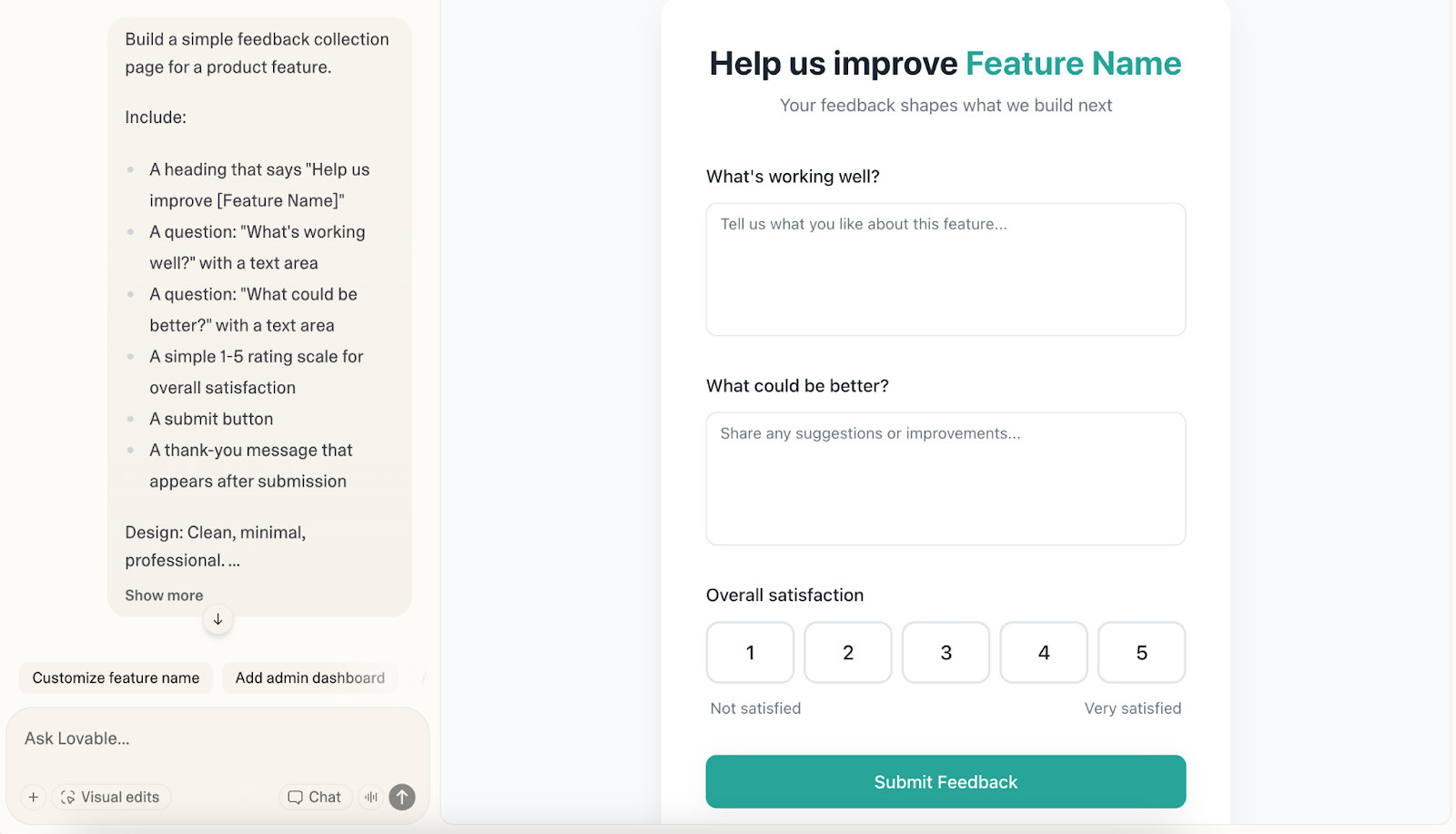
Fifteen minutes. No engineering ticket. No sprint planning. No waiting.
Is this production-grade enterprise software? No. Is it good enough to validate whether users care about your new feature? Absolutely.
What You Can Build (And What You Can’t)
I want to be honest about the boundaries, because nothing kills momentum faster than running into a wall you didn’t expect.
What works well:
- Personal productivity tools (expense trackers, habit trackers, recipe organizers)
- Internal team tools that replace spreadsheets
- Prototypes to validate ideas before investing in proper development
- Landing pages and marketing sites
- Simple data collection and display
- Client-facing demos of your methodology (consultants, this is you)
What doesn’t work (yet):
- Complex multi-user systems with sophisticated permissions
- Anything requiring HIPAA, SOC2, or serious compliance
- High-traffic production applications
- Complex integrations with enterprise systems (Salesforce, SAP, etc.)
- Anything where security is genuinely critical
The pattern that works: solve problems you personally experience, replace manual processes, serve small groups, use simple data models. The pattern that fails: trying to build production SaaS that competes with established software.
Think of it like home cooking versus running a restaurant. You can make yourself an excellent dinner without being a professional chef. That’s valuable. That’s real. But you’re not opening a restaurant with home kitchen equipment.
How This Changes Your Relationship With Engineering
Here’s the thing I think builders underestimate: when you can prototype, your conversations with engineers fundamentally change.
Before, you described what you wanted and hoped the translation was accurate. You’d write tickets with mockups and acceptance criteria, then wait weeks to see if what came back matched your vision. Often it didn’t. Not because engineers were incompetent, but because translating vision to implementation is genuinely hard, and your words couldn’t carry all the information your brain contained.
Now you can show instead of tell.
Imagine this: instead of writing a ticket describing a new workflow, you build a rough version in Lovable first. It’s not production-ready. The code would make engineers wince. But it works. You can click through it. You can show exactly what you mean—not describe it, show it.
The conversation shifts from “here’s what I want, go build it” to “here’s a working version of my thinking—how do we make this real?” You’re collaborating on a shared artifact instead of playing telephone across a specification document.
This also means you start understanding why certain requests are hard. You build something and hit a wall—authentication is tricky, real-time updates are complicated, making it work on mobile requires different thinking. That friction is educational. You develop intuition for what’s simple and what isn’t, which makes your requests to engineering more realistic and your roadmaps more honest.
You’re not replacing engineers. You’re becoming a better partner to them. And honestly? Most engineers I know are thrilled when PMs and designers can prototype. It means fewer misunderstandings, faster iteration, and more time for engineers to work on genuinely hard problems instead of translating mockups.
The Skills You’re Actually Building
When you build something in Lovable or Replit, you’re not just creating that one thing. You’re developing a muscle that compounds.
Specification clarity. You learn to describe what you want precisely, because vague prompts produce vague results. This skill transfers directly to working with engineers, writing better PRDs, and thinking more clearly about product decisions.
Systems thinking. You start noticing how pieces connect—how a form submission leads to data storage leads to display. You develop intuition for information architecture that makes you better at product work generally.
Rapid validation. You learn to test ideas quickly instead of over-investing in things that might not work. The two-hour prototype that proves nobody wants your feature saves months of engineering time.
Technical vocabulary. You start understanding terms you used to glaze over—components, state, routing, authentication. Not deeply enough to implement them yourself in production, but enough to have real conversations about technical tradeoffs.
These skills matter whether you ever touch a no-code tool again. They make you better at the work you were already doing.
FOR ENGINEERS: THE JOB IS TRANSFORMING
Now let me talk to the engineers. Because everything I just told the builders has implications for you—and those implications aren’t “learn to code faster before AI takes your job.” The story is more interesting than that.
The Implementation Bottleneck Broke
I want to be precise about what happened, because there’s a tendency to either overstate it (”AI builds everything now!”) or understate it (”it’s just autocomplete”). The truth is specific.
UI implementation didn’t get marginally cheaper. It got structurally cheaper—the cost curve changed shape, not just slope.
Here’s the mechanism. Component libraries matured to production-grade. shadcn, Radix, Material UI—these are accessible, tested, composable primitives with the hard work already done. When your building blocks are that solid, assembling complex UIs from pre-built components becomes faster than custom implementations. That was true even before AI.
Then AI learned to wire these components correctly. The GitHub Copilot controlled experiment found developers completing tasks roughly 56% faster with the assistant—not self-reported feelings, but measured time-to-completion. The repetitive translation work—Figma to code, state wiring, routing, CSS alignment—became something tools handle reasonably well.
The gap between “design intent” and “working first draft” collapsed from days to hours for standard patterns.
Where AI actually removes labor: State wiring between components. Boilerplate routing and form logic. Test scaffolding. CSS alignment and responsive patterns. The median implementation task—the kind that used to take a day of careful work—is compressing significantly.
Where AI fails: Accessibility edge cases requiring human judgment about screen reader experience. Performance optimization under real load. Complex state management across intricate applications. And critically—consistent interaction contracts across dozens of screens. AI can build a filter component. It cannot ensure your filter component behaves the same way as the nine other filter components scattered across your product.
That last failure mode is where the constraint moved.
Why the Primitives Aren’t Enough
There’s a tempting response here that misses the point: “We’ve got shadcn, we’ve got our design system, we’ve got good components. Isn’t that enough? Can’t AI just assemble from those?”
Necessary but not sufficient.
Having good primitives is table stakes. But primitives don’t tell you what combinations are allowed. They don’t specify which button variant suits which context. They don’t ensure your filter interaction works consistently everywhere it appears. They don’t prevent someone—human or AI—from composing valid components into invalid experiences.
You can have the world’s best Lego bricks, but without constraints about what combinations make sense, you can assemble something that works technically but fails experientially. When AI does the assembly, that failure mode amplifies—because AI happily combines valid primitives into invalid experiences. It doesn’t know the difference. It just knows the code compiles.
This is the gap front-end composability fills. The layer between “we have good components” and “our composed UIs are actually consistent.”
What Front-End Composability Actually Means
For the last decade, front-end engineering meant building one screen at a time. Take a design, implement it, ship it, next design. The unit of work was the page. The skill was translating design intent into production code.
Front-end composability is a different unit entirely. You’re not building screens—you’re defining the schema that describes allowable UI states across hundreds of screens you’ll never directly touch. You’re deciding what can vary and what can’t. You’re setting boundaries within which composition happens.
This means writing explicit contracts about variation boundaries. Buttons can be primary, secondary, or ghost, but not 47 custom variants someone invented for their feature. Tables have filtering and sorting, but the interaction patterns stay consistent—same animation, same placement, same keyboard behavior. Forms adapt their fields based on user type, but validation patterns and error states stay locked.
You’re defining the interaction vocabulary that both humans and agents use. When someone—or something—requests a UI, your contracts specify what’s possible. Can I add a purple button with rounded corners and a drop shadow? The contract provides a clear answer. If an AI generates a filter that works differently from your other filters, the contract catches that.
The hard part—and I don’t think people appreciate this until they try it—is that you’re not just setting technical constraints. You’re encoding product decisions about where flexibility serves users and where it creates confusion. That requires understanding use cases at a much deeper level than traditional front-end work demanded.
This pushes you toward more customer conversations, not fewer. You need to see where variation helps users and where it creates inconsistency. You can’t figure that out from a Figma file. You need ongoing exposure to how different users actually work.
Your Job Is Enabling Everyone Else to Build
Here’s the reframe I want you to hold: the composability work you do is what makes Lovable and Replit possible for the builders in the previous section.
When a PM opens Lovable and describes a feedback form, they’re implicitly relying on component libraries that work, interaction patterns that make sense, accessibility standards that hold. Someone built those foundations. Someone maintains them. When that PM’s prototype eventually needs to become production code, your systems are what make that transition smooth instead of a ground-up rewrite.
Your skill was turning requirements into working code. That translation work is collapsing—AI does it reasonably well now.
Your new discipline: building the infrastructure that lets non-engineers ship front-end safely. You’re the one ensuring that when five different people push UI changes, the result coheres instead of conflicts. You’re reviewing what the AI reviewed, catching the consistency failures automation misses, designing the guardrails that make distributed building possible. The system you create is what lets this scale.
Think of it this way: your value isn’t in how many screens you can personally build. It’s in how many good screens you enable others to build. One person owning composability with a well-designed schema can enable ten PMs to ship UIs that feel consistent, because the consistency is baked into constraints. You’re not manually reviewing every screen. You’re designing the system that makes bad screens harder to produce.
The interview question changed. It’s not “show me the beautiful React UI you built.” It’s “walk me through how you’d architect a front-end system where designers, PMs, and AI can all contribute without the result feeling like a patchwork.”
The Four Capabilities You Need
Front-end composability isn’t one skill. It’s four distinct capabilities most teams have never staffed for.
Schema Definition: Decide what can change and what can’t.
You need explicit, machine-readable contracts about variation boundaries for every major UI pattern. Not a style guide in Notion—a specification that generators actually consume.
For each component type: which variants are allowed, which props can vary, which are locked, what interaction patterns must stay consistent.
For each page type or workflow: what layouts are acceptable, what content sections can appear, what the information hierarchy must preserve.
The output should answer questions that actually arise: given this user role, this task type, this data shape, what can the UI do? What can’t it do?
Brand Consistency at Scale: Keep the promise across generated screens.
Your product makes an implicit promise: this will feel like one coherent thing, not fourteen apps wearing the same logo. Composability is how you keep that promise when screens are composed rather than hand-built.
Lock what matters: spacing systems, color semantics, typography scales, core interaction patterns. These elements make your product recognizable. If they vary by feature, trust erodes.
Define bounded variation for everything else. Different user roles need different views. Different tasks need different emphasis. Adaptation should happen within explicit bounds, not freestyle.
The testing challenge shifts: you can’t manually QA every permutation. You test the generation system itself. Given these inputs, does the output maintain brand consistency?
Agent Auditability: Track what agents do.
This is the capability most teams aren’t thinking about yet. AI agents will interact with your UI—assistants taking actions for users, automated workflows, systems generating or navigating surfaces without human intervention.
You need to know what these agents saw and did. Current session replay tools aren’t built for this. The missing layer: the agent had this access level, this was the composed view it saw, this action was taken. Regulatory requirements in healthcare, pharma, and finance create real obligations here.
Generation Guardrails: Control where AI can modify UI.
Not every surface should be generated. Not every surface should be locked. The discipline is knowing which is which.
Lock critical paths—financial transactions, healthcare diagnostics, high-traffic surfaces where you need human review of every line. Allow generation where adaptation serves users without creating risk—internal tools, admin interfaces, reporting dashboards.
Prevent AI from creating divergent UX patterns. If your generation system can produce fourteen ways to filter a table, users will be confused. Constrain the generator to produce variation within a consistent vocabulary.
What Happens When No One Does This Work
You don’t get to opt out of having contracts. UI contracts exist whether you define them or not—they’re just written by accident instead of intention.
When no one owns composability explicitly, here’s who makes decisions implicitly:
The last shipper. Whatever got merged last week becomes the standard because it’s recent and copyable. An engineer builds a filter component for their feature. Another engineer finds it, copies with modifications. Six months later: nine filter implementations, each slightly different. No one decided this. It happened through accumulated expedience.
The loudest engineer. In code reviews, some voices carry more weight. When explicit contracts don’t exist, implicit contracts form around whoever argues most persistently.
Product managers via acceptance criteria. “Make it work like the filters on the dashboard, but with these options.” Each ticket is a contract decision in disguise.
Framework defaults. Next.js conventions, library constraints, starter templates—these become de facto policy not because anyone decided they were right, but because they were the path of least resistance.
The result isn’t flexibility. It’s a hundred local decisions with no owner. The same interaction behaving four ways across nine screens. Three error states for identical validation rules. Users notice, even if they can’t articulate what’s wrong.
And when AI enters the picture, this gets worse. AI happily assembles whatever primitives exist. If your patterns are inconsistent, AI manufactures inconsistency at machine speed.
The Craft Trade-Off (Being Honest)
I want to acknowledge something directly: if you became a front-end engineer for the craft loop, what I’m describing is a real trade.
There’s specific satisfaction in taking a design and making it real. Pushing pixels until spacing is perfect. Getting animation timing exactly right. Solving a gnarly CSS problem. Looking at a page and knowing: I made that. It exists because I built it.
Front-end composability doesn’t offer that satisfaction the same way. The system produces output. You defined the rules constraining what the system can produce. That’s more powerful abstractly, but less... yours. You can’t point at a generated screen the same way.
The draftspeople who became BIM managers in architecture faced exactly this trade. Some found system-level work deeply rewarding. Some missed the pencil in their hand. Both responses were honest.
You can make the trade and still be honest that something is being given up. The people who pretend there’s no loss are usually either lying or never valued the craft in the first place.
WHERE THESE TWO WORLDS MEET
Here’s what I want both audiences to understand: you’re not competing. You’re two halves of the same system.
Builders Need Composability (Whether They Know It or Not)
Every time a PM builds something in Lovable, they’re implicitly relying on the composability work engineers have done at the platform level. The component libraries. The accessibility standards. The interaction patterns that feel natural because someone figured out years ago how buttons should respond to hover states.
When builders ship prototypes that feel good, that’s composability working invisibly. When prototypes feel janky or inconsistent, that’s composability gaps surfacing.
And when those prototypes need to become real products—when the Lovable feedback form needs to integrate with the actual product—that’s where engineering composability becomes visible. If your systems are designed well, the builder’s prototype can inform the real implementation instead of being thrown away. If your systems are chaotic, every prototype is a ground-up rewrite.
Engineers Need Builders Building
Here’s the part engineers sometimes miss: builders stepping through the door is why your composability work matters more than ever.
When only engineers could build, consistency was (theoretically) maintainable through code review and tribal knowledge. Twelve engineers can sort of stay coordinated through osmosis.
But when designers can prototype in Replit, PMs can build in Lovable, AI can generate dashboards, and every team can spin up internal tools—the coordination problem explodes. You can’t maintain consistency through code review when half the UI isn’t going through code review.
This is why composability becomes critical infrastructure instead of nice-to-have. The more people building, the more valuable the constraints that keep building coherent.
Your work isn’t threatened by builders. It’s validated by them. Every person who can now build is a person who needs the systems you create to be good.
The Shared Language
Something interesting happens when builders start building: they develop vocabulary.
The PM who builds a form in Lovable starts understanding why state management is complicated. The founder who prototypes a dashboard starts intuiting what “components” mean. The designer who ships something real learns why certain requests are hard.
Meanwhile, the engineer who’s shifted to composability work starts thinking more about user needs, variation patterns, what flexibility actually serves people.
The gap narrows. Not because everyone becomes identical, but because you’re developing shared context. You can have real conversations about tradeoffs because both sides understand something about the other’s world.
This is how organizations get faster: not by eliminating roles, but by creating enough shared understanding that handoffs become collaborations.
THE FORK IN FRONT OF YOU
For builders: the door is open. The question is whether you walk through it.
You can keep waiting for engineering bandwidth, writing tickets, describing what you want and hoping the translation is accurate. That’s a choice. Or you can spend two hours this week building something—anything—and discover what’s possible when you stop waiting for permission.
I’m not saying quit your job and become a full-time Lovable developer. I’m saying: build one thing. Solve one problem. Feel what it’s like to make something real. That experience changes how you work, even if you never build again.
For engineers: the job is forking, and you should choose deliberately.
Path 1: Move into composability work. Own primitives, workflows, guardrails. Accept less direct making in exchange for more leverage over how making happens. Your craft knowledge becomes essential context for setting smart constraints—you know which decisions need locking because you’ve seen what happens when they’re not. Your learning priorities shift toward schema-driven UI patterns, permission models, generation guardrails.
Path 2: Stay in the handcrafted lane. There’s still a place for implementation craft. It’s narrower and getting narrower, but it’s not disappearing. High-polish consumer products need custom rendering, intricate interactions, careful performance tuning. Mission-critical, high-traffic surfaces still need humans reading every line. Healthcare, finance, regulated domains may require bespoke implementation. But understand: this is a specialist niche, not the default path. If you’re choosing it, choose deliberately.
For both: understand that you need each other.
Builders without engineering composability get chaos—prototypes that can’t become products, inconsistent experiences, technical debt from day one. Engineers without builders get isolation—composability work that nobody uses, systems designed for theoretical users, infrastructure without adoption.
The best version of this future is collaborative. Builders prototyping, engineers enabling, both learning from each other, both pushing the craft forward.
RUN THIS DIAGNOSTIC
Three questions that reveal where you are.
For builders:
- When did you last build something? Not spec it. Not describe it. Actually build it. If the answer is “never” or “years ago,” the door is open and you’re not walking through it.
- Could you show your next feature idea instead of describing it? If engineering bandwidth magically appeared tomorrow, could you hand them a working prototype? If not, you’re still playing telephone.
- Do you understand why your last three engineering requests were scoped the way they were? If the estimates seemed arbitrary, you might be missing technical context that building would give you.
For engineers:
- Count the ratio. How many of your front-end engineers do implementation versus composability? If the answer is 8:0, you’re staffed for 2020.
- What can your system generate safely? If the answer is “nothing”—you’re behind. If the answer is “everything”—you’re lying to yourself. The good answer is specific.
- Can you articulate your UI generation constraints in one page? Not your style guide. Your contracts. What can vary, what can’t, where AI can touch, where it can’t. If you can’t write that document, you’re not ready for the world that’s arriving.
THE TRANSITION
Front-end is dead in the sense that the era where most of the job was hand-implementing pages is ending. AI and component libraries and schema-driven UIs collapsed that work into something cheap.
But long live front-end. The craft grew up. It shifted from implementing pages to designing systems that enable pages to be generated reliably. From making to enabling making. From pixels to contracts.
And the builders finally got their tools. Twenty years of broken promises, and now the promises actually work. Not perfectly. Not for everything. But enough to change who gets to create.
The draftspeople who became BIM managers didn’t stop mattering. They started mattering differently. Their knowledge of how buildings work became essential context for designing systems others would use.
That’s the transition. Not from skilled to unskilled. From maker to architect-of-making. From “I built this” to “I designed the rules that let this be built well, at scale, by people and systems I’ll never directly touch.”
For builders: more agency. More ability to test ideas and show instead of tell. More partnership with engineering instead of dependency.
For engineers: more leverage. Less tactility. A different kind of satisfaction, for those who learn to find it.
For both: a shared project. Making it possible to build good things, faster, for more people.
Let’s figure out what you’re becoming.
I make this Substack thanks to readers like you! Learn about all my Substack tiers here and grab my prompt tool here