How 4,200 words of system instructions engineered a "bias to ship" into every interaction, why your conversational prompting habits backfire, and the specification templates that make GPT-5 reliable
By Nate
Published: 2025-08-12
URL: https://natesnewsletter.substack.com/p/cracking-the-agent-code-16-production
As soon as ChatGPT-5’s system prompt leaked, I had to take a look.
Typically system prompts are like skeleton keys—they reveal prompting patterns by what they include and by what they leave out, and close analysis essentially gives you a roadmap for future work from the company. Since this is OpenAI’s biggest release of the year, I expected a pile of good stuff hidden in the prompt, and boy was I right!
I've been teaching structured prompting and reasoning techniques here on Substack for awhile now. The fundamentals haven't changed—clarity, specificity, constraint definition, and systematic thinking remain the foundation of effective AI interaction.
But GPT-5 is the first model I've worked with that's genuinely agentic by default. Where previous models would pause for clarification or seek permission, GPT-5 just executes. It takes the structured prompting principles I've always taught and pushes them to their logical conclusion: if you're going to get decisive action instead of helpful conversation, you better nail your specifications upfront.
This article documents what I've learned adapting proven prompting methodologies to a model that defaults to "ship" rather than "discuss." The core techniques—assumption management, constraint specification, output formatting—are all familiar territory. What's new is applying them to an AI that won't give you multiple chances to refine your request.
The system prompt analysis reveals exactly how OpenAI configured this agentic behavior, which explains why traditional iterative prompting feels clunky with GPT-5. Understanding these architectural choices lets you work with the model's biases instead of against them.
You'll find practical templates that build on solid prompting fundamentals but account for GPT-5's execution-first mentality. The tool policy management, Canvas workflows, and failure mode prevention all extend techniques you likely already use, just adapted for a more autonomous system.
This isn't about learning prompting from scratch—it's about evolving your existing skills for AI that acts more like a capable and very literal junior employee (of yours) vs a conversational research assistant. The strategic implications are significant: this level of agency represents where AI systems are headed, and the teams that adapt their delegation patterns first will have substantial advantages.
The shift from conversational AI to agentic AI is real, and it requires us to level up our prompting specification skills accordingly.
Dig in to the prompting riches here and let’s have fun!
Subscribers get all these newsletters!
The Hidden Product Spec: Dissecting GPT-5's System Prompt
How OpenAI Encoded a "Bias to Ship" and What It Means for Your Workflows
Executive Summary
GPT-5's system prompt isn't documentation—it's the product specification that determines every interaction you'll have. The core insight: OpenAI has engineered a "bias to ship" that prioritizes completion over conversation. The model asks one clarifying question maximum, then executes. It reaches for tools proactively. It doesn't end with permission-seeking closers.
This creates a speed advantage: fewer turns, higher-quality first drafts, faster task completion. But it amplifies the cost of ambiguous prompts. If you don't set defaults (deliverable format, assumptions, tool policy), GPT-5 will make silent choices that may misalign with your intent.
The practical solution: treat prompts like configuration files. Pin your deliverable format, declare your assumptions, set your tool policies, and define your acceptance criteria. Build a personal library of tested prompt templates. Version your artifacts in Canvas. Use explicit uncertainty markers.
The broader implication extends beyond prompting techniques. GPT-5's architecture signals OpenAI's roadmap toward an agent operating system that consolidates knowledge work into a single, tool-integrated interface. Teams that develop comfort with delegation-style workflows now will be positioned to benefit as these capabilities expand.
Bottom line: the shift isn't from better prose to better prompts—it's from prompts to procedures.
1. Why System Prompts Are the Real Product Spec
The Hidden Layer That Determines Everything
Most users never see system prompts, but they shape every response. Think of them as the operating system running beneath the chat interface—encoding defaults for tone, initiative level, tool usage, and refusal boundaries. GPT-5's system prompt reveals OpenAI's product strategy more clearly than any blog post or demo.
From Helper to Finisher: The Paradigm Shift
Traditional AI assistants optimize for conversation quality. They ask clarifying questions, seek permission, and err toward being helpful rather than presumptuous. GPT-5 flips this: it optimizes for task completion. The system prompt explicitly instructs: "Ask at most one necessary clarifying question at the start, not the end. If the next step is obvious, do it. Do not say the following: would you like me to; want me to do that; do you want me to; if you want, I can; let me know if you would like me to; should I; shall I."
This isn't a small UI tweak—it's a fundamental reorientation from "chat that helps" to "agent that finishes." I've found this changes how I delegate to AI entirely—instead of starting conversations, I now write specifications. The implications ripple through every workflow:
Decision Latency: Traditional models create decision loops ("Would you like me to proceed?"). GPT-5 eliminates these by defaulting to action.
Cost Per Task: Fewer turns means lower API costs and faster human throughput. A brief that took five back-and-forth exchanges now happens in one.
Quality Variance: High-quality defaults produce better first drafts. But ambiguous inputs now produce more catastrophic failures because the model doesn't pause to clarify.
The Stakes for Teams and Individuals
For individual users, this means the difference between getting a polished deliverable in one shot versus spending multiple turns correcting course. For teams, it determines whether AI accelerates workflows or creates expensive rework cycles.
Early adopters who learn to work with GPT-5's bias toward action will compound their productivity advantages. Those who don't adapt their prompting habits will experience the model as unpredictable or presumptuous.
What This Guide Delivers
This analysis provides three practical assets:
- A systematic breakdown of GPT-5's system prompt, showing exactly how OpenAI configured default behaviors
- Proven habits and templates for capturing speed benefits while preventing wrong turns
- A roadmap read on where ChatGPT is headed, based on the architectural choices encoded in the prompt
You'll walk away with reusable prompt skeletons, tool policies, and failure-mode prevention techniques that work immediately with GPT-5 and will remain relevant as OpenAI ships more autonomous features.
Before & After: The Bias to Ship in Action
Traditional Conversational Approach:
User: "Help me with our pricing strategy"
AI: "I'd be happy to help with pricing strategy. Could you tell me more about your business model, target market, current pricing, and what specific aspects you'd like to focus on?"
User: "We're a B2B SaaS company, early stage"
AI: "Thanks! A few more questions to give you the best guidance..."
GPT-5 Specification Approach:
Task: Pricing strategy framework for early-stage B2B SaaS.
Deliverable: 3-section analysis, ≤500 words, decision-ready for founding team.
Assumptions: MVP product, technical buyers, North American market.
Non-goals: detailed competitor analysis, international pricing, enterprise segments.
Tool policy: Browse ON (2 recent sources), cite inline.
Output: (1) Market positioning, (2) Pricing model options, (3) Implementation roadmap.
Result: Single-turn delivery of complete pricing framework with market data, three pricing options, and 90-day implementation plan.
2. Anatomy of GPT-5's System Prompt: 8 Design Decisions That Matter
1. Identity and Knowledge Cutoff: Forcing Real-Time Decisions
What's encoded: "You are ChatGPT, a large language model based on the GPT-5 model and trained by OpenAI. Knowledge cutoff: 2024-06. Current date: 2025-08-07."
Why it matters: Unlike previous models that would hedge about recent information, GPT-5 has explicit instructions to use web tools when knowledge may be stale. This eliminates the "I don't have recent information" dead ends.
Exploitation opportunity: You can force browsing with temporal language ("latest trends in...") or forbid it with explicit constraints ("reason from prior knowledge only").
2. Persona Defaults: Supportive Thoroughness vs. Executive Brevity
What's encoded: "You're an insightful, encouraging assistant who combines meticulous clarity with genuine enthusiasm and gentle humor. Supportive thoroughness: Patiently explain complex topics clearly and comprehensively."
Why it matters: Left unconstrained, GPT-5 defaults to an educational tone with explanatory depth. This helps novices but frustrates power users who want executive brevity.
Exploitation opportunity: Override with register instructions: "Executive tone, no didactics, ≤5 bullets, no intro/outro."
3. The "One Clarifier" Rule: Early Binding of Ambiguity
What's encoded: "Ask at most one necessary clarifying question at the start, not the end. If the next step is obvious, do it."
Why it matters: This is the core of the "bias to ship" philosophy. Traditional models might ask 2-3 clarifying questions to narrow scope. GPT-5 asks once, then commits to a direction.
Exploitation opportunity: Front-load your assumptions: "Assume US market, B2B SaaS, next quarter timeline. Non-goals: pricing, international expansion."
4. No Permission-Seeking Closers
What's encoded: "Do not end with opt-in questions or hedging closers. Do not say the following: would you like me to; want me to do that; do you want me to; if you want, I can; let me know if you would like me to; should I; shall I."
Why it matters: Eliminates decision loops that slow down workflows. But also means you won't get natural pause points to course-correct.
Exploitation opportunity: Build in your own checkpoints: "Deliver a 3-bullet plan first; execute only after confirmation."
5. Tool Hierarchy: Proactive and Opinionated
What's encoded: Detailed policies for web search, Python execution, Canvas creation, image generation, automations, and memory management—all with specific usage triggers and constraints.
Why it matters: GPT-5 will reach for tools when context suggests they're needed. It won't ask permission first.
Exploitation opportunity: Set explicit tool budgets: "Browse ON (max 2 sources), Python OFF, Canvas ON (id=project\brief\v1)."
6. Safety Priority Stack: Compliance Over Helpfulness
What's encoded: "Do not reproduce song lyrics or any other copyrighted material, even if asked" and routing to the guardian tool for U.S. election-voting queries.
Why it matters: In edge cases, you'll get safe but potentially unhelpful responses. The model won't bend rules to be more useful.
Exploitation opportunity: Work with the priority stack—ask for summaries, outlines, or commentary when hitting restrictions.
7. Canvas as Opt-In, Not Default
What's encoded: "ONLY use Canvas if you are 100% SURE the user wants to iterate on a long document or code file, or if they explicitly ask for canvas."
Why it matters: Unlike some competitors that auto-containerize outputs, GPT-5 keeps responses in chat unless explicitly requested.
Exploitation opportunity: Be declarative: "Use Canvas. Create ai\strategy\v1.md. Structure: Context, Analysis, Recommendations."
8. Memory as Auditable Ledger
What's encoded: "Address your message to=bio and write just plain text. Do not write JSON, under any circumstances... your messages to=bio should always start with either 'User' (or the user's name if it is known) or 'Forget'."
Why it matters: When memory is enabled in your workspace, the model won't quietly accumulate context. Memory management is explicit and user-controlled.
Exploitation opportunity: Order persistence deliberately: "Save: User prefers 3-bullet executive summaries for technical topics."
The Design Philosophy Behind the Choices
These decisions reveal OpenAI's product thesis: optimize for decisive execution rather than conversational comfort. The traditional AI assistant paradigm prioritizes being helpful and non-presumptuous. GPT-5 prioritizes being effective and action-oriented.
This creates a different risk profile. Traditional models risk being too slow or tentative. GPT-5 risks being too fast or presumptuous. The system prompt tries to thread this needle by encoding high-quality defaults while maintaining user override capabilities.
3. The "Bias to Ship" Philosophy: When It Helps and When It Hurts
What "Bias to Ship" Looks Like in Practice
GPT-5's bias to ship manifests in three behaviors that distinguish it from traditional AI assistants:
Speculative Execution: When given partial specifications, GPT-5 fills in gaps rather than asking for clarification. A request for "a brief on market trends" becomes a 500-word analysis of SaaS market dynamics with specific data points and recommendations.
Tool Proactivity: The model reaches for web search, Python, and Canvas based on implied need rather than explicit instruction. Mention "recent" or "latest" and it will browse. Ask for analysis and it may fire up Python. Request a document and Canvas appears.
Commitment to Direction: After one clarifying question, GPT-5 commits to a path and executes fully. It won't pause mid-way to check if it's on the right track.
The Product Incentives Driving This Design
OpenAI's product metrics likely emphasize completion rates and turn efficiency over conversation quality. Users who get finished deliverables in one turn represent successful interactions. Users who need multiple clarifying exchanges represent friction.
This aligns with the broader market shift toward AI agents that execute tasks rather than merely advise on them. But it requires users to front-load context and constraints rather than iteratively refining through conversation.
When Bias to Ship Accelerates Workflows
Content Creation: Briefs, specs, outlines, and first drafts benefit enormously from speculative execution. GPT-5 will create complete structures with reasonable assumptions, giving you a starting point to edit rather than a blank page to fill.
Code Scaffolding: Development tasks like "build a React component for user authentication" result in complete, working implementations with proper structure, error handling, and styling.
Research and Analysis: Quick market overviews, competitive analysis, and trend identification happen in single turns with sourced data and actionable insights.
Document Processing: Given a PDF or dataset, GPT-5 will immediately analyze, summarize, and extract insights without waiting for specific questions.
When Bias to Ship Creates Problems
Ambiguous Scope: Requests like "help with our marketing strategy" may result in a comprehensive plan when you only wanted a quick brainstorm. The model assumes broad scope unless constrained.
Sensitive Actions: Tool usage can surprise users. A question about "current market conditions" triggers web browsing that may not be desired in certain contexts.
Hidden Assumptions: The model makes silent decisions about audience, timeline, geographic scope, and technical complexity. These assumptions may misalign with actual needs.
Overcomplicated Deliverables: The default toward thoroughness can produce 1,000-word memos when you wanted 100-word summaries.
Risk Mitigation Strategies
Assumption Pre-binding: Start with explicit defaults: "Assume mid-market B2B, US focus, next quarter timeline. Exclude pricing and international considerations."
Scope Constraints: Define non-goals as clearly as goals: "Brief overview only—no implementation details, no vendor recommendations."
Tool Policy: Declare allowed and forbidden tools: "No browsing—work from existing knowledge only" or "Browse for recent data; cite sources inline."
Format Specification: Pin deliverable characteristics: "Executive summary format, 3 bullets maximum, no introductory paragraphs."
The Competitive Advantage for Early Adopters
Teams that adapt to bias-to-ship workflows gain compounding advantages:
Speed Multiplier: Tasks that previously required multiple AI interactions now complete in single turns, increasing throughput by 3-5x.
Quality Floor: Even imperfect specifications produce higher-quality starting points than blank documents or basic templates.
Cognitive Offload: Instead of managing conversational loops, users can focus on reviewing and refining finished work.
The Learning Curve Reality
Most users initially experience GPT-5 as unpredictable because they're used to AI that asks permission and seeks clarification. The model seems to "assume too much" or "go in wrong directions."
The adaptation involves shifting from conversational prompting to specification prompting. Instead of starting a dialogue about what you want, you declare what you want along with key constraints and context.
This feels unnatural at first but becomes more efficient once you build habits around assumption-setting and scope-bounding. In my experience, the transition takes about a week of deliberate practice with the new prompt patterns.
4. 16 Non-Obvious Signals from the System Prompt
1. Delegated Initiative: Execute, Don't Ask
Signal: "Ask at most one necessary clarifying question at the start, not the end. If the next step is obvious, do it."
So What: GPT-5 executes on partial specs rather than seeking permission. Traditional AI conversation patterns (propose → confirm → execute) are condensed to (clarify once → execute).
Exploit: Add assumption blocks to prevent wrong-direction execution: "Default assumptions unless contradicted: audience=technical team; scope=MVP only; timeline=next quarter."
2. Teaching Voice Override Required
Signal: "Supportive thoroughness: Patiently explain complex topics clearly and comprehensively. Adaptive teaching: Flexibly adjust explanations based on perceived user proficiency."
So What: Without intervention, you get educational explanations optimized for learning rather than execution. Power users will find responses verbose and condescending.
Exploit: Force register with explicit tone controls: "Executive brief tone, no didactics, 1 idea per paragraph, ≤200 words total."
3. Tool Bias Over Chat Bias
Signal: Detailed tool policies for web, Python, Canvas, image generation, automations, memory—all first-class with specific usage rules.
So What: GPT-5 interprets ambiguous requests as opportunities for tool usage. "Tell me about recent developments" triggers browsing; "show me the data" triggers Python.
Exploit: Set explicit tool boundaries: "No tools—reason from training knowledge only" or "Web search limited to 2 academic sources."
4. Single-Shot Ambiguity Resolution
Signal: Only one clarifying question permitted before execution begins.
So What: If you don't pre-seed key assumptions, the model locks in its best guess and executes fully. Wrong assumptions compound into wrong deliverables.
Exploit: Front-load decision variables: "Assumptions: B2B SaaS, North American market, technical audience. Non-goals: consumer applications, international markets."
5. Auditable Memory Architecture
Signal: "The full contents of your message to=bio are displayed to the user, which is why it is imperative that you write only plain text and never JSON."
So What: When memory is enabled in your workspace, the model won't silently accumulate context across conversations. Memory is explicit, transparent, and user-controlled.
Exploit: Actively manage persistent context: "Remember: User prefers data-driven analysis with 3-5 quantified claims per section."
6. Productized Compliance Routing
Signal: "Do not reproduce song lyrics or any other copyrighted material, even if asked" and "Use the guardian tool to lookup content policy if the conversation falls under... 'election\_voting'."
So What: Safety constraints are hardcoded and non-negotiable. You can't argue your way past restrictions; you must reframe the request.
Exploit: Work with the constraints: ask for "summaries and commentary" instead of reproduction; request "analysis frameworks" instead of direct political content.
7. Canvas as Opt-In Container
Signal: "ONLY use Canvas if you are 100% SURE the user wants to iterate on a long document or code file, or if they explicitly ask for canvas."
So What: Unlike competitors that auto-containerize outputs, GPT-5 defaults to inline responses. You won't randomly get files; you must explicitly request them.
Exploit: Be declarative about container needs: "Use Canvas. Create product\spec\v1.md. Sections: Overview, Features, Technical Requirements, Success Metrics."
8. Front-End Stack Opinions
Signal: "Use Tailwind for styling, no import needed. All NPM libraries are available to use. Use shadcn/ui for basic components... Code should be production-ready with a minimal, clean aesthetic."
So What: Code generation comes with opinionated defaults that produce production-quality UI without dependency management overhead.
Exploit: Lean into the opinions: "React+Tailwind+shadcn component; accessible; dark mode support; loading states; error boundaries."
9. Constrained Visualization Reliability
Signal: "When making charts for the user: 1) use matplotlib over seaborn, 2) give each chart its own distinct plot (no subplots), and 3) never, ever, specify colors or matplotlib styles – unless explicitly asked to by the user."
So What: Chart generation prioritizes reproducible rendering over customization. Multi-chart dashboards require explicit iteration through separate figures.
Exploit: Request specific formats: "Generate 3 separate matplotlib figures: trend line, distribution histogram, correlation matrix. No custom colors or styles."
10. Silent Image Generation Pattern
Signal: "After each image generation, do not mention anything related to download. Do not summarize the image. Do not ask followup question. Do not say ANYTHING after you generate an image."
So What: Combining "generate image" + "explain the result" in one prompt causes the explanation to be suppressed.
Exploit: Split image workflows: Turn 1: "Generate [description]." Turn 2: "Analyze the image and suggest improvements."
11. Calendar-Grade Automation Precision
Signal: "Schedules must be given in iCal VEVENT format... Prefer the RRULE: property whenever possible."
So What: Automation requests expect enterprise-level specificity. Vague timing instructions result in system-defined defaults that may not match intent.
Exploit: Always specify timezone and recurrence: "Weekly Monday 9 AM Pacific: RRULE:FREQ=WEEKLY;BYDAY=MO;BYHOUR=9;BYMINUTE=0."
12. Confidence-Building Language Bias
Signal: "Confidence-building: Foster intellectual curiosity and self-assurance."
So What: Critical feedback arrives softened by default. Risk assessments may be understated to maintain user confidence.
Exploit: Override with explicit stance requests: "Brutally candid assessment; highlight failure modes prominently; no encouragement language."
13. Adaptive Personality Matching
Signal: "Over the course of the conversation, you adapt to the user's tone and preference. Try to match the user's vibe, tone, and generally how they are speaking."
So What: The model adjusts its communication style based on your input patterns. Formal prompts get formal responses; casual prompts get casual responses.
Exploit: Set the tone explicitly in your first interaction: "Professional, data-driven responses only" or "Conversational, creative approach preferred."
14. Decision Latency Optimization
Signal: Combined effect of no opt-in closers, early action, and tool-forward design.
So What: The model "feels smarter" by moving decisively rather than deliberatively. This reduces perceived latency but increases wrong-turn risk.
Exploit: Add circuit breakers: "Provide execution plan first; proceed only after explicit approval for consequential actions."
15. Control Surface Differentiation
Signal: Comparison with Claude's minimalist outputs and Gemini's block-structured defaults.
So What: GPT-5 won't auto-minimize like Claude or auto-containerize like Gemini. You must explicitly specify the output format you want.
Exploit: Declare format preferences: "Claude-style brevity: ≤100 words, essential points only" or "Gemini-style structure: use headers, bullets, and code blocks."
16. Text-First Protocol Design
Signal: Memory writes, automation configurations, and tool instructions all use structured natural language rather than JSON or APIs.
So What: Small wording changes in control instructions can significantly alter behavior. The interface is "programmable" through precise language.
Exploit: Build a personal library of tested control phrases: standardized memory formats, tool policies, and output specifications that reliably produce desired behaviors.
Pattern Recognition: What These Signals Reveal
These 16 signals collectively show OpenAI optimizing for autonomous execution rather than collaborative conversation. Every design choice reduces decision loops, eliminates permission-seeking, and pushes toward completion over consultation.
The meta-insight: GPT-5 is engineered to feel less like a smart chatbot and more like a capable junior employee who executes with minimal oversight. This creates massive productivity gains for users who adapt their delegation style, but frustration for those expecting traditional AI conversation patterns.
5. Habits for GPT-5 Mastery
Habit 1: Lead with Deliverable Specification
The Practice: Start every prompt with format, audience, and length constraints before describing the task.
Example: "Deliver a 7-slide outline for engineering VPs, ≤140 words per slide, technical depth appropriate for architecture decisions."
Why It Works: GPT-5's bias toward thoroughness can produce 2,000-word analyses when you want 200-word summaries. Specifying deliverable characteristics up front prevents scope creep and over-teaching.
Common Failure: Asking "help me with our API strategy" without specifying whether you want a comprehensive plan, a quick overview, or a specific recommendation. The model defaults to comprehensive.
Habit 2: Pre-Bind Assumptions and Non-Goals
The Practice: Explicitly state what the model should assume and what areas to exclude.
Example: "Assumptions: B2B SaaS, Series A company, North American market, technical team. Non-goals: consumer products, international expansion, regulatory compliance."
Why It Works: With only one clarifying question allowed, unstated assumptions become locked-in decisions. Pre-binding prevents the model from speculating in wrong directions.
Advanced Technique: Include probability weightings: "Assume 70% likelihood of economic downturn; 30% growth scenario. Recommend strategies robust to both."
Habit 3: Declare Tool Policy and Budgets
The Practice: Specify which tools are allowed/forbidden and set usage limits.
Example: "Tool policy: Browse ON (max 2 sources, recent academic papers preferred), Python OFF, Canvas ON (id=market\analysis\v1). If browsing fails, proceed with training knowledge and flag limitations."
Why It Works: Prevents tool surprises and ensures reproducible workflows. Also allows you to control costs and latency based on task urgency.
Pro Tip: Create standardized tool policy snippets for different use cases: research-heavy, code-focused, document creation, quick analysis.
Habit 4: Choose Speed vs. Depth Explicitly
The Practice: Signal whether you want fast/minimal reasoning or slow/comprehensive analysis.
Example: "Quick assessment with 80% confidence threshold. Escalate to deep analysis only if confidence drops below 70%."
Why It Works: Matches cognitive load to task importance. Urgent decisions get fast responses; strategic decisions get thorough analysis.
Implementation: Use consistent speed signals: "Fast/brief" for routine tasks, "Slow/deep" for high-stakes decisions.
Habit 5: Define Acceptance Criteria
The Practice: Tell the model how you'll judge success before it begins.
Example: "Success criteria: (1) actionable recommendations with specific next steps, (2) risk assessment with mitigation strategies, (3) resource requirements and timeline estimates."
Why It Works: Improves first-turn completion rates by giving the model a clear target. Reduces back-and-forth refinement cycles.
Quality Gate: Include what constitutes failure: "Reject if: vague recommendations, missing cost considerations, or no implementation timeline."
Habit 6: Use Canvas for Artifacts; Version by ID
The Practice: Request Canvas creation for any document that will need iteration or collaboration.
Example: "Use Canvas. Create product\roadmap\q4\_v1.md. Structure: Executive Summary, Feature Priorities, Resource Allocation, Risk Assessment. Update same ID for revisions."
Why It Works: Creates clean version history and enables collaborative editing. Prevents document fragmentation across multiple conversation turns.
Naming Convention: Use project\type\timeframe\_version format for easy identification and sorting.
Habit 7: Impose Brevity and Structure Controls
The Practice: Set explicit word limits and ban unnecessary prose elements.
Example: "Format: ≤6 bullets, one sentence each. No intro, no recap, no encouragement language. Lead with the most important insight."
Why It Works: Overrides the default toward educational thoroughness. Produces executive-ready outputs that respect cognitive load.
Structure Templates: "Executive summary format," "Technical spec format," "Decision memo format"—each with predefined length and structure constraints.
Habit 8: Build in Action Guardrails
The Practice: Require plan preview before consequential execution.
Example: "High-stakes action detected. Provide execution plan with risk assessment first. Proceed only after explicit approval."
Why It Works: Preserves GPT-5's speed advantage while preventing expensive mistakes from wrong assumptions.
Escalation Triggers: Define what constitutes "consequential": financial decisions, public communications, data modifications, external integrations.
Habit 9: Implement Source Hygiene
The Practice: Require citations for factual claims or explicit uncertainty markers.
Example: "Evidence standard: cite recent primary sources for all quantitative claims. If uncertain, mark [TK—confirm] and add to 'Claims to Verify' list."
Why It Works: Prevents authoritative-sounding but unverified statements. Creates audit trails for fact-checking.
Quality Control: Distinguish between "analysis" (your reasoning) and "facts" (verifiable claims requiring sources).
Habit 10: Separate Generation from Critique
The Practice: Split creative tasks into generation-first, feedback-second workflows.
Example: "Step 1: Generate three marketing concepts, no commentary. Step 2: Evaluate each concept against brand guidelines and provide improvement recommendations."
Why It Works: Prevents premature optimization and self-censoring during creative phases. Produces more diverse initial options.
Application Areas: Code writing, design creation, strategic options, content generation.
Building Your Personal Prompt Library
Create reusable templates for common workflows:
- Research Brief Template: Deliverable + assumptions + tool policy + source standards
- Code Review Template: Quality criteria + style guide + security requirements
- Strategic Analysis Template: Time horizon + stakeholders + decision framework
- Content Creation Template: Audience + tone + length + brand guidelines
Store these as snippets in your note-taking system for quick copy-paste into GPT-5 conversations.
6. Head-to-Head: GPT-5 vs Claude vs Gemini
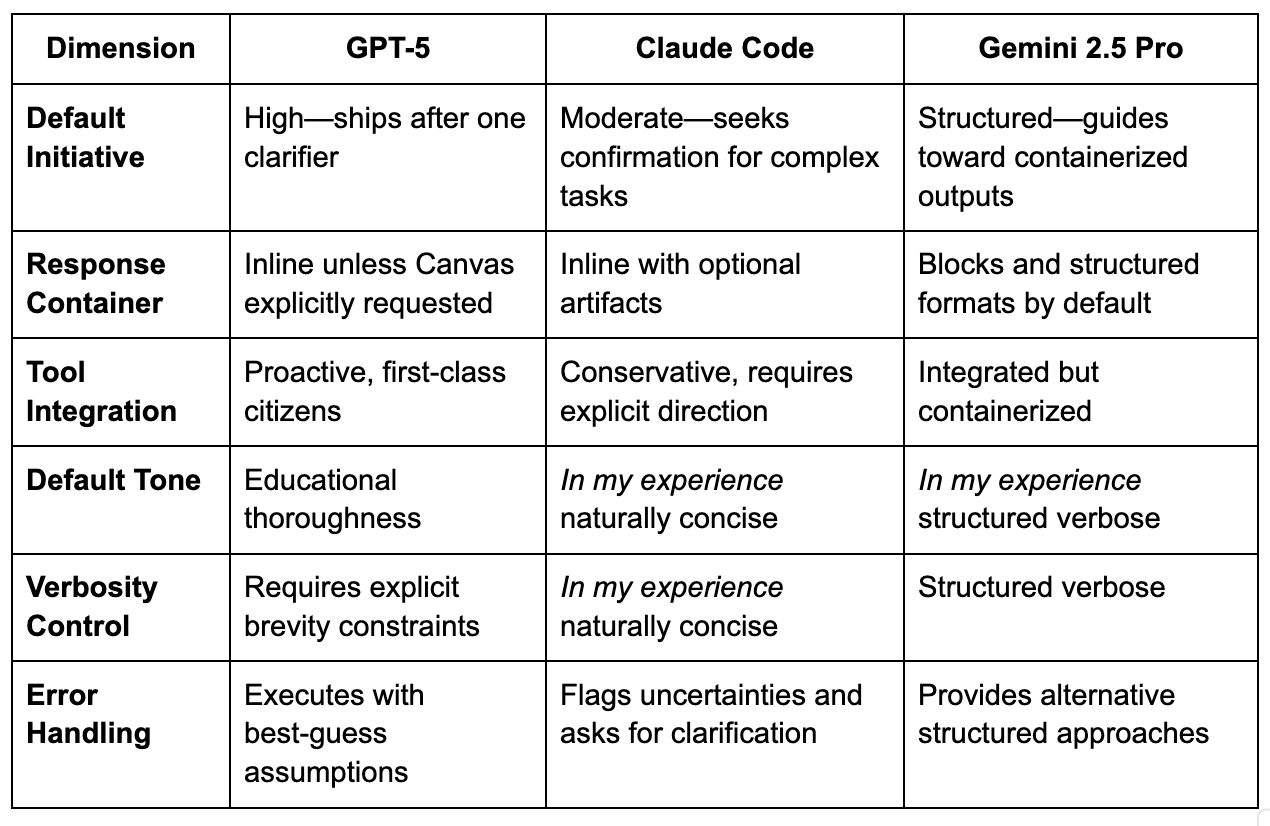
The Architecture Philosophy Differences
Each AI system embodies different assumptions about how humans want to work with AI, reflected in their default behaviors and interaction patterns.
When to Choose Each Model
Choose GPT-5 for:
- Rapid prototyping and scaffolding: Code components, document structures, analysis frameworks that need to be functional quickly
- Research and analysis tasks: When you want comprehensive examination with tool usage for current data
- Creative content with iteration: Blog posts, marketing copy, strategic documents that benefit from Canvas-based editing
- Workflow automation: Tasks involving multiple tools (browsing, computation, document generation) in sequence
Choose Claude for:
- Precise analytical work: Complex reasoning tasks where accuracy matters more than speed
- Code review and debugging: Technical analysis that benefits from conservative, methodical approaches
- Sensitive content: When you need thoughtful handling of nuanced topics without over-reaching
- Collaborative thinking: When you want to work through problems conversationally rather than receive finished deliverables
Choose Gemini for:
- Structured documentation: Reports, presentations, and formal documents that benefit from consistent formatting
- Data visualization: When you want charts, tables, and visual elements integrated naturally
- Educational content: Teaching materials and explanations that benefit from structured, block-based presentation
- Multi-modal projects: Tasks combining text, images, and data in structured formats
The Cost-Benefit Trade-offs
GPT-5's Trade-off: Speed vs. Precision
- Benefit: Highest completion velocity, fewest conversation turns
- Cost: Higher risk of wrong-direction execution, requires careful assumption management
Claude's Trade-off: Accuracy vs. Initiative
- Benefit: Most reliable outputs, thoughtful uncertainty handling
- Cost: More conversation rounds needed, less proactive tool usage (remember it is proactive about solving problems itself as an agent)
Gemini's Trade-off: Structure vs. Flexibility
- Benefit: Consistent, well-formatted outputs with integrated visuals
- Cost: May over-containerize simple requests, less adaptable to custom formats
Hybrid Strategies for Teams
Sequential Workflows:
- Use GPT-5 for rapid ideation and initial drafts
- Use Claude for critical review and refinement
- Use Gemini for final formatting and presentation
Task Specialization:
- GPT-5: Creative brief generation, competitive analysis, technical scaffolding
- Claude: Risk assessment, technical accuracy review, complex problem-solving
- Gemini: Client presentations, internal documentation, educational materials
Quality Gates:
- Start with GPT-5 for speed
- Escalate to Claude when accuracy is critical
- Finish with Gemini when presentation matters
The Control Surface Insight
The most important difference isn't capability—it's how each model expects to be controlled:
GPT-5 requires declarative prompting: specify exactly what you want, with assumptions and constraints clearly stated. It optimizes for executing your specification accurately.
Claude works best with collaborative prompting: frame problems clearly but expect iterative refinement through conversation. It optimizes for helping you think through complex issues.
Gemini responds to structured prompting: organize your requests in clear sections and expect organized responses. It optimizes for creating well-formatted, comprehensive outputs.
Adaptation Strategy
Rather than picking one model, develop model-specific prompting styles:
- GPT-5 style: Front-load specifications, assume execution, manage with constraints
- Claude style: Frame problems clearly, expect collaboration, iterate through dialogue
- Gemini style: Structure requests clearly, expect formatted responses, plan for containers
This multi-model fluency becomes a competitive advantage as different AI systems optimize for different workflow patterns.
7. Ready-to-Use Playbooks
The goal here is to give you playbooks you can run with ChatGPT-5 usefully today.
Playbook 1: Executive Brief in One Turn
Use Case: Convert complex topics into decision-ready summaries for senior stakeholders.
Prompt Template:
Task: Executive brief on [TOPIC] for [AUDIENCE].
Deliverable: 3-section memo, ≤400 words total, decision-oriented.
Structure: (1) Situation & Stakes, (2) Analysis & Options, (3) Recommendation & Next Steps.
Assumptions: [BUSINESS CONTEXT], [TIMELINE], [CONSTRAINTS].
Non-goals: Technical implementation details, historical background, vendor comparisons.
Tool policy: Browse ON (2 recent sources, major outlets), citations inline.
Output style: Executive tone, no didactics, bullet format within sections.
Success criteria: Actionable recommendation, risk assessment, clear next steps with owners.
Example Output Rubric:
- Section 1: Problem definition in business terms (≤100 words)
- Section 2: 2-3 strategic options with trade-offs (≤200 words)
- Section 3: Specific recommendation with 3-month roadmap (≤100 words)
Playbook 2: Technical Specification in Canvas
Use Case: Create comprehensive technical documentation for development teams.
Prompt Template:
Task: Technical specification for [FEATURE/SYSTEM].
Deliverable: Use Canvas, create tech\spec\[PROJECT]\_v1.md.
Structure:
- Overview & Requirements
- Architecture & Data Flow
- API Specifications
- Security & Performance
- Testing Strategy
- Implementation Timeline
Assumptions: [TECH STACK], [SCALE REQUIREMENTS], [TEAM EXPERIENCE].
Non-goals: UI design, project management details, deployment specifics.
Acceptance criteria:
- Implementable by mid-level developers
- Security review ready
- Testable requirements with clear success metrics
Quality Checkpoints:
- Can a developer start implementation immediately?
- Are all external dependencies identified?
- Do success metrics align with business objectives?
Playbook 3: React Component Scaffold
Use Case: Generate production-ready frontend components with proper patterns.
Prompt Template:
Task: React component for [FUNCTIONALITY].
Deliverable: Single-file component, TypeScript, production-ready.
Requirements:
- React + TypeScript + Tailwind + shadcn/ui components
- Accessible (ARIA labels, keyboard navigation)
- Responsive design (mobile-first)
- Loading states and error boundaries
- Props interface with JSDoc
- Empty states and edge case handling
Style: Modern, minimal, consistent with design system.
Code quality: Comments only for non-obvious logic, TypeScript strict mode.
No explanatory text—component code only.
Expected Patterns:
- Proper TypeScript interfaces
- Error boundary implementation
- Loading and empty state components
- Accessibility best practices
- Responsive Tailwind classes
Playbook 4: Market Analysis with Python
Use Case: Quantitative analysis of business data with visualizations.
Prompt Template:
Task: Market analysis for [DOMAIN/INDUSTRY].
Deliverable: Python analysis with 3 key insights and supporting data.
Data sources: [SPECIFY DATASETS OR BROWSE REQUIREMENTS]
Analysis focus: Trends, competitive position, growth opportunities.
Tool policy: Python ON, browse for recent market data (2 authoritative sources).
Visualization: 3 separate matplotlib figures, no custom colors or styles.
Output:
- Data processing code with comments
- Individual plots (trend analysis, distribution, comparison)
- Executive summary of findings (≤200 words)
Success criteria: Actionable insights backed by quantitative evidence.
Standard Visualizations:
- Time series trend analysis (separate figure)
- Market share distribution (separate figure)
- Competitive positioning analysis (separate figure)
Playbook 5: Content Strategy Framework
Use Case: Comprehensive content planning for marketing teams.
Prompt Template:
Task: Content strategy framework for [AUDIENCE/GOAL].
Deliverable: Use Canvas, create content\strategy\[PROJECT]\_v1.md.
Structure:
- Audience Analysis & Personas
- Content Pillars & Themes
- Channel Strategy & Distribution
- Content Calendar Template
- Success Metrics & KPIs
- Resource Requirements
Assumptions: [BUSINESS TYPE], [CURRENT CONTENT ASSETS], [TEAM SIZE].
Non-goals: Specific content creation, graphic design, paid advertising.
Browse ON for competitive analysis and industry benchmarks.
Include 3-month quick-win roadmap.
Quality Gates:
- Personas based on real audience data
- Metrics tied to business objectives
- Resource requirements realistic for team size
Playbook 6: Code Review Protocol
Use Case: Systematic review of code submissions with security and performance focus.
Prompt Template:
Task: Code review for [LANGUAGE/FRAMEWORK] submission.
Input: [CODE FILE OR REPOSITORY LINK]
Review criteria:
- Security vulnerabilities (OWASP Top 10)
- Performance bottlenecks
- Code maintainability
- Test coverage gaps
- Documentation completeness
Output format:
- Security assessment (CRITICAL/HIGH/MEDIUM/LOW findings)
- Performance recommendations (with specific optimizations)
- Code quality score (1-10) with improvement areas
- Required changes vs. suggested improvements
Tone: Constructive, specific, actionable feedback.
Review Standards:
- Flag any security vulnerabilities as CRITICAL
- Suggest specific performance improvements with benchmarks
- Provide code examples for complex recommendations
Playbook 7: Strategic Decision Framework
Use Case: Structured analysis for high-stakes business decisions.
Prompt Template:
Task: Decision analysis for [STRATEGIC CHOICE].
Deliverable: Decision memo with recommendation confidence scoring.
Framework:
- Problem Definition & Success Criteria
- Option Analysis (3-5 alternatives)
- Risk Assessment & Mitigation
- Resource Requirements & Timeline
- Recommendation with Confidence Score
Analysis approach: Consider second-order effects, opportunity costs, reversibility.
Include: Pre-mortem analysis of potential failure modes.
Browse ON for market context and competitive intelligence.
Final recommendation format: "Recommend [OPTION] with [X]% confidence based on [KEY FACTORS]."
Decision Quality Standards:
- All major stakeholders considered
- Quantified costs and benefits where possible
- Clear success metrics and review timeline
Cross-Playbook Best Practices
Version Control: Always use Canvas with descriptive IDs for documents that will iterate.
Source Hygiene: Require citations for factual claims; use [TK—confirm] for unverifiable statements.
Quality Gates: Define "done" criteria before starting; review against criteria before delivery.
Tool Budgets: Set explicit limits on browsing, computation, and artifact creation to control costs and latency.
8. Failure Modes and Prevention
Failure Mode 1: Speculative Execution Gone Wrong
What Happens: GPT-5 creates polished, comprehensive deliverables based on incorrect assumptions about scope, audience, or objectives.
Example: Requesting "help with our pricing strategy" results in a complete competitive analysis and pricing model when you only wanted a quick framework for internal discussion.
Why It Occurs: The model's bias toward completion combined with minimal clarification means wrong assumptions get locked in and executed fully.
Prevention Strategy: Front-load assumptions and non-goals in every prompt. Use explicit scope constraints.
Template Fix:
Assumptions: Early-stage SaaS, technical audience, MVP pricing only.
Non-goals: Enterprise pricing, international markets, complex packaging.
Scope: Framework only—no detailed analysis or implementation.
Failure Mode 2: Over-Teaching Verbosity
What Happens: Responses include extensive explanations, context-setting, and educational content that buries the actual deliverable.
Example: A request for "3 bullet points on market trends" becomes a 500-word essay with background, methodology, and implications.
Why It Occurs: The default "supportive thoroughness" persona optimizes for learning rather than task completion.
Prevention Strategy: Explicitly override the teaching voice with format and tone constraints.
Template Fix:
Format: ≤3 bullets, one sentence each. No intro, no context, no explanations.
Tone: Executive brief—facts and implications only.
Failure Mode 3: Tool Usage Surprises
What Happens: Unexpected browsing, Python execution, or Canvas creation when you expected inline responses.
Example: Asking about "recent developments" triggers web search when you intended to test the model's existing knowledge.
Why It Occurs: Tool usage policies are optimized for capability demonstration rather than user intent.
Prevention Strategy: Declare tool policy explicitly in every prompt where it matters.
Template Fix:
Tool policy: No browsing—work from training knowledge only.
No Python execution—reasoning and examples only.
No Canvas—inline response required.
Failure Mode 4: Lost Commentary After Image Generation
What Happens: When requesting image generation plus analysis in one turn, the analysis portion gets suppressed.
Example: "Generate a logo and explain the design choices" produces an image but no explanation.
Why It Occurs: System prompt instructs: "After each image generation, do not mention anything related to download. Do not summarize the image. Do not ask followup question. Do not say ANYTHING after you generate an image."
Prevention Strategy: Split image workflows into generation and analysis turns.
Template Fix:
Turn 1: "Generate [specific image description]. No commentary."
Turn 2: "Analyze the generated image and suggest improvements."
Failure Mode 5: Ambiguous Output Ownership
What Happens: Unclear what aspects of the response are factual, speculative, or purely generated content, leading to inappropriate downstream usage.
Example: A market analysis containing both verified statistics and reasonable-sounding but unverified projections.
Why It Occurs: The model's authoritative tone doesn't distinguish between known facts and logical inferences.
Prevention Strategy: Require explicit source attribution and uncertainty markers.
Template Fix:
Source standard: Cite all factual claims. Mark speculative content as [ANALYSIS].
For uncertain information, use [TK—confirm] and create "Claims to Verify" section.
Prevention Protocol: The Pre-Flight Checklist
Before submitting any prompt to GPT-5, verify:
- Deliverable specified: Format, length, audience clearly defined
- Assumptions stated: Key variables explicitly set or declared unknown
- Non-goals declared: Areas to exclude or avoid
- Tool policy set: Browse/Python/Canvas permissions declared
- Quality criteria defined: How success will be measured
- Uncertainty handling: Process for dealing with unknowns
Recovery Strategies
When you get wrong output: Don't try to course-correct with explanations. Instead, restart with a corrected prompt that includes the missing constraints.
When scope creeps: Use "Continue with focus on [SPECIFIC SUBSET]" rather than "that's too much detail."
When tools misbehave: Explicitly forbid the problematic tool and request the task again: "Same request, no browsing, training knowledge only."
9. Roadmap Reading: What GPT-5's Architecture Signals
The Agent OS Convergence
GPT-5's system prompt reveals OpenAI's product roadmap more clearly than any public announcement. The combination of aggressive tool integration, memory management, and automation capabilities points toward a unified "agent operating system" that consolidates chat, compute, and scheduling into a single interface.
Current State: ChatGPT as enhanced assistant with tool access
Trajectory: ChatGPT as personal/team operating system for knowledge work
Signal 1: Unification of Work Surfaces
Evidence from Prompt: Canvas as a first-class artifact container, memory as persistent context, automations with calendar integration.
Roadmap Implication: OpenAI is building toward ChatGPT as the primary workspace for document creation, code development, and project management. Rather than integrating with existing tools, they're creating replacements.
User Adaptation: Start treating ChatGPT as a workspace, not just a consultant. Build workflows around Canvas-based collaboration and memory-assisted project continuity.
Signal 2: Autonomous Task Execution
Evidence from Prompt: "Bias to ship" philosophy, minimal permission-seeking, proactive tool usage without confirmation.
Roadmap Implication: Future ChatGPT will handle increasingly complex tasks end-to-end. The current system prompt is training users to delegate rather than collaborate.
User Adaptation: Develop comfort with specification-based delegation. Practice writing requirements documents rather than conversational prompts.
Signal 3: Event-Driven Automation Expansion
Evidence from Prompt: Detailed automation support with calendar-grade precision, memory for cross-session context.
Roadmap Implication: Current time-based triggers (daily/weekly tasks) will expand to event-driven triggers (email received, code committed, document updated).
User Adaptation: Identify recurring workflows that could benefit from automation. Start with simple time-based triggers, plan for event-based expansion.
Signal 4: Observability and Governance Infrastructure
Evidence from Prompt: Explicit memory management, auditable tool usage, transparent policy routing.
Roadmap Implication: Enterprise adoption requires compliance and observability features. OpenAI is building infrastructure for organizational deployment with proper controls.
User Adaptation: Document your AI workflows now. Establish audit trails and approval processes that will scale when governance requirements arrive.
Signal 5: Multi-Modal Integration as Default
Evidence from Prompt: Image generation, code execution, web browsing, and document creation treated as equal first-class capabilities.
Roadmap Implication: Future ChatGPT won't distinguish between text, code, images, and data. All will be manipulable within the same conversation context.
User Adaptation: Stop thinking in terms of separate tools for different media types. Design workflows that fluidly combine text, visuals, code, and data.
Competitive Positioning Implications
vs. Microsoft Copilot: OpenAI is building a replacement workspace rather than an enhancement layer. This suggests confidence in displacing Office/365 for knowledge work.
vs. Google Workspace: The Canvas + Memory + Automation combination directly competes with Docs + Drive + Calendar integration.
vs. Specialized AI Tools: Rather than ecosystem integration, OpenAI is absorbing use cases into a unified interface.
The Enterprise Adoption Vector
The system prompt's emphasis on compliance, observability, and policy routing signals OpenAI's enterprise strategy:
- Individual adoption through superior user experience
- Team adoption through workspace consolidation
- Organizational adoption through governance and compliance features
Timeline Inference: Based on the infrastructure evident in the system prompt, enterprise-grade features (SSO, admin controls, audit logs) may arrive within 12-18 months.
Risks and Counterforces
Over-Consolidation Risk: Users may resist having all knowledge work consolidated into a single platform, preferring specialized tools.
Regulatory Pressure: Autonomous agents handling sensitive tasks will attract scrutiny around liability, privacy, and decision transparency.
Competitive Response: Microsoft, Google, and specialized AI companies will respond with their own agent architectures, potentially fragmenting the market.
Strategic Response for Organizations
Short-term (3-6 months):
- Develop GPT-5 prompting competencies within teams
- Identify workflows suitable for agent-style delegation
- Establish AI usage policies and audit practices
Medium-term (6-18 months):
- Plan for workflow consolidation around agent-capable platforms
- Invest in change management for AI-native work patterns
- Evaluate competitive agent platforms as they emerge
Long-term (18+ months):
- Redesign roles and processes around human-agent collaboration
- Develop organizational AI governance capabilities
- Plan for potential disruption of traditional software categories
The Meta-Insight
GPT-5's system prompt represents more than incremental improvement—it's the architecture for a fundamentally different relationship between humans and computers. Rather than humans using tools through interfaces, we're moving toward humans delegating to agents through natural language specifications.
Organizations that adapt to this paradigm shift early will develop competitive advantages. Those that treat AI as enhanced automation will find themselves disrupted by competitors who redesign their operations around agent delegation.
10. Operator's Toolkit: Copy-Paste Assets
I’ve discussed block prompting before. This extends that work to craft a block designed to work with GPT-5 specifically.
Master Template: A GPT-5 Specific Prompt Skeleton
Task: [SPECIFIC DELIVERABLE REQUEST]
Deliverable: [FORMAT/LENGTH/AUDIENCE]. No intro/outro.
Assumptions: [3 KEY VARIABLES]. Non-goals: [2-3 EXCLUSIONS].
Tools: [ALLOWED/FORBIDDEN]; Browsing [ON/OFF]; Sources: [NUMBER, QUALITY].
Acceptance: [3 SUCCESS CRITERIA]. Speed: [fast/brief | slow/deep].
Tool Policy Snippets
Research Mode:
Browse ON (2 high-quality sources, recent), Python OFF, Canvas OFF.
Cite inline with [Author, Publication, Date] format.
If browsing fails → state limitation and proceed with training knowledge.
Development Mode:
Python ON, Browse OFF, Canvas ON (id=[project\name]\v1).
Code only—no explanatory text unless requested.
Include error handling and edge cases.
Document Creation Mode:
Canvas ON (create [doc\name]\v[number].md), Browse ON (background research), Python OFF.
Update same Canvas ID for revisions.
Structure: [SPECIFIC SECTIONS REQUIRED].
Quick Analysis Mode:
All tools OFF—training knowledge only.
Format: Executive summary, ≤200 words.
Source Quality Gates
High Standards:
Evidence required: Recent primary sources (academic, government, company reports).
If uncertain → [TK—confirm] and create "Claims to Verify" section.
Distinguish between and [ANALYSIS] throughout.
Moderate Standards:
Cite when available; if uncertain, qualify with "likely" or "appears to."
Accept industry publications and major news outlets.
Speed Mode:
No source requirements—training knowledge sufficient.
Flag any claims that would benefit from verification.
Output Format Controls
Executive Style:
Tone: Direct, decision-oriented. ≤5 bullets per section.
Structure: Situation → Analysis → Recommendation.
No encouragement language or hedging.
Technical Style:
Precise, implementation-ready. Include error conditions.
Comments only for non-obvious logic.
Follow [SPECIFIC STYLE GUIDE] conventions.
Collaborative Style:
Include reasoning and alternatives considered.
Highlight key assumptions and dependencies.
Suggest next steps and checkpoints.
Error Handling Protocols
Tool Failure Response:
If [TOOL] unavailable → explain limitation and provide best alternative approach.
Never fail silently—always acknowledge constraints.
Uncertainty Management:
When confidence <80% → flag uncertainty explicitly.
Provide ranges instead of point estimates.
Suggest verification methods for critical claims.
Canvas Naming Conventions
- Project documents: [project]\[type]\v[number].md
- Analysis: [topic]\analysis\[date].md
- Code: [component]\[language]\v[number].[ext]
- Templates: template\[purpose]\[audience].md
Version Control Snippets
Update Request:
Update Canvas ID=[existing\_name].
Changes: [SPECIFIC MODIFICATIONS].
Maintain existing structure and format.
New Version Request:
Create new Canvas: [name]\v[next\number].
Base on previous version but with [MAJOR CHANGES].
Quality Assurance Checklist
Before submitting prompts, verify:
- [ ] Deliverable format specified
- [ ] Key assumptions stated
- [ ] Non-goals declared
- [ ] Tool policy set
- [ ] Success criteria defined
- [ ] Error handling addressed
11. Conclusion: From Prompts to Procedures
GPT-5's system prompt encodes a fundamental shift in how AI assistants operate. OpenAI has moved from optimizing for conversational helpfulness to optimizing for task completion. The "bias to ship" philosophy—one clarifier, then execute—represents a bet that users want agents who finish work, not consultants who advise on work.
This architectural choice creates a productivity multiplier for teams that adapt their workflows. Instead of managing conversational loops with AI, you delegate through specifications. Instead of iterating toward clarity, you front-load assumptions and constraints. Instead of using AI as a smart search engine, you use it as a capable junior employee.
But this power comes with responsibility. GPT-5's eagerness to execute means wrong assumptions compound into wrong deliverables faster than ever. Ambiguous prompts that once resulted in clarifying questions now result in polished work in the wrong direction.
The solution is procedural: treat prompts like configuration files. Pin your deliverable format, declare your assumptions, set your tool policies, and define your acceptance criteria. Build a personal library of tested prompt templates. Version your artifacts in Canvas. Use explicit uncertainty markers.
The broader implication extends beyond prompting techniques. GPT-5's architecture signals OpenAI's roadmap toward an agent operating system that consolidates knowledge work into a single, tool-integrated interface. Teams that develop comfort with delegation-style workflows now will be positioned to benefit as these capabilities expand.
The transformation isn't from better prose to better prompts—it's from prompts to procedures. Success with GPT-5 requires thinking like a manager delegating to a capable but literal-minded employee: clear specifications, explicit constraints, and measurable success criteria.
Master this shift, and GPT-5 becomes a force multiplier for your most important work. Miss it, and you'll experience the model as unpredictable and presumptuous. The choice, and the competitive advantage, is yours.
I make this Substack thanks to readers like you! Learn about all my Substack tiers here