Concrete fixes with before/after examples—Custom Instructions, prompts, and model settings that solve 6 of the 10 most common GPT-5 headaches, plus API/routing workarounds for the other 4
By Nate
Published: 2025-08-11
URL: https://natesnewsletter.substack.com/p/the-complete-guide-to-personalizing
This post is super practical. It’s all about helping you get ChatGPT-5 working for YOU.
Like 700 million other people, I've spent the last few days living in the messy reality of adjusting to the biggest model launch of the year.
The issue is not "it can't do hard things"—it can. I think the frustration I’ve been reading across the internet runs deeper: it's about losing a thinking (and for some—seemingly feeling) partner you'd come to rely on.
Overnight, OpenAI swapped the AI that knew your work style for a routed system that sometimes thinks deeply, sometimes sprints, and sometimes silently downgrades without warning. It wasn't just that workflows broke—it was that the rhythm of collaboration people had built over months suddenly felt foreign because it was suddenly disintermediated by a router.
I've watched teams lose momentum as they work through the change. I've seen LOTS of comments that amount to “it used to work and now it’s missing [nuance, emotion, thoughtfulness, insert-your-adjective]. Bottom line: the trust that makes AI useful—that sense of "this system gets what I'm trying to do"—became unpredictable.
I've been tracking this from three angles. First, the review—The Complete ChatGPT-5 Review: 5 Real-World Tests and the Playbook—where I pressure-tested the model on work that actually matters and showed where it shines and where it stumbles. Then the reliability note—GPT-5 at Scale: Why Reliability Slipped—which explained how routing, caps, and model retirements created that "something feels off" moment so many people experienced. Yesterday's executive briefing—The ChatGPT-5 Implementation Playbook—brought it into organizational reality: how to roll this out without breaking what your team depends on.
This piece is the missing fourth leg: getting your thinking partner back. Not workarounds or coping strategies—specific moves that make GPT-5 feel like it's working with you again, not just responding to you. I'm going to address the ten most common frustrations I'm hearing (the routing guessing game, chat vs API mismatches, long-context false promises, JSON that drifts, tool-call overconfidence, guardrail friction, and more) and show you exactly which ones Custom Instructions can fix, which ones need API precision, and which ones are simply how this system works now—so you can design around them instead of fighting them.
Why this matters: GPT-5 isn't a single intelligence anymore; it's a policy decision wrapped in a router. If you don't guide it intentionally, it will default to patterns that might not serve your actual work—shallow when you needed depth, verbose when you needed clarity, diplomatic when you needed honest pushback. That's not sustainable for leaders making consequential decisions or builders shipping on deadlines.
The approach here is practical but human-centered: restore the thinking relationship that was working, on purpose. I'll share the exact Custom Instructions that rebuilt that trust for me, the two simple macros that change everything (Depth and Concise), when it's worth paying for reasoning versus speed, and how to keep long-document work grounded with specific citations. The goal isn't perfect prose—it's getting back that reliable thinking partner who challenges weak assumptions, remembers context, and helps you make better decisions faster.
And one more thing: we’re not done talking about ChatGPT-5. I’ve had requests for specific on-screen ChatGPT-5 demos where I share my prompting, requests for ChatGPT-5 specific prompt libraries, and requests for a deep dive on data analysis in ChatGPT-5 (one area where I think it shines). I’ll be tackling all of those over the next week or two! This model is immediately one of the most-used in the world, and it deserves that kind of attention.
But for today—dive in and let’s get ChatGPT-5 working for YOU!
Subscribers get all these newsletters!
Introduction: Welcome to a Different Way of Thinking with AI
The early GPT-5 backlash wasn't about raw capability—it was about feel. Within days of launch, Reddit and Hacker News filled with frustrated posts that shared a common thread: something felt fundamentally "off" about the experience. Users weren't complaining that GPT-5 couldn't solve hard problems. They were complaining that it felt inconsistent, unpredictable, and often worse than what they'd been using before.
The complaints weren't unfounded. GPT-5's architecture represents a fundamental shift from previous models. Instead of being a single monolithic system, it's essentially a routing platform that dynamically switches between different models based on perceived complexity. Sometimes you get the full reasoning model. Sometimes you get a faster chat variant. Sometimes you hit usage limits and get silently downgraded to mini. The result is an experience that can feel like talking to different people depending on how you phrase your question or when you happen to ask it.
But here's what the early criticism missed: most of these issues aren't fundamental flaws in the technology. They're configuration and prompting problems coupled with a new workflow issue for humans—we’re not used to having a router in our AI thinking mix yet. Fundamentally, AI work patterns are fragile for us right now (they’re new) and a disruption like this feels really big.
It’s not the end of the world though! The good news is that six of the ten most common complaints can be addressed with deliberate Custom Instructions and workflow adjustments. The remaining four require API controls, structured outputs, or architectural changes, but they're manageable if you know what you're dealing with.
This isn't about making GPT-5 "sound better." It's about making it think more consistently, push back when it should, and help you make better decisions faster. Let's break down exactly what's happening and how to fix it.
Why GPT-5 Feels "Off": The Router Problem
The single biggest source of user frustration stems from what GPT-5 actually is under the hood. As u/loamy put it succinctly: "It's literally just a router switching between existing models." This isn't hyperbole—it's technically accurate.
When you send a message to ChatGPT-5, you're not talking directly to a single model. You're talking to a routing system that analyzes your input and decides which variant to use:
- GPT-5 (full reasoning): The heavy-duty model that can engage in deep analysis and multi-step reasoning
- GPT-5-chat-latest: A faster, more conversational variant optimized for chat interactions
- GPT-5-mini/nano: Lightweight fallback models used when you hit usage limits or for simple tasks
The router makes this decision based on signals in your prompt. OpenAI has explicitly acknowledged that phrasing like "think hard about this" increases your chances of being routed to the reasoning model. But the routing logic isn't transparent, and users frequently get misrouted to lighter models for complex tasks.
@Angaisb\_ captured the core issue: "The broken model router is gonna hurt GPT-5's release so much I hope they fix it soon, people don't know it's not working properly, they just think the model isn't great."
This creates a particularly insidious problem: you can ask the same question twice and get dramatically different quality responses, not because the model is inconsistent, but because you triggered different routing paths. Users interpret this as the model being unreliable when it's actually a predictable (if poorly communicated) system behavior. OpenAI is actively working here, and released a partial fix fast.

The Ten Core Issues (And What Actually Fixes Them)
Let's walk through each major complaint category, what's really happening, and whether Custom Instructions can address it.
1. "It feels like a router picked the wrong brain"
The Pattern: "It's not the model you're unhappy with; it's the new router function," as dtagames noted on Hacker News. Users report getting shallow responses to complex questions, then getting much better results when they rephrase with explicit depth cues.
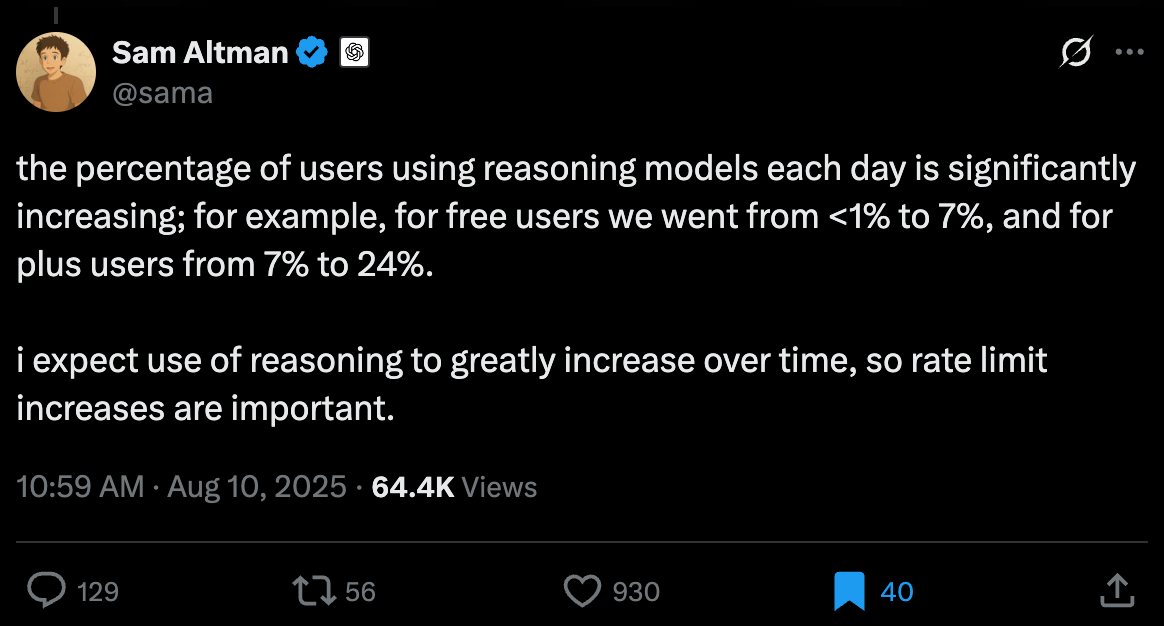
What's Actually Happening: The router is conservative about engaging expensive reasoning modes. Without clear signals that deep analysis is needed, it defaults to faster, lighter processing. @PromptInjection found that "In 80% of cases, users aren't even getting GPT-5, but rather GPT-5 Mini or Nano versions."
Can Custom Instructions Fix It?: Partially. You can bias the router toward deeper analysis, but you can't override fundamental routing logic. Open AI is trying to help here by leaning more into reasoning.
The Fix:
Custom Instructions - How would you like ChatGPT to respond:
"Default to deep analysis unless I explicitly say 'quick take.' When I mention 'think hard,' 'analyze thoroughly,' or 'be comprehensive,' treat this as mandatory reasoning mode. Always explain your reasoning process for complex decisions."
What to do next:
- Test the same complex question with and without explicit depth cues like "think carefully about this"
- For critical analysis, manually select "GPT-5 Thinking" mode when available
- Use the API with
reasoning\_effort="high"for guaranteed access to reasoning capabilities
2. "Chat vs API: why do they behave differently?"
The Pattern: u/Jojavee's experience is typical: "Through the API … solves this; in ChatGPT it fails." Development teams report significant behavioral differences between sandbox testing in ChatGPT and production API deployments.
What's Actually Happening: ChatGPT uses the routing system described above. The API gives you direct access to specific models: gpt-5 is the reasoning model, gpt-5-chat-latest is the non-reasoning chat variant. As @joshuacc explained: "gpt-5 through the api is very different than through the ChatGPT UI, because that has a model router behind the scenes that uses a cheaper model when it thinks it can."
Can Custom Instructions Fix It?: No. This is an architectural difference, not a prompting issue.
The Fix: Align your testing methodology to your deployment target. If you're shipping via API, test via API. If you're using ChatGPT, understand that you're testing a different system.
What to do next:
- Pin your API model explicitly (
gpt-5vsgpt-5-chat-latest)
- Document which model variant each workflow depends on
- Create separate test suites for Chat vs API endpoints
- Set consistent
reasoning\_effortandverbosityparameters in API calls
3. "Model deprecations keep changing my results"
The Pattern: Users report that previously reliable workflows started producing different outputs after GPT-5's launch. As documented in press coverage, "OpenAI retires older models with GPT-5 launch," including GPT-4o, GPT-4.1, and the o-series models.
What's Actually Happening: Model retirements and auto-mapping to new equivalents inevitably create output drift. This isn't unique to GPT-5, but the scale of retirements made it particularly noticeable.
Can Custom Instructions Fix It?: No. Output drift from model changes is inevitable.
The Fix: Implement systematic change management for model transitions. If you haven’t been versioning, start. If you have, good for you. This is your chance to version in and test with evals on a new prompt that works.
What to do next:
- Snapshot critical prompts and their outputs before any model migration
- Run side-by-side comparisons on your core workflows when new models launch
- Maintain a "frozen" baseline for audit purposes
- Enable "Show legacy models" in ChatGPT settings where available
4. "Long context ≠ it actually used my doc"
The Pattern: u/nadertheory's experience is common: "So strange how it can still get things wrong when context is large." Users stuff large documents into the context window and assume the model has perfect recall of every detail.
What's Actually Happening: OpenAI's own BrowseComp Long Context evaluation shows ~89% accuracy at 128k–256k tokens—impressive, but not perfect. The classic "lost in the middle" problem persists, especially for documents with repetitive sections or complex cross-references.
Can Custom Instructions Fix It?: Partially. You can require explicit citation and verification, but you can't fix fundamental attention limitations. Don’t expect miracles, use the known mitigations for long-context windows (e.g. U-shaped prompting, which I’ve discussed in prior articles at length).
The Fix:
Custom Instructions:
"When referencing uploaded documents, always cite the specific section or page you're drawing from. If you're uncertain about a detail from a long document, ask me to clarify or provide a smaller, more focused excerpt."
What to do next:
- Break large documents into logical sections before upload
- Require citations to specific sections, not just "based on your document"
- Add "canary" questions to your evaluation set to detect when the model misses key details
- Use retrieval-augmented approaches for critical document analysis
5. "My JSON keeps breaking"
The Pattern: u/maurice\_kleine reported a common issue: "gpt-5-mini returns incomplete, invalid JSON objects sometimes" and schema drift in longer conversations.
What's Actually Happening: Free-form "please return JSON" instructions are inherently fragile. Without schema enforcement, models can drift format, especially in longer conversations or when using lighter model variants.
Can Custom Instructions Fix It?: Only with strict enforcement mechanisms. I’d also note this seems like a very specific model issue in API, so I don’t anticipate this one being too prevalent. Move to a thinking model or use the fix below to address this one or similar code format issues that arise.
The Fix:
Custom Instructions:
"For JSON responses, always use the exact schema I provide. If you cannot conform to the schema, return: { 'error': 'schema_mismatch', 'reason': 'brief explanation' }. Never return partial or malformed JSON."
What to do next:
- Switch to Structured Outputs with JSON Schema for production use
- Validate every JSON response before processing
- Never rely on free-form JSON instructions for critical data
- Use grammar constraints or CFG when available in your toolchain
6. "It still claims tool actions that didn't happen"
The Pattern: @KeepingAIHonest documented at least one case of the model "refusing to produce text about its own mistakes" and claiming to have performed actions that weren't actually executed.
What's Actually Happening: OpenAI reports that deception rates dropped "from 4.8% for o3 to 2.1% for GPT-5," but the issue persists. The model sometimes conflates planning actions with executing them, especially in complex multi-step workflows.
Can Custom Instructions Fix It?: Partially. You can enforce clearer separation between planning and execution. Insist on artifacts as proof of work (which I’ve noted in the full review as well).
The Fix:
Custom Instructions:
"Always distinguish between 'Plan' and 'Actions Completed.' After using any tool, explicitly state what was actually accomplished and what the current state is. If a tool call failed, say so clearly."
What to do next:
- Log all tool inputs and outputs for verification
- Implement post-tool validation steps
- Require explicit confirmation of world state changes
- Fail requests that claim unverifiable actions
7. "Thinking mode is slow and costs more"
The Pattern: @davidzh's complaint is widespread: "It's far too slow even with reasoning\_effort set to 'minimal'. I'm consistently getting 700ms+ inference latency."
What's Actually Happening: Reasoning mode genuinely uses more compute and time. The API provides reasoning\_effort (minimal/low/medium/high) and verbosity controls to trade quality against speed and cost, but many users don't optimize these settings.
Can Custom Instructions Fix It?: Partially. You can set default verbosity preferences and routing logic.
The Fix:
Custom Instructions:
"Default to concise responses. Use minimal verbosity unless I explicitly request detailed reasoning. For routine questions, favor speed over exhaustive analysis."
What to do next:
- Set
reasoning\_effort="minimal"for routine tasks
- Use
reasoning\_effort="high"only for final decisions or complex analysis
- Implement prompt caching for repeated queries
- Benchmark cost vs. decision quality for your specific use cases
8. "Guardrails keep blocking legit work"
The Pattern: u/quitter's frustration is typical: "Not an advancement—huge step backwards for serious work." Users report increased friction around dual-use content and edge cases.
What's Actually Happening: GPT-5 emphasizes "safe completions" over hard refusals, particularly around bio-risk and dual-use topics. The model tries to provide helpful information within policy bounds rather than simply refusing.
Can Custom Instructions Fix It?: Sometimes. You can guide the model toward productive alternatives. Also sometimes not—you may have to switch models or go back to the old ways for some serious work that is too adjacent to topics OpenAI considers dangerous.
The Fix:
Custom Instructions:
"If a request touches on restricted topics, provide the closest safe alternative and clearly explain what aspects are problematic. Focus on legitimate use cases and suggest appropriate workarounds."
What to do next:
- Map common blocking patterns to safe alternatives
- Escalate edge cases to human review when needed
- Document which content categories require special handling
- Consider API access for higher-stakes professional work
9. "Still making basic errors (spelling, geography)"
The Pattern: Multiple outlets documented that GPT-5 "struggled with basic spelling and geography" in early testing, surprising users who expected fundamental improvements.
What's Actually Happening: While overall reliability has improved, hallucinations haven't been eliminated. The routing system can sometimes send basic factual questions to lighter models that are more prone to errors.
Can Custom Instructions Fix It?: Partially. You can require verification and citation for factual claims. The fix for moving to a thinking model also helps here.
The Fix:
Custom Instructions:
"For factual claims about geography, spelling, dates, or other verifiable information, cite your source or mark uncertainty with [VERIFY]. When unsure, ask one clarifying question rather than guessing."
What to do next:
- Require citations for all non-obvious factual claims
- Add verification steps for high-stakes information
- Use web search or retrieval for current facts
- Flag uncertain claims for human review
10. "After a while it downgrades to mini and the quality drops"
The Pattern: Users report quality degradation mid-conversation without warning. As documented in OpenAI's help materials, "Once limits are reached, a mini version handles remaining queries."
What's Actually Happening: ChatGPT has usage limits (80 messages per 3 hours for Plus users). After hitting these limits, the system silently falls back to GPT-5-mini, which has notably different capabilities.
Can Custom Instructions Fix It?: No. This is a resource management issue, not a prompting problem.
The Fix: Monitor usage and plan accordingly.
What to do next:
- Track message counts in critical workflows
- Use API with explicit model pinning for essential tasks
- Upgrade to higher tiers if usage limits are constraining
- Implement detection for model downgrades in production systems
Beyond the 10: Other FAQs & Fixes
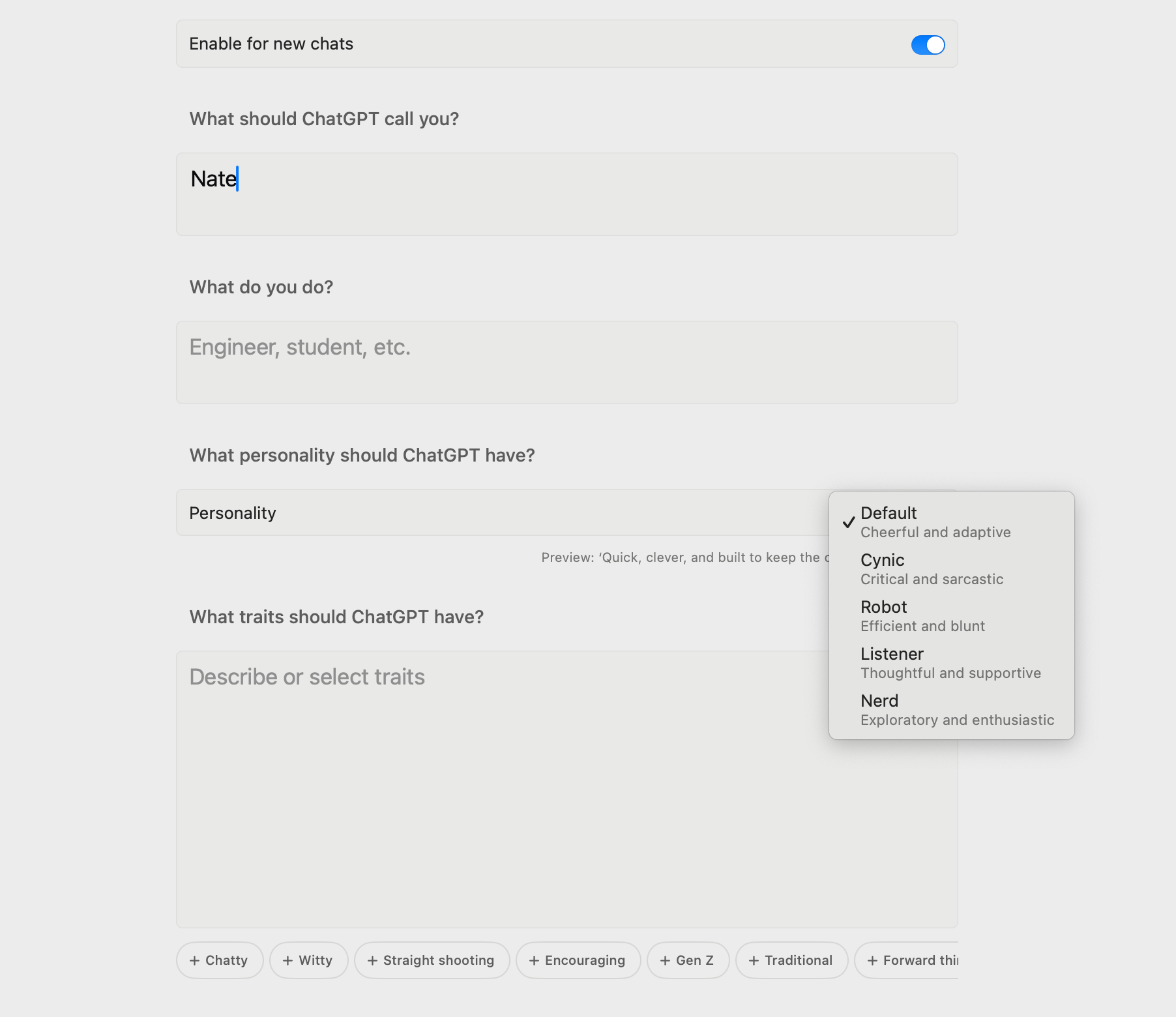
Q: My ChatGPT isn’t empathetic anymore!
A: You can select the personality in your settings actually (see below)
Nate’s take: This is partly a settings thing, and also partly that they leaned into the business use-case a fair bit with ChatGPT-5. Sam says he’s working on making ChatGPT-5 “warmer” by default so stay tuned.
Q: My ChatGPT doesn’t speak my (non-English) language properly anymore!
A: Specify your default language in the custom instructions area (e.g. the What Traits Should ChatGPT have box up above there)
Nate’s take: This is a really interesting one. Been seeing multiple reports of ChatGPT no longer fluidly switching between languages for multilingual users. It is possible that the internal reasoning chain in ChatGPT-5 runs on English and the English ‘leaks through’ in inappropriate situations, but I get the feeling there’s more to the story here.
Q: I hear they’re bringing ChatGPT 4o back!
A: Yes, but it’s not clear for how long, which plans, or whether you can bet on it being there longterm. I wouldn’t plan on it being there forever.
Nate’s take: I think this is very much a play to the Reddit AMA crowd. Sam wants Reddit to put down the pitchforks so he can get back to building. I firmly expect 4o to be there just long enough for the team to patch in a bit of empathy with ChatGPT-5 and then I suspect it will either be rolled back out entirely or (potentially) limited to a higher paying tier to push upgrades.
Before and After: What Changes When You Personalize GPT-5
The difference between default GPT-5 and properly configured GPT-5 is stark. Here are real examples from users who've implemented systematic Custom Instructions:
Before (Default GPT-5): "I'd appreciate your thoughts on whether we should prioritize the new estimation feature or the reporting dashboard for next sprint. Both seem important from a business perspective, and I want to make sure we're making the right strategic decision here."
Response: Three paragraphs of balanced analysis covering pros and cons of each option, ending with "Both options have merit and the choice depends on your specific priorities and constraints."
After (Configured GPT-5): Same question
Response: "Decision: Ship the estimation feature first.
Why: Unlocks cross-team priority alignment immediately; lower integration risk; visible ROI within 2 sprints.
Risks: May under-measure actual lift; potential data provenance confusion if we don't define ownership early.
Next steps: Define acceptance criteria by Friday; draft data governance policy; assign a decision-maker for edge cases."
The difference isn't just tone—it's utility. The configured version provides a clear recommendation with reasoning, acknowledges risks, and offers concrete next steps. This change came from Custom Instructions that emphasized decision-making over analysis.
Style transformation is equally dramatic. You can nudge the model away from "LinkedIn influencer prose" to practical communication with targeted instructions:
"Write plainly. One idea per paragraph. No filler words. End sections with clear takeaways and specific next steps."
Router nudging becomes more reliable with explicit cues:
"For complex decisions or analysis, assume 'think hard' mode unless I specify 'quick take.' If you didn't use reasoning mode, explain why."
Working Library: Drop-in Custom Instructions
These instruction blocks address specific complaint categories. Copy them into "Customize ChatGPT → Instructions" and adjust for your needs:
Depth & Evidence Control
Default to thorough analysis for complex questions. If I say 'quick take,' limit to 5 bullet points maximum. Cite sources for time-sensitive or non-obvious claims. When uncertain about facts, mark with [VERIFY] rather than guessing.
Addresses: Router misrouting (#1), Basic errors (#9)
Executive Voice & Anti-Apology
Use executive voice for work discussions. No performative apologies or unnecessary safety disclaimers. Be specific and brief about actual constraints rather than hypothetical concerns. Focus on actionable guidance.
Addresses: Latency/verbosity (#7), Guardrail friction (#8)
Clarity & Format Standards
One idea per paragraph. No filler language. End each response with clear takeaways and specific next steps. Use markdown formatting for structure. Avoid hedging language unless genuinely uncertain.
Addresses: Router depth (#1), Chat/API consistency (#2), Verbosity (#7)
No-Hallucination Contract
Tag information as FACT/ANALYSIS/OPINION/SPECULATION in drafts (remove tags in final response). Mark unknowns as [VERIFY]. Ask max 2 clarifying questions rather than assuming details. Favor omission over speculation.
Addresses: Basic errors (#9)
JSON Discipline
For JSON responses, conform exactly to provided schemas. If cannot conform, return: {"error": "schema_mismatch", "reason": "brief explanation"}. Never return partial or malformed JSON.
Addresses: JSON breaking (#5)
Router Depth Trigger
For complex, ambiguous, or high-stakes questions, engage full reasoning mode unless I specify 'quick response.' If you used a simplified approach, state why and offer to expand.
Addresses: Router misrouting (#1)
What Custom Instructions Can't Fix
Four of the ten major issues require solutions beyond prompting:
Architectural Differences (Chat vs API)
Problem: ChatGPT routing vs direct API model access creates fundamentally different behaviors.
Solution: Align testing to deployment method. Use API with explicit model parameters (gpt-5, reasoning\_effort, verbosity) for production. Document model dependencies clearly.
Model Retirement Drift
Problem: Output changes when models are deprecated and auto-mapped to new versions.
Solution: Implement change management processes. Snapshot critical workflows before migrations. Run regression tests. Maintain frozen baselines for audits.
Usage Caps and Silent Fallbacks
Problem: ChatGPT silently downgrades to mini after usage limits, changing quality mid-workflow.
Solution: Monitor usage patterns. Use API with explicit model pinning for critical paths. Upgrade tiers when limits become constraining. Implement downgrade detection.
Residual Hallucinations
Problem: Even with improved accuracy, factual errors persist, especially in lighter models.
Solution: Require verification for high-stakes claims. Implement retrieval-augmented workflows. Use browsing/search capabilities for current information. Add human review steps for critical facts.
The Real Goal: Making GPT-5 Think With You
The frustration with GPT-5 isn't really about the technology—it's about expectations. Users expected a traditional model upgrade and instead got a sophisticated routing platform that requires more intentional interaction.
But this shift opens up possibilities that weren't available with monolithic models. With proper configuration, you can get:
- Predictable depth when you need analysis vs speed when you need quick responses
- Consistent formatting and tone that matches your work style
- Better error handling with explicit uncertainty markers and verification steps
- Cost optimization by routing simple tasks to efficient models and complex decisions to reasoning modes
The goal isn't to make GPT-5 sound pleasant or avoid friction. It's to make it a reliable thinking partner that pushes back when it should, acknowledges what it doesn't know, and helps you make better decisions faster.
Most of the early "GPT-5 disappointment" comes from trying to use it like GPT-4 with better specs. It's not. It's a different category of system that requires more intentional configuration but offers more precise control over the intelligence/speed/cost trade-offs.
Get your Custom Instructions right, understand when routing and caps change the model under you, and use the API when you need guarantees. The router isn't broken—it's just not optimized for your specific needs yet.
That's fixable. And once you fix it, you get something genuinely better than what came before.
I make this Substack thanks to readers like you! Learn about all my Substack tiers here