You've heard me talk about the prompt as the product, now let's dive deep on workflows—how can you save hours a week with a five minute prompt? This post has 5 examples and teaches you how!
By Nate
Published: 2025-04-25
URL: https://natesnewsletter.substack.com/p/turn-chatgpt-into-a-sushi-conveyor
I keep realizing that we are under-estimating what these models can do, and that includes me!
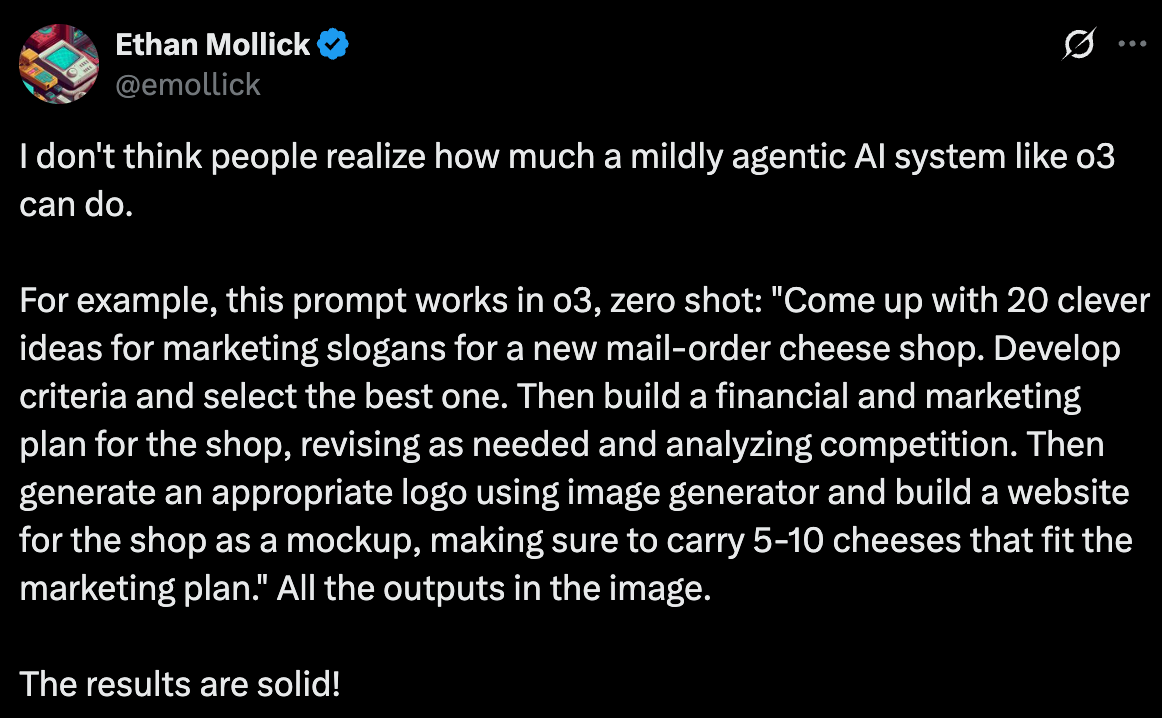
As just one little example, I ran across a tweet from Ethan Mollick yesterday that called out how o3 can one-shot an entire business idea from scratch:
That’s just one small example. One of the most powerful things about these models is their ability to let you do a lot of decent quality work very very quickly.
Before, I had to stare at a blank piece of paper to think of marketing copy. Now I can throw a dirty draft or vibes into ChatGPT and get back a bunch of ideas in no time at all.
And that’s been true for awhile. So what’s changed now?
Ethan’s tweet is a good example of how models are fundamentally moving from chat » reasoning » workflow.
A little example will help illustrate how far we’ve come here.
Beforetimes—raw human: Nate stares at wall, goes for walk, spends all afternoon banging head on desk and staring at hundreds of customer anecdotes to product a Product Requirements Document (PRD) draft that is kind of ok. Total time = 6ish hours.
ChatGPT 2023—just chat: Nate gets 15 bad ideas for his PRD but they’re kind of ok and they get him off the blank page and he moves about an hour or so faster. Feels magical. Total time = 5ish hours.
ChatGPT December 2024—chat + reasoning: Nate has an actual thoughtful conversation with a reasoning model about his PRD. Develops a sharper angle on his product thesis. The document is tangibly better and faster. Total time = 4ish hours.
ChatGPT April 2025—chat+reasoning+workflow: Nate throws hundreds of anecdotes into o3, one-shots an entire quantitative and qualitative analysis, takes 10 minutes to develop a grounded thesis, fights about an outline for 10 minutes, and then rips through a deeply customer-grounded draft in half an hour. Then takes a final 5 minutes to schedule an update on customer anecdotes weekly. Total time = ~1 hour.
TLDR; I’ve compressed work on this task 6x in 3 years, and the biggest single jump was from December 2024 to April 2025. Yes, you read that right.
And that’s the breakthrough I want to lay out for you today. I wrote an article earlier this week on the idea of prompt-as-product, where we have to update our assumptions about prompting for these new models. This article builds on that concept and goes much further, focusing specifically on what I think is the most powerful aspect of o3 in particular: agentic workflows.
Subscribers get all these pieces!
My browser is an endangered species
This morning at 8AM a chat updated in my ChatGPT app. I did not start it, and no my ChatGPT is not possessed. Inside was a tidy competitive assessment of tech startup news in Sweden in the last 24 hours. Why Sweden? Because frankly, Sweden has been kind of cooking lately (see Strawberry, Lovable 2.0, etc.)
Anyway, ChatGPT had this:
- Froda lands €20 M Series B to expand its embedded-finance platform for small businesses across Europe.
- Cloud Retail raises US $3 M seed to help grocery and convenience chains launch 15-minute delivery apps from a single SaaS stack.
- HealthCap closes a new €48 M health-tech fund, aiming to pour later-stage capital into Stockholm’s med-tech scene.
I hadn’t touched a browser, RSS reader, or Slack channel. Two nights earlier I’d typed a single prompt into an o3 chat; since then the model has woken up on schedule, swept press wires and dev blogs, double-checked each headline, and dropped a neat digest right inside our conversation. One prompt turned ChatGPT into my personal competitive-intel engine—and my old news-scraping routine suddenly looked as dated as a fax machine.
Oh and we’re not done! I also get custom LLM technical lessons every single morning in ChatGPT, and they’re bite-sized and exactly at the learning pace I want to keep fresh.
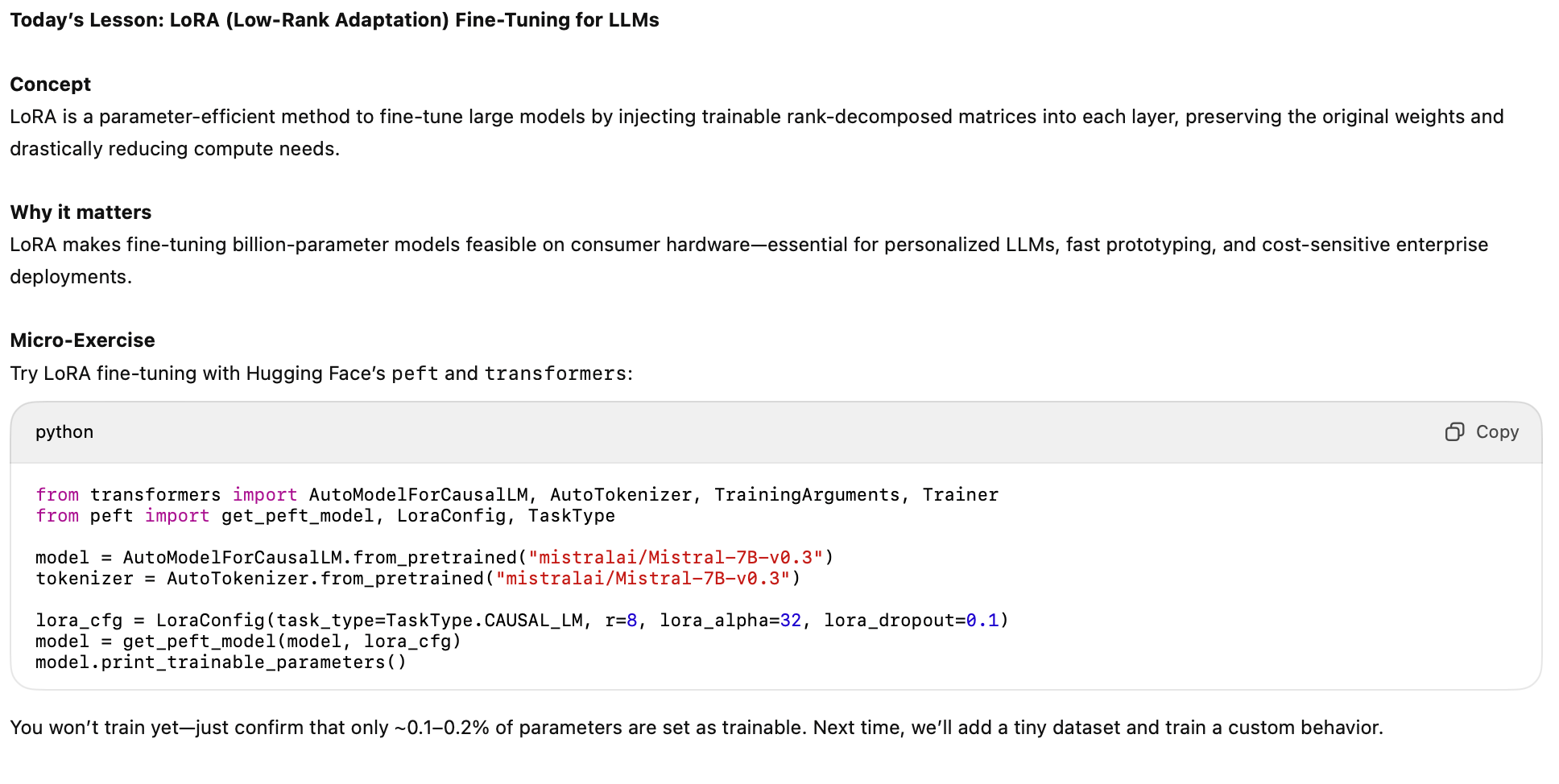
The shock here isn’t the accuracy (though that is eerie); it’s the calendar-time shift.
For the competitive assessment, what used to cost me half an hour of scrolling every morning—and a longer synthesis session every Friday—now costs twelve seconds of model latency and exactly zero human braincycles.
For the LLM lessons, what I used to gather in bits and pieces from across the internet is now delivered in exactly the format I want on my schedule with a practical exercise tuned to me with exactly zero effort on my part.
In these moments the phrase “Prompt → Workflow” stopped being a clever metaphor; it became my new default way to think about work.
Why o3 Lets a Single Prompt Run an Ongoing Workflow
When people talk about “smarter models,” they usually point at benchmark scores or longer context windows. Those things matter, but they’re not what turned my throw-away competitive-intel prompt into a daily habit. What changed is that o3 now supplies three capabilities that, in concert, let a chunk of plain English behave like a small autonomous system—no code, no plugins, no second prompt required.
Layered reasoning: the model edits itself before you ever read a word
Earlier GPT versions generated text the way a woodpecker chips bark: one token at a time, in a straight line, with no chance to stand back and ask “Does this actually make sense?” I definitely have had those moments, watching the model spin off and just keep spitting tokens when I can tell it’s going the wrong way.
o3 is different. It takes your instruction, thinks once, then—invisibly—thinks again. If you label a prompt EFFORT: deep, you’re implicitly asking for several of these private passes: one to outline, one to fact-check, another to reconcile contradictions, and only then does it start speaking to you. But it’s not that one word that matters, the key is extremely clearly describing the level of exertion you expect the model to exercise and doing so in plain English.
I felt that difference swapping between o4-mini-high and o3. o4-mini-high is a distilled model and it takes more deliberate prompting to get good validation. And even then I find deeper reflection from o3. Your mileage may vary, but the extra pass and few seconds of diligence from o3 can save you 15 minutes of validation sometimes from a lighter o4-mini-high pass.
Native tool calls: automation without plugins or plumbing
Hidden reasoning is powerful, but on its own it only changes quality. o3’s second unlock changes workflow: the ability to invoke tools—web search, Python snippets, graphs, scheduled tasks—from inside the consumer chat window. Before, many of those tasks were laughably impossible using Large Language Models. Now I have choices—either remind the model what tool I want (more reliable) or just let it vibe by describing my task very specifically. And I can just write in plain English:
Tools I’d like you to use: use web search, scheduled tasks
And the model understands, handles all the tool invocations on the backend, and just works. The prompt is the scheduler, the scraper, and the notepad—all tucked behind a single Enter key.
Persistent intent: instructions that stick between runs
Deep thinking and tool access would be impressive but exhausting if I had to re-issue the prompt every morning. The real magic is that o3 remembers the intent baked into the original instruction—“Run at 07:00 PT on weekdays, double-source headlines, skip opinions.”
Now to be fair, scheduled tasks launched prior to o3, but there’s a reason they’re only available for the o3 and o4-mini model series. They fundamentally deliver workflow value when combined with the qualities I called out above: multi-pass reasoning and tool calling. The magic (as in so many great product experiences) is in the sum of all these components working together.
Because of the persistent intent encoded in scheduled tasks, the model resurrects it on each run, re-loads the watch-list file, and re-applies the guardrails without drift. If a news site changes its layout and breaks the scrape, o3 pauses the workflow, re-evaluates, and re-adjusts on the fly.
That stickiness makes the whole arrangement feel less like a chatbot and more like a junior analyst who shows up on time with a finished brief, day after day, until I rewrite the SOP. I typed the coding prompt once. The model has followed it seven mornings in a row without a nudge and each time the lessons have been great.
TLDR; Put these three abilities together—layered self-critique, built-in tool access, and intent that persists—and a prompt stops being a request. It becomes a durable micro-system that thinks, verifies, schedules, loops, and even asks for help when the environment changes.
That’s the breakthrough that turns “Prompt → Workflow” from slogan into everyday leverage, and it’s why the Swedish-startup brief materialized while I sipped coffee and my browser sat untouched.
Build a Competitive-Intel Digest with one copy-and-paste
You don’t need a watch-list file, a Slack bot, or three different browser tabs.
Everything o3 needs can live inside a single prompt. Copy the block below—company names and all—drop it into a fresh chat with o3, press Enter, and you’ve just hired a tireless market-scout that clocks in every weekday at 07:00 PT. Yes, companies like Lindy let you do some of this stuff, but I have to admit it’s awfully handy to just stick it in chat and be done. (And yes all that motion away from the browser means Google should be a tiny bit worried.)
──────────────────────────────────────
PURPOSE: Develop competitive intelligence on relevant industry players every weekday.
MODE: agentic EFFORT: standard
INSTRUCTIONS
• Every weekday at 07:00 PT, run web.search\_query with recency:1 (past 24 h) over official press-release domains and dev/engineering blogs for each company in [Stick Your Companies Here].
• Capture any product launch or funding event of $XX million or more.
• Double-source each item; skip opinion pieces and rumours.
• Write a three-bullet brief for every qualifying event.
• If no item qualifies, output the single line No material updates.
• If a headline is verbatim identical to yesterday’s, still list it but add “(repeat)” after the headline.
ACTION
- If not already scheduled, create a recurring task to run this scan at 07:00 PT on weekdays.
- Execute the scan immediately and post today’s digest.
OUTPUT
Title the note CI-Digest- (date in PT).
Provide a Markdown table—one line per headline—in this format:
Date (PT) | Company | Headline | Two-sentence context | URL
──────────────────────────────────────
What happens after you hit Enter
1. An immediate first run
Because you pasted the prompt during the workday, o3 executes on the spot: it hits the web, cross-checks every qualifying headline, and drops today’s digest right beneath your message. If the news is slow, you’ll see a neat note that says “No material updates.” Either way, you just saved half an hour of tab-surfing.
2. A self-reviving loop
Tomorrow at exactly 07:00 PT the model wakes itself, repeats the scrape, and appends a new note titled CI-Digest-2025-04-25. You don’t reopen the prompt, you don’t set a reminder—the intent you embedded in that single paragraph persists. The chat thread grows into a date-stamped timeline you can skim in seconds.
3. Effortless tweaks when you need them
Want deeper context? Change EFFORT: standard to EFFORT: deep and the model will quote filings or analyst notes next run. Need to follow another rival? Add the name to the comma-separated list and press Enter; o3 absorbs the change on the fly. No extra wiring, no brittle integrations to babysit.
Why this matters
In ninety seconds you replaced an hour-a-week chore with an autonomous micro-system. More important, you felt the core principle of this article in action: a prompt, when written as a clear specification, becomes a reusable workflow. From here you can clone the pattern—swap in a slide image for a vision critique, or a rough email for an on-brand rewrite—and watch o3 shoulder more of the mental load while you focus on decisions, not data hunting.
From Single Digest to Four Full-Throttle Workflows
The competitive-intel note you built in Section 3 is a proof-of-concept: one prompt, zero code, daily value. But most of us juggle several recurring headaches—keeping the roadmap honest, filling the sales pipe, watching the conference circuit, and tracking the unfiltered voice of the customer, and countless other tasks. And part of my goal here is to teach you how to use these models for your own workflows, not just to copy my stuff.
Back to it: Re-running recurring chores by hand steals hours of focus every week. The good news is that the same four-block recipe—Purpose · Instructions · Reference · Output—can eat those chores for breakfast. Below is a quick summary table; the notes that follow unpack the why, the how, and the payoff for each workflow.
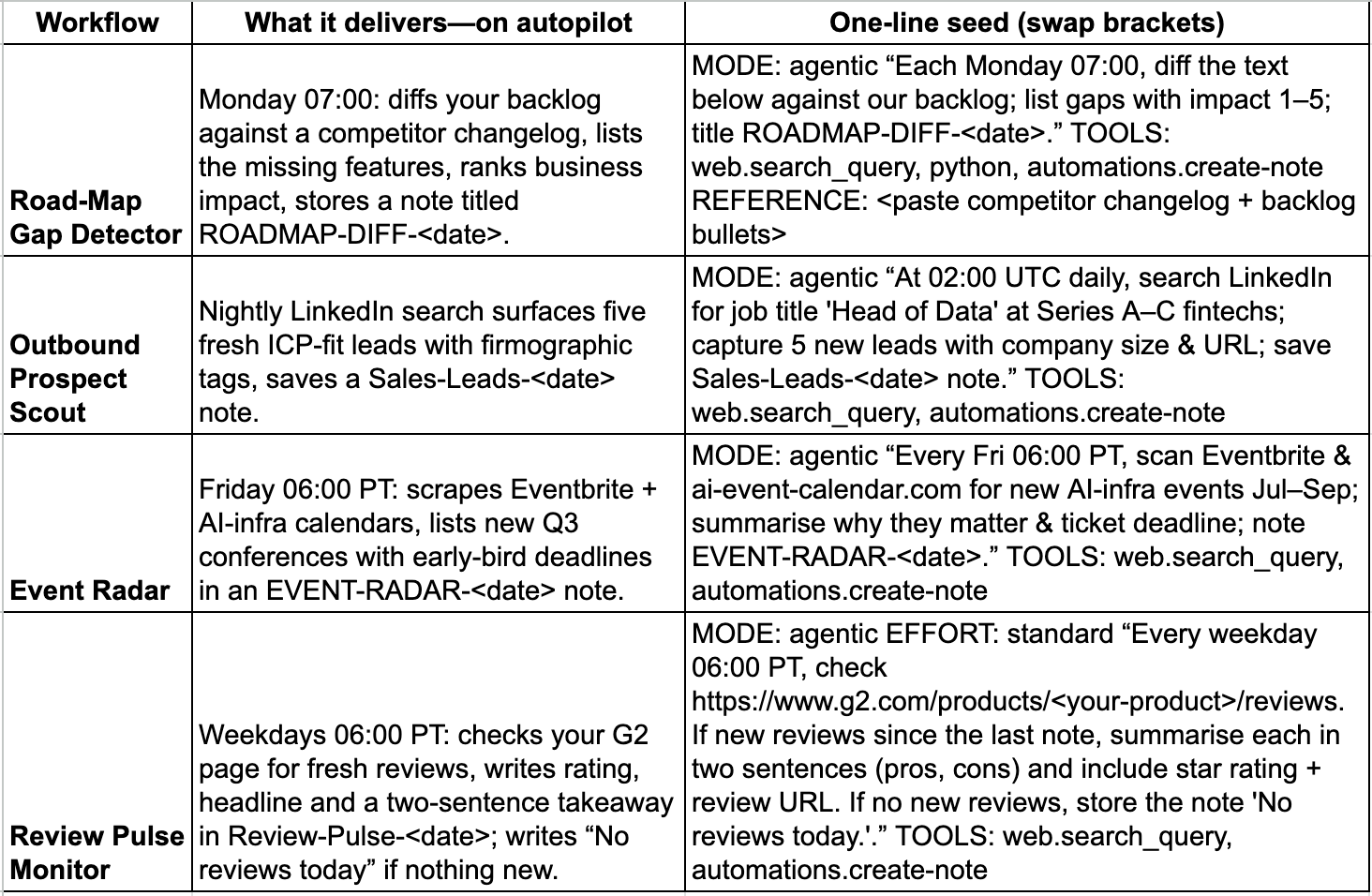
Grab the full prompts for all these here » LINK
Road-Map Gap Detector — Monday meetings that start with facts, not hunches
The pain. A competitor drops a feature blog at 5 p.m. Friday. By Monday stand-up, half the team has skimmed it, half haven’t, and everyone has a different opinion about whether it matters. An hour of debate later you still don’t know if it belongs in the sprint.
The workflow. Drop the latest backlog bullets and the rival’s public changelog into the prompt, hit Enter, and forget it. Every Monday at 07:00 o3 wakes, runs a quick Python diff, and stores a note that looks like:
ROADMAP-DIFF-2025-04-28
• Role-Based Access Control — Competitor shipped 2025-04-24 — Impact 5 (enterprise blocker)
• Usage Meter Widget — Competitor beta only — Impact 3 (nice-to-have)
Now stand-up starts with a ranked list: engineering sees “Impact 5” and knows it’s sprint-blocking, product sees “beta only” and decides whether to let it ride.
Setup time: five minutes.
Weekly time saved: roughly the length of one meandering status meeting.
Outbound Prospect Scout — lead-gen while the team sleeps
The pain. SDRs burn mornings scrolling LinkedIn, guessing which titles matter, copying names into spreadsheets, and only then starting outreach. Momentum dies before the first call.
The workflow. Define the ICP once—say, “Head of Data” at Series A–C fintechs. Each night, o3 searches LinkedIn People, filters fresh profiles, tags company size, and writes:
Sales-Leads-2025-04-25
Name | Company | Size | HQ | Profile URL
Five laser-selected leads appear overnight. SDRs open ChatGPT, click the URLs, and start personalised messages while competitors are still copy-pasting. The agent enforces a five-lead cap to keep the list human-scale; you can dial it up as the team grows.
Setup time: five minutes.
Weekly time saved: either hours (if your team is doing their job) or 0 to 1 (as in your team was not doing this before when you told them to).
Event Radar — never miss another early-bird deadline
The pain. You learn about the “must-attend” AI summit the day after early-bird pricing ends, or a CFP closes, or speaker slots fill. Costs double, visibility evaporates, everyone groans “next year.”
The workflow. Every Friday the agent sweeps Eventbrite plus an industry calendar three months ahead, grabs only brand-new listings, and stores:
EVENT | CITY | DATE | WHY IT MATTERS | EARLY-BIRD EXPIRES
AI Summit | NYC | Dec 10-11 | Scale AI focus | Jun 15
Marketing decides in minutes whether to attend, sponsor, or ignore—before prices spike or submission windows slam shut. No more frantic “Anyone know the discount code?” threads at midnight.
Setup time: five minutes. Also saves real dollars because you catch the early bird deals.
Weekly time saved: were people actually doing this regularly? It would take hours.
Review Pulse Monitor — the customer voice, minus the scroll
The pain. G2 reviews are gold, but nobody wants the daily chore of sifting stars and boilerplate. Valuable nuggets get buried until a quarterly retro.
The workflow. At 06:00 PT the agent hits your G2 page, identifies only the reviews posted since yesterday, and writes:
Review-Pulse-2025-04-25
⭐⭐⭐⭐ “Great multi-tenant analytics”
Pros: Fast query engine for metrics…
Cons: Steep learning curve for new analysts…
If no reviews land, today’s note politely says “No reviews today,” so your attention isn’t hijacked by false alarms. Product, CS, and Marketing all read the same two-sentence distillation and act the same day the feedback arrives.
Setup time: five minutes. Also saves real dollars because you catch the early bird deals.
Weekly time saved: saves hours of pain every few weeks, but more importantly ensures actual timely customer responsiveness, which is worth much more.
Why these four deliver real 10× leverage
Running numbers is useful, but the felt impact is even clearer. The Gap Detector ends the “What did they launch?” scramble before it starts. The Prospect Scout gifts SDRs a fresh, qualified top-funnel list every morning. The Event Radar pays for itself the first time you snag a half-price ticket or land a speaker slot. The Review Pulse Monitor keeps customer sentiment on everyone’s radar without eating a single browser tab.
Stack any two of these agents with the competitive-intel digest from Section 3 and you and your team can reasonably reclaim an entire workday every month—not in theory, but in the calendar that counts. That’s the promise of “Prompt → Workflow”: write once, delegate forever, and spend your reclaimed hours on decisions no language model can make for you.
Your Next Move — Develop the Eye for Workflows
A prompt that runs itself is a productivity win; a habit of spotting prompt-worthy workflows is a competitive advantage. Any repetitive task that consumes attention—scrolling dashboards, diffing docs, checking tickets—can usually be expressed in four blocks and handed to o3. The real upside isn’t the four examples above; it’s learning to recognise the next ten hiding in your week.
How to Turn Friction into an Agent
- Run one agent today. Copy a workflow that stings the most—road-map gaps, outbound leads, event radar, or review pulse. Paste the full prompt into an o3 chat, swap the placeholders, hit Enter.
- Watch with intent. For seven days do two things:
- Log the minutes you didn’t spend on that chore.
- Note every decision or next step that happened sooner because the note landed unprompted.
- Scan your calendar. At week’s end, skim last week’s meetings and to-dos. Any item that begins, “Gather…”, “Check…”, “Compare…”, or “Remind…” is a candidate for a prompt-workflow.
- Write the spec, not the prose. Use the same four blocks—Purpose, Instructions, Reference, Output—plus MODE/EFFORT and a tool whitelist. Add triple-verification and a 30-word reflection so you can trust the output without babysitting it.
- Iterate one agent at a time. Resist spinning up ten workflows on day one; reliability beats volume. When an agent has run a week without inconsistencies, clone the pattern for the next pain-point.
TLDR; Pick one task that stole at least an hour of your time last week, write its four-block prompt tonight, and let o3 carry the weight for seven days. Then tell me two numbers:
- Minutes reclaimed
- Most valuable action or insight the agent made possible
Reply in the comments or DM me—I’d love to see what you saved!
The difference between early adopters and power users isn’t tool access—it’s the ability to notice friction and translate it into a living prompt. Train that eye, and every repetitive annoyance becomes an opportunity to gain time, clarity, and momentum.
For more on AI, subscribe and share!

\Sushi conveyor belts are the perfect metaphor for workflows\