Dancing is the only word for an orchestration layer. Here's the deal with Composio MCP, why some developers hate it, where it actually adds value, and how to understand the middleware play
By Nate
Published: 2025-03-08
URL: https://natesnewsletter.substack.com/p/composio-mcp-wants-to-dance-with
I wrote this because no one can seem to agree on what MCP is or why it matters. Some people say that it’s a bad replacement for APIs. Some people swear that MCP is a phenomenal accelerator to AI-driven development, and frankly most people are stuck in the middle wondering what the heck MCP even is—so if that’s you this is for you! My goal here is to give you a really complete and factual overview of MCP so you can figure out for yourself whether it works in your building workflows. Let me know what you think!
Imagine you're building an AI assistant that needs to juggle Gmail, Slack, a CRM, and a database all at once. The traditional path is daunting: wrangle each API’s docs, implement OAuth flows, handle rate limits, and write glue code by hand. It’s tedious work that can take months. Enter Composio, a new breed of Model Context Protocol (MCP) designed for AI integrations. Composio acts as a unifying layer between AI agents (like large language models) and the web of third-party services they need to use. Instead of wiring every API from scratch, you get a toolkit of pre-integrated services and a standardized way for your AI to invoke them (Composio MCP | Composio). The premise is simple: let developers focus on what the AI should do, and let Composio handle how to connect to the apps and data that enable those actions.
In this deep-dive, I want to lay out for you how Composio works and how it compares to other approaches. We’ll look at why you might choose an MCP like Composio over direct API calls, how it stacks up against popular AI “builder” tools (Cursor, Bolt.new, Lovable.dev, Windsurf), real-world use cases, and where this emerging technology is headed. By the end, you should have a clear picture of Composio’s value proposition and the role of middleware platforms in the evolving AI ecosystem. So without further ado, let’s pull back the curtain on this powerful integration layer for AI.
Subscribers get all these posts!
Composio vs. Direct API Integrations
Developers are used to calling APIs directly—using SDKs or HTTP requests to communicate with services like Salesforce, Gmail, or GitHub. Composio reimagines this process by abstracting away the API complexities behind a unified interface. Concretely, Composio provides out-of-the-box integration with over 250+ applications (everything from GitHub and Salesforce to file systems and code execution tools). Instead of writing bespoke integration code for each service, you can rely on Composio’s pre-built “tools” and a consistent API protocol to invoke them. It’s akin to having a universal remote for dozens of APIs – the underlying complexity is hidden, and you get a standard way to push the buttons.
Unified Tool Invocation: At the heart of Composio’s design is the idea of tool calling. Modern LLMs support a feature called function calling (or tool use) where the model can request to execute a certain function with provided parameters. Composio leverages this by presenting each integration as a callable tool. Your AI agent doesn’t need to know the gritty details of, say, the Gmail API – it just needs to know that a tool called "GMAIL\SEND\EMAIL" exists and what parameters it expects. Composio’s SDK and cloud service take care of the rest. When the AI decides to use a tool, Composio intercepts the call, routes it to the correct external API, and returns the result in a model-friendly format (Tool Calling and Composio | Composio). In effect, Composio acts as the translator between the language model’s function call and the actual API call. This architecture is illustrated below.
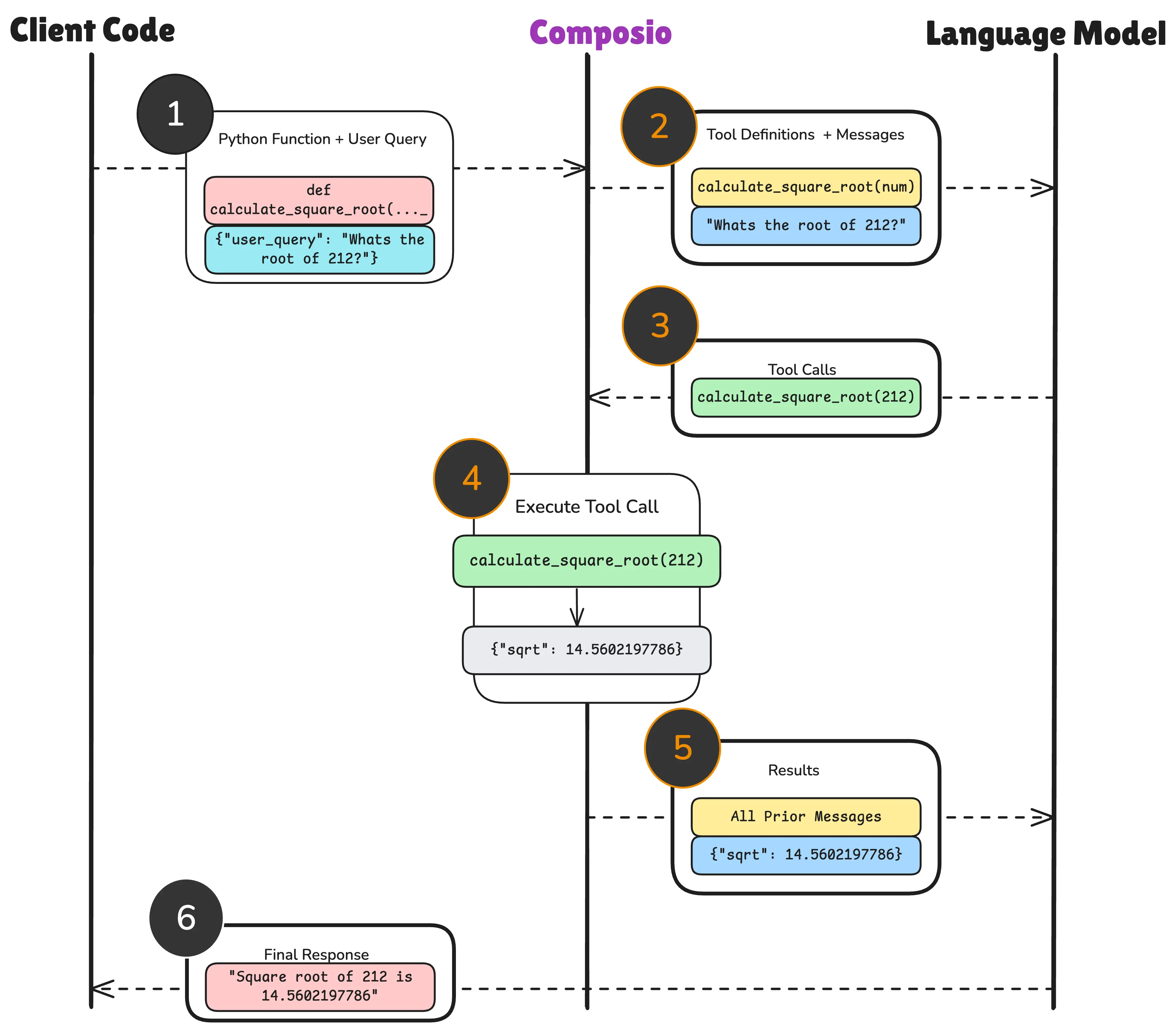
The tool-calling flow with Composio. Client code defines available tools (functions) and a user query (1). Composio provides the tool definitions to the language model alongside the query (2). The LLM decides to invoke a tool and emits a tool call (3), which Composio intercepts and executes against the real API or function (4). The results are returned to the model (5), which then produces a final answer to the user (6). Composio handles the heavy lifting in steps 3–5, bridging the LLM and external service.
Under the hood, Composio provides a layered execution environment that balances local and cloud execution. Some tools are executed locally (e.g. file operations, shell commands) to allow the AI to affect the host environment when needed. Others are hosted by Composio – for example, integrations with SaaS apps like Gmail, Notion, or Salesforce are handled via Composio’s cloud, so you don’t have to run custom integration code on your end. There’s even support for custom tools: you can define your own functions or API calls and register them with Composio, effectively extending the platform. These custom tools can coexist seamlessly with Composio’s built-in ones, giving a lot of flexibility. This multi-layer approach means your AI agent can, say, call a local Python function to crunch numbers and then use a hosted Gmail tool to send an email – all through the same unified interface.
Authentication & Security: One of the biggest headaches in direct integrations is managing authentication – securing API keys, OAuth tokens, handling refreshes, and so on. Composio squarely addresses this by providing managed authentication for all integrated services. You can connect user accounts to, for example, Google or Slack via Composio’s dashboard, and the platform handles storing credentials and refreshing tokens safely. Composio supports OAuth flows, API keys, JWT, and other auth methods out of the box. In practice, this means you don’t need to write separate OAuth logic for each integration; Composio’s server handles the handshake with Google’s or Salesforce’s API and just gives your agent the access it needs. Credentials are centralized and abstracted behind that single Composio API key you use to access the platform, simplifying secret management. From a security standpoint, this centralization can reduce risk: API tokens are kept off your codebase and are instead vaulted in Composio. Additionally, Composio’s design enforces type-safe operations, validating that the parameters an AI provides to a function call match the expected schema. This validation acts as a safety net, catching mistakes (or hallucinations) where the AI might call an API with wrong arguments. It’s an extra layer of security and robustness that you wouldn’t get by hitting the APIs directly without extensive checks.
Of course, using an MCP introduces its own trade-offs. There is an additional network hop and processing layer between your AI and the end service. In a direct integration, your code would call the service’s API directly; with Composio, the sequence is: your AI -> Composio -> target API -> back through Composio. This indirection adds a bit of latency and complexity under the hood. However, in practice the overhead is often minor relative to the overall cost of an LLM call or a third-party API response time. Composio is optimized for asynchronous, scalable handling of calls, but developers should still be aware of this when building latency-sensitive applications. Another consideration is reliability and control. By delegating calls to Composio, you are trusting a third-party service to handle critical parts of your application. If Composio experiences downtime, your agent’s capabilities might be impacted just as if a direct API were down.
The flip side is that Composio can actually increase reliability of tool use in many cases. From experience with Google, Gmail apps scripts tend to be brittle and might only succeed ~40–50% of the time in production (due to formatting errors or other issues), whereas through Composio the reliability can exceed 90% (Composio makes AI integrations more efficient by saving developer time | YourStory). The reason is that Composio standardizes the call patterns and handles many edge cases, so there’s less opportunity for the AI to misuse the API. In essence, you’re offloading a lot of error-handling and edge-case logic to the platform that specializes in it.
Security considerations should also be weighed. With direct calls, you keep full control of data flow and credentials (but also full responsibility). With Composio, you’re entrusting sensitive API access to an intermediary. Composio’s design emphasizes security – for instance, local tools run in a defined workspace sandbox to limit their scope, and the platform’s auth system ensures tokens are scoped properly to each integration – but any time a third party is in the loop, due diligence is required. For many, the convenience and robust features are worth that trust, especially when Composio has been adopted by engineers at major companies and has enterprise-grade practices. In a regulated environment, some teams might still opt for direct integrations (or a self-hosted MCP, if available) to satisfy compliance. It’s a classic convenience vs. control trade-off.
From a development cycle perspective, the impact of using Composio can be dramatic. Instead of spending days or weeks writing boilerplate code for each new API integration, you enable the integration in Composio (often through a simple dashboard click or a few lines of config) and call it from your agent. This can reduce development time from months to days for complex AI automation projects. YourStory, profiling Composio, noted that what normally might take months of engineering to get an AI agent working reliably with external software can be achieved much faster via Composio’s platform (Composio makes AI integrations more efficient by saving developer time | YourStory).
By cutting out a lot of “plumbing” work, development teams can iterate quicker and focus on the higher-level logic and user experience of their AI applications. Quicker integration also means faster experimentation – you can prototype an agent that uses 5 different services in a fraction of the time it would take to build one integration end-to-end the old way. This agility in development is a big reason why middleware platforms are gaining traction. TLDR, Composio vs. direct integration boils down to abstraction and efficiency vs. low-level control.
Composio abstracts away API headaches (auth, endpoints, data formatting) in exchange for a slight overhead and reliance on an external service. For many AI projects aiming to scale or go to production quickly, that trade-off is well worth it, as evidenced by significantly improved reliability and dev velocity in practice. But it’s important to understand the architecture and implications, which we’ve now laid out: a unified execution layer, managed auth, type-safe calls – and the considerations of performance and security that come with introducing model context protocols as a middleware layer.
Composio vs. Other AI Builder Tools (Cursor, Bolt.new, Lovable.dev, Windsurf)
The AI tooling ecosystem is crowded with new platforms promising to accelerate development. Four names that often come up are Cursor, Windsurf, Bolt.new, and Lovable.dev – each of which helps developers build with AI in different ways (wrote about these here). It’s important to clarify that Composio isn’t directly comparable to these as a feature-by-feature competitor; rather, it addresses a different layer of the stack. Let’s break down what these tools do, and where Composio fits in by comparison.
- Cursor and Windsurf: These are AI-powered IDEs (integrated development environments) or coding assistants. Cursor, for example, integrates multiple LLMs into a code editor, providing smart suggestions and the ability to have conversations about your code. It’s often praised as one of the best AI coding tools for handling large, complex projects (Which AI Coding Tool Should You Use?). Windsurf is similar – an advanced code editor with AI features – and it even has an “agent mode” (called Cascade) to help manage coding tasks step by step. Both target experienced developers who want AI to speed up writing and understanding code. In essence, they make you more productive when developing software, but they don’t provide pre-built integrations for external services. If you want your code (with Cursor’s help) to talk to the Twitter API, you still have to write that API call yourself (though an AI assistant might help draft it). These tools shine in developer experience – making coding faster and easier – but they are not middleware or runtime platforms for agents. They operate during development, not as part of the deployed application.
- Bolt.new and Lovable.dev: These fall into the “web builder” or low-code category. Bolt.new is known for letting users whip up simple web apps or SaaS prototypes very quickly with AI assistance. Bolt can generate front-end components, set up basic backend logic, and even has features for building mobile apps. These tools are geared towards beginners or hackers who want to go from idea to prototype fast, perhaps without deep coding expertise. Lovable.dev is similar and has strengths in creating landing pages or UI prototypes and has a special feature for pushing a web app to iOS. So Lovable and Bolt do offer some built-in integrations, but are typically limited to generic services like a database or sending emails. They emphasize ease of use and quick results, often at the cost of flexibility—folks I work with (and me) tend to see diminishing returns as projects scale in complexity, so these platforms become limiting and you might have to export the code and go back to a traditional development workflow (Which AI Coding Tool Should You Use?).
Composio’s Niche: Compared to the above, Composio is laser-focused on being a backend integration layer for AI agents. It’s not an IDE or a code generation tool; it’s something you incorporate into your project (which you might be coding in VS Code, Cursor, or any environment of your choice). In fact, Composio can complement those tools. For example, if you love using Cursor to write your code, you can plug Composio into your development – Composio provides an MCP server that Cursor can interface with via SSE (Server-Sent Events). This means you could be coding with Cursor’s help and still let your code utilize Composio’s integrations when running.
The key point is that Composio operates at runtime to empower your AI (the agent) with abilities, whereas Cursor/Windsurf operate at dev-time to assist the programmer. Bolt/Lovable operate at design-time to scaffold an app. Composio doesn’t build your UI or write your business logic – it provides the plumbing for your AI to perform actions. It’s quite possible to use both in tandem: e.g. use Bolt.new to spin up a quick UI for a chatbot, but use Composio behind the scenes so that chatbot can connect to 10 different services reliably.
Let’s compare on a few specific dimensions:
- Customization and Integration Depth: Composio offers a much deeper library of integrations (250+ and growing) and also allows developers to define custom tools if needed (How Composio Helped Gorilla from UC Berkeley Ship AgentArena - Composio). The integrations cover a wide range: enterprise apps (Salesforce, HubSpot), communication tools (Slack, Gmail), developer tools (GitHub, database connectors), and more. Builder tools like Bolt.new or Lovable.dev, in contrast, provide only a handful of common integrations out-of-the-box (perhaps an email sender, or a database). Anything beyond that, you’re expected to drop down to code. With Cursor or Windsurf, integration is entirely manual (they might help you code it, but you have to write it). So if your project demands extensive customization – e.g. connecting to niche APIs, handling complex workflows between multiple services – Composio is in a different league. It’s built for that exact purpose, whereas the other tools would leave you on your own once you reach the limits of their templates or AI code suggestions.
- Scalability and Production Readiness: Composio is a hosted platform meant to run in production. It uses a usage-based pricing model with an API key, implying you can scale up usage as your application grows. It’s designed to handle multiple users and multi-agent scenarios; for instance, it has the concept of entities to represent individual end-users in your app, each with their own set of service connections (Integrations, Authentication and Authorization | Composio). This is crucial if you’re building an application where many users will connect their accounts (imagine a SaaS app where each user connects their Google Drive so an AI agent can manage their files – Composio can segregate and manage auth for each user under the hood). None of the builder tools operate at this level of multi-user orchestration. They are mostly aimed at single-user or single-team usage during development. When it comes time to deploy a solution built with Bolt.new or Lovable.dev, you often have to export the code and ensure it scales on a proper backend. Cursor and Windsurf are not deployment platforms at all – they hand you code that you will then run on servers or cloud functions you manage. In short, Composio is more “enterprise-ready” in this sense: it’s built to live inside production AI systems from the get-go. You could still use code written with Cursor or Bolt, but Composio would be the part that handles the heavy lifting when that code is live.
- Security and Reliability: Composio centralizes auth and provides a secure execution layer for tools. This means things like OAuth tokens and API keys can be managed in one place (the Composio console) with proper encryption, scopes, and revocation when needed. Developer tools like Cursor don’t manage your secrets at all (that’s up to you and whatever environment you run the code in). Low-code builders like Bolt might store keys for you if you use their hosting, but typically those are accessible to the app’s code. There’s also the matter of reliability: Composio’s function validation and consistent API schemas can reduce the chance of runtime errors due to AI mistakes. The builder tools don’t address this – if the AI writes code that’s slightly wrong, it’s on the developer to debug and fix it. In contrast, Composio is actively in the loop at runtime ensuring that, say, an email-sending action has all required fields and is well-formed, or that a database query is properly parameterized. In essence, Composio acts as a guardian for the AI’s actions, whereas builder tools are more like assistants that step aside once the code is written.
- Developer Experience: There is a difference in the target user. Composio assumes a developer who may not be an expert in every API, but is comfortable writing some code and integrating an SDK. Its motto could be “developer-first integration platform” – you still write Python/JavaScript code to create your agent, but that code is simpler because Composio handles the integrations. The learning curve involves understanding Composio’s tool format and possibly browsing their documentation for what actions are available for a given service. By contrast, Bolt.new or Lovable.dev cater to those who might not want to write much code – they lean on natural language or drag-and-drop to assemble an app. Cursor and Windsurf cater to coders, but provide an AI pair-programmer experience, which can feel magical but also has its own learning curve (prompting the AI effectively, etc.). If we compare directly: to use Composio, you might write a few lines of Python to initialize a
ComposioToolSetand load some tools (Tool Calling and Composio | Composio), whereas to use Bolt.new you might literally type “build a todo app” and get a starting point generated for you. They’re very different experiences. In fact, a savvy developer could use an AI coding assistant to help integrate Composio – the tools can be complementary. There isn’t much overlap where you would choose one or the other purely on features; it’s more about what part of the AI development workflow they address.
So when should a builder use Composio versus these other tools? If your goal is to accelerate coding or quickly prototype an application, a tool like Cursor or Bolt.new is great to start with – they’ll help you generate the scaffolding and logic. However, the moment your AI application needs to do non-trivial things in the real world (call multiple external APIs, handle user credentials, ensure reliability), you should at least look at Composio. For instance, you might prototype a Slack bot using an AI IDE to help with code, but to make that bot actually interact with Slack, Google Calendar, and your database reliably, you might integrate Composio to manage those connections.
Conversely, if you’re building something very small-scale or one-off (say a script to fetch weather data and nothing else), plugging in a whole middleware platform might be overkill – an AI coding assistant could just help you write a 50-line script using the weather API directly. In many cases, Composio and builder tools are not mutually exclusive – Composio can be the integration backbone inside a project, regardless of how that project’s code was created. A developer using Windsurf or Cursor can import Composio’s SDK and gain the same benefits. The decision is less “Composio vs Cursor” and more “Do I need a dedicated integration layer (Composio) or can I manage with direct API calls aided by an AI assistant?” If the scope is beyond a couple of APIs or if long-term maintainability is a concern, Composio starts to look very attractive.
To summarize the comparison, here’s a quick overview:
- Purpose: Composio is a middleware service for runtime integrations; Cursor/Windsurf are AI-enhanced coding tools; Bolt/Lovable are AI-assisted app builders.
- Integration Coverage: Composio offers hundreds of integrations + custom tools out-of-the-box. Others offer few or none (they rely on you or provide minimal backend options).
- Scalability: Composio is designed for production scale and multi-user scenarios. Builder tools are great for prototypes or single-user development, and may need a transition for scaling up.
- Security/Auth: Composio manages auth (OAuth, keys) centrally, improving security and reducing dev burden. Builder tools typically require you to handle secrets or limit you to simpler auth methods.
- Developer Experience: Composio requires writing some code and learning its SDK, but then simplifies development cycles greatly. Builder tools might require less coding upfront, but you may hit complexity limits or have to debug AI-generated code more.
- When to Use: Use Composio when your AI project needs to reliably connect to many services or handle complex workflows. Use AI IDEs (Cursor/Windsurf) to boost your coding productivity and AI app builders (Bolt/Lovable) to quickly mock up an idea or UI. Often, combine them: e.g. AI-assisted coding + Composio integrations for the best of both.
Use Cases & Practical Applications
Composio MCP opens up a world of possibilities for AI-driven applications. By simplifying integrations, they enable complex multi-tool workflows that would be painful to implement otherwise. Here are some real-world use cases and scenarios illustrating where Composio shines:
- Automated Business Workflows: Yes, this is a lot like Zapier! We don’t often talk a lot about Zapier as an AI building tool, but in this situation it feels appropriate. Fundamentally Zapier exists to enable non-business users to connect apps that would usually require API knowledge. Whereas Composio exists to make integrations (especially LLM-powered integrations) easier for builders or developers. Composio is much more AI agent friendly than Zapier. Let’s get specific here: consider an AI-powered customer support agent that can handle tickets. Using Composio, such an agent could integrate with the ticketing system (e.g. Zendesk or Jira), a knowledge base, email, and chat apps. For example, when a new support ticket arrives (Composio supports triggers to listen for events from integrated apps), it could prompt the agent to fetch relevant knowledge base articles, draft a response, and even log follow-up tasks in a project management tool. All those actions – searching the KB, sending an email reply, updating a task – can be performed via Composio’s tool library without the developers coding each API call. This kind of end-to-end workflow automation is much faster to build with an MCP. A sales workflow is another example: an AI agent could monitor incoming leads, cross-reference a CRM (Salesforce), send a personalized outreach email via Gmail, and update a spreadsheet – basically acting like an autonomous SDR (sales development rep).
- AI-Driven Data Analysis & Reporting: Data analysts spend time pulling data from various sources – SQL databases, SaaS analytics tools, spreadsheets – and then generating reports or insights. An AI agent can automate this by using Composio to connect to those sources. For instance, a marketing analyst’s AI assistant could query Google Analytics, fetch revenue data from Stripe, and pull social media stats from Twitter’s API, then compile a summary. Composio would manage the connections to each of those services (handling auth and API calls), and perhaps even use a local code execution tool to perform calculations or generate a chart. The AI’s natural language capabilities combined with Composio’s integrations mean you could ask, "Hey AI, compare our website traffic and sales for this month and email me a summary," and the agent could actually do it: call the GA API, call the sales API, maybe run a quick regression or correlation in Python locally, and then send the results via Gmail – all orchestrated through the MCP. This goes beyond what a single API or plugin can do, because it’s coordinating multiple steps and data sources.
- Multi-Agent Collaboration: In more advanced setups, you might have multiple AI agents with different specialties working together. Imagine a research scenario where one agent is really good at browsing and extracting information (using tools like a web scraper or Browser API), and another agent is good at synthesis and writing reports. Using a platform like Composio, these agents can share a common set of integration tools and even trigger one another via defined events. One agent could gather data (using Composio’s web scraping and database tools), then signal a second agent to generate a report, which in turn uses Composio’s Google Docs API integration to write the findings into a document. Multi-agent systems are still an emerging pattern, but Composio’s support for multiple frameworks (LangChain, LlamaIndex, etc.) and unified tool interface makes it easier to get such collaborations off the ground (How Composio Helped Gorilla from UC Berkeley Ship AgentArena - Composio). Essentially, MCPs can act as the shared “toolbox” for a team of AI agents, ensuring they all speak the same language when interacting with external services.
- DevOps and Software Engineering Agents: Not all AI agents are for end-users; some are for developers themselves. An AI pair programmer might automatically run tests, lint code, or open GitHub issues. With Composio, a coding agent can have direct access to the developer’s toolbox: it can run shell commands or scripts (via local tools), manage files, interface with GitHub’s API to create pull requests or comment on issues, and even deploy to cloud providers. For example, an agent monitoring a code repository could, when a PR is merged, use the AWS CLI (exposed as a Composio tool) to deploy the new code, then post a message on Slack. Without an MCP, you’d have to wire up all those integration points manually. Composio provides pre-built integrations for many such developer tools (CI/CD, version control, package managers) as part of what they call the “SWE-kit” (Software Engineer kit). This opens the door for automated DevOps bots or QA agents that can take actions in the development pipeline proactively.
These examples aren’t just hypothetical. We’re already seeing companies and projects leverage Composio in these ways. One startup, Assista AI, reported that using Composio to handle their AI integrations helped them reduce their go-to-market time by a factor of 8× and saved hundreds of engineering hours in the process (Blog - Composio). Assista was able to accelerate development because they didn’t have to build every integration from scratch – a huge boon for a small team trying to ship an AI-powered product. In another case, an enterprise AI company named 11x used Composio to supercharge their sales automation agents, resulting in an estimated $4.2M increase in their enterprise deal pipeline and saving 380 dev hours of work (Blog - Composio). Yes, these are blog posts designed to highlight positive outcomes, and no tool is perfect! But I think they illustrate real value as well. Like fundamentally these are significant real-world outcomes: more revenue, less toil. Even in academia, Composio has made an impact – the Gorilla team at UC Berkeley (known for AI research on tool use) integrated Composio for their AgentArena platform to quickly equip agents with email and calendar skills. The result was an 80% improvement in tool-calling accuracy and a 4× faster development timeline for their project. In other words, their agents made far fewer mistakes when using tools, and the team got the platform up and running much sooner than anticipated by leveraging the MCP approach.
Despite these advantages, it’s worth noting that direct API integrations can still be preferable in certain scenarios. When might you not want Composio in the loop? Here are a few considerations:
- Simplicity of Scope: If your AI or application only needs to interact with one or two services, and those services are relatively simple, a direct integration might be straightforward enough. For example, if all you need is to call OpenAI’s API and nothing else, you don’t gain much by adding an extra platform in between. Similarly, a script that only hits the weather API could just use a requests library. Introducing Composio for a trivial task could be overkill.
- Fine-Grained Control: In cases where you need to use an API in a very specialized way or leverage cutting-edge features that Composio’s abstraction hasn’t caught up with, doing it yourself could be easier. Developers have mentioned that for Google Sheets and Airtable, Composio’s provided actions were “inconsistent and require navigating numerous parameters,” essentially acting as a thin wrapper around the native APIs (Should I ditch composio.dev for direct APIs in my LangGraph Data Entry Project?" : r/LangChain). This made them question the value of the extra layer for that particular use case. If the MCP’s tool interface is as complex as the API itself, you might not be saving much effort. At that point, writing directly against the official API (or using that service’s SDK) could give you more clarity or capabilities.
- Performance and Latency: As discussed, Composio is fundamentally a middleware approach that adds an extra hop. For most apps this is negligible, but for ultra-low-latency requirements or offline scenarios, it might be a concern. If you’re building something that has to run in an environment with no external internet (say, on-premise for security or a device in the field), relying on a cloud MCP isn’t feasible unless that platform offers an on-prem version. In such cases, direct integration or an offline library is the way to go.
- Security/Compliance Constraints: Some organizations have strict rules about where data can flow or which third-party services can be involved. While Composio handling auth and calls is convenient, a company might balk at a third party having access to, for instance, their database or internal API, even if indirectly. In those situations, teams might choose to implement everything in-house despite the extra work, simply to maintain end-to-end control. (It’s worth noting that Composio is quite flexible – e.g. you could use Composio for the public integrations and keep internal ones direct – but the principle stands that adding any external platform has to clear a security review).
In summary, Composio excels in complex, multi-integration, automation-heavy applications, whereas extremely simple or highly specialized cases might stick with direct integrations. The good news is that these approaches aren’t mutually exclusive – you can mix and match. You might use direct calls for one or two services where you need custom control, and use Composio for everything else. The goal for any builder should be to maximize development efficiency while meeting performance and security requirements. Composio is one of the strongest tools available for the efficiency part, evidenced by the real-world successes above, but it’s important to architect with its trade-offs in mind.
The Future of Middleware
As AI continues its rapid march into applications, the need for reliable integration between AI agents and the wider software ecosystem is only growing. Middleware platforms like Composio are poised to play a pivotal role in this next phase of AI adoption. Let’s look ahead at where trends in middleware may be going, and what challenges remain to be solved.
Mainstream Adoption and Standardization: We are at the cusp of AI agents moving from prototypes to production at scale – industry experts predict a surge of full-scale deployments in 2025 as companies move beyond MVPs, and to be honest they’re probably off by a year. Companies are trying to make agents work this year, and they will probably succeed at a wide scale in 2026 vs. 2025.
In this context, players like Composio provide the scaffolding to make those deployments easier and more robust. We can expect standardization of protocols for AI-to-tool communication to accelerate. Composio’s MCP is essentially a proprietary standard for how an AI and external services talk in a structured way. In the future, we might see open standards emerge, or at least cross-compatibility between platforms. For example, OpenAI’s function calling JSON schema could become a lingua franca that different players adopt so that tools are defined in a common format. This would echo what happened in web development with things like OpenAPI/Swagger for REST APIs – a common specification that multiple platforms use.
Composio has a head start with a large tool library and a working protocol, but competitors and open-source projects will likely appear. In fact, big tech is already eyeing this space: Google’s Vertex AI offers an Agent Builder that helps create generative AI agents for enterprise workflows, allowing both no-code and code-first approaches and integrating with frameworks like LangChain (Best Composio Alternatives & Competitors). This suggests that cloud providers will bake middleware-like capabilities into their platforms, further validating the concept. It’s conceivable that Microsoft, AWS, and others will have their own takes on AI integration middleware, possibly tied into their product ecosystems (imagine an AWS AI agent orchestrator that hooks into AWS services easily, or Microsoft’s version integrated with Office 365 and Dynamics). The trend is clear: AI agents won’t remain siloed; they’re going to be plugged into everything.
More Tools, More Modalities: Composio focuses primarily on text-based interactions and APIs (as that’s what LLMs handle well). Over time, we’ll see support for a broader range of modalities and actions. For instance, handling images or video – an agent might want to call an image recognition service or generate a chart and embed it in a slide deck. Future players (including Composio) could facilitate that by providing standardized tools for vision AI or media generation that tie into an agent’s workflow. We might also see integration with IoT and robotics: an AI agent telling a robot arm what to do via a middleware interface, or reading sensor data through a unified API. Essentially, any area where an AI needs to interact with the physical world or a specialized digital domain could become part of the repertoire. With the rapid progress in multi-modal AI models, players like Composio might evolve to route not just text instructions but also binary data (images, audio) between models and services. Imagine an AI that can not only talk and write, but also see (through a camera API) and hear (through a microphone input) – middleware will be needed to manage those inputs/outputs consistently.
Reliability and Intelligence: One of the biggest challenges in deploying AI agents is their tendency to err or hallucinate. Composio addresses part of this by constraining the agent to known tools and validating its requests. In the future, expect MCPs to get even smarter about this. They could, for example, maintain an internal memory of successful vs. failed tool calls and adjust the agent’s prompts or parameters to guide it away from pitfalls. We might see features like auto-retry with adjusted parameters if an API call fails, or even using one tool to verify another’s output (like double-checking with a secondary service if the first result looks off). Essentially, the middleware could evolve from a passive relay to an active co-pilot that assists the AI agent in using tools correctly. This could involve lightweight reasoning algorithms or secondary AI models that monitor the main model’s tool usage. The goal would be to push that reliability well into the 95-99% range for critical applications, making AI agents truly dependable.
Challenges and Open Issues: One of the biggest challenges for Composio is vendor lock-in versus open ecosystems. Right now, if you build heavily around Composio’s tools and SDK, migrating away would mean re-writing those integrations elsewhere. Developers will demand either assurance of longevity or easier portability. It’s possible we’ll get an open-source framework that anyone can run, which could use community-contributed tool definitions. If such a standard catches on, Composio and others might adopt it or at least provide export/import. We’re not there yet, but the history of software suggests that proprietary solutions often lead to an open alternative once the pattern is established (think about Kubernetes standardizing container orchestration). Composio’s early mover advantage and rich feature set means it could influence such standards – maybe the way Composio handles Model Context Protocol becomes the blueprint others follow.
Shaping AI Automation Trends: In the bigger picture, Composio is helping enable a shift in how we build AI applications. The Composio platform encourages a lego-block style of development where you can snap together capabilities (email, database, CRM, etc.) into your AI’s skillset without deep expertise in each. This lowers the barrier for new applications and fosters innovation – someone with a clever idea for an AI service can assemble the needed integrations much faster, which we’ve seen translating to faster time-to-market. We’re likely to see a proliferation of niche AI agents for all sorts of tasks, empowered by these platforms. From personal assistants that manage your smart home, to enterprise agents that automate entire business processes, the ease of integration is a catalyst for creativity. Composio is essentially becoming the glue of the AI-powered world, connecting large language models (which excel at reasoning and communication) with the vast functionality of software APIs.
We’re moving toward an era where AI agents are first-class citizens in the software architecture, and platforms like Composio are the highways that connect them to the rest of the digital world. By abstracting complexity and enabling scalability, platforms like Composio are not just making integrations easier; they’re shaping how we think about building with AI altogether. The best part? This is just the beginning. For AI-savvy builders who have yet to try a middleware platform, it’s a good time to start exploring – the tools of tomorrow are here today, and they’re only getting more powerful.
For more on AI, subscribe and share!

\A good piece of middleware is absolutely a dancer between pieces of software\