Claude 3.7 came out yesterday. Check out how Claude compares to other LLM coding models like Grok 3, o3-mini-high, o1 Pro, DeepSeek, and Gemini 2.0. Coding samples included!
By Nate
Published: 2025-02-26
URL: https://natesnewsletter.substack.com/p/a-complete-guide-to-claude-37-with
Here it is! A complete guide to Claude 3.7, including a code comparison across all the major coding models. I am to make this article a complete introduction to Claude 3.7 focused on its strength: coding. I know how it scores on the benchmarks, but I’m really interested in how the code quality actually compares to other major AI models on a real-world coding scenario. In my view we have a real problem with real world measurement for AI model quality, and I want to start to show a better way by directly comparing models more on specific real-world tasks. So sit back and enjoy, and I hope this brings back fond memories of playing Monopoly!
You might wonder what I’m using in this article to assess code quality. It’s a very simple prompt! I’m looking to give AI coding models an open-ended prompt around a domain that’s familiar to them that gives them scope to put their creativity to work to really build something cool. The prompt is this:
Subscribers get all these posts!
Dynamic Monopoly Market Simulator: Build a React component that simulates a Monopoly property market. It should fetch mock real-time data, animate value changes, and allow users to simulate buying, trading, and dynamic pricing over a timeline. Don't worry about running out of tokens. Put in your very best work.
And that’s it! The result is a nice open-ended code challenge that acts as a sample real-world benchmark for code quality and gives us some fun visuals on the side.
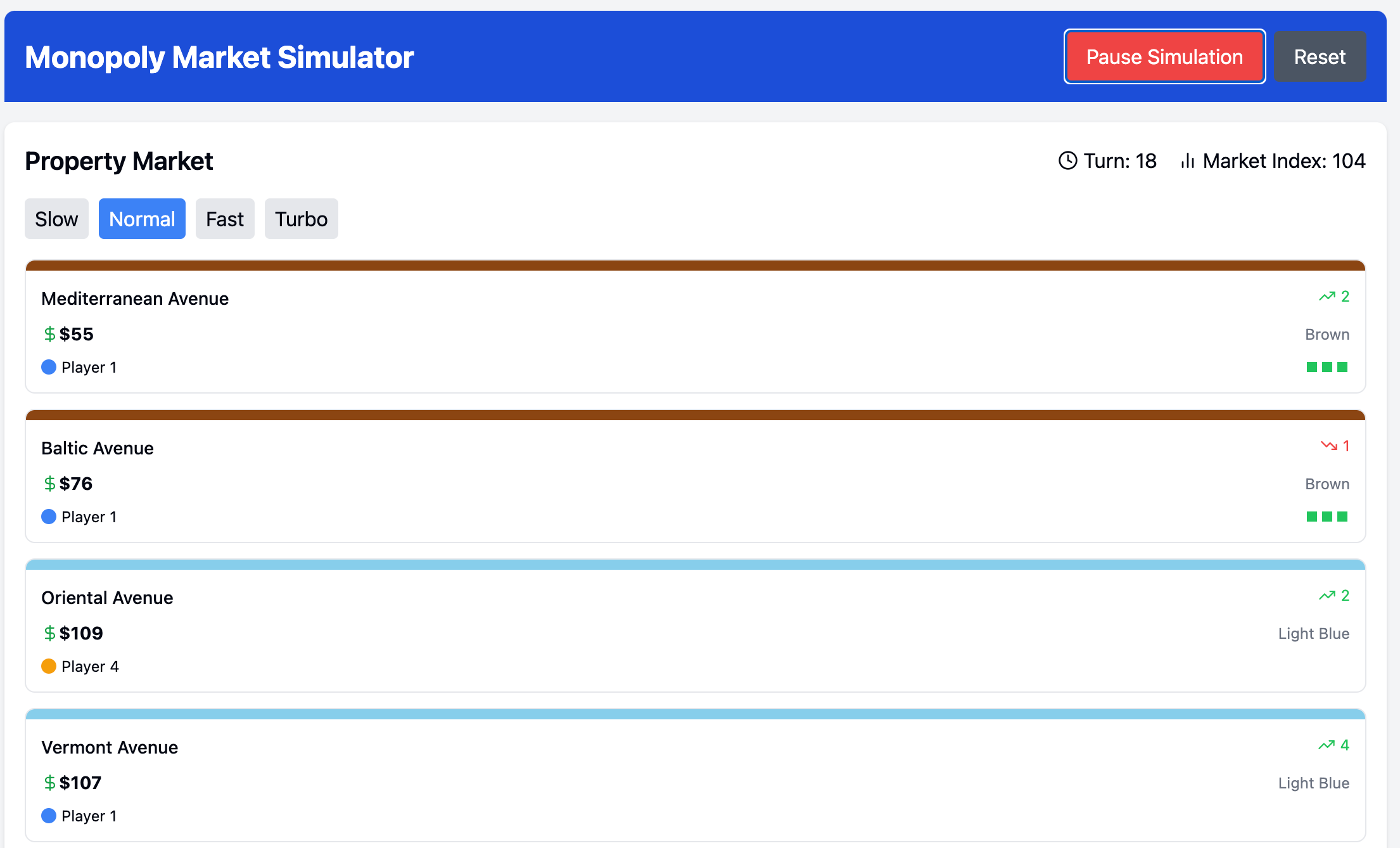
\Here is Claude 3.7 running a simulation\
First: Measuring the Unmeasurable
I’ve spent way too many hours messing with AI-generated code that, on the surface, looked flawless—only to discover a single, deeply nested flaw that kept me from shipping. We’ve all heard the horror stories about footguns like “code that compiles but never works” or “logic bombs waiting to explode.” Now imagine that risk multiplied, as Gen3 AI models like Claude 3.7 Sonnet make it possible to be more ambitious with your code (even as the models themselves improve).
By Gen3 models, I mean models that are trained on likely an order of magnitude more data than ChatGPT 4. We think Grok 3 and Claude 3.7 are the models that are likely out there with that training scale, but actual scale is private.
In this piece, I’ll walk you through my journey evaluating code produced by today’s leading LLMs, with a special focus on Claude 3.7. This means diving into the details: the architectural decisions behind each snippet, the state management patterns they use, and the real-world maintainability concerns they raise. I’ll be pulling insights from two primary resources that I put together over the last couple of days with Claude 3.7
- A Technical Briefing that meticulously dissects React components generated by seven different LLM models, including Claude 3.7, Claude 3.5, DeepSeek, Gemini 2.0 Pro Experimental (CSS Only), o3 Mini High, Grok 3, and o1 Pro.
- A Comprehensive Briefing on Claude 3.7 Sonnet itself, which sheds light on hybrid reasoning, extended token lengths, and how Gen3 AI is transforming coding from mere automation to genuine collaboration.
My goal is to give you a detailed, first-person perspective—one that clarifies not just the “what” of these AI models but the “how” and “why” that matter most in a real-world development context.
Why Claude 3.7 Sonnet Is a Milestone in Gen3 AI
Claude’s “Hybrid Reasoning” Approach
When I first heard about Claude 3.7 Sonnet, I admit I was a bit skeptical about Anthropic’s claim that it could intelligently toggle between “standard” and “extended thinking” modes. Extended thinking means inference here, like o1 Pro. Models like GPT-3 and GPT-4 had already shown me what large-scale training can accomplish, but the idea that a single AI could quickly produce code one moment and then reason deeply the next felt hard, and it’s worth noting that not even OpenAI has released a model that hybridizes inference and standard modes.
However, after digging into Claude 3.7, several details stood out:
- 10^26 FLOPs? There were some early rumors that Claude 3.7 reached this level of computational power in training, but it looks like in practice the actual FLOPS count is lower. Regardless of the exact number, the point is that Claude is focused on relevant training at scale. In simpler terms, it suggests the model has a vast technical “knowledge base” to draw upon, which can enhance both breadth and depth of coding expertise. We’ll see this in the sample.
- Extended Token Length (up to 128K): One of the complaints about Claude 3.5 was the tiny context window and Anthropic is clearly working to open this up. Claude 3.7 can handle far more context in a single pass. This is crucial if I want it to analyze more of a codebase at once (e.g., a large React project with many components).
- Two Scaling Laws: The first is about training size—bigger data, bigger model capacity. The second is about inference-time computing, giving the AI “extra seconds of thought” to improve accuracy, almost like a developer taking a moment to think through edge cases. Claude 3.7 has both.
For me, these features translate into something more tangible: the possibility of an AI that doesn’t just spit out lines of code, but one that can truly help me reason about architectural decisions, such as how to structure state across multiple code components or how to design a project for optimal performance.
The Challenge of Evaluating LLM-Generated Code
Why Traditional Metrics Aren’t Enough
Historically, I’ve relied on well-known metrics for code quality: readability, performance, scalability, and maintainability. These still matter, but AI-generated code adds unique wrinkles:
- Architectural Intent: Most of us, when we design code, do so with a mental model of how data and functions will evolve. AI, however, might produce something that “works” but lacks a unifying design philosophy. This can lead to bizarre state transitions or UI elements thrown into random places.
- Hidden Complexity: Because LLMs can unify many features in a single code snippet, we sometimes see a monstrous, thousand-line component that technically accomplishes everything but is nearly impossible to debug or extend.
- Misalignment with Actual Needs: AI often lacks direct awareness of the exact domain constraints. For example, if you’re building a property-trading sim with strict regulatory constraints or a unique transaction flow, LLMs won’t necessarily capture those nuances unless you meticulously prompt them.
A New Evaluation Framework
Given these challenges, I’ve adopted a three-part evaluation framework that takes into account these new wrinkles with LLM-generated code.
- Complexity & Features
- Richness of simulation logic: Do we see real-time updates, AI-driven decisions, or timeline scrubbing?
- Advanced functionality: Are there trading modals, property ownership transitions, or event-based price fluctuations?
- UI/UX Quality
- Visual polish: Animations, transitions, responsive layouts, how well the user sees feedback on a transaction or a price shift.
- Ease of interaction: Sliders, notifications, or dynamic charts that help the user navigate complex states without confusion.
- Modularity & Maintainability
- Separation of concerns: Is the code broken into smaller components (e.g., a
<MarketChart/>, a<TradeModal/>, a<TimelineSlider/>), or is everything packed into one file? - Hooks usage and performance considerations: Are we using
useEffectresponsibly? Are we employing custom hooks or memoization for performance?
A Detailed Look at the Seven Code Samples
Now I’ll walk through each of the seven LLM-generated code components. All of these were generated in response to the Monopoly prompt at the top of the article!
If you’re interested in full text of these code samples, you can see them here. Below, I’ll include not just bullet points but deeper explanations of how each snippet handles state, organizes code, and addresses UI feedback.
Claude 3.7
Overview:
Claude 3.7’s React snippet is described as a “full-fledged market simulator” with Monopoly-like property data, real-time price updates, interactive trading, and advanced logic around AI decision-making. At first glance, it’s a single monstrous component, but that is somewhat by design: the model tried to unify everything in one place—random price fluctuations, a timeline slider, a property list, and the user’s cash management.
Key Implementation Details:
- Inline State & Effects: The code uses multiple
useStatehooks to manage user cash, property data, simulation time, and a rolling history of snapshots. For example,const [history, setHistory] = useState([])is appended to each time an update occurs, allowing the user to jump back in time.
- Real-Time Updates: The model sets up an interval inside a
useEffect(() => { ... }, []), which triggers property price fluctuations every few seconds. If you’re not careful, you might forget to clean up intervals in React, but I found that the snippet does handle interval cleanup, which is a good sign.
- AI-Driven Trading Logic: Claude 3.7 suggests scenarios where the AI decides which properties to purchase or sell. This is heavily commented in places, referencing “preferred returns” or “optimal buy points” based on the property’s historical performance. While mostly heuristic, it’s a step beyond random decisions.
- Visual Feedback with Framer Motion: Price changes are animated, so if a property’s value shoots up, you might see a quick highlight or a small bounce effect. This goes a long way toward helping the end-user feel the simulation’s changes.
Strengths:
- Deep Complexity: If you want a robust, near-production-level simulator from a single snippet, Claude 3.7’s code sample is the gold standard.
- Realistic Market Mechanics: It’s not just random numbers; there’s an attempt at bounding price fluctuations (e.g., “no property can fall below $10”) and a history slider that freeze-frames the entire state.
Weaknesses:
- Monolithic Architecture: Everything—simulation logic, timeline slider, property list, buy/sell buttons—is jammed into a single file. This is workable but not ideal for maintenance. Splitting the timeline control into its own component, for instance, would make debugging far easier.
- Steeper Debug Curve: If something goes wrong—like a transaction not updating the user’s cash properly—you have to sift through a large body of code with multiple side-effects layered on top of each other.
Claude 3.5
Overview:
The Claude 3.5 snippet feels like a mid-level approach, featuring fundamental price changes, transaction history, and some chart integration (via react-chartjs-2). It’s less feature-rich than Claude 3.7 but still tries to deliver a polished UI with minor animations. It is worth noting that Claude locked off 3.5 Sonnet in the chat interface after launching 3.7, so this is 3.5 Haiku.
Key Implementation Details:
- Basic Price Simulation: It increments or decrements property values by a random delta, though it doesn’t do the advanced bounding or AI-based logic seen in 3.7.
- Chart Integration: A small
<Line>chart shows property price trends over time, providing a snapshot of how different properties have changed. This is helpful if you want a quick glance at performance.
- Use of Framer Motion: Similar to 3.7, Claude 3.5 sprinkles in basic animations—like a fade-in effect when you load the app or hover transitions on property cards.
Strengths:
- Simplicity: Easier to follow than 3.7, especially if you’re new to React or you just want a “starter kit” for a market simulator.
- Clear Documented Functions: The code is peppered with comments about what each function does, which helps any developer picking this up for the first time.
Weaknesses:
- No Deep Decision-Making: It’s basically random price changes, no mention of advanced logic or attempts at “optimal” purchasing.
- Still Monolithic: The structure is a single large component with a few child components for charts, but not fully modular. If you tried to incorporate user authentication or a more advanced transaction system, you’d quickly be rewriting large chunks of the snippet.
DeepSeek
Overview:
DeepSeek stands out for its polished UI and asynchronous data handling. According to the Technical Briefing, it’s one of the more “modular” examples, splitting the interface into multiple sub-components: property cards, notification pop-ups, and a market history chart.
Key Implementation Details:
- Styled-Components & Animations: The snippet heavily uses
styled-componentsfor theming and custom CSS transitions for showing/hiding notifications (e.g., sliding them in from the right and fading them out).
- Market History Tracking: Instead of a simple array of snapshots, it keeps a more thorough record of data changes, so you can easily display a line chart that updates in real time.
- Notification System: If a property’s price crosses a certain threshold, a notification slides in, letting the user know about a “significant price jump.” This is partly asynchronous, so the system can handle multiple triggers at once.
Strengths:
- High UI/UX Quality: DeepSeek feels more modern and user-friendly out of the box. The screen transitions are smooth, and the use of fade-in/fade-out effects helps the user track changes.
- Modular Architecture: Different features (like the chart, notifications, property display) live in separate files/folders. This is a boon for long-term maintenance.
Weaknesses:
- Minor Notification/Type Inconsistencies: The Technical Briefing notes that removing notifications sometimes leads to console warnings—possibly a mismatch in array indexing or the unique key usage in a React list. These are small but can become headaches under production load.
- Less Advanced Simulation Logic: DeepSeek focuses on the display aspect rather than advanced market simulations or AI-based trades. If you want rich logic, you’d need to code it yourself or incorporate code from a heavier snippet like Claude 3.7 or o1 Pro.
Gemini 2.0 Pro Experimental
Overview:
Gemini 2.0 Pro is a bit of an outlier: it’s purely a styling framework for a Monopoly-themed simulation. The snippet has no logic for buying/selling or real-time updates. Instead, it’s a meticulously crafted CSS environment with animations, transitions, and responsive layouts.
Key Implementation Details:
- Responsive Flexbox Layouts: The code includes clever use of flex-wrap,
justify-content, and media queries to ensure the layout rearranges itself on different screen sizes.
- Animation & Transition Classes: Comments explain how each class is meant to be used, e.g., a
.property-card:hovermight do a gentle scale-up or color shift.
- Tooltips & Hover States: The snippet details how to position tooltips above property tiles, including smooth fade-in/out times.
Strengths:
- Exemplary UI: If you already have the business logic, dropping Gemini’s CSS can instantly make your simulator feel polished and consistent.
- Modular CSS: Each section (like the
.timeline-slideror.trading-modal) is separated in the file, making it simpler to locate relevant styles.
Weaknesses:
- No Simulation Logic: You can’t run a market or track user transactions. You only get the interface shell.
- Dependency on External Logic: If you rely on a snippet like Claude 3.7 or DeepSeek for your functional code, you must carefully integrate Gemini’s classes without overshadowing their existing styling.
o3 Mini High
Overview:
o3 Mini High is described as a focused but still interactive simulator. It tries to find a sweet spot between minimal code overhead and essential simulation features: dynamic price updates, a timeline slider, and basic buy/sell actions.
Key Implementation Details:
- Single Component with Inline Styles: Instead of external CSS or a big SCSS file, it uses inline style objects in React for quick styling. This keeps everything in one place but can become unwieldy.
- Timeline Slider: The snippet stores snapshots of property data each time an update occurs. A slider (likely an
<input type="range" />) lets you jump between these snapshots. It’s less fancy than the Claude 3.7 approach but still functional.
- Trade Selection: You can choose which property to trade, and it handles the logic of transferring ownership. However, the mechanics are simpler—there’s no AI “negotiation” or complicated scenario like you might see in advanced code.
Strengths:
- Simplicity and Focus: It’s a good teaching example if you want to demonstrate a real-time market update and a replay feature.
- Straightforward Use of React Hooks: Not too many layers of
useEffect; easy to trace where each update is triggered.
Weaknesses:
- Inline Styles: If you care about theming or want to quickly adapt the design, inline styles can be a nightmare to maintain at scale.
- Limited Depth: Once you get beyond basic simulation features, you’ll quickly find yourself rewriting the code or adding bigger modules.
Grok 3
Overview:
Grok 3 is the “entry-level” or “proof-of-concept” approach. It provides real-time price updates and a button or two for trading, but no advanced timeline, no complex ownership logic, and minimal styling.
Key Implementation Details:
- Basic setInterval: Inside a single
useEffect, it picks random properties to tweak, likeproperty.price += Math.floor(Math.random() \* 5). There’s no bounding or user feedback, so prices could skyrocket or plummet without rhyme or reason.
- Single-File Simplicity: Everything from rendering a property list to handling a buy transaction is in one file, with minimal comments.
Strengths:
- Easiest to Understand: If you’re brand-new to React, this code is a gentle introduction: a single setInterval, a single array for properties, and a couple of event handlers.
- Low Overhead: Good for hackathons or proof-of-concept prototypes where you don’t want a complex codebase.
Weaknesses:
- No Real UI Polish: Don’t expect any fancy animations or charts here.
- No Scalability: If you wanted advanced features, you’d basically have to rebuild from scratch.
o1 Pro
Overview:
The o1 Pro snippet is arguably the most feature-rich and comprehensive. It’s right there with Claude 3.7, possibly surpassing it in advanced logic, though sometimes at the cost of even greater complexity in a single file.
Key Implementation Details:
- Advanced State Management: Multiple
useEffecthooks handle both real-time price updates and timeline snapshot captures. The code also usesuseReffor short-lived transitional states, like highlighting properties whose prices changed significantly.
- Complex Trading Logic: Not just a “buy/sell” button—there may be scenarios for partial trades or advanced conditions like rent multipliers, akin to real Monopoly rules.
- Playback Control: The user can jump to a specific point in the timeline and watch the simulation “replay” from that state, effectively pausing live data while they explore past events.
Strengths:
- Highly Interactive: There’s a real sense of a living simulation. The UI feedback is immediate, and the features approximate a mini-game more than a simple snippet.
- Refined Animations: By leveraging Framer Motion’s
<AnimatePresence>, transitions feel dynamic and fluid, which can delight end users.
Weaknesses:
- Monolithic and Complex: Arguably even more so than Claude 3.7, everything is jammed into one or two files. Maintaining or extending this quickly becomes a chore if you don’t refactor.
- Steep Learning Curve for Debug: If one effect triggers at the same time as another, or if two states conflict, you’ll spend a lot of time dissecting the interplay of various hooks and refs.
Scoring and Comparative Insights
Below is a more detailed table, reflecting my combined letter grades and numerical scores. Each category is explained with a sentence or two on why these scores matter and how I arrived at them. If that type is too small, you can see the sheet here.
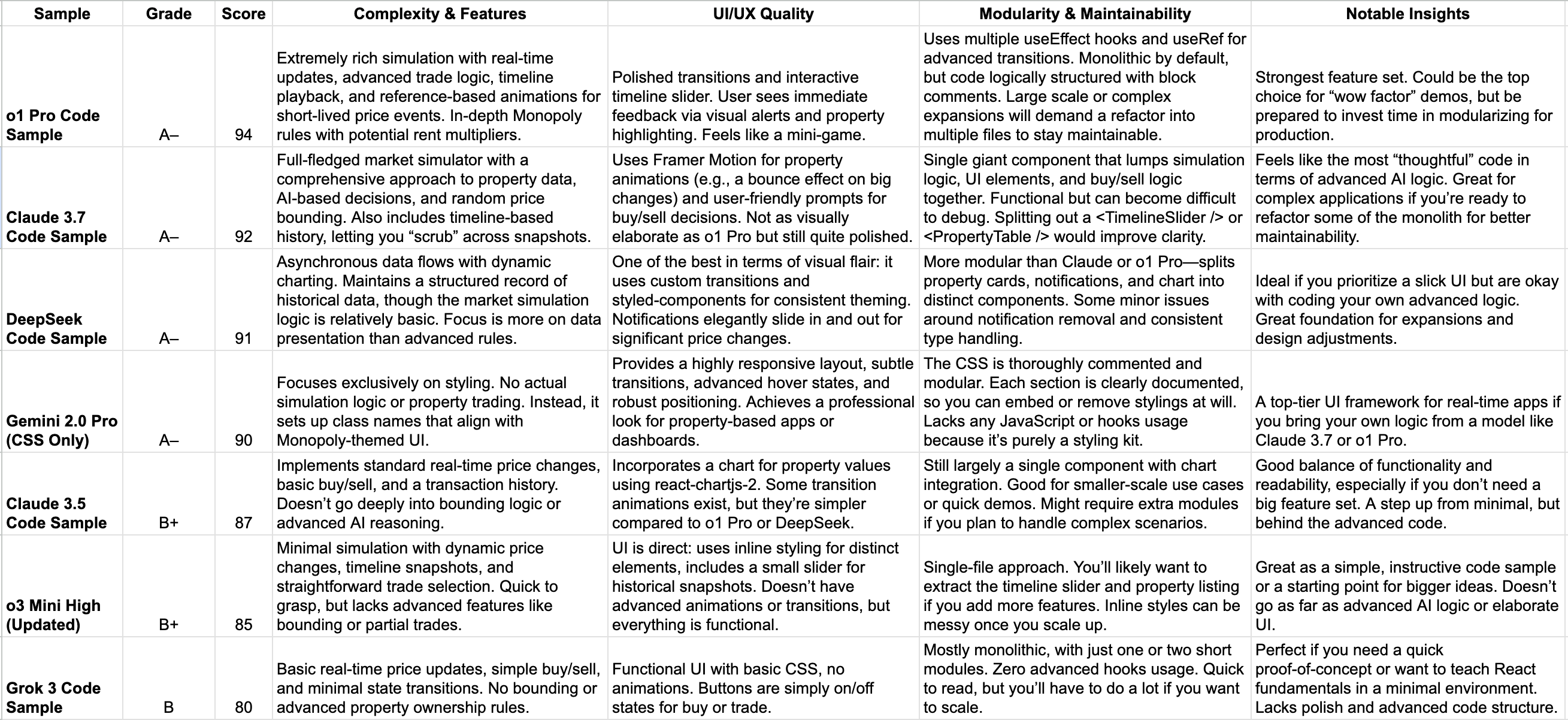
Claude 3.7 Sonnet’s “Hybrid Reasoning” in Practice
One of the most intriguing aspects of Claude 3.7 is how it blends rapid-response code generation (similar to Claude 3.5) with extended thinking. According to the Comprehensive Briefing, this means that if you prompt Claude 3.7 with a question like:
Build a React component that simulates a Monopoly property market. It should fetch mock real-time data, animate value changes, and allow users to simulate buying, trading, and dynamic pricing over a timeline. Don't worry about running out of tokens. Put in your very best work.
It might do the following:
- Immediate Outline (Standard Mode): Quickly produce a skeleton with
useEffectfor intervals, auseStatefor user cash, and a table or list for properties. - Deeper Logical Refinements (Extended Thinking Mode): Then add bounding logic (like “prices never drop below $10,” “prices never exceed $1000”), note where to store historical snapshots, and even sprinkle in advanced features such as “If the user’s cash is above X, attempt an AI-driven buy.”
During that second phase, it references a broader set of patterns from its training data—think of it like a developer who says, “Wait, we also need to handle corner cases.” That’s how you end up with a solid technical approach.
You can see how Claude 3.7 actually coded a response to that prompt here.
The Bigger Picture: Gen3 AI and the Future of Coding
Moving from Automation to Collaboration
One of the biggest themes from the launch of Claude 3.7 is that we’re finally seeing AI that collaborates rather than just obeys. With hybrid reasoning, developers can use short prompts to get immediate scaffolding, then go deeper, asking the model to refine or re-architect parts of the code. This synergy feels akin to a developer pairing with a very eager intern—someone who can produce a ton of code quickly, but still needs your expertise to shape it into a final product.
The Urgent Need for Real-World Benchmarks
The Technical Briefing underscores the importance of systematic, real-world testing. While code compiles and passes basic checks, the real question is: “How does it behave under actual conditions?” Does the timeline slider crash if 10,000 snapshots build up? Does concurrency break the trading logic if five users are “buying” at once?
I believe the industry could benefit from collaborative, open-source “scenario-based test suites” for AI-generated code. These would replicate real enterprise or gaming conditions—concurrent user interactions, heavy data loads, partial failures—and reveal whether the LLM-generated code is truly robust. Right now, many LLM benchmarks remain abstract, focusing on small puzzles or static correctness, but production-level code demands more dynamic scrutiny.
Final Thoughts: Why I’m Picking Claude 3.7
Evaluating LLM-generated code isn’t just about seeing if it “works” at a glance. It’s about understanding the architecture, the state flows, the trade logic, and the user feedback loops that make an app genuinely valuable—and maintainable. Claude 3.7 Sonnet marks a new era of “hybrid reasoning” AI that can produce code approaching production-level complexity and reliability, if properly guided.
I’ll add one final note: one of the special characteristics of Claude 3.7 is the team’s clear commitment to making the model available across multiple building environments. Claude 3.7 is available at the command line, it’s available (obviously) in the chat window, it’s available as an invokable model in Windsurf and Cursor. The team is clearly focused on making Claude available everywhere you build, and that by itself is enough for me to make Claude 3.7 my preferred build model today.
I truly believe we’re on the cusp of a development revolution, where AI can handle 70% of routine tasks and also propose creative solutions for the remaining 30%. But unlocking that potential means raising our standards for code evaluation and fostering a culture of open, detailed, scenario-based testing.
Thank you for taking this deep dive with me! If you’re using LLMs in your projects—whether it’s Claude 3.7, Grok 3, or another model—I’d love to hear about your experiences. Feel free to comment, message, or write your own breakdown of these code snippets. I’m particularly interested in how models are useful in practical building scenarios.
For more on AI, subscribe and share!

\Claude 3.7 is really good at coding\