I grabbed these models and immediately put them to the test with what they are supposed to be best at: technical coding and planning. Then I scored them vs. other popular models to check performance!
By Nate
Published: 2025-02-01
URL: https://natesnewsletter.substack.com/p/openai-o3-mini-and-o3-mini-high-a
I wrote this in two parts. Part 1 is all about what o3-mini is and how it scores and works. Part 2 is all about how it actually held up when I tested it, with lots of examples! I wanted to give a really full picture of the model, and so that meant level-setting before getting into the dirty details. If you want the big shocker reveal, head straight to Part 2 because I did NOT expect the test results I got.
Part 1: The Launch of o3-mini—and Why It Matters
Today, OpenAI announced two new reasoning models in their “mini” series: o3-mini and o3-mini-high, built to deliver robust STEM performance, faster response times, and a lower price tag than previous small models—particularly the outgoing o1-mini. The main goal? Push the boundaries of cost-effective reasoning while making advanced AI more accessible to developers and end users.
I’ve been been playing with these two new models in the ChatGPT environment, comparing them to existing offerings like OpenAI o1, o1 Pro, and Claude 3.5 Sonnet. Below, you’ll see why these newcomers matter, how they stack up, and what the data says about their speed, accuracy, and safety training.
Subscribers get the whole post!
o3-mini at a Glance
What is it?
- A small reasoning model, specialized in math, science, and coding tasks.
- Comes with three “reasoning effort” levels—low, medium, and high—so you can balance speed versus accuracy.
- Replaces o1-mini in the model picker, with support for function calling, structured outputs, streaming, and developer messages.
- Rolling out in ChatGPT and the API to paid and free users alike (free users get to try it by choosing “Reason” in the composer).
Key Gains Over o1-mini
- Faster responses.
- Lower latency to first token.
- More accurate answers (up to a 39% reduction in major errors in real-world tasks).
- Better performance in advanced STEM domains like competition math, PhD-level science, and code generation.
Comparing to Existing Models
The biggest question I get: How does o3-mini compare to the “larger” or “older” models? OpenAI has pitched o3-mini (and its higher-gear version, o3-mini-high) as a direct replacement for o1-mini. But there are also folks who use the bigger o1 model for heavier tasks. After playing with it a bit, here’s my best take at a backpocket summary for these models:

Where o3-mini wins
- Cost: Cheaper and more scalable for repeated calls.
- Speed: 24% faster overall than o1-mini. Lower average latency.
- STEM tasks: Great for math competitions, code generation, and advanced science queries.
Where you might still want o1
- Vision-based tasks: o3-mini doesn’t do vision.
- Broad general knowledge: While o3-mini holds up well, o1 is still the broader knowledge model.
- One gear: Some teams prefer not to micromanage “reasoning effort.”
Examples of o3-mini in Action
Ironically, I just published a post on all of these evals, because I wanted to make sure I could understand and explain what they were. You can read it here, and check out o3-mini’s scores below.
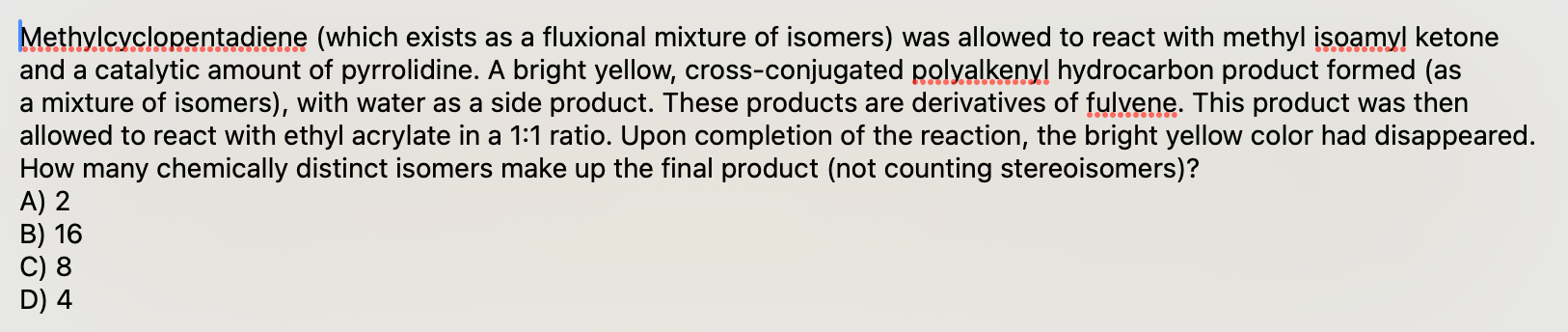
1. Competition Math (AIME)
OpenAI’s data shows o3-mini (high) reaching 83.6% accuracy on AIME 2024. By comparison, older small models hovered much lower. Even at medium effort, o3-mini’s math capability matches or exceeds o1 on many tests. AIME questions look like this:


o3-mini (high) not only gave the correct numeric answer to most of these questions but provided a step-by-step reasoning breakdown.
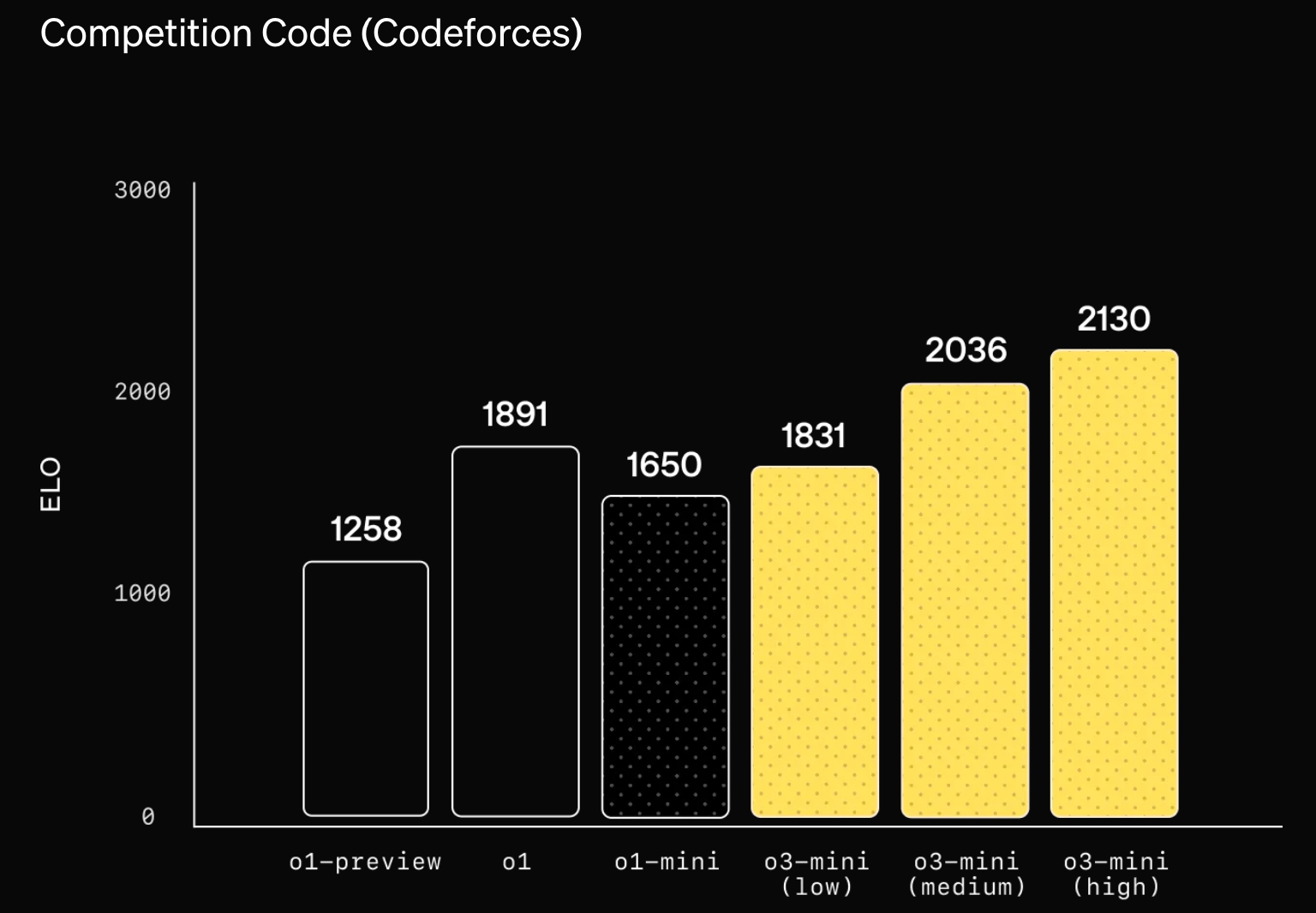
2. Codeforces Competitive Programming
In coding tasks, o3-mini’s Elo rating climbs notably when set to medium or high effort, surpassing o1-mini.
• Low effort: On par with o1-mini.
• Medium: ~Matches o1.
• High: Exceeds prior small models by a decent margin.
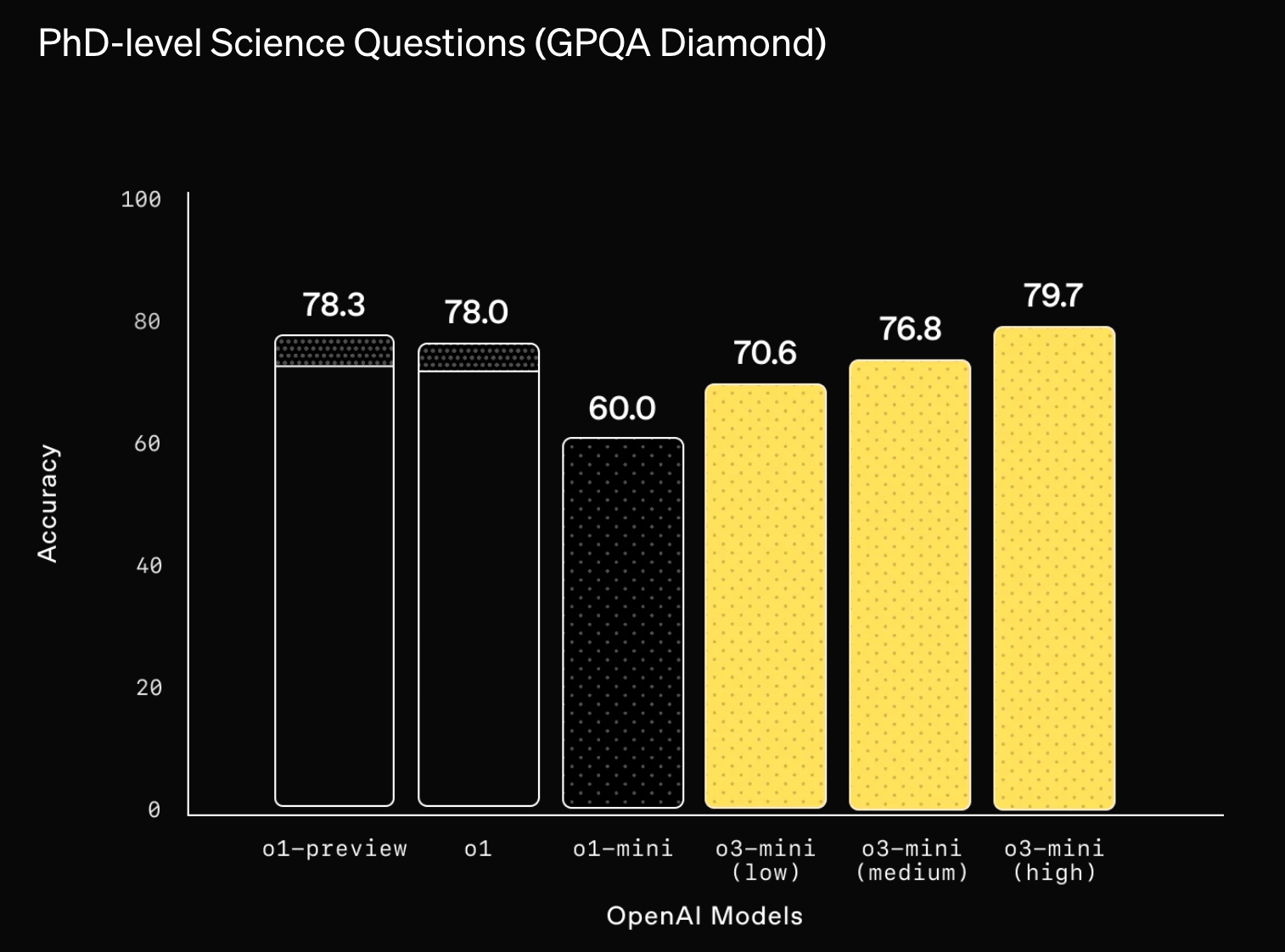
3. PhD-Level Science (GPQA Diamond)
For advanced biology, chemistry, and physics queries, o3-mini’s high setting rivaled the performance of o1 (and beat out o1-mini comfortably). While it’s not quite GPT-4o territory, it’s impressive for a “mini” model. Here’s what it looks like:
And here’s the scores:
The o3-mini-high Option
I know it’s a terrible name. An intriguing aspect is that paid users (Plus, Team, Pro) can select o3-mini-high explicitly if they want maximum accuracy for tricky or critical tasks—like a multi-step mathematics proof or complicated debugging session. In my scrappy playtesting so far, o3-mini-high:
- Technically takes longer but feels fast (slightly higher latency).
- Consistently yields more thorough, step-by-step solutions.
- Outperforms even some older “larger” models on certain specialized STEM tasks.
If cheetah speed is paramount, you can stick to o3-mini (medium). It’s a sweet spot for daily coding, Q&A, or general usage.
What About Safety? New Approach to Safety Training: “Deliberative Alignment”
Like o1, these new models have gone through a rigorous safety alignment process. One highlight is “deliberative alignment,” where the model is trained to reason about human-written safety specs before responding. In simpler terms, it double-checks safety guidelines before forming a final answer.
- Effectiveness: According to OpenAI’s red-teaming results, o3-mini filters out disallowed content reliably and is harder to “jailbreak” than earlier small models.
- Why it matters: If you’re building a production app that handles user-generated queries, you’ll likely appreciate the improved safety features.
OpenAI also teased that they used the same preparedness approach, external red teams, and thorough system card analyses they first introduced with GPT-4. The new system card for o3-mini details the safety improvements, disclaimers, and risk assessments.
Performance & Latency in Practice
OpenAI claims that, across internal A/B tests, o3-mini returns results on average 2.5 seconds faster than o1-mini, with an average total response time around 7.7 seconds. In my own tests in ChatGPT today, the difference is noticeable. You see the first token arrive sooner, which is crucial if you’re iterating quickly or chaining multiple calls in an application. It’s just faster, and that means ChatGPT moves as fast as I think and I’m not sitting around.
Key takeaway: If you’re doing repeated math or code queries, you’ll likely find the speed boost quite helpful.
Who is o3-mini for?
- Developers building STEM-intensive apps: The model’s main sweet spot is cost-effective mathematical, scientific, or coding tasks.
- Teams wanting to scale cheaply: With lower cost per token, you can handle more requests without busting your budget.
- Anyone who wants fast smart chat in ChatGPT: o3-mini essentially replaces o1-mini in both cost and speed while delivering better accuracy. But in certain ways it beats o1 and even o1 Pro too (more below).
What if you’re on the free plan?
You can try “Reason” mode in ChatGPT. This is the first time a small reasoning model is open to free users. It’s defaulted to a medium reasoning level, so it’s quite capable for everyday problem-solving.
TLDR on the model
With o3-mini and o3-mini-high, OpenAI is betting big on fast, specialized reasoning at a lower price point. Yes the availability is absolutely driven by DeepSeek, but this model has been in the works for awhile.
For many coding and math use cases, it really does close the gap between “big-model intelligence” and “mini-model efficiency.” Meanwhile, the new safety training approach—deliberative alignment—brings more robust guardrails to small, cost-effective models, and shows us a path forward on safety for larger and more capable models.
Ultimately, if you need broad knowledge or vision tasks, you might still rely on o1 or a GPT-4 tier. But for those everyday coding sessions or tricky math problem sets—where you want speed, lower cost, and good accuracy—o3-mini is shaping up to be the new standard in the mini lineup.
Part 2: See o3-mini in action!
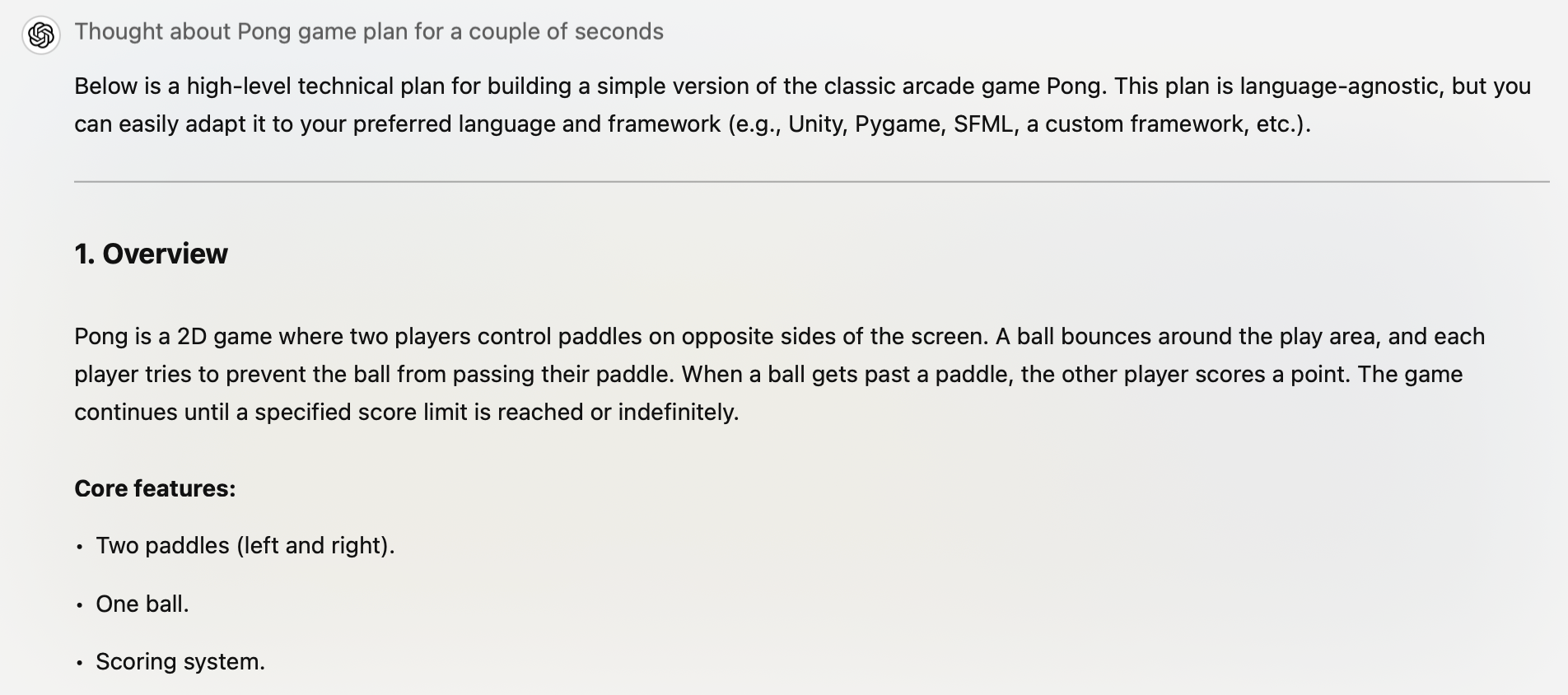
So I got curious and wanted to see what a good technical plan would look like for o3-mini, and how it would compare to other models. Here’s the prompt: Give me a technical plan for the game pong
I gave that to: o3-mini, o3-mini-high, o1, o1 Pro, and Claude 3.5 Sonnet. Yes I could have done other models but this is already long enough. Each model produced a technical plan. Like this but many more tokens:
Below is a side-by-side comparison and ranking of the various Pong technical plans. The goal is to highlight which plan is most thorough, easiest to follow, and most likely to lead to a high-quality result for a developer building a Pong game. Along the way, you’ll see the rationale behind the ranking as well as each plan’s notable strengths and weaknesses.
1. Criteria for Evaluation
To compare these plans fairly, we’ll consider:
Depth & Clarity
- How clearly the plan explains each step (from setup to final polish).
- Whether it includes rationale behind design decisions.
Implementation Detail
- How thorough the plan is in providing pseudocode, code snippets, or references to actual methods.
- Whether it addresses practical considerations such as collision formulas, resetting the ball, or scaling difficulty.
Extendability & Advanced Topics
- Coverage of optional features (e.g., AI, menus, spin mechanics, performance considerations, etc.).
- How easily the plan can be built upon or adapted to new frameworks.
Best Practices & Project Structure
- Whether the plan mentions code organization, modularity, maintainable design, or testing strategies.
- Clarity around performance constraints, data structures, input handling, and architecture.
2. What’s in the box? What did each model suggest?
o1—What It Looks Like
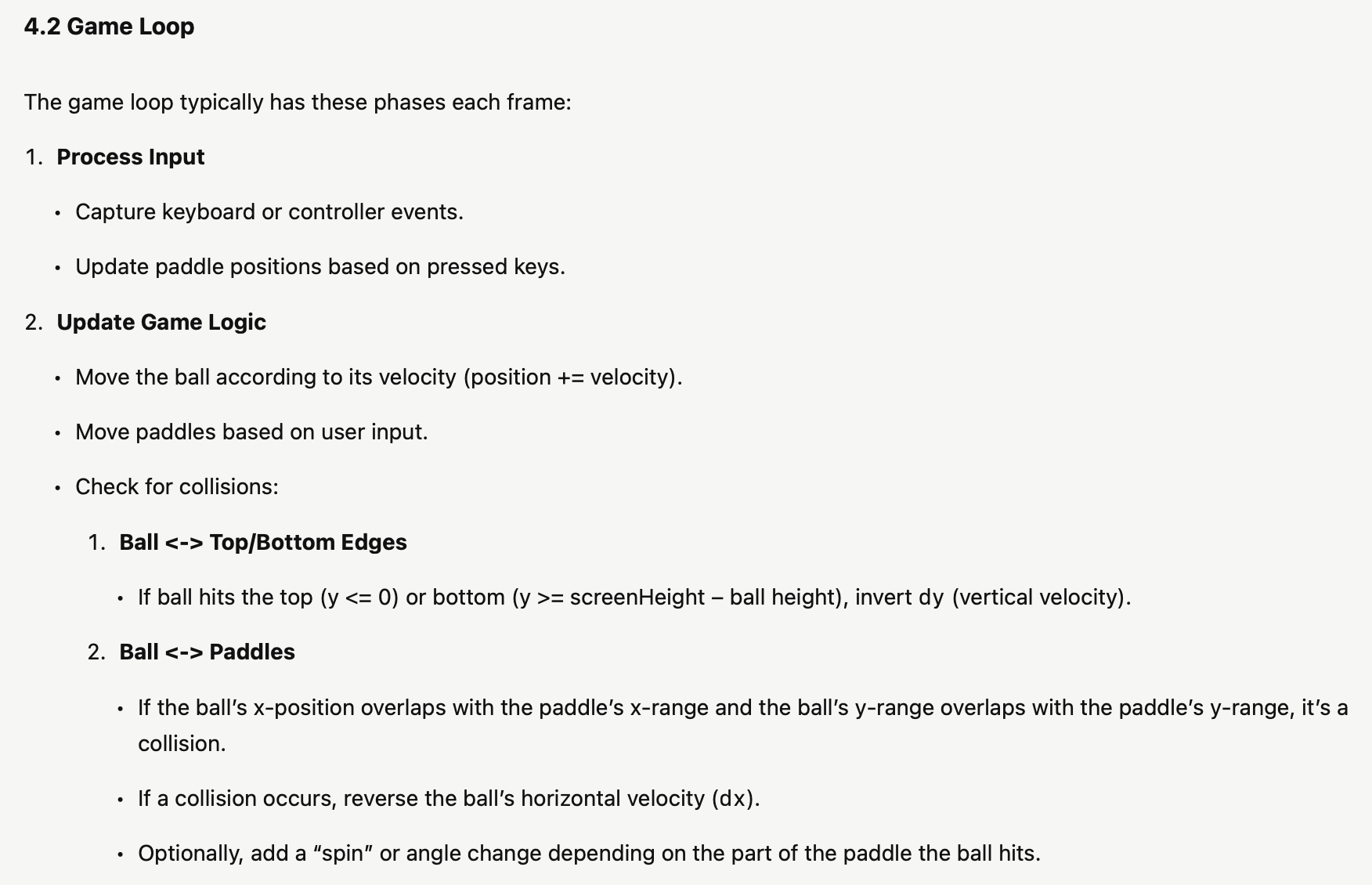
Style & Format:
A traditional step-by-step tutorial. Organized into requirements, system architecture, detailed implementation steps, collision details, data structures, pseudocode, and enhancements.
Strengths:
- Very comprehensive on the basics: game loop, input handling, collision detection, and scoring.
- Clear pseudocode for the main loop.
- Good coverage of optional enhancements like sound, animations, menu systems.
Weaknesses:
While it includes performance constraints, it does not delve too deeply into optimization or advanced AI beyond the simplest approach.
Overall Takeaway:
A very solid “classic tutorial” style plan. Great for beginners or anyone wanting a clear, stepwise approach.
o1 Pro—What It Looks Like
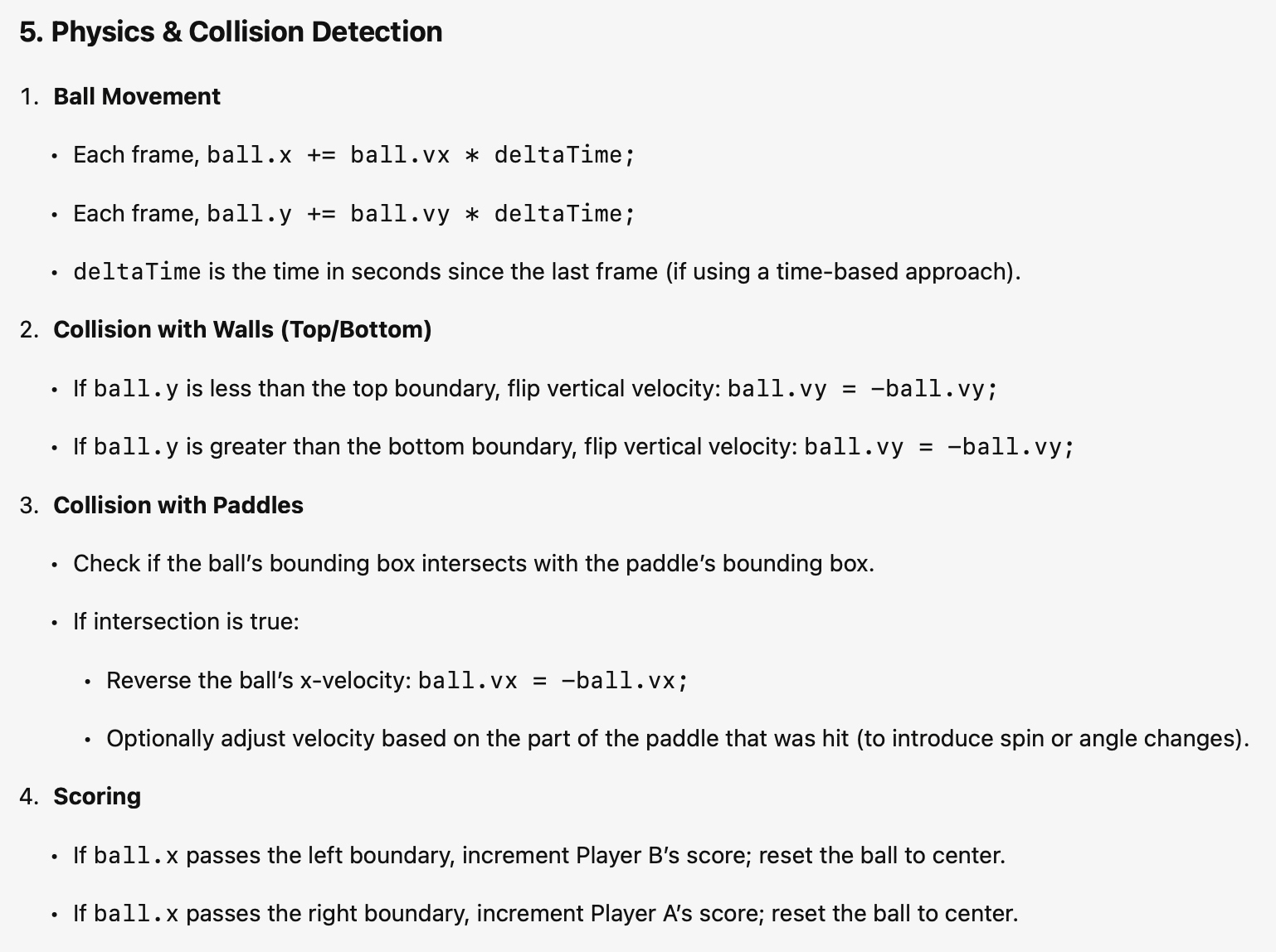
Style & Format:
Similar structure to o1, covering high-level architecture (game loop, input, update, render), object definitions (paddle, ball, score), and optional enhancements.
Strengths:
- Straightforward coverage of the essentials—paddles, ball, collision, scoring.
- Good mention of potential expansions like power-ups, menu states, or multiplayer networking.
Weaknesses:
Largely overlaps with o1 in content, sometimes a bit more concise. Readers looking for especially deep or specialized detail (e.g., advanced spin mechanics or deeper collision physics) might find it a bit high-level.
Overall Takeaway:
Another good “core plan” that is direct and easy to adapt. Slightly less detailed than o1 in certain sections but still covers all the bases well.
o3-mini—What It Looks Like
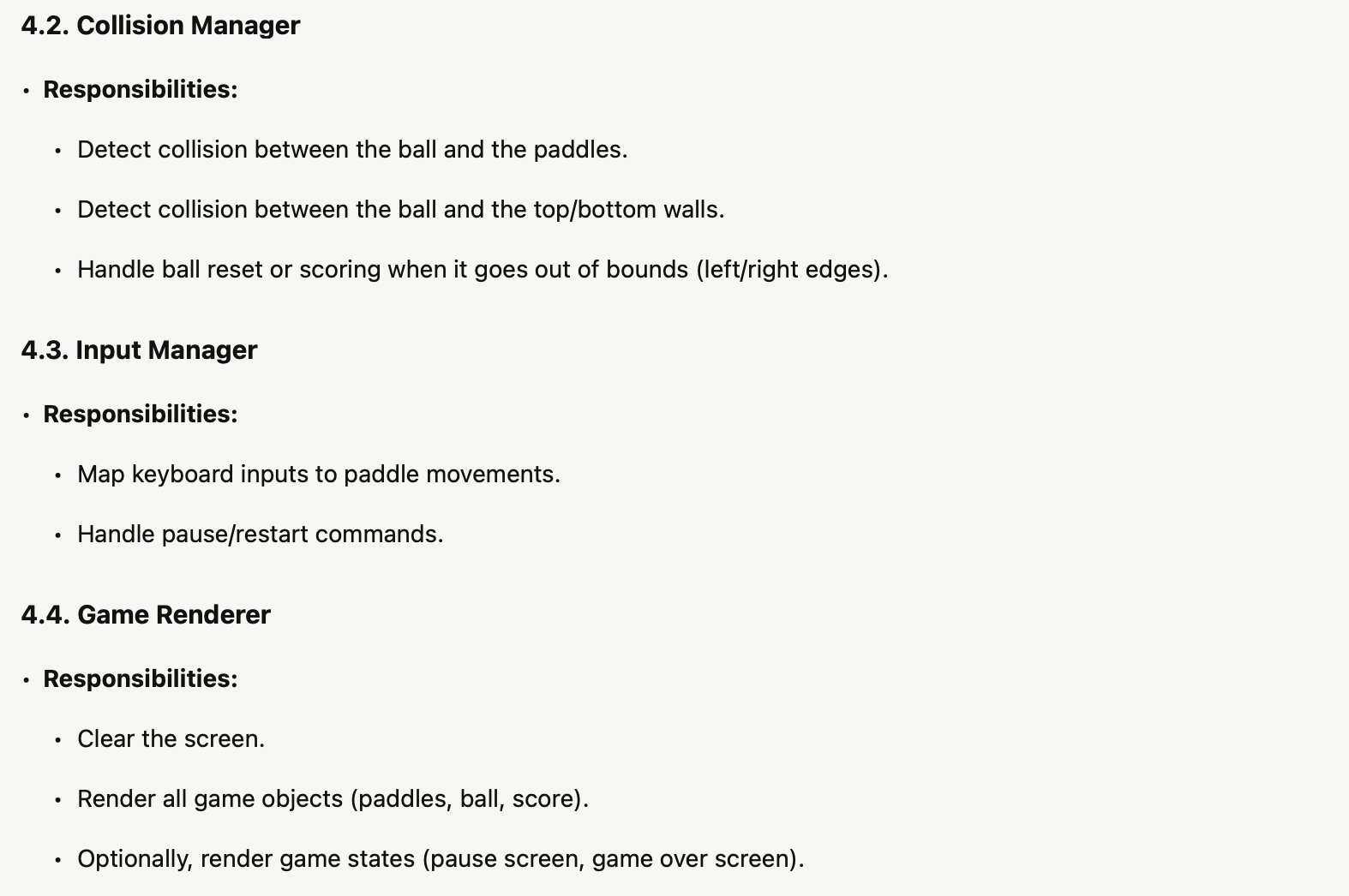
Style & Format:
A relatively concise plan. Hits on the major pieces (game loop, object classes, collision detection, scoreboard).
Strengths:
- Very direct, clear bullets.
- Good pseudocode blocks for quick reference, especially for a small project or a coding demonstration.
Weaknesses:
- By design, it is shorter (“mini”), so it does not dive as deeply into advanced features (AI variety, performance techniques, or broader game states).
- Some expansions or best practices are mentioned only briefly.
Overall Takeaways:
Ideal if you want a quick reference or a minimal starting point. Less thorough than other plans in covering performance, advanced collision, or multi-state menus.
o3-mini-high—What It Looks Like
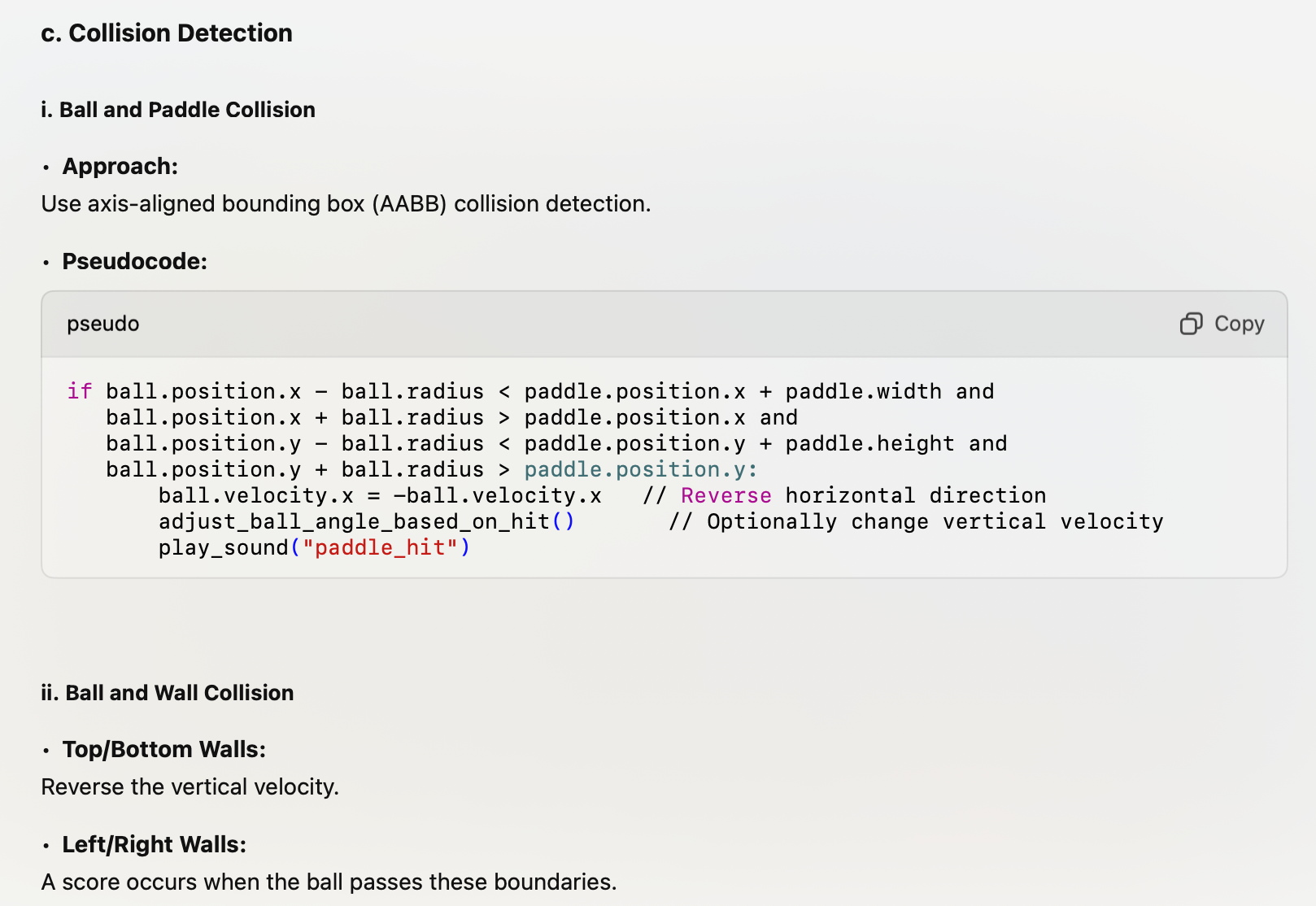
Style & Format:
Billed as a “comprehensive” plan. Similar bullet structure, but more detailed coverage of system architecture, game loop, collision detection, game states, enhancements, and pseudocode.
Strengths:
- Very thorough coverage of each step: system requirements, architecture, data structures, collision logic, AI, optional enhancements.
- Provides a well-organized approach for not only building Pong but also extending it with more sophisticated features (spin mechanics, difficulty settings, network play).
- Specifically includes sections on testing, performance, and possible expansions.
Weaknesses:
Might be overkill for someone who just wants the absolute simplest Pong. It leans more into a complete “mini-project architecture” approach.
Overall Takeaways:
An excellent, in-depth plan for someone who wants to build Pong in a robust, maintainable manner and possibly add advanced features later. Likely the strongest in terms of completeness and clarity.
Claude 3.5 Sonnet—What It Looks Like
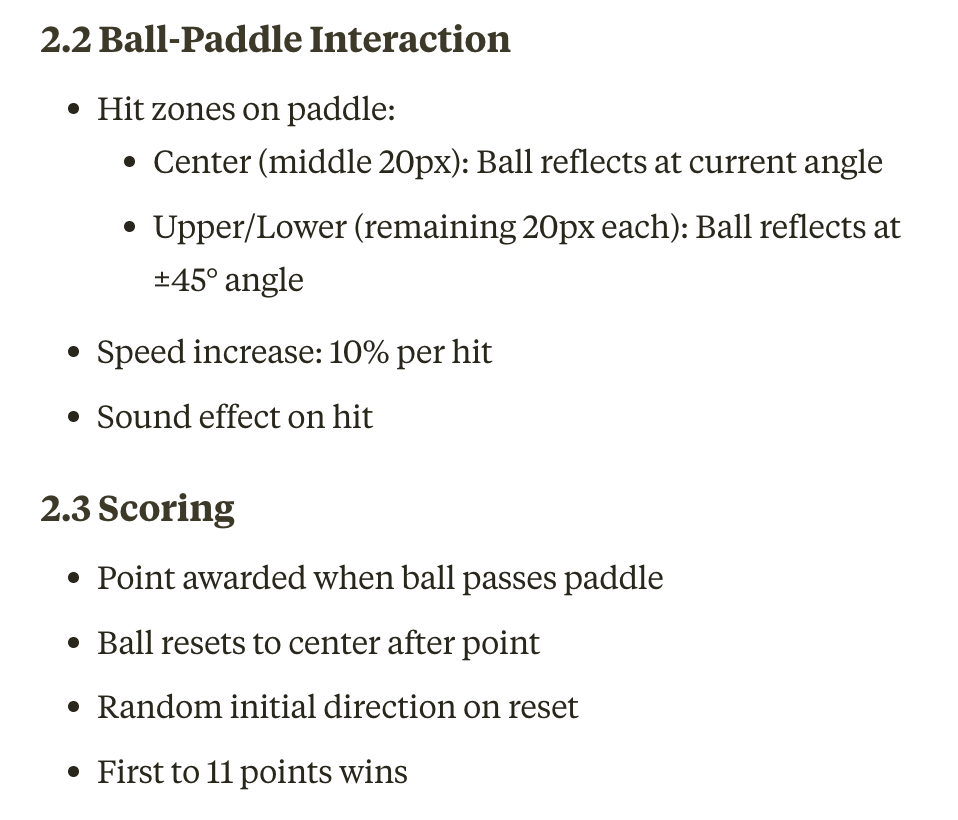
Style & Format:
A technical specification approach, with bullet points for game components, mechanics, controls, and performance. Includes an example structure that hints at React/JSX or TypeScript usage.
Strengths:
- Covers specific details like pixel dimensions, speeds, angle calculations, maximum speeds, and even references to a center dashed line.
- Includes AI difficulties, testing strategies, performance considerations, and code organization hints.
- Mentions modern front-end frameworks (e.g., React with a Game.jsx, Paddle.jsx) which can be useful if you’re building a web-based Pong.
Weaknesses:
- Slightly specialized toward a JavaScript/React environment, so it may be less universal if you want a purely language-agnostic plan.
- Its bullet style is quite direct but can feel less tutorial-like compared to others.
Overall Takeaways:
A strong plan for developers who want a modern web stack approach with clear technical specs. Balances a requirements-spec style (dimensions, speeds) with a short overview of code structure.
3. Ranking & Rationale
Below is a summarized ranking of these plans, from most comprehensive and generally “highest quality” to more concise or specialized. Keep in mind that any of these could be “best” depending on your goals (e.g., quick project vs. advanced expansions vs. modern JS environment).
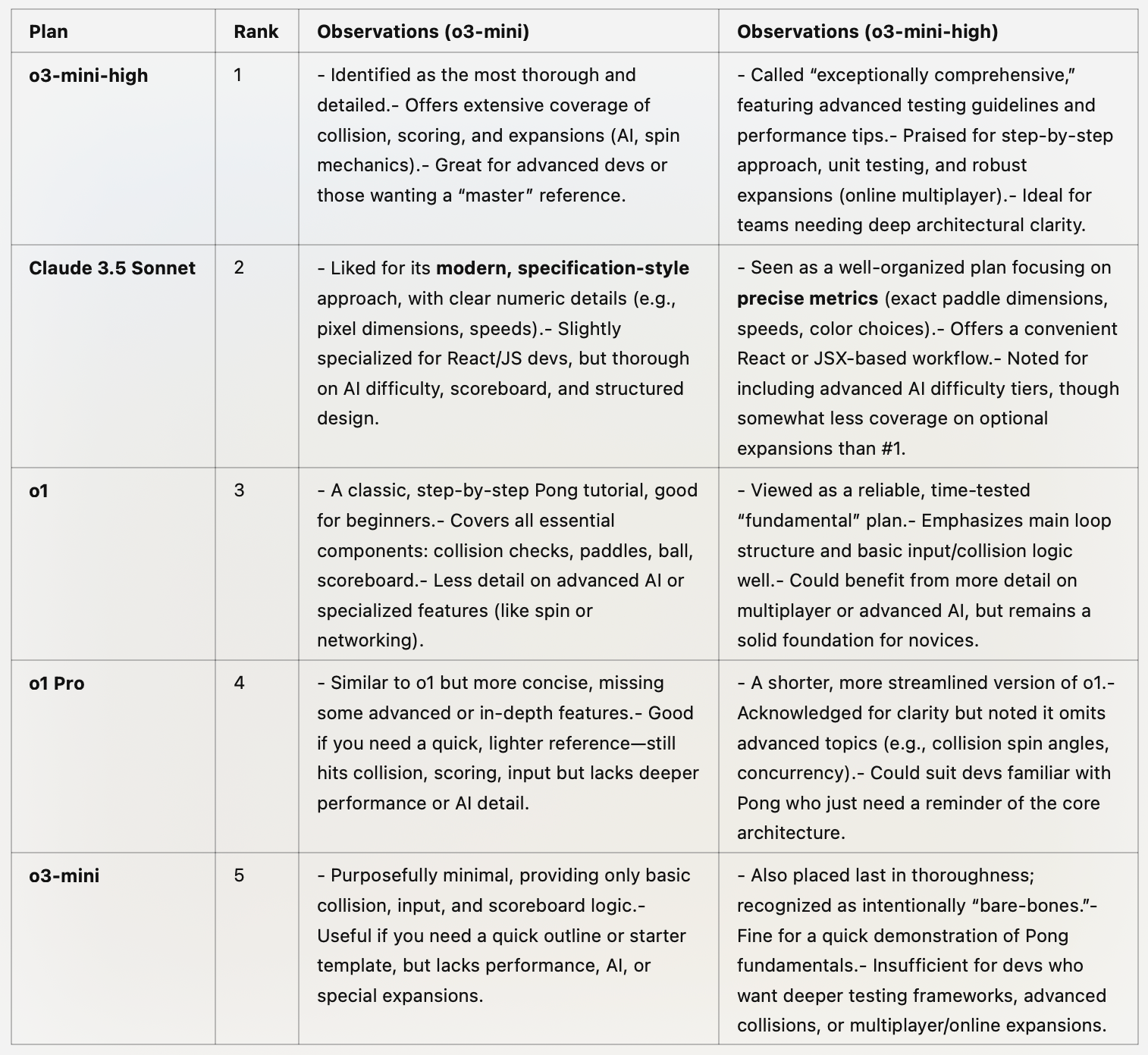
1. o3-mini-high
Why #1?
- Comprehensive coverage of the entire development cycle, from game loop to testing.
- Thorough discussion of collision detection, states, AI, and possible enhancements.
- Excellent for building not just a simple Pong, but a well-structured, maintainable version.
2. Claude 3.5 Sonnet
Why #2?
- A very organized bullet-point approach with specific numbers, speed increments, AI difficulty, performance metrics, and a React/TypeScript-friendly architecture.
- Particularly good if you’re targeting modern web technologies or want a crisp “requirements spec” for each component.
3. o1
Why #3?
- A classic, detailed Pong tutorial that is language-agnostic and covers the fundamentals in a friendly, step-by-step manner.
- Great blend of clarity and thoroughness if you’re implementing Pong from scratch in a standard 2D framework.
4. o1 Pro
Why #4?
- Closely parallels o1 in structure and completeness, just slightly more streamlined.
- Covers all the basic collisions, scoring, input, but not as in-depth on expansions.
5. o3-mini
Why #5?
- Purposefully minimal. A fine quick reference but not as deep on advanced topics, expansions, or best practices.
- Best for a short, rapid prototype or for teaching the absolute basics in a condensed way.
Which One is “Most Useful” For You?
- If you want maximum detail and a solid structure that will scale up (more complicated features, advanced AI, or sophisticated menus) → go with o3-mini-high.
- If you prefer a bullet-point style specification that’s easy to implement in a modern JavaScript stack (e.g., React) → choose claude.
- If you just need a standard, language-agnostic tutorial with good step-by-step coverage → pick o1.
- If you want that same coverage but in a slightly more concise form → o1Pro.
- If you need something minimal and you already understand most of the fundamentals but want a short checklist → o3-mini.
Overall Takeaways
All of these plans will get you to a working version of Pong. Each addresses the core elements—paddles, ball, collisions, scoring, basic input—so none are “wrong.” The differences boil down to the level of detail, style of explanation, and how many extra features or best practices they include.
o3-mini-high stands out as the richest single document for a thoroughly maintainable, extensible Pong.
Claude is a close second, especially for a modern web-based approach.
o1 and o1Pro are classic comprehensive tutorials that remain perfectly serviceable for a straightforward Pong implementation.
o3-mini is a succinct plan that is easy to scan but relatively light on optional depth.
Whichever you pick, you’ll have the essentials to build a classic Pong—and hopefully have fun extending and polishing it afterward!
I hope you enjoyed this deep dive into o3-mini! Let me know what you’re building in the comments.
For more on AI, subscribe and share!

\o3-mini is FAST\