I jumped in and started playing with Operator as soon as it became available—yes it's the future and you will love it, but gosh the future is very janky right now!
By Nate
Published: 2025-01-24
URL: https://natesnewsletter.substack.com/p/openai-operator-a-complete-hands
Since it became available this morning, I’ve been playing with OpenAI Operator in its research preview form, and despite its quirks and occasional nail-biting slowness, it feels like peering into the future. My hat is off to the OpenAI team for this one.
And yes, it beats Claude MCP hands down!

\Apparently we humans are less than 80% good at computers\
First, what is Operator?
Operator is an AI that doesn’t just answer questions in a chat—it can actually go to websites, scroll, click, type, and fill out forms on your behalf. It can do complex tasks (mostly) like downloading PDFs from emails, or researching travel itineraries, and it even (via Booking) can book travel for you.
Here’s the full story of what it can (and sometimes can’t) do.
Subscribers get the full details on Operator!
The Heart of Operator: How It Works
OpenAI calls Operator an “agent” that uses a brand-new model named Computer-Using Agent (CUA). CUA combines GPT-4o’s vision capabilities with reinforcement learning, letting it “see” the same webpages we do—like Amazon or a local restaurant’s site—and then interact with them. Instead of relying on specialized APIs, Operator literally interprets screenshots and uses mouse clicks and keystrokes to accomplish tasks.
It’s a Research Preview: Only available to Pro users in the U.S. for now. The price is the biggest problem ($200 per month).
Benchmarks: The official blog post says CUA sets new state-of-the-art results on WebArena (58.1% success rate) and WebVoyager (87%)—not perfect, but a big leap for a general-purpose browser agent.
Safety Layers: Operator is designed with features like user confirmations, “watch mode” on sensitive sites, and a special “monitor model” to guard against malicious websites or hidden instructions (prompt injections).
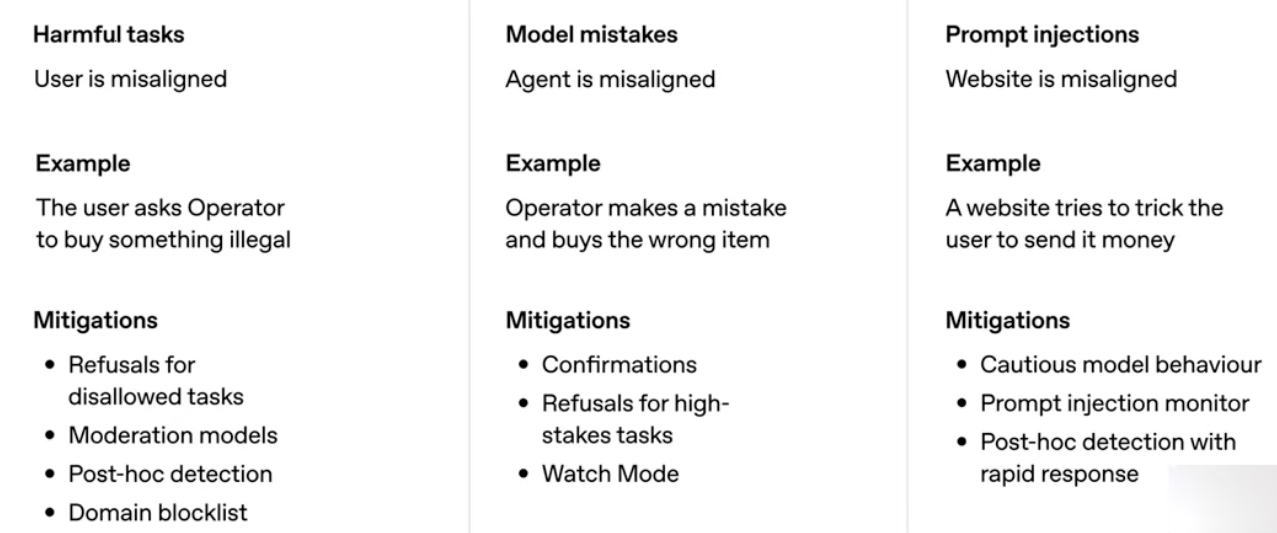
\When I get up in the morning without coffee, I am misaligned\
In simpler terms, Operator is trying to be a universal digital assistant that can do the same repetitive tasks we do with a mouse and keyboard—like searching for deals, ordering groceries, or making appointments—only it does them by “looking” at the screen.
What I Used Operator For: From Beanies to Turtles to Hobbit Adventures
I tested Operator on a variety of tasks. Here are some highlights from my actual screenshot logs:
Finding 6 Creative Beanie Hats
I’m the beanie guy on TikTok, so I asked Operator to open Amazon and gave it the following (probably overly detailed) prompt:
Can you please find 6 really creative beanie hats and add them to my amazon cart? I'm a big fan of beanies and I'd like to get some new colorful ones with fun themes for my collection. I like goth themes, the colors green, yellow, orange, and black, and I also enjoy skiing and sauna and polar bear swims. Feel free to have fun picking good beanie hat options!
It typed “goth beanie hats” in the search bar, scrolled through the listings (painstakingly slowly, I might add), read product descriptions, and eventually found one beanie hat. It asked what I thought. I thought it looked terrible and told it to avoid hand-knitted hats. Then it found a pair of spiked beanies which made me giggle, so I said add that and find more. It also found a neon green ski mask.
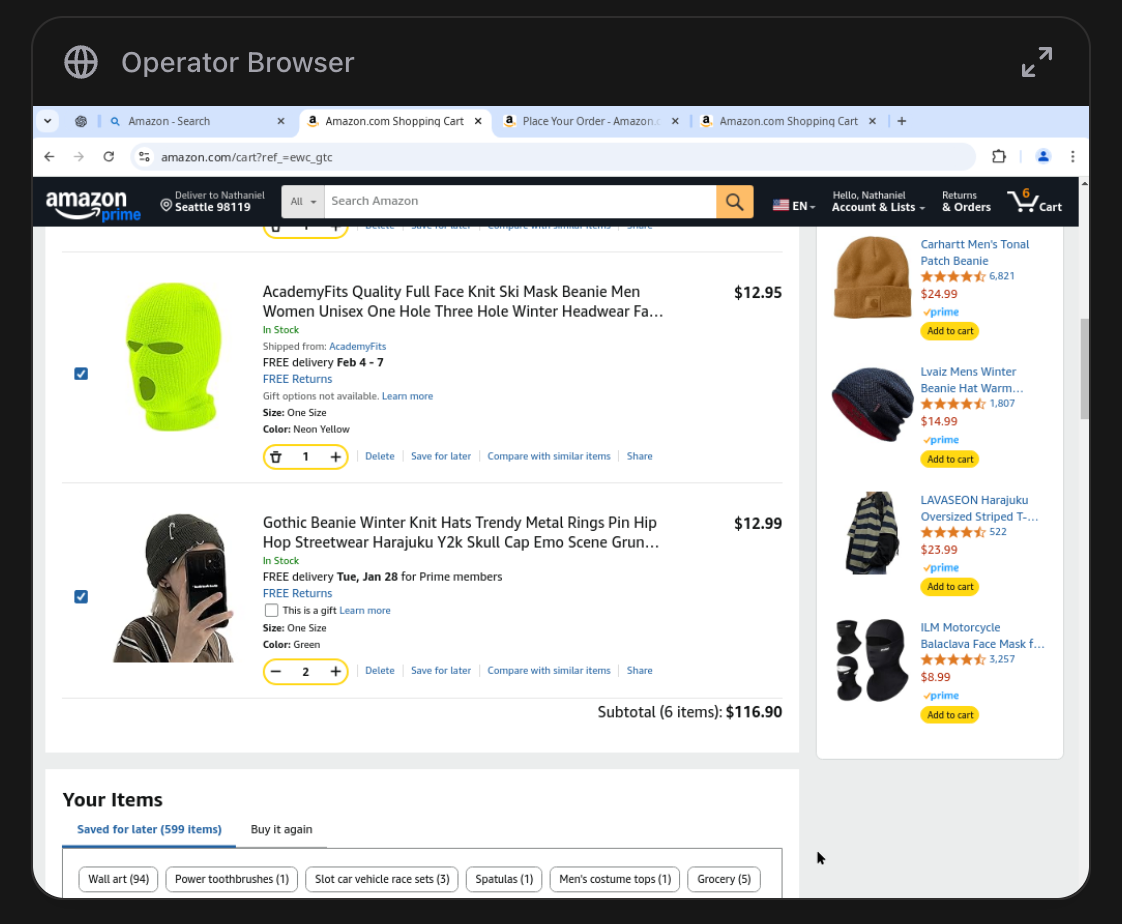
Halfway through it asked me to log in. So I did. Then it wanted to persuade me to check out with two beanies, not six. I’m not that guy. So I sent it back to look for more, and we’re still not done.
It can close its eyes for passwords: Right before handing control, Operator told me it was not taking screenshots and the screen got very big so I could use it without Operator “looking.” It was a nice UX because I believed I was entering my password privately.
It is SLOW: I will say, this was slow to watch. But the huge upside was that I could step away, do other things, and let it methodically work.
It has unexpected bugs: Like a lot of people, I keep a bunch of random stuff I’m thinking about in my Amazon cart. Without being asked Operator cleared ALL of those items out so it could add a couple of beanies. I was not amused.
It makes weird choices: Is a neon green ski mask a beanie? No. But Operator kind of thinks that it is a beanie. Or at least can’t tell the difference.
Vacation Snax
One of my pet tests for AI is whether it can help find restaurants locals value.
I asked it to look for poke restaurants locals recommend on the northwest coast of Maui, near Napili Bay. After digging around for awhile, Operator came back with a winner:

I am drooling already, and I appreciated that I could clearly see where and how Operator reached that conclusion.
Surprisingly Accurate: I could actually see on Yelp where the reviewer mentioned that locals recommend Miso Phat Sushi.
UI is Refreshingly Clean: Operator’s interface gave me a window with screenshots as it hopped from site to site, plus a ChatGPT-like pane underneath where I could type new questions. I found it completely intuitive.
Hobbit or Lord of the Rings–Themed Activities in Seattle
Possibly my favorite demonstration: I asked Operator to find Hobbit-themed kid activities in Seattle with this prompt:
Can you find me hobbit or lord of the rings themed activities within a radius of about 50 miles of Seattle that are appropriate for a kid between 8-12 years old. The dates need to between today (January 23 2025) and six months from today. I'd like you to rank them overall in terms of delight, affordability, ease of travel from Seattle, length of activity, and cognitive complexity. I'd like to prefer adventurous and complex activities, since that's what my child will enjoy. Please deliver an overall ranking and rationale, along with a top recommended activity. Each activity should include relevant dates, details, and prices.
Lo and behold, it found one event (not many exist) and gave me basic details about scheduling, location, and approximate cost.

\It’s a real event!\
Time Saver: While it rummaged through event listings, I literally did something else. By the time I checked back, I had the info I needed, including times and relevant notes.
Strengths: Why It Feels Like the Future
It Gives You Time Back, Sometimes
The biggest perk is that Operator does the grunt work while you focus on something else. This was crystal clear for me when it was searching for that hobbit-themed event in the background. If you picture letting it handle nanny research, or scheduling a dental appointment across multiple provider websites, the time you save could be huge.
Amazingly Broad Utility
Because it uses a visual interface (screenshots and mouse clicks), it can technically navigate any site that a normal human could, from Amazon to random local government portals, without specialized APIs. The official blog post even mentions potential uses in public services (like the City of Stockton’s pilot program), letting people more easily enroll in city programs.
Clean UI and Good Safety Checks
Operator’s user interface keeps the experience from becoming overwhelming:
• A central browser window that shows you step-by-step screenshots.
• A familiar ChatGPT-style text conversation to steer Operator.
• “Watch mode” on sensitive sites (like email or financial pages) so you can supervise every click.
• Confirmations before major actions: It asked me for confirmation before finalizing any Amazon purchase or email deletion. That’s comforting!
Fewer AI ‘Hallucinations’
Because Operator can only show you what it actually finds online, you’re less likely to get made-up “facts.” Yes, it can still misunderstand or misread a site, but it can’t conjure a local restaurant that doesn’t exist. If there’s nothing out there, it just fails gracefully.
Weaknesses: It’s Slow and Sometimes Fumbly
Eye-Scratchingly Slow at Times
Watching Operator can be like watching a novice user navigate the internet on dial-up. It’ll scroll, open a wrong tab, backtrack, highlight text incorrectly, or get stuck in loops. If you’re in a hurry, it can be maddening. It’s best to queue up tasks you’re happy to let run in the background.
The Mistakes Feel Real
Especially on pages with intricate forms or weird pop-up sequences, Operator can get into trial-and-error clicks. Or it can simply make decisions (like dumping an Amazon cart) while you aren’t looking.
The logs from my beanie-hat order show it accidentally re-checking the same product link multiple times. That’s basically the trade-off with a universal interface: it has to guess a website’s UI flow from scratch.
Not Fully Autonomous
This is absolutely correct because of how janky the model is right now, but it is still annoying. As advanced as it is, you still need to give Operator well-phrased instructions. Overly narrow requests might yield nothing, while overly broad ones can lead to meandering searches. You’re definitely still in the driver’s seat—just with a helpful sidekick who handles the wheel occasionally.
Technical Nuggets from Under the Hood
CUA’s Benchmarks: Operator’s underlying model, CUA, scores 58.1% on a complex web-browsing benchmark called WebArena, and 87% on WebVoyager. It also performs at about 38.1% success on OSWorld, which tests full operating system tasks. These numbers mean it’s good—but not yet near human-level skill—at controlling a browser or PC. You can read more on the system card paper here.
Safety Layers:
• User Confirmation: Operator asks before critical steps.
• Training Opt-Out: If you turn off “Improve the model” in your ChatGPT settings, your Operator data also won’t be used to further train these models.
• Prompt Injection Monitor: If a malicious website tries to slip in hidden instructions, Operator is designed to detect and ignore them (most of the time).
• Data Privacy: The official docs mention easy ways to delete browsing data, log out of all sites, or remove past conversations. So if you want to keep your tasks private, you can quickly do so.
Final Thoughts: A Janky, Slow, But Addictive Glimpse of the Future
Despite Operator’s slow speed and occasional awkwardness, it genuinely frees you up to do other things. My personal experiences—whether that was letting it dig up beanie hats, find poke spots, or gather Lord of the Rings–style events—have convinced me that we’re on the verge of something big here.
Could It Replace You for Basic Web Chores? Not yet, but it’s already great for tasks like listing out options, checking local events, or scouring a site’s menu so you don’t have to.
Is It Perfectly Polished? Absolutely not. There’s still real frustration if you watch it for too long. You’ll see it rummaging clumsily through pages. But guess what? That’s time you’re saving.
Does It Feel Like the Future? 100%. When Operator is rummaging through half a dozen websites for you while you focus on something else, it’s easy to imagine how entire workflows could soon be semi-automated.
In short, Operator is a big leap. Yes, you’ll occasionally want to yank the mouse away from it and say, “Stop clicking around!” But that’s part of what it means to watch an AI literally use a browser. For me, that slow, methodical approach was worth it—especially once I saw the results stacked neatly in my cart or in a summary list. If you’re a Pro user in the U.S., I’d encourage you to try it. Even if you only ask it to do something silly—like gather six weirdly goth beanies—it will open your eyes to the next frontier of AI.
For more on AI, subscribe and share!

\The robot is learning to use the computer, which is really cool\