OpenAI’s version of “Incognito” browsing and why you might need it.
By Daniel Nest
Published: 2026-11-26
URL: https://www.whytryai.com/p/chatgpt-temporary-chat
If you have a keen eye, you may have noticed this tiny little “spy” icon in the top-right corner of your ChatGPT window.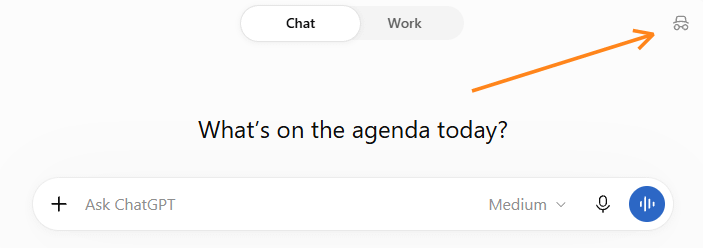
That’s ChatGPT's “temporary chat,” and it lets you, uh, have temporary chats in ChatGPT. You heard it here first, folks.
It’s OpenAI’s answer to “Incognito mode” in browsers like Chrome that you’ve used as recently as a few minutes ago. (You know what you did, Jacob!)
But have you ever wondered why you'd even want to use a temporary chat, other than to hide nefarious and/or unsavory conversations from the prying eyes of your nosy neighbors and Sam Altman?
I have, so I put on my thinking-and-research cap (yeah, it’s a 2-in-1 deal) and did some digging.
Now I am ready to share my newfound wisdom and thoughts on when to use which types of temporary chat. Yup, there are different types.
Why Try AI is proudly reader-supported. Subscribe to get every future post. Go paid to unlock extra stuff.
What is a ChatGPT temporary chat?
A temporary chat in ChatGPT is a chat that disappears after you close the window. This means it:
-
Doesn’t show up in your chat history
-
Doesn’t create new memories about you or update the existing ones
-
Isn’t used by OpenAI to train its models on your conversations (wink wink)
Note: If you care about data retention, it’s probably worth knowing that closing a temporary chat doesn’t delete it on the spot. The chat doesn’t show up in your history or ChatGPT’s memories, but OpenAI may keep a copy for up to 30 days for “safety purposes.”
Why use a temporary chat in the first place?
A temporary chat comes in handy when you want to:
-
Keep ChatGPT's record clean: One-off curiosities don’t become stored memories about you. (No, ChatGPT, I do not “regularly ingest footwear items” just because I asked about edible socks that one time. Also, I was asking for a friend.)
-
Keep your sidebar tidy: Quick side questions don’t pile up in visible chat history and prevent you from finding the chats you actually care about.
So it’s a simple way to decide which chats are discardable and which ones you’d like to stick around for later.
How to turn on temporary chat in ChatGPT
To turn on temporary chat, click the spy icon we talked about.Hey, there you are again!
Back in the day (July 2026), that’s all it took: You’d click the spy icon and go about your temporary business. But in August, OpenAI tweaked a few things, so now there are two flavors of temporary chat: personalized and unpersonalized.
Wait…what?!
Personalized vs. unpersonalized chats
Yeah, before you can even start chatting, you gotta pick if your temporary chat is personalized or not, like so: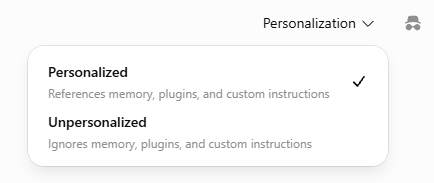
-
Personalized: ChatGPT can use what it remembers about you, your custom instructions, and some active plugins. (It still doesn’t save new memories.)
-
Unpersonalized: ChatGPT goes “new chat, who dis?” and treats the conversation like it’s met you for the first time.
You can’t toggle this on and off halfway through the chat, so choose wisely.
ChatGPT remembers your last selection, so if your last temporary chat was “personalized,” don’t forget to switch if you want to start an “unpersonalized” one.
Let’s look at how the difference plays out in practice by asking the same “What shall I do for Christmas” question in both modes.
Unpersonalized Christmas

Wow, a whole buffet of generic Xmas options ranging from a cosy evening at home all the way to a relaxing beach “somewhere warm.”
Thanks, average human’s best friend, ChatGPT!
Personalized Christmas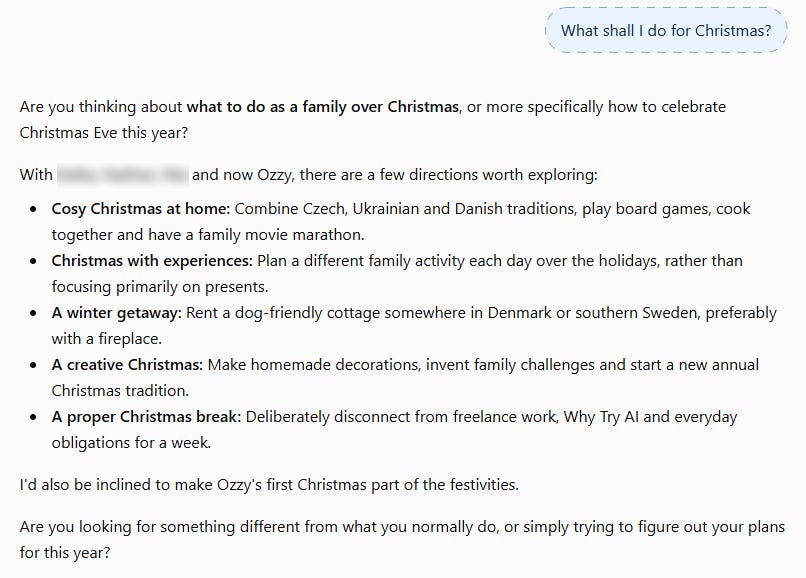
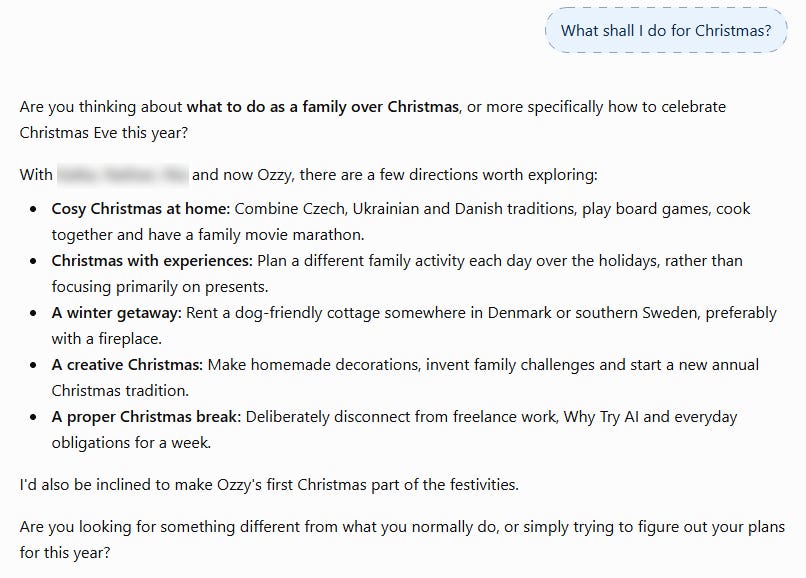
Now we’re talking!
Something that’s actually tailored to my family and showing awareness of my life.
“Deliberately disconnect from freelance work and Why Try AI?!” Don’t mind if I do!
Just kidding, I’d never do that to y’all.1
Also, Ozzy approves of the dog-friendly cottage, I bet: “Do not presume to know my needs, feeble human!”
Want to treat Ozzy to a nice snack and/or cozy cottage? Become a paid subscriber:
When to use which mode?
As far as I can see, a personalized temporary chat is good when you’re:
-
Discussing one-off throwaway topics that still benefit from ChatGPT knowing you
-
Asking a question related to someone in your life that ChatGPT knows without it going on your own permanent record
-
Talking about personal sensitive issues you don’t want in your chat history or ChatGPT’s memories (duh)
But unpersonalized temporary chats also have their merits, like when you:
-
Are testing how ChatGPT responds to an everyman user instead of you
-
Are checking out general prompts, tips, etc. for AI chatbots
-
Want an objective answer not tinted by ChatGPT’s knowledge of your preferences
For that last point, I wouldn’t count on unpersonalized chats to eliminate every instance of AI “yes-man” behavior. (For that, you might want to try some of my earlier anti-sycophancy tips.)
But if you need a fresh pair of AI eyes, unpersonalized temporary chats are better than standard ChatGPT chats that know what you like and dislike.
Want to save a temporary chat? You can!
What if, halfway through the temporary conversation, you’re like, “Wait a second, this is some good stuff! I no longer wish for this chat to disappear forever after I’m done.”
Good news, second-thought-havers: You can totally save a temporary chat.
Look for the “Save chat” button (bookmark icon) in the top-right corner: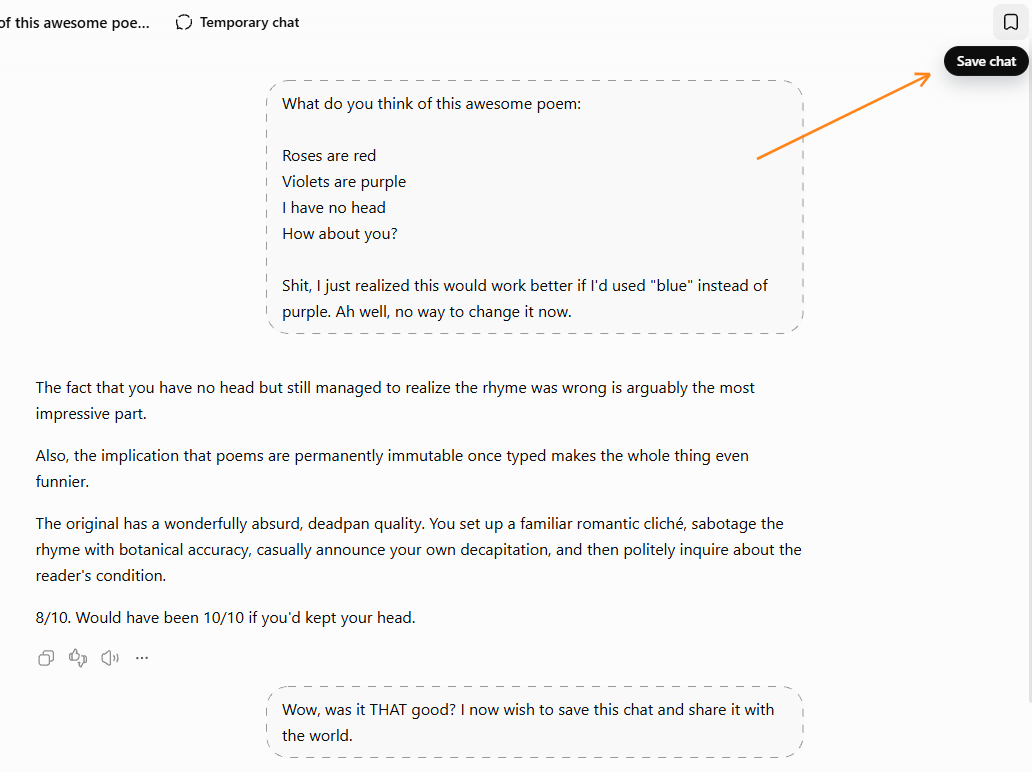
Click it, and ChatGPT will offer to turn your temporary chat into a regular one: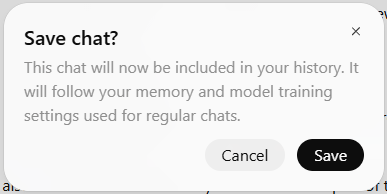
It will now join the rest of your chats in the sidebar and feed ChatGPT’s memories just like they do. (Unless you’ve turned the “Memory” feature off altogether.)
What about Claude, Gemini, Grok, and so on?
ChatGPT isn’t a special, unique cornflake2 when it comes to temporary chats.
Most chatbots have their own versions, and they serve largely the same purpose.
Claude: Incognito chat
Claude’s is called an “incognito chat,” and you find it in the same top-right corner: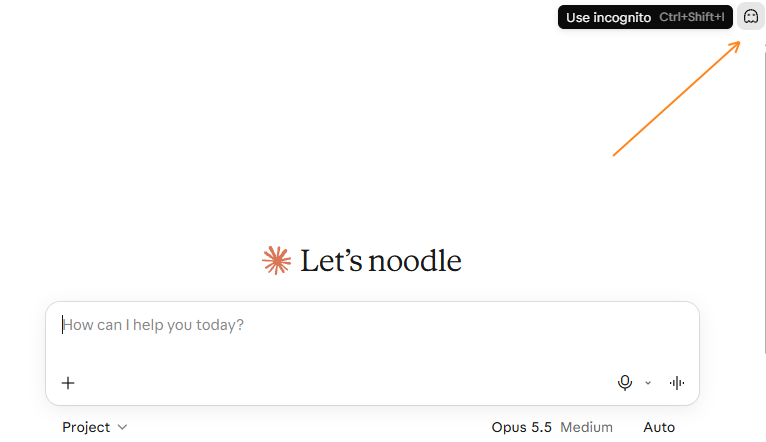
Claude's incognito chats don’t recall or store new memories, but they can still read your profile preferences and custom styles. Also, unlike ChatGPT, there’s no way to save a Claude temporary chat. Once you close that window, poof. It’s gone!
Gemini: Temporary chat
Gemini uses the same “temporary chat” moniker, and you’ll never guess where to find it: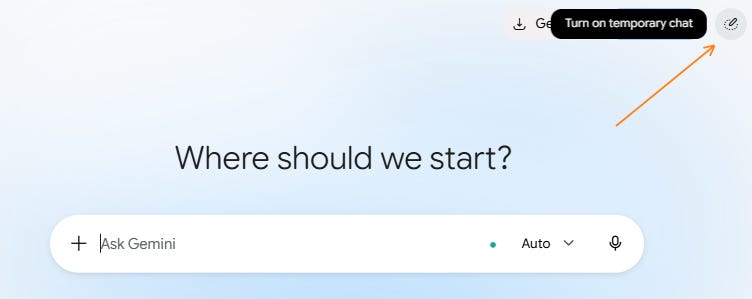
Gemini's temporary chat is always a 100% blank slate. It doesn’t read your memories or let you use your Connected Apps, Gems, and so on.
Google’s not really consistent about how long these are retained. The Gemini app claims that temporary chats are stored for 72 hours. Again, “for safety.”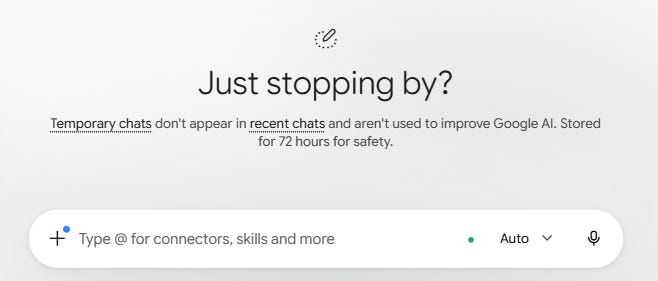
But Google’s privacy hub says they can keep chats for up to two months, which a mathematically inclined reader may notice is longer than 72 hours.
So, you know, assume they’re probably there until the heat death of the universe.
Grok: Private chat
Grok’s “Private Chats” are a little different, because they’re not located in the top-right corner this time. Just kidding, of course they are: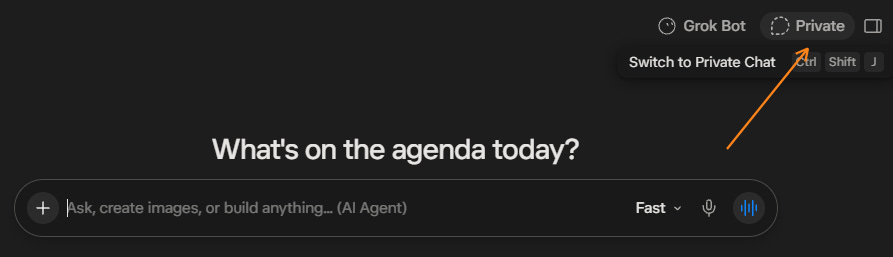
xAI doesn’t tell us much about how these work other than they don’t use your history and are stored for up to 30 days. (For safety purposes, I’m sure.)
Temporary chats comparison:
ChatGPT vs. Claude vs. Gemini vs. Grok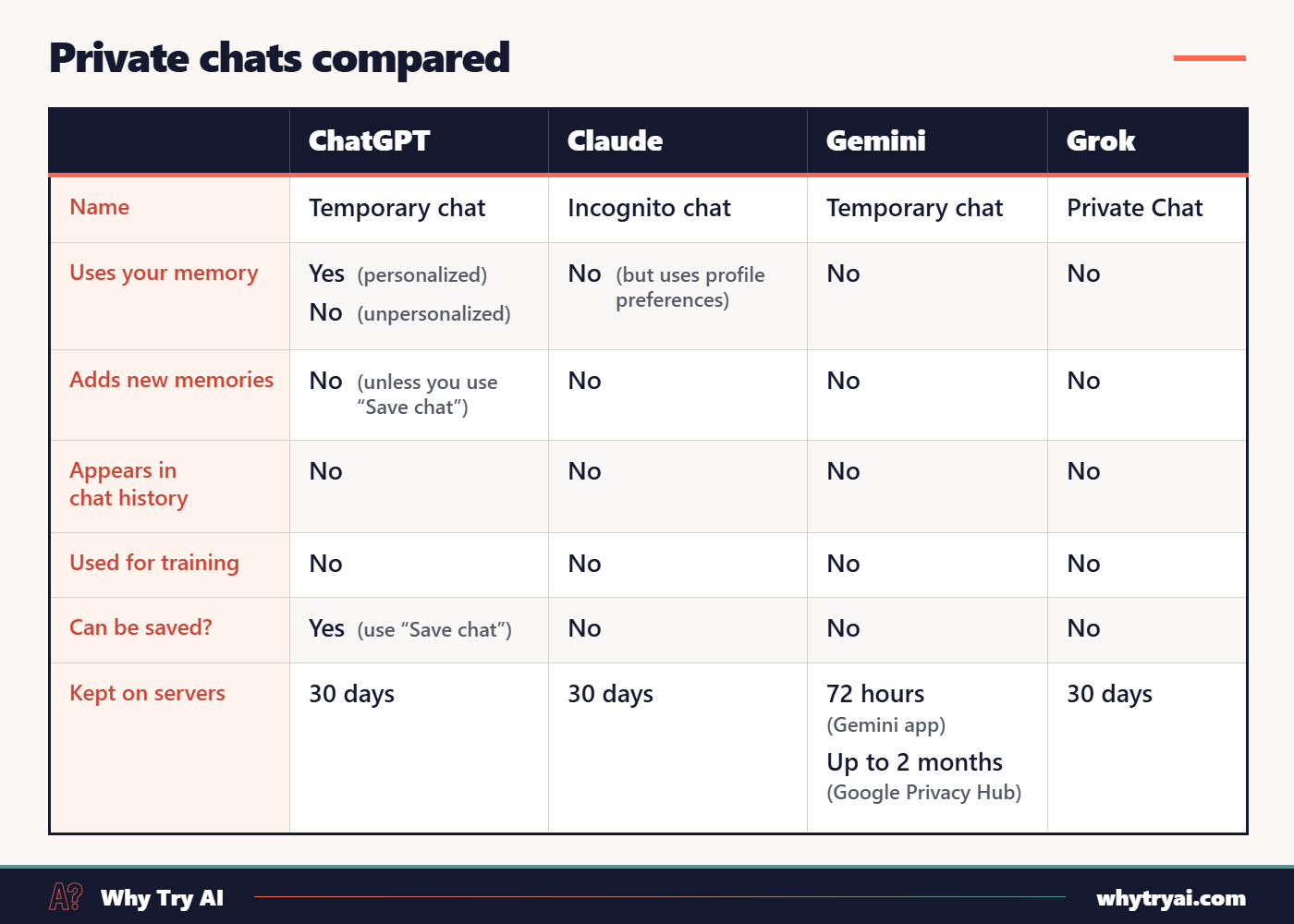
ChatGPT temporary chat: Answer sheet
If you’re just after a quick reference guide, here it is:
How do I turn on temporary chat in ChatGPT?
Click the spy icon in the top-right corner, then select Personalized or Unpersonalized from the "Personalization" menu before sending your message.
Does temporary chat work on free ChatGPT plans?
Yup. You don’t have to pay to stay off the grid.
Does ChatGPT temporary chat use memory?
If you pick “Personalized,” yes: It then reads your existing memories and instructions but doesn’t create new ones.
“Unpersonalized” temporary chats don’t use your memories at all.
Are ChatGPT temporary chats private?
In most ways, yes: They stay out of your chat history, don’t create new memories, and OpenAI says it won’t train new models on them. But temporary chats stay on the company’s servers for up to 30 days.
Can you recover a temporary chat?
Not after you close the window, since they’re never committed to chat history. If you want to keep a temporary chat, use the “Save chat” button to do so.
How do I save a ChatGPT temporary chat or make it permanent?
Click the "Save chat" button in the top-right corner. This turns the temporary chat into a regular one that’s saved in your chat history and follows your usual memory settings.
Can I switch between Personalized and Unpersonalized mid-chat?
Nope. You pick one before you start, and that lasts for the rest of the chat.
Thanks for reading!
If you enjoy my stuff, here’s how you can help:
-
❤️Like this post if it resonates with you.
-
🔄Share it to help others discover this newsletter.
-
🗣️Comment below. I love hearing from my readers.
-
🔓Support me and unlock cool perks by going paid:
…or would I?2
I’m pretty sure “cornflake” is the analogy people use, right?