What LinkedIn changed this autumn, what it means for your newsletter, and exactly what to do about each one
By Kristina God
Published: 2026-11-18
URL: https://www.onlinewritingclub.com/p/7-linkedin-updates-every-writer-needs

When Kristina asked me for our LinkedIn-Substack Flywheel Masterclass on 23rd November which LinkedIn changes writers really need to know about, I thought the answer would be short. It turned out to be anything but.
In the last six weeks alone, LinkedIn has published an engineering paper explaining how it picks posts to show to strangers, introduced new filters on comments, launched new analytics and started a handful of tests that could change how your writing travels. Most of it has been reported as tech news. Very little of it has been translated into what a writer with a newsletter should do on Monday morning.
Here is the detail I would share with every writer I know. LinkedIn’s newest system for showing your posts to relevant strangers will not recommend a post until at least one person outside your network has reacted to it, according to LinkedIn’s own engineering write-up. Your connections are the launchpad. Someone beyond them has to light the fuse.
I have been training professionals on LinkedIn since 2017, and I have watched plenty of “algorithm hacks” come and go. These seven updates are different. Together they reward the things good writers already do well: clear thinking, a distinct voice and real conversation. With LinkedIn now counting 1.4 billion members, many of your future readers are scrolling there during their working day.
Psst! You’re invited! The Substack–LinkedIn Flywheel MASTERCLASS 2026
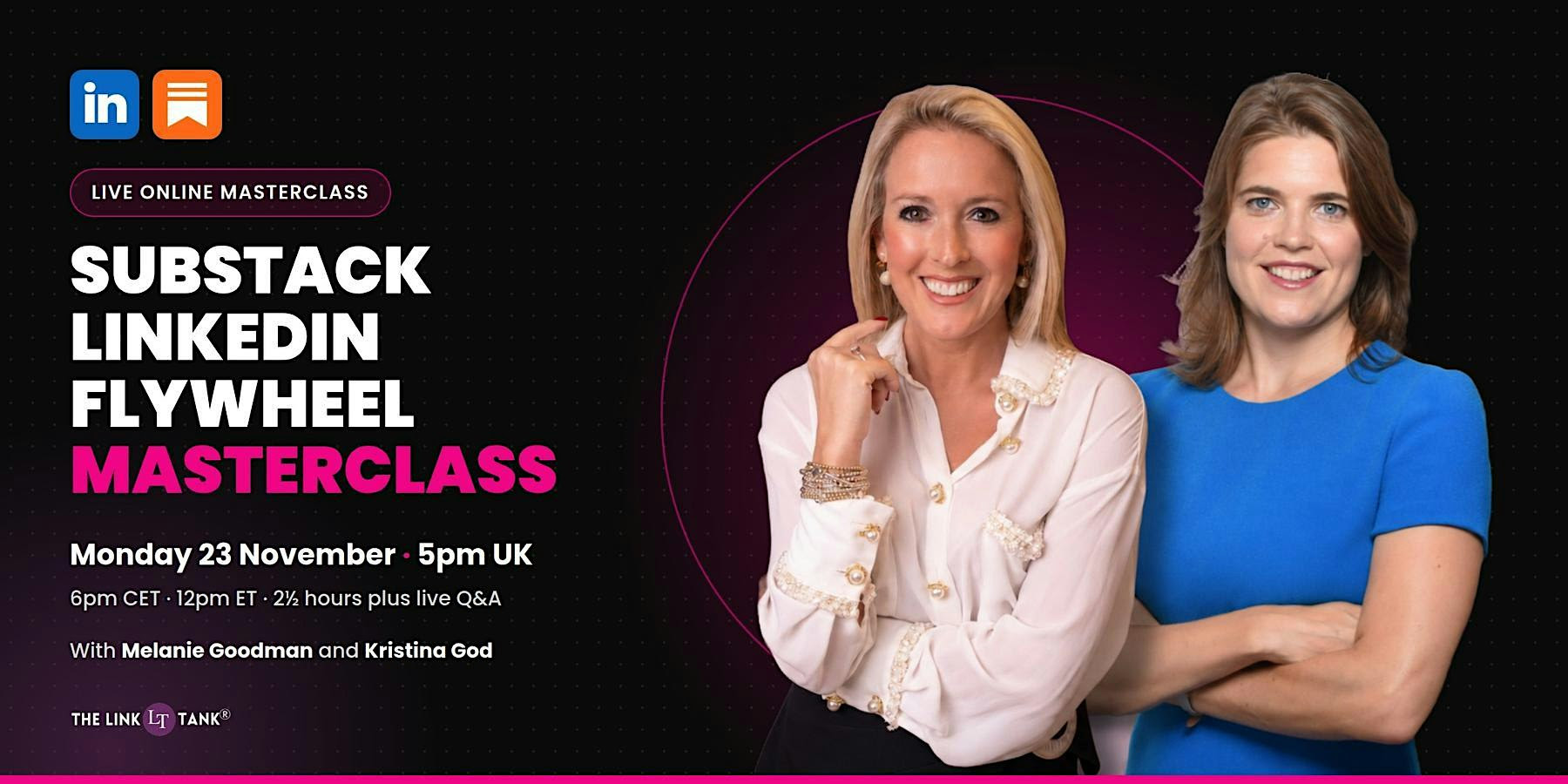
Monday, November 23, 2026 — LIVE Get seen on LinkedIn. Get paid on Substack.
Monday 23 November at 5pm UK
### No-brainer for only $69 (~~$199~~)
BONUS: StackBuddy access (value $150): Substack AI buddy, Notes scheduler, LinkedIn + Substack poster, AI image generator, viral Notes writer, subject line and posts analyser – included: Claude and Nano Banana access for FREE
+
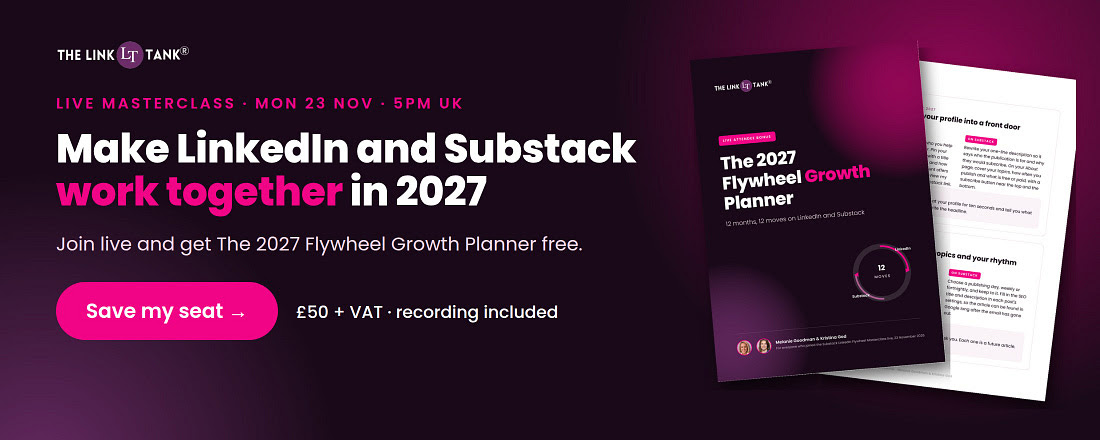
FREE 2027 Substack-LinkedIn Flywheel Growth Planner (value $29)
BLACK FRIDAY DEAL!I NEED this!
I’m jumping out of my skin excited, in this end-of-the-year session, we’ll show you how to run both platforms as one system, so the visibility you get on LinkedIn turns into readers, subscribers, and clients you own.
“These two QUEENS! Listen to what they say.” Claudia Q., from zero to 4,000 subscribers with our LinkedIn–Substack Flywheel
#### Join 35+ students who want to hit their Substack + LinkedIn goals before Christmas!
#### 15 seats left
Here is what changed, and how to turn each one into readers.
1. Your comments are now being judged too
What changed
On 13 November, LinkedIn’s Chief Product Officer Hari Srinivasan announced new classifiers that push low-quality “slop” comments down the default “Most relevant” view. In testing, LinkedIn saw a reduction of more than 20% in views of those comments, and Srinivasan said the change would reach everyone “soon”, as reported by Business of GTM. The comments stay up but rank lower, and LinkedIn is also changing notifications so that authors are alerted to “high-quality comments you’re likely to care about”, according to Dataconomy.
This builds on what LinkedIn started over the summer. More than a million members used the new “Seems like AI slop” button within two weeks of launch, views of content classified as AI slop fell by 40%, and LinkedIn replaced its AI rewriting tool with one that only proofreads, LinkedIn confirmed in September. If enough members flag one of your posts, you will now see a tip about it in your post analytics.
What it means for writers
Commenting is still one of the fastest ways to be discovered by another writer’s audience. It is how many of us find each other in the first place. The trouble is that a comment like “Great insights, thank you for sharing!” or a neat AI summary of the post now does more than waste your time. It may sink to the bottom of the thread, and the author may never be notified that you left it.
LinkedIn describes AI slop as content that “may sound polished on the surface but lacks a clear point of view, unique perspective, or substance.” You will notice that definition says nothing about who typed it. A human can write slop too.
What to do this week
Use what I call the three-part comment.
Pick out one specific detail from the post, add one thing from your own experience, and finish with a question or a useful addition.
Write it yourself. If you use AI at all, use it the way LinkedIn now does, to proofread rather than to write.
I set out the full daily routine in The 15 minutes a day that grow your LinkedIn faster than posting, and the four prompts I use instead of letting AI write for me in Stop asking AI to write your LinkedIn posts. Ask it this instead.
2. Your profile now decides which strangers see your posts
What changed
On 9 November, LinkedIn’s engineering team explained a system called Profile Relevance. It uses large language models to turn each member’s public profile into a structured summary, then matches posts to people whose professional context fits. The summary draws on your headline, About section, key skills, work history and education, as Ninety8 Media sets out. Posts are read through their text, titles and video transcripts, and each match is judged on topic, location, job title, company, industry, seniority and education, Social Media Today reports.
The results LinkedIn shared are worth a second look. The hide rate fell by 18.8%, and for members with very little activity history, viral engagement rose by 17.7%.
Then there is the gate I mentioned earlier. Posts matched on topic alone struggled to compete against posts that already had social proof, so LinkedIn added a rule: before Profile Relevance can recommend a post, someone you are not connected to must have liked, commented on or shared it, according to Lumiary’s breakdown of the paper.
What it means for writers
Two things. First, your profile now does two jobs. People still visit it after reading you, and LinkedIn also uses it to work out what you write about and who should see it. A headline that reads “Writer | Dreamer | Coffee lover” gives the system almost nothing to work with.
Second, LinkedIn is also reading your readers’ profiles. A post about “finding your voice” is hard to match to anyone in particular. A post about how a part-time writer with a full-time job can publish weekly without burning out is easy to match to exactly the people who need it.
The engagement gate matters too. Your first few reactions from people outside your connections can open a door that your network alone cannot.
What to do this week
Rewrite your headline in plain language so it says what you write about and who you write it for.
Make sure your About section mentions your newsletter by name and the problem it solves.
Check your location is filled in, because LinkedIn found its early versions were losing geographic cues and now adds your country to the match. If you want a step-by-step framework, my guides on writing a LinkedIn headline and writing a LinkedIn About section both include templates and before-and-after examples.
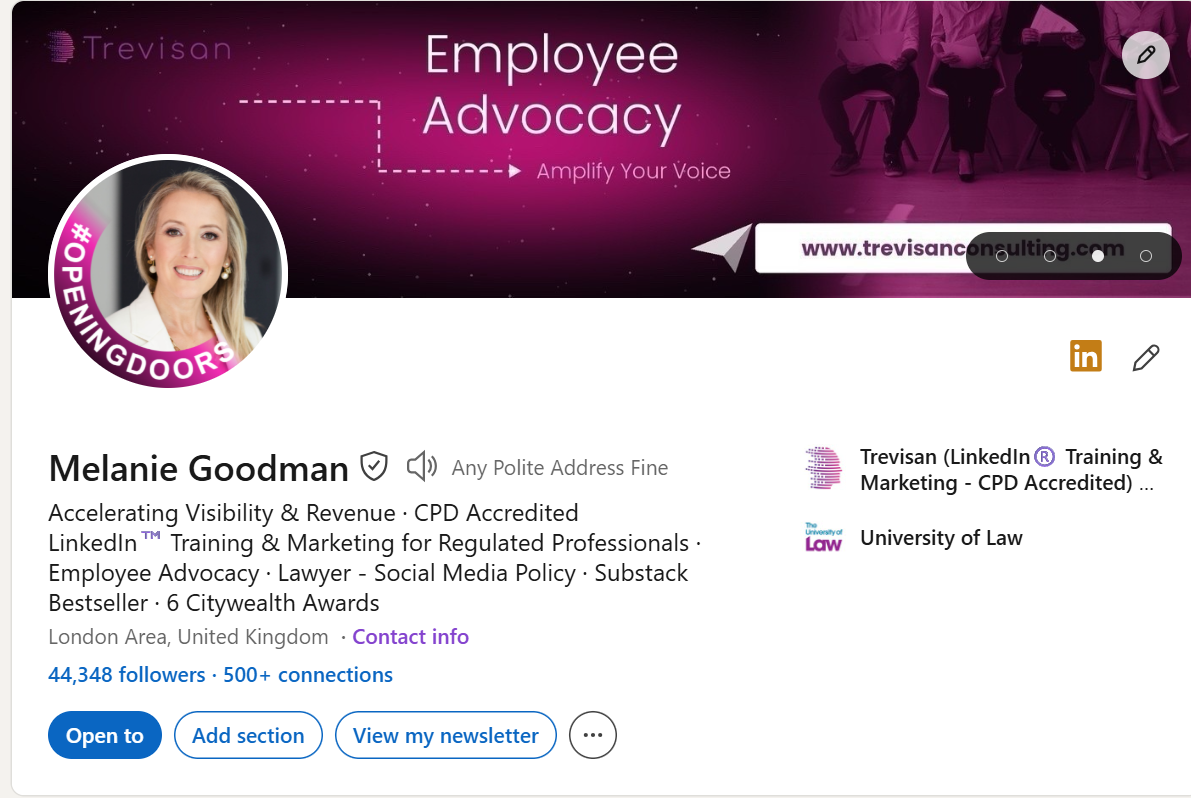
\My headline spells out who I help, what I do and that I write on Substack. Screenshot from my LinkedIn, November 2026.\
Then, when you publish something you are proud of, tell your Substack readers where to find it. Many of them follow you without being connected, and their genuine response is exactly the kind of signal that gate is waiting for.
3. You can finally see which post brought you which followers
What changed
LinkedIn has introduced a Post Performance Table on desktop that brings the metrics from multiple posts into one exportable view. It covers impressions, members reached, video views and watch time, follower gains, reactions, comments, reposts, saves and sends. LinkedIn has also expanded the follower metric to show which members followed you from an individual post, Leaders Social reports. Mobile access is due to follow.
On my own account, the table also splits impressions into in-network and out-of-network, which is the quickest way I know to check whether a post reached beyond your connections.
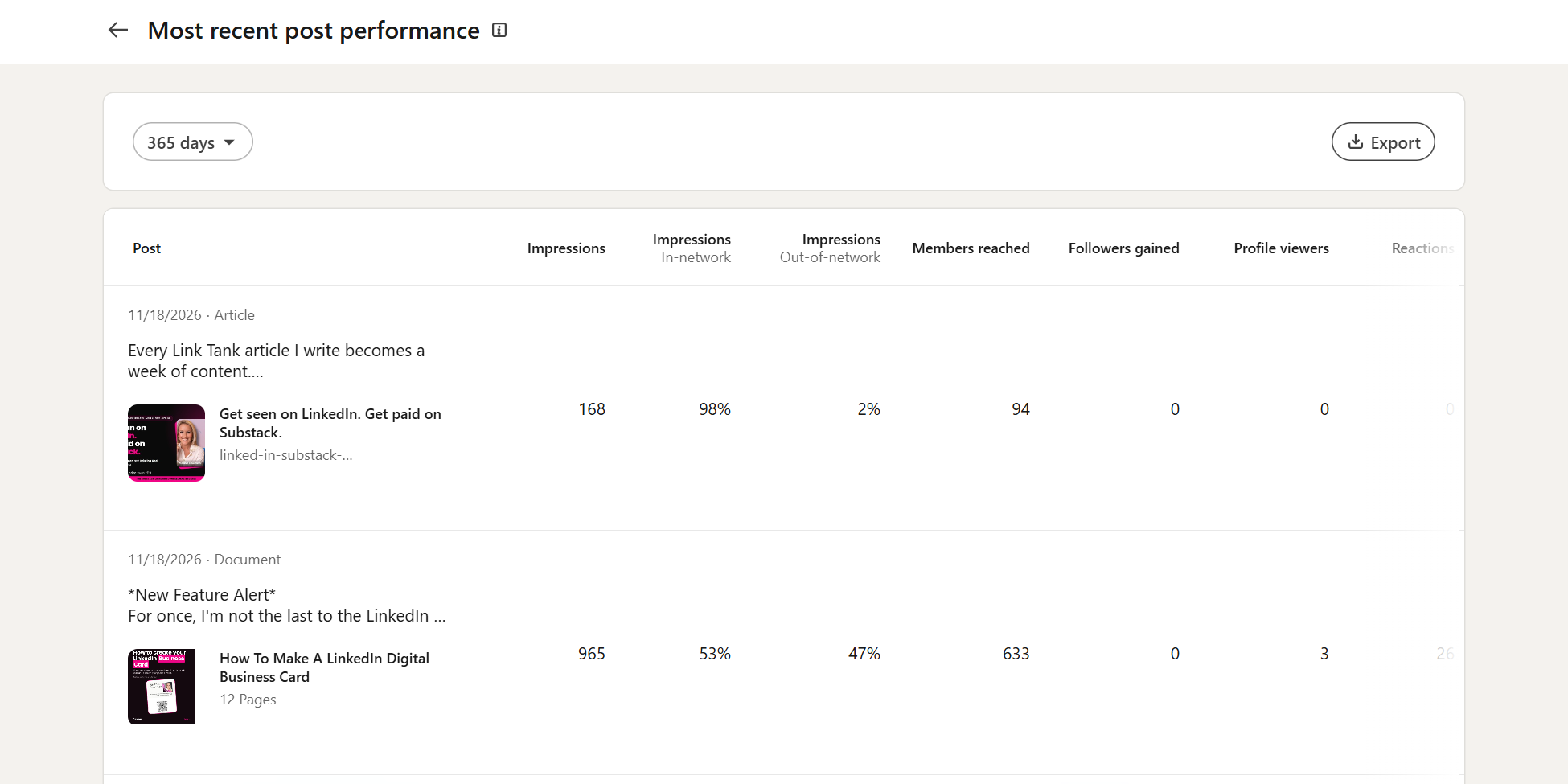
\The Post Performance Table, with an Export button at the top right. Screenshot from my LinkedIn, November 2026.\
What it means for writers
This is the LinkedIn equivalent of knowing which post brought you your paid subscribers. For years, most of us have judged LinkedIn posts by likes, which tells you very little about whether a post built your audience. Follower gains, saves and sends are far better measures. A save means “I want to come back to this.” A send means “Someone I know needs to read this.” Those are the readers who go on to subscribe.
What to do this week
Set aside 20 minutes at the end of each month. Export the table, sort it by follower gains, and look at your top three posts.
What topic did they cover? What format were they in?
Then look at who followed. If they look like the people who read your newsletter, write more of that. If they do not, you have learned something just as useful. I turned this into a 30-minute monthly Follower Audit in How to see which LinkedIn posts attract your buyers.
YESSSS! The Substack–LinkedIn Flywheel MASTERCLASS 2026
Monday, November 23, 2026 — LIVE Get seen on LinkedIn. Get paid on Substack.
Monday 23 November at 5pm UK
### No-brainer for only $69 (~~$199~~)
BONUS:
FREE 2027 Substack-LinkedIn Flywheel Growth Planner (value $29)
BLACK FRIDAY DEAL!I NEED this!
In one session, we’ll show you how to run both platforms as one system, so the visibility you get on LinkedIn turns into readers, subscribers, and clients you own.
“These two QUEENS! Listen to what they say.” Claudia Q., from zero to 4,000 subscribers with our LinkedIn–Substack Flywheel
#### Join 35+ students!
#### 15 seats left
4. Collaborative Posts put one post in front of several audiences
What changed
Collaborative Posts let you publish a single post jointly with up to five other members or Company Pages. Your collaborators get a notification and choose whether to accept, and the format works with almost anything, including text, video, images, documents, polls, events and posts with an external link, LinkedIn confirmed. In November, the “Add collaborators” option arrived on desktop as well, according to SocialBee.
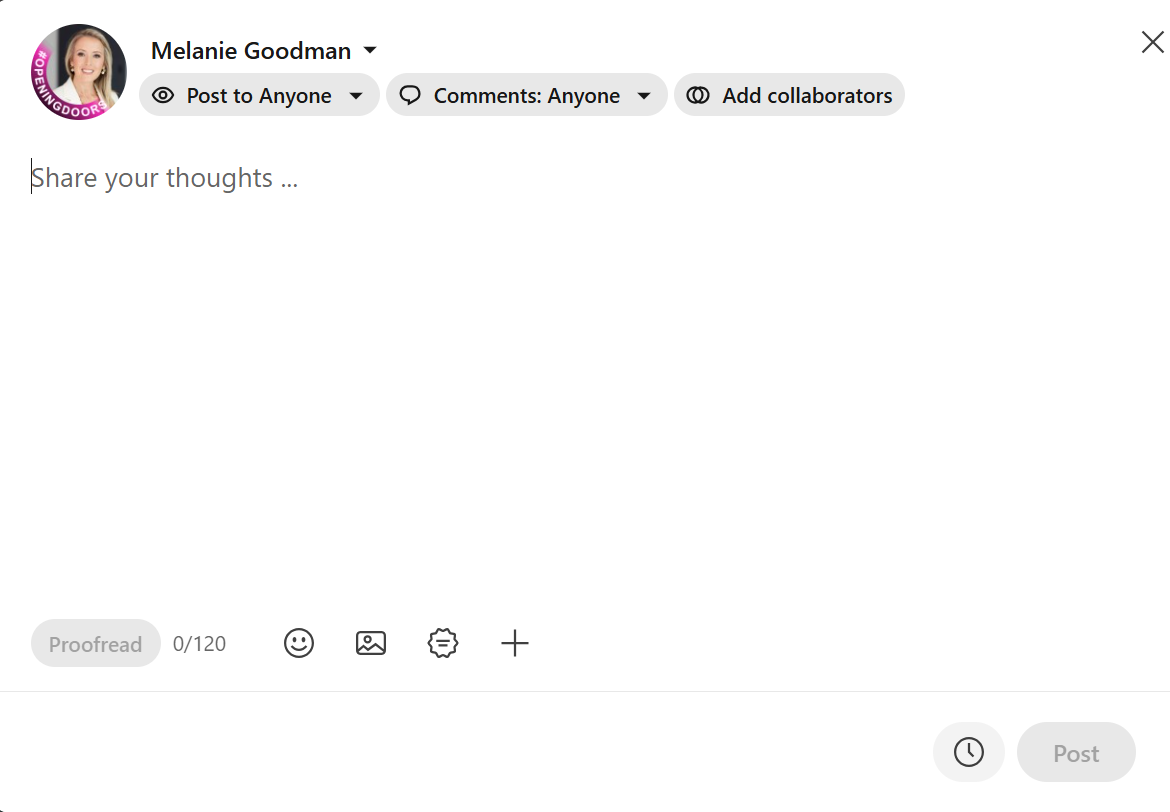
\“Add collaborators” now sits at the top of the desktop post editor. You can also see the Proofread button LinkedIn introduced in place of its old AI rewriting tool. Screenshot from my LinkedIn, November 2026.\
What it means for writers
Writers on Substack already know the power of a good collaboration. Guest posts, joint lives and recommendations have built some of the fastest-growing publications on the platform. Collaborative Posts bring that same idea to LinkedIn. Instead of two people posting separately about the same project and splitting the conversation, there is one post, one comment thread and every collaborator named at the top.
A guest article like this one is exactly the kind of thing the feature was made for. Two authors, two audiences, one conversation.
What to do this week
Make a shortlist of three writers you have worked with or would like to work with. Before you invite anyone, agree the copy, the timing and who will reply to comments, because only the original author can edit the post.
One practical warning: not every scheduling tool supports the feature yet, and Influent found it had to publish natively for collaborative posts, as it explains here. Check yours before launch day. I covered the rules and the best uses for the feature when it first appeared in New LinkedIn Features: AI Slop Button, Comments and Collabs.
5. The feed is testing longer previews of your words
What changed
LinkedIn is testing a simplified layout on mobile and desktop, with analytics, saved items and settings gathered into one “You” space. At the same time, it is showing longer sections of text posts in the feed before readers have to click “more”, Social Media Today reports. The test varies by account, region and language, so you may or may not see it yet.
What it means for writers
For years, LinkedIn posts relied on a cliffhanger first line designed to make people click “see more”. If readers can see more of your post without clicking, that trick loses its power. What replaces it is something writers are naturally good at: an opening paragraph that makes a complete point and earns the next one.
What to do this week
Look at your last five posts and read only the first three or four lines of each. Would a stranger know what the post is about and who it is for? Would they want to keep reading because the idea is interesting, rather than because something has been withheld?
If the answer is no, rewrite the opening of your next post as a proper paragraph, the way you would open a newsletter.
6. Digital business cards bring LinkedIn into the room with you
What changed
LinkedIn is rolling out a digital business card you can design and personalise, add to your phone’s digital wallet and use “to stay connected with people you meet in person”. The card shows your headshot and job role from your profile, plus a QR code, with a range of design options, and it is rolling out globally over the coming months, Social Media Today reports. LinkedIn tried profile QR codes back in 2018 and they never really caught on. This version is far more polished, and it lives in the wallet you already open every day.
The card reached my own phone last night, so I can tell you how it works in practice. You can choose one of six layouts, six fonts, your own colours and one of eleven patterns, and the card headline can be different from your profile headline. It saves to Apple Wallet or Google Wallet. If you turn on auto-swap, two people can exchange cards in a single scan, and swapping does not send a connection request, so you still decide who to connect with. For now it is mobile only and in English, so do not worry if you cannot see it yet. I put every step, with screenshots from my phone, into a carousel on LinkedIn.
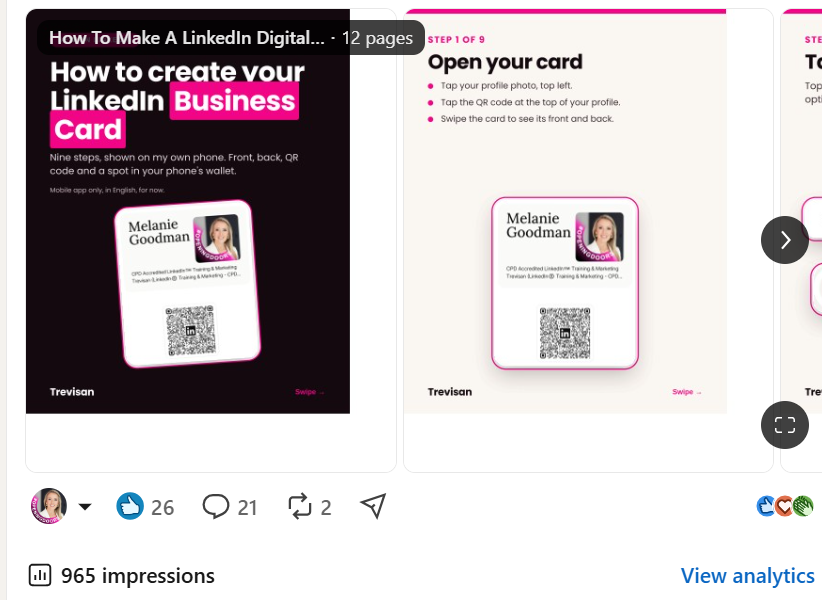
\My new LinkedIn business card, from my step-by-step carousel. Screenshot from my LinkedIn, November 2026.\
What it means for writers
Writers spend more time in rooms than people assume. Book launches, festivals, conferences, workshops, podcast recordings and the odd coffee with a reader all create the same awkward moment at the end: “How do I find you?” Saying “search for me on Substack” relies on someone remembering your name correctly an hour later. A card they can scan in two seconds does not.
There is one catch. The QR code takes people to your LinkedIn profile, so your profile has to do the next job for you. If the person who scanned your card cannot see what you write and where to subscribe within a few seconds, the conversation ends there.
What to do this week
Check your app for the card: tap your profile photo, then the QR code at the top of your profile, and tap the pencil to edit it. Use the card headline to name your newsletter.
If it has not reached you yet, you already have a LinkedIn QR code: tap the QR icon in the search bar of the mobile app and choose My code, then save it to your photos so it works even when the venue’s signal is weak, as Siela’s guide explains. Then make sure your headline names your newsletter, your Featured section links to it, and your About section tells a new acquaintance why they should subscribe.
When you get home from an event, send each new connection a short personal message that mentions what you talked about. My 15-step guide, How to Link LinkedIn and Substack to Grow Paid Subscribers, walks through every profile setting that turns a visitor into a subscriber.
7. LinkedIn is building its own creator economy, so protect your list
What changed
On 15 October, LinkedIn announced a creator dashboard rolling out globally, a test of In-Stream Ads that pays select US creators when pre-roll ads run before their videos, and Advice Sessions, which let US Business Premium subscribers sell one-to-one consultations from their profile, PPC Land reports. LinkedIn has not said what share of the ad revenue it keeps. It has also added a monetisation tab to profile analytics, linked to its Creator Marketplace, according to Social Media Today.
Meanwhile, some LinkedIn newsletter publishers say their email-open data has disappeared, even though LinkedIn’s Help Centre still lists the metric, Leaders Social notes. The scope of that change is still unclear.
What it means for writers
LinkedIn clearly wants creators to build and earn on the platform, and that is good news for anyone who writes there. More tools and more ways to be paid mean more reasons for your future readers to spend time on LinkedIn.
The open-rate story is a useful reminder, though. Features arrive, change and disappear on someone else’s timetable, and most of these monetisation tools are still US-only or invitation-only. The audience you can reach on LinkedIn belongs to LinkedIn. The readers who subscribe to your newsletter are yours.
What to do this week
Use LinkedIn for discovery and conversation, and use your newsletter for the relationship. In practice, that means every week publishing at least one LinkedIn post that gives real value on its own and then gives readers a clear, polite reason to subscribe for more. Be deliberate about links. If a post’s main job is to send traffic, put the link in the post itself and accept the small dip in reach. If its job is reach, leave the link out and let your profile and newsletter do the converting.
Hiding the link in the first comment no longer works the way it used to. I share the weekly routine I use in How to Turn Your LinkedIn Followers into Substack Subscribers, and Kristina and I went deeper on earning from your network in our live, How to Credibly Monetise Your LinkedIn Network.
Also worth watching
A few smaller changes are not yet big enough for the main list, but keep an eye on them. A “Super Like” reaction is appearing on some accounts, though there is no verified evidence it affects reach, Influent notes.
LinkedIn is also testing a “Frequent Viewer” label that would show some Premium subscribers how often each person has revisited their profile, though it has shared no further details, Social Media Today reports, citing Wired. If you do see it, respond with something useful rather than mentioning how many times they have looked. The Network feed, which shows only posts from people you are connected to or follow, is still a test in selected markets. It has appeared on my own account as a second tab next to For you.
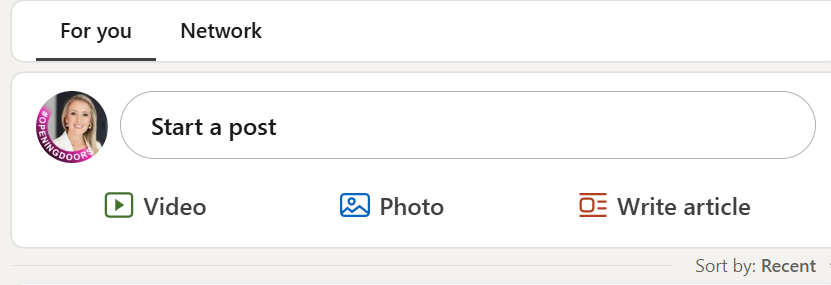
\The Network tab sits next to For you at the top of my feed. Screenshot from my LinkedIn, November 2026.\
I covered that one, along with private profile notes and pinned comments, in my recent piece on how LinkedIn is changing in 2027.
The one thing to take away
Read these seven updates together and a clear pattern appears.
LinkedIn is spending a great deal of money and engineering effort to work out who you are, what you know and whether real people value what you say. It is filtering out the generic, rewarding the specific and giving you better tools to see what is working.
For writers, that is very good news. The skills you have built on Substack, writing with a clear point of view, knowing exactly who you are writing for and turning readers into a community, are precisely the skills LinkedIn now rewards.
Pick one of these seven actions this week, track what changes, and let your writing do the rest.
P.S. You’re invited! The Substack–LinkedIn Flywheel MASTERCLASS 2026
Monday, November 23, 2026 — LIVE Get seen on LinkedIn. Get paid on Substack.
Monday 23 November at 5pm UK
LinkedIn and Substack are one system. When you connect them the right way, every post you write on LinkedIn quietly feeds subscribers, readers and clients into a list you own.
That’s exactly what we’re teaching LIVE on Monday 23 November at 5pm UK in the Substack–LinkedIn Flywheel Masterclass.
Claudia went from zero to 4,000 subscribers with this exact flywheel. Zero!
And because it’s Black Friday season, you’re getting it for $69 (normally $199), plus StackBuddy access ($150 value) and the 2027 Growth Planner ($29 value) thrown in.
BLACK FRIDAY DEAL!I NEED this!
In one session, we’ll show you how to run both platforms as one system, so the visibility you get on LinkedIn turns into readers, subscribers, and clients you own.
“These two QUEENS! Listen to what they say.” Claudia Q., from zero to 4,000 subscribers with our LinkedIn–Substack Flywheel
#### Join 35+ students!
#### 15 seats left
👇🏻👇🏻Share your LinkedIn account in the comments and connect!👇🏻👇🏻
Kristina: <https://www.linkedin.com/in/kristina-god-substack-bestseller-writing-branding/>
Melanie: <https://www.linkedin.com/in/melaniegoodman-training-marketing-employee-advocacy/>