Substack credits my Notes with $53,934. Here’s what 1,556 notes taught me, and the Claude skill that finds the hooks that work for your audience.
By Gencay
Published: 2026-11-09
URL: https://www.learnwithmeai.com/p/i-earned-50k-from-substack-notes
I came across this kind of content on Substack over and over.
How I did X to get Y followers or subscribers using Substack Notes.
But when I check their notes or their profiles, it does not look that way.
To compare, I checked my statistics; I told myself, "Gencay, you need to share this."

\Substack’s Growth sources page, New revenue (ARR), All Time. Notes brought $53,934.57.\
Some of this revenue is not realized yet because, to be honest, when a subscriber pays monthly, Substack counts it as a full year.
But the real number is close to this because most of my subscribers are annual or in the inner circle. (70%)
And yes, it is incredible.
In this one, I’ll explain how, but first, let me introduce myself, because you need to know me to understand how I did this.
Who am I?
I am Gencay. I graduated as a mechanical engineer and worked as one for years; then I decided to switch to data science and worked as a data scientist for a couple of years; then I moved to AI.
I have worked 7,000+ hours just on Upwork for clients worldwide.
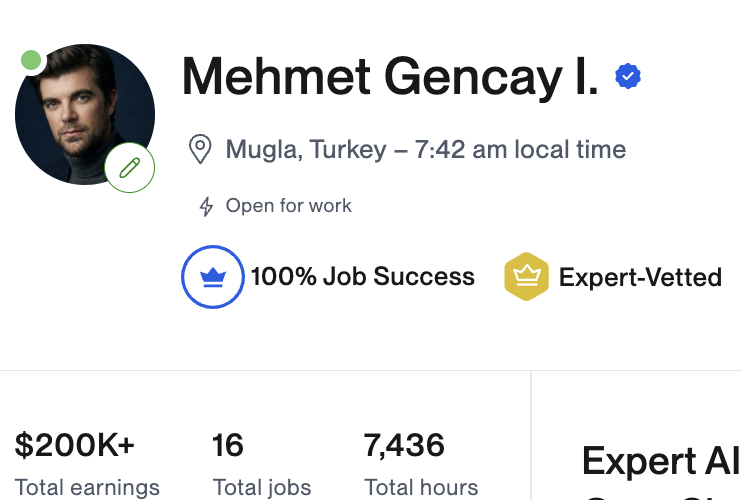
\You can hire me fromhere.\
For this story, the important part is not only my AI Expert title.
Thanks to my data scientist hat, I got used to doing analysis, and a couple of months ago I decided to analyze each of my Substack Notes statistics every week.
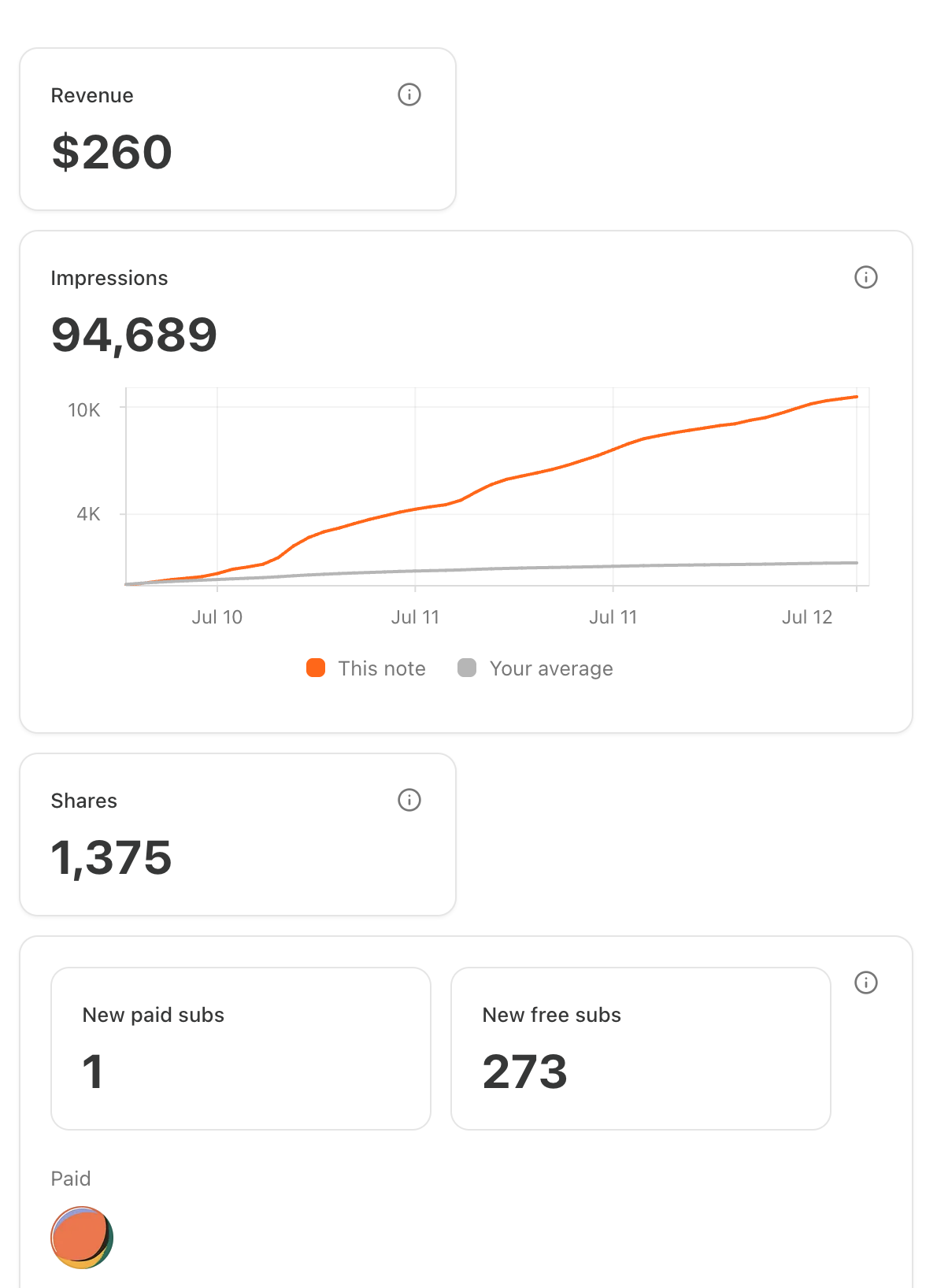
\Every note has a stats page. This one got 94,689 impressions, 273 free subs and 1 paid.\
At first, I did this manually. I checked each Substack note and saved the statistics to a CSV.
Now, thanks to Claude’s new features, I do it with one skill. I’ll get to that later in this post.
It includes A/B testing my hooks (the first sentences) and the images inside the note.
Like this one.
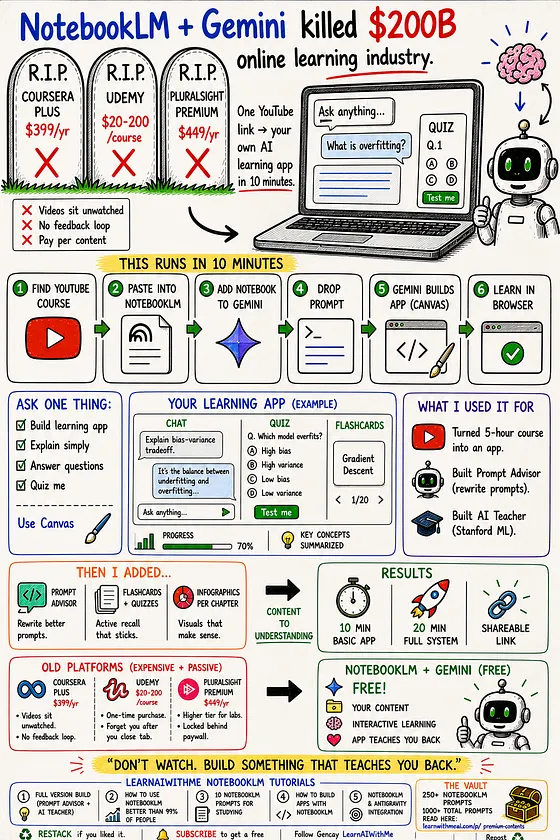
\The image from my GOODBYE Coursera note.\
This note, by the way, was viewed 400K+ times.
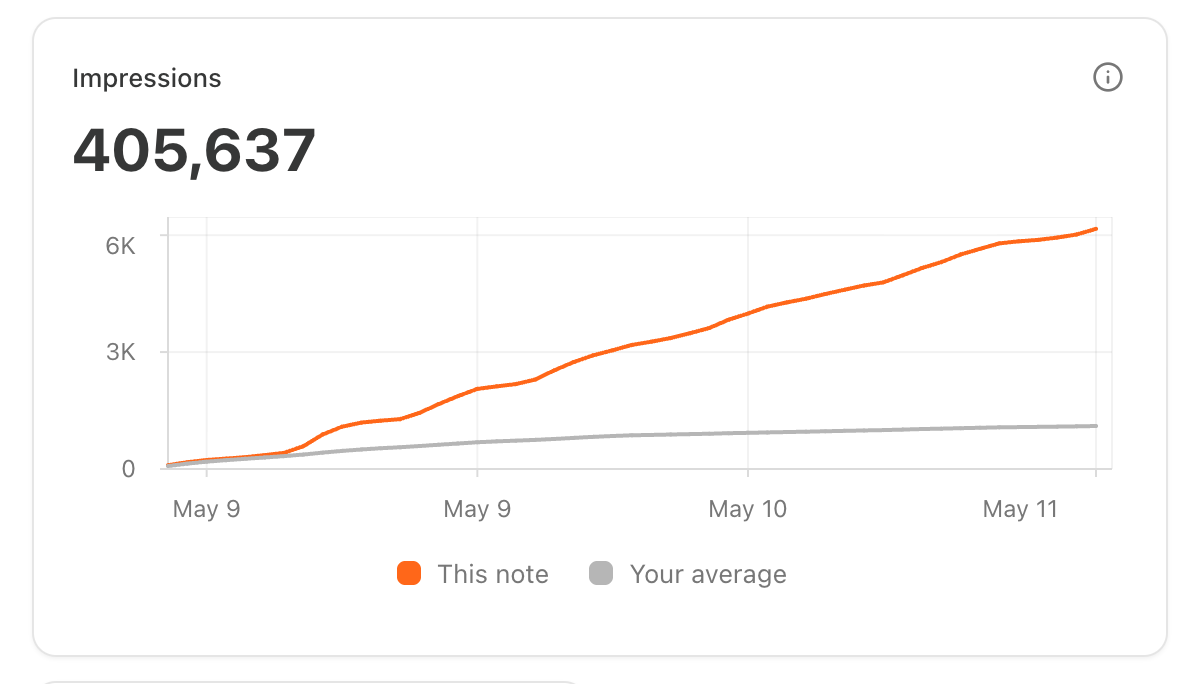
\405,637 impressions. The gray line is my average note.\
And it made $15K+.

\Substack credits this one note with $15,625.28 in new revenue.\
Why should you listen to me?
Before I share what I discovered, let me explain my motivation for becoming successful after just one [ ].
One [ ] ?
For me, it is an Upwork proposal and a Substack note, for now.
In this era of social media, yours can be one X post, one YouTube video, or one LinkedIn post.
It does not matter.
The formula I am about to give works for all of them.
Because;
What gets measured improves.
And the sentence my wife and I often remind ourselves of is this.
Don't forget! One Substack note, one Upwork proposal can change your life!
This is so true.
Because once, I sent one Upwork proposal. I spent years working with that same client and made almost $200K from that one client.
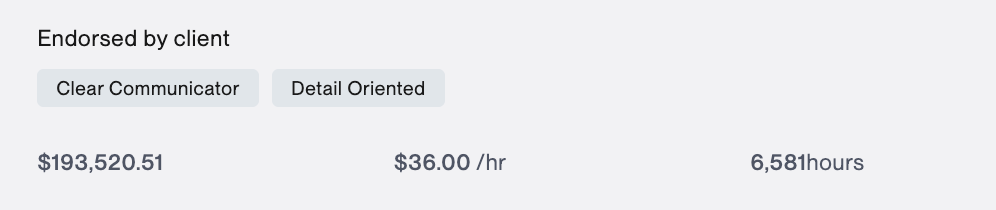
\One proposal, one client: $193,520.51 over 6,581 hours.\
And I made $15K from just one Substack note.
\And this is that one note: $15,625.28.\
So in a nutshell, these two made me $200K+, and believe it or not, I used AI in both of them.
Virality Maker Skill
If you’ve read this far, thank you.
In this section, I am going to show you how this Virality Maker Skill works.
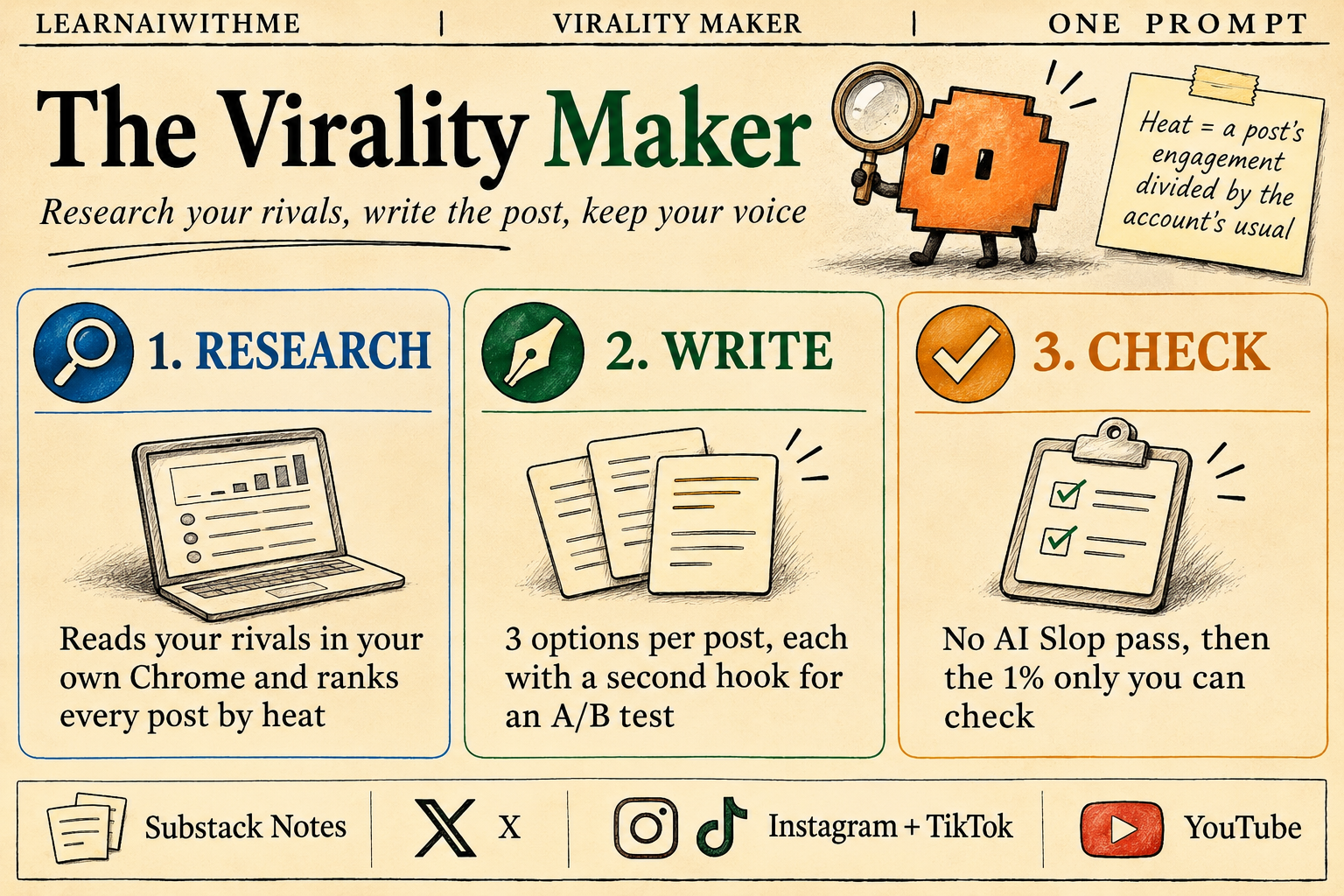
\Virality Maker in one picture: research, write, check.\
But first, I want to announce the LearnAIWithMe MCP.
Once you install the MCP, all you have to do is use this prompt.
Use Virality Maker Skill to create posts for [ ]
After this one prompt, it’ll load this skill from the DB and ask you a couple of questions.
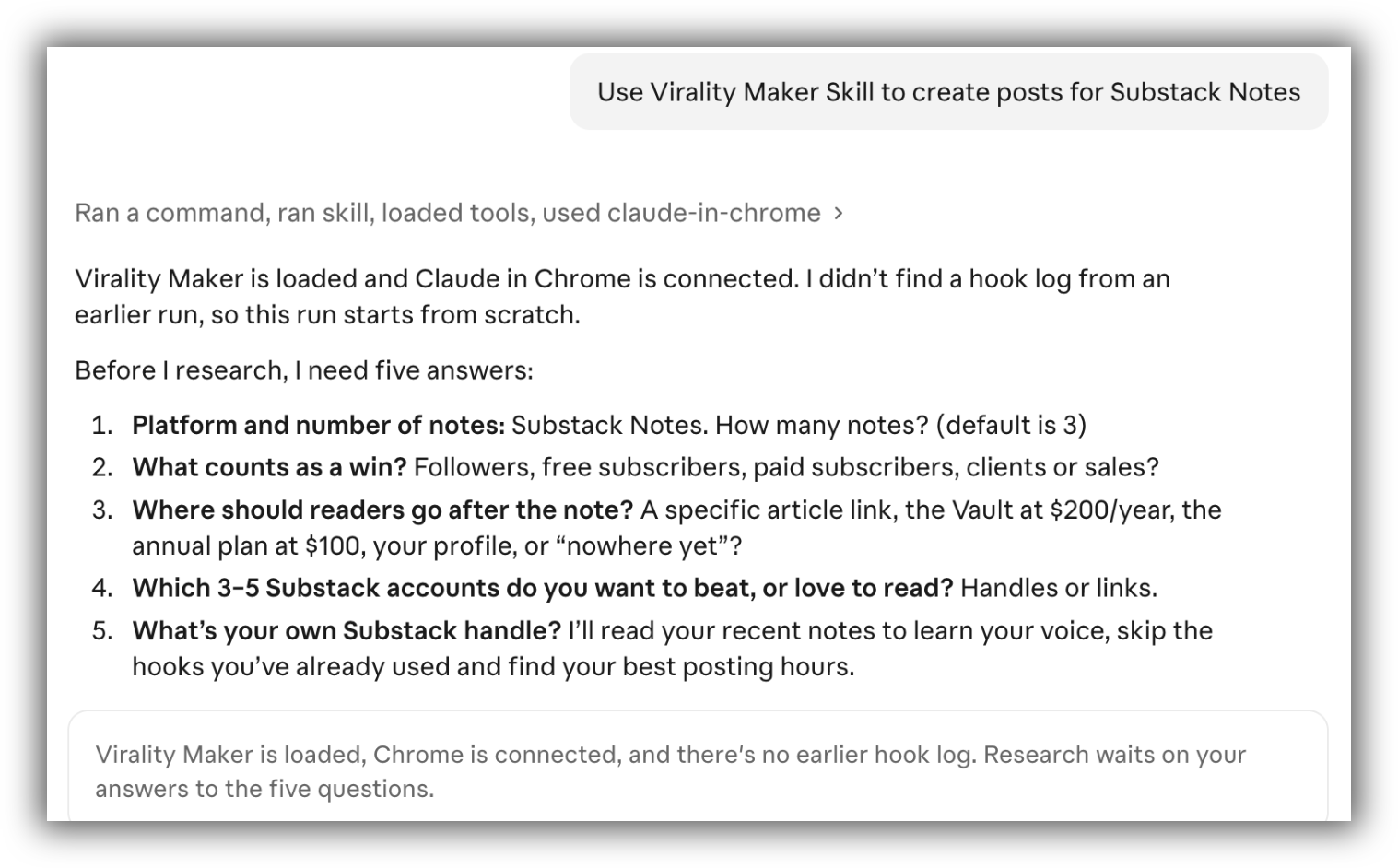
\One prompt loads the skill. Then it asks five questions.\
Based on your answers, it’ll open X, YouTube, Instagram, TikTok, Substack or wherever you want to be successful, and do the research for you first.
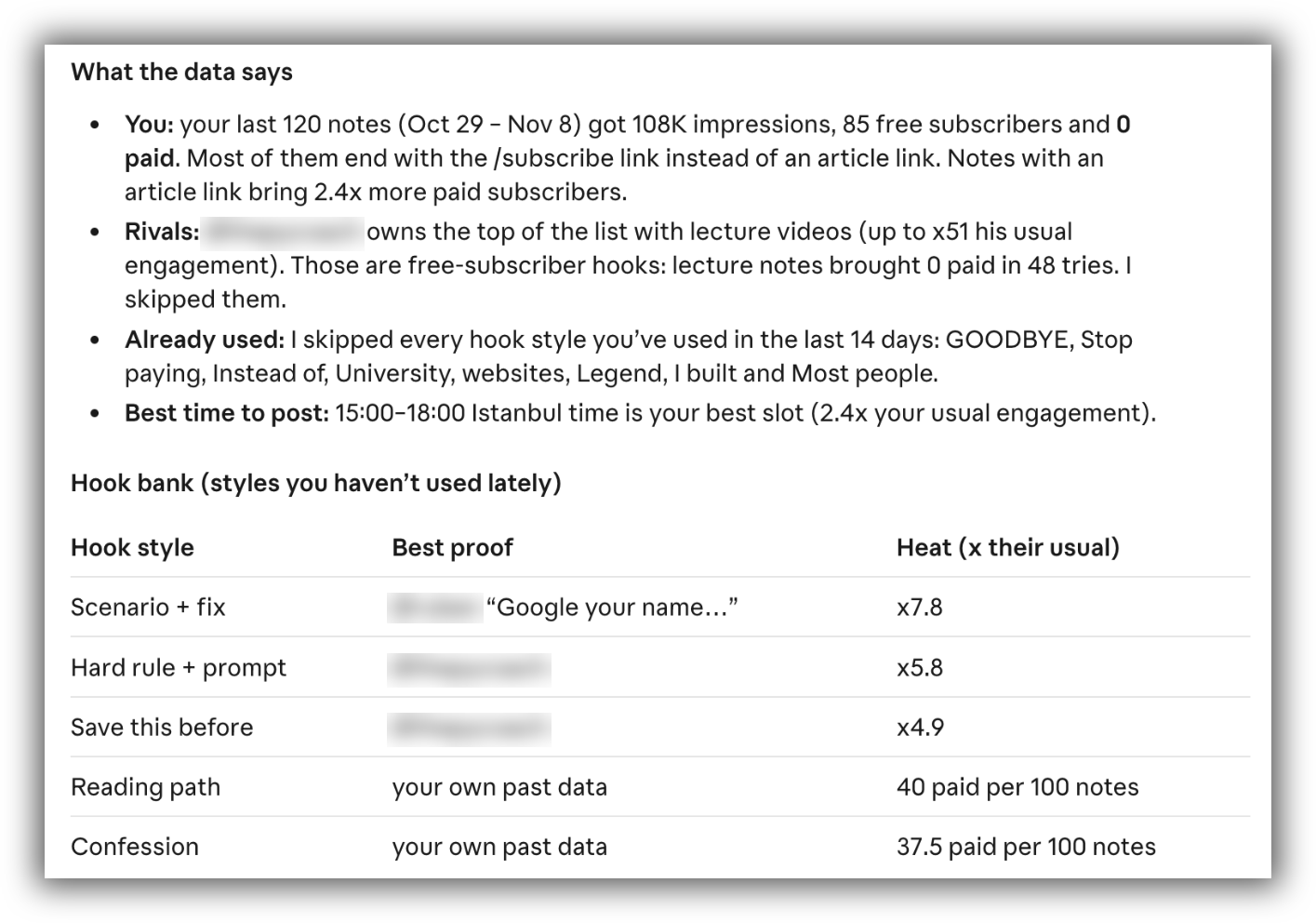
\In my run it read 465 notes from 4 rivals and my own account, then built the hook bank.\
Next, it’ll create content for you and send it to you as a few options.
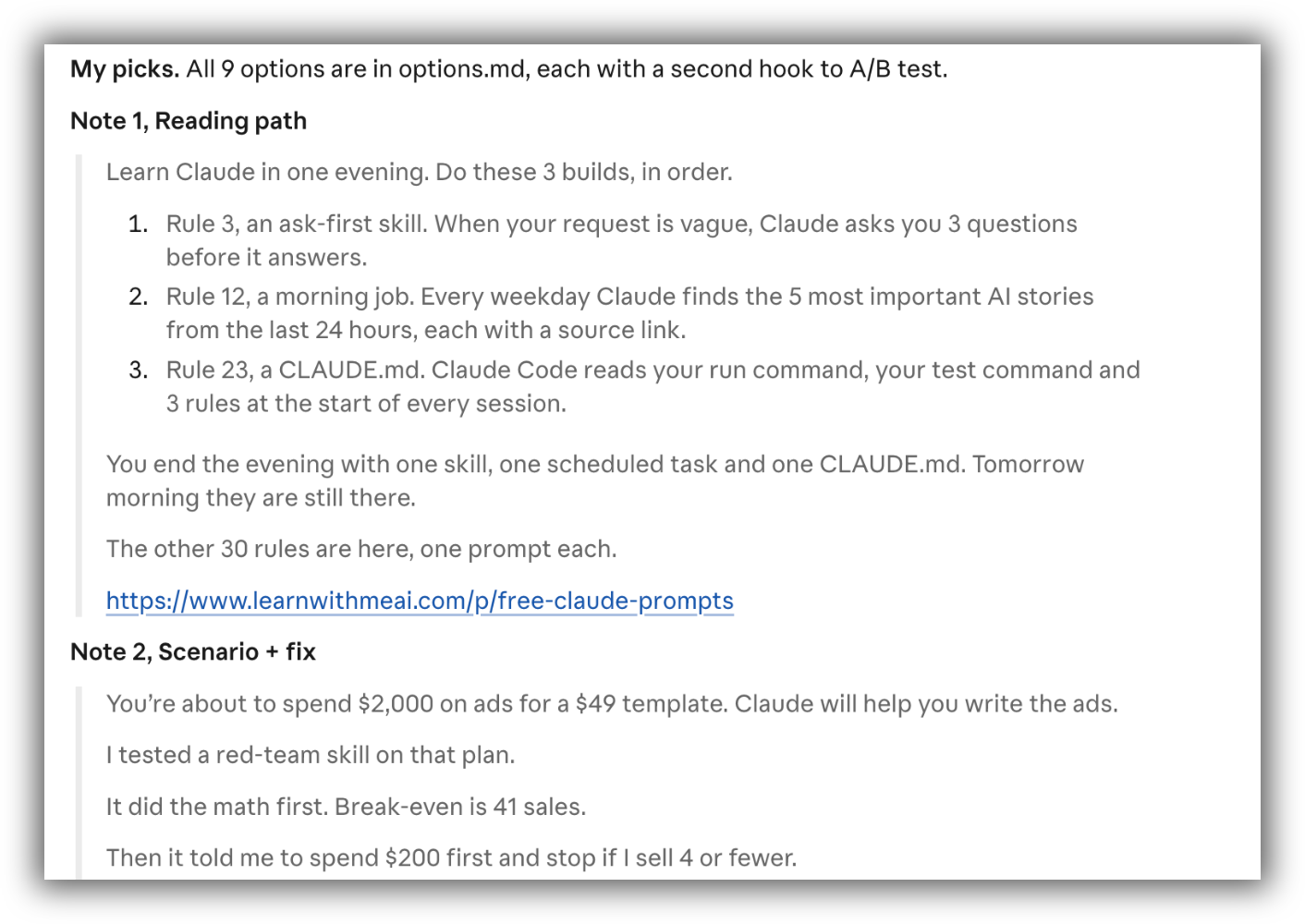
\3 notes, 3 options each. Every option comes with a second hook for an A/B test.\
At this point, to avoid AI slop, it’ll ask you to check a few things. This is one of the things I’m most proud of.
Because let’s face it, even if AI gets 99% right, the remaining 1% can ruin the entire thing.
That’s why I put a safeguard here, and you need to get involved and check, so AI slop is avoided.
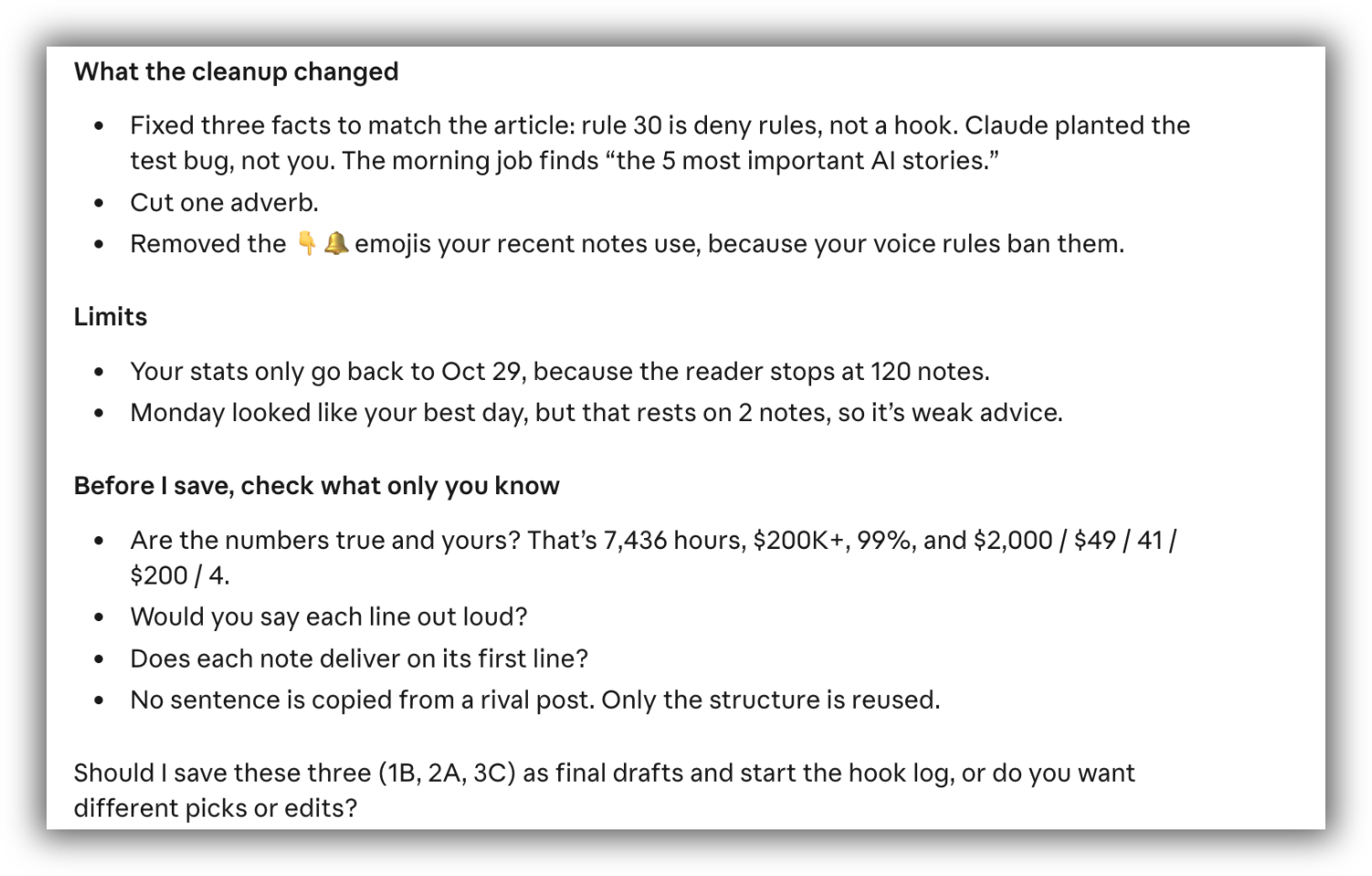
\The No AI Slop pass, then the checks only you can do.\
But first, how do you install the LearnAIWithMe MCP?
I’ll show you how to do it in 2 minutes.
But you can also paste this information into your agent, and it’ll do it for you.
After the paywall, I’ll show you how to install the LearnAIWithMe MCP, how to install the Virality Maker Skill, how I research content and find viral hooks, and how I formulate my content.
- how I create these infographics, viewed millions of times,
- when you should publish,
- what the pitfalls are,
- how I run it every week,
- what you should do to avoid AI slop.
Here is the link to this skill if you don’t want to install LearnAIWithMe MCP : https://drive.google.com/drive/folders/10rcLdV2L\_KUtUhRkFymsEmAFWLdY2-Ec?usp=sharing
How to Install the LearnAIWithMe MCP
It takes 2 minutes.
- Open Claude (the desktop app or claude.ai).
- Go to Customize, then Connectors.
- Click Add, then Add custom connector.
- Paste this URL: <https://www.learnaiwme.com/mcp>
- It’ll check your subscription through the Vault, so sign in with the email you use for LearnAIWithMe.
- No Vault account yet? Sign up at https://www.learnaiwme.com with that same email first. That’s it.
If you use Claude Code with the same Claude account, the connector shows up there too.
If you want your agent to do it, paste this into Claude Code:
Add the LearnAIWithMe MCP server to Claude Code with this command: claude mcp add --transport http learnaiwithme https://www.learnaiwme.com/mcp. Then tell me how to sign in.
Virality Maker is open on every paid plan, the monthly plan included.
How to Install the Virality Maker Skill
You don’t have to install anything else. Once the MCP is connected, this one prompt loads the skill:
Use Virality Maker Skill to create posts for [Substack Notes / X / Instagram / TikTok / YouTube]
The skill reads your rivals in your own Chrome. So you need the Claude in Chrome extension connected to Claude, and you need to be logged in to the platforms you want to research. (Claude can’t log in for you.)
If you want to keep the skill on your computer, use this prompt:
Install the Virality Maker skill from the LearnAIWithMe connector into ~/.claude/skills/virality-maker. Fetch every file with get\skill\file and keep the same folder structure.
How I Research Content and Find Viral Hooks
Everything starts with one number. I call it heat.
Heat is a post’s engagement divided by that account’s usual engagement. So it doesn’t look for the biggest post. It looks for the post that surprised its own audience.
Because a big account gets 500 likes on a normal day. But if a small account gets 40 likes on a normal day and 300 on one note, that note found something. That’s the one to study.
In my test run, the skill read 465 notes from the last 30 days: 345 from four writers I read every week, and 120 of mine. One writer’s “Google your name…” note did 7.8 times his usual. Another writer’s lecture videos went up to 51 times his usual.
Then the skill sorts the winners into hook families. A hook family is the shape of the first line. The words change, the shape stays.
These are a few families I measured on 1,556 of my own notes:
- GOODBYE [paid learning product]: 107 paid subscribers per 100 notes.
- Confession (“I have been building with X for months… it’s 1% of what it can do”): 37.5 paid per 100 notes.
- Most people think X. It’s not.: 33 paid per 100 notes.
- University just put its course online: 0 paid in 48 tries. (Great for free subscribers though.)
That’s why the skill asks what a win is for you before it writes anything. Free subscribers and paid subscribers come from different hooks.
How I Create These Infographics
All of my note images come from ChatGPT. Same chat, same style, every week. My GOODBYE note alone got 405K+ impressions with one of them.
Here is how I do it:
- Open a new chat in ChatGPT and attach 2 of your best images as references. (Your own images, never someone else’s.)
- Write the exact words for every box, in quotes.
- End the prompt with “Spell every word exactly as given.”
- When it’s done, zoom in on every word. ChatGPT drops letters in long labels.
- To fix one word, say: “Edit this exact image. Change only X to Y.”
The skill does these steps in your own ChatGPT and saves the images to your Downloads folder. It has 5 styles inside: vintage comic infographic, free library bookshelf, playbook page, GOODBYE card and quote card.
This is the prompt for the style I use most:
Make a 4:5 vintage hand-drawn comic infographic on aged parchment paper. Title at the top in bold ink letters: "[TITLE]". [N] numbered panels, each with a small sketch and a short label: 1 "[label]", 2 "[label]", 3 "[label]". A friendly cartoon narrator in the corner pointing at panel 1. Warm sepia ink, muted red and teal accents, clean readable lettering. Spell every word exactly as given. No other text, no logos, no real people’s faces.
One tip: the style drifts after about 7 images in the same chat. When that happens, open a new chat and attach the references again.
When You Should Publish
I post 10 notes a day, one per hour, between 06:00 and 15:00 Istanbul time.
I picked that window from a WriteStack study of 18.8 million notes, where the best hours were 3 to 8 AM Eastern time.
But a study is someone else’s audience.
Your own numbers win.
When the skill ran on my account, it found that my best slot was 15:00 to 18:00 Istanbul time, at 2.4 times my usual engagement.
That’s right after my window ends.
The skill also tells you when the data is weak.
Monday looked like my best day, but that rested on only 2 notes, so the skill said not to trust it.
The Pitfalls
- Repeating a winner. My “Stop paying for AI courses” note brought 1,502 free subscribers. The same idea brought 273 the second time and 93 the third time. Every hook family dies after 2 to 5 uses.
- Using a free hook for a paid goal. University course notes bring followers. They brought 0 paid subscribers in 48 tries.
- Linking to /subscribe instead of an article. My last 120 notes got 108K impressions, 85 free subscribers and 0 paid. Most of them ended with the /subscribe link. Notes with an article link bring 2.4x more paid subscribers.
- Video notes. They brought the fewest paid subscribers: 2.6 per 100 notes, against 8.4 for image notes and 10.5 for notes with an article card.
- Copying. Take the shape, never the words or the image. A writer once threatened a DMCA over exactly this.
How I Run It Every Week
Once a week I do three things.
1. Measure last week. 48 hours after the last note goes out, I paste the links:
Virality Maker measure. These are my posted links: [links]
Or just give it your profile link.
It reads every note, compares it with my usual engagement, names the A/B winners, and writes everything into the hook log.
2. Pick the families. Winners stay. A family that already won 2 to 5 times rests for a month.
3. Write the week. Then I start the new run from the winners:
Use Virality Maker Skill to create posts for Substack Notes. Start from last week’s winners in my hook log and skip the families that need a rest.
The skill never posts. I read every draft, then I publish.
How to Avoid AI Slop
There are two layers.
First, the skill runs every draft through Peter Yang’s No AI Slop skill (MIT license).
It cuts lines like “It’s not X. It’s Y.” and “Here’s what nobody tells you”, keeps your voice, and tells you what it changed.
In my run, it fixed three facts to match my article, cut one adverb, and removed two emojis.
Second, you. The skill stops and asks 4 questions only you can answer:
- Are the numbers true and yours?
- Would you say each line out loud?
- Does each note deliver on its first line?
- Is any sentence copied from a rival post?
If one answer is no, the post doesn’t go out. That’s the 1%.
Start with one prompt:
Use Virality Maker Skill to create posts for [your platform]
Thanks for reading!
The Early Black Friday Price
Black Friday starts early.
- AI Academy (Inner Circle) goes from $300 to $200 a year.
- AI Labs (Annual) goes from $150 to $100 a year.
Both plans include every Substack article and the Vault.
Annual comes with AI Labs and 1,000+ prompts. Inner Circle adds AI Academy.
Inner Circle seats are limited. If you joined Inner Circle in August at $200, nobody gets in cheaper than you.