I built a Claude Skill that reads my Obsidian vault and answers client messages when my brain is foggy. Full setup, CLAUDE.md, and 5 brain-off prompts.
By Gencay
Published: 2026-04-20
URL: https://www.learnwithmeai.com/p/claude-cowork-obsidian-problem-solver-skill

\Claude Cowork running the problem-solver Skill on an Obsidian vault for Acme Corp client workspace\
According to Upwork, I worked 2,106 hours in the last 12 months.
That’s 8.3 hours a day. Every day.
On top of that, I run LearnAIWithMe with my wife.
Articles, vault, newsletters, experiments with AI tools, and another 3-4 hours per day. (at least.)
So by 2 PM some days, my brain just stops.
I stare at a client message for ten minutes, and nothing happens.
The words are there. The meaning is not.
If you have ADHD, you know this.
If you don’t, but you work a lot, you know this too.
I got tired of losing afternoons.
So I built something.
TL;DR: I built a Claude Skill called problem-solver. It reads my Obsidian vault, takes any panicked client message, and hands me back a calm to-do list in 20 seconds.
Full code, CLAUDE.md config, vault structure, and 5 brain-off prompts below. Setup takes under an hour.
The system in one sentence
Every client conversation, meeting, decision, and Slack thread lives in an Obsidian vault.
Claude Code reads that vault.
When my brain stops, Claude picks up.
Three months ago, I wrote about the basic setup.
This post is what I built on top of it: a Skill that takes any client message and hands me back a calm to-do list, even when I can’t think.
What it looks like when it’s working
Let me show you with a demo.
“Acme Corp” isn’t a real client, real client data stays private, but the vault, the Skill, and the workflow are exactly what I use every day.
I mocked up Acme’s folder with realistic meeting notes, Slack logs, and a project brief. Then I ran a real client-style message through it.
Here’s the message.
“Hey, we need to revisit the pricing page before Friday. Also the Stripe webhook is still firing twice on renewal. And are we still on for the Tuesday call or did that move? Let me know.”
Three questions in one message.
Your brain reads “Friday” and panics if you’re burned out or already worked 7 hours that day.
Old you would stare at this for 20 minutes.
New you paste it into Claude Code and say: use problem-solver skill, client is Acme Corp.
Claude goes to Acme Corp/ in the vault. Reads the last three meeting notes, the current month’s Slack log, and the project brief. Comes back in 20 seconds.
Here’s what I get back.
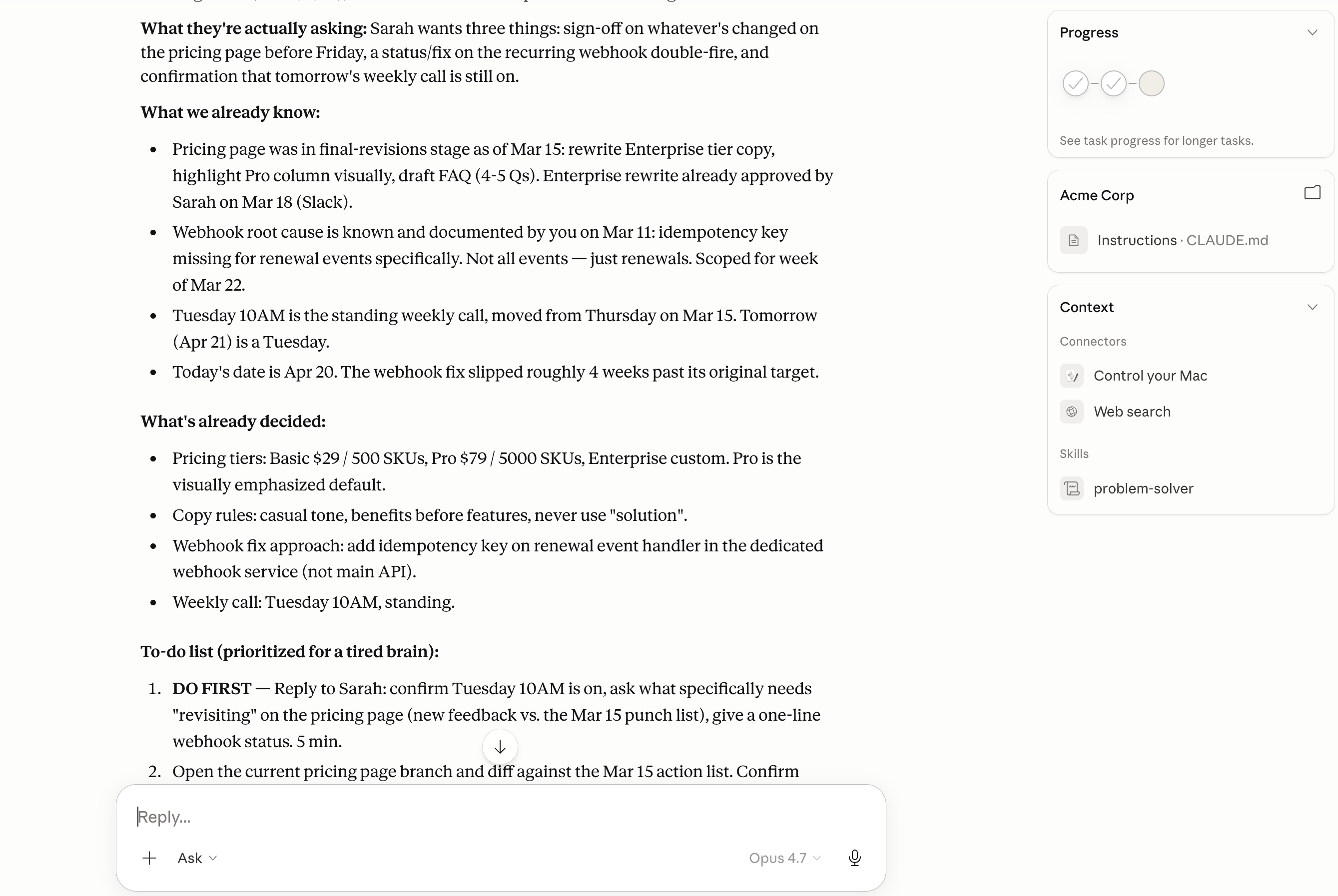
A breakdown of what we already know, what was decided, and what to do next.
The Skill does the same on your real client conversations, once your vault has them.
When you don’t have the energy, the to-do list acts in your place.
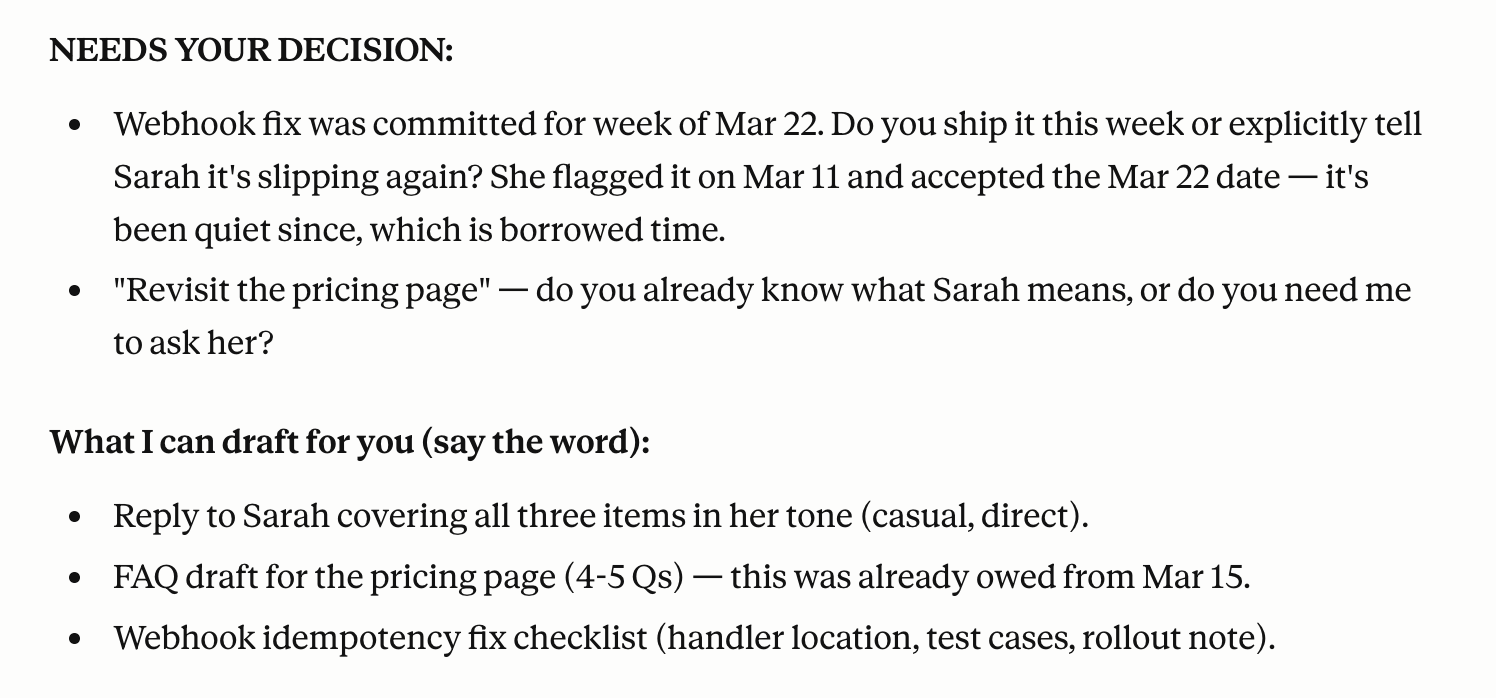
Why does this work when I can’t think
The skill does three things my tired brain can’t:
It separates signal from urgency. The message felt like a fire. It wasn’t. It was three normal items stacked with a Friday reference that my amygdala heard as “emergency”.
It remembers what I decided last week. Half the panic in client messages is “did I already answer this and forget?” The vault knows. I don’t have to.
It caps the to-do list at six items, each under 15 minutes. An overwhelmed brain can’t do a 3-hour task. It can do a 12-minute task. The Skill enforces this rule, so I don’t have to.
The vault is the memory.
The Skill is the translator between “panicked client message” and “thing I can actually do right now”.
Below the paywall: the full Skill code you can drop into Claude Code today, the vault structure that makes it work, the exact CLAUDE.md config, and the five brain-off prompts I use when I can barely form sentences.
The Setup
Four pieces. Each one does one job.
- Obsidian vault, organized by client
CLAUDE.mdpointing Claude to the vault- The
problem-solverSkill - Five prompts I use when my brain is foggy.
1. The Obsidian Vault
I wrote about the base vault three months ago.
Quick recap for the structure that matters:
Obsidian Vault/
├── Client A/
│ ├── Meeting Notes/
│ │ └── YYYY-MM-DD.md
│ ├── Slack Messages/
│ │ └── YYYY-MM.md
│ ├── WhatsApp Messages/
│ │ └── YYYY-MM.md
│ ├── Project Brief.md
│ └── Tech Stack.md
├── Client B/
│ └── (same structure)
└── LearnAIWithMe/
└── (newsletter stuff)
Two rules make this work.
Rule 1: One folder per client. Never mix. Never share a “Projects” folder. The Skill needs to know where to look and stop.
Rule 2: Dated files for time-bound content. Meeting notes are YYYY-MM-DD.md. Messages are YYYY-MM.md (one per month).
This lets the Skill sort by recency without parsing content.
Everything else is optional. Project Brief.md and Tech Stack.md are just files Claude reads for baseline context. Call them whatever you want as long as CLAUDE.md knows the names.
To-do List
- Create one folder per active client in your vault
- Inside each, add three subfolders:
Meeting Notes/,Slack Messages/,Project Brief.md
- Rename your files to
YYYY-MM-DD.md(meetings) andYYYY-MM.md(messages)
- Move whatever you already have into the right place.
- Don’t reorganize old stuff. Just new stuff going forward.
2. CLAUDE.md
This is the file that tells Claude Code where your vault lives and how it’s organized. I use Claude Cowork, which lets me set this per workspace. Works the same in Claude Code terminal.
If you don’t know what it is, read this one.
# [Client Name] Workspace
## Obsidian Vault Path
/Users/yourname/Obsidian/Vault/
## Folder Structure

- /Client A/

- Meeting Notes/ — one file per meeting, named YYYY-MM-DD.md

- Slack Messages/ — one file per month, named YYYY-MM.md

- Project Brief.md — scope, contacts, boundaries

- Tech Stack.md — what we use, key decisions, known issues
## Rules

- ALWAYS check the client folder before asking me for context

- Read Meeting Notes newest to oldest (last 3 files)

- Read current month Slack first, then previous month

- NEVER ask "what's the tech stack" — it's in Tech Stack.md

- If something is missing from the vault, say so directly
## Skills Available

- problem-solver — use when I paste a client message and say "brain off"
Paste your actual vault path in line 3. That’s the only thing you have to change.
To-do List
- Copy the CLAUDE.md template above
- Replace the vault path with yours (line 3)
- Replace client names in the Folder Structure section with your real clients
- Save it in your Claude Code project root, or in your Cowork workspace instructions
3. The Problem-Solver Skill
Save this as .claude/skills/problem-solver/SKILL.md in your project (or workspace in Cowork):
---
name: problem-solver
description: Use when a client message creates panic, overload, or "brain-off" paralysis. Takes the client message as input, reads relevant Obsidian vault folders for context, and returns a calm breakdown: what's actually being asked, what's already decided, and a prioritized to-do list the user can execute even when tired.
---
# Problem-Solver Skill
## When to trigger

- User pastes a client message and expresses overwhelm or tiredness

- User asks "what do I do with this" or says "brain is off"
## Input

- Client message (pasted by user)

- Client name (ask once if not obvious)
## Process
### Step 1: Go to the client folder
Navigate to Obsidian Vault/[Client Name]/. If ambiguous, ask once.
### Step 2: Read context in this order
1. Meeting Notes/ — last 3 files by date
2. Slack Messages/ or WhatsApp Messages/ — current and previous month
3. Project Brief.md and Tech Stack.md — baseline
4. Any file whose name matches keywords in the message
Do NOT read the entire vault.
### Step 3: Return this exact structure
\*\*What they're actually asking:\*\*
Plain language. Strip urgency. 1-2 sentences.
\*\*What we already know:\*\*
2-5 bullets pulled from vault. Each with a source like "Meeting Notes 2026-03-15".
\*\*What's already decided:\*\*
If past notes cover it, state the decision.
\*\*To-do list (prioritized for a tired brain):\*\*
3-6 items max. Each under 15 minutes. Label the fastest closer as "DO FIRST".
\*\*What I can draft for you:\*\*
1-3 artifacts the Skill can generate. Wait for confirmation.
\*\*NEEDS YOUR DECISION:\*\*
Flag anything requiring user judgment. Do not guess.
## Rules

- Never invent context. If the vault has nothing, say so.

- Never exceed 6 to-do items. The point is reducing overload.

- Every to-do must be concrete and under 15 minutes.

- If the message has emotional pressure, note it but don't mirror it.

- Stay flat and factual. No hype. No "Great question!" The user is already overwhelmed. Calm is the product.
That’s the whole Skill. Drop it in, restart Claude Code or Cowork, it’s live.
To-do List
- Create
.claude/skills/problem-solver/in your project (or in Cowork: Skills tab)
- Paste the SKILL.md above into that folder
- Restart Claude Code or reload Cowork
- Update
Claude.MD.(Tell it to update, adding this skill.)
- Test it: paste any client message and say “use problem-solver skill”
4. Five Brain-Off Prompts
When the Skill isn’t enough, and I need to poke at the vault directly.
All of these assume CLAUDE.md that it is set up, and Claude can read the vault.
Prompt 1 — Where did we leave off?
“Read the last two meeting notes for [Client]. Tell me the three most recent open items and what I said I’d do next.”
Use this on Monday mornings.
Replaces the 20-minute “scroll through Slack trying to remember what I owe people” ritual.
Prompt 2 — Did I already answer this?
“[Paste client question]. Search [Client] Slack and Meeting Notes for the last 60 days. Did I already answer a version of this? If yes, quote what I said and when.”
Catches the “wait, didn’t we discuss this” moments before you send a duplicate reply.
Prompt 3 — Draft a reply in my voice.
“Read my last 20 Slack messages to [Client]. Draft a reply to this: [paste message]. Match my tone, word choice, sentence length. Do not use words I don’t use.”
Voice matching only works if you save your Slack/WhatsApp messages weekly. If you don’t, start.
Prompt 4 — What did I decide about X?
“Search [Client]’s Meeting Notes for anything about [topic]. Summarize what was decided and when. If there are contradictions across meetings, flag them.”
The contradiction flag is the magic. Past-you and present-you disagree more than you think.
Prompt 5 — Shrink this task.
“This task feels huge: [describe task]. Read [Client]’s Project Brief and Tech Stack. Break this into steps under 15 minutes each. No step should require new information I don’t already have.”
Anti-paralysis prompt. Turns “build the dashboard feature” into “open the feature branch, copy the existing component, rename it.” Tired brains can do step 2. They can’t do “build the feature.”
To-do List
- Save all five prompts in a note called
Brain-off prompts.mdin your vault.
- Pick one and use it today on a real client thread, not tomorrow, today.
- Add your own prompts to the list as you discover them.
- Share the ones that work in the comments, I’ll add them to a follow-up.
Why I Built This
I’m not a productivity guy.
I don’t have a system for everything.
I built this because I lost a full Friday afternoon to a Slack message last month.
Not because the message was hard.
Because my brain was done, and I didn’t have a tool for “done” brain.
Everybody has a 2 PM.
Running three clients and a newsletter makes it louder.
A baby coming in six weeks is going to make it even louder.
The vault doesn’t replace thinking.
It holds the context, so I don’t have to.
The Skill doesn’t make decisions. It removes the panic so I can.
That’s it.
That’s the whole post.
If you build this and it helps, reply and tell me.
If you build it and something breaks, reply and tell me that, too.
I’ll write a follow-up with the edge cases and more automation. (Taking meeting notes, WhatsApp messages, or Slack messages through there using API.)