Learn 10 practical ways to reduce LLM costs including Prompt caching, Semantic caching, Model routing, Distillation and more.
By Dr. Ashish Bamania
Published: 2026-11-22
URL: https://www.intoai.pub/p/reduce-llm-costs
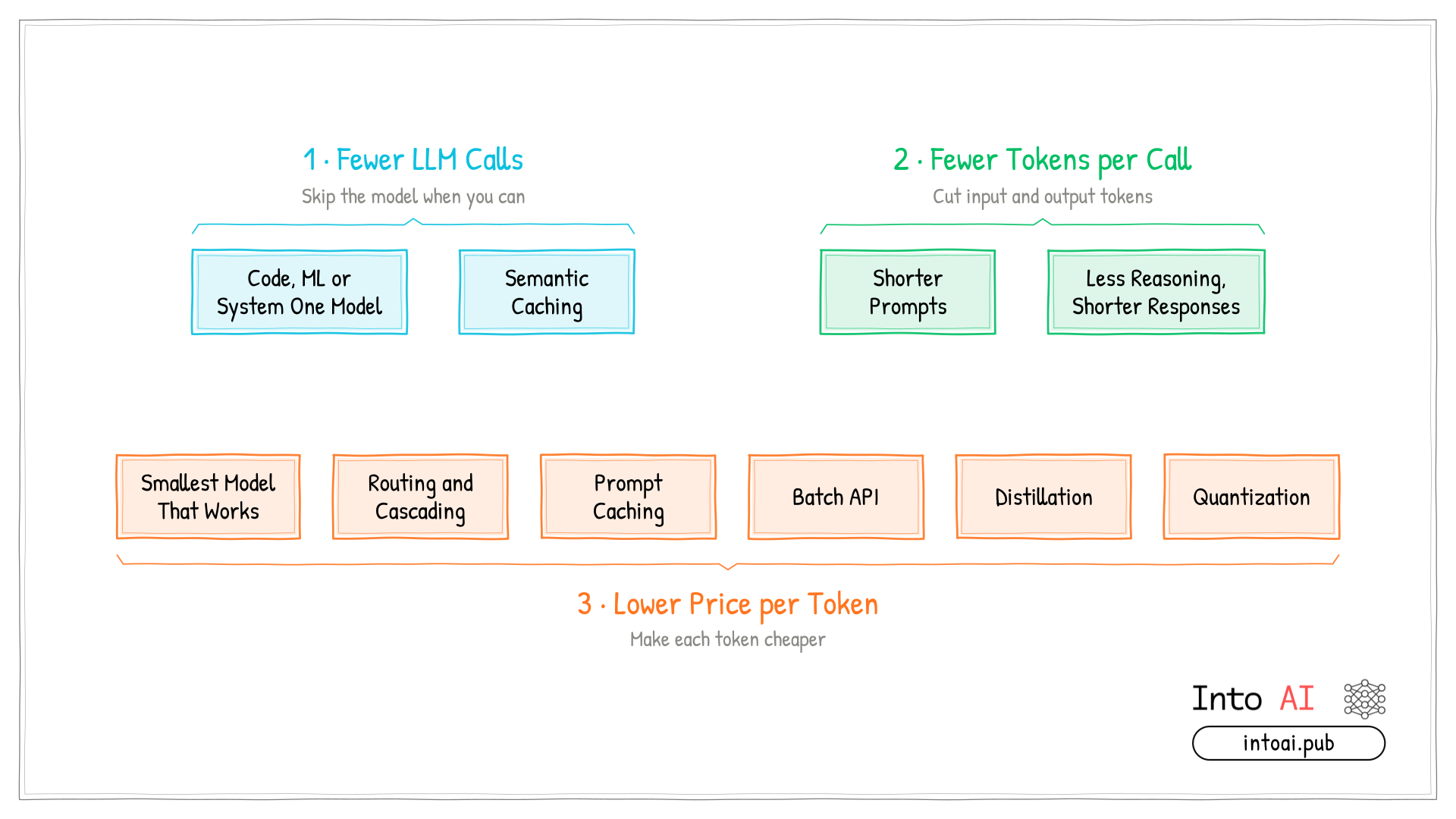
As AI models become more capable, people are using them for many more use cases and spending a lot more on tokens. There’s a growing need to understand how AI costs scale within your organization and optimize them so they don’t break the bank. Revolut did just that, cutting its AI costs by roughly 90% in less than a year.
Here are 10 techniques that will help you cut your AI bill as well, whether you use an API or run models yourself.
If you’re running short on time, jump to the TL;DR section or watch the video version of this lesson on my YouTube channel.
🥳 We just hit 1 million views on the Into AI YouTube channel! If you haven’t yet, please subscribe to the channel for interesting, super-valuable videos all week. 🎥
1. Use an appropriate LLM for a use case
The bigger a model, the more parameters it has and the more calculations it does for every token it reads or writes, which increases cost.
For example, Claude Fable 5.2 costs $40 per million output tokens, while Claude Haiku 5.5 costs $0.50 per million output tokens (for prompts up to 100K tokens), making it 80× cheaper.
This is obvious, and you wouldn’t use a road roller to flatten your pastry dough. Similarly, using a reasoning LLM for trivial tasks like the following is wasted compute:
- Checking output formats
- Performing simple calculations
- Triaging support tickets
- Fixing grammar
Such tasks can be easily handled by a smaller LLM or SLM.
But how do you know if a small model will work well? You build evals.
- Build a test set of a hundred task examples with ground-truth answers.
- Run the test examples with different models (smaller to larger) and score their outputs, and record the cost and latency of each run.
- Once you reach the needed performance, don’t move up further for larger models.
A small LLM might fail on tasks that require complex reasoning, difficult calculations, or expert-level judgment. This is where you cannot skip a larger reasoning model, but for most other tasks, you can.
2. Tune down on ‘Reasoning’ and ask for short responses
Reasoning involves the model ‘thinking’ or producing its chain of thought before replying. These reasoning tokens add to your overall AI bill.
Take Claude Opus 5.5, which costs $20 per million output tokens. Let’s see how its output and cost change at different reasoning effort settings:
- At
loweffort, a request could produce 500 reasoning tokens before giving a 200-token answer. This totals 700 tokens and costs about 1.4 cents.
- At
higheffort, the same request would produce 5,000 reasoning tokens before giving the 200-token answer. This is 5,200 output tokens, which costs about 10.4 cents. That’s about 7× more expensive for the same answer length!
Claude Opus 5.5 comes with five supported reasoning effort levels: low, medium, high, xhigh, and max, and defaults to medium.
usage.output\tokens\details.thinking\_tokens is the API response field that tells how many billed output tokens a model spent on reasoning.
Always evaluate the task accuracy against tokens used on different reasoning efforts, and if your task does not require it, explicitly set the reasoning effort to low rather than relying on the default. Also, in my experience, the max reasoning effort is rarely required for a task.
Output tokens also cost several times more than input tokens (5× on current Claude models), so ask for short answers and limit the output length with max\_tokens.
3. Use Model Routing & Cascading
Often, task complexity of real-world traffic isn't predictable beforehand. For example, a chatbot might receive a request to tell the time in a different time zone. This is a trivial task a small model can handle well, as opposed to performing complex calculus, which needs a large model.
In such cases, instead of picking a single model that serves all user requests, one could route each request to the appropriate model. There are two ways to do this:
- Model routing: A small and fast request classifier reads each request and sends it to the most appropriate model.
- Model cascading: A smaller, cheaper model first answers every request. If the response falls short, based on a programmatic check, the model's output confidence, or a separate scoring model, it is directed to the larger model.
Model routing saves on cost, as each request is answered by one model, but it can be inaccurate because the classifier must judge difficulty from the question alone.
On the other hand, with Model cascading, it is easier to judge request difficulty given the question and the generated answer, but escalated requests incur costs from both the smaller and larger models and take longer.
Popular LLM routers include OpenRouter’s Auto Router, a managed service, and RouteLLM and LLMRouter, which are open-source.
4. Don’t use an LLM at all
Not all tasks require using an LLM. Look at the following examples:
- Format checks and extracting dates and numbers from text can be done with regex.
- You can check for valid output (for example, valid JSON or output that follows a schema) with a simple programmatic script.
- Finding names, locations, and companies in text can be done with Named-entity recognition (NER) using libraries like SpaCy
- Spam detection and churn prediction can be done using classical ML algorithms such as logistic regression or XGBoost.
- Intent detection or sentiment detection can be done using a fine-tuned BERT) classifier.
- Recommendations and duplicate detection can be done using embedding models.
- Input and output toxicity checks can be performed using moderation classifiers.
There’s also a new category of models called System One models that, unlike LLMs, do not write replies, produce code, or generate explanations of their reasoning. Instead of generating text, these models returntyped decisions and probabilities for a given query.
These models suit tasks that require a quick decision rather than a full written answer. For example, sentiment classification on user requests, or routing support tickets to the right team.
Popular System One models include Jev, Perplexity Decider, Laya, Microsoft-Decision-1, and Clef.
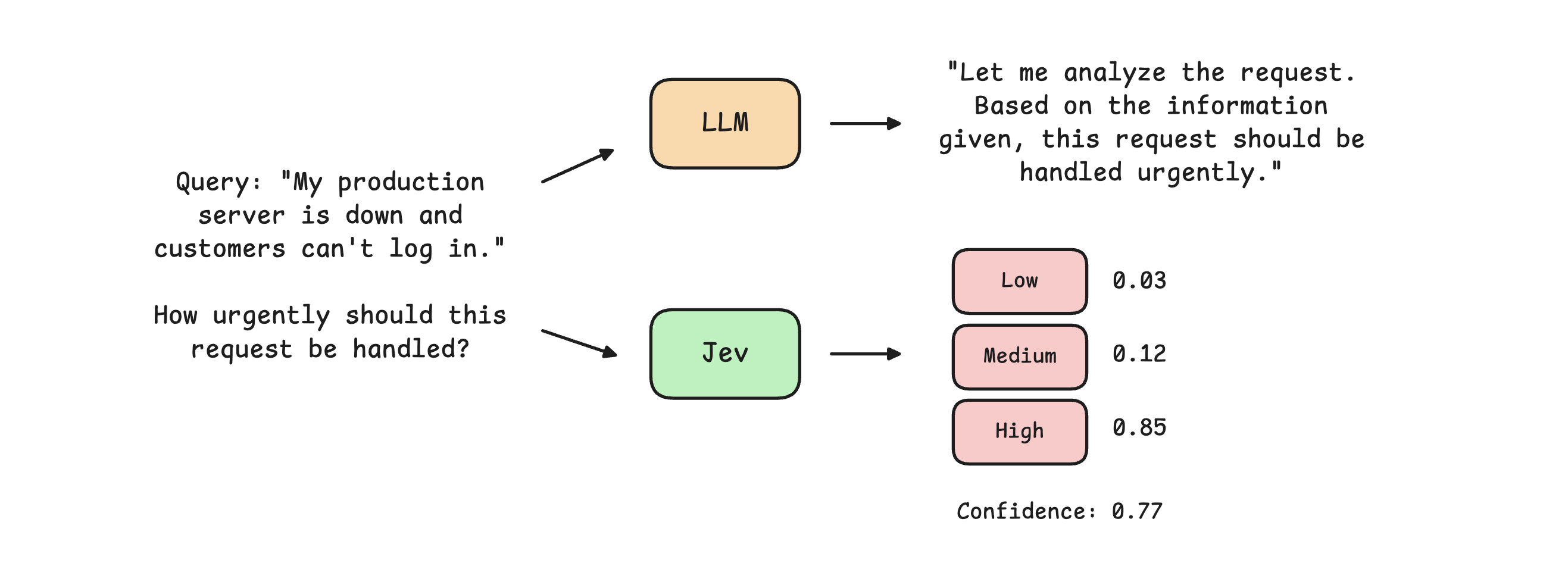
\Outputs from an LLM vs. Jev (Source)\
System One models are much cheaper than LLMs. Jev, the first System One model, costs only $0.042 per million input tokens, with completely free output tokens.
If you’re new to System One models like Jev, check out the following lesson to learn them better.