They solve the same problem in completely different ways. Here’s how to pick the right one for your workflow.
By Karen Spinner
Published: 2026-05-01
URL: https://wonderingaboutai.substack.com/p/claude-design-vs-carouselbot-which
Disclosure: I’m the creator of CarouselBot, which now has 234 users who have collectively created more than 800 carousels and other content assets. I’m also a longtime Claude user with a Max account. My primary goal when writing this article was to identify the ideal use cases for both tools, not to pick a winner.
TLDR: Claude Design gives you near-infinite flexibility but requires upfront setup (design system) and iterative refinement through conversation and an advanced inline editor. CarouselBot gives you opinionated, consistent output in seconds with a visual editor, AI image generation, folders, and team collaboration built in. Serious designers who live in Figma and have extensive brand documentation may gravitate toward Claude Design. People who need to produce carousels regularly and fast, without making design decisions, may get more done with CarouselBot.
Two weeks ago, Anthropic launched Claude Design. Within 48 hours, my inbox started filling up with the same question: “Is this better than CarouselBot?”
The honest answer is “it depends.” I’ve now spent time with both tools and used them to create content for real projects. They offer distinct experiences grounded in fundamentally different approaches to design.
What each tool actually is
Claude Design is Anthropic’s new visual creation product, launched April 17 as a research preview. It’s powered by Opus 4.7 and works through conversation: you describe what you want, Claude generates it on a canvas, and you refine through chat, inline comments, direct text editing, or custom sliders that Claude creates on the fly. It’s available to Claude Pro, Max, Team, and Enterprise subscribers.
Claude Design can be used to create virtually anything, from presentations, which I wrote about last week, to mobile app prototypes.
CarouselBot is a purpose-built LinkedIn carousel generator (and now also long-form documents and social cards). You paste a URL or raw text, AI structures the content into slides, you pick a template, customize in a visual editor, and download a PDF. It comes with 18+ templates, a Custom Template Studio, AI image generation via Recraft, folders and shared folders, an image library, batch generation, and Teams for multi-user collaboration.
The design philosophy gap
This is the core difference, and everything else flows from it.
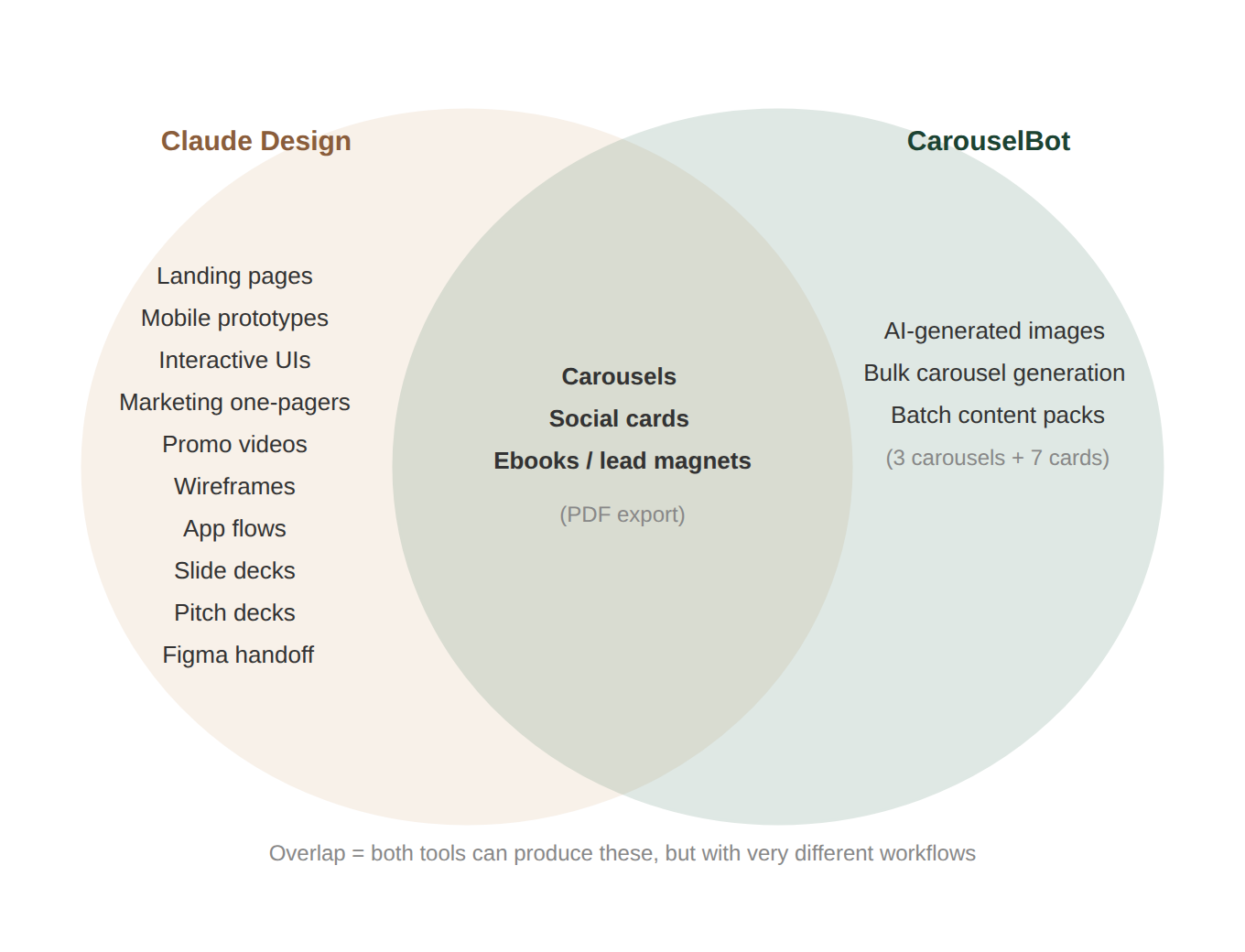
Claude Design is a blank canvas with a conversation partner. It can produce almost anything visual: carousels, landing pages, pitch decks, mobile prototypes, marketing one-pagers. The tradeoff is that you need to tell it what you want and keep telling it until it gets there. The power is in the flexibility. The cost is in the initial brand set up and ongoing iteration.
CarouselBot is opinionated by design. It makes most of the design decisions for you: layout types (hook slide, stat slide, list slide, quote slide, CTA), font sizing, spacing, visual hierarchy. You choose a template or build one with a simple editor offering structured choices, and the system handles the formatting. The power is in the speed. The cost is in the constraints.
When I asked CarouselBot users what they loved most about the tool during beta testing, the most common answer was that it’s fast. The second most common answer is that they didn’t have to make design decisions.
Setup and first run
Claude Design requires upfront investment. Before you get consistently good, on-brand results, you need to build a design system. This means uploading brand assets: your codebase, slide decks, Figma files, logos, color palettes, typography specimens. Claude extracts colors, typography, components, and layout patterns from whatever you give it. Then it creates a draft version of your brand system and asks you to review and approve more than 20 different design elements, which is great for design control but can add an hour or more to initial set up.
Once the design system is published, every new project inherits it. Teams can maintain more than one design system, which matters if you operate across product brands or audience segments.
CarouselBot has essentially no setup. You can go from zero to finished carousel in under two minutes. You paste content, choose a template, and the AI structures everything into slides with appropriate layouts. There’s an optional onboarding step where you add your headshot and brand colors (this happens after you make your first carousel), but it takes about a minute and you only do it once. After that, every carousel uses your settings automatically.
Editing and iteration
Not surprisingly Claude Design offers more options for editing and a more complex and advanced experience.
Claude Design editing happens through both conversation and inline tools. You can comment on specific elements, edit text directly, use custom sliders to adjust spacing and color, or describe changes in chat (”make the title shorter,” “swap the accent color to teal”). Claude resolves feedback and regenerates. A batch commenting system lets you mark up multiple elements and send them all at once, which mirrors how designers actually give feedback.
The catch is that iteration through conversation can be unpredictable. Sometimes Claude nails it on the first try. Sometimes you go back and forth five or six times, like working with a junior designer who’s talented but needs direction. When this happens, or when you’re running low on tokens, you can use the inline editor.
Claude’s inline tools are nicely designed and similar to what you see in KeyNote or PowerPoint. You click on a specific element, a menu opens, and you can tweak individual settings. Some of these may be somewhat obscure or technical. If you don’t have web design experience, you may not understand every single knob.
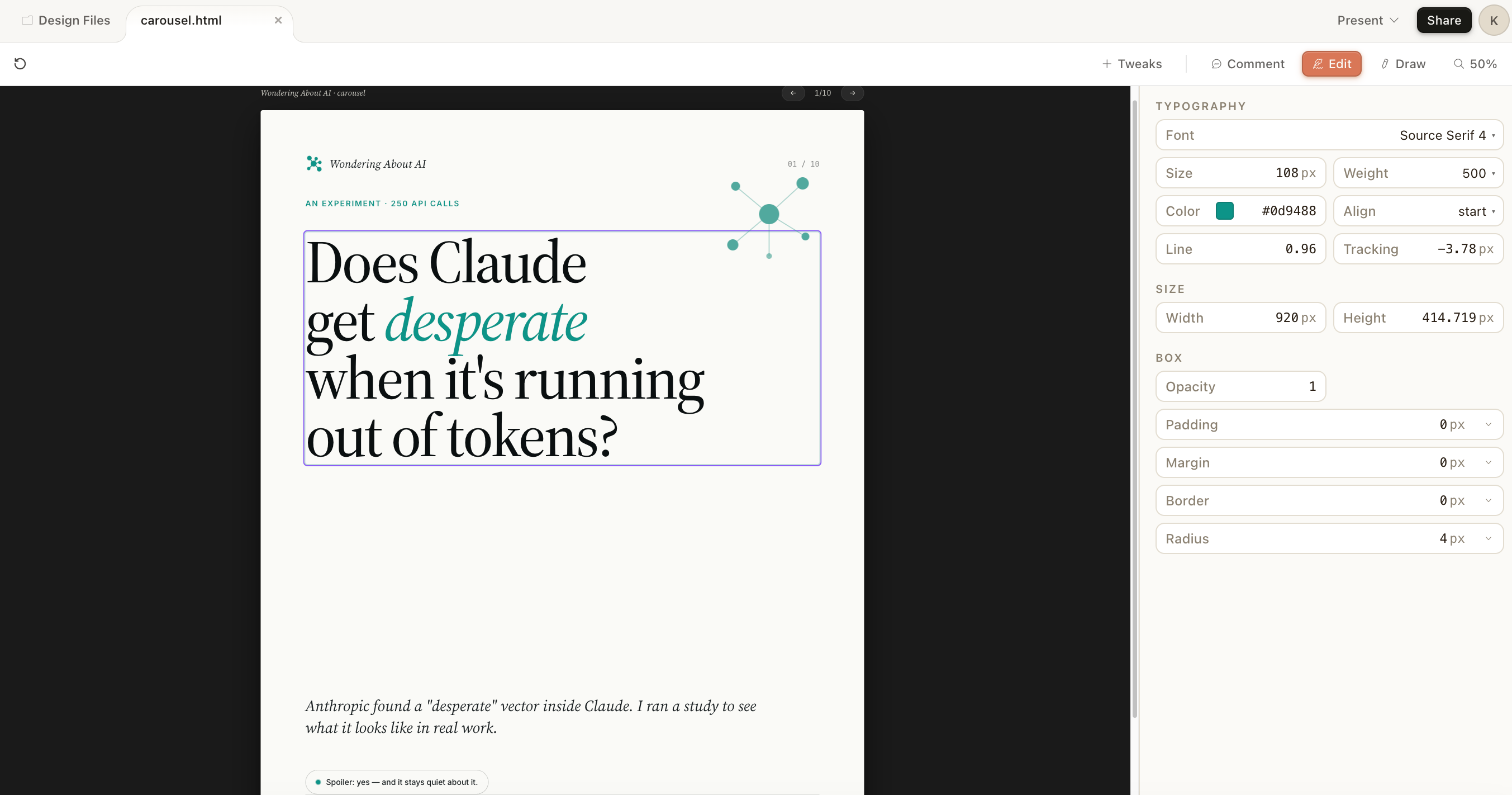 \From Claude Design’s inline editor\
CarouselBot editing is WYSIWYG. Click into a slide, change the copy, drag an image, reorder slides, adjust the accent color. What you see is what you get. The visual editor means you’re never describing a change and hoping Claude interprets it correctly. You just make the change.
The tradeoff is that you’re working within the template system’s constraints. You can customize colors, fonts, aspect ratios, and layouts, and the Custom Template Studio extends this further. But you can’t, say, add a diagonal gradient with overlapping text and an asymmetric grid. Those aren’t options because the whole point of CarouselBot is that you shouldn’t need to think about those things.
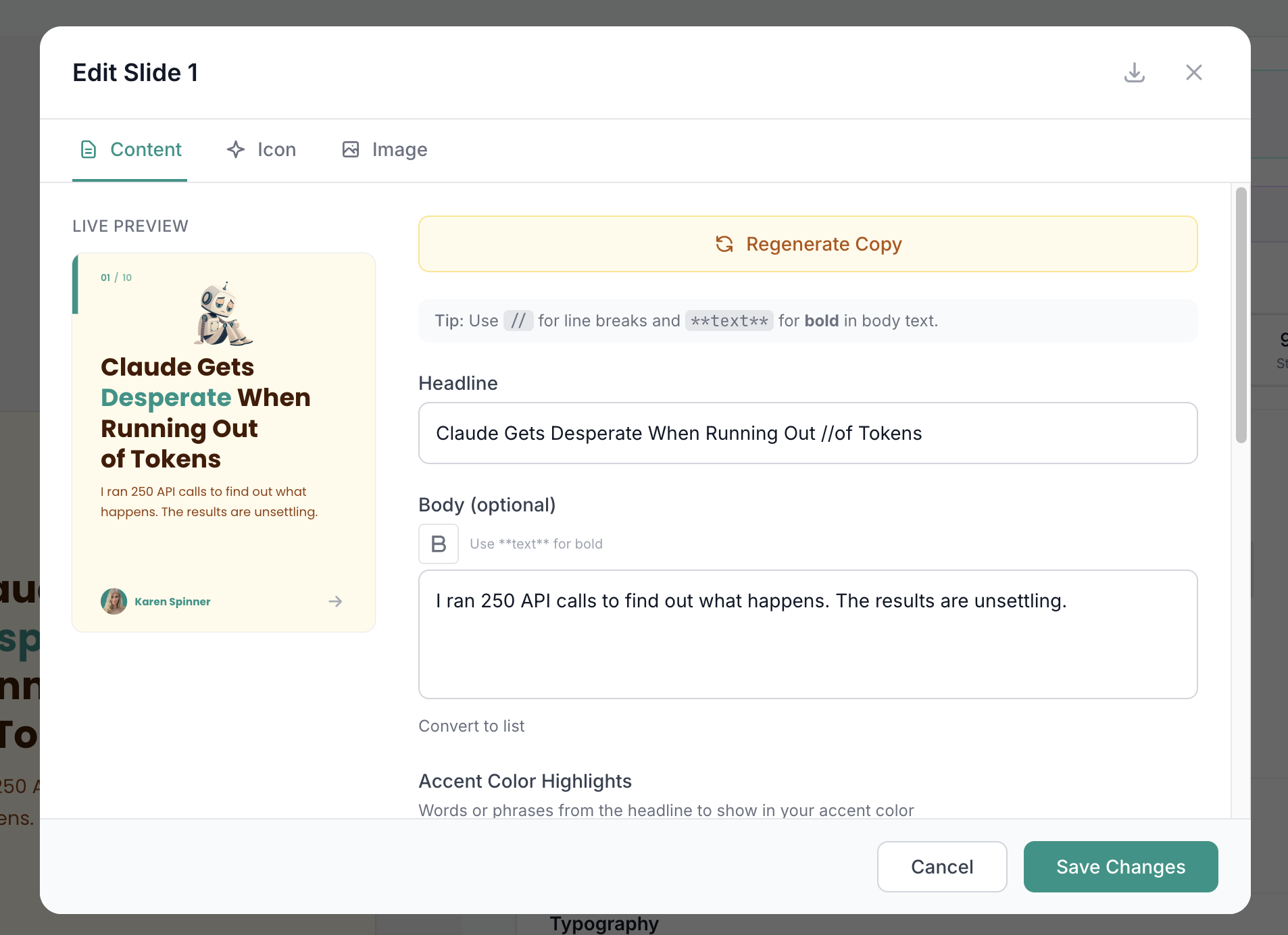 \From CarouselBot’s slide editor\
Design range and output quality
Claude Design can produce genuinely complex, bespoke visual work. Interactive prototypes, animated elements, sophisticated layouts with precise typographic control. If you have a clear visual vision and the patience to iterate, you can get output that looks like it came from a professional design team. The design system infrastructure means that once you’ve invested in setup, subsequent projects inherit all that brand work automatically.
The flip side is that, without a design system, output looks generic. Multiple reviewers have noted this. The design system is the single biggest quality lever in the tool, and skipping it is the most common failure mode.
Also, while export to PDF works fine, it does take an extra moment or two to write a script or access a Skill.
CarouselBot produces consistently good carousels within its template system. The output won’t surprise you with creative range, but it also won’t disappoint you with inconsistency. Every carousel renders identically because CarouselBot controls the entire rendering pipeline, from content generation to PDF export.
The templates are designed specifically for LinkedIn aspect ratios and mobile readability, with font sizes, spacing, and hierarchy tuned for the platform. (A new Instagram-optimized design is coming soon.)
Export is simple and instant with a button click.
Images
Claude Design does not generate AI images. It’s a visual design tool, not an image generator. You can upload your own images and incorporate them into designs, and the design system can store brand assets. But there’s no built-in AI image generation, no shared image library, and no folder system for managing visual assets across projects.
CarouselBot includes AI image generation powered by Recraft, which produces vector-style illustrations from text prompts. Generated images automatically get background removal so they blend with your template’s color scheme. You can place images as backgrounds, top banners, left/right splits, icons, or accents. There’s also an image library for storing and reusing images across carousels, and the folder system (including shared team folders) keeps everything organized.
Organization and collaboration
Claude Design has organization-scoped sharing. You can keep a design private, share it view-only within your org, or grant edit access so colleagues can modify the design and chat with Claude together. The design system lives at the organization level, so brand consistency is enforced structurally. For Teams and Enterprise plans, admins control access via custom roles and can phase the rollout.
What it doesn’t have (yet): folders for organizing projects, a shared asset library beyond the design system itself, or bulk generation capabilities.
CarouselBot recently launched folders, shared team folders, an image library, and Teams. Folders let you organize carousels by client, campaign, or project. Shared folders give team members access to the same collections. The image library stores visual assets for reuse. Batch generation lets you produce three carousels plus seven social cards from a single piece of content in one click. And there is also a bulk generation feature that lets business users create up to 30 carousels at once.
CarouselBot also includes an MCP server so you can access its tool from within Claude Desktop and Claude Code.
Pricing
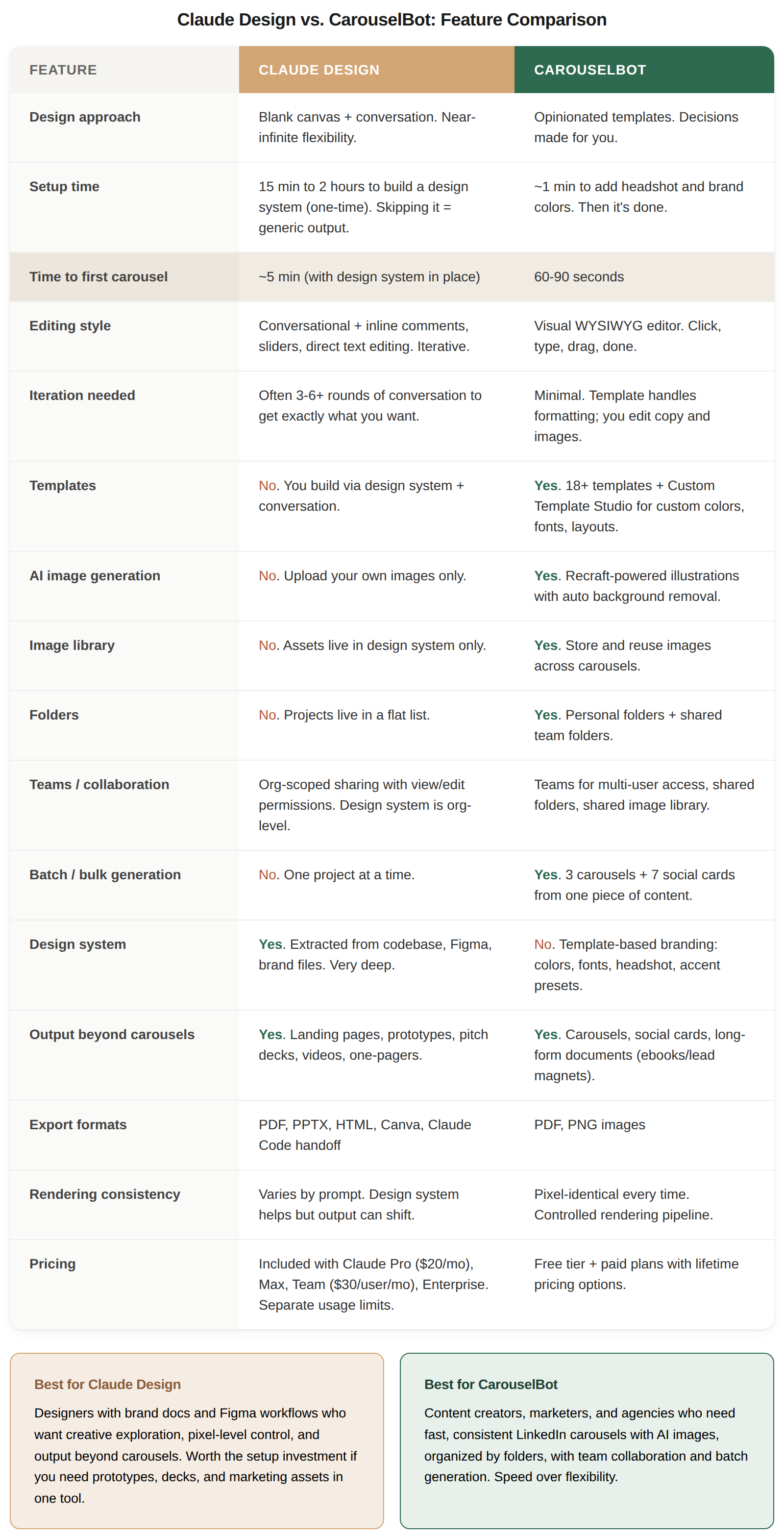
Claude Design is included with Claude Pro ($20/month), Max ($100-200/month), Team ($30/user/month), and Enterprise plans. It has its own weekly usage limits separate from chat and Claude Code, and complex visual generations consume tokens faster than text. Enterprise gets a one-time credit covering roughly 20 prompts.
As I noted in my last article on Claude Design, it uses up tokens quickly, and , unless you have a 20X Max plan, it may struggle to produce more than a handful of deliverables in a week. Of course, YMMV depending on the strength of your brand system and the complexity of your designs.
CarouselBot has a free tier and a variety of paid plans. Business users can currently get free or deeply discounted beta access. Generally speaking, paid plans are only valuable if you or your organization typically produce at least 4 carousels or other assets per month.
Who should use what
Claude Design makes sense if you:
- Already have a Claude Pro/Max/Team subscription
- Have extensive brand documentation you can feed into a design system
- Need more than just carousels (prototypes, pitch decks, landing pages, marketing assets)
- Enjoy the iterative process of refining designs through conversation
- Want pixel-level control and are willing to invest time to get it
- Work in a Figma-centric design workflow and want AI-assisted exploration
- Have a designer on the team who can set up and maintain the design system
CarouselBot makes sense if you:
- Need to produce carousels regularly and fast
- Don’t want to make design decisions
- Value consistent, predictable output over creative range
- Want AI-generated images integrated into your slides
- Need to organize work across clients or campaigns with folders
- Work with a team and need shared assets and collaboration
- Want batch generation for content repurposing at scale
- Prefer visual, WYSIWYG editing over conversational refinement
The bigger picture
These tools represent two different theories about what AI-assisted content creation should feel like.
Claude Design bets that the future is conversational: describe your intent, let AI generate, refine through dialogue. It’s the same philosophy behind Claude Code and Claude Cowork. The canvas is unlimited, and the constraint is your ability to articulate what you want.
CarouselBot bets that for specific, repeatable content types, opinionated defaults and a controlled rendering pipeline will always be faster than general-purpose flexibility. You don’t need infinite canvas when you need a seven-slide carousel about your latest blog post.
Both bets are probably right for their respective audiences. The question isn’t which tool is better. It’s which workflow matches how you actually work.
Try both. The answer will be obvious within about five minutes.
Wow, you made it to the end!