Starting your project can help you learn faster than watching endless tutorials
By Karen Spinner
Published: 2026-04-03
URL: https://wonderingaboutai.substack.com/p/the-fastest-way-to-get-started-with
TLDR; Based on my conversations with subscribers and other builders, the best way to get started with agentic coding tools like Claude Code is to just use them. The projects featured in this article, ranging from beginner to advanced, show just how much you can accomplish with a clear vision, a coding tool like Claude Code, and the patience to work through errors and bugs.
Disclosure: I wrote a rough draft of this article and used Claude to clean it up. Also, one of the featured builds is the latest version of CarouselBot, which now lets you turn one post into 7-10 different social assets (including carousels).
For the first two months of Wondering About AI’s paid subscription program, I ran weekly workshops. Most of these were live builds in which I’d build something with Claude Code in real time, simply to show how accessible the process could be. While I ended the workshops because a weekly meeting was just too much for most readers, they did succeed in one respect. They made it very clear that you don’t need a deep technical background to start building with AI.
Based on my conversations with subscribers, I think many people—especially writers who work primarily with language—second guess themselves when it comes to coding with AI. They wonder if they’re “not technical enough” and worry what will happen if something doesn’t work. And often they find themselves stuck watching tutorials and reading articles, but not actually starting a project.
I designed the Monthly Build Project as a structured way for subscribers to get unstuck. Each month, I share a project brief with a theme, suggested approaches for easy, medium, and hard projects, and questions to ask your AI coding tool along the way. I provide guidance and ideas, but not requirements. You take it wherever you want.
In March, I invited paid subscribers to try out the first Monthly Build Project.
Want to try this yourself? The “learning by doing” approach can work for anyone at any experience level.
Start by writing out exactly what you want your tool to do. Get really granular and picky. Once you’ve done that, open up Claude Code or Cursor and work in plan mode (where the model maps out your project before writing any code) to build a multi-phased spec. Then, when it feels solid, give it to Claude or another model to code.
Go one phase at a time, test often, and take screen captures of any error messages you see. And ask questions about anything you don’t understand. You’ll learn a lot and, if you’re patient, end up with exactly the tool you need.
The first theme: Content repurposing
This is a problem that every newsletter writer knows. You write a great post, and then it just sits there. Maybe you share it once on LinkedIn, maybe you don’t. Meanwhile, that post contains enough ideas for a week of social content, an email teaser, a Substack Note, and more. The gap between “I published” and “I promoted” is where most creators lose reach.
The project brief asked subscribers to build a personalized content repurposing system that takes one piece of writing and transforms it into multiple formats, tuned to your voice, your platforms, and your audience.
I offered three tiers:
- The Beginner project was a single-page HTML tool: you paste in an article, click a button, and it sends the content to the Anthropic API with your custom system prompt, then displays the repurposed output in separate panels with copy buttons. It runs entirely in your browser with no server needed, and most people could build it in an hour or two.
- The Intermediate tier was a Chrome extension with a “Repurpose This” button that works on any web page, so you can repurpose content without leaving the article you’re reading. Same engine under the hood, but integrated into your browsing workflow.
- The Advanced tier was a multi-agent pipeline where specialized AI agents collaborate to extract themes, generate drafts, quality-check each other’s work, and approve final output. The hard part is getting the agents to work together without spiraling into chaos.
People worked on these throughout March on their own time. This month I’m featuring two builds from subscribers who broadly followed the brief, two projects from the Wondering About AI community that weren’t part of the formal build project but still deserve the spotlight, and the new content repurposing feature I added to CarouselBot.
A note for anyone thinking “I could never do this”
If you’re thinking about trying Claude Code or Cursor, but worry that you’re not ready, here are a few things to keep in mind:
- When you feel like you’re not technical enough: Every person featured in this article felt that way at some point during their build. One began in Claude chat, not a code editor, which is exactly how I got started more than a year ago. Another had never written a line of code herself. “Technical enough” is not a prerequisite. Willingness to describe what you want in plain English and then iterate when it doesn’t work is the whole skill.
- When your code breaks and you don’t know why: This is not a sign that you’re doing it wrong; it’s actually part of the process. When you see errors, just paste the error message along with a description of the unexpected behavior back into Claude and ask “what happened?” You don’t need to understand the error yourself (although looking it up is a great way to learn). You need to show it to the AI and ask for help. Most bugs take one or two rounds of this to fix.
- When the output looks terrible on the first try: It will. , one of this month’s featured builders, spelled it out: “I had runs where the output was almost perfect, then I’d fix one thing and something else would break.” First versions are supposed to be rough. If your tool produces ugly output or your system prompt generates generic slop, that’s not failure; that’s a version 0. Tell Claude what’s wrong and ask it to fix it.
- When you’ve been at it for an hour and it still doesn’t work: Take a break and come back tomorrow. These are monthly projects for a reason. Nobody is building these in one uninterrupted session. Walk away, sleep on it, and come back with fresh eyes. The project will still be there, and you’ll almost always see the problem more clearly after a break.
- When you compare your build to someone else’s: Don’t. Seriously. The point of this project is not to ship something impressive. It’s to ship something yours. A simple tool that you actually use is worth more than an elaborate one you built to show off and never opened again.
Guin’s build: Return
Builder: writes The Quiet Reset, a newsletter for introverted entrepreneurs and quiet leaders navigating sales and business on their own terms.
[ The Quiet Reset
INFJ, enrolled member of Cherokee Nation, AI enthusiast, human design specialist, sales strategist, certified coach. On the spectrum and dealing with the effects of Alexithymia. Quit my last sales job in 2019. Now devoted to raw truth.
By Guin](https://guineveremarie.substack.com?utmsource=substack&utmcampaign=publicationembed&utmmedium=web)
Guin went completely off-script, and that’s exactly the point.
Instead of building a content repurposer, she built an app called Return that houses her favorite go-to personal practices. She started in Claude chat, iterated multiple times to get the app to a solid place, then moved everything over to Claude Code and rebuilt it from scratch with improvements. She kept the design intentionally simple.
What stood out about Guin’s process was how she used multiple agents to keep the output authentic. She had a UX/UI agent helping with the build and design, plus voice activator and anti-patterns agents that kept the content true to her own style and tone.
Her takeaway: “I was surprised how fun and easy it was to collaborate with Claude and build something that I absolutely LOVE and use daily.”
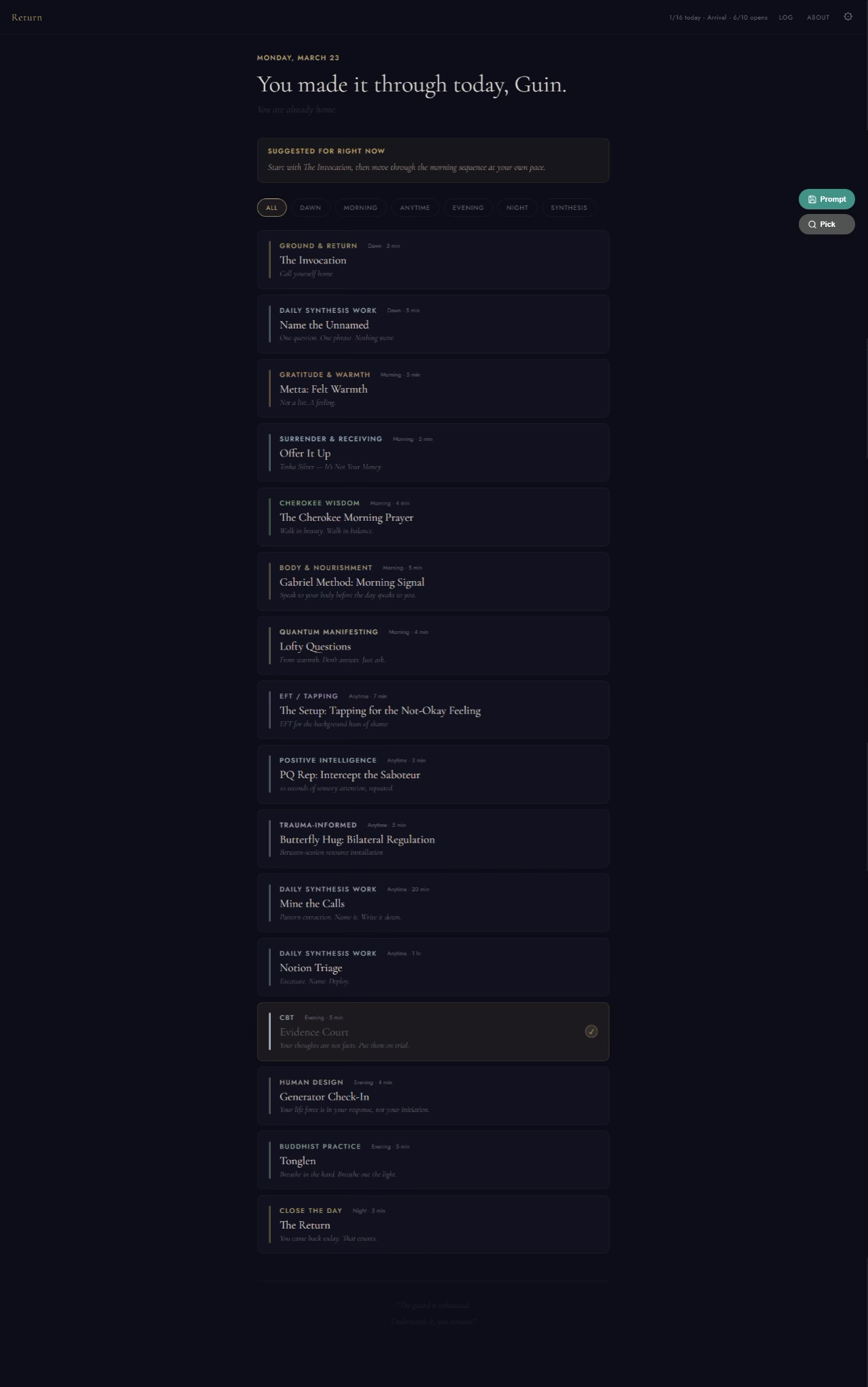 \Return: A home for daily practices\
Claire’s build: Longevity Loop
Builder: Claire Machado writes Long Happy Life, a newsletter about health, habits, longevity, and biohacking.
[ Long Happy Life
Essays on health, habits, longevity, and biohacking.
By Claire Machado](https://longhappylife.substack.com?utmsource=substack&utmcampaign=publicationembed&utmmedium=web)
Claire built a Beginner-tier HTML tool called Longevity Loop that takes one of her Long Happy Life articles and turns it into six ready-to-use pieces: a LinkedIn post, two Instagram captions of different lengths, and three Substack Notes.
What makes Claire’s version distinctive is how much work she put into the system prompt. She included concrete examples from her own published articles as voice samples, a detailed list of structures and phrases she never uses, and specific instructions for each format covering word counts and whether to include a CTA or link.
The three Substack Notes each serve a different purpose: one counterintuitive finding, one personal angle, and one practical experiment. She also customized the UI with her brand colors.
Her takeaway was honest and useful: “I learned that iterating is everything, and that you should never trust what the model says it did; always test every version.”
She had runs where the output was nearly perfect, then she’d fix one thing and something else would break. Claude explained that the problem was structural: she was asking an LLM not to do things it naturally tends to do, like certain rhetorical structures or em dashes. Which is why editing the output still matters, even with a well-crafted system prompt.
Claire also shared that the repurposer is one piece of a larger workflow. After generating the text formats, she uses CarouselBot to turn the article into slides, and NotebookLM to create an infographic and an audio version. Having the written formats ready first makes the rest of the process faster.
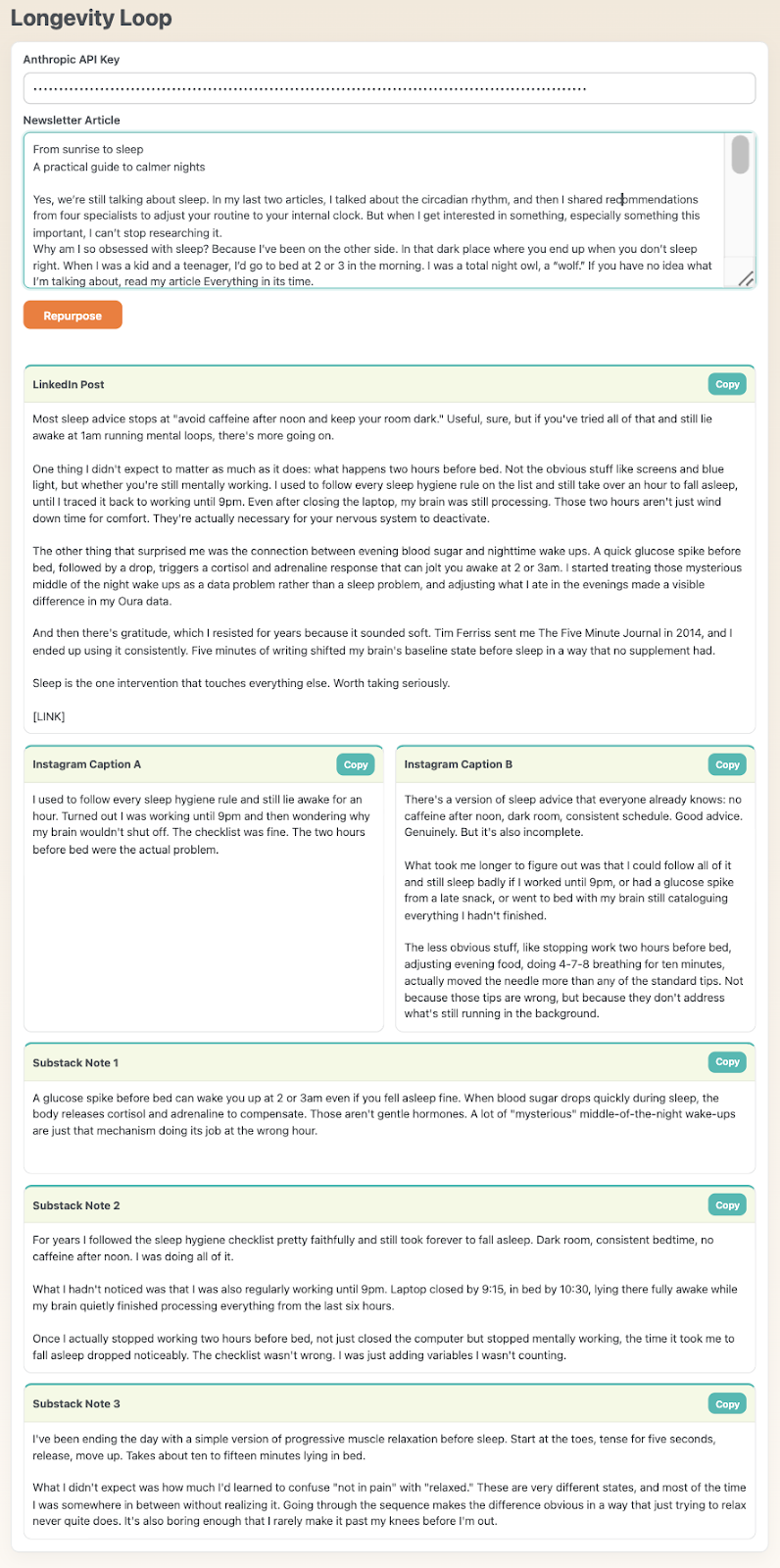 \The Longevity Loop content repurposer\
Community builds
These two projects weren’t part of the formal Monthly Build, but they were built by Wondering About AI subscribers during the same period and they’re too good not to share.
Karo’s build: LinkSwap
Builder: Karo Zieminski runs the best-selling newsletter Product with Attitude, the digital home of the AI coding movement.
[ Product with Attitude
AI Product Manager turning everyone into AI builders & experimenters. I help you design, build, test & feature your projects on StackShelf.app. Join a 14K+ community building in public & growing critical AI literacy the only way that sticks: by immersion.
By Karo (Product with Attitude)](https://karozieminski.substack.com?utmsource=substack&utmcampaign=publicationembed&utmmedium=web)
Karo had been circling an idea for months without being able to name it. She knew Substack runs on trust, and that writers are already willing to share each other’s work. What kept nagging at him was the gap between that willingness and any practical way to act on it. Then, while researching SEO and AIO for his own newsletter, it clicked: backlinks. Not the spammy kind. Curated partnerships between writers who already respect each other’s work.
So she built LinkSwap, a system that automates the process of finding topically relevant link exchange opportunities between newsletters. Instead of manually hunting through each other’s archives for natural places to add backlinks, the tool handles topic matching and batch approvals. As Karo put it, the willingness to share was already there: “What’s been missing is the infrastructure.”
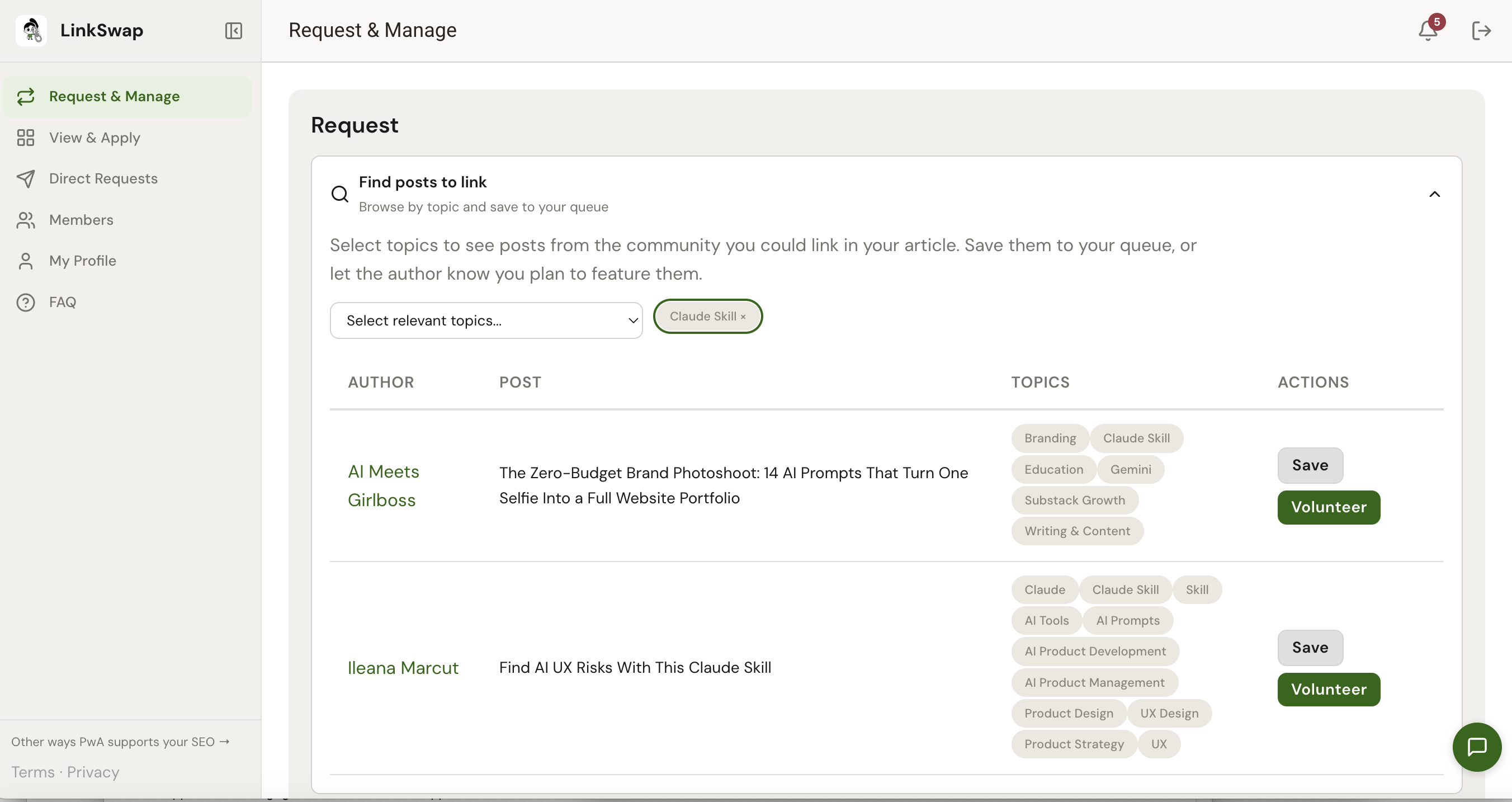 \High quality link swapping of relevant content is good for SEO and your readers.\
She brought in SEO expert to validate the approach, and the two co-authored a deep dive into why backlinks still matter for Substack writers in 2026, covering everything from how cross-author links build topic authority to how they increase the odds of showing up in AI-generated search summaries. The whole thing is designed to take about three minutes a week.
Kim’s build: A full custom platform
Builder: Kim Doyal’s newsletter shows solopreneurs how to build with AI in ways that save time and generate income.
[ Kim Doyal
Build AI-powered solutions without a coding degree. After 17+ years online, I'm showing you how to use AI to save time, scale smarter, and create tools you didn't think you could. Get 'the SPARK' newsletter every Thursday + tutorials and guides in between](https://kimdoyal.substack.com?utmsource=substack&utmcampaign=publicationembed&utmmedium=web)
For 17 years, WordPress was Kim’s entire online identity. She had the agency, the outsourcing company, the podcast. Everything she built ran on WordPress. Then vibe coding happened, and instead of rebuilding on the platform she knew, she decided to start from scratch.
In mid-February, she relaunched kimdoyal.com as something far more ambitious than a website. It’s a fully custom platform with her own CMS, SEO tools, a rich-text editor, a members area with dashboards and a directory, training infrastructure, and both an admin backend and a member-facing frontend. The kind of thing people typically pay developers thousands of dollars to build. Kim did it with Cursor, Claude Code, and what she describes as being “just very tenacious.”
Her process is worth studying. She started with Gemini to generate a visual mockup, basically using it as a conversation-driven style guide for her brand colors, fonts, and layout. But once the code got too long on a single page, things started falling apart, so she stopped at the homepage and moved to Cursor with Claude Code for the real build. Her recommendation: use an AI tool to get your visual direction locked in first, then bring it to a proper editor where you can iterate without things breaking every time you change one element.
Kim’s build is a good reminder that “content repurposing” isn’t always about turning articles into social posts. Sometimes it’s about rebuilding the infrastructure that houses all your content in the first place.
Karen’s project: One to many batching in CarouselBot
After talking with users, I realized one of the weakness of CarouselBot was that it only offered one-to-one and many-to-many generation. You could paste a link and get a single carousel or document. Or you could paste many links and get many carousels.
But most creators and agencies want something a little different. They want to paste a link and get multiple assets in multiple formats—basically, a week of social media content from a single source.
So, I added two content repurposing features that offer one-to-many generation.
First, the Cards feature lets you generate 7 different social cards in different shapes and sizes from a single link. And second, the Batch feature lets you generate three carousels with different angles and storylines plus a set of 7 cards from a single link.
Here’s a set of social cards I crated in about 45 seconds:
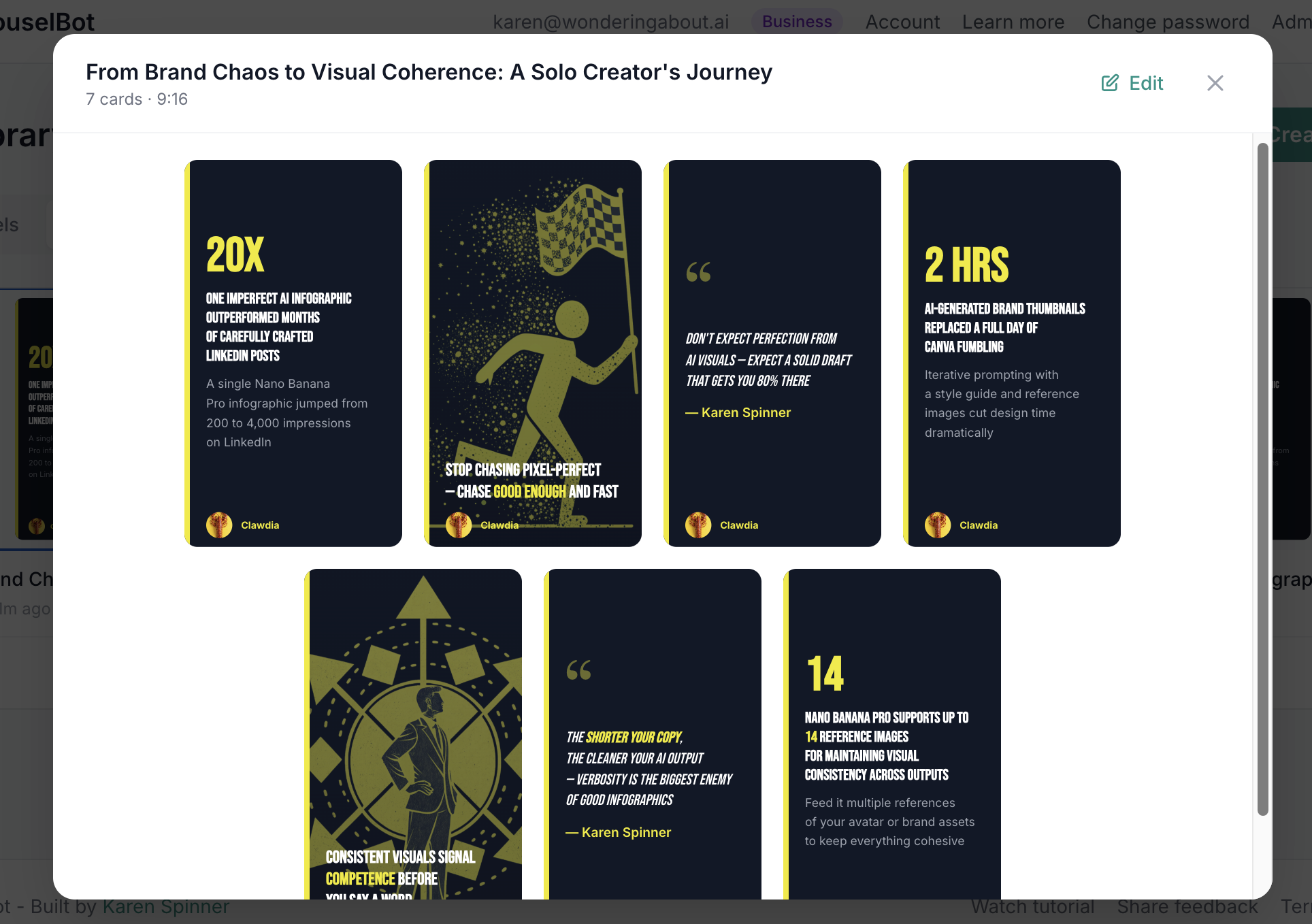
And here’s the batch feature in action:
Coming in April: Spring Cleaning
Spring is a great time of year to clear out the clutter, so I’m choosing personal productivity and “spring cleaning” as this month’s theme. Project suggestions include:
Beginner: Habit Tracker
Build a simple daily check-in app that tracks whatever matters to you: writing streaks, exercise, mood, water intake. This is HTML, CSS, and basic JavaScript. You'll learn how to structure a small app from scratch and actually ship something you can use every morning. (This is very similar to Guin's app.)
Intermediate: API Spending Dashboard
Pull your spending data from the Anthropic or OpenAI API, display it visually, and set a budget line so there are no more surprises. You’ll learn API integration, data fetching, and basic charting, all skills that carry into whatever you build next. If you’ve ever checked your usage and thought “wait, I spent how much this month?”, this one’s for you.
Advanced: Email Triage with Analytics
Connect to your Gmail, use an LLM to classify messages by urgency and category, and build a custom analytics dashboard that reveals patterns in your inbox: busiest hours, top senders, how much is signal vs. noise. You’ll learn auth, email parsing, API calls, and how to wire an LLM into a real workflow. Inbox zero as a spring cleaning project feels right.
While Claude Cowork can do some of this if you give it access to your inbox, this project teaches you how auth, APIs, and LLM classification actually work, so you’re building your own skills and getting a customized tool.
If you want to try one of these builds, paid subscribers get the full project specs, step-by-step guidance, and something new this month: 1:1 build consultations. If you get stuck, I'll help you work through it.
Here’s a sneak preview:
Already a paid subscriber? Check your inbox for the April build announcement.