How I set up an MCP server for CarouselBot and the challenges I encountered along the way
By Karen Spinner
Published: 2026-03-13
URL: https://wonderingaboutai.substack.com/p/i-embraced-the-saaspocalypse-and
TLDR; MCP lets your app talk to Claude, but there’s a big difference between getting it to work on your local machine and running it in production. Here’s what I learned while building an MCP server for my SaaS and deploying it to Vercel, including the bugs, the fixes, and why programmatic software services are the wave of the future.
Disclosure: This article was written by me, a human. I used Claude extensively for debugging and research during the build, and this article heavily references Anthropic’s docs. I also feature CarouselBot, my carousel- and document-building app, which can now connect to Claude Desktop via MCP.
On January 30, 2026, Anthropic released a set of plugins for Claude Cowork targeting legal, sales, finance, and data analysis workflows. The market reaction was swift. A Goldman Sachs basket of U.S. software stocks posted its worst session since the April tariff selloff, and traders gave it a catchy name: the SaaSpocalypse.
Weeks later, on February 24, Anthropic announced that roughly a dozen companies including DocuSign and Google would offer access to their functionality and data through MCP connectors for Claude Cowork. The S&P 500 Software Index had its most volatile week in years.
The main driver behind this meltdown was fear that we’re heading towards a future in which all SaaS functionality will be mediated by Claude or other AI agents, and that software branding and UX will become irrelevant as agents select tools based solely on price and capability.
As the creator of two small SaaS products, I found this a little worrying. I’ve put a lot of work into building really painless, easy-to-use experiences for my small but growing customer base. And my conversations with professional marketing and content teams suggest that there’s a growing demand for programmatic access to image and document editing capabilities that would otherwise require a lot of manual cut-paste-and-clicking, which nobody enjoys.
But since I usually run towards new tech instead of away from it, I decided this would be a good time to let users access CarouselBot, my social image and document creation tool, programmatically. Because MCP is becoming increasingly popular and many of my friends here on Substack are starting to use Claude Code and Claude Cowork, I chose to connect CarouselBot to Claude through MCP.
Psst! You still have time to be part of this newsletter’s March build project! The theme is content repurposing.
What is MCP
If you’ve used Claude Code or Claude Cowork, you’ve probably noticed that Claude can now connect to external tools. It can search your Google Drive, post to Slack, pull data from Salesforce, or check your calendar. The technology that makes all of this possible is called MCP, which stands for Model Context Protocol.
Think of MCP like a universal adapter. Before MCP, every AI tool had to build its own custom integration for every service it wanted to talk to. Slack needed one integration, GitHub needed another, your database needed a third. MCP creates a single standard so that any AI tool that supports the protocol can connect to any service that speaks it. One connector, many possible clients.
Anthropic introduced MCP in late 2024, and it has since been adopted by OpenAI, Google DeepMind, Microsoft, and many others. At the end of 2025, Anthropic donated MCP to the Agentic AI Foundation under the Linux Foundation, co-founded with Block and OpenAI. The MCP server catalog has grown to over 10,000 active servers.
Here’s how it works at a basic level. You have three components. An MCP host is the AI application, like Claude Desktop or Claude Cowork. An MCP client lives inside the host and manages the connection. And an MCP server exposes tools and data from the external service. When the client starts up, it connects to whatever servers you’ve configured and asks “what can you do?” Each server responds with its capabilities, and the AI can use them during your conversation.
If you’ve ever installed a VS Code extension that gives your editor support for a new language, you’ve used something conceptually similar.
How is MCP different from Claude Skills and Plugins?
This is a question I get asked a lot, and the answer is that they solve different problems.
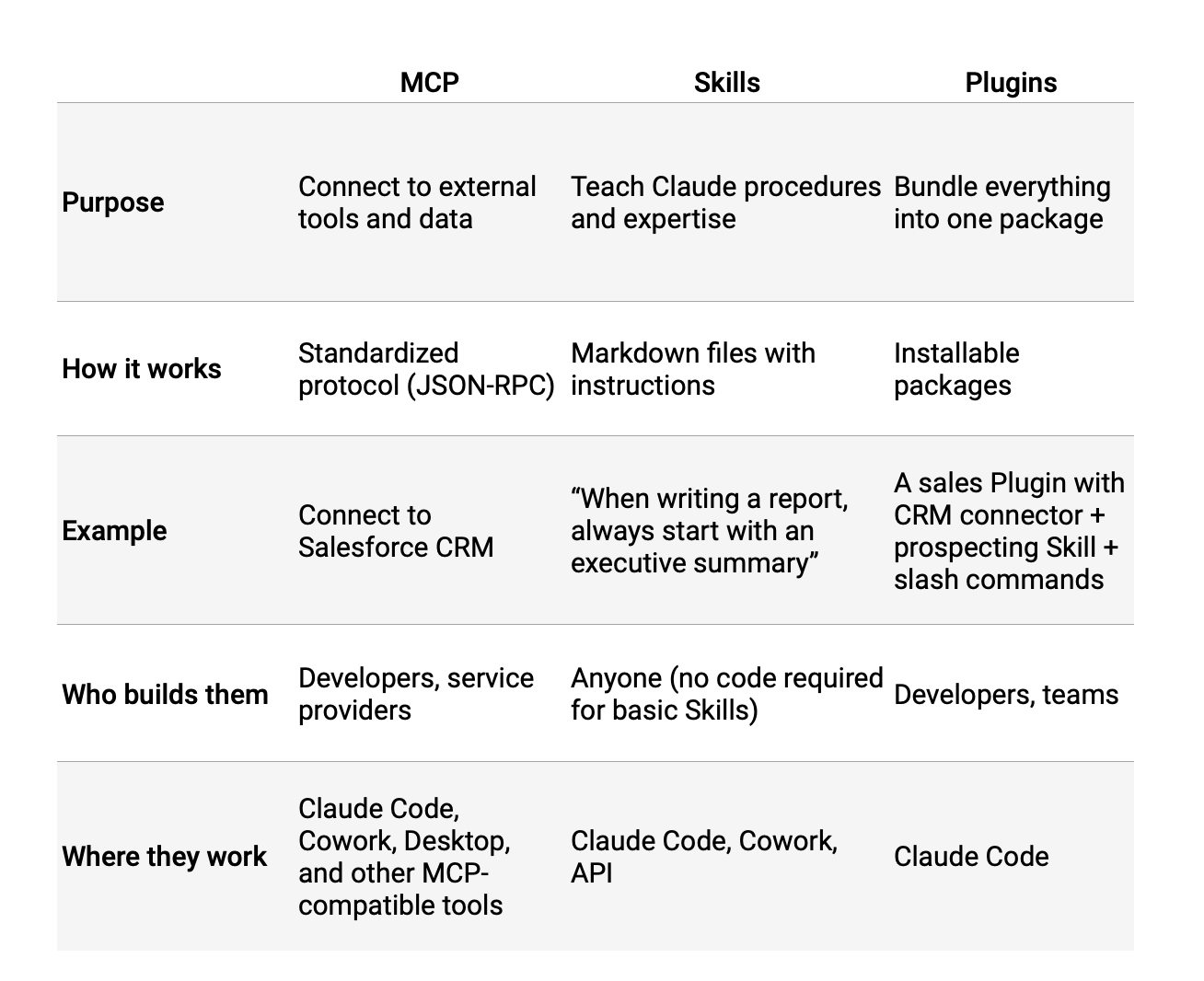
MCP is about connectivity. It’s how Claude reaches external tools, APIs, and data sources. When Claude needs to access your Google Drive, read from a database, or interact with a third-party service, it’s using MCP.
Skills are about procedural knowledge. They’re folders containing instructions that teach Claude how to perform specific tasks. A Skill might contain your brand guidelines, your code review checklist, or your document formatting standards. Skills are lightweight (about 30-50 tokens each until actually needed) and load on demand.
Plugins bundle everything together. A Plugin can contain Skills, MCP configurations, slash commands, and sub-agents in a single installable package designed for a specific job function. A legal Plugin might include a Skill with your NDA review playbook, MCP connectors to your document management system, and slash commands for triaging contracts.
The simplest way to think about it: MCP connects Claude to your stuff. Skills teach Claude what to do with your stuff. Plugins package both into a ready-to-use bundle.
They’re complementary, not competing. A Skill can use MCP tools. A Plugin can contain both.
What are some typical use cases for MCP?
MCP use cases range from simple to complex. On the simple end, you might connect Claude to your Google Calendar so it can check your schedule before suggesting meeting times. On the complex end, an investment banking Plugin might chain together MCP connections to FactSet for financial data, Google Drive for your internal models, and Slack for team coordination, all orchestrated by Claude as part of a single research workflow.
Some common patterns I’ve seen:
- Development workflows. Connect Claude Code to GitHub for repository management, to a database for direct queries, or to Playwright for browser automation testing. This was MCP’s original sweet spot.
- Knowledge work. Connect Cowork to Google Drive, Slack, and your CRM so Claude can pull context from multiple sources when drafting a report or preparing for a meeting.
- Content creation. Connect to tools that generate images, create documents, or publish to platforms like WordPress. (This is where CarouselBot comes in.)
- Data analysis. Connect to databases or analytics platforms so Claude can query, analyze, and visualize data without you having to export CSVs and paste them into the chat.
And what about CarouselBot?
CarouselBot is my social image and document creation tool. It lets you create LinkedIn carousels, Instagram slides, and multi-page eBooks from a topic or pasted content. You pick a template, generate or edit the content, add AI images if you want, and download a PDF.
Adding MCP to CarouselBot means users can do all of this from inside Claude without ever opening the CarouselBot web app. Here’s why that matters:
- Add carousels and docs to content workflows. If you’re using Claude to draft a LinkedIn post, you can also create a carousel to go with it in the same conversation. No context switching. No copy-pasting content between tools.
- Automate repurposing. Feed Claude a blog post or newsletter and ask it to turn the key points into a carousel. Claude handles the content extraction. CarouselBot handles the design. You review the result.
- Stay in Claude. For teams that are already living in Claude Cowork, adding CarouselBot through MCP means one less tool to log into and one less tab to manage.
- Bulk generation. This is the one that gets agencies excited. Create 10 carousels from 10 different topics in a single Claude session. MCP makes it programmatic. Claude makes it conversational.
How I set up the CarouselBot MCP server
Here’s what I did, roughly in order.
Identify functionality to include
I started by mapping out which CarouselBot features should be exposed as MCP tools. Each tool is essentially a function that Claude can call, so I needed to think about what actions a user would want to take from inside a conversation.
I ended up with nine tools: create a carousel, create a long-form document (eBook/lead magnet), edit a slide, edit a document page, generate an AI image for a slide, get full carousel details, get full document details, list available templates, and list available document themes. I also built tools for listing existing carousels and documents so users can pick up where they left off.
Choose an approach to auth
MCP supports two main authentication approaches. OAuth is the more complex option, where users are redirected through an authorization flow (the kind of “Sign in with Google” experience you’re used to). Bearer tokens are simpler; the user provides an API key, and that key is sent with every request.
I went with Bearer token auth. CarouselBot already tracks usage per user for subscription limits, and API keys mapped cleanly to that system. Each user can generate an API key from their CarouselBot settings. The key is hashed with SHA-256 before storage, and all usage limits apply through MCP exactly as they do in the web app. If you’re on the free tier, you get the same limits in Claude as you do in the browser.
This worked perfectly in development. Production was a different story. And my research suggests I should migrate CarouselBot to OAuth even if it will add complexity to my stack. (More on this later.)
Build the MCP wrapper for CarouselBot API endpoints
MCP servers in Next.js live in API routes. I used the mcp-handler library to manage transport types, which takes care of the protocol-level details (JSON-RPC messages, tool discovery, etc.) so I could focus on mapping each tool to the right CarouselBot API endpoint.
Each tool definition includes a name, a description (which Claude reads to decide when to use it), and an input schema specifying what parameters it expects. When Claude calls create\_carousel, for example, my MCP server receives the topic, template ID, and optional title, then calls the CarouselBot API to generate the content, and returns the result to Claude.
Connect CarouselBot to Claude
The final step was making it easy for users to actually connect. There are two paths depending on which Claude tool you’re using.
For Claude Code, you add the connection to your settings JSON file, pointing to the CarouselBot MCP URL and providing your API key.
For Claude Desktop and Cowork, I packaged everything into a .mcpb extension bundle. Users download the file, open it, enter their API key, and they’re connected. The extension file tells Claude where the server lives and what authentication to use.
You can see the full setup instructions at carouselbot.app/help.
Getting it all to work was harder than I expected
The setup process I just described sounds clean. It was not clean. Here’s what actually happened.
Setting up the local test environment
Our MCP server lives at app/api/mcp/[transport]/route.ts, a dynamic catch-all that the mcp-handler library uses to manage different transport types. I configured the extension to point Claude at https://carouselbot.app/api/mcp.
It didn’t work.
The fix was adding an extra path segment: /api/mcp/mcp. The [transport] dynamic route in Next.js requires an actual value in the URL. It won’t match on the bare parent path. This is the kind of thing that’s obvious in retrospect; I probably lost 45 minutes to this missing path segment.
Once the URL was right, local development worked beautifully. Claude could list templates, create carousels, edit slides, generate AI images. Overall, I built nine tools, added auth guards, created an API key system with SHA-256 hashing, and packaged it all into a .mcpb extension bundle.
What is an .mcpb extension bundle?
Claude Desktop supports one-click extension installs through .mcpb files — a zip bundle containing a manifest.json and any dependencies. The manifest declares what the extension is called, what config it needs from the user (in this case, an API key), and how to launch the local proxy.
Mine bundles mcp-remote as a dependency and tells Claude Desktop to run it, pointing at CarouselBot’s API endpoint. The user downloads the file, double-clicks it, pastes their API key, and they’re connected. No terminal commands, no editing JSON config files.
Getting auth to work in production on Vercel
On localhost, authentication was fine. In production on Vercel, it broke down, generating an “Authentication required” message for every tool call.
The main problem was that MCP uses Streamable HTTP transport, where every request (including tool calls) is a POST. The bridge tool that connects Claude Desktop to your server, a Node.js package called mcp-remote, doesn’t forward the Authorization header on POST requests, which means it’s never sent at all.
On localhost, this wasn’t visible because the Node.js dev server keeps in-memory state between requests, so auth context survived. On Vercel serverless, each POST is a separate cold-start invocation with no shared memory. No header, no memory; your auth just vanishes.
The fix was putting the API key into the URL as a query parameter.
https://carouselbot.app/api/mcp/mcp?apiKey=cb_live_xxx
Every POST goes to this URL. Every POST has the key.
Is this secure?
Since mcp-remote runs locally on the user’s machine and talks directly to the Vercel endpoint, there’s no browser involved, no referrer headers leaking tokens to third parties, and no shared proxy infrastructure. The keys are stored as SHA-256 hashes in the database and are revocable from the dashboard. The practical risk is low.
The biggest concern is that API keys in URLs can appear in server-side logs. Vercel logs request URLs including query parameters, so the key is visible there in plaintext. For a single-developer project where I’m the only one with access to those logs, I believe this is an acceptable short-term risk, but it’s one of the reasons I’m moving to OAuth.
Why I’m migrating to OAuth
A lot of the MCP documentation you find online will point you toward mcp-remote as the bridge for connecting Claude Desktop to remote servers, packaged as a .mcpb extension bundle for one-click installation; that’s the approach I initially ran with. It works, but it routes every request through a local proxy that doesn’t forward auth headers, which forced the query parameter workaround.
What I’ve since learned is that Claude Desktop also supports a native connector flow where users paste a URL and authenticate via OAuth directly, bypassing mcp-remote entirely. Users go to Settings > Connectors, paste a URL, complete an OAuth login, and they’re connected. No extension file, no API key to manage, and no proxy dropping headers. Claude handles the token exchange and sends proper auth headers on every request.
The mcp-handler package I already use for the server side has built-in OAuth support, so the migration is mostly about adding token verification and an OAuth metadata endpoint. CarouselBot primarily uses magic link authentication (no passwords), but it does support password login as well. The simplest path is probably to have the OAuth consent screen use password-based login, while the main app continues to default to magic links. Most users won’t mind setting a password once for the MCP connection.
Once OAuth is in place (probably the end of next week), I expect the API key approach will be phased out. New users will get the simpler native flow, existing API keys will keep working for a transition period, and eventually the setup will be just: paste URL, log in, done.
Other educational bugs
Once auth worked, I hit two more issues that are worth sharing because I think other MCP server builders will run into them.
Preview images looked terrible in Claude Desktop.
I had built an elaborate contact sheet renderer. Puppeteer renders each slide, Sharp composites them into a grid, the grid is base64-encoded and sent as an MCP image response. It was technically impressive. It also took 15-30 seconds per carousel and the results had missing emojis, wrong fonts, and mangled layouts.
The problem is that Claude Desktop isn’t a web browser. It has different rendering capabilities for inline images, and complex HTML-to-image pipelines don’t translate well into the chat window.
Instead of trying to make inline previews look better, I created a new tool that generates a shareable preview link. The user clicks the link and sees their carousel rendered properly in the browser, with a dark overlay for easy viewing.
Claude used the entire prompt as the carousel title
When a user says “Create a carousel about the top 5 benefits of meditation for busy professionals who struggle with work-life balance,” Claude passed that entire string as both the topic (for content generation) and used it as the title. The resulting carousel had a title that ran off the slide.
I added a title parameter to the tool schema, but making it required caused Claude to surface schema errors to the user. Making it optional meant Claude ignored it and kept stuffing the full prompt into the title field.
The fix was a server-side cleanTitle function that strips imperative prefixes (“Create a carousel about…”), takes the first sentence, and truncates to 60 characters. Claude can pass whatever it wants. The server makes it presentable. This is a strategyI think will become common in MCP development; don’t fight the model’s behavior, accommodate it at the server level.
What I learned
Always read the latest docs.
MCP tutorials and examples often lag behind the spec. The official documentation standardized Streamable HTTP over a year ago, but plenty of blog posts and AI-generated code still describe the old SSE pattern. If something isn’t working, read the spec, not the tutorial.
Use the logs.
My most productive debugging sessions started with verbose logging and ended with reading what actually happened.
Claude Desktop is not a browser.
Don’t render complex images for inline display. Don’t assume emoji support. Don’t spend time making things look good inside the chat window. Give people a link to the real thing.
Accommodate the model, don’t fight it.
Claude will use your tools in ways you didn’t anticipate. Instead of adding more constraints to your tool schemas (which often just creates more errors), handle messy input gracefully on the server side.
Where this is all heading
The SaaS-pocalypse headlines are dramatic, but what I actually experienced building an MCP server was something more mundane and more interesting: a new distribution channel. CarouselBot still has its web app. It still has its UI. But now it also has a programmatic interface that lets people create carousels from inside the tool they’re already working in.
I think this is what the MCP future actually looks like for small SaaS builders. Not the elimination of your product, but the addition of a new surface area. Your web app serves users who want a visual, hands-on experience. Your MCP server serves users who want to stay in their AI workflow and delegate the visual work to your tool. And your API can serve businesses that want to do things at scale.
If you’re thinking about adding MCP to your app, my advice is to start small, deploy early, log everything, and accept that you may not get it righty on your first try. But when it works, it’s kind of magical to watch Claude create a carousel on your behalf without leaving the conversation.
The MCP server catalog has over 10,000 servers now. I’m glad CarouselBot is one of them.
If you want to try the CarouselBot MCP server, you can find setup instructions at carouselbot.app/help. And if you’re building your own MCP server and run into something weird, drop me a comment. I’ve probably hit it already.