Why "no changes today" is the most important run a loop makes.
By Youssef Hosni
Published: 2026-08-04
URL: https://todatabeyond.substack.com/p/the-claude-loop-that-reviews-my-repo
Hands-On Loop Engineering Course
Last Friday I ran a three-hour workshop on loop engineering with Claude Code, and
by the end of it I was completely done in. Good session — the questions were
better than the ones I had prepared for — but three hours of live demos takes
more out of you than three hours of writing.
Nearly every question came back to the same assumption, so let me start there.
Most people think the step up from prompting is scheduling. Run the prompt
every morning instead of typing it every morning.
It isn’t. That gets you a prompt on a timer. It still forgets what it did
yesterday, it still can’t tell a good result from a plausible-looking wrong one,
and it still doesn’t know when to stop.
Here is the loop I actually run, and the one design decision in it that I think
matters most.
Hands-On Loop Engineering Course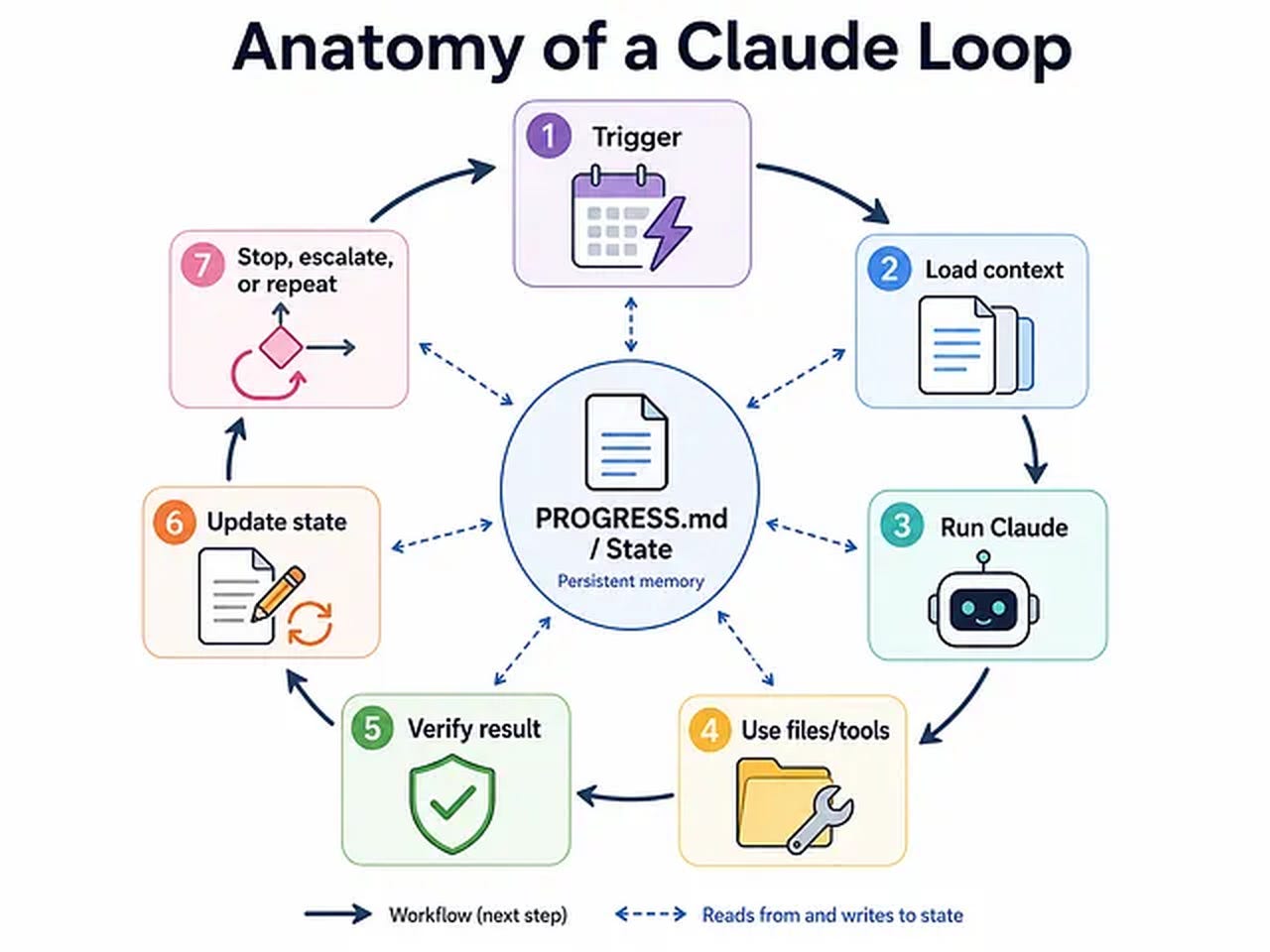
A Loop that Watches a Repository
It monitors a GitHub branch and writes me a review, **but only when the branch
head has actually moved.**
That constraint is the whole point. Most scheduled-AI setups produce output every
time they fire. You end up with an inbox full of reports saying “no changes
detected,” and now you have to read them to discover they were pointless. The
automation has created work rather than removing it.
The workspace is small:
minimal-git-loop/
├── TASK.md                 the goal, stable across runs
├── LOOP_INSTRUCTIONS.md    the operating procedure
├── PROGRESS.md             what happened last time
├── check-changes.sh        the trigger
├── state/last-seen.txt     sha of the last reviewed commit
└── outputs/reports/        one report per real change
check-changes.sh does one job: compare the remote head against the last SHA we
reviewed, and print one of three words — EMPTY, NO_CHANGE, or CHANGED.
Everything else hangs off that.
Get all my 10 AI Courses with 60% off
Three things that break without structure
-
Without state, every run starts from zero. Claude rediscovers the same
context daily and you pay tokens for it.
-
Without verification, a run ends because Claude said “done” — which is a
conversational signal, not an operational one. A beautifully written report about
the wrong directory looks identical to a correct one from the outside. So the run
should end because something concrete was checked: the file exists, the required
sections are present, the state file was updated, nothing outside the allowed
scope was touched.
-
Without a stop condition, it keeps going until it has spent your tokens and —
if you gave it write access — modified something you did not expect.
None of those are prompt-quality problems. You cannot write your way out of them,
because they are all about what happens between runs.
Get All My 9 Books With 60% Off
One rule if you take nothing else
Autonomy is a ladder, not a switch:
-
Read-only analysis
-
Draft output to a folder it owns
-
Sandboxed edits on a branch or worktree
-
Draft external actions, never sent
-
Human-approved actions
-
Automated low-risk actions, with logs and rollback
Most first loops belong at level one or two. Climb only after you have inspected
several runs and the verification has actually caught something. A scheduled loop
runs when you are not watching — that changes the risk profile entirely.
I turned the workshop into a self-paced course.
Hands-On Loop Engineering with Claude — 9 video lessons, a 117-page
book, three runnable loop projects including the repo watcher above, every prompt
used, and the full 247-slide deck.
Get 30% off with code 3D22DH0 until Thursday 6 August, 09:00 Helsinki time. After that, it is 25 through Sunday, then 25 through Sunday, then 30.
Hands-On Loop Engineering Course
— Youssef
To Data & Beyond is a reader-supported publication. To receive new posts and support my work, consider becoming a free or paid subscriber.