A practical breakdown of the folders, files, and boundaries that usually appear once a Gen AI application has to survive production
By Youssef Hosni
Published: 2026-06-09
URL: https://todatabeyond.substack.com/p/what-a-real-production-gen-ai-folder
Most GenAI examples online are designed to explain a workflow, not to show how a real production project is structured. That is why many tutorials flatten the system into one script, one notebook, or one clean pipeline.
In practice, production GenAI applications rarely stay that simple. FastAPI’s guidance for larger applications already makes the software point clearly: real systems usually need multiple files, routers, and separated modules rather than a single entry file.
To Data & Beyond is a reader-supported publication. To receive new posts and support my work, consider becoming a free or paid subscriber.
Production GenAI projects add even more boundaries on top of that baseline because model behavior is variable, prompts evolve, quality must be measured, and failures need to be traced after deployment.
OpenAI’s evaluation guidance, MLflow’s tracing documentation, and Anthropic’s writing on agent evals all point in the same direction: reliable GenAI systems need clearer separation between runtime logic, prompt assets, evaluation, observability, safety, and operational tooling.
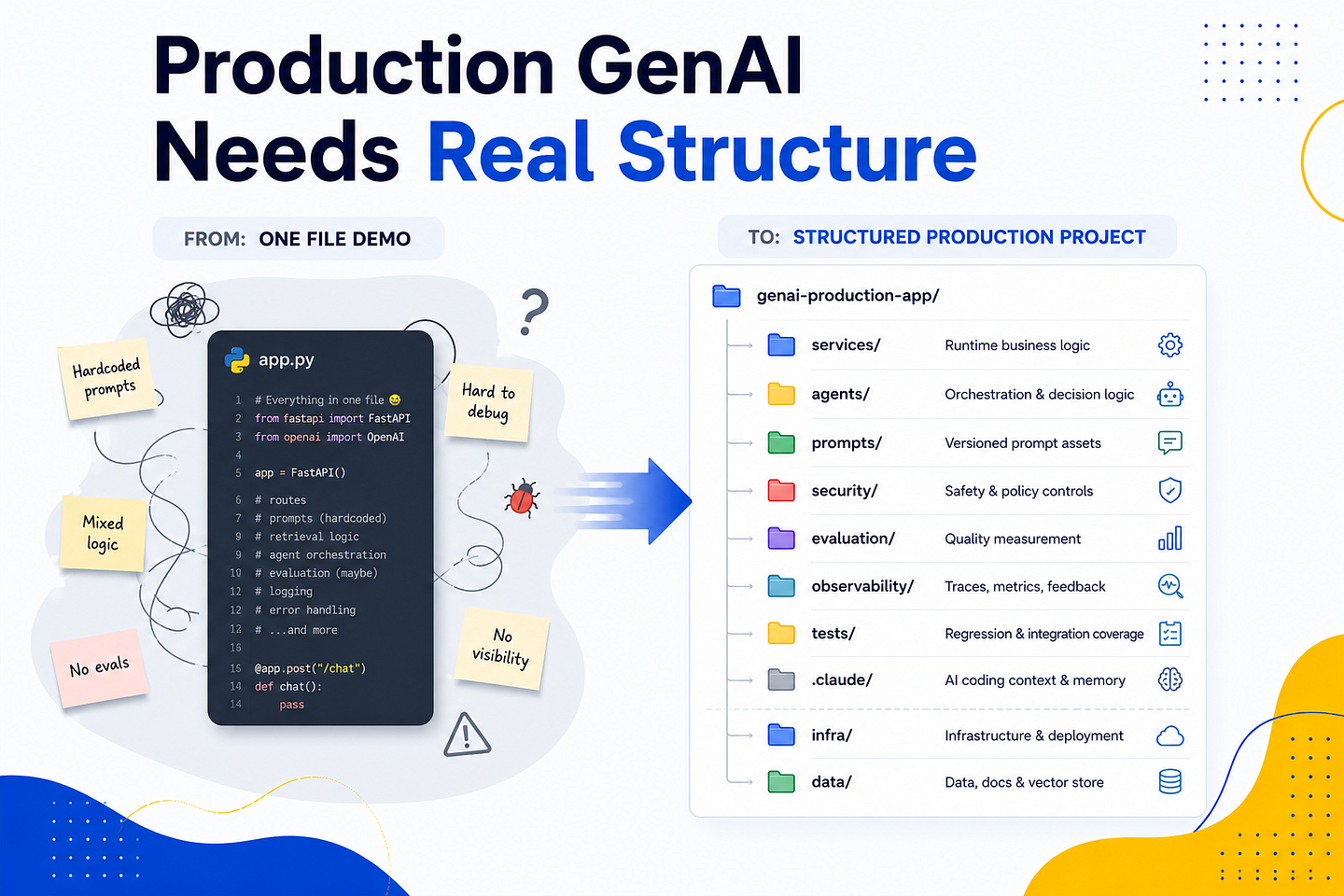
This article breaks down what a real production GenAI folder architecture usually looks like and why those boundaries matter. Instead of treating folders as a cosmetic repo choice, it frames them as operational design decisions: services/ for runtime business logic, agents/ for orchestration, prompts/ for versioned prompt assets, security/ for safety controls, evaluation/ for quality measurement, observability/ for traces and feedback, and supporting folders for testing, infrastructure, and AI coding context.
The exact tree will vary across teams, but the pattern is consistent: once a GenAI project has to survive production, folder structure becomes part of the system’s reliability model rather than just its code organization.
Want to Learn Claude Cowork in a Practical Way?
I’m hosting a live 1.5-hour workshop: Hands-On Claude Cowork: From Prompts to Deliverables & Automated Workflows
We will cover how to use Claude Cowork to move from simple prompts to real deliverables, structured workflows, and practical automation.

1. Why folder architecture matters in production GenAI projects
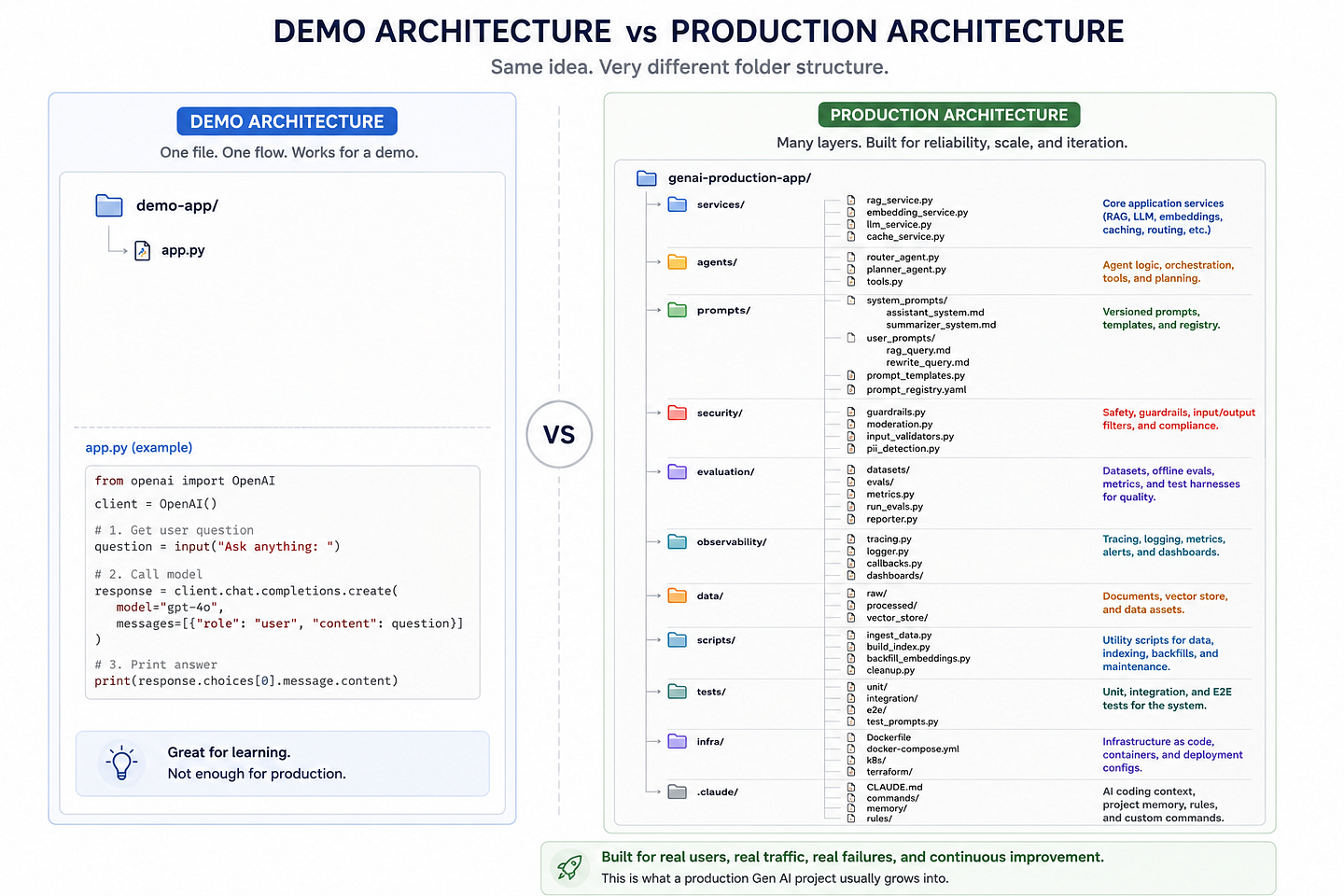 \Demo Architecture vs Production Architecture\
The reason this architecture breakdown resonates is that it shows something most GenAI content skips: production systems are not organized around a single chain, notebook, or demo script. They are organized around boundaries.
In a real production GenAI project, folders are not cosmetic. They define where prompt logic lives, where orchestration lives, where safety checks happen, where evaluation runs, and where observability data is collected.
FastAPI’s official guidance for “bigger applications” makes the same core point at the application level: once a system grows, you stop putting everything in one file and start splitting responsibilities into clearer modules and packages.
A production GenAI project inherits that same software-engineering need, but adds extra boundaries because model behavior is variable and much harder to reason about than deterministic code.
That is what makes folder structure especially important in GenAI systems. In a conventional application, poor folder organization might make the codebase messy.
In a GenAI application, it can also make the system harder to evaluate, harder to debug, and harder to control. OpenAI’s evaluation best-practices guide explicitly notes that generative systems are non-deterministic, which means reliability cannot come only from unit tests or a single happy-path demo.
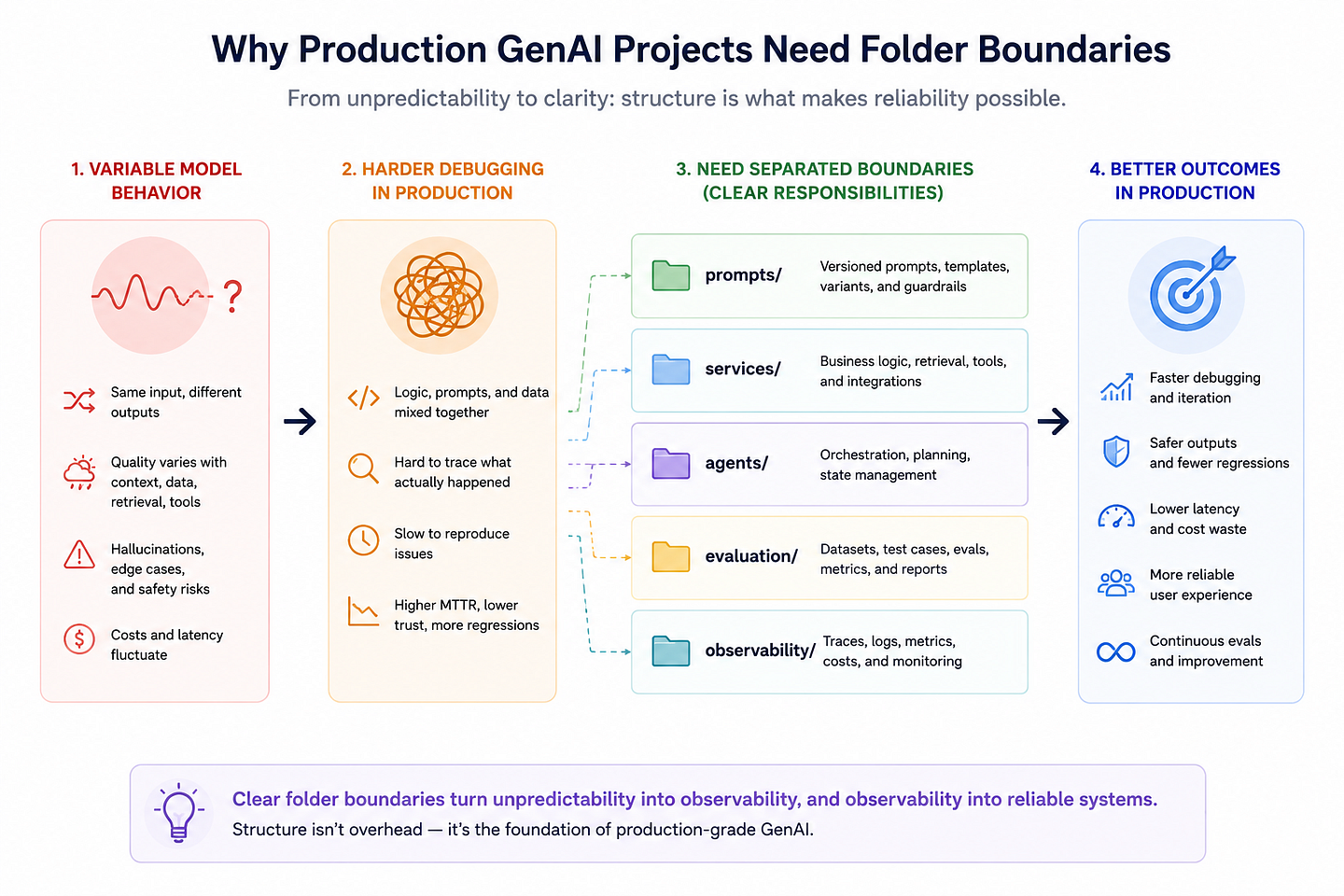 \Why production GenAI projects need folder boundaries.\
If prompts, retrieval logic, agent routing, and evaluation code are all mixed together, then once the system starts drifting or failing in production, the team has no clean boundary for figuring out what actually broke. The project structure matters because it becomes the first layer of operational clarity.
This is also why a serious GenAI project usually grows a set of folders that would feel excessive in a toy example. You do not separate services/, agents/, prompts/, evaluation/, or observability/ because it looks sophisticated.
You do it because each of those areas changes at a different speed, fails differently, and needs a different feedback loop. MLflow’s GenAI tracing docs make this very concrete: production GenAI systems need traces that capture prompts, retrievals, tool calls, intermediate steps, and metadata so teams can understand how a request actually moved through the application.
That kind of observability only works well when the system already has a structure that separates those concerns instead of collapsing them into one monolithic file.
The same is true for evaluation. Anthropic’s recent guide on evals for AI agents argues that evaluations become useful only when they are part of a broader operational loop that includes production monitoring, feedback, and continuous improvement.
That is hard to do if evaluation logic is scattered across ad hoc scripts or buried inside the main application code. A clean project architecture makes it possible to say: this folder owns evaluation assets, this one owns runtime orchestration, this one owns prompt definitions, and this one owns safety or guardrails. In other words, folder architecture is not just about keeping files tidy. It is about making the system legible enough to operate after deployment.
So the real lesson in this post is not only that production GenAI projects have more folders than demos. It is the folder structure itself that reveals how the team thinks about the system.
A weak structure usually indicates that the project is still being treated as an experiment. A strong structure usually means the team expects the application to evolve, break, get monitored, and improve over time.
That is why this kind of architecture diagram feels more honest than most. It is not showing an idealized flow. It shows the actual boundaries a production GenAI project needs to survive in production.
2. The key folders in a real production GenAI project
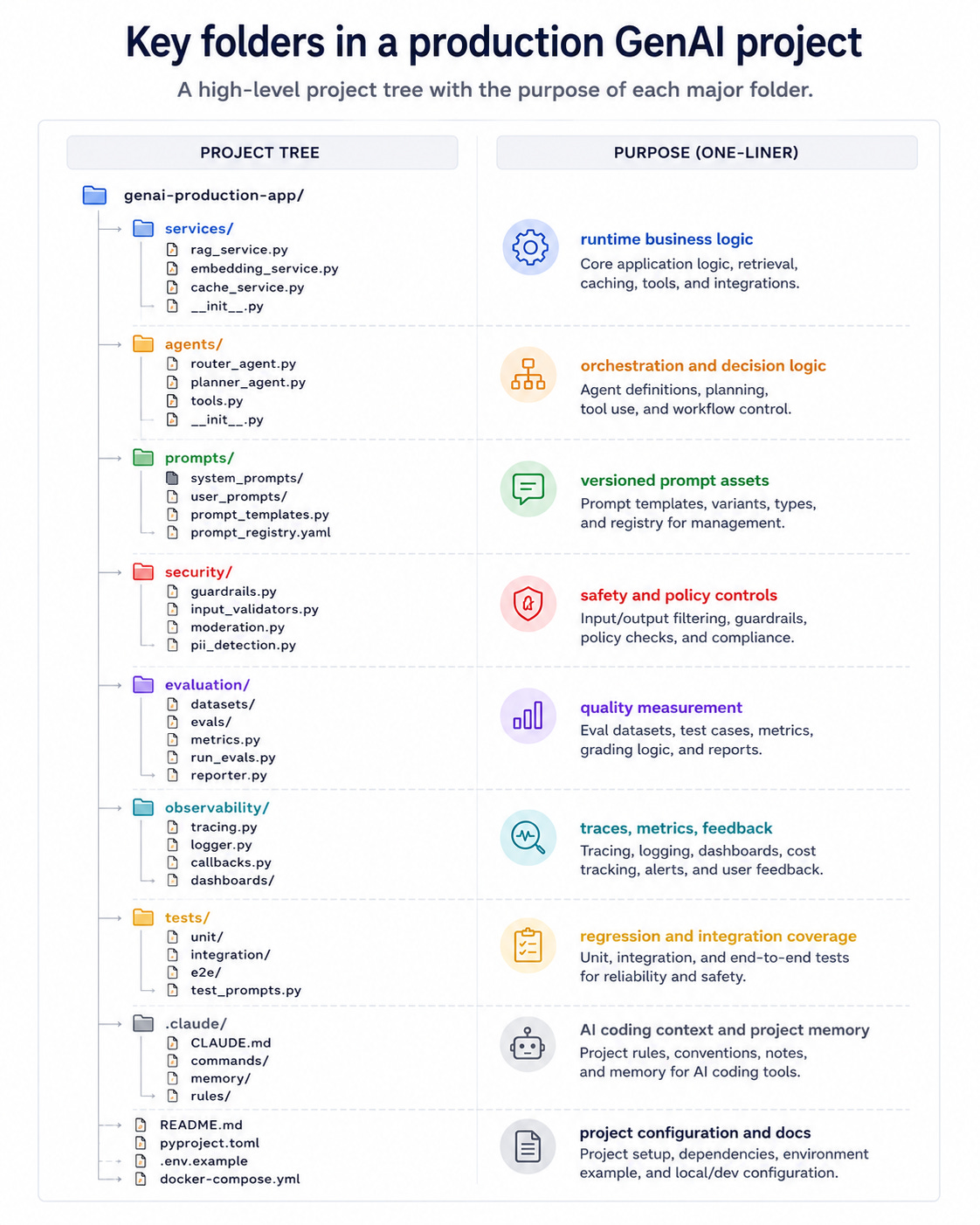
Once a GenAI project moves beyond the prototype stage, the folder structure starts reflecting operational boundaries rather than convenience. The important shift is that the project is no longer just organizing Python files.
It is organizing responsibilities: where runtime orchestration lives, where prompts are versioned, where safety checks run, where evals are stored, and where traces are captured.
Bigger systems need clearer module boundaries so related concerns can evolve independently. In GenAI projects, that need becomes even stronger because the system’s behavior is shaped not only by code, but also by prompts, data, tool calls, retrieval paths, and model variability.
A folder like services /usually becomes the home of core application logic: retrieval pipelines, caching, query rewriting, routing, memory layers, and the functions that connect user requests to actual runtime behavior.
This matters because those concerns often change independently from prompt wording or agent orchestration. If retrieval logic and orchestration logic are mixed together, the system becomes difficult to reason about when output quality drops.
That is why a serious project usually keeps business services separate from agent behavior. The point is not elegance. The point is being able to answer a basic production question: did the system fail because retrieval was weak, because routing was wrong, or because the model reasoned badly after getting the right context?
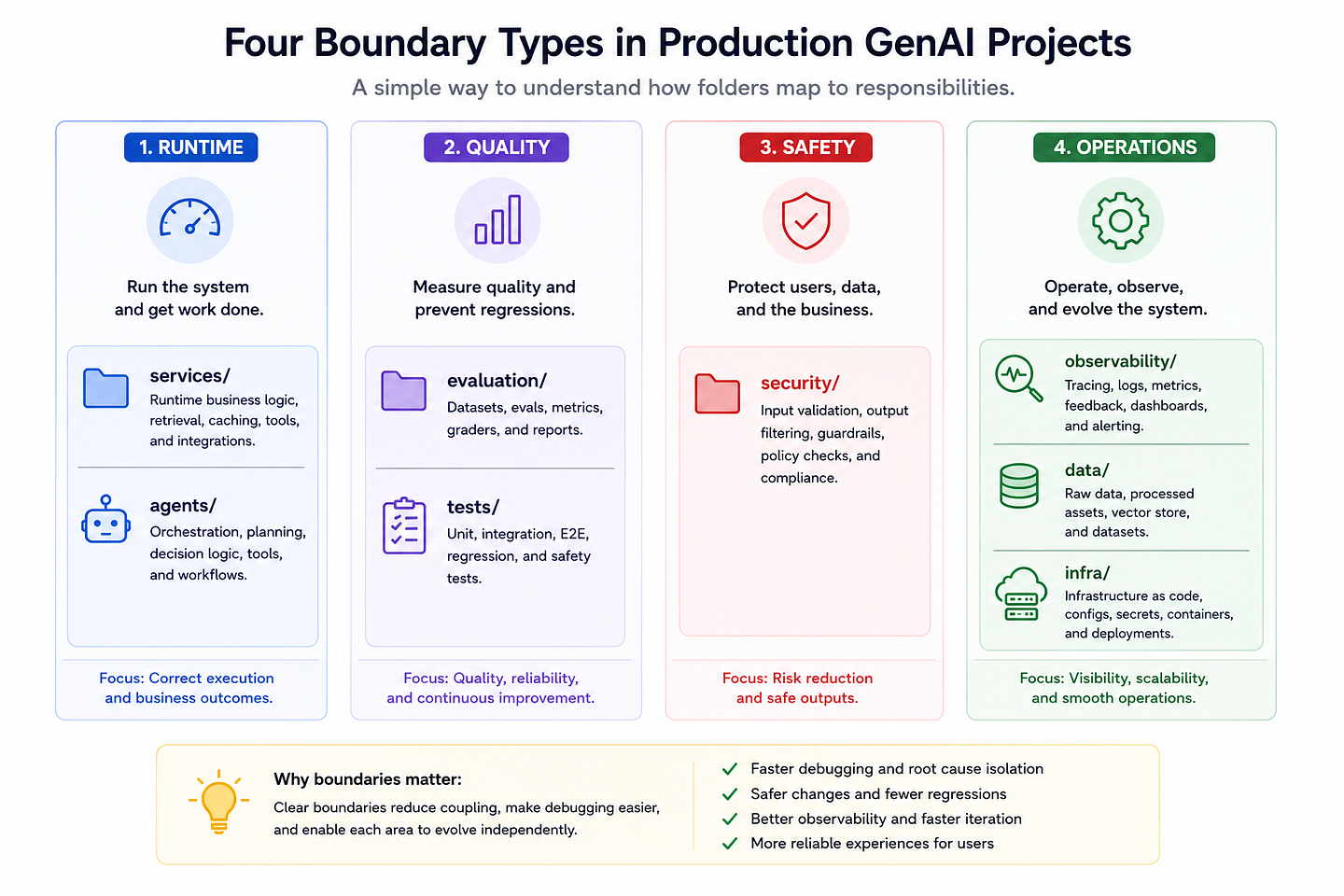
OpenAI’s evaluation guidance and MLflow’s tracing documentation both reinforce this separation by emphasizing scoped testing and step-level observability across a request path.
The same logic explains why agents/ and prompts/ deserve their own folders. In a production GenAI project, agents are not just wrappers around a model call.
They often own orchestration logic, decomposition rules, planning behavior, tool selection, or corrective loops. Prompts, meanwhile, should not be buried inline inside services or endpoint handlers.
They usually need their own versioned and typed layer, because prompt behavior changes frequently, must be reviewed independently, and often need offline or online comparison across variants.
MLflow explicitly treats prompt management as part of the production tooling around LLM systems, and Anthropic’s work on evals for agents supports the broader point that model behavior has to be iterated and assessed systematically, not patched ad hoc inside application code.
Then there are the folders that many teams postpone until too late: security/, evaluation/, and observability/. These are often the clearest markers that a project has crossed from “interesting demo” to “operating system.” A security/ boundary typically owns input validation, moderation, output filtering, policy checks, or data access controls.
An evaluation/ boundary owns datasets, graders, offline test cases, metrics, and scripts for measuring regressions. An observability /boundary owns tracing, logs, callbacks, feedback capture, cost tracking, and production monitoring.
OpenAI’s production best-practices guide explicitly frames scaling, security, and robust architecture as core production concerns, not optional extras.
MLflow’s tracing docs go even further by arguing that traces should capture inputs, outputs, prompts, retrievals, tool calls, latency, and costs so teams can diagnose the source of bugs and unexpected behaviors. In other words, these folders exist because production GenAI systems need to be inspectable after they fail, not just impressive before they do.
The supporting folders matter too. data/ often becomes the boundary for raw documents, processed assets, and indexing inputs. scripts/ usually holds utility workflows such as ingestion, backfills, migrations, and maintenance jobs.
tests/ owns retrieval tests, routing tests, safety tests, and integration tests that validate the system beyond a single happy path. infra/ or infrastructure files own deployment, containers, secrets, and environment parity. And increasingly, .claude/ or similar agent-assistant context directories are becoming part of real projects as well, because teams want their AI coding tools to understand project rules, conventions, and memory before touching the codebase.
That last part is still newer than the others, but it fits the same pattern: in production GenAI projects, even the development environment is starting to acquire its own structured boundary layer.
So the main takeaway from this kind of architecture is not that every project needs the same folder names. It is that production GenAI projects almost always end up separating the same categories of responsibility. One part of the project owns runtime services.
Another owns agents and orchestration. Another owns prompts. Others own safety, evaluation, observability, data, testing, and infrastructure. The exact tree will vary, but the boundaries usually do not.
That is the real signal of a production system: not more files for the sake of complexity, but clearer ownership over the moving parts that determine whether the system can be debugged, evaluated, and improved over time.
3. What most GenAI projects still get wrong
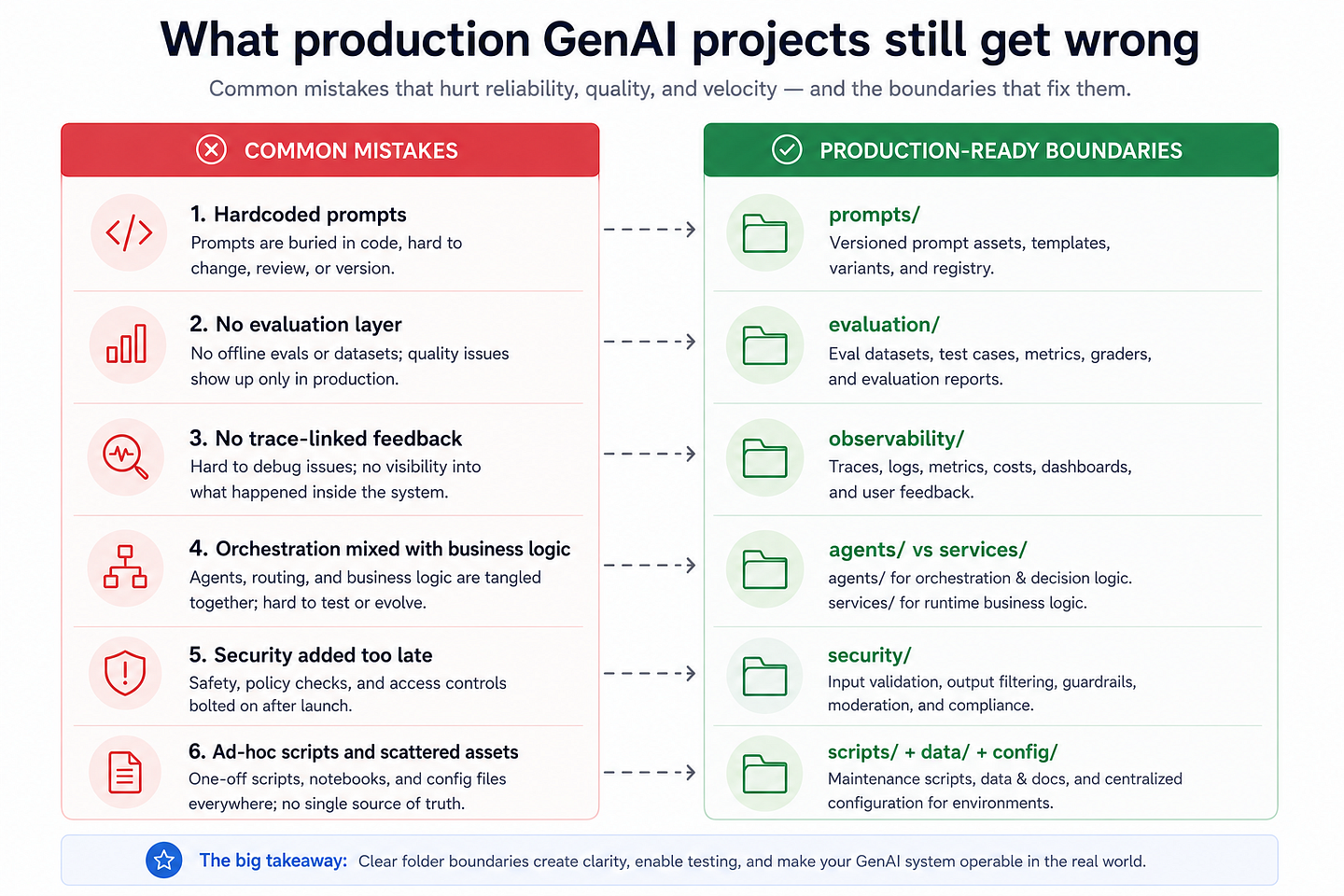
One of the most common mistakes in GenAI projects is the weak separation of responsibilities. Teams often start with a fast prototype and then keep extending it until prompts, retrieval logic, agent orchestration, eval scripts, and debugging code all live in the same part of the project.
That works for a while, but it creates a system that is hard to inspect once quality drops. FastAPI’s own guidance for bigger applications starts from a simple observation: larger systems rarely fit cleanly into one file, and once they grow, they need a clearer modular structure. In production GenAI projects, that need is even stronger because the system is shaped by both software logic and non-deterministic model behavior.
A second mistake is treating prompts like inline strings instead of managed project assets. In many projects, the most important behavior of the system is still buried inside endpoint handlers, service files, or scattered utility functions.
That makes prompt changes hard to review, hard to compare, and hard to evaluate systematically. OpenAI’s prompt guidance and broader production guidance both point in the same direction: prompt behavior needs to be explicit, testable, and iterated deliberately, not patched casually into code paths. Once prompts affect routing, safety, decomposition, or tool use, they stop being “just text” and start becoming part of the project’s real architecture.
The third mistake is shipping without a real evaluation boundary. This is probably the clearest line between a demo and a production GenAI project. OpenAI’s evaluation best-practices guide is direct that generative systems are variable, which means traditional software testing is not enough by itself.
Anthropic makes the same point from the agent side: a complete understanding of system quality requires not only automated evals, but also production monitoring, user feedback, transcript review, and other operating signals.
If a project has no clear evaluation/ layer, then quality regressions tend to show up first through user frustration rather than through a controlled measurement loop. That is when teams realize too late that the application was never really instrumented to improve.
Another major mistake is skipping observability or treating logging as enough. In a conventional app, an error log may tell you where the code failed. In a GenAI project, that is usually not sufficient. You often need to know the prompt, retrieved context, tool calls, intermediate outputs, latency, and costs associated with a request before you can explain what actually happened.
MLflow’s tracing docs emphasize that production LLM and agent systems need step-level traces and metadata to pinpoint the source of bugs and unexpected behaviors. Their production tracing guide also notes that real users behave differently from test data, so monitoring has to continue after deployment, not stop at launch. If a project has no clear observability/ boundary, then most failures remain expensive mysteries.
The last mistake is treating project structure as an afterthought rather than as a design decision. Folder architecture is not only about keeping things tidy for future developers. It shapes whether the system can be operated, tested, debugged, and safely changed.
A production GenAI project usually becomes healthier when it makes a few things explicit: services/ own runtime logic, agents/ own orchestration, prompts/ own behavior assets, security/ owns controls, evaluation/ owns quality measurement, observability/ owns traces and feedback, and tests/ own regression coverage.
The exact names may vary, but the boundary pattern is remarkably consistent. That is why this kind of project tree is so useful. It is not just showing files. It is showing whether the team has actually designed the system to survive production.
The main lesson is not that every production GenAI project should use the same folder names. It is that serious systems almost always converge on the same kinds of boundaries. Runtime logic needs its own home.
Prompt assets need to be explicit and versionable. Evaluation needs to exist as a real layer rather than an afterthought. Observability needs to capture what happened inside the system, not just whether an API call returned successfully.
Safety controls need to be designed into the project, not bolted on after launch. That pattern is consistent with current guidance from FastAPI, OpenAI, MLflow, and Anthropic, all of which treat structure, evaluation, and observability as core parts of production readiness.
So when a GenAI project still lives in one file with hardcoded prompts, no eval layer, and no trace-linked feedback, the issue is usually not just technical debt. It is that the project is still being treated like a prototype.
A production GenAI application is different because it is designed to be operated, debugged, measured, and improved over time. The folder architecture is one of the clearest signals of whether that transition has actually happened.
In that sense, the project tree is not just a documentation of the codebase. It is documentation of how seriously the team takes production.
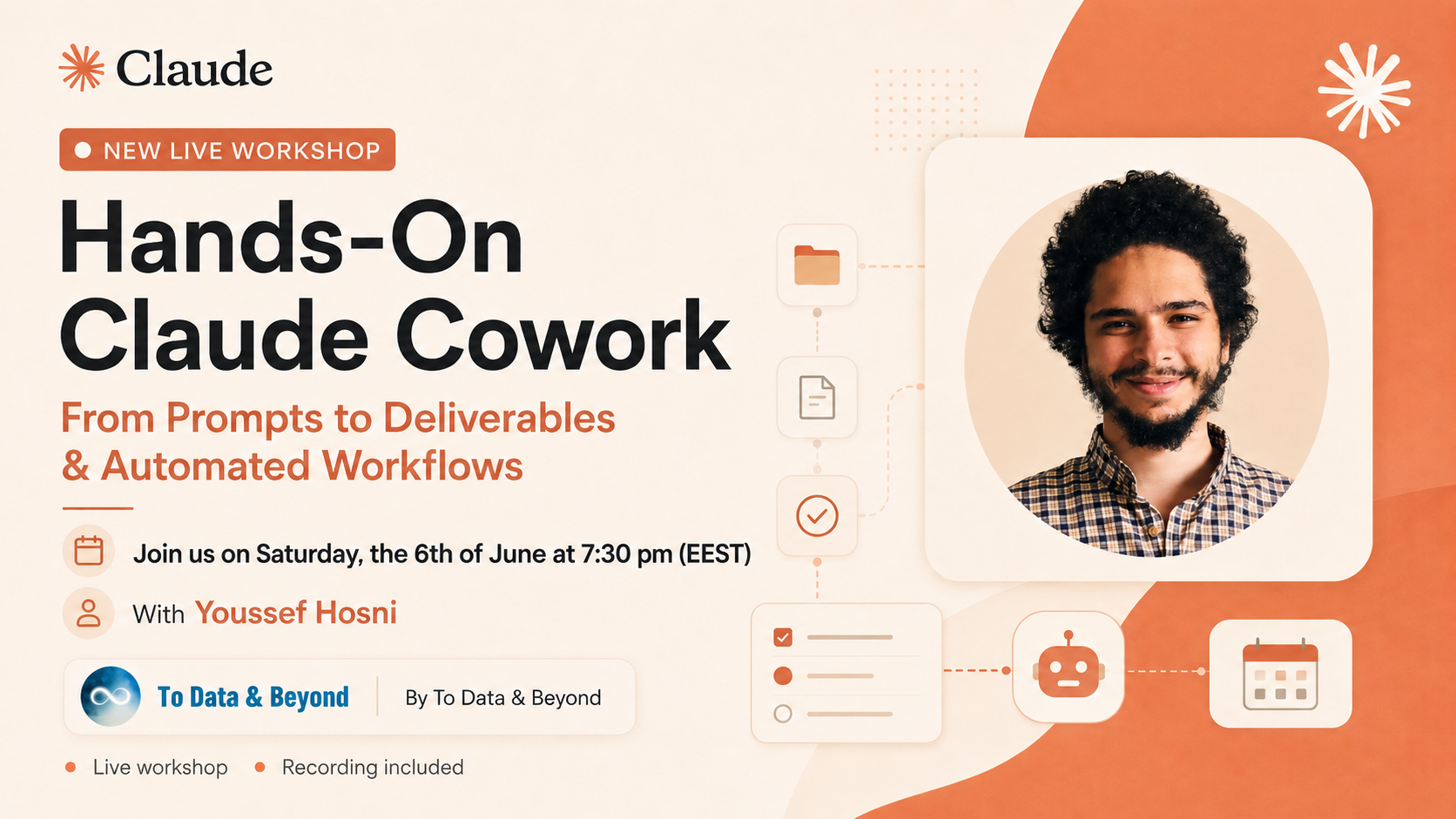
Want to Learn Claude Cowork in a Practical Way?
I’m hosting a live 1.5-hour workshop: Hands-On Claude Cowork: From Prompts to Deliverables & Automated Workflows
We will cover how to use Claude Cowork to move from simple prompts to real deliverables, structured workflows, and practical automation.
- Date: Saturday, 6th of May
- Time: 7:30 PM EEST
- Price: $30
You can book your seat here:
References
To Data & Beyond is a reader-supported publication. To receive new posts and support my work, consider becoming a free or paid subscriber.