I spent years publishing frameworks for how organizations should run. Then I built the operating system my own publication was missing - and I’m going to show you how.
By Alex Pawlowski
Published: 2026-07-27
TL;DR
-
A content operating system is Strategy OS applied to intellectual property — the layer between your archive and your decisions, with explicit phases instead of editorial guesswork.
-
You build it in six phases: inventory → diagnose → ship → connect → protect → learn (loop).
-
Built for paid readers who operate in strategy, platforms, or builder mode — CSOs who need org memory, platform thinkers who need a canonical mesh, founders who need a product-like reader journey.
-
You need three things: a folder on your computer, one Markdown file per piece of content, and an AI workspace (Cursor, ChatGPT, or Claude Code). You approve every ship.
-
Start Monday — pick your path below (Part 0), then Phase 0 in Part 2.
A personal note — written for you, the paid reader
If you are reading this, you already pay for frameworks that hold up in real decisions — Strategy OS, the Agentic Operating Model, Revenue Architecture, platform and capability work.
Lab Notes is different. It is how I run the publication as an operating system — the same design logic I write about for enterprises, applied to a 160-essay archive.
You are not here for tool reviews or growth hacks. You are here because:
-
Strategists (Archetype A) — you need organizational memory for your IP: what is canonical, what routes to depth, what you can point a board or client to without embarrassment.
-
Builders (Archetype B) — you treat the publication like a product: paywall sequencing, onboarding paths, iteration loops — not a Substack you “should post to more.”
-
Platform thinkers (Archetype C) — you care about mesh, hubs, and compounding — why duplicate essays cannibalize and how navigation becomes moat.
This guide is a build manual, not a performance report. No subscriber counts or traffic scorecards — only how to replicate the system for your newsletter, firm blog, LinkedIn corpus, or internal strategy library.
Some steps use AI. None require you to be a developer.
Part 0 — Who this is for, and where to start
Four reader modes show up across The Strategy Stack. This guide speaks to all three paid archetypes — with different emphasis.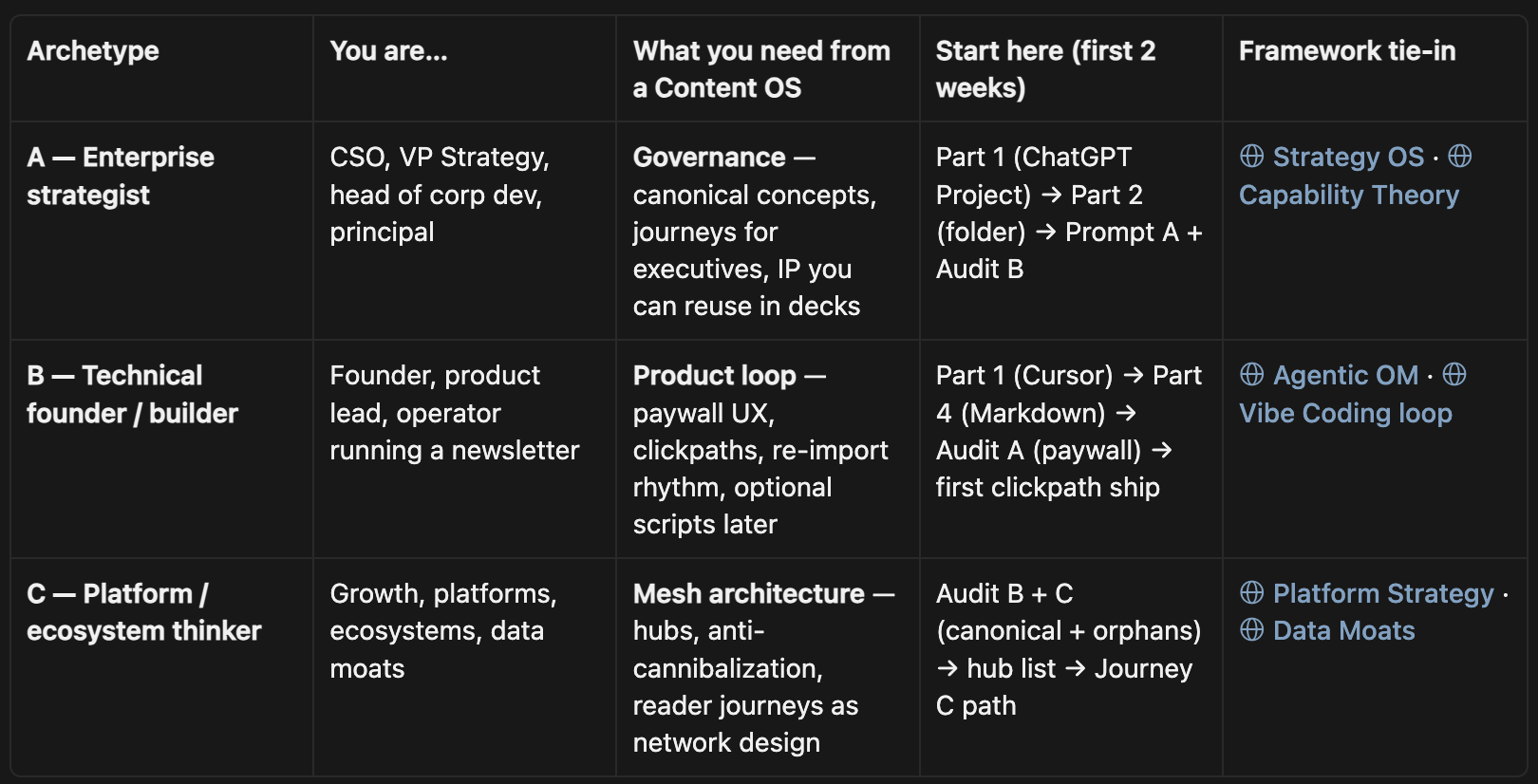
Upgrading from tool-first reading? Skip to Audit B (canonical map) and Part 12 (bridge problem) — then return to Part 1 for workspace setup.
If you only have 90 minutes: Archetype A → folder + canonical map. Archetype B → folder + one clickpath shipped. Archetype C → index + hub list + orphan sort.
How the Content OS maps to work you already do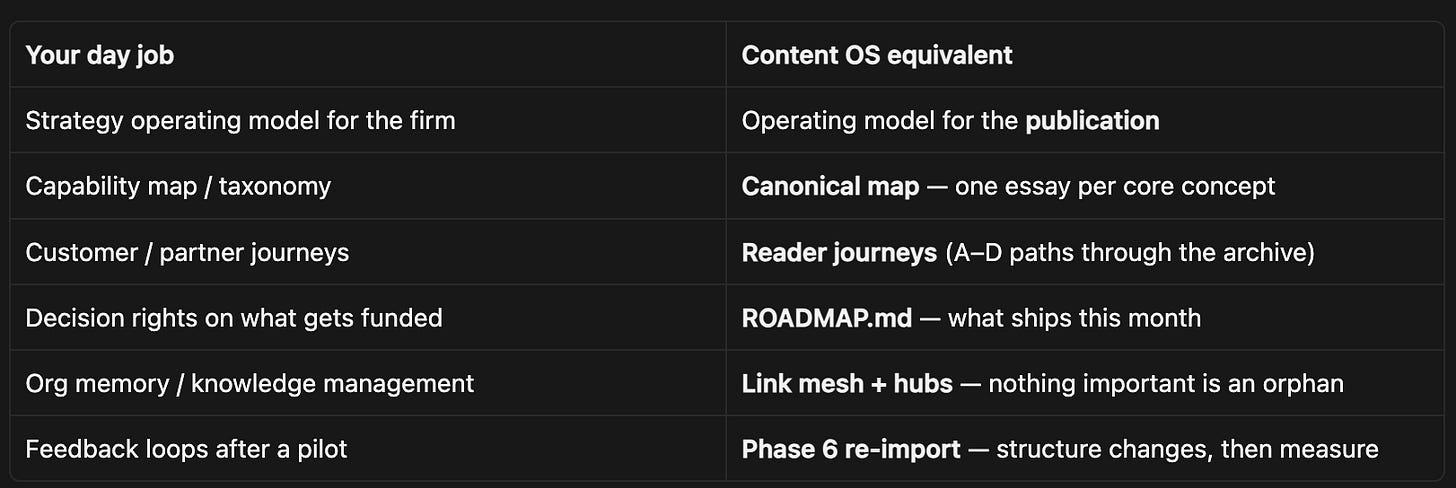
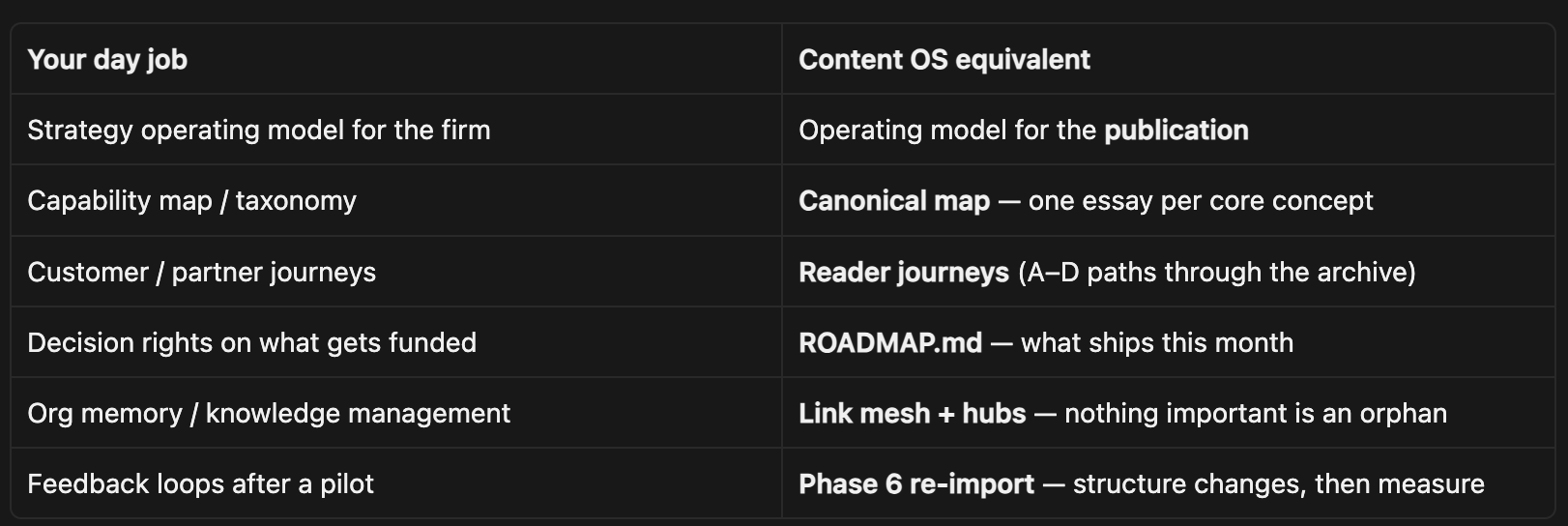
Same logic as The Agentic Operating Model: explicit phases, artifacts, and loops — not more analysis.
Pull quotes — find your lane
For CSOs and strategy leaders: Organizational memory is not a folder of PDFs. It is one canonical answer per concept and a journey your board or client team can follow without you in the room.
For builders and founders: Your newsletter is a product. Paywall placement, clickpaths, and re-import loops are UX — not “content marketing.”
For platform thinkers: Duplicate essays cannibalize like competing APIs. Hubs, journeys, and inbound links are network design — the moat is navigation, not volume.
Tool-first readers upgrading to paid: start with the canonical map (Audit B) and Phase 3c bridges — the rest of this guide assumes you are building governance or product, not another tool review.
What problem does a content OS solve?
Picture this: you have written dozens or hundreds of pieces. You know they form a curriculum — the same way a strategy team knows the firm has capabilities, but only a fraction are documented. You can explain the logic in a workshop. Nothing on the page reflects it.
That is an operating model problem — the same category of failure as strategy decks without decision rights, or agent pilots without feedback loops.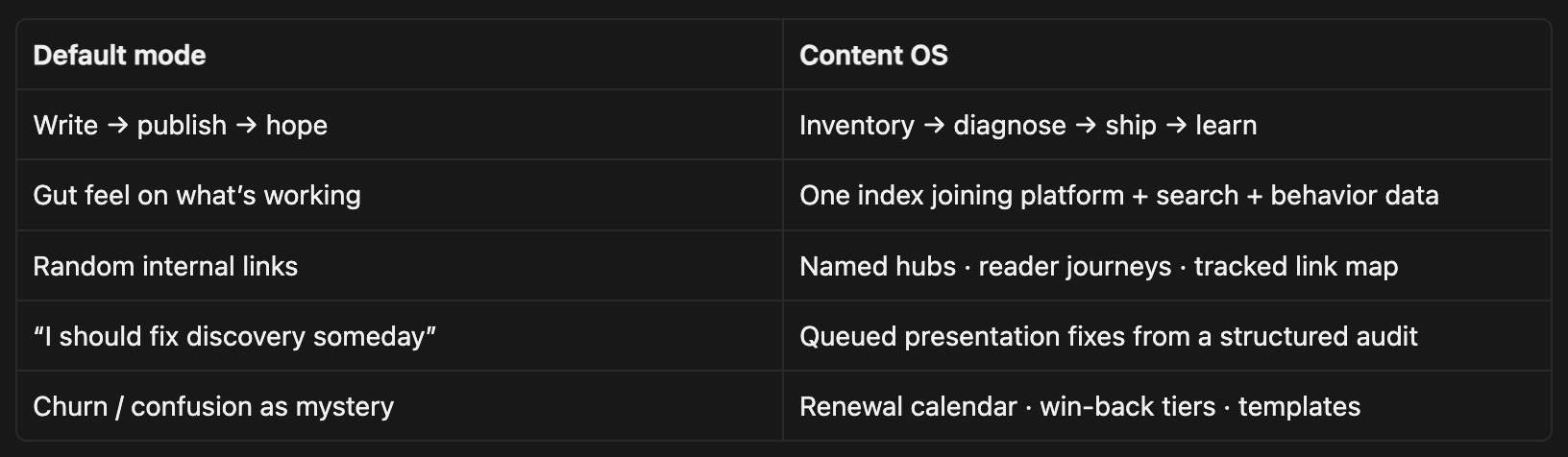
The asset is not any single post. The asset is the system between posts — your publication’s equivalent of organizational memory.
Use cases by archetype (pick yours)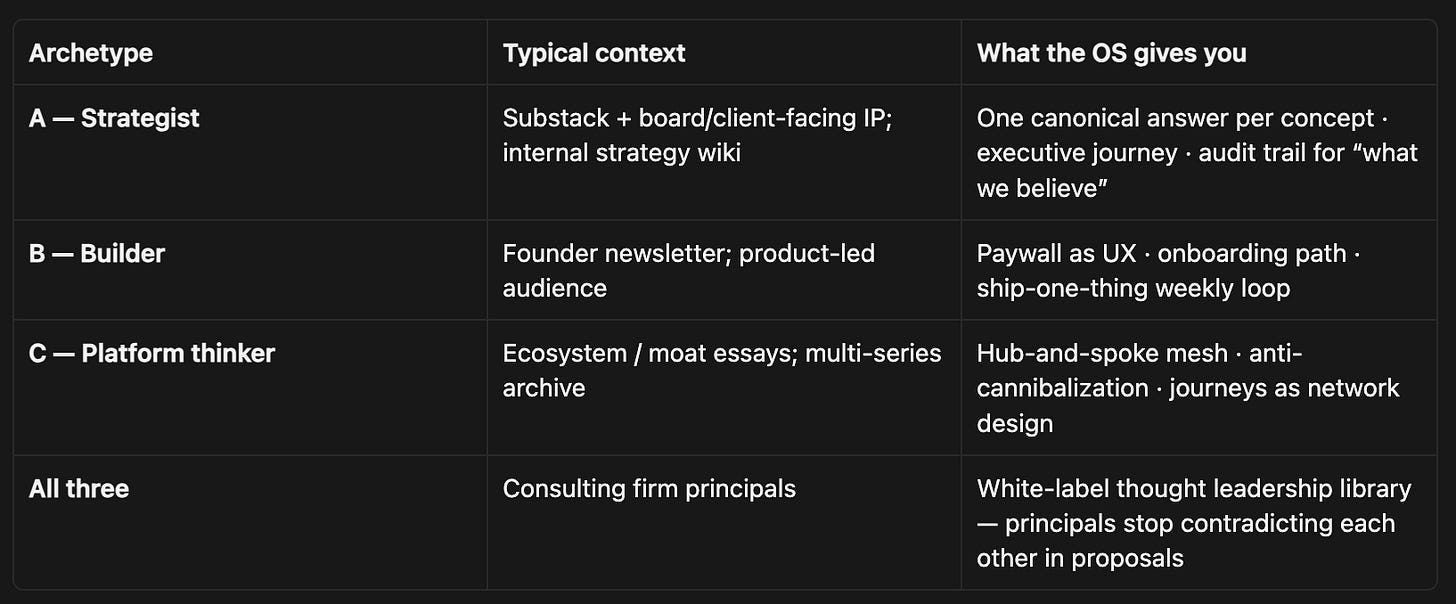
Steal this for your organization
Consulting firms and corporate strategy teams hit the same wall as solo publishers: strong fragments, no operating model. Principals reuse slides from different eras; client teams cite conflicting memos; nobody agrees on the canonical take on “agentic strategy” or “platform moats.”
Run the Content OS on an internal folder — not a public Substack. Export partner memos, deck outlines, and workshop outputs into articles/ as Markdown. Build a canonical map the whole practice shares. Draft Journey D for onboarding new directors or client-facing principals. Use ROADMAP.md as your steering backlog: what gets updated this quarter, what gets retired.
The client does not need to see the repo. They get one link to the canonical piece before the workshop. That is Strategy OS for intellectual property — inside the firm.
Where this works — contexts, limits, and honest boundaries
This guide uses a newsletter archive as the running example because that is what I run. The same architecture applies elsewhere.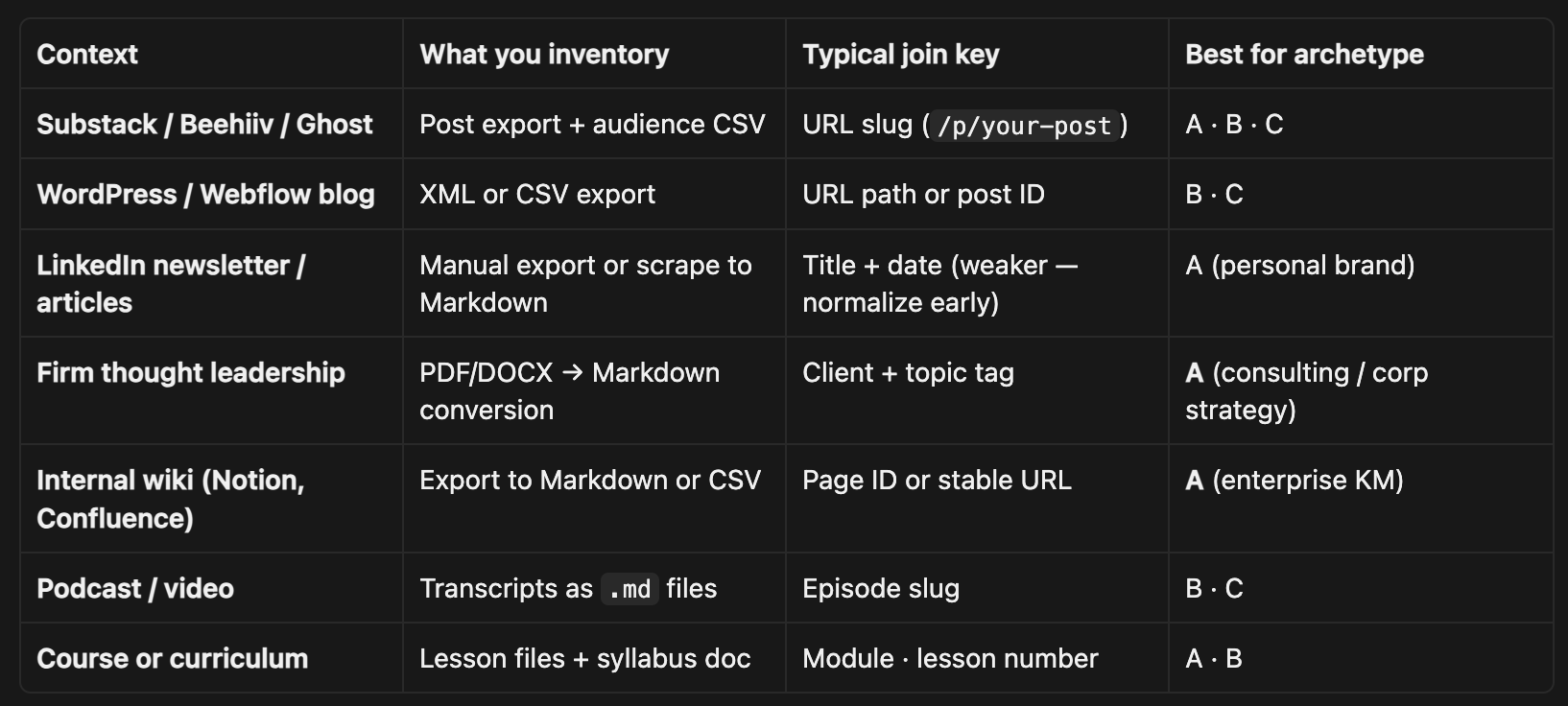
Where it works well
-
50+ evergreen pieces and growing — below that, a spreadsheet may suffice.
-
You own the archive — you can export, edit, and re-link without legal blockers.
-
Curriculum logic exists — even informally. The OS makes it visible.
-
You publish on a schedule — the loop (re-import → audit → ship) has something to refresh.
Where it struggles
-
Daily news or hot takes — the OS is built for evergreen IP, not the firehose.
-
No export path — if your platform traps content, fix that first or migrate.
-
Single-author only, no time — minimum ~2 hours/week to maintain the loop.
-
Expecting AI to publish for you — agents draft and audit; you click Publish.
-
Regulated industries without review workflow — add a compliance gate (see proposed sections below).
Design principle: Build for structure first, automation second. A well-organized folder beats a fancy pipeline you abandon in week three.
Before you start — checklist
Gather these before Session 1 (about 30 minutes):
-
Computer with a desktop browser (setup is desktop-first; mobile comes later for review and voice)
-
Admin access to your publishing platform (to export posts)
-
One AI workspace account — Cursor (free tier works), ChatGPT Plus, or Claude Pro
-
Optional: Google Search Console + analytics access for your site
-
Optional: GitHub account (free) for backup and version history — not required day one
Time budget for first build: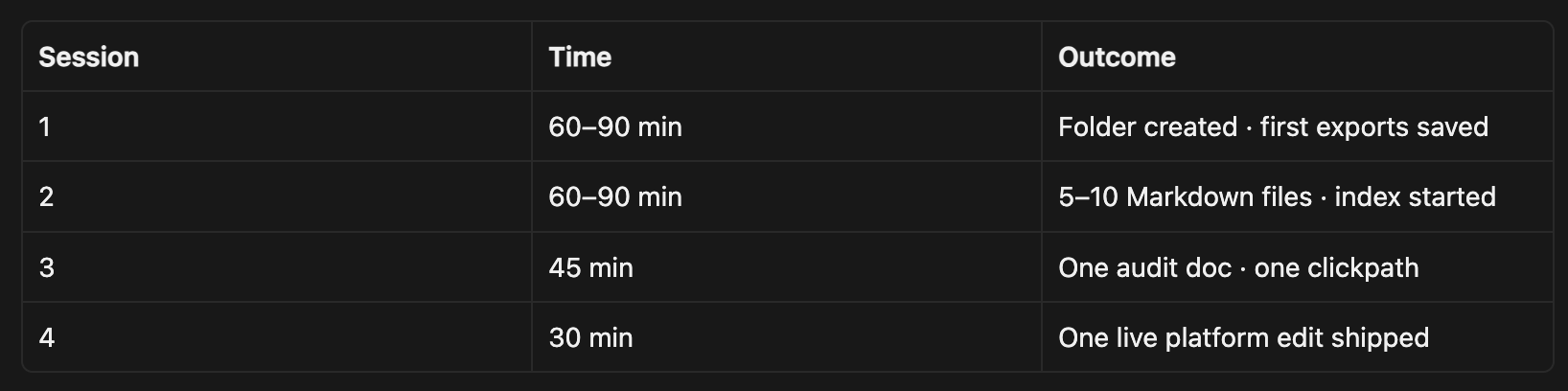
Everything below is the full build manual — folder setup, Operator Cards, prompts by archetype, and Monday tracks. Paid subscribers only.