A realistic, production ready implementation that I have been using to enable RAG for an Agent.
By Alejandro Aboy
Published: 2025-09-27
URL: https://thepipeandtheline.substack.com/p/introduction-to-rag-hands-on-implementation
Over the last few weeks, I’ve been going through an extensive list on how to get introduced to RAG by following the most common concepts surrounding it. Check out all my RAG articles if you haven’t done so yet.
We went through why LLM limitations in accessing the outside world opened new opportunities to use tools like RAG. We also analyzed when it is relevant to implement techniques like this.
Remember, the AI space has high levels of FOMO, and the main goal is to make you think that the latest and most complex thing is what you need to use. But don’t pay attention to that—focus on understanding what works depending on the use case.
We went through the “embedding” concept and how we use it to perform vector searches, chunking strategies to make your content semantic search-ready, vector databases to understand the principles they work under, and metadata filters to improve the retrieval process when running RAG workflows.
Check the previous posts on this series:
Now, let’s go all in with a hands-on implementation. Image generated by ChatGPT.

RAG Implementation with Agno Framework
Source repo: RAG Demo
I’ve used Agno because out of all the frameworks I tested, this is the one that covers most of my use cases.
I’ve already used it for small projects deployed on Railway and in production deploying on AWS, so I can trust its performance and capabilities since I have evidence to support it.
That said, use whatever you want! Agno is not the best or the worst—it’s the one I find really easy to use. Go, research, and find yours!
We'll walk through implementing semantic chunking, metadata filtering, and document processing for a social media posts knowledge base.
This project includes:
-
A simple API loader for social media posts
-
PostgreSQL using pgvector, the extension that gives vector database capabilities to PostgreSQL, allowing the use of vector-type columns to handle embeddings
-
A simple agent that answers questions based on the content
-
Semantic Chunking when loading documents, using 0.3 similarity so the content organization is not too strict but not too broad
-
Metadata filters to ensure the agent can look for specific assets during retrieval. In the project example, it uses user_id.
Thanks for reading The Pipe & The Line! Subscribe for free to receive new posts and support my work.
The Data Engineering Part ❤️
This step defines 80% of the project. Don’t rush this part—craft it properly, as it will be critical.
This is why many Data Engineers in small teams end up diving into AI. They are the closest individuals to the data and know how to prepare it effectively.
Good data will always enable AI to produce higher quality outputs.
If you take a look at load_posts.py, you will see this: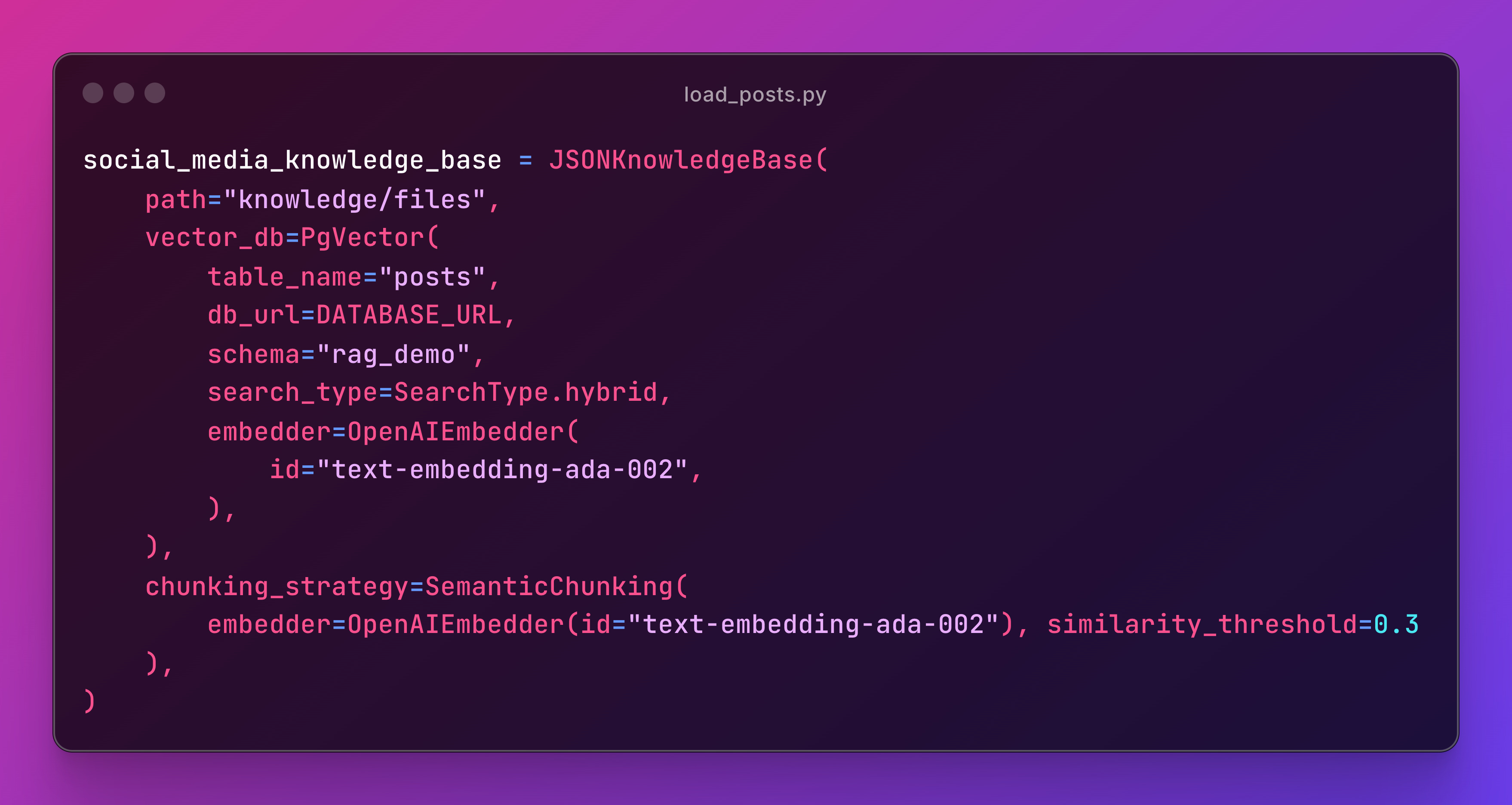
Some considerations:
-
You need to save the files in a path for the first time, that’s why we use save_posts beforehand to ensure synthetic data is available.
-
The JSONKnowledgeBase is setting:
-
A PgVector instance with schema-table target
-
A Search Type (Hybrid = Vector & Keyword search)
-
An embedder model to process queries into vectors for searching and embedding
-
A chunking strategy, which in this case is Semantic Chunking, as it's the most compatible for the use case
If you recall this graph from Weaviate, we have two angles: the document embedding and the user query embedding to make the vector comparison. This is what Agno is doing for semantic search.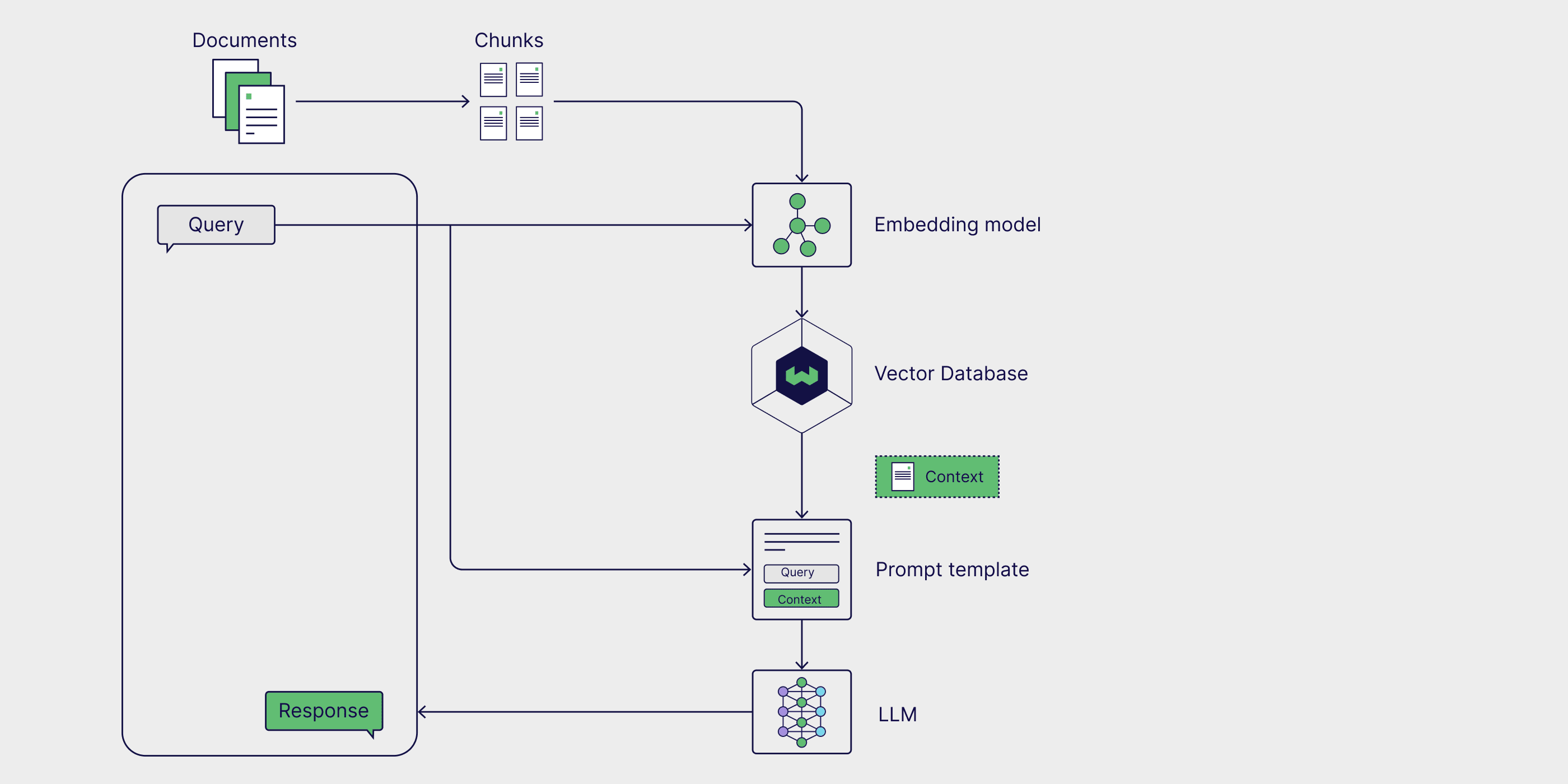 Source: https://weaviate.io/blog/introduction-to-rag
📝 Side note: We are doing some custom processing in load_posts using the Agno Document object to prepare the document exactly as we need.
This ensures metadata filters will not fail if we define where to place them. For that purpose, we use the createdocumentmetadata, generatedocuments, and loadposts methods to customize the loading.
Thanks for reading The Pipe & The Line! This post is public so feel free to share it.
After we run load_posts script, we would go from raw JSON files like this: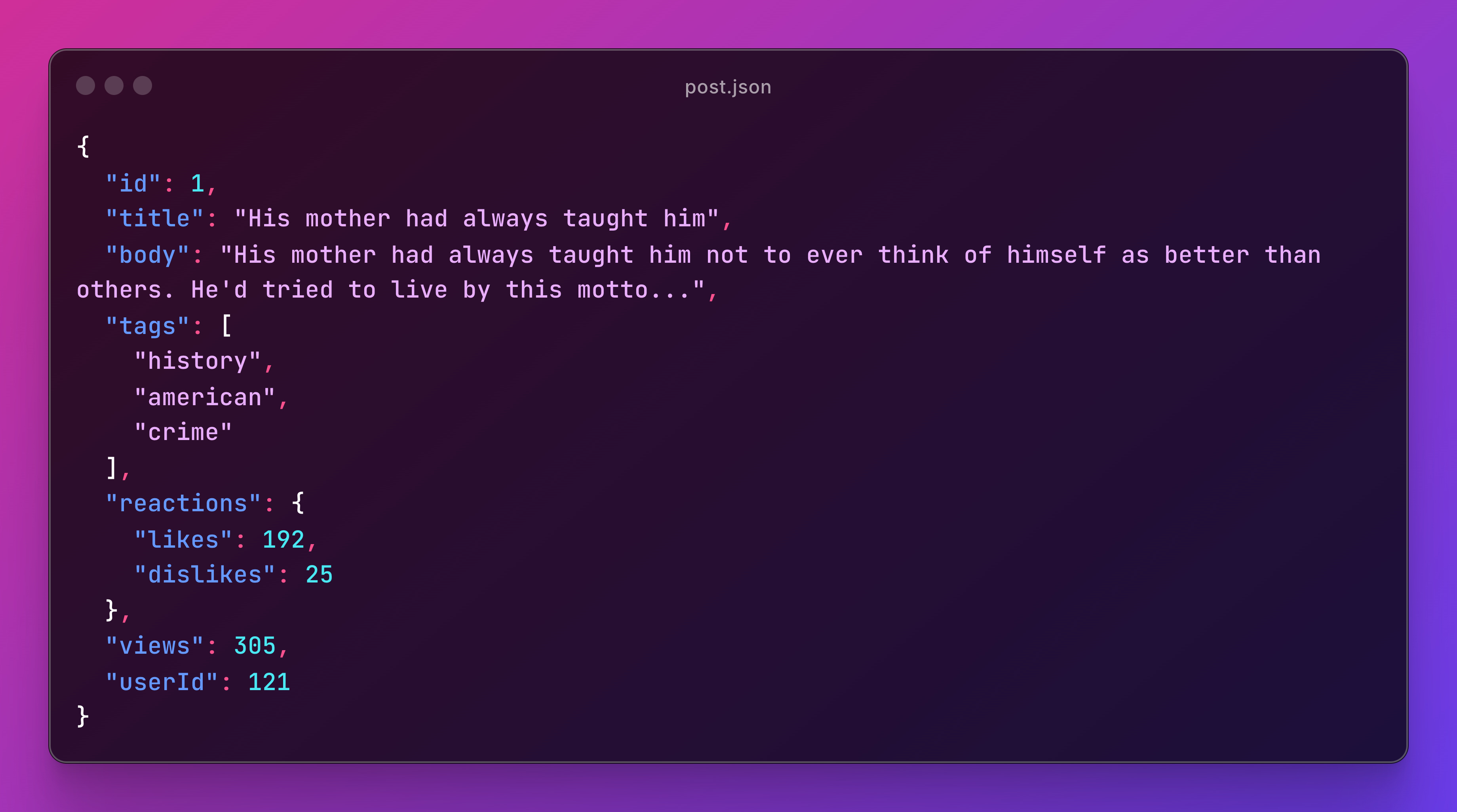
To full RAG ready documents in our PostgreSQL database:
The Agent Part 🤖
Now that we have the RAG assets ready in our vector database, we can setup what the agent will do.
In the agent file, we have different moving parts:
-
Knowledge Base: same as before. In this case, instead of setting it up to load documents, we use it to tell the Agent which database table to look in to find documents.
-
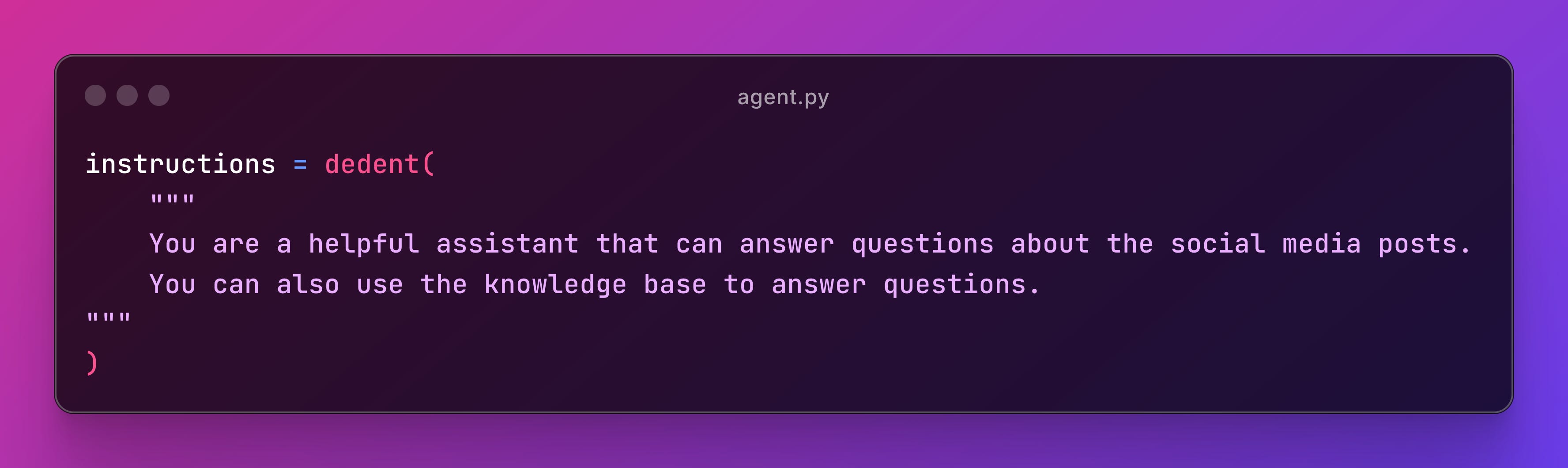
Instructions: the system prompt that defines how the agent should behave:
-
Agent configuration: the model, passing the knowledge_base and instructions definitions and give it the capability to search knowledge when it requires it.
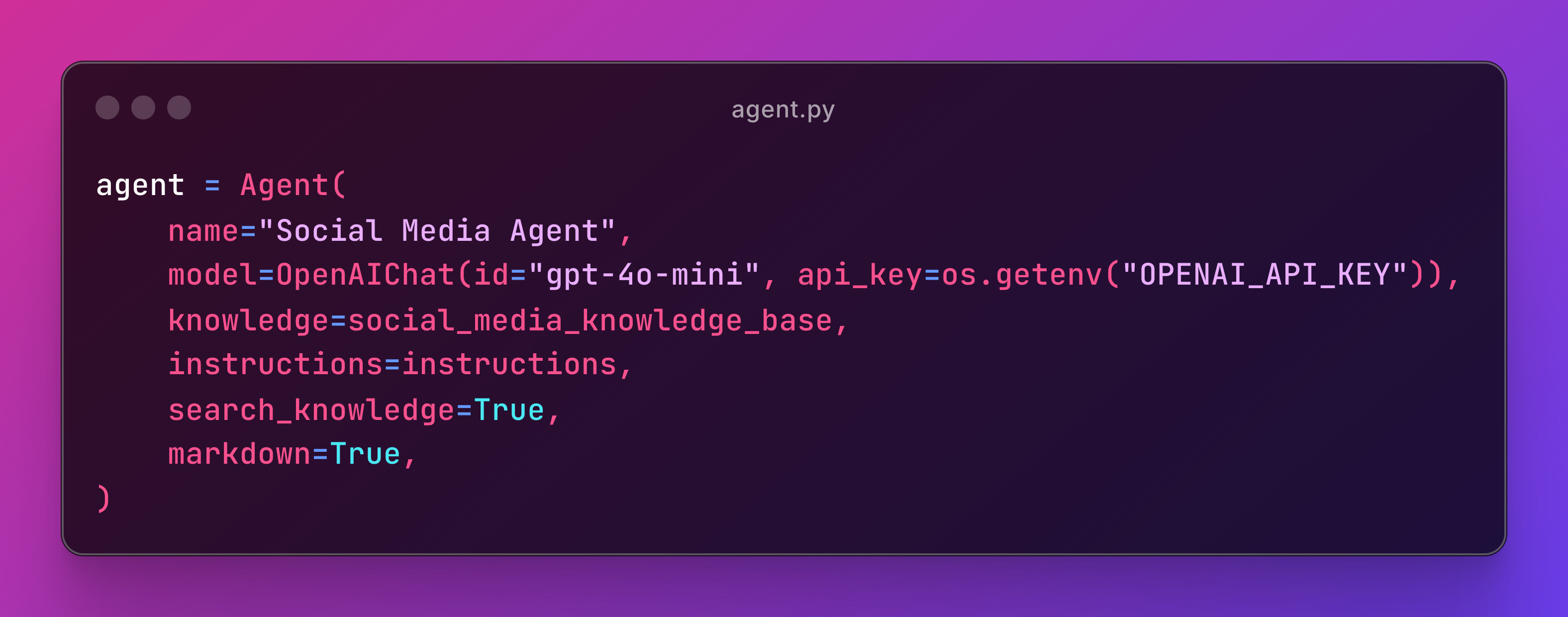
When prompting to an Agent with RAG capabilities, its important to tell it that it can and should use search tools, otherwise it doesn’t know that from its context.
Demo time 🤝
With all that in mind, we can ask a question to look for a specific document. For example, I want to ask a question that should be answered with this doc: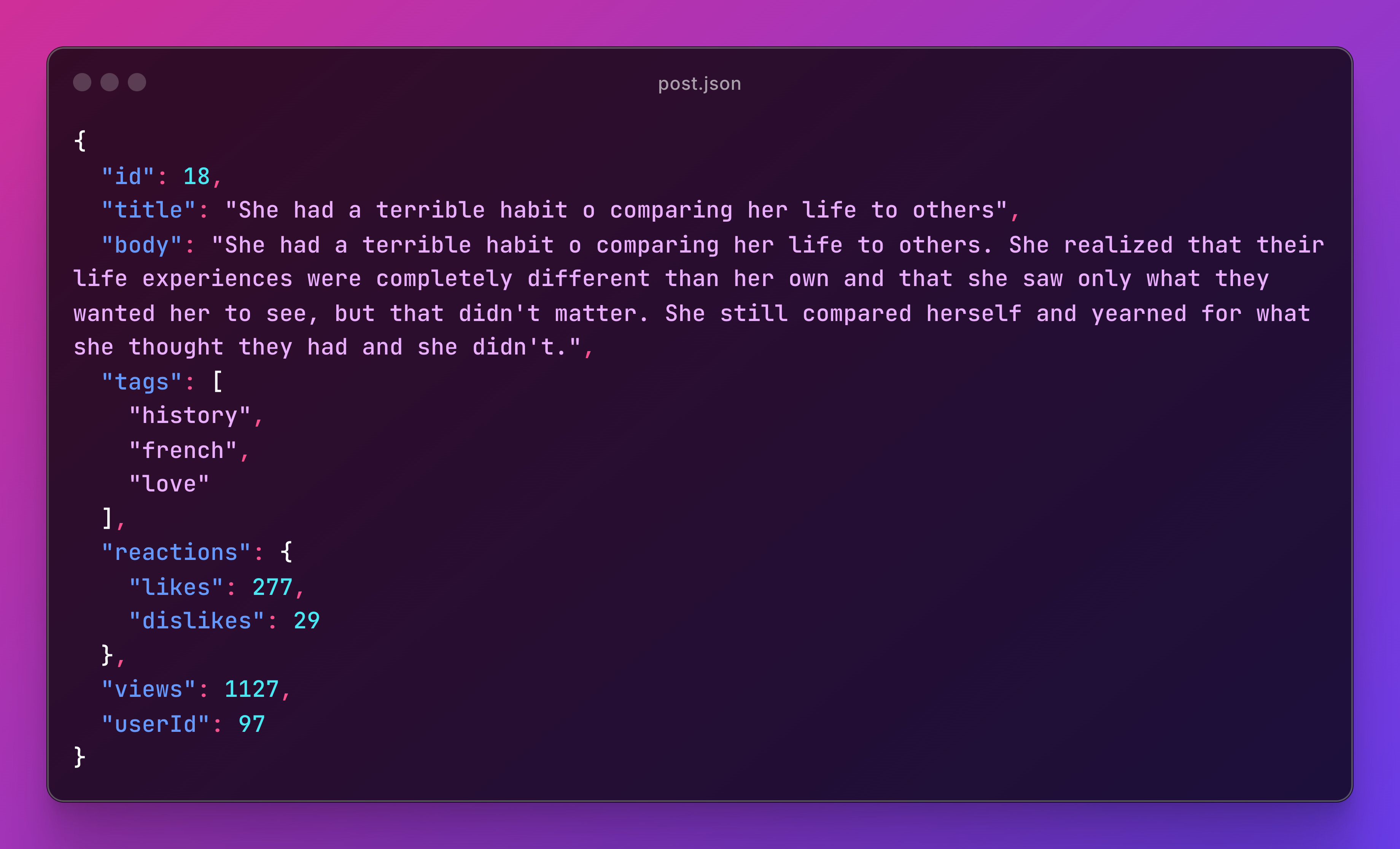
Let’s take a look:
Now let’s look at the responses:
-
First, unfiltered questions that just implied searching on the posts.
-
Second, using knowledge filters (metadata) for specific retrieval parameters (e.g. user_id), so, I can do this:
agent.print_response(
"What was her terrible habit?",
knowledge_filters={"user_id": 97},
)
You can see in the video that now the Agent found only one document instead of five.
Although the answer was already correct because the semantic chunking and threshold are well-suited to the use case, we refined the semantic search with the filter, which improved its precision.
-
Third, knowing beforehand that only userid 97 talked about that topic, I can change the userid value and see what happens:
agent.print_response(
"What was her terrible habit?",
knowledge_filters={"user_id": 19},
)
Despite it found 1 document, the metadata filter didn’t went through and the Agent could not respond properly.
Thanks for reading The Pipe & The Line! Subscribe for free to receive new posts and support my work.
Challenges about RAG 🧠
The caveats here are:
-
Spend time understanding the data and the AI application use cases before jumping into implementation. Don’t be dazzled by shiny tech—look at things from a business-tech perspective to enhance the implementation process afterward.
-
You need to chunk properly; you can't just put 100 documents into one embedding. Modern embedding models can’t handle very large context windows, so a good pre-chunking strategy is essential to keep things smooth.
-
You need to experiment a lot. It takes time to find the right balance of filters, chunking strategies, and similarity thresholds, but it's worth the effort.
I have a setup like this in production for an Agent that has 50 other tools, and it works really well. I hope you can make it work for your use cases too.
If you enjoyed the content, hit the like ❤️ button, share, comment, repost, and all those nice things people do when like stuff these days. Glad to know you made it to this part!

Hi, I am Alejandro Aboy. I am currently working as a Data Engineer. I started in digital marketing at 19. I gained experience in website tracking, advertising, and analytics. I also founded my agency. In 2021, I found my passion for data engineering. So, I shifted my career focus, despite lacking a CS degree. I'm now pursuing this path, leveraging my diverse experience and willingness to learn.