By this point we cover RAG fundamentals, now we will go through Similarity Search, the most common use case for this approach.
By Alejandro Aboy
Published: 2025-09-13
URL: https://thepipeandtheline.substack.com/p/rag-intro-for-data-professionals-ca5
Hi there! Alejandro here 😊
Suscribe if you like to read about technical data & AI learnings, deep dives!
Enjoy the reading and let me know in the comments what you think about it 👨🏻💻
So far we talked about:
-
LLM limitations.
-
What to do before jumping into RAG.
-
How to prepare documents using embeddings.
-
Chunking documents for optimal embedding preparation.
-
Vector Databases and their characteristics.
Now it’s time to go over the last part of RAG process, in which we finally give the LLM what it needs to respond.
Check the previous posts on this series:
Table of contents
-
= Using Similarity Search to find the right context for the LLM
-
💬 How everything fits into a Prompt Template
-
👀 How does the agent know how to filter its queries? Metadata!
-
🏁 Challenges about RAG
-
🔄 Recap on RAG Series
 Generated by ChatGPT
Thanks for reading The Pipe & The Line! This post is public so feel free to share it.
= Using Similarity Search to find the right context for the LLM
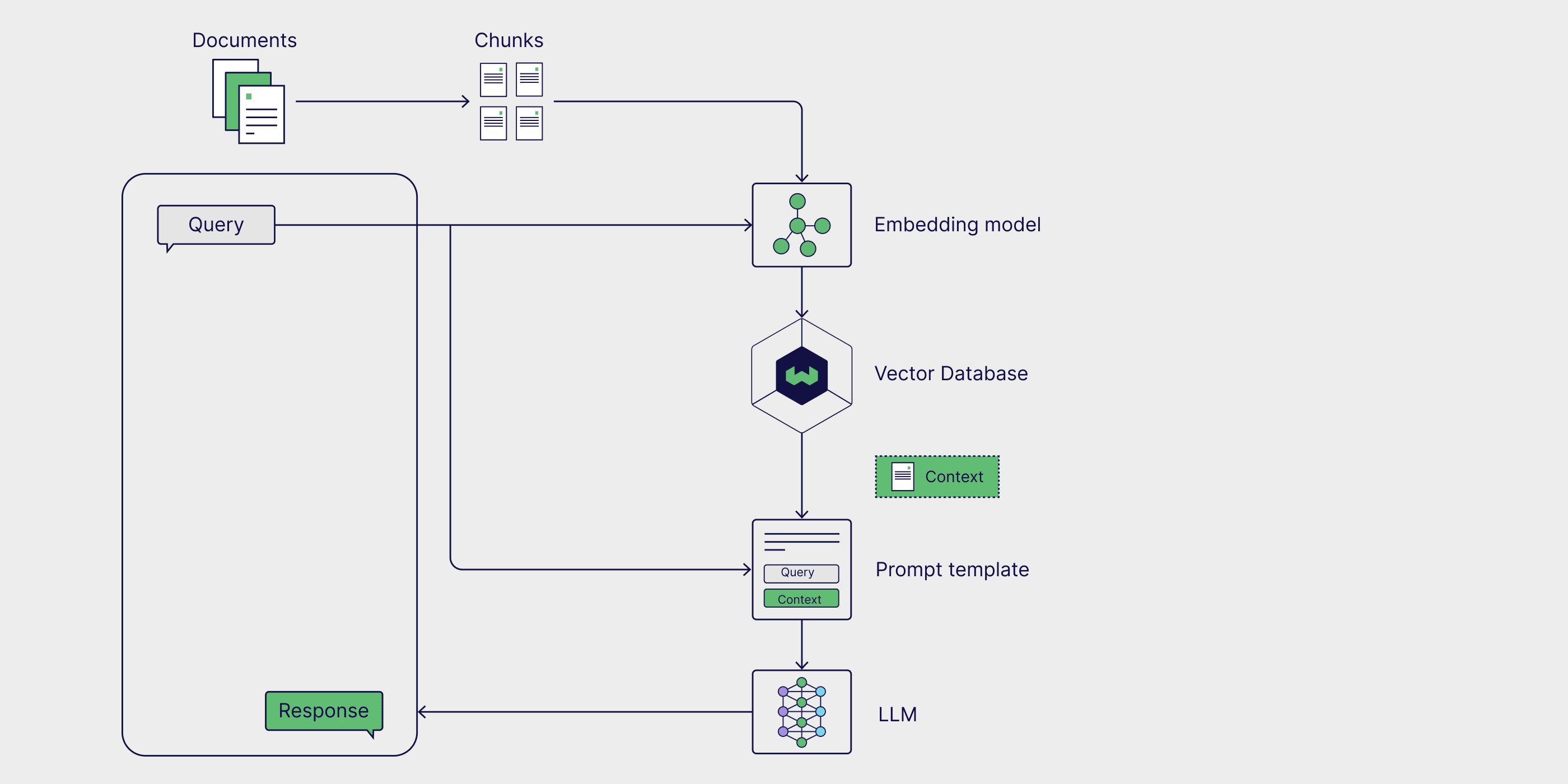
This is the most common use case for RAG and vector databases. A user asks a question, and it triggers a process that looks like this:
-
Convert Query to Vector: The user question becomes a mathematical representation.
-
Calculate Distances: Measure cosine similarity between the query and vectors available in the database. The distance ranges from 0 to 1.
-
Apply Threshold & Rank Results
-
Filter results based on minimum similarity requirements.
-
Order by similarity score from most to least relevant.
Let’s see it: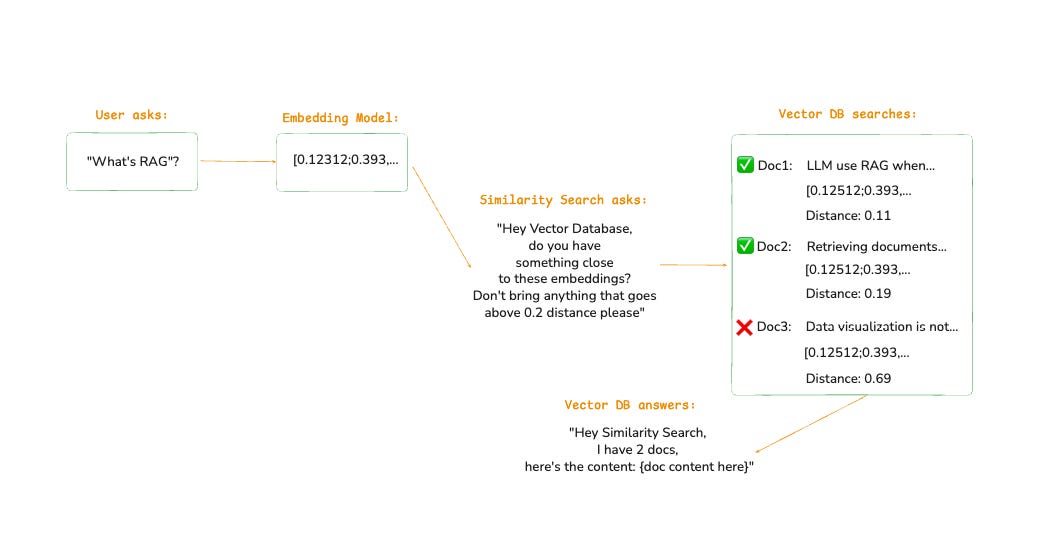 Image generated by author.
Thanks for reading The Pipe & The Line! Subscribe for free to receive new posts and support my work.
💬 How everything fits into a Prompt Template
When you run your similarity search and retrieve relevant documents for your RAG process, you need to send them into the context of a prompt so the LLM can prepare its response.
Note that the LLM does not see vectors at all, since this occurs outside its scope, and it has no awareness of the extra context being injected.
With that in mind, it can still provide a good response because it has relevant documents included in its prompt template to generate a final answer.
Following up with our previous visual representation: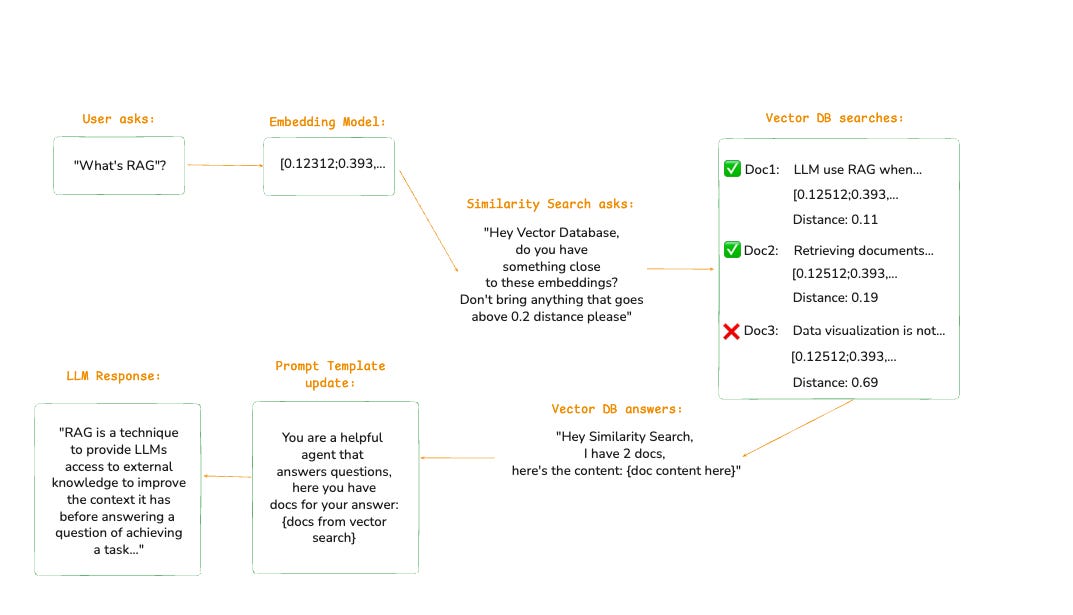 Image generated by author.
👀 How does the agent know how to filter its queries? Metadata!
This might be a more advanced topic, but it is worth mentioning.
Most of the time, the LLM will struggle because it needs to search through everything in the vector database.
With metadata (a.k.a. knowledge filters), you can filter the retrieval scope for the agent, allowing better semantic searches and improved outputs.
Common use cases include: adding the page URL of the document, a label or topic, a category, the page section of the chunk, or any other information that can help an LLM fetch the most relevant content during similarity search.
For example, if you have user- or customer-based documents, user_id is an excellent metadata dimension to include when saving documents.
Here’s how Agno (a Python Agent Framework) solves this:
knowledge_base = PDFKnowledgeBase(
path=[
{
"path": "docs/cv1.pdf",
"metadata": {
"user_id": "1234",
"document_type": "cv",
"year": 2025,
},
},
# ... more documents ...
],
vector_db=vector_db,
)
knowledge_base.load(recreate=True)
Thanks for reading The Pipe & The Line! This post is public so feel free to share it.
This is beneficial for RAG because:
-
It reduces noise from the retrieval process.
-
The model can scan only what it needs, rather than searching through irrelevant input.
-
We can efficiently handle this ingestion in our transformations, making it easy to maintain when creating data pipelines.
Here’s a good representation of this: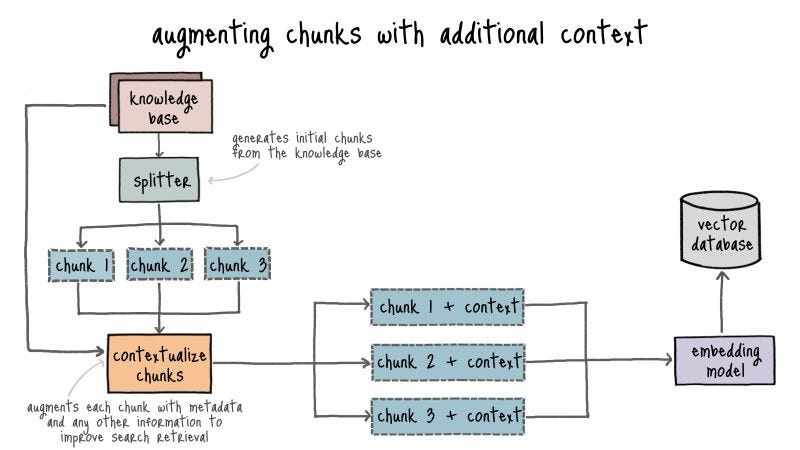 See Santiago’s Valdarrama post: https://www.linkedin.com/posts/svpinothis-makes-your-rag-application-10x-better-activity-7345771925526261763-8rwR?rcm=ACoAACDJGE8BPp2KLT4m4TVoC89e7-MA-x2i7U
Recommended read: Agno - RAG Knowledge Filters
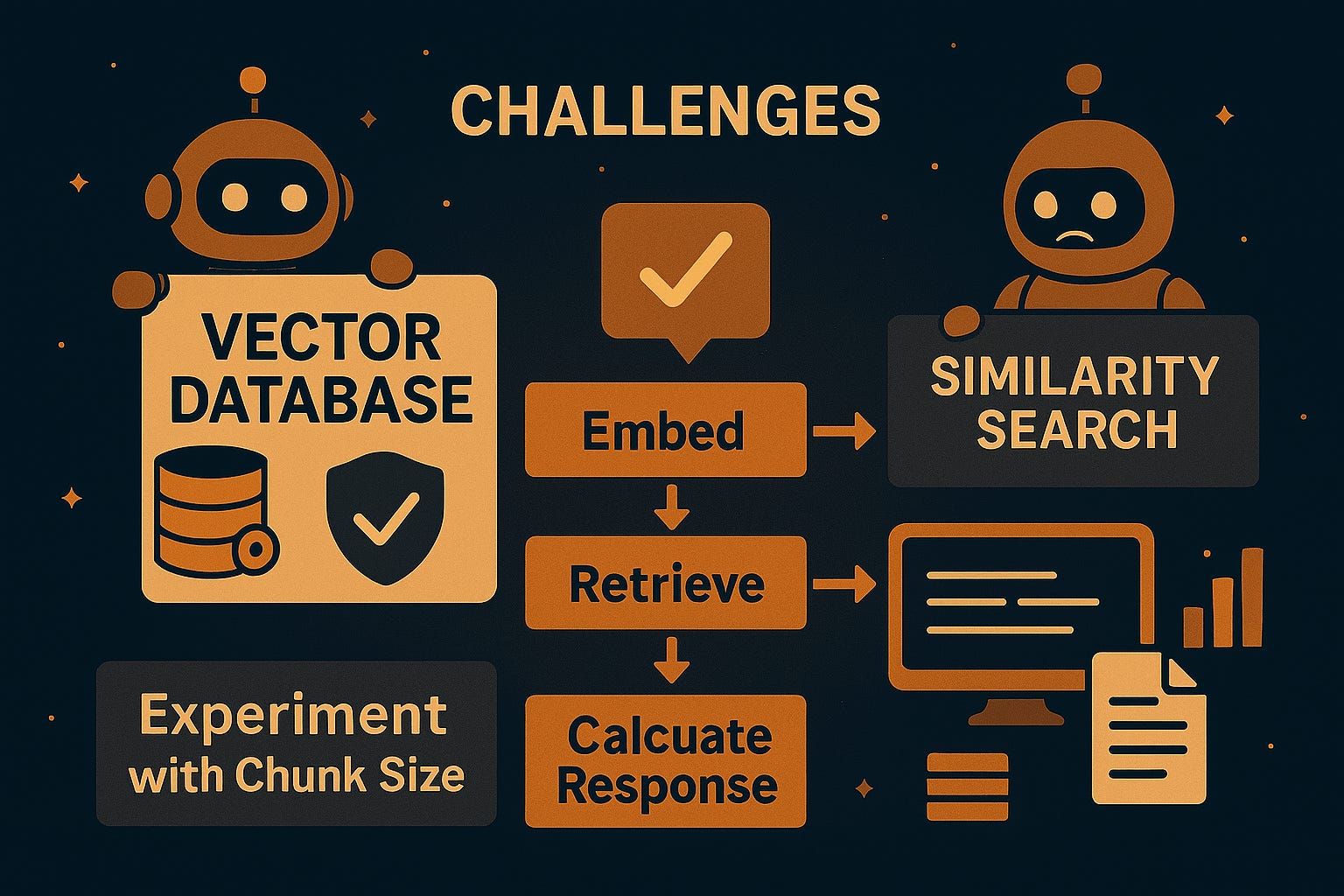
🏁 Challenges about RAG
-
Not all embedding models cannot handle too much in their context yet (e.g., OpenAI’s embedding models are currently limited to 8,192 tokens). You need to have a good pre-chunking strategy in place and follow benchmarks closely to find the best model for your embedding use cases.
-
Multiple operations at runtime: Normally, the flow is as follows—user query → embed → retrieve from vector DB → calculate distance → generate response.
-
You need to experiment to find the ideal chunk size, similarity threshold, and knowledge filters. Smaller chunks bring precision but might miss context; larger chunks will sacrifice precision to provide more context. Additionally, knowing which metadata assets to pass for context can dramatically enhance output quality.
🔄 Recap on RAG Series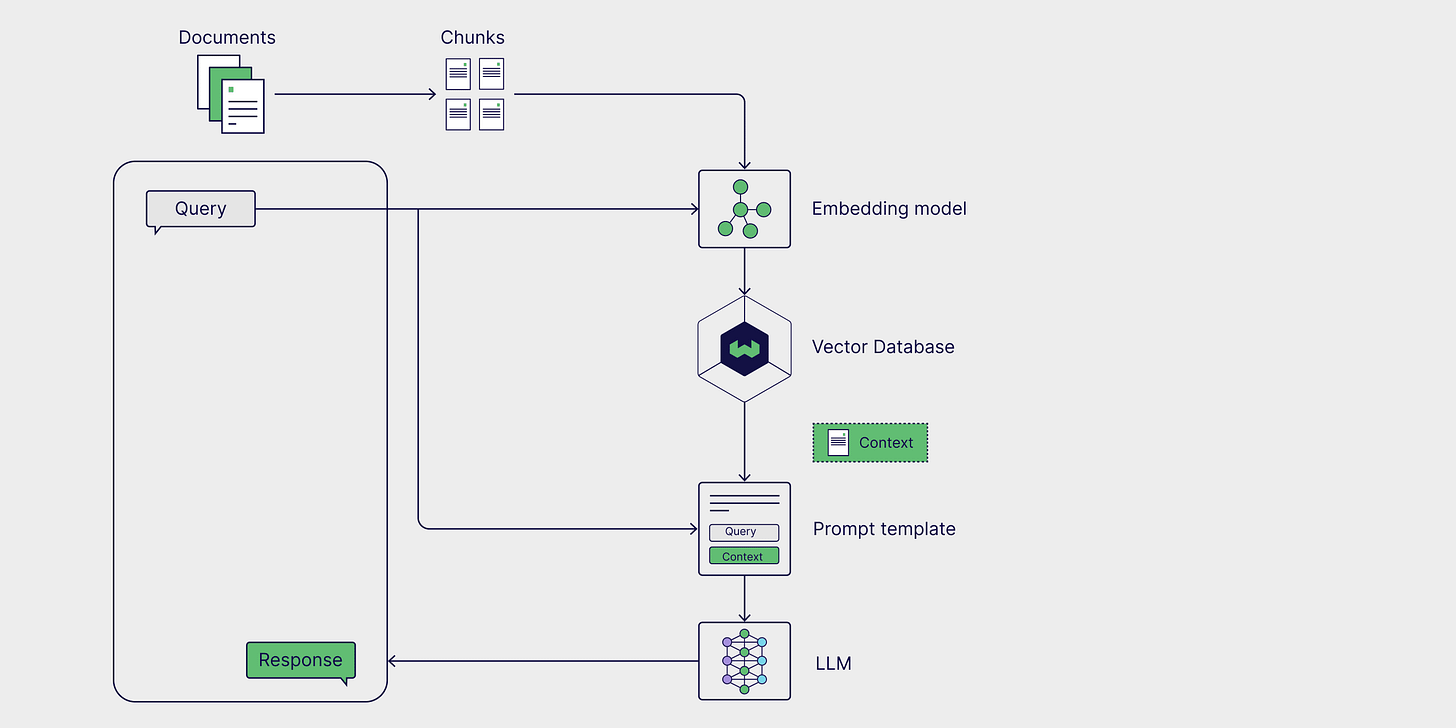 Source: https://weaviate.io/blog/introduction-to-rag
Part 1
-
❌ Limitations on LLMs
-
LLMs can’t access the outside world, they are stuck on training datasets.
-
🔎 What is RAG (Retrieval Augmented Generation)?
-
We look for data in external sources and inject it in the context of the LLM to achieve the task.
-
🙋🏻♂️ Do I really need RAG?
-
Look if prompts, API calls added to prompts or LLM with Tools are enough before going to RAG.
-
👁️🗨️ Try before RAG: API Calls and LLM Tools
-
Test if doing API Calls and passing response into context is enough.
-
Enhance LLM with Tools to validate if that’s enough.
-
Reflect & experiment before jumping into the complexities of Fine Tuning.
-
👀 How do use RAG to make all this external knowledge available to the LLMs?
-
Using vector representations known as embeddings to calculate geometrical distances to get relevant context.
Part 2
-
🏠 Vector Databases, the house of your embeddings
-
The place where all the embedded documents of your company will live, ready to be retrieved after comparing vector distances against each other.
-
🔎 How do we use embeddings to prepare data for RAG?
-
Pick your embedding models based on dimensions and your use cases.
-
📝 How do I save my embedded documents in the database?
-
Find your ideal chunking strategy.
-
Split your documents using packages like chonkie.
Part 3
-
= Using Similarity Search to find the right context for the LLM
-
Convert Query to Vector.
-
Calculate Distances.
-
Apply Threshold & Rank Results.
-
💬 How everything fits into a Prompt Template
-
Once you have the right context from the vector & similarity search, you pass to the LLM to give a great response.
-
👀 How does the agent know how to filter its queries? Metadata!
-
Add contextual filters such as user_id to optimise your retrieval process
-
🏁 Challenges about RAG
-
Not all embedding models cannot handle too much in their context yet.
-
Multiple operations at runtime.
-
You need to experiment to find the ideal chunk size, similarity threshold, and knowledge filters.
In part 4, we will cover a hands-on example on how to implement all the concepts of this article series.
If you enjoyed the content, hit the like ❤️ button, share, comment, repost, and all those nice things people do when like stuff these days. Glad to know you made it to this part!

Hi, I am Alejandro Aboy. I am currently working as a Data Engineer. I started in digital marketing at 19. I gained experience in website tracking, advertising, and analytics. I also founded my agency. In 2021, I found my passion for data engineering. So, I shifted my career focus, despite lacking a CS degree. I'm now pursuing this path, leveraging my diverse experience and willingness to learn.