A continuation of Part 1, attempting to create a simple glossary to help you understand all the buzzwords around AI.
By Alejandro Aboy
Published: 2025-07-19
URL: https://thepipeandtheline.substack.com/p/the-ai-glossary-part-2-ai-workflows
Hi there! Alejandro here 😊
Suscribe if you like to read about technical data & AI learnings, deep dives!
Enjoy the reading and let me know in the comments what you think about it 👨🏻💻
If you like the topic, you can check another article on the topic here:
Table of Contents
-
API Call of AI Models
-
AI Workflow
-
Tools & Function Calling
-
Agent
-
Agentic vs Non-Agentic
-
Multi-Agent or Team of Agents
-
A2A (Agent-to-Agent)
-
MCP (Model Context Protocol)
 Generated by ChatGPT.
In this part, I will compare multiple scenarios, since there’s a lot of confusion.
For now, just know this:
Not everything is an agent. Agents are probably the last thing you should think of building.
📞 API Call of AI Models
The process of sending a prompt or question to an external AI model and getting back a response.
There’s no memory, session, or extra context beyond what you send and receive.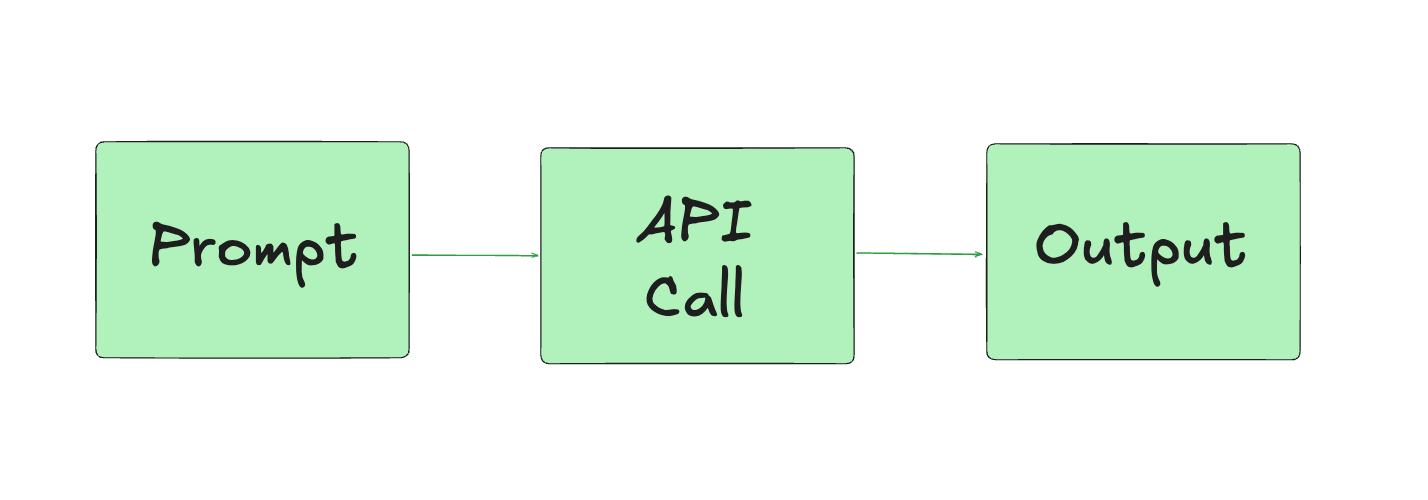
This will likely cover 80% of your use cases, so don’t skip stages if this can do the job.
🔗 AI Workflow
Remember the API call of an AI model? Well, it’s basically a chain.
You have to make sure the prompts are robust enough to avoid failures along the way, because outputs serve as inputs for the next steps in the chain.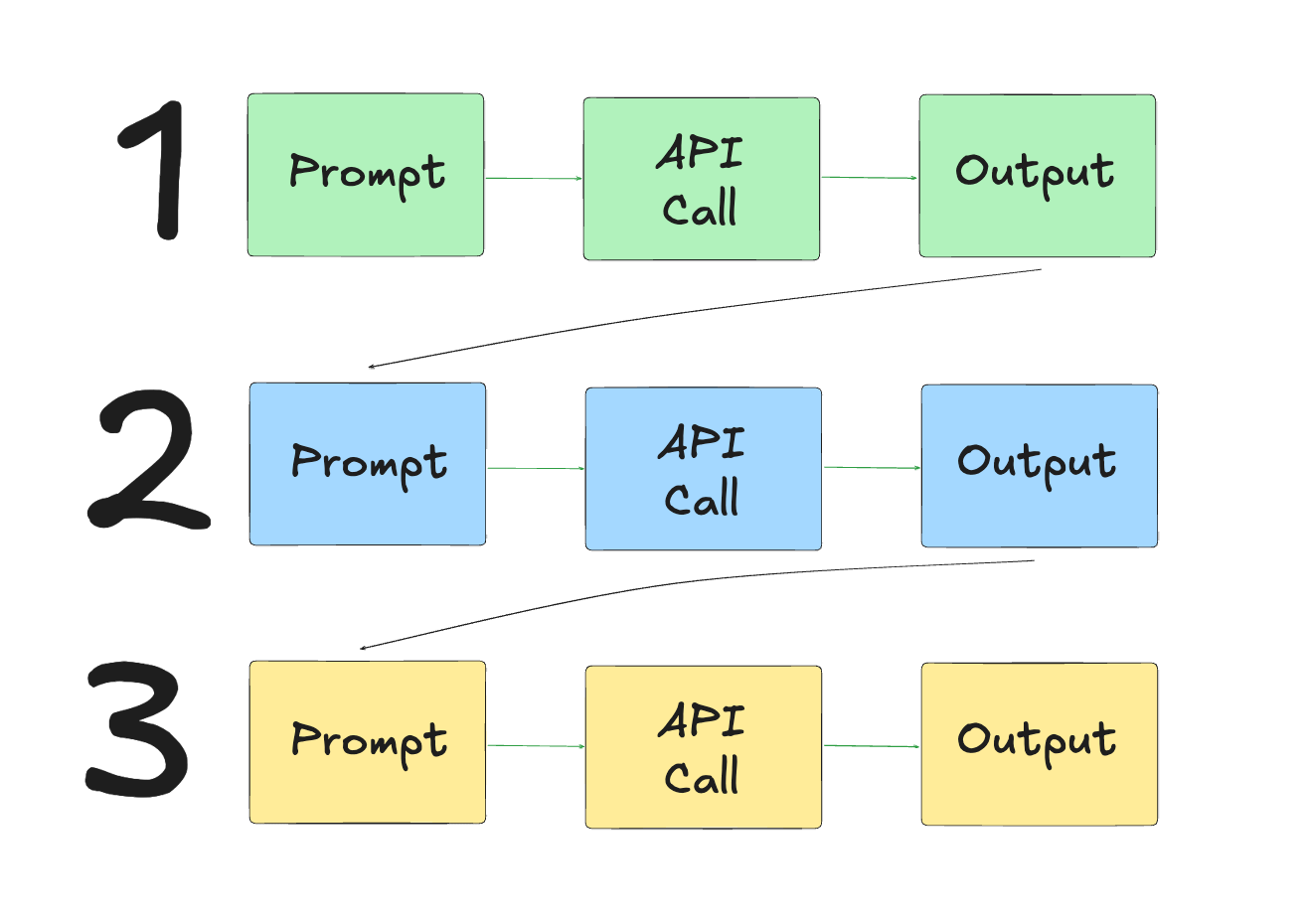
If you have predictable and well-defined output structures, go with this option!
Recommended read: Decoding ML - Stop building AI Agents
Thanks for reading The Pipe & The Line! Subscribe for free to receive new posts and support my work.
⚒️ Tools & Function Calling
An LLM can use tools for certain actions to enhance its capabilities.
This can be expanded to a variety of use cases: calling APIs, executing code to perform a particular task, and more.
Whenever you enable web search on ChatGPT, you are using a tool.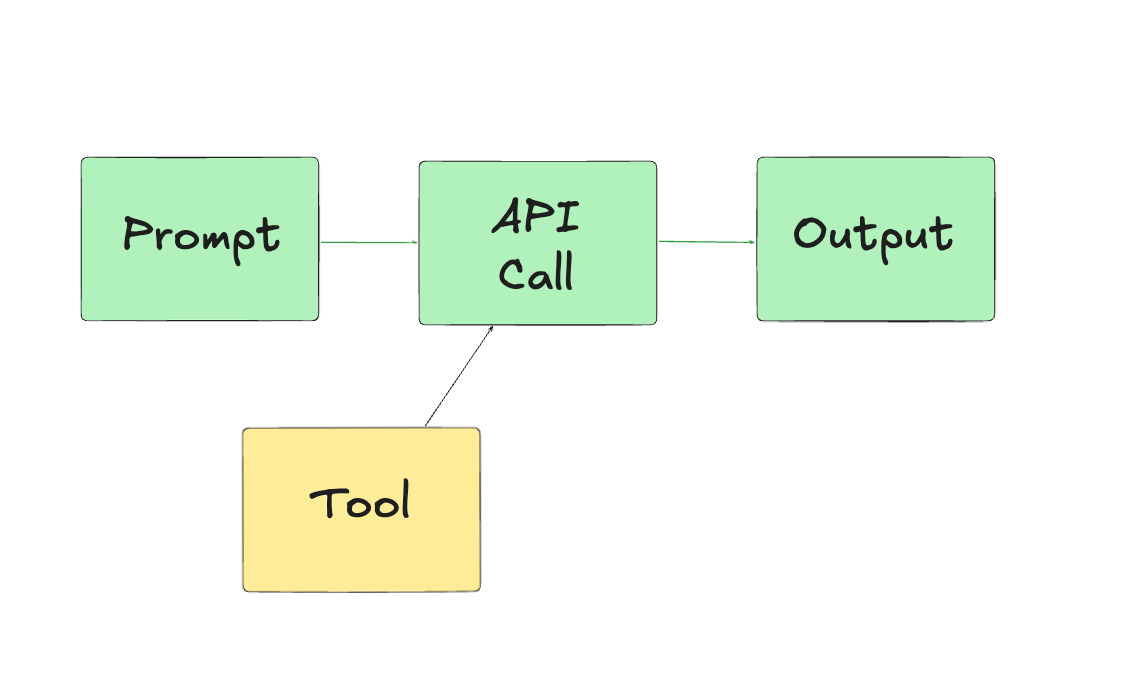
Good documentation is critical, since the LLM will read your tool description to understand what it does, what parameters it is expecting, and how the tool or function output should be formatted.
🦸🏻♂️ Agent
An agent is using API calls of AI models, and probably chaining them sometimes.
But it has enough autonomy to decide when to use what and to make decisions based on its instructions, memory, and context.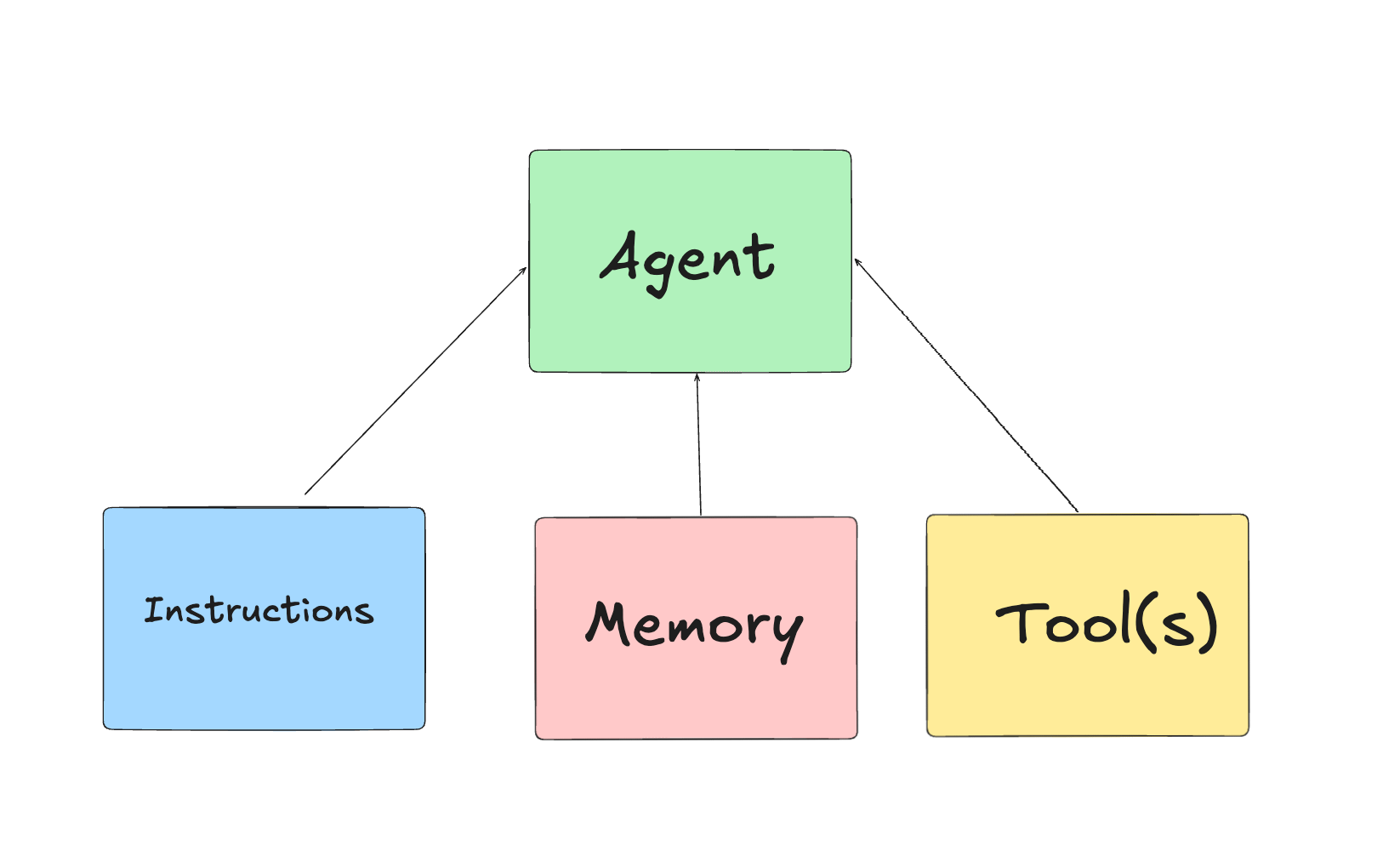
Try to test a lot of AI workflows and simple API calls for your use case before moving into agents; otherwise, you might drown in complexity!
Recommended read: Anthropic - Building Effective Agents
🤖 Agentic vs Non-Agentic
Following up on our agent definition, let’s think about a scenario:
-
Assistant 1: You pass a dataset and ask for the dataset to be filtered, transformed, and exported.
Assistant 2: You pass a dataset and ask for the top highlights about the information. The agent uses Python, SQL, and reasoning to find those insights and present them in a graph.
The difference:
-
The first one is passive and static; you pass something and probably get the same response over and over.
-
The second one decides what tools to use, how to use them, analyzes the outputs, and can generate dynamic results depending on the context provided.
The biggest challenge here is how you automate or orchestrate this autonomy. Do you trigger the agent when something happens? Do you trigger it on a schedule? Experimentation will tell.
Thanks for reading The Pipe & The Line! This post is public so feel free to share it.
🦾 Multi-Agent or Team of Agents
The definition lies in the title.
Same as before, but with multiple agents for different purposes.
In this case, you usually have a router that decides to which agent it should pass the corresponding task based on the instructions.
For example, if you have two customer support agents—one for money-related tasks such as refunds or editing subscriptions, and another for FAQs—the router agent can pass the specific request to the corresponding agent.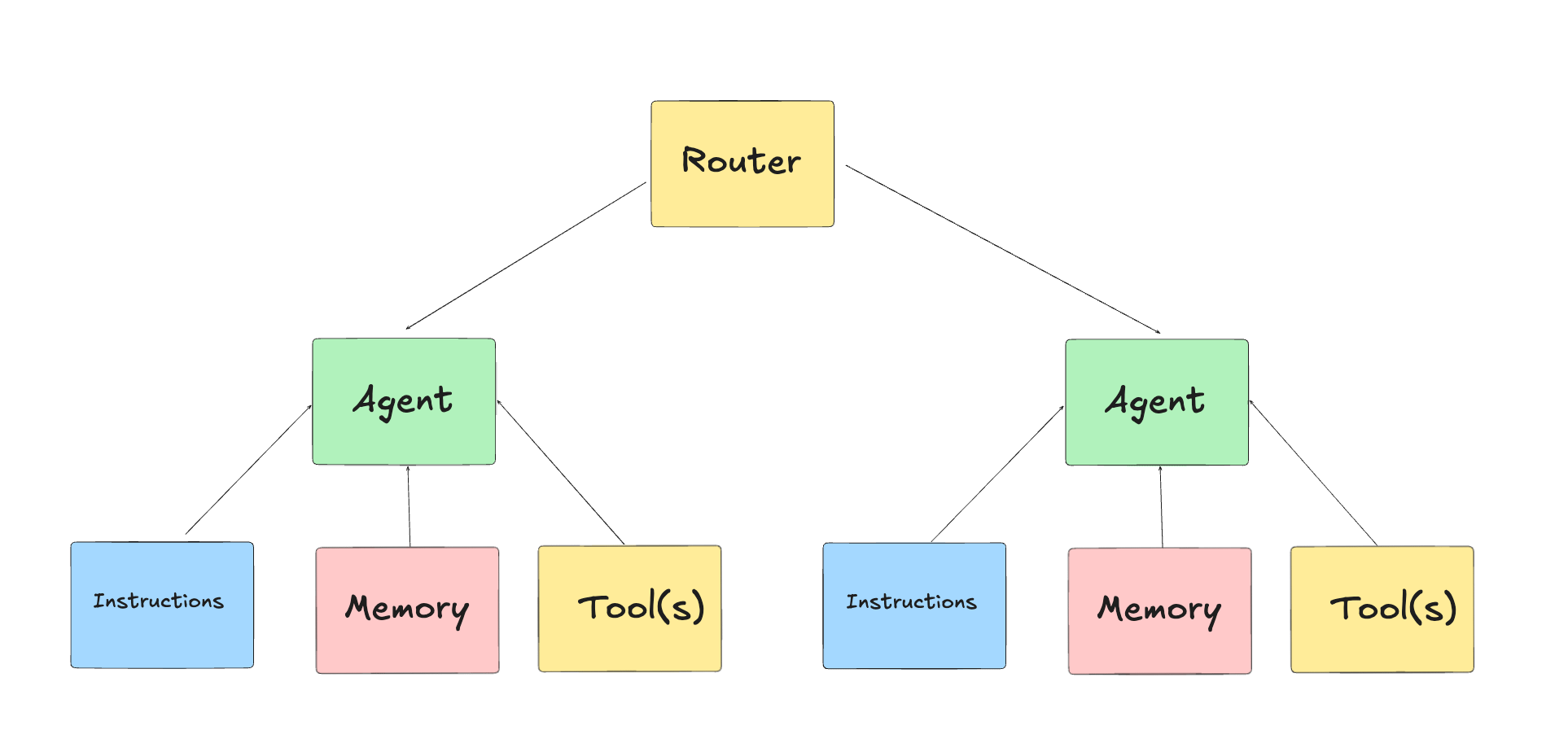
In my opinion, you should only reach this point if you have specific, well-defined, and non-overlapping responsibilities for different agent use cases that can be grouped together.
Recommended read: Langchain - How and When to Build Multi Agent Systems
🤝 A2A (Agent-to-Agent)
It may seem to overlap with the Multi-Agent structure, but not necessarily.
A2A refers to the interaction itself when an agent communicates directly with another agent, either for passing data, asking for help, or double-checking work.
An important concept here is handoff, where, for any reason, an agent realizes that a request is outside its scope and decides to pass that request to another agent who can handle it.
Source: OpenAI - Agents Handoffs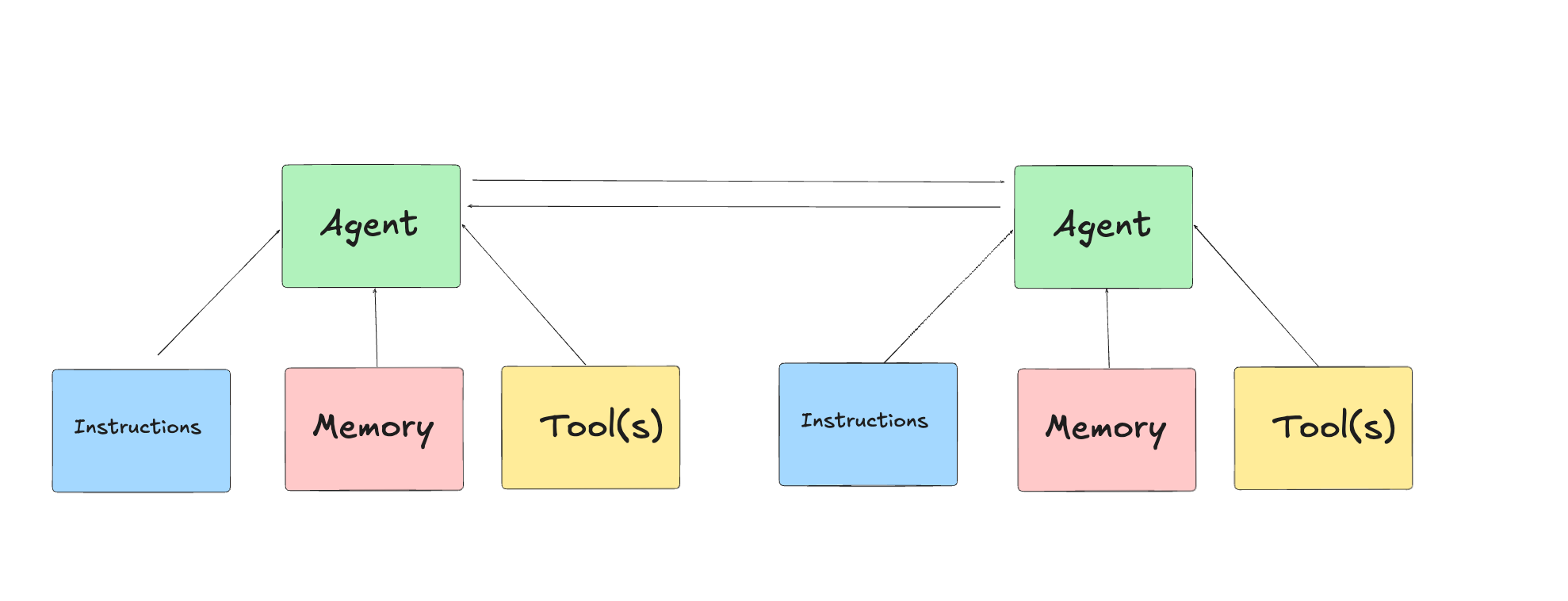
Similar to Multi-Agent systems, proper definition and clear scopes are critical in these systems, because everything could become over-engineered very quickly.
🧑💻 MCP (Model Context Protocol)
This is a huge achievement in the AI space.
Previously, for every API integration, you would develop your code and adapt it to each one individually. You would eventually add those functions as tools to your LLMs or agents.
But maintaining this? Chaos.
That’s call the “MxN problem”: for M different AI applications connecting to N different data sources, you need to build and maintain MxN custom integrations.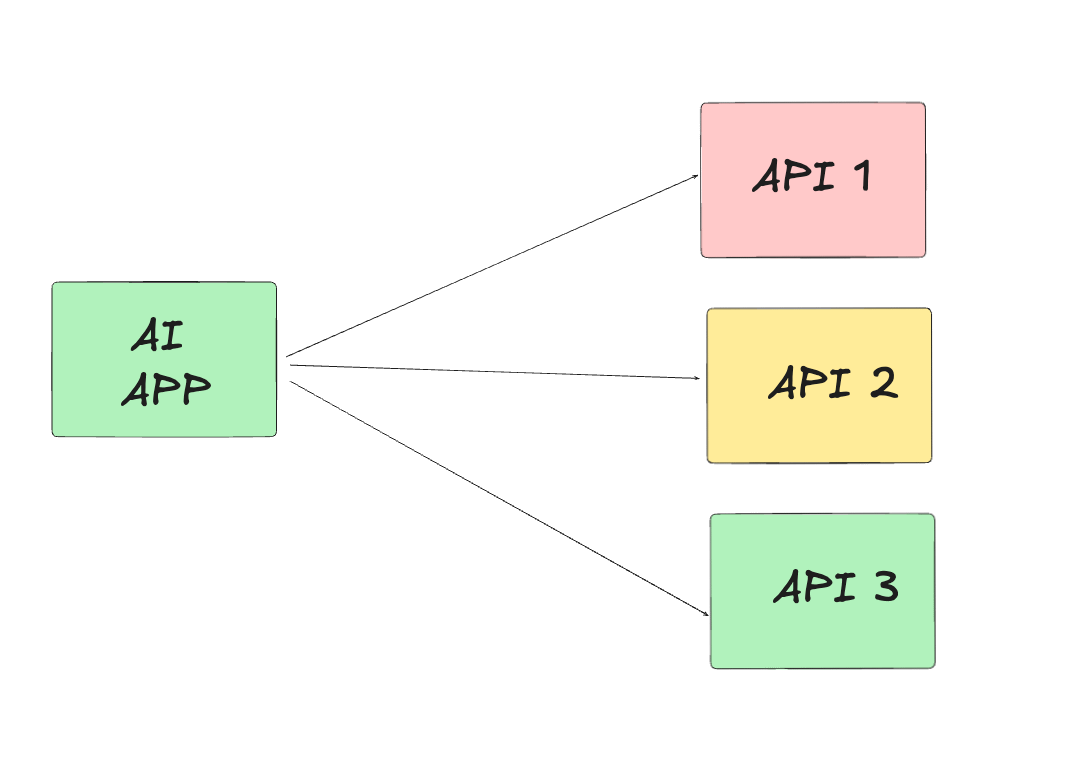 For every integration you needed to build a way of communicating.
MCP created a single protocol for LLMs to communicate with all these APIs, removing all the struggle for developers.
For example, if you had a custom integration with Google Drive, you can find an MCP for it. In this way, you can “talk” to your Google Drive that will allow you to know what files you have, what’s inside and even edit them from an MCP interaction.
If your company wants to provide an AI-ready version of its API, it can create an MCP with well-defined tools and resources to be exposed for an LLM-based context.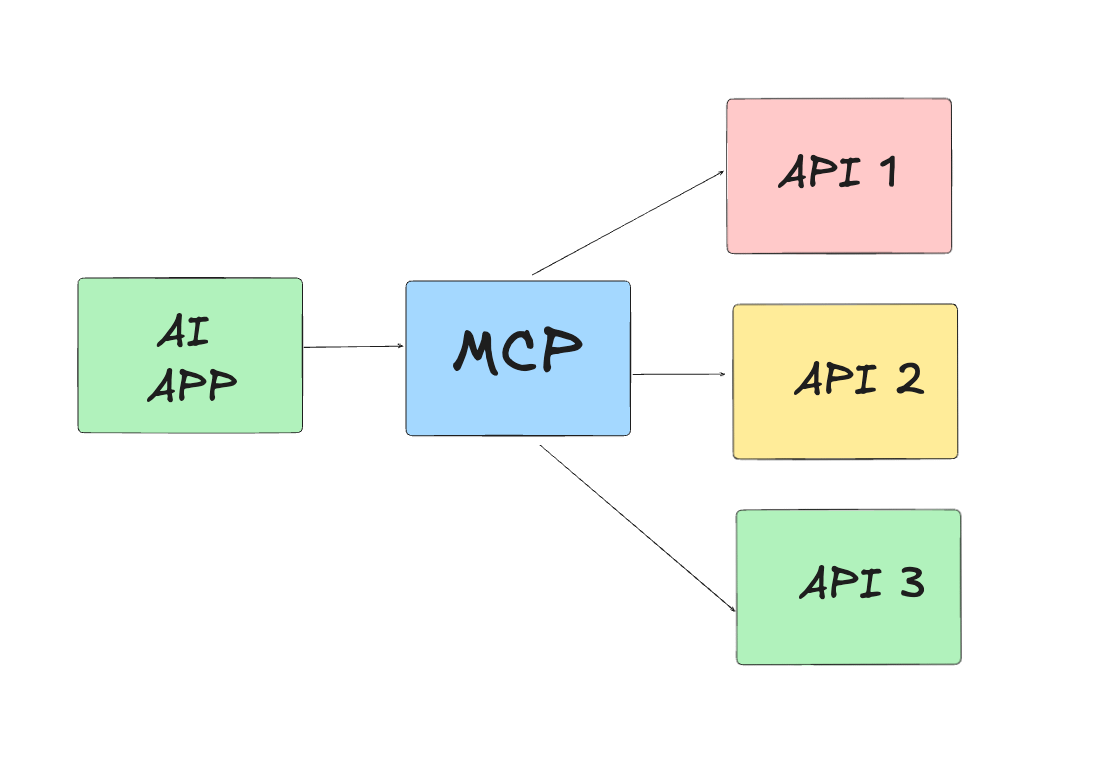 Now, you can go through an MCP server to talk to specific APIs without developing that communication.
The way MCP materialises right now are mainly through Claude Desktop and AI Assisted Code Editor such as Cursor or Windsurf, which are local ways to connect to MCP servers through your computer.
But there’s a consistent development of remote MCP that you can access through deployed applications and use them the same way you would use an API.
🚨 Disclaimer: Authentication and security of these servers are still sensitive topics to discuss, because most use cases do not contemplate this when developing servers.
Once again, don’t use MCP unless there’s value you can provide with it. Most of its use cases can be covered with a simple agent with tools; you don’t need to reinvent the wheel.
💡 TL;DR
-
📞 AI API Call: A single prompt with a single, isolated output.
-
🔗 AI Workflow: Chaining API calls into a predictable flow.
-
⚒️ Tools & Function Calling: Extending LLMs or agents with extra assets to achieve their tasks.
-
🦸🏻♂️ Agent: AI with memory, tools, instructions, and autonomy.
-
🤖 Agentic vs. Non-Agentic: AI decides when to use everything at its disposal.
-
🦾 Multi-Agent: Teams of agents, each with a specialty, working together.
-
🤝 A2A: Agents talking to each other, passing data or tasks.
-
🧑💻 MCP: The common ground for LLMs to communicate with APIs.
If you enjoyed the content, hit the like ❤️ button, share, comment, repost, and all those nice things people do when like stuff these days. Glad to know you made it to this part!

Hi, I am Alejandro Aboy. I am currently working as a Data Engineer. I started in digital marketing at 19. I gained experience in website tracking, advertising, and analytics. I also founded my agency. In 2021, I found my passion for data engineering. So, I shifted my career focus, despite lacking a CS degree. I'm now pursuing this path, leveraging my diverse experience and willingness to learn.