The log, partitions, consumer groups and replication: how Kafka stores, scales and survives failures
By The Coding Gopher
Published: 2026-11-09
URL: https://thecodinggopher.substack.com/p/how-kafka-actually-works
Kafka is not a message queue. It is a distributed, append-only log. Once you see it that way, the surprising parts make sense: a new service can replay months of old events, two services can read the same message, and ordering holds within a partition but not across a topic.
Four ideas explain almost everything Kafka does: the log, partitions, consumer groups and replication. Here they are, in order.
1. The log: append, never edit
A Kafka topic (say orders) is a sequence of records. Producers can only do one thing to it: add a record at the end. Each record gets a number, its offset: 0, 1, 2, 3, and so on. Nothing is updated in place, and reading a record does not remove it.
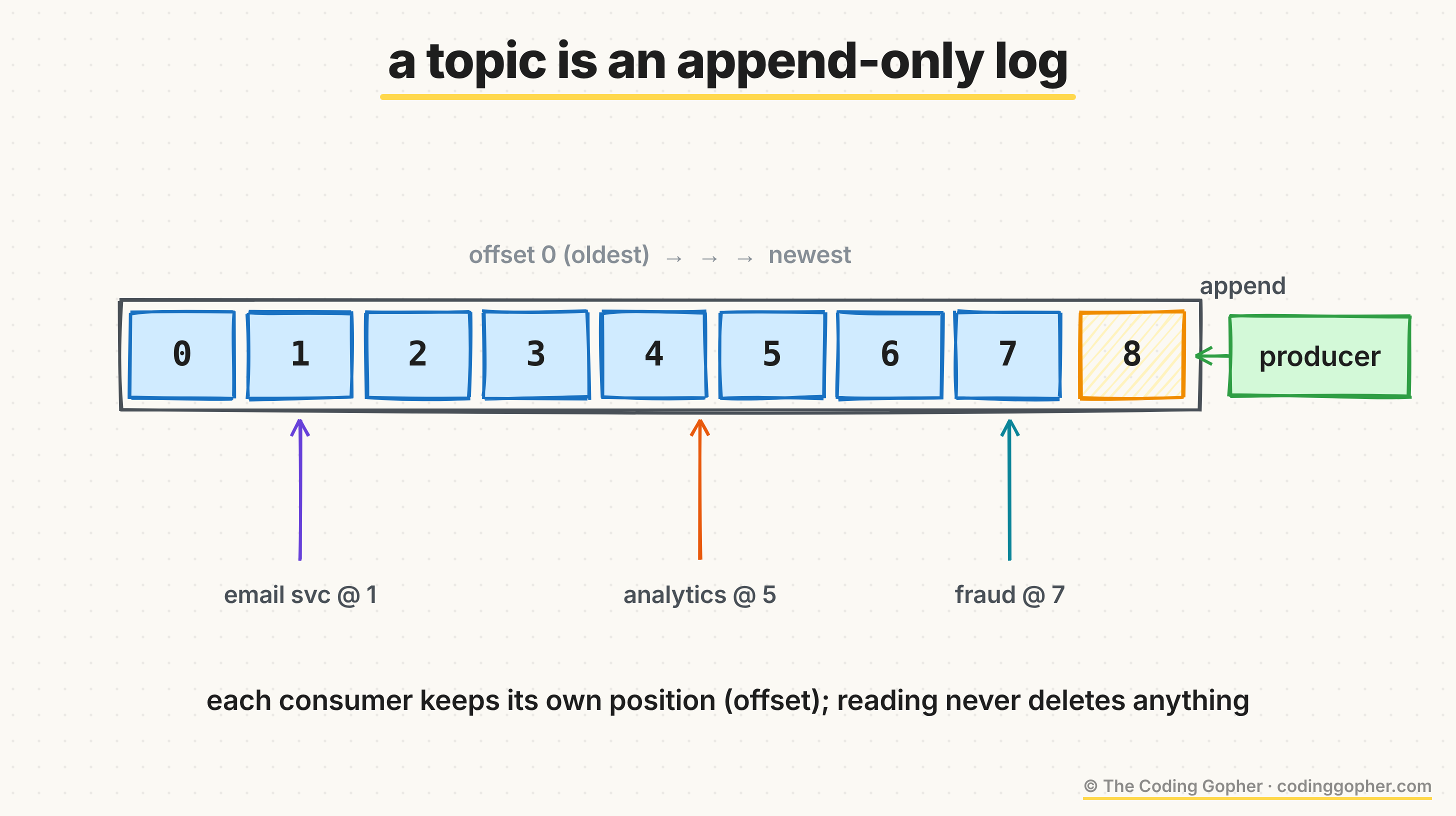
\A topic is an append-only log. Every consumer tracks its own offset.\
That last part is the big difference from a queue like SQS or RabbitMQ. In a queue, a message is handed to one worker and then deleted. In Kafka, the record stays in the log (for 7 days by default, or forever if you configure it), and every consumer keeps its own bookmark.
- The email service might be at offset 1.
- Analytics might be at offset 5.
- Fraud detection might be all the way at offset 7.
- A brand-new recommendations service can start at offset 0 and replay the entire history.
That is why Kafka is great for events ("order 4521 was placed") that many systems care about, and why a queue is still the right tool for tasks ("send this one email") that exactly one worker should do.
Learn System Design, Visually (Module 1 Free)
Want to understand systems like this well enough to design them yourself?
My animated course System Design, Visually Explained builds every concept as a clean, step-by-step diagram, from the fundamentals to real interview designs. It grew out of my YouTube explainers, which have millions of views.
Module 1 is free. No card needed.
Want everything? All-Access Lifetime includes all 4 live courses, the 8 on the way (System Design case studies, DSA, Docker & Kubernetes, AI agents and more), the full System Design Visual Guide and every course after that, for one payment.
💡 Many engineers expense this through their team's learning budget.
2. Partitions: how one topic scales
One log on one machine has a ceiling. So a topic is split into partitions, and each partition is its own independent log on (usually) a different broker. A topic with 3 partitions is really three logs.
When a producer sends a record, Kafka picks the partition with hash(key) % partitions. Records with the same key (say the same user\_id) always land in the same partition.
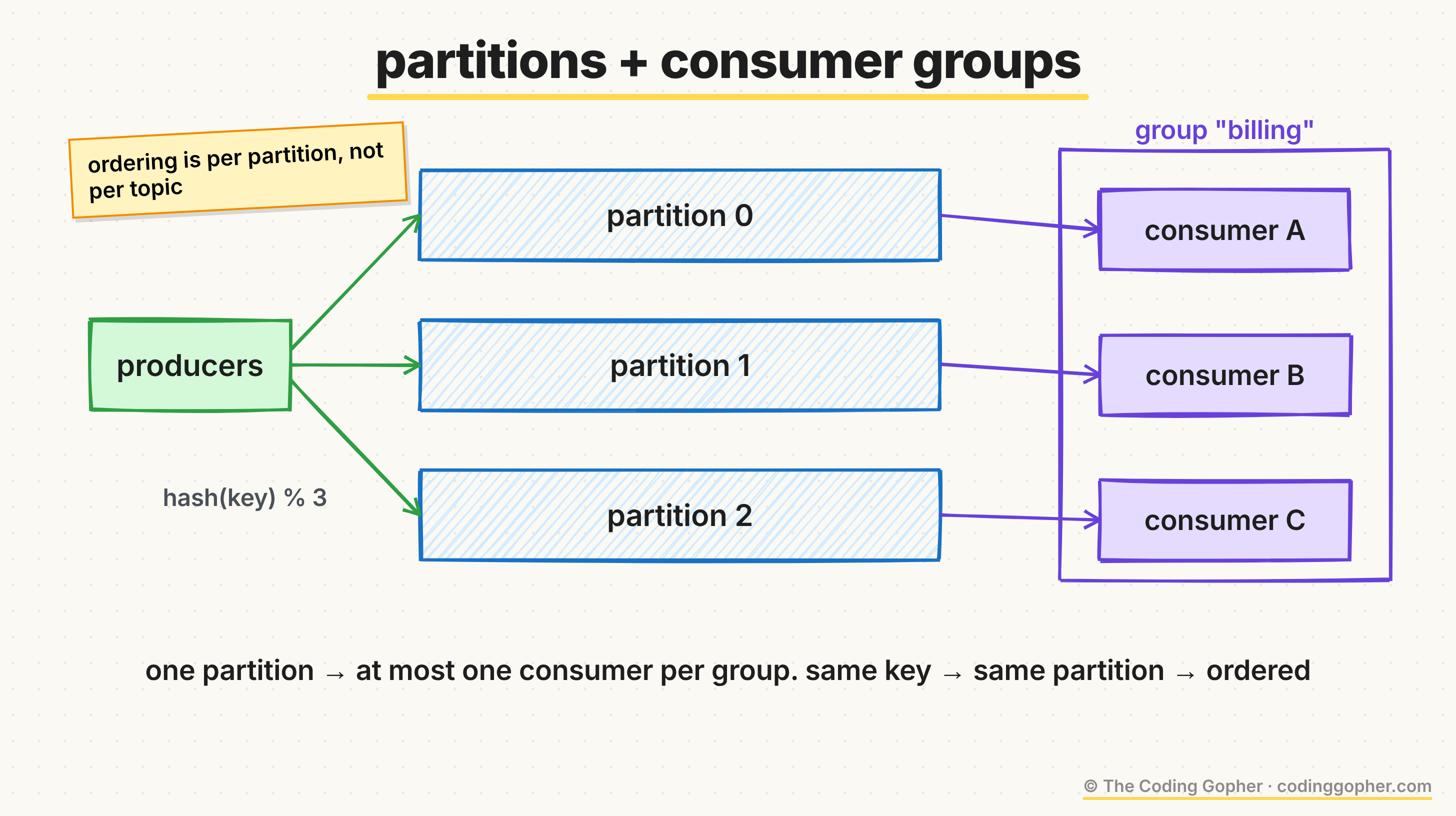
\Keys pick partitions. Inside a group, each partition is read by exactly one consumer.\
This gives you the most misunderstood rule in Kafka: ordering is guaranteed per partition, not per topic. All events for user 42 are in order. Events for user 42 and user 77 might not be.
If you need ordering, choose the key carefully. If you need ordering across the whole topic, you need one partition, and you just gave up most of Kafka's scalability.
Get visual deep dives on system design, backend and AI every week, plus my free System Design handbook when you subscribe.
3. Consumer groups: scaling the readers
Consumers that share a group.id split the partitions between them. With 3 partitions and 3 consumers, each one gets a partition. Add a 4th consumer and it sits idle, because a partition is read by at most one consumer in a group. That is how Kafka keeps per-partition order while still letting you scale reads.
Different groups are completely independent. The billing group and the analytics group both read every record, each at its own pace, each with its own committed offsets. That's the pub/sub half of Kafka.
When a consumer crashes or a new one joins, the group rebalances: partitions are reassigned and the new owner resumes from the last committed offset. If your consumer processed a record but crashed before committing, that record is read again. So, just like with queues, your consumers must be idempotent.
4. Replication: surviving a dead broker
Each partition is copied to several brokers (the replication factor, often 3). One copy is the leader and handles reads and writes; the others are followers that continuously fetch from the leader.
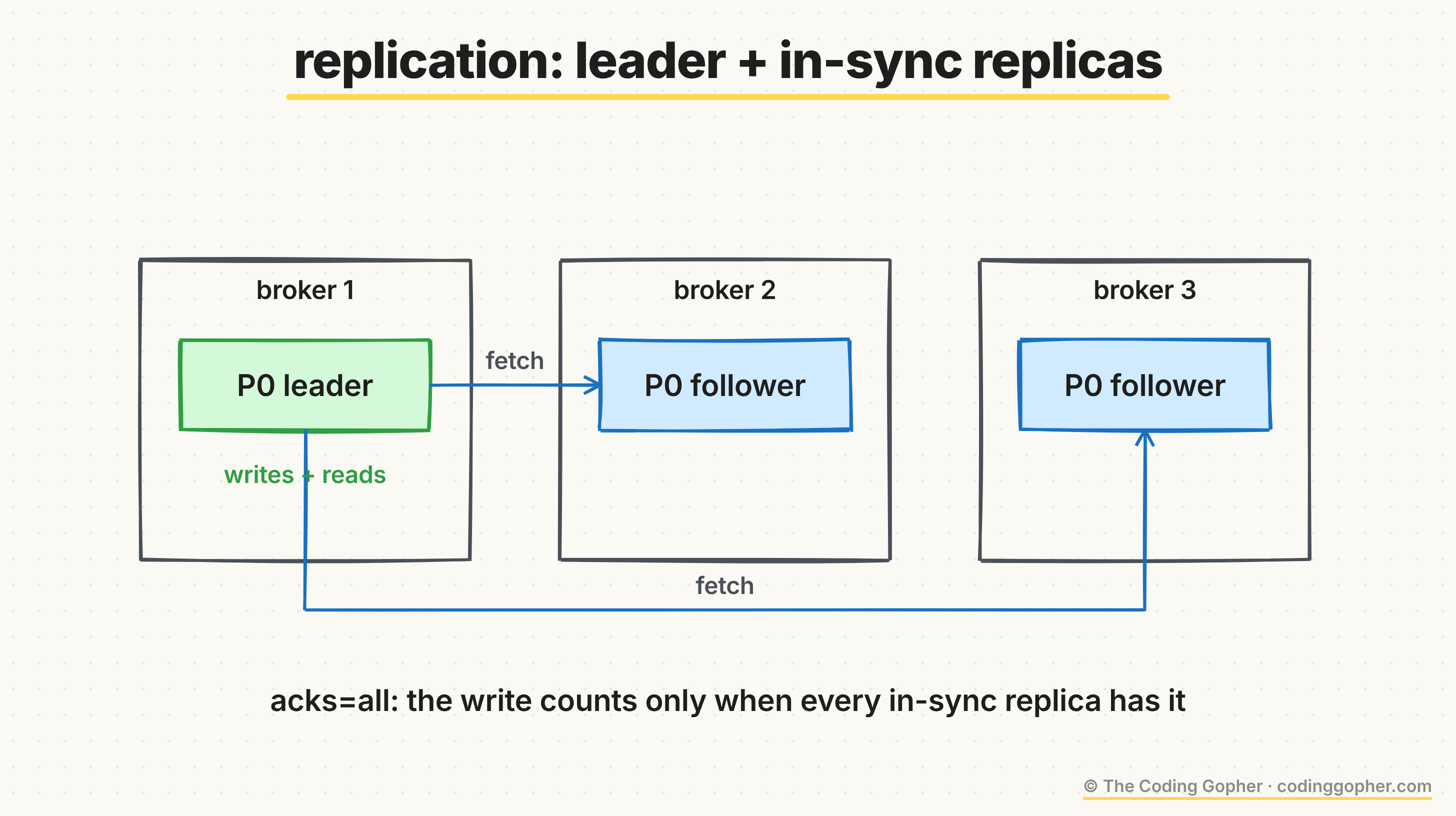
\Each partition has one leader and followers that stay in sync.\
Followers that are caught up form the ISR (in-sync replicas). With acks=all, a producer's write only counts once every in-sync replica has it. If the leader's broker dies, Kafka promotes an in-sync follower, and no acknowledged write is lost.
Why it's fast
- Sequential disk I/O. Appending to the end of a file is one of the fastest things a disk can do.
- The OS page cache. Recent records are usually served straight from memory.
- Zero-copy. Kafka uses
sendfileto move bytes from disk to the network without copying them through the application.
- Batching and compression. Producers send records in batches, compressed together.
When to use which
- One task, done once by one worker (send an email, resize an image): use a queue.
- One fact that many systems care about, possibly later (order placed, user signed up): use Kafka.
- You need to rebuild state or backfill a new service from history: Kafka, with long retention.
The trade-off: Kafka is genuinely hard to operate. Partition counts, retention, consumer lag and rebalances are all things you now own. Add it when fan-out or replay is a real need, not because it's on a roadmap.
TL;DR
- A topic is an append-only log; consumers track their own offsets, and reading deletes nothing.
- Partitions scale a topic; the key decides the partition; ordering is per partition.
- A consumer group splits partitions between its members; separate groups each see everything.
- Replication with a leader and in-sync followers keeps acknowledged writes safe.
Get visual deep dives on system design, backend and AI every week, plus my free System Design handbook when you subscribe.