A deep dive into AOF, RDB, and keeping your data safe when the lights go out.
By The Coding Gopher
Published: 2026-04-23
URL: https://thecodinggopher.substack.com/p/a-deep-dive-into-redis-data-persistence
A deep dive into RDB snapshots, AOF ledgers, and the mechanics of in-memory durability.
The defining characteristic of Redis is that it lives entirely in RAM. This is the source of its blistering, sub-millisecond speed. But it also introduces a terrifying physical reality: if the server loses power, or the process crashes, the RAM is instantly wiped clean.
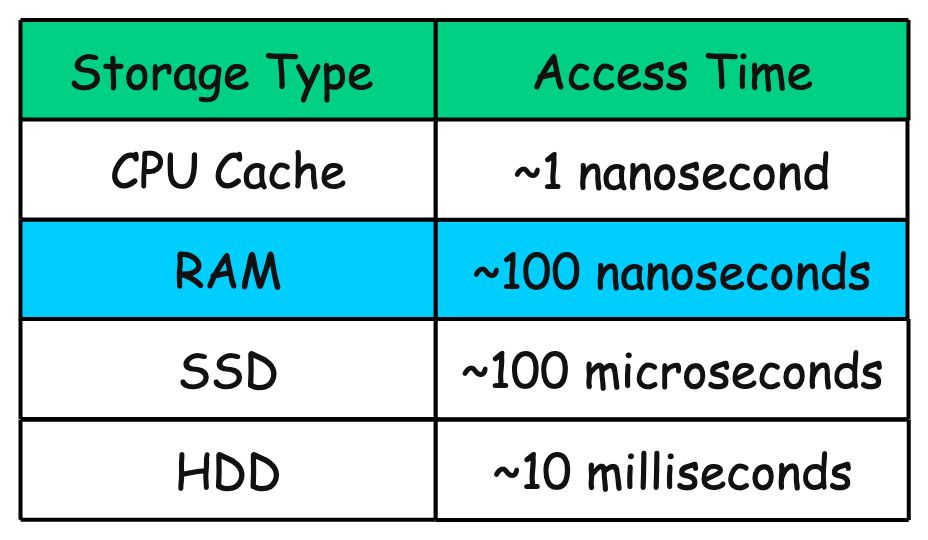
So, how can we trust Redis with critical data like user sessions, persistent queues, or primary application state?
The answer lies in its persistence mechanisms. Redis solves the “volatile RAM” problem by elegantly bridging the gap between memory and the physical hard drive using two completely different strategies: RDB (Redis Database) and AOF (Append-Only File).
1. RDB: The Point-in-Time Snapshot
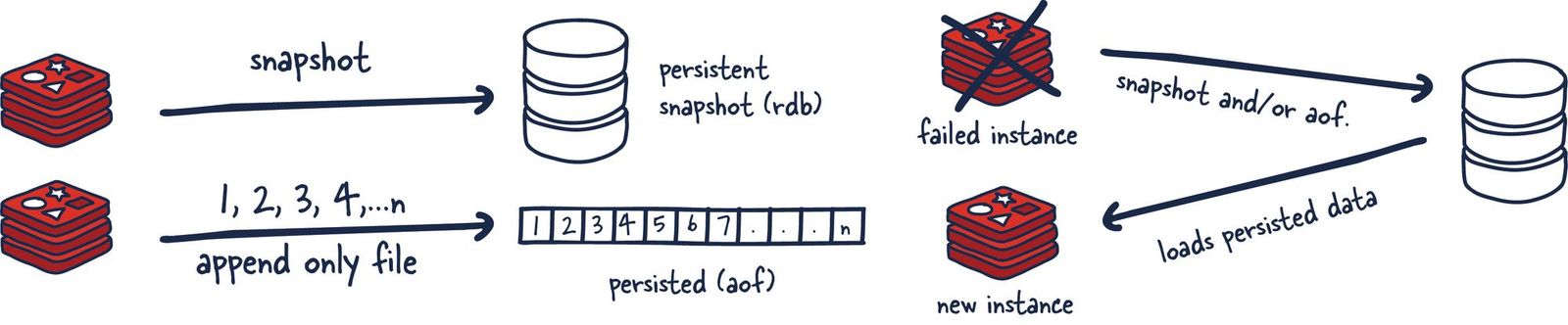
RDB is the default persistence mode in Redis. Think of it like taking a photograph of your entire dataset at a specific moment in time.
If you configure Redis to save every 5 minutes, it will take all the keys, lists, sets, and hashes currently sitting in RAM, compress them into a tiny binary file (usually named dump.rdb), and write that file to the hard disk.
The Magic of fork() and Copy-on-Write
You might be wondering: If Redis is single-threaded, doesn’t writing a massive 10GB dataset to a slow hard drive block the entire database and cause requests to time out?
It would, if Redis did the writing itself. Instead, Redis uses a brilliant UNIX system call called fork().
When thefork()system call is called, the operating system kernel makes a copy of the parent process’s memory space, open file descriptors, and execution state. Both processes then run independently and concurrently, continuing execution from the exact same point immediately after thefork()call.
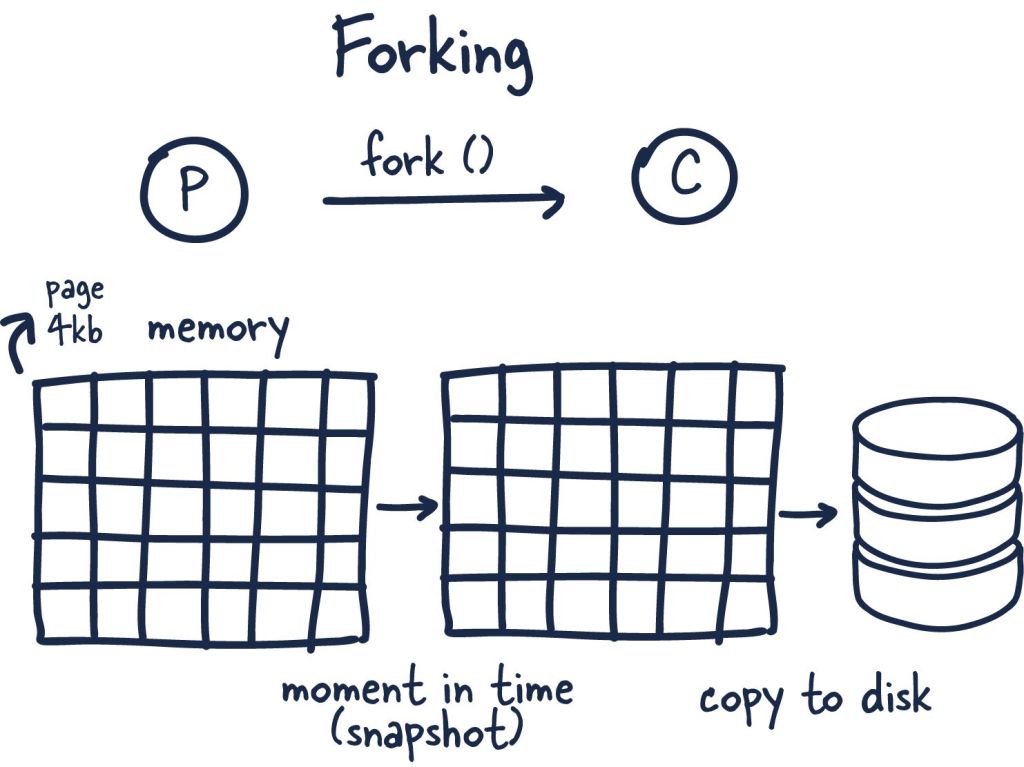
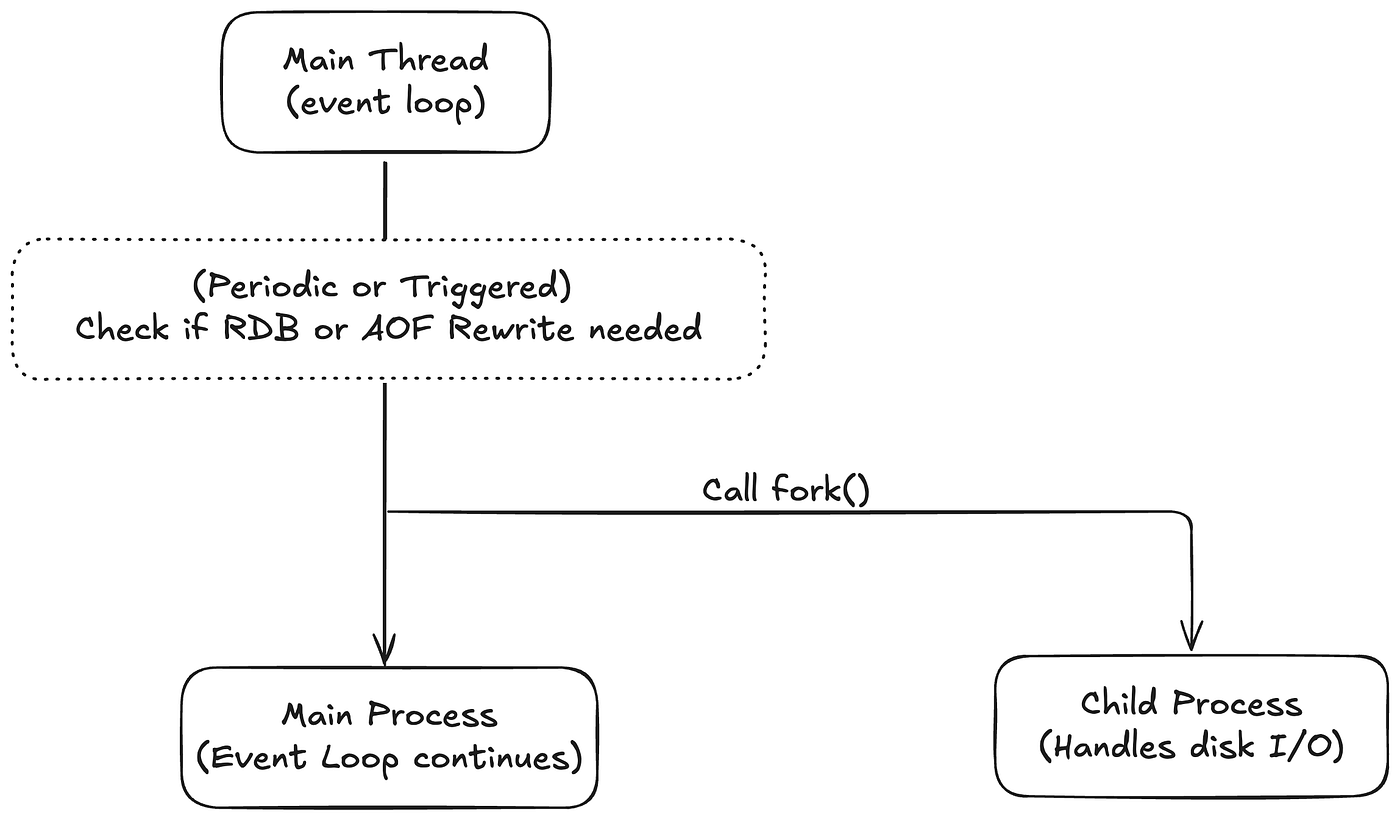
- When it’s time to take a snapshot, the main Redis process
forksitself, creating an exact child clone of the database in memory.
- The main process continues serving client requests with zero interruption.
- The child process takes the snapshot, writes the
dump.rdbfile to the disk, and then silently kills itself.
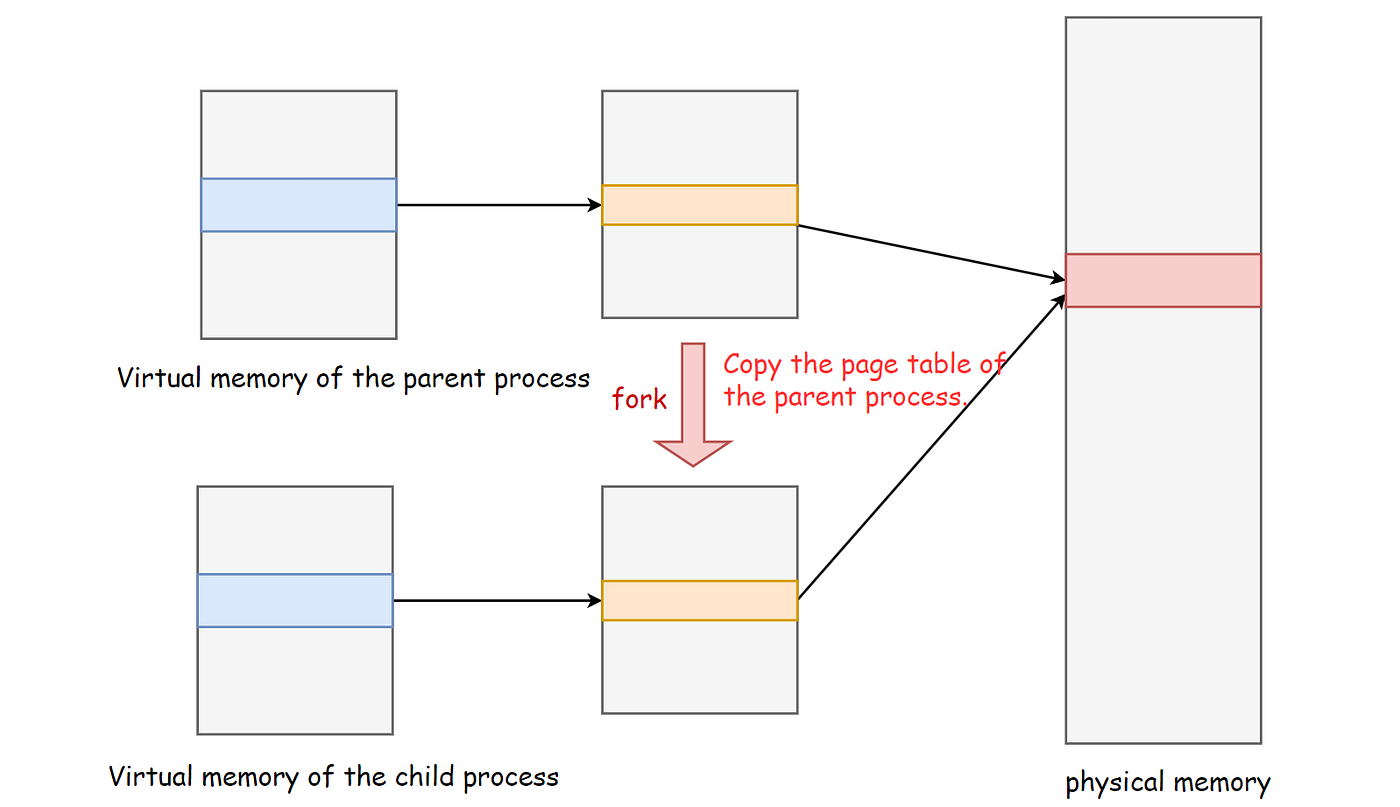
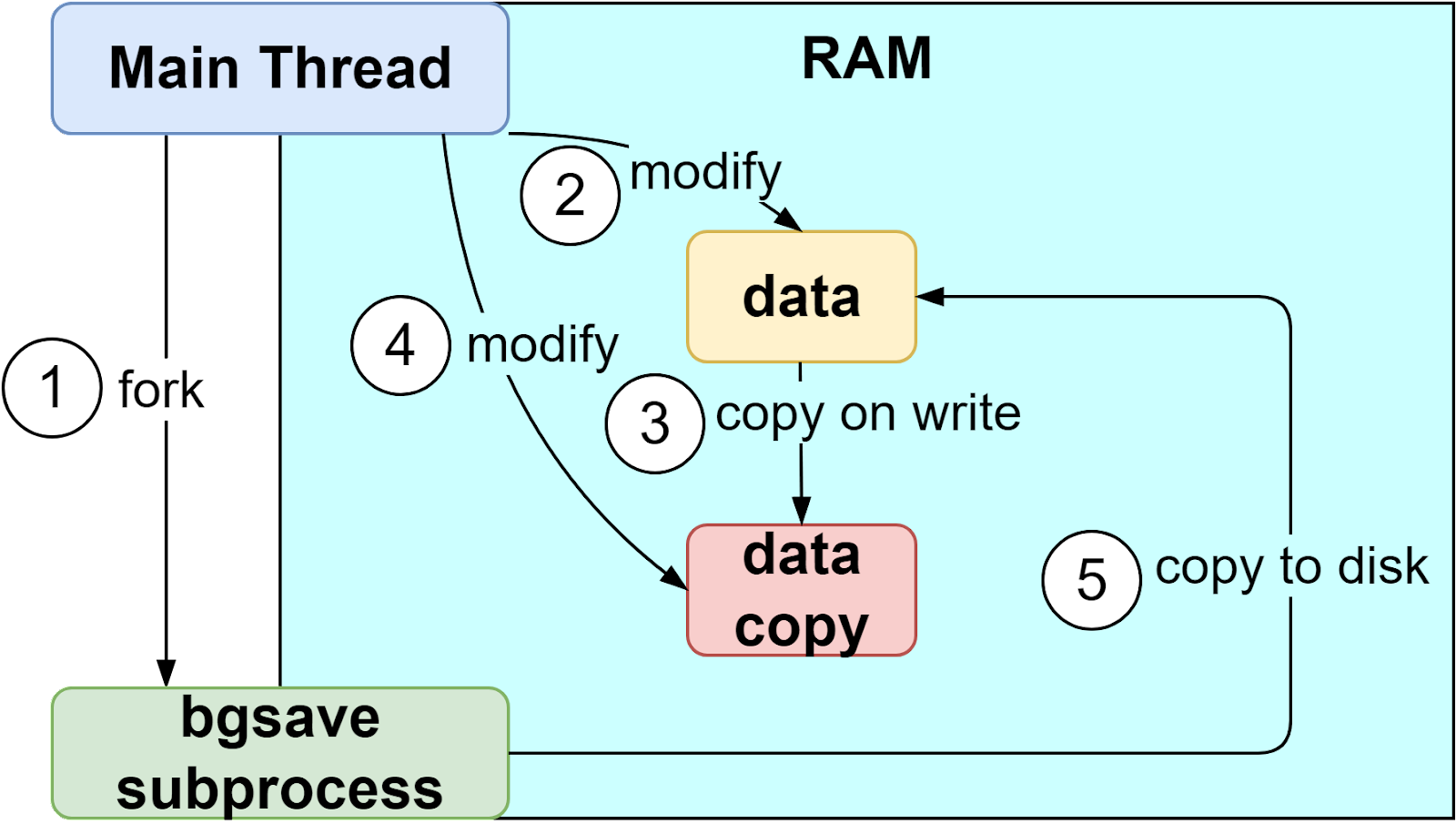
Because modern operating systems use Copy-on-Write (CoW), the child process doesn’t actually duplicate all 10GB of memory. It simply shares the memory with the parent, only duplicating the specific memory pages that get modified while the snapshot is being written.
Copy-on-write (CoW) is an optimization strategy that delays copying data until it is actually modified. Instead of creating a full duplicate immediately, the system creates a reference to the original, allowing multiple actors to share the same data. A true copy is only made when a write operation occurs.
The Catch: The Data Loss Window
RDB is incredibly efficient, but it has one fatal flaw. If Redis takes a snapshot at 12:00 PM, and the server crashes at 12:04 PM, you lose all the data written during those four minutes. RDB trades absolute durability for performance.
2. AOF: The Indestructible Ledger
If losing even a single second of data is unacceptable for your application, you need AOF (Append-Only File).
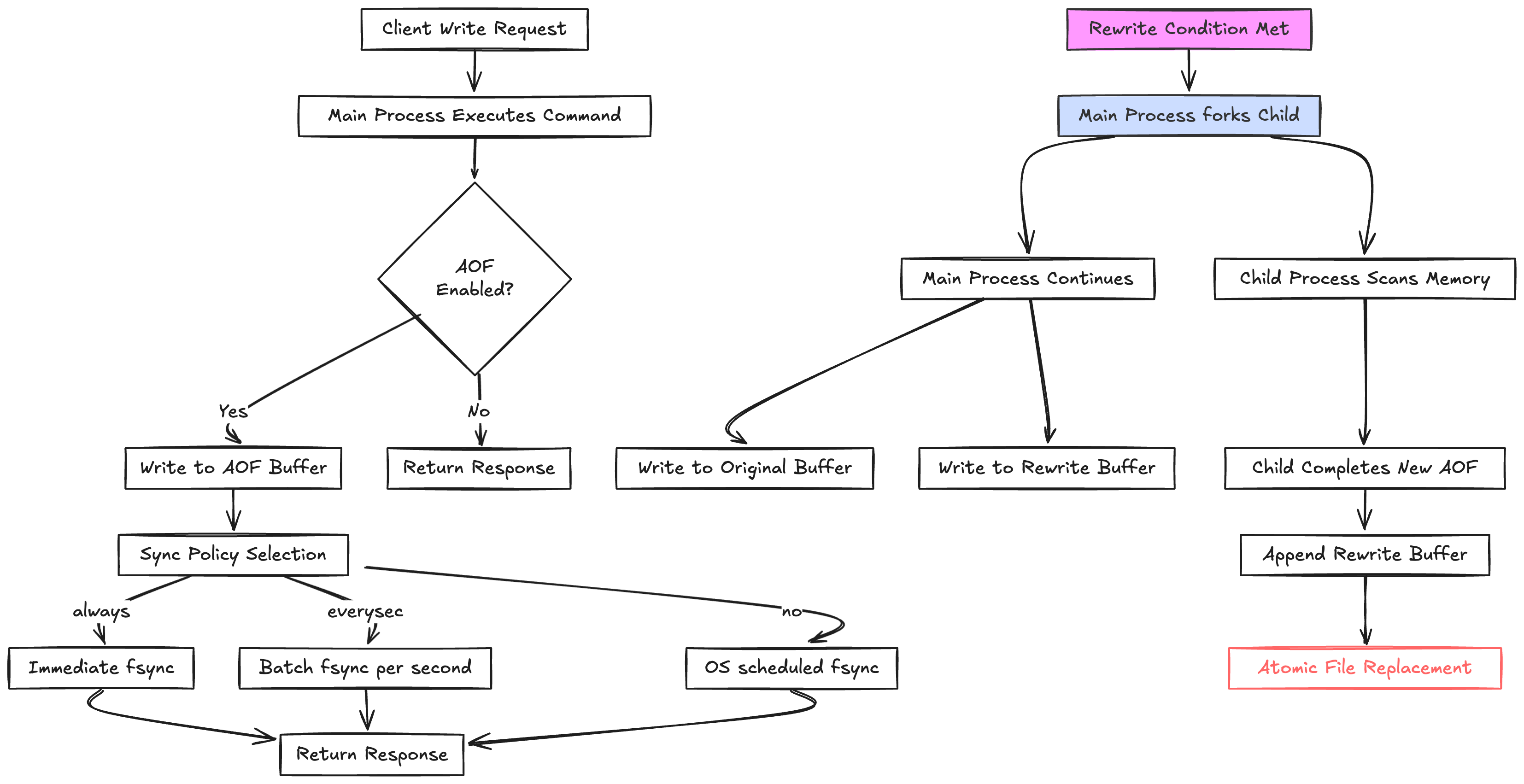
Instead of taking periodic snapshots, AOF acts as a continuous ledger. Every time a write command changes the database (like SET user:1 "Alice"), Redis immediately logs that exact command as text to the bottom of the AOF file on the disk.
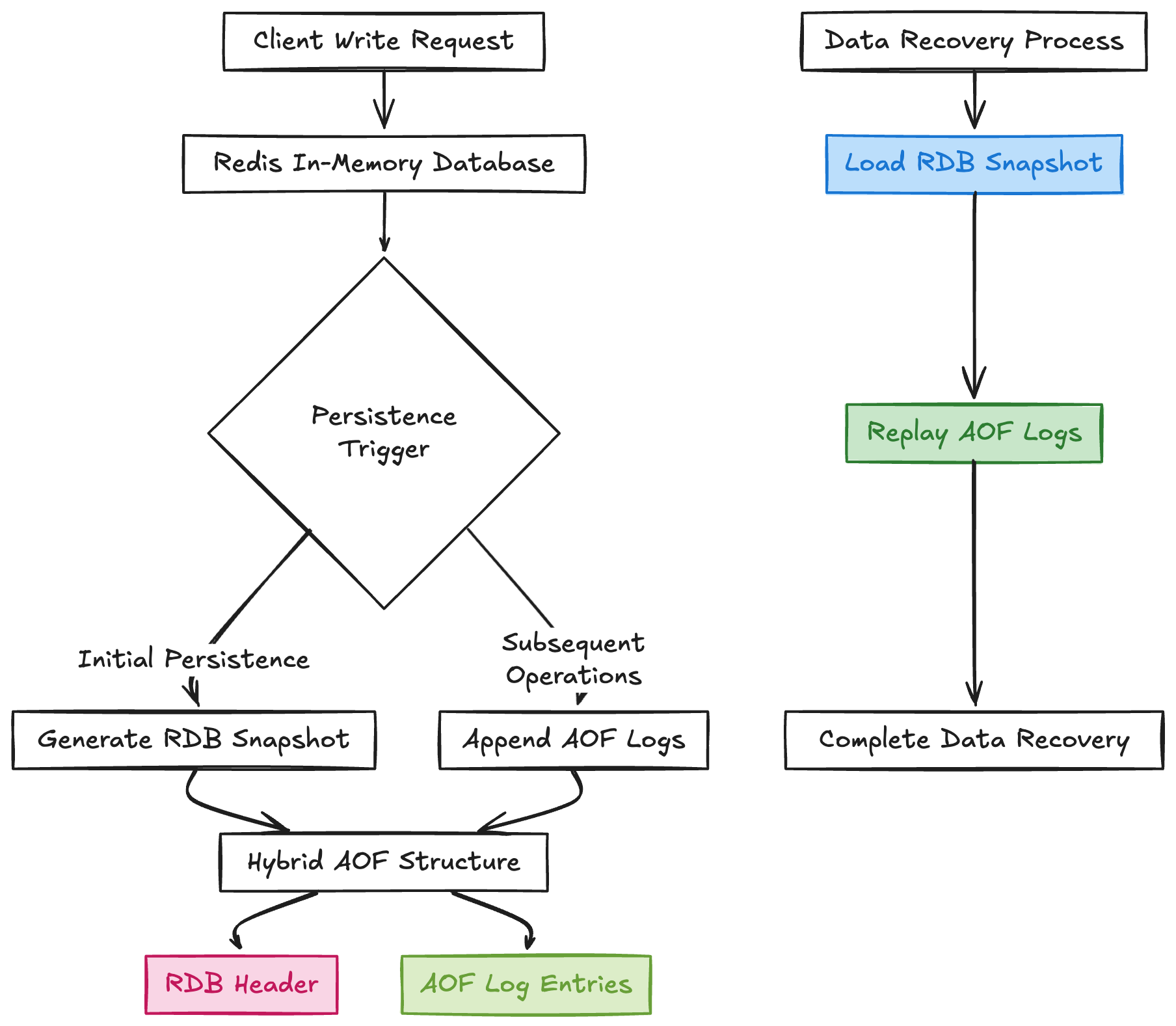
If the server crashes, Redis simply reads the AOF file from top to bottom, replaying every single command to reconstruct the database state perfectly.
𝐋𝐞𝐚𝐫𝐧 𝐭𝐨 𝐛𝐮𝐢𝐥𝐝 𝐆𝐢𝐭, 𝐃𝐨𝐜𝐤𝐞𝐫, 𝐑𝐞𝐝𝐢𝐬, 𝐇𝐓𝐓𝐏 𝐬𝐞𝐫𝐯𝐞𝐫𝐬, 𝐚𝐧𝐝 𝐜𝐨𝐦𝐩𝐢𝐥𝐞𝐫𝐬, 𝐟𝐫𝐨𝐦 𝐬𝐜𝐫𝐚𝐭𝐜𝐡. Get 40% OFF CodeCrafters: <https://app.codecrafters.io/join?via=the-coding-gopher>
This Substack is reader-supported. To receive new posts and support my work, consider becoming a free or paid subscriber.
The fsync Dilemma
Writing to a disk for every single operation sounds incredibly slow.
To manage this, Redis allows you to configure how often it flushes data to the physical disk using the fsync policy:
appendfsync always: Absolutely no data loss. Extremely slow. Every write command waits for the hard drive.
appendfsync everysec: The industry standard. Redis buffers the commands and writes them to disk once per second in a background thread. The absolute worst-case scenario is losing 1 second of data.
appendfsync no: Redis hands the data to the operating system and hopes for the best. Fast, but risky.
The Catch: The Bloating File
If a counter is incremented 10,000 times, RDB simply saves the final number. AOF, however, logs 10,000 individual INCR commands. Left unchecked, the AOF file would grow infinitely until it consumed your entire hard drive.
To fix this, Redis uses an AOF Rewrite mechanism. In the background, Redis analyzes the dataset and writes a completely new, optimized AOF file. It takes those 10,000 INCR commands and simply writes SET counter 10000, shrinking the file size drastically without interrupting service.
The Verdict: Which should you use?
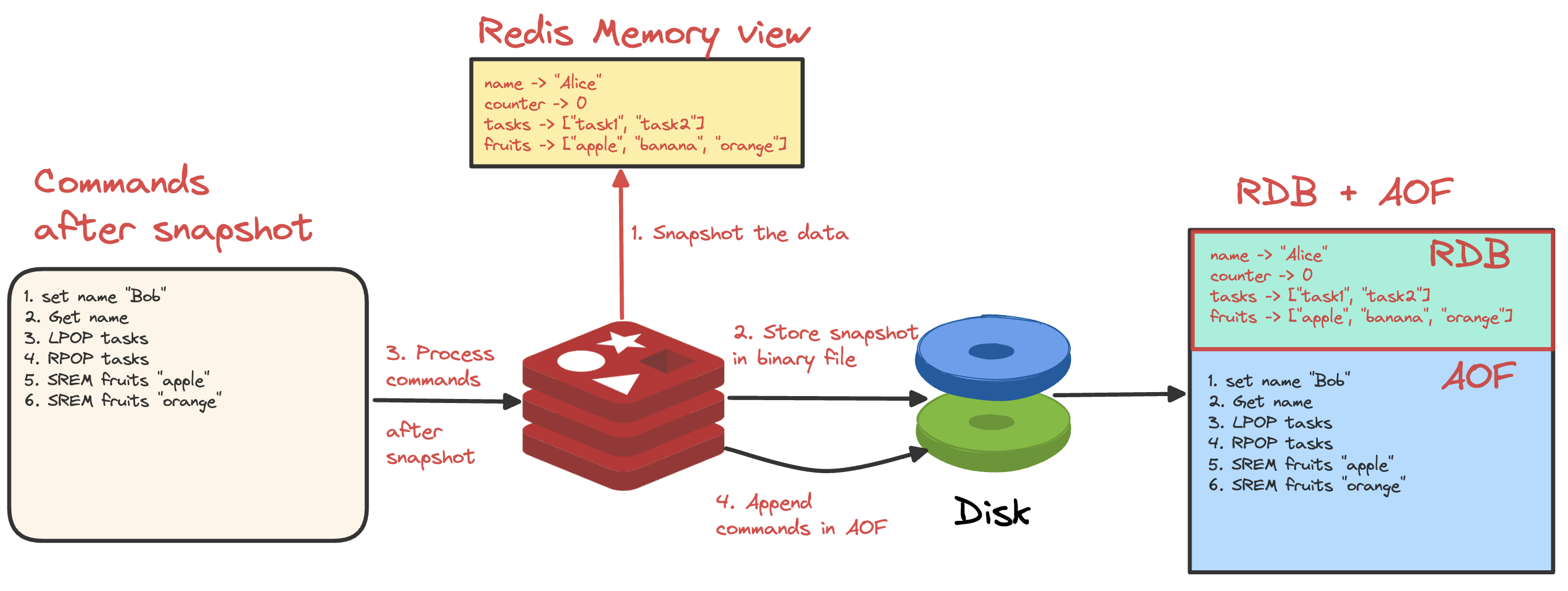
Most robust production environments don’t choose between them—they use both.
By enabling both, Redis will use the AOF file to rebuild the data with maximum safety when the server restarts, but you still get the compact RDB snapshots to send to off-site storage for disaster recovery (like restoring your database from yesterday).
This Substack is reader-supported. To receive new posts and support my work, consider becoming a free or paid subscriber.
Thanks for reading! This post is public so feel free to share it.