A plain-English guide for non-technical users to know when to stop pasting context into a chat window and start using Codex as your working environment.
By The Agentic Teacher
Published: 2026-08-10
URL: https://theagenticteacher.substack.com/p/chatgpt-is-for-quick-help-codex-is
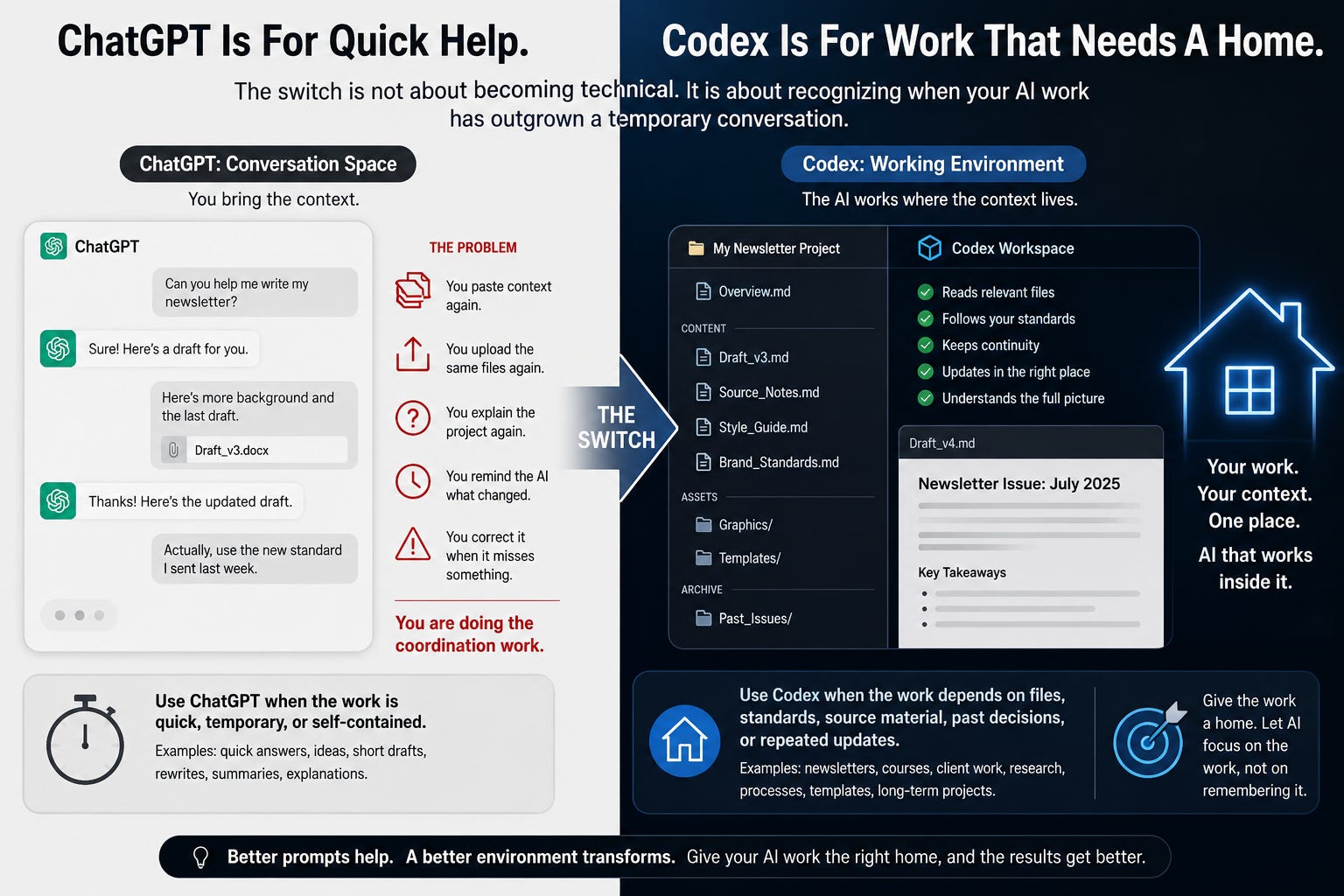
The switch is not about becoming technical. It is about recognizing when your AI work has outgrown a temporary conversation.
You probably already know how to use ChatGPT.
You ask a question. You paste some background. You upload a file. You ask for a draft, a summary, a plan, a rewrite, or a second opinion.
For quick work, that is often enough.
But then the work gets heavier.
You are not asking one simple question anymore. You are trying to continue a project. You need the AI to remember what the draft was supposed to do. You need it to compare several files. You need it to follow a standard you already created. You need it to update something without breaking what already works.
That is where the memory problem starts to show up.
Sometimes ChatGPT remembers something useful. Sometimes it does not. Sometimes it remembers a preference in a general way but still fails to apply it to the specific file, draft, campaign, or decision sitting in front of you.
So you start doing the same thing over and over.
You paste the old context again.
You upload the same file again.
You explain the project again.
You remind the AI what changed.
You tell it which version matters.
You correct it when it ignores the standard you already explained last week.
At some point, the problem is not that ChatGPT is bad.
The problem is that you are asking a temporary chat window to hold work that needs a home.
ChatGPT Works Until The Work Needs Continuity
ChatGPT is still useful.
It is good for quick questions, rough ideas, short drafts, brainstorming, summaries, rewrites, explanations, and low-risk tasks where the context can fit inside the conversation.
If you need help thinking through a sentence, making a list, understanding a concept, drafting a note, or cleaning up a short piece of text, a chat window may be exactly the right place.
The trouble starts when the work becomes connected.
Connected work depends on more than the prompt you type in the box. It depends on files, examples, decisions, standards, prior drafts, source material, and the current state of the project.
That is where many non-technical users get stuck.
They think they need a better prompt.
Sometimes they do.
But often, the real problem is that the AI cannot see the working environment behind the task.
You are carrying the environment manually.
The Breaking Point Is Context
A better prompt can help an AI understand a task.
But a prompt is not the same thing as a workspace.
If the files live outside the conversation, you have to bring them in. If the standards live in another document, you have to explain them. If the decision changed yesterday, you have to remember to tell the AI. If the latest version is sitting in a folder somewhere, you have to find it, upload it, and hope the AI uses it correctly.
That is why serious AI work can start to feel strangely tiring.
The AI may be doing useful work, but you are still doing the coordination around the work.
You are the one gathering context.
You are the one remembering which files matter.
You are the one explaining the rules again.
You are the one checking whether the output fits the larger project.
The issue is not only whether the AI remembers you.
The issue is whether the task has the right material around it when the AI starts working.
This is the point where ChatGPT can still be useful, but it may no longer be the best environment for the job.
Codex Changes Where The AI Works
For a non-technical user, Codex can sound like the wrong tool.
The name makes it feel like something for developers. It sounds like code. It sounds like software work. It sounds like a place you should not open unless you know what you are doing.
But the useful way to understand Codex is much simpler:
ChatGPT is a conversation space.
Codex is a working environment.
In ChatGPT, you usually bring the context to the AI.
In Codex, the AI can work inside the place where the context already lives.
That place might be a folder for a client project, a content system, a course, a research file, a business process, a set of templates, or a group of drafts.
Instead of asking the AI to remember everything inside one conversation, you can give the work a home and let the AI inspect the relevant files, follow standing instructions, and make changes inside clear boundaries.
That is the real switch.
It is not a switch from “non-technical” to “technical.”
It is a switch from asking for help in a chat window to giving AI a governed place to work.
A Simple Decision Rule
Use ChatGPT when the work is quick, temporary, or self-contained.
Use Codex when the work depends on files, standards, source material, past decisions, or repeated updates.
That one rule will keep you from overcomplicating the decision.
You do not need Codex for every AI task. You do not need to move every conversation into a workspace. You do not need to reorganize your whole computer before you begin.
Start with the nature of the work.
Ask one practical question:
What needs to surround the task for the AI to do this well?
If the task can be handled in one conversation and you do not need to preserve much context afterward, ChatGPT is probably fine.
If the task belongs to a larger body of work and the AI needs to understand what already exists, Codex may be the better tool.
For example, if you want help rewriting one paragraph in an article, ChatGPT is probably enough. But if you are developing a newsletter issue that needs to match your publication standards, use source notes, preserve the free and paid boundary, and connect to prior drafts, that work needs a home. Codex is better suited for that.
The same is true in marketing. If you want five subject line ideas for one email, ChatGPT can help. But if you are building a campaign that depends on past offers, brand language, customer research, approved claims, and several connected assets, Codex gives the AI a place to inspect the work before it suggests the next move.
Five Signs It Is Time To Open Codex
Useful ideas should be easy to come back to.
Subscribe free to access the Free Resource Hub: practical articles, guides, and starting points that help you think more clearly, make better judgments, and move your AI-supported work forward.
Join free and give yourself a dependable place to return when you need the right idea again.
Paid Subscriber Resource
This post has bonus content for paid subscribers. Upgrade to get full access.